sort-by-property
Version:
Type-safe array sorting method with support for deeply nested properties and Typescript autocompletion.
129 lines (94 loc) • 3.51 kB
Markdown
Type-safe array sorting method with support for deeply nested properties and Typescript autocompletion.
```typescript
blogPosts.sort(sortByProperty('author.name', 'asc'));
```
- Type-safety and Typescript autocompletion on the properties you try to sort
- Define nested property to sort on using a path string like: `"author.name"`
- Supports sorting by `string`, `number`, `boolean`, `Date`, `Symbol` and `BigInt` values
- Handles `null` and `undefined` values gracefully by moving the object to the end of the array
- Small file size, only 0.6kb gzipped
- High performance, up to 3 times faster than lodash orderBy and sortBy \*
Try it out: https://codesandbox.io/s/sort-by-property-example-hin358
Requires Typescript 4.1+ because of the internal use of [template literals](https://www.typescriptlang.org/docs/handbook/release-notes/typescript-4-1.html) for the autocompletion.
Install with your favorite package manager:
```bash
npm install sort-by-property
```
or
```bash
yarn add sort-by-property
```
```typescript
// For an array of objects
import { sortByProperty } from 'sort-by-property';
// For one-dimensional arrays
import { sortBy } from 'sort-by-property';
```
```typescript
import { sortByProperty } from 'sort-by-property';
interface BlogPost {
id: number;
title: string;
author: {
id: number;
name: string;
};
}
const blogPosts: BlogPost[] = [
{
id: 1,
title: 'Never gonna run around and desert you',
author: {
id: 10,
name: 'Joe',
},
},
{
id: 2,
title: 'Never gonna let you down',
author: {
id: 20,
name: 'Ben',
},
},
{
id: 3,
title: 'Never gonna give you up',
author: {
id: 30,
name: 'Alice',
},
},
];
// Sort the blog posts by author name
blogPosts.sort(sortByProperty('author.name', 'asc'));
// If you need to use a custom locale for sorting strings, you can do
blogPosts.sort(sortByProperty('author.name', 'asc', {locale: 'nb-no'}))
```
Will sort the array `ascending` by `author.name`:
```typescript
[
{ id: 3, title: 'Never gonna give you up', author: { id: 30, name: 'Alice' } },
{ id: 2, title: 'Never gonna let you down', author: { id: 20, name: 'Ben' } },
{ id: 1, title: 'Never gonna run around and desert you', author: { id: 10, name: 'Joe' } },
];
```
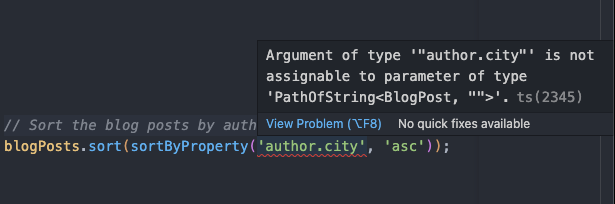
Will show a type error when you try to sort on properties that do not exist:
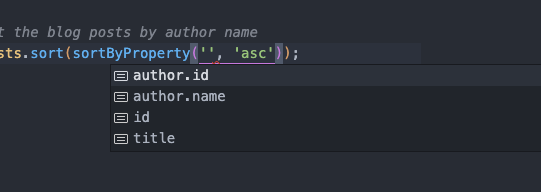
Will show an autocomplete of the available properties to sort on:
This package exports 2 methods. Use `sortBy` to sort one-dimensional arrays. This sorting method supports all the same types as `sortByProperty`.
```typescript
import { sortBy } from 'sort-by-property';
const array = ['c', 'b', 'a'];
array.sort(sortBy('asc'));
// Result: ['a', 'b', 'c']
```
<sub>\* on an array with 10 million items: ~450ms vs ~1350ms. See the /src/examples directory.</sub>