smartdown-gallery
Version:
Example Smartdown documents and associated resources that demonstrate various Smartdown features and serve as raw material for other Smartdown demos.
275 lines (168 loc) • 12.5 kB
Markdown
### Smartdown Disclosables
Smartdown now provides an experimental feature that we are calling *Disclosables*, which enables an author to *stage* the content that a reader sees, and enables the reader to control how much detail they wish to see. This feature is one mechanism Smartdown uses to provide [**progressive disclosure**](::progdisc/tooltip), which can help make [Explorable Explanations](https://worrydream.com/ExplorableExplanations/) *rich* but *manageable*.
# :::: progdisc
[Progressive Disclosure](https://en.wikipedia.org/wiki/Progressive_disclosure) is a design technique that maintains the user's focus and attention by reducing the amount of data presented to the user and thereby reduces their cognitive load.
# ::::
The key elements of this feature are the *disclosable*, which is Smartdown content that is hidden by default; and the *trigger*, which is the means by which a reader can control the visibility of the disclosable.
#### Creating a Disclosable
A section of your Smartdown content can be marked as a disclosable by sandwiching the content between special markdown headers containing the characters `::::`. For example, here is how a disclosable named `MyDisclosable` might be declared:
```markdown
# :::: MyDisclosable
This is the hidden content for the disclosable called `MyDisclosable`
- The content is hidden by default
- Any type of *Smartdown* may be contained in a disclosable
# ::::
```
Notice that the first section header contains `::::` and the disclosable name, `MyDisclosable`. The disclosable declaration is completed with an empty `::::` header with no name.
#### Creating a Trigger
The trigger for a disclosable specifies the way a disclosable will be revealed or hidden. When we define a trigger we also get to specify many aspects of how the disclosable will be displayed and what it will look like. We'll begin with two very simple ways to define triggers.
- A *Button* trigger will toggle the visibility of the disclosable content when clicked. This content will remain visible until the user toggles the button. The content of the disclosable will be displayed inline with the rest of your text at the position where the disclosable is defined.
- A *Tooltip* trigger will reveal the disclosable content when hovered over or tapped. This content will appear beneath the trigger and it will remain visible until the user moves their mouse away from the trigger or taps it again. In other words, Tooltips are *spring-loaded* and will deactivate when the user ceases to interact with the trigger.
Both triggers are specified using a variant of Markdown's link syntax that contains a user-visible label and the disclosable's name. For example, a Button-style trigger for the above example `MyDisclosable` would be declared as:
```markdown
If you click [here :rainbow:](::MyDisclosable) you will reveal the hidden content. Clicking again will hide the content.
```
Similarly, we can declare a Tooltip-style trigger by adding the `/tooltip` suffix to the trigger URL, as below:
```markdown
If you hover your mouse over [here](::MyDisclosable/tooltip) you will reveal the hidden content until you move your mouse away.
```
Here is a working example of the above:
> If you hover your mouse over [here](::MyDisclosable/tooltip) you will reveal the hidden content until you move your mouse away.
>
> If you click [here :rainbow:](::MyDisclosable) you will reveal the hidden content. Clicking again will hide the content.
# :::: MyDisclosable
This is the hidden content for the disclosable called `MyDisclosable`
- The content is hidden by default
- Any type of *Smartdown* may be contained in a disclosable
- I wonder if Emoji work here? :four_leaf_clover: :globe_with_meridians:
# ::::
#### Controlling the Size and Placement of Button Triggers
If you place the trigger on a header line, you can control the size of the button. For example, the syntax
```
## [My Disclosable](::MyDisclosableSection)
```
will result in a level 2 section header labeled `My Disclosable` that will reveal the disclosable content for `MyDisclosableSection`. Typically, you would declare the disclosable immediately after such a section button. For example:
```markdown
## [My Disclosable](::MyDisclosableSection)
#### :::: MyDisclosableSection
This is the disclosable content.
# ::::
```
which renders as:
## [My Disclosable](::MyDisclosableSection)
#### :::: MyDisclosableSection
This is the disclosable content.
# ::::
#### Rich Content Disclosables
Typical usage of the disclosable feature is to provide a tooltip or some detail to an explanation. This content can be *any* Smartdown content, and can be interacted with as ordinary Smartdown content. The following example shows a disclosable that can be triggered via a [**tooltip**](::AboutMarkdown/tooltip/outline) or via a [**button**](::AboutMarkdown), and has its own rich Smartdown structure.
# :::: AboutMarkdown
## About Markdown
Although there are several variants and extensions of Markdown, the ubiquity of the core Markdown syntax makes it a worthwhile and minimal investment to learn. Smartdown is based primarily upon GitHub-flavored Markdown, which is supported widely on GitHub, and also by many other Markdown tools and sites.
Some resources that may help:
- [John Gruber's Markdown from 2004](https://daringfireball.net/projects/markdown/)
- [GitHub's *Mastering Markdown*](https://guides.github.com/features/mastering-markdown/)
# Level 1 header [Link Test](https://en.wikipedia.org/wiki/Markdown)
## Level 2 header $E=mc^2$
### Level 3 header `var a = 50; // Code`
#### Level 4 header `var a = 50; // Smaller Code`
##### Level 5 header $E=mc^2$
###### Level 6 header [Link Test](https://en.wikipedia.org/wiki/Markdown)
# ::::
The above disclosable is defined as:
```markdown
# :::: AboutMarkdown
## About Markdown
Although there are several variants and extensions of Markdown, the ubiquity of the core Markdown syntax makes it a worthwhile and minimal investment to learn. Smartdown is based primarily upon GitHub-flavored Markdown, which is supported widely on GitHub, and also by many other Markdown tools and sites.
Some resources that may help:
- [John Gruber's Markdown from 2004](https://daringfireball.net/projects/markdown/)
- [GitHub's *Mastering Markdown*](https://guides.github.com/features/mastering-markdown/)
# Level 1 header [Link Test](https://en.wikipedia.org/wiki/Markdown)
## Level 2 header $E=mc^2$
### Level 3 header `var a = 50; // Code`
#### Level 4 header `var a = 50; // Smaller Code`
##### Level 5 header $E=mc^2$
###### Level 6 header [Link Test](https://en.wikipedia.org/wiki/Markdown)
# ::::
```
#### Triggers with Media
We can build triggers that utilize Smartdown's media syntax. For example, we can have an image trigger that reveals more detail via a disclosable. For example, we can consider one of Mars's satellites, [Phobos](::MoreAboutPhobos/tooltip/outline).
[Phobos 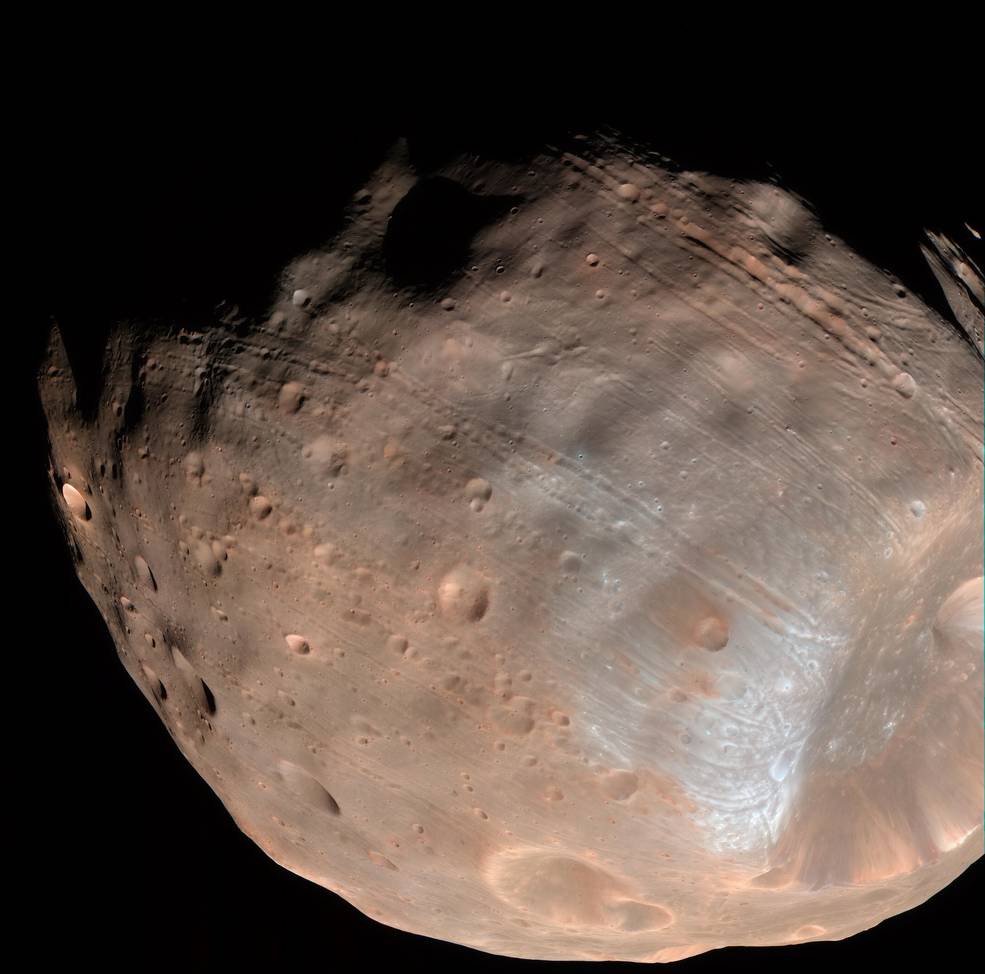](::MoreAboutPhobos)
# :::: MoreAboutPhobos
[Phobos in Orbit around Mars](https://mars.nasa.gov/resources/8823/phobos-in-orbit-around-mars/)

# ::::
#### Tiny Disclosables
This is used to test whether smaller disclosables are positioned correctly as when triggered via a tooltip. We'll also exercise different types of disclosable content and decorations. The non-`default` examples also apply the `/transparent` qualifier, to remove the default shadow/outline/background.
- `tooltip` with `colorbox` content: [default](::colorboxDisclosable/tooltip/transparent) [outline](::colorboxDisclosable/tooltip/outline/transparent) [shadow](::colorboxDisclosable/tooltip/shadow/transparent) [outline/shadow](::colorboxDisclosable/tooltip/outline/shadow/transparent)
# :::: colorboxDisclosable
# --colorbox
[](:Xa1) area
[](:Xa2) diameter
[](:Xa3) size
# --colorbox
# ::::
- `tooltip/transparent` with `outlinebox` content: [default](::outlineboxDisclosable/tooltip/transparent) [outline](::outlineboxDisclosable/tooltip/outline/transparent) [shadow](::outlineboxDisclosable/tooltip/shadow/transparent) [outline/shadow](::outlineboxDisclosable/tooltip/outline/shadow/transparent)
# :::: outlineboxDisclosable
# --outlinebox
[](:Xa1) area
[](:Xa2) diameter
[](:Xa3) size
# --outlinebox
# ::::
- `tooltip/transparent` with `partialborder` content: [default](::partialborderDisclosable/tooltip/transparent) [outline](::partialborderDisclosable/tooltip/outline/transparent) [shadow](::partialborderDisclosable/tooltip/shadow/transparent) [outline/shadow](::partialborderDisclosable/tooltip/outline/shadow/transparent)
# :::: partialborderDisclosable
# --partialborder
[](:Xa1) area
[](:Xa2) diameter
[](:Xa3) size
# --partialborder
# ::::
- `tooltip` with MathJax content: [default](::mathjaxDisclosable/tooltip) [outline](::mathjaxDisclosable/tooltip/transparent/outline) [shadow](::mathjaxDisclosable/transparent/tooltip/shadow) [outline/shadow](::mathjaxDisclosable/tooltip/transparent/outline/shadow)
# :::: mathjaxDisclosable
$$E=mc^2 E=mc^2 E=mc^2 E=mc^2 E=mc^2$$
# ::::
- `tooltip` with plain text content: [default](::plaintextDisclosable/tooltip) [outline](::plaintextDisclosable/tooltip/transparent/outline) [shadow](::plaintextDisclosable/tooltip/transparent/shadow) [outline/shadow](::plaintextDisclosable/tooltip/transparent/outline/shadow)
# :::: plaintextDisclosable
Hello World
# ::::
#### Signalling Playables via Disclosables
Disclosables, and their triggers, work together to ensure that a tooltip or button trigger will show and hide their corresponding disclosable. However, sometimes it is necessary to provide a trigger that affects a playable on the page, rather than showing/hiding a disclosable. This is easily implemented because every disclosable has a corresponding Smartdown variable of the same name.
For example, suppose we have a disclosable named `DisclosableABC`. Whenever `DisclosableABC` is shown (either via a button or tooltip trigger), then the Smartdown variable `DisclosableABC` will become `true`; similarly, whenever this disclosable is hidden, then `DisclosableABC` will become `false`. This variable can be *observed* by playables via the `this.dependOn` feature, to allow a playable to respond to changes in the disclosable's visibility.
In the example below, we will provide a button and tooltip trigger that refers to `DisclosableABC`, and a playable that observes the corresponding variable.
> If you hover your mouse over [here](::DisclosableABC/tooltip) you will reveal the hidden content until you move your mouse away.
>
> If you click [here :rainbow:](::DisclosableABC) you will reveal the hidden content. Clicking again will hide the content.
# :::: DisclosableABC
This is the hidden content for the disclosable called `DisclosableABC`
# ::::
```javascript /playable/autoplay
this.dependOn.DisclosableABC = function() {
this.log('DisclosableABC is ' +
(env.DisclosableABC ? 'SHOWN' : 'HIDDEN'));
};
```
#### Signalling Playables with *Phantom* Disclosables
There may be times when a Smartdown author wants to have a button or tooltip trigger in their prose that causes a *reaction* in an associated playables. Smartdown supports the idea of a trigger that refers to a disclosable that is not declared. These *phantom* disclosables still retain the idea of a Smartdown variable that changes state between shown/hidden. This enables readers to interact with the Smartdown prose via tooltip and button triggers, but the *effect* of this interaction is reflected in playables.
Adapting the above example, let's create a P5JS playable that reacts to one of two tooltip triggers.
> If you hover your mouse over [red](::DisclosableRed/tooltip) the P5JS sketch will turn red.
> If you hover your mouse over [blue](::DisclosableBlue/tooltip) the P5JS sketch will turn blue.
```javascript /p5js/autoplay/playable
const defaultColor = 'black';
let color = defaultColor;
this.dependOn.DisclosableRed = () => {
color = env.DisclosableRed ? 'red' : defaultColor;
};
this.dependOn.DisclosableBlue = () => {
color = env.DisclosableBlue ? 'blue' : defaultColor;
};
p5.draw = function() {
p5.clear();
p5.fill(color);
p5.ellipse(50, 50, 80, 80);
p5.fill('white');
p5.textSize(24);
p5.text(color, 25, 50);
};
```
---
[Back to Home](:@Home)