skipper-organisms
Version:
A vanilla JavaScript library for skipperhospitality management
355 lines (293 loc) • 10.1 kB
Markdown
# Skipper Organisms
Open source UI elements developed by [SkipperHospitality](https://www.skipperhospitality.com/)
### Table of Contents
* [Day Range Picker](#day-range-picker)
* [Basic Structure](#basic-structure)
* [Show Date on HTML Label attribute](#show-date-on-html-label-attribute)
* [Applying DateRange Picker](#applying-daterange-picker)
* [Update Style](#update-style-file)
* [Parameter List](#parameter-list)
* [DateRange API's](#daterange-apis)
* [Accommodation Search Form](#accommodation-search-form)
* [Basic Form Structure](#basic-form-structure)
* [Import Form Package](#import-form-package)
* [Update Form Style file](#update-form-style-file)
* [Creating Form Component](#creating-form-component)
* [Form Submission Event Listener](#form-submission-event-listener)
* [Form Parameter List](#form-parameter-list)
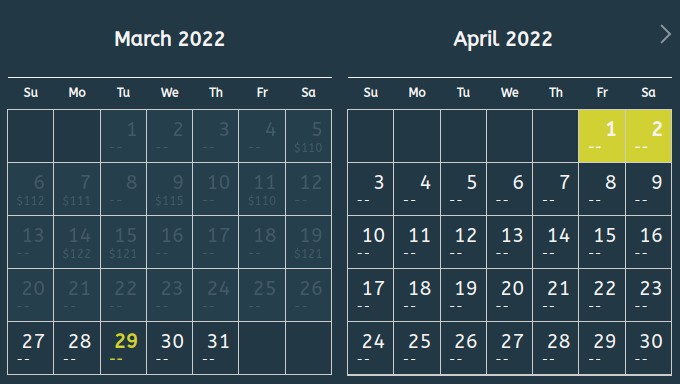
# Day Range Picker
write the required markup to build your date range picker.
## Basic Structure
This is the basic HTML structure that DateRange picker requires:
```html
<div>
<input
type="text"
name="check-in"
id="datepicker-check-in" />
<input
type="text"
name="check-in"
id="datepicker-check-out"/>
</div>
```
## Show Date on HTML Label attribute
You may need to show dates into lable instead of input box:
```html
<div>
<input
type="text"
name="check-in"
id="datepicker-check-in"/>
<label
for="datepicker-check-in"
id="datepicker-check-in-label">
18 <small>Feb</small>
</label>
<input
type="text"
name="check-in"
id="datepicker-check-out"
value=""/>
<label
class="datepicker text-center"
id="datepicker-check-out-label">
19 <small>Feb</small>
</label>
</div>
```
# Applying DateRange Picker
## Import Package
```js
//via npm
npm i skipper-organisms
import { DayRangePicker } from "skipper-organisms";
```
### **Importing from CDN**
```js
//CSS CDN:
<link rel="stylesheet" href="https://cdn.jsdelivr.net/npm/skipper-organisms@1.0.1/dist/day-range-picker.min.css">
//Javascript CDN:
//CJS
<script src="https://cdn.jsdelivr.net/npm/skipper-organisms@1.0.1/dist/day-range-picker.cjs.min.js"></script>
//ES
<script src="https://cdn.jsdelivr.net/npm/skipper-organisms@1.0.1/dist/day-range-picker.es.min.js" type="module"></script>
```
## Import Styles file
```js
<link rel="stylesheet" href="https://cdn.jsdelivr.net/npm/skipper-organisms@0.0.5/dist/day-range-picker.min.css">
```
## Update Style file
You can also update your calendar widget **styles** by overwrite following css variables.
```js
.daypicker-range {
--daypicker-primary-color: #F6F4F2;
--daypicker-inactive-color: #94A3B8;
--daypicker-active-color: #d1d106;
--daypicker-border: #fff;
--bg-daypicker-inactive-color: #2E5162;
--bg-daypicker: #253846;
--bg-daypicker-range: #253846;
--daypicker-border: #ccc;
--daypicker-accent-color: #bebe04;
--primary-font: "ABeeZee", sans-serif;
}
```
## Creating Component
```js
// Parameter List
const checkIn = document.getElementById("datepicker-check-in");
const checkOut = document.getElementById("datepicker-check-out");
const showPrice = true ;
const format = "DD/MM/YYYY";
var picker = new DayRangePicker({
checkIn, checkOut,
showPrice,format});
```
## Include Input Label
```js
// Parameter List
const checkIn = document.getElementById("datepicker-check-in");
const checkOut = document.getElementById("datepicker-check-out");
const checkInLabel = document.getElementById("datepicker-check-in-label");
const checkOutLabel = document.getElementById("datepicker-check-out-label");
const showPrice = true ;
const format = "DD/MM/YYYY";
var picker = new DayRangePicker({
checkIn, checkOut,
checkInLabel, checkOutLabel
showPrice,format});
```
## Parameter List
| Parameter | Required | Types of Ele. | Description |
| ------ | ------ | ----- | ----- |
| checkIn | True | HTML Element | HTML *Input* box
| checkOut | True | HTML Element | HTML *Input* box
| showPrice | False | Boolean | Default = *false*
| format | False | String | Default = *YYYY-MM-DD*
| checkInLabel | False | HTML Element | HTML *label*
| checkOutLabel | False | HTML Element | HTML *label*
| startDate | False | JS Date | *null*
| endDate | False | JS Date | *null*
| priceList | False | JS Object Array | *null* dependen on *showPrice* i.e. [{ date: '2022-03-19T14:48:00.000Z', price: 121}]
| position | false | enum | position of the datepicker, relative to the field (default to bottom & left), ('bottom' & 'left' keywords are not used, 'top' & 'right' are modifier on the bottom/left position)
| numberOfMonths | False | Number | Number of month to show, Default = *2*
| minDate | False | Date | The minimum/earliest date that can be selected
| maxDate | False | Date | The maximum/latest date that can be selected
## **DateRange API's**
### **.goToNextMonth()**
Change **Calendar** view to next month.
```js
// @parms: null
// @return: null
picker.goToNextMonth();
```
### **.goToPrevMonth()**
Change **Calendar** view to previous month.
```js
// @parms: null
// @return: null
picker.goToPrevMonth();
```
### **.selectStartDate(date)**
Select start date for calendar
```js
// @parms: date => java script date
// @return: null
let date = new Date();
picker.selectStartDate(date);
```
### **.selectEndDate(date)**
Select end date for calendar
```js
// @parms: date => java script date
// @return: null
let date = new Date();
picker.selectEndDate(date);
```
### **.getCurrentStartDate()**
Return current start/checkIn date
```js
// @parms: null
// @return: current calendar selected start/checkIn date
picker.getCurrentStartDate();
```
### **.getCurrentEndDate()**
Return current end/CheckOut date
```js
// @parms: null
// @return: current calendar selected end/checkOut date
picker.getCurrentEndDate();
```
setDateRange
### **.setDateRange(start, end)**
Set current start/CheckIn and end/CheckOut date
```js
// @parms: start => Javascript date
// @parms: end => Javascript date
// @return: null
picker.setDateRange(start, end);
```
### **.getCurrentDateRange()**
Return current start/CheckIn and end/CheckOut date
```js
// @parms: null
// @return: current start/CheckIn and end/CheckOut date
picker.getCurrentDateRange();
```
### **.setPriceList(prices)**
Set price list for calendar
```js
/*
const prices = [
{
date: '2022-03-05T14:48:00.000Z',
price: 110
}, {
date: '2022-03-06T14:48:00.000Z',
price: 112
}
];
date is a ISO Date
*/
// @parms: price list in array of object
// @return: null
picker.setPriceList(prices);
```
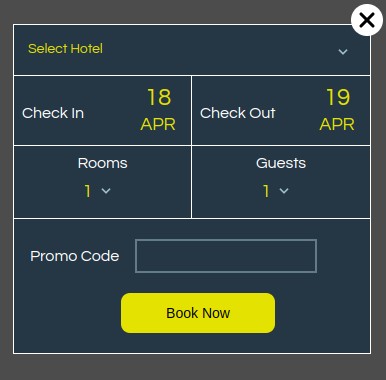
# Accommodation Search Form
write the required markup to build your Accomodation Form

## Basic Form Structure
This is the basic HTML structure that DateRange picker requires:
```html
<div id="accommodation-search-form">Form</div>
```
## Import Form Package
```js
//via npm
npm i skipper-organisms
import { AccomodationForm } from "skipper-organisms";
```
### **Importing Form from CDN**
```js
//CSS CDN:
<link rel="stylesheet" href="https://cdn.jsdelivr.net/npm/skipper-organisms@1.0.1/dist/accommodation-search-form.min.css">
//Javascript CDN:
//CJS
<script src="https://cdn.jsdelivr.net/npm/skipper-organisms@1.0.1/dist/accommodation-search-form.cjs.min.js"></script>
//ES
<script src="https://cdn.jsdelivr.net/npm/skipper-organisms@1.0.1/dist/accommodation-search-form.es.min.js" type="module"></script>
```
## Import Form Styles file
```js
```
## Update Form Style file
You can also update your calendar widget **styles** by overwrite following css variables.
```js
.form_container {
--primary-accommodation-search-form: #ffffff;
--secondary-accommodation-search-form: #e3e200;
--bg-accommodation-search-form: #253745;
--bg-accommodation-search-form-input-box: #253745;
--border-accommodation-search-form: #617c87;
}
```
## Creating Form Component
```js
const accommodations = [
"Accommodation 1",
"Accommodation 2",
"Accommodation 3",
"Accommodation 4",
"Accommodation 5",
];
var accommodationForm = new AccomodationForm({
blockId: "accommodation-search-form",
accommodations,
format: "DD/MM/YYYY",
});
```
## Form Submission Event Listener
```js
document.addEventListener(
"accommodation-search-form-submitted",
function (e) {
console.log(e.detail); // Prints "Example of an event"
}
);
```
## Form Parameter List
| Parameter | Required | Types of Ele. | Description |
| ------ | ------ | ----- | ----- |
| blockId | True | string | Id of `div` to be rendered
| blockClass | false | string | Class name of `div` to be rendered required if `blockId` is empty
| accommodations | false | string array | List of Accommodations
| checkIn | False | date | Default CheckIn Date
| checkOut | False | date | Default CheckOut Date
| maxRoom | False | Number | Maximum Number of rooms that can be select ( Default 10)
| maxGuest | Flase | Number | Maximum Number of Guests that can be select (Default 10)
| showAccommodations | false | Boolean | Accomodation list to be show or not
| showDatesLabel | False | Boolean | Input date fileds should be override or not
| showPromocode | False | Boolean | Promocode Field to be show or not