simple-xml-to-json
Version:
Convert XML to JSON - Fast & Simple
88 lines (63 loc) • 3.6 kB
Markdown
# A simple XML to JSON converter
[](https://www.npmjs.com/package/simple-xml-to-json)
[](https://github.com/nirgit/simple-xml-to-json/actions/workflows/node.js.yml)
[](https://codecov.io/gh/nirgit/simple-xml-to-json)
## Install
Simply install using NPM in your project directory
> npm install simple-xml-to-json
## Usage and API
### 1. convertXML(xmlToConvert [,customConverter])
* `xmlToConvert` \<string\>
* `customConverter` \<function\>
* Returns: \<JSON\> by default or other if `customConverter` is used
### 2. createAST(xmlToConvert)
* `xmlToConvert` \<string\>
* Returns: An AST representation of the XML \<JSON\>
**CommonJS (Node.js):**
```javascript
const { convertXML, createAST } = require("simple-xml-to-json")
const myJson = convertXML(myXMLString)
const myYaml = convertXML(myXMLString, yamlConverter)
const myAst = createAST(myXMLString)
```
**ESM (modern frontend apps, Node.js with `"type": "module"`, bundlers):**
```javascript
import { convertXML, createAST } from "simple-xml-to-json"
const myJson = convertXML(myXMLString)
const myYaml = convertXML(myXMLString, yamlConverter)
const myAst = createAST(myXMLString)
```
---
###  Typescript compatible
---
## Notes and how to use code
1. The easiest thing to start is to run `node example/example.js` (CJS) or `node example/example.mjs` (ESM) in your terminal and see what happens.
2. There's the `xmlToJson.js` file for convenience. Just pass in the XML as a String.
3. MIT licensed allowing code customization
4. Profit
## How this works in a nutshell
1. The library converts the XML to an AST
2. There is a JSON converter that takes the AST and spits out a JSON
3. You can write your own converters if you need XML-to-ANY-OTHER-FORMAT
## Benchmark
_Take these results with a grain of salt._\
According to a __simple__ benchmark test I performed in __April 2024__ with a random XML. _YMMV_.
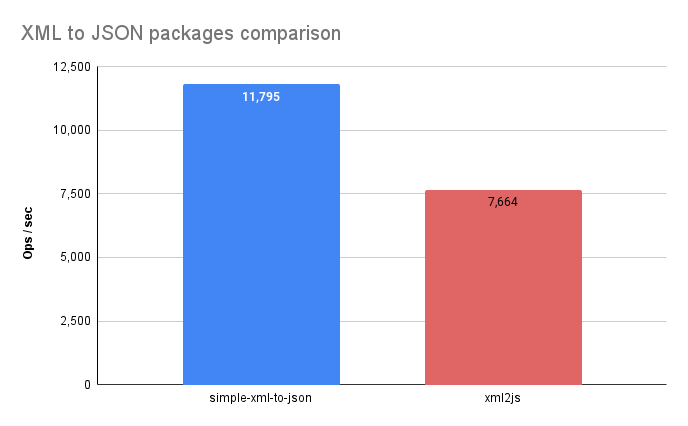
* The chart results __may be__ outdated. [Run the test yourself](https://runkit.com/nirgit/6620cf27943a41000847221d)
## Current Drawbacks
1. All values are translated to strings in JSON
2. There are currently reserved words in the JSON converter:
* "content" - up to version 1.2.3
* "children"
### Default Mapping & Collisions
By default, an element's **text content** is mapped to a `"content"` property, while its **attributes** are mapped directly to JSON properties of the same name.
#### The Risk
If an XML element possesses an attribute actually named `content` while also containing text content, a **name collision** occurs. This typically results in a parsing error or data loss due to duplicate keys.
**Example Collision:**
```xml
<MyElement content="attr-value">text-content</MyElement>
```
### Version 1.2.3+ Fix
To prevent these collisions, versions newer than 1.2.3 will specifically prefix the `"content"` attribute name with an `@` symbol. So the attribute `"content"` now becomes the `"@content"` JSON property.
> [!NOTE]
> If you need to, you can write your own converter from the AST created by the parser, and pass it as a 2nd parameter after the xml string