simple-vue-timeline
Version:
A timeline vue component
199 lines (162 loc) • 5.77 kB
Markdown
# simple-vue-timeline




A simple but customizable and reactive timeline vue component which leverages the use of common libraries:
* [bootstrap vue components](https://bootstrap-vue.js.org/),
* [vue-fontawesome](https://github.com/FortAwesome/vue-fontawesome)
* and [fecha](https://github.com/taylorhakes/fecha) date formatting.
If you find it useful, give it a [star](https://github.com/scottie34/simple-vue-timeline) and please consider [buying me a coffee](https://www.buymeacoffee.com/scottie34).
Refer to the [documentation](https://scottie34.github.io/simple-vue-timeline/) for further details.
Use [github](https://github.com/scottie34/simple-vue-timeline) for any issue you encountered or to give me some feedback of your usage.
## Getting Started
### Installation
```shell script
npm install --save simple-vue-timeline
```
```ts
import { Vue } from "vue";
import { SimpleTimelinePlugin } from 'simple-vue-timeline';
Vue.use(SimpleTimelinePlugin);
```
### Declare third party libraries usage
Since 2.x version, third party usages are no more declared by the simple-vue-timeline itself.
It is thus your responsibility to declare them in your vue project which uses simple-vue-timeline.
#### vue-fontawesome
Refer to [vue-fontawesome](https://github.com/FortAwesome/vue-fontawesome#usage) documentation.
```ts
import { FontAwesomeIcon } from '/vue-fontawesome';
import { Vue } from "vue";
Vue.component('font-awesome-icon', FontAwesomeIcon);
```
#### bootstrap-vue
Refer to [bootstrap-vue](https://bootstrap-vue.js.org/docs/) documentation.
The following plugins must be declared:
* BadgePlugin
* ButtonPlugin
* CardPlugin
* LayoutPlugin
```ts
import { Vue } from "vue";
import { BadgePlugin, ButtonPlugin, CardPlugin, LayoutPlugin } from 'bootstrap-vue';
Vue.use(BadgePlugin);
Vue.use(ButtonPlugin);
Vue.use(CardPlugin);
Vue.use(LayoutPlugin);
```
### Style
```ts
'~simple-vue-timeline/dist/simple-vue-timeline';
```
You must also add the bootstrap style:
```ts
'~bootstrap/scss/bootstrap';
```
### Template Element
Add the element as follows:
`template`
```vue
<simple-timeline :items="items" dateFormat="YY/MM/DD" -edit="edit" v-on="$listeners"></simple-timeline>
```
Refer to the `Vue Class Component Sample` section below for a complete sample.
## Contribute
Once cloned, you can run the following commands to serve the [demo.ts](https://github.com/scottie34/simple-vue-timeline/blob/master/src/demo.ts)
entry point.
```shell script
npm install
npm run serve
```
### Commit messages
Commit messages must follow the [AngularJS's commit message convention](https://github.com/angular/angular.js/blob/master/DEVELOPERS.md#-git-commit-guidelines) also known as [conventional-changelog](https://github.com/ajoslin/conventional-changelog).
This repo is [commitizen-friendly](https://github.com/commitizen/cz-cli).
### Local Test with npm link
You can use [npm link](https://docs.npmjs.com/cli/link.html) to try the lib integration locally.
Note that you must add a `vue.config.js` in the project using the lib with the following content
```js
const path = require("path");
// npm link https://github.com/vuejs/vue-cli/issues/4271#issuecomment-585299391
module.exports = {
configureWebpack: {
resolve: {
alias: {
vue$: path.resolve("./node_modules/vue/dist/vue.runtime.esm.js")
}
}
}
};
```
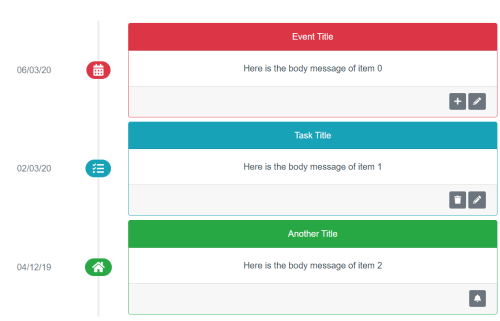
## Vue Class Component Sample
```vue
<template>
<div>
<simple-timeline
:items="items"
dateFormat="YY/MM/DD"
-edit="edit"
-copy="copy"
-trash="trash"
v-on="$listeners"
></simple-timeline>
</div>
</template>
<script lang="ts">
import Vue from "vue";
import { Control, Item, Status } from "simple-vue-timeline";
import { Component } from "vue-property-decorator";
export default class App extends Vue {
public items: Item[] = [
new Item(
0,
"calendar-alt",
Status.DANGER,
"Event Title",
[new Control("edit", "pencil-alt"), new Control("copy", "plus")],
new Date(),
"Here is the body message of item 0"
),
new Item(
1,
"tasks",
Status.INFO,
"Task Title",
[new Control("edit", "pencil-alt"), new Control("trash", "trash")],
new Date(2020, 2, 2),
"Here is the body message of item 1"
),
new Item(
2,
"home",
Status.SUCCESS,
"Another Title",
[new Control("edit", "bell")],
new Date(2019, 11, 4),
"Here is the body message of item 2"
)
];
public edit(e: any) {
console.log("edit " + e["eventId"]);
}
public copy(e: any) {
console.log("copy " + e["eventId"]);
const item: Item = this.items.find(item => item.id == e["eventId"]) as Item;
const clone = new Item(
this.items.length,
item.icon,
item.status,
item.title,
item.controls,
item.createdDate,
item.body
);
this.items.push(clone);
}
public trash(e: any) {
console.log("trash " + e["eventId"]);
this.items.pop();
}
}
</script>
```