signalk-polar-performance-plugin
Version:
A plugin that calculates performance information based on a (CSV) polar diagram.
114 lines (95 loc) • 4.69 kB
Markdown
# Polar performance plugin
Generate performance information based on a polar diagram.
## Data correctness
It's assumed data is already corrected when it's read by this plugin. This can be sometimes be done by the sensor, sometimes upon entry into SignalK using the [calibration plugin](https://www.npmjs.com/package/@signalk/calibration).
## Data sources
The following paths are read
- navigation.speedThroughWater
- environment.wind.speedTrue
- environment.wind.angleTrueWater
- navigation.speedOverGround (optional)
## Plugin configuration
### Polar diagram
The polar diagram can be configured through CSV notation as used on [ORC sailboat data](https://jieter.github.io/orc-data/site/).
## Example csv
```
twa/tws;6;8;10;12;14;16;20
0;0;0;0;0;0;0;0
46.9;4.23;0;0;0;0;0;0
44.8;0;5.09;0;0;0;0;0
43.5;0;0;5.72;0;0;0;0
42.6;0;0;0;6.22;0;0;0
41.8;0;0;0;0;6.57;0;0
40.8;0;0;0;0;0;6.75;0
41.1;0;0;0;0;0;0;6.93
52;4.57;5.59;6.33;6.87;7.23;7.45;7.65
60;4.93;5.93;6.66;7.15;7.47;7.68;7.94
75;5.17;6.18;6.91;7.37;7.68;7.92;8.31
90;5.29;6.43;7.23;7.71;8.03;8.29;8.57
110;5.38;6.56;7.36;7.84;8.22;8.6;9.31
120;5.2;6.38;7.23;7.76;8.16;8.55;9.36
135;4.65;5.84;6.78;7.43;7.87;8.25;9.03
150;3.92;5.05;5.97;6.7;7.2;7.58;8.17
144.2;4.19;0;0;0;0;0;0
146.4;0;5.25;0;0;0;0;0
146.9;0;0;6.17;0;0;0;0
147.1;0;0;0;6.91;0;0;0
148.3;0;0;0;0;7.33;0;0
171.2;0;0;0;0;0;6.76;0
176.3;0;0;0;0;0;0;7.59
```
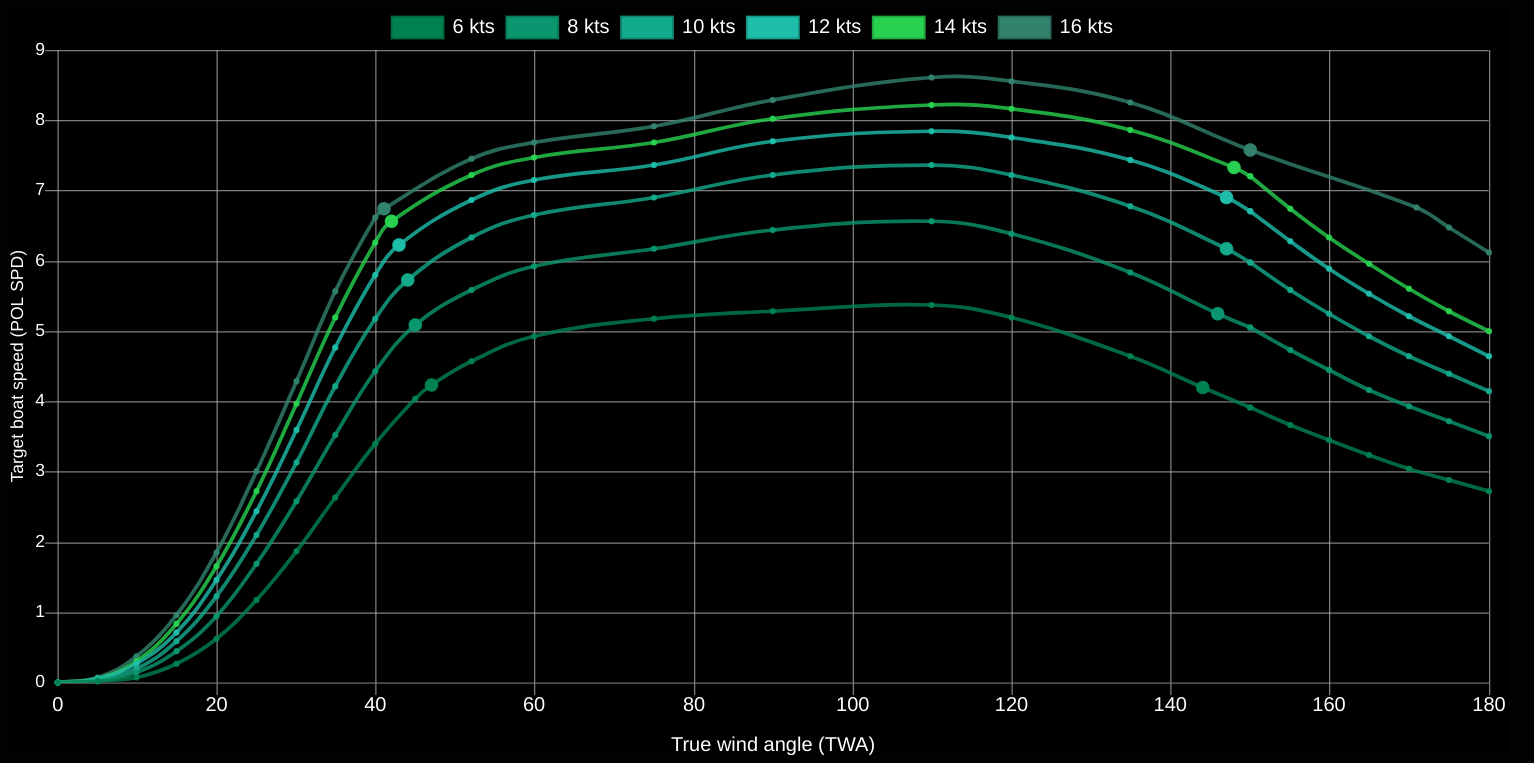
The resulting polar after processing can be seen here in the WebApp, looking something like:
### Plugin options
In the plugin configuration you can toggle the following options:
- Enable calculation/sending of beat/upwind and run/gybe/downwind angle
- Enable calculation/sending of beat/upwind and run/gybe/downwind VMG
- Enable sending Target TWA
- Enable calculation of Optimum Wind Angle (difference between TWA and beat/run angle (depends on beat/run angle)
- Enable sending of maximum speed angle and boat speed for a given TWS
- Enable calculation of Optimum Wind Angle (difference between TWA and beat/run angle (depends on beat/run angle)
## Calculated performance data
### Currently supported
- Upwind / beat angle (performance.beatAngle)
- Downwind / run / gybe angle (performance.gybeAngle)
- Upwind / beat VMG (performance.beatAngleVelocityMadeGood)
- Downwind / run / gybe VMG (performance.gybeAngleVelocityMadeGood)
- Target TWA (performance.targetAngle) (equals upwind or downwind angle)
- Optimal Wind Angle (diff between TWA and environment.wind.directionTrue)
- Polar Boat Speed (performance.polarSpeed)
- Polar Speed Ratio (performance.polarSpeedRatio)
- Plugin option to use SOG as boat speed
- Wind angle for maximum speed at this wind speed
- Fill up the ends of the polar diagram
- Visualisation of the polar diagram
- Configurable damping alorithm on inputs
- Extrapolation of polar data towards 0
- Configurable overall performance adjustment ratio
- Dots in webapp indicating Polar Speed and Boat Speed
- Use highest polar speed when going north of Polar
### To-do list
- Improved interpolation
- Make moment to do calculation smarter/configurable
- API to see JSON of polar
- Create polar from live data
-- Save polar info to file
-- Save new record speed for angle in polar
-- Determine if we're on a steady course to avoid fake records
-- Configure the resolution of the polar diagram
- Support multiple polar diagrams
- Capture heel in polar diagram
## MFD configuration
### B&G
To get the values calculated by this plugin from SignalK to your B&G MFD/Triton2, you need to install the [B&G performance plugin](https://www.npmjs.com/package/signalk-bandg-performance-plugin) and select at least the following values:
- Polar Speed (Polar Speed - POL SPD)
- Polar Speed Ratio (Polar Performance - POL PERF))
- Target TWA (TARG TWA)
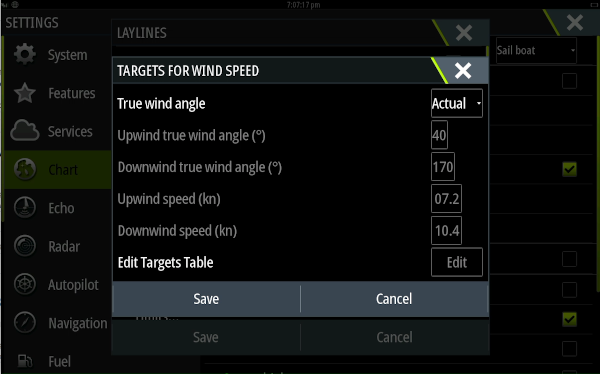
To see lay lines you need to set:
- Settings -> Chart -> Laylines -> Targets... -> True wind angle to 'Actual'
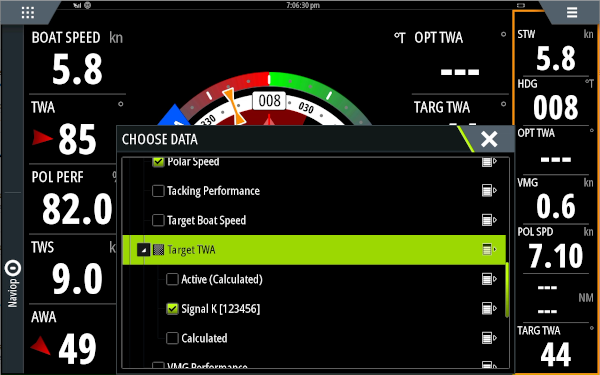
- SailSteer screen -> Long press tile to add 'Performance -> Target TWA -> decollapse, choose SignalK'
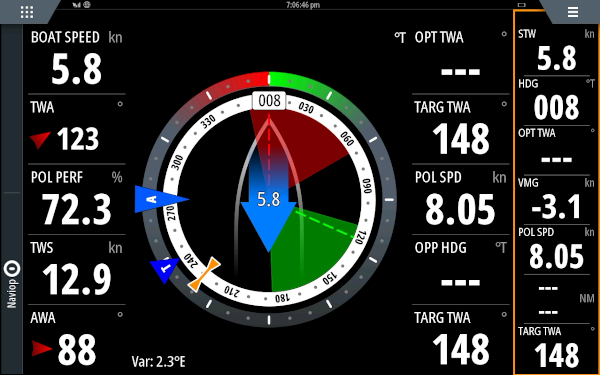
Now the Target TWA is coming from SignalK and the laylines will be drawn based on it's value.
### Raymarine
If you have a Raymarine MFD and can tell more about this, please add to the README or tell me.