shp-to-gltf
Version:
a javascript lib to convert shp to gltf
211 lines (167 loc) • 6.25 kB
Markdown
# shp-to-gltf
shp-to-gltf 是一个javascript库,用于将SHP(shapefile)转换为gltf(glb)。
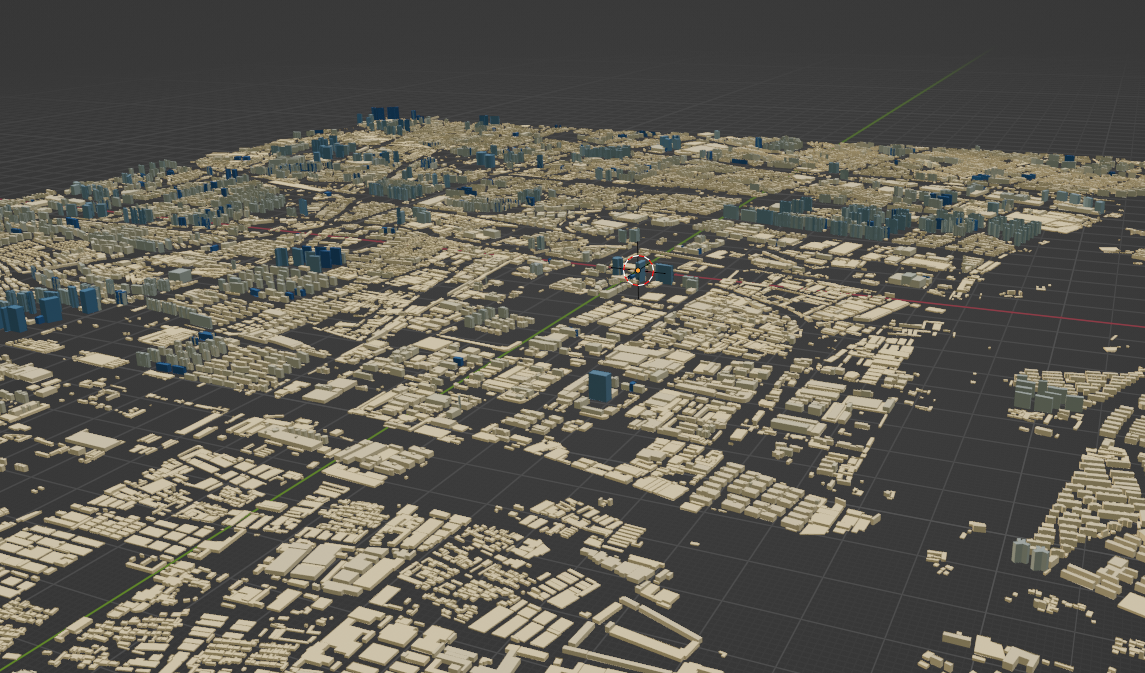
## 如何使用
```js
npm install shp-to-gltf -g
```
```
shp-to-gltf -i ./data/polygon.zip -o ./data/b.glb -f Elevation -c true -s color.json
```
## 参数
| **-i** | **输入文件路径,该路径代表的文件为shp文件,且必须为zip文件** |
| ------ | ------------------------------------------------------------ |
| **-o** | **输出文件路径** |
| **-c** | **将模型中心设置为原点true为原点false为非原点** |
| **-f** | **设置用来将平面挤压成模型的字段** |
| **-d** | **使用drago压缩模型true是使用false不使用** |
| **-s** | **样式文件路径是一个json文件,用于渲染每个要素** |
| **-h** | **展示帮助信息** |
| **-g** | **用来对要素进行分组输出。** |
### **样式文件**
```json
{
"filed" : "Elevation", // 字段用于计算样式
"style" : [
//此选项表示当字段Elevation 大于 range[0] 且 小于 range[1] 时渲染该颜色
{
"range": [
0,
10
],
"color": "rgb(253 , 215,154)"
},
{
"range": [
180,
190
],
"color": "rgb(25 , 84,123)"
},
{
"range": [
290,
300
],
"color": "rgb(25 , 84,123)"
}
],
"defaultColor" : "rgb(25 , 84,123)" // 当没有命中style时渲染默认颜色
}
```
# **在浏览器中使用**
```html
<!DOCTYPE html>
<html lang="en">
<head>
<meta charset="UTF-8">
<meta name="viewport" content="width=device-width, initial-scale=1.0">
<title>shp</title>
</head>
<body>
<h1 id="conent">ss</h1>
<script type="module">
import {ShpParse} from 'shp-to-gltf'
const h1 = document.getElementById('conent')
// 获取样式文件
const getColorJson = async ()=>{
const color = await fetch('./data/color.json')
return await color.json()
}
// 下载文件
const download = (data)=>{
const blob = new Blob([data])
const url = URL.createObjectURL(blob)
const a = document.createElement('a')
a.addEventListener
a.href = url
a.download = 'test.glb'
a.click()
}
const shp = new ShpParse()
const json = await getColorJson()
// 为shp对象设置样式输出
shp.setColorJson(json)
const option = {
height : 'Elevation', // 高度字段
center : true, // 输出的原点设置为(0 , 0 , 0)
}
// 解析shp文件为glb
const data = await shp.parseWithUrl('./data/polygon.zip' , option)
download(data)
</script>
</body>
</html>
```
# **在node中使用**
```js
import {ShpParse} from 'shp-to-gltf'
const shpParse = new ShpParse()
// 设置样式文件
const config = fs.readFileSync('./data/color.json')
shpParse.setColorJson(JSON.parse(config))
const dir = ['test1.zip' , 'test2.zip']
for (let i = 0 ; i < dir.length ; i++) {
const item = dir[i]
if (item.search('.zip') === -1) continue
// 获取shp文件
const data = fs.readFileSync(item)
// 解析shp
const glb = await ShpParse.parseWithBuffer(data , {
height : 'Elevation',
center : true,
chunk : 100000 // 单个glb文件的要素超过10000 在进行分组输出
})
if (Array.isArray(glb)) {
glb.forEach(async (items , index)=>{
const tem = Buffer.from(items)
fs.writeFileSync(`test${index}.glb` , tem )
})
} else {
const tem = Buffer.from(glb)
fs.writeFileSync(`test$.glb` , tem)
}
}
```
# **api**
## **ShpParse**
**一个用来解析shp文件为gltf的类**
### **方法**
#### **parseWithUrl**
```js
/**
*
* @param {string} url
* @param {{height : string , center : boolean , chunk ?: number , outputType ?: string}} option
*
*/
async parseWithUrl(url , option)
```
| **url** | **一个用来表示shp文件的地址** |
| ----------------- | ------------------------------------------------------------ |
| **option-height** | **设置用来将平面挤压成模型的字段 , 该字段的值将被设置为三维模型的高度** |
| **option-center** | **是否将模型的中心点设置为(0,0,0)** |
| **option-chunk** | **每个glb的最大要素数量, 超过这个数量会自动进行分组.** |
#### **parseWithBuffer**
```js
/**
*
* @param {ArrayBuffer} buffer
* @param {{height : string , center : boolean , chunk ?: number , outputType ?: string}} option
*
*
*/
async parseWithBuffer(buffer , option)
```
| **buffer** | **一个用来表示shp文件的buffer** |
| ----------------- | ------------------------------------------------------------ |
| **option-height** | **设置用来将平面挤压成模型的字段 , 该字段的值将被设置为三维模型的高度** |
| **option-center** | **是否将模型的中心点设置为(0,0,0)** |
| **option-chunk** | **每个glb的最大要素数量, 超过这个数量会自动进行分组.** |
#### **setColorJson**
**用来设置输出模型的样式,样式规则见上文样式文件**
```js
setColorJson(colors)
```
# **注意事项**
**1 当你的shp文件很大的时候,输出时请使用 -g 命令来进行分块输出 , 使用api时请指定chunk属性**