shortcut-buttons-flatpickr
Version:
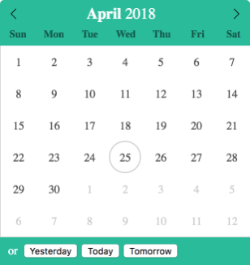
Shortcut buttons is a plugin for flatpickr that provides users an alternative way to interact with the datetime picker.
49 lines (41 loc) • 4.55 kB
Markdown
# Shortcut buttons
[](https://circleci.com/gh/jcsmorais/shortcut-buttons-flatpickr/tree/master)
[](https://coveralls.io/github/jcsmorais/shortcut-buttons-flatpickr?branch=master)
[](https://badge.fury.io/js/shortcut-buttons-flatpickr)
[](https://flatpickr.js.org/)
[](https://raw.githubusercontent.com/jcsmorais/shortcut-buttons-flatpickr/master/LICENSE)
[](https://www.jsdelivr.com/package/npm/shortcut-buttons-flatpickr)
Shortcut buttons is a plugin for [flatpickr](https://flatpickr.js.org/) that provides users an alternative way to interact with the datetime picker.



# Motivation
Shortcut buttons development has been motivated by the need of having a fast, flexible and seemless alternative way for users to select specific date(s) without being forced to navigate through their calendars and individually select those date(s).
# Installation
Installing as a module:
```bash
yarn add shortcut-buttons-flatpickr
```
Installing on non-module environments:
```html
<link rel="stylesheet" href="https://cdn.jsdelivr.net/npm/shortcut-buttons-flatpickr@0.1.0/dist/themes/light.min.css">
<script src="https://cdn.jsdelivr.net/npm/shortcut-buttons-flatpickr@0.1.0/dist/shortcut-buttons-flatpickr.min.js"></script>
```
# API
| Params | Type | Description |
|-----------------------|--------------------------|----------------------------------------------------------------------------------------------------------------------------------------------------------------------------------|
| `button` | `Object`, `Object[]` | Button(s). |
| `[button.attributes]` | `Object` | Button's attributes.<br/>Supported attributes: `accesskey`, `aria-label`, `class` and `tabindex`. |
| `button.label` | `string` | Button's label. |
| `[label]` | `string` | Label including a word/sentence stating that the user can use the calendar or one of the buttons. |
| `onClick` | `Function`, `Function[]` | Callback(s) invoked when plugin's buttons are clicked. Each callback is fed with two parameters:<br/>`index` - the index of the clicked button.<br/>`fp` - flatpickr's instance. |
| `[theme]` | `string` | Flatpickr's theme, defaults to `light` if none supplied. |
# Usage Examples
* [Beginning Of Time](http://bit.ly/2jjcQK0)
* [Clear Date Selection](http://bit.ly/2wrPyYp)
* [Quick Month Selection](http://bit.ly/2KdleFS)
* [US Holidays Navigator](http://bit.ly/2raWK9D)
* [Yesterday, Today and Tomorrow](http://bit.ly/2KrWMC0)