shippie
Version:
an extensible code review agent
110 lines (72 loc) • 4.06 kB
Markdown
# Shippie 🚢 (formerly Code Review GPT)
[![NPM][npm_badge]][npm]
[![Contributors][contributors_badge]][contributors]
[![Pulse][pulse_badge]][pulse]
[![License][license_badge]][license]
[![Twitter][twitter_badge]][twitter]
## Helps you ship faster
Shippie uses Large Language Models to review code in your CI/CD pipeline. It should pick up on common issues such as:
- Exposed secrets
- Slow or inefficient code
- Potential bugs or unhandled edge cases
It can also be run locally in your command line to review staged files.
```bash
npx shippie review
```
## Demo
https://github.com/mattzcarey/shippie/assets/77928207/92029baf-f691-465f-8d15-e1363fcb808e
## Ethos 💭
- Beautiful CLI tool written in typescript and bun
- Vertically integrated into your CI/CD pipeline
- Functions as a human code reviewer, using a small set of optimised tools
- Acts as a [Model Context Protocol (MCP)](https://modelcontextprotocol.io/) client for integration with external tools such as browser use, infrastructure deployments, observability monitoring.
## Setup Instructions 💫
See the [setup instructions](docs/setup.md) for more docs on how to set up shippie in your CI/CD pipeline and use it locally.
### Additional Documentation
- [Rules Files](docs/rules-files.md) - How to use rules files to get the most out of Shippie
- [AI Provider Configuration](docs/ai-provider-config.md) - Configure different AI providers
- [Action Options](docs/action-options.md) - GitHub Action configuration options
- [Model Context Protocol (MCP)](docs/mcp.md) - Give Shippie access to external tools
## Development 🔧
1. Clone the repository:
```shell
git clone https://github.com/mattzcarey/shippie.git
cd shippie
```
2. Install dependencies (we use bun but you can use npm or pnpm if you prefer):
```shell
bun i
```
3. Set up the API key:
- Rename the `.env.example` file to `.env`.
- Open the `.env` file and replace `YOUR_API_KEY` with your actual OPENAI API key.
4. Run the application:
```shell
bun start
```
See the package.json file for all the npm commands you can run.
5. Make a PR 🎉
We use [release-please](https://github.com/googleapis/release-please) on this project. If you want to create a new release from your PR, please make sure your PR title follows the [Conventional Commits](https://www.conventionalcommits.org/en/v1.0.0/) format. The release-please bot will automatically create a new release for you when your PR is merged.
- fix: which represents bug fixes, and correlates to a patch version.
- feat: which represents a new feature, and correlates to a SemVer minor.
- feat!:, or fix!:, refactor!:, etc., which represent a breaking change (indicated by the !) and will result in a major version.
## Contributors 🙏
Thanks to our wonderful contributors!
<a href="https://github.com/mattzcarey/shippie/graphs/contributors">
<img src="https://contrib.rocks/image?repo=mattzcarey/shippie" />
</a>
## Roadmap 🌏
Have a look at the [discussion tab](https://github.com/mattzcarey/shippie/discussions) for the latest chat and ideas. I am actively working on the items in [todo.md](todo.md).
## Star History ⭐️
[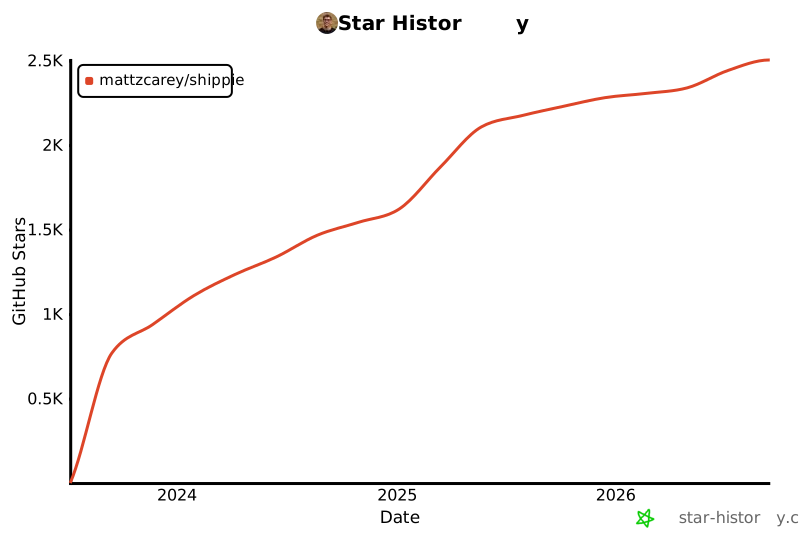](https://star-history.com/#mattzcarey/shippie&Date)
<!-- Badges -->
[npm]: https://www.npmjs.com/package/shippie
[npm_badge]: https://img.shields.io/npm/dm/shippie.svg
[license]: https://opensource.org/licenses/MIT
[license_badge]: https://img.shields.io/github/license/mattzcarey/shippie.svg?color=blue&style=flat-square&ghcache=unused
[contributors]: https://github.com/mattzcarey/shippie/graphs/contributors
[contributors_badge]: https://img.shields.io/github/contributors/mattzcarey/shippie
[pulse]: https://github.com/mattzcarey/shippie/pulse
[pulse_badge]: https://img.shields.io/github/commit-activity/m/mattzcarey/shippie
[twitter]: https://twitter.com/intent/follow?screen_name=mattzcarey
[twitter_badge]: https://img.shields.io/twitter/follow/mattzcarey?style=social&logo=twitter