sheep-and-crocodile
Version:
Console game for nodejs about a sheep that runs away from a crocodile.
97 lines (59 loc) • 1.86 kB
Markdown
# sheep-and-crocodile
[](https://www.npmjs.com/package/sheep-and-crocodile)
Console game for nodejs about a sheep that runs away from a crocodile.
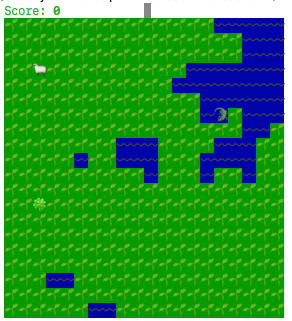
## Controls and rules
Use **arrows** or **WSAD** buttons to control a sheep (🐑).
Your goal is eat as much clovers (🍀) as you can.
Sheep eats clovers, crocodile (🐊) eats sheep. The crocodile will pursue the sheep until it is eaten by it.
By the way there are some random water on the map. A crocodile can swim, but a sheep does not.
You can exit game by **Q** button.
## Install
You can install it by npm:
```commandline
npm install -g sheep-and-crocodile
```
## Game start
To start a game execute this in command line:
```commandline
sheep_and_crocodile
```
or just:
```commandline
sheepcroc
```
## Params
### --help
Prints rules and controls info.
### --difficulty
You can choose difficulty by using this parameter (from 1 to 3):
```commandline
sheep_and_crocodile --difficulty=1
```
By default difficulty is 1. The more value the harder to play (alias for 3 is 'nightmare').
### --water
If you don't want water you can disable it this way:
```commandline
sheep_and_crocodile --water=0
```
or just:
```commandline
sheep_and_crocodile --no-water
```
### --emoji
If you don't want emoji graphics you can disable it this way:
```commandline
sheep_and_crocodile --emoji=0
```
or just:
```commandline
sheep_and_crocodile --no-emoji
```
And you will see something like this:
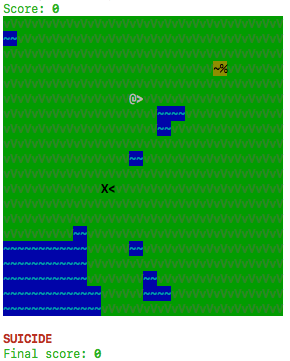
Where:
* \X< - crocodile;
* @> - sheep;
* ~% - clover;
* vV - grass;
* ~~ - water.