sharding-stats
Version:
A cool Dashboard & Manager for showing Live Stats and managing your Discord Bot/Shards
133 lines (109 loc) • 6.56 kB
Markdown
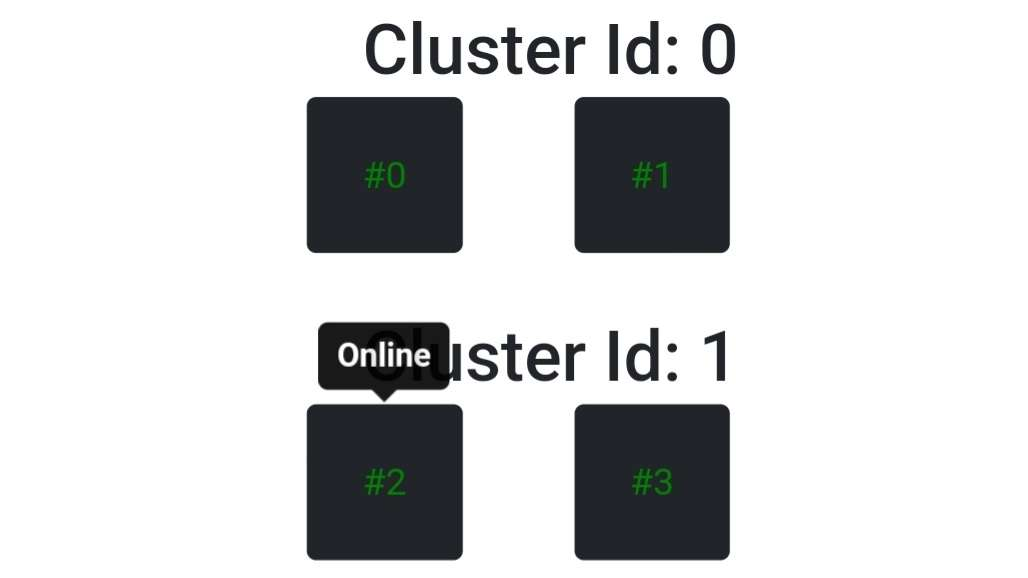
**Simple (self-hosted) Stats Front-End Page:**
- Done with bootstrap
- Design: for with [discord-hybrid-sharding](https://npmjs.com/discord-hybrid-sharding)
- Because it's filtering forclusters, you can easily change it to [JUST SHARDS](#just-shards)
- create: `server.js` on your website host (can be same as bot host if you want)
```js
const Stats = require('sharding-stats');
const express = require("express");
const app = express();
const port = 3333;
const StatsServer = new Stats.Server(app, {
selfHost: true,
stats_uri: "http://localhost:3333/", //Base URL
authorizationkey: "your_secure_password",
// not needed on self host- so boiler data
bot: { name: "s", icon: "s", website: "s", client_id: "s", client_secret: "s" }, redirect_uri: "s",
owners: ["442355791412854784"],
});
// http://localhost:3333/statuspage -> to see the status
app.get("/statuspage", (req, res) => {
const data = StatsServer.getStatsData().raw.shards
const sorted = StatsServer.chunkShardsToClusterArrays(data)
let statsBody = "";
const shardMap = x => `<div class="col-auto"><span class="text bg-dark p-4 rounded" style="color: ${x.color}" data-bs-toggle="tooltip" data-bs-html="true" title="<b>${x.statusText}</b>">#${x.id}</span></div>`;
for(const { cluster, shards } of sorted) statsBody += `<h2 class="m-4 mt-5">Cluster Id: ${cluster}</h2><div class="row gx-5">${shards.map(shardMap).join("")}</div>`
// set header for html content
res.setHeader('Content-type','text/html');
// send status page with auto-reloader and more
res.send(`<html><head><link href="https://cdn.jsdelivr.net/npm/bootstrap@5.0.2/dist/css/bootstrap.min.css" rel="stylesheet" integrity="sha384-EVSTQN3/azprG1Anm3QDgpJLIm9Nao0Yz1ztcQTwFspd3yD65VohhpuuCOmLASjC" crossorigin="anonymous"></head><body>
<!-- Here is your bootstrap website code-->
<div class="container px-4"><h1>Bot | Status</h1>${statsBody}</div>
<!-- auto-reload page every X ms -->
<script> setInterval(() => location.reload(true), 20000)</script>
<!-- Bootstrap scripts -->
<script src="https://cdn.jsdelivr.net/npm/bootstrap@5.0.2/dist/js/bootstrap.bundle.min.js" integrity="sha384-MrcW6ZMFYlzcLA8Nl+NtUVF0sA7MsXsP1UyJoMp4YLEuNSfAP+JcXn/tWtIaxVXM" crossorigin="anonymous"></script>
<script>var tooltipTriggerList = [].slice.call(document.querySelectorAll('[data-bs-toggle="tooltip"]'));var tooltipList = tooltipTriggerList.map(function (tooltipTriggerEl) { return new bootstrap.Tooltip(tooltipTriggerEl); });</script>
</body></html>`);
});
StatsServer.on('error', console.error)
app.listen(port, () => console.log("website ready"));
```
**bot.js file**
```js
//const { ClusterClient } = require('discord-hybrid-sharding');
//const Discord = require('discord.js');
//const client = new Discord.Client({ intents: [Guilds,GuildMessages,GuildMembers] })
//client.cluster = new ClusterClient(client);
// however you create your client, it needs to be passed in the sharding stats
const Stats = require('sharding-stats');
new Stats.Client(client, {
stats_uri: 'http://localhost:3333/', // url and port MUST be the same as on server.js, e.g. 'http://127.127.127.127:3333/'
authorizationkey: "your_secure_password", postinterval: 2000,
})
```
**Images**

## just shards
- without clustering filtering (for plain discord.js sharding or no clusters etc.)
- create: `server.js` on your website host (can be same as bot host if you want)
```js
const Stats = require('sharding-stats');
const express = require("express");
const app = express();
const port = 3333;
const StatsServer = new Stats.Server(app, {
selfHost: true,
stats_uri: "http://localhost:3333/", //Base URL
authorizationkey: "your_secure_password",
// not needed on self host- so boiler data
bot: { name: "s", icon: "s", website: "s", client_id: "s", client_secret: "s" }, redirect_uri: "s",
owners: ["442355791412854784"],
});
// http://localhost:3333/statuspage -> to see the status
app.get("/statuspage", (req, res) => {
const data = StatsServer.getStatsData().raw.shards
const sorted = data.sort((a,b) => a.id - b.id);
let statsBody = "";
const shardMap = x => `<div class="col-auto"><span class="text bg-dark p-4 rounded" style="color: ${x.color}" data-bs-toggle="tooltip" data-bs-html="true" title="<b>${x.statusText}</b>">#${x.id}</span></div>`;
statsBody += `<h2 class="m-4 mt-5">${sorted.length} Shards</h2><div class="row gx-5">${sorted.map(shardMap).join("")}</div>`
// set header for html content
res.setHeader('Content-type','text/html');
// send status page with auto-reloader and more
res.send(`<html><head><link href="https://cdn.jsdelivr.net/npm/bootstrap@5.0.2/dist/css/bootstrap.min.css" rel="stylesheet" integrity="sha384-EVSTQN3/azprG1Anm3QDgpJLIm9Nao0Yz1ztcQTwFspd3yD65VohhpuuCOmLASjC" crossorigin="anonymous"></head><body>
<!-- Here is your bootstrap website code-->
<div class="container px-4"><h1>Bot | Status</h1>${statsBody}</div>
<!-- auto-reload page every X ms -->
<script> setInterval(() => location.reload(true), 20000)</script>
<!-- Bootstrap scripts -->
<script src="https://cdn.jsdelivr.net/npm/bootstrap@5.0.2/dist/js/bootstrap.bundle.min.js" integrity="sha384-MrcW6ZMFYlzcLA8Nl+NtUVF0sA7MsXsP1UyJoMp4YLEuNSfAP+JcXn/tWtIaxVXM" crossorigin="anonymous"></script>
<script>var tooltipTriggerList = [].slice.call(document.querySelectorAll('[data-bs-toggle="tooltip"]'));var tooltipList = tooltipTriggerList.map(function (tooltipTriggerEl) { return new bootstrap.Tooltip(tooltipTriggerEl); });</script>
</body></html>`);
});
StatsServer.on('error', console.error)
app.listen(port, () => console.log("website ready"));
```
**bot.js file**
```js
//const { ClusterClient } = require('discord-hybrid-sharding');
//const Discord = require('discord.js');
//const client = new Discord.Client()
//client.cluster = new ClusterClient(client);
// however you create your client, it needs to be passed in the sharding stats
const Stats = require('sharding-stats');
new Stats.Client(client, {
stats_uri: 'http://localhost:3333/', // url and port MUST be the same as on server.js, e.g. 'http://127.127.127.127:3333/'
authorizationkey: "your_secure_password", postinterval: 2000,
})
```