sfdx-hardis
Version:
Swiss-army-knife Toolbox for Salesforce. Allows you to define a complete CD/CD Pipeline. Orchestrate base commands and assist users with interactive wizards
16,227 lines • 830 kB
JSON
{
"commands": {
"hello:world": {
"aliases": [],
"args": {},
"description": "\n## Command Behavior\n\n**Says hello to the world or a specified person.**\n\nThis is a simple command used for demonstration purposes. It outputs a greeting message to the console.\n\nKey functionalities:\n\n- **Customizable Greeting:** You can specify a name using the `--name` flag to personalize the greeting.\n- **Timestamp:** The greeting includes the current date.\n\n<details markdown=\"1\">\n<summary>Technical explanations</summary>\n\nThe command's technical implementation involves:\n\n- **Flag Parsing:** It parses the `--name` flag to get the recipient of the greeting.\n- **Date Retrieval:** It gets the current date using `new Date().toDateString()`.\n- **Console Output:** It constructs the greeting message using the provided name and the current date, and then logs it to the console using `this.log()`.\n</details>\n",
"examples": [
"Say hello to the world:\n<%= config.bin %> <%= command.id %>",
"Say hello to someone you know:\n<%= config.bin %> <%= command.id %> --name Astro"
],
"flags": {
"json": {
"description": "Format output as json.",
"helpGroup": "GLOBAL",
"name": "json",
"allowNo": false,
"type": "boolean"
},
"flags-dir": {
"helpGroup": "GLOBAL",
"name": "flags-dir",
"summary": "Import flag values from a directory.",
"hasDynamicHelp": false,
"multiple": false,
"type": "option"
},
"name": {
"char": "n",
"description": "This person can be anyone in the world!",
"name": "name",
"summary": "The name of the person you'd like to say hello to.",
"default": "World",
"hasDynamicHelp": false,
"multiple": false,
"type": "option"
}
},
"hasDynamicHelp": false,
"hiddenAliases": [],
"id": "hello:world",
"pluginAlias": "sfdx-hardis",
"pluginName": "sfdx-hardis",
"pluginType": "core",
"strict": true,
"summary": "Say hello.",
"enableJsonFlag": true,
"isESM": true,
"relativePath": [
"lib",
"commands",
"hello",
"world.js"
],
"aliasPermutations": [],
"permutations": [
"hello:world",
"world:hello"
]
},
"hardis:auth:login": {
"aliases": [],
"args": {},
"description": "\n## Command Behavior\n\n**Authenticates to a Salesforce org, primarily designed for CI/CD workflows.**\n\nThis command facilitates secure and automated logins to Salesforce organizations within continuous integration and continuous delivery pipelines. It leverages pre-configured authentication details, ensuring that CI/CD processes can interact with Salesforce without manual intervention.\n\nKey aspects:\n\n- **Configuration-Driven:** It relies on authentication variables and files set up by dedicated configuration commands:\n - For CI/CD repositories: [Configure Org CI Authentication](https://sfdx-hardis.cloudity.com/hardis/project/configure/auth/)\n - For Monitoring repositories: [Configure Org Monitoring](https://sfdx-hardis.cloudity.com/hardis/org/configure/monitoring/)\n- **Technical Org Support:** Supports authentication to a 'technical org' (e.g., for calling Agentforce from another org) by utilizing the `SFDX_AUTH_URL_TECHNICAL_ORG` environment variable. If this variable is set, the command authenticates to this org with the alias `TECHNICAL_ORG`.\n\nTo obtain the `SFDX_AUTH_URL_TECHNICAL_ORG` value, you can run `sf org display --verbose --json` and copy the `sfdxAuthUrl` field from the output.\n\n<details markdown=\"1\">\n<summary>Technical explanations</summary>\n\nThe command's technical flow involves:\n\n- **Flag Parsing:** It parses command-line flags such as `instanceurl`, `devhub`, `scratchorg`, and `debug` to determine the authentication context.\n- **Authentication Hook:** It triggers an internal authentication hook (`this.config.runHook('auth', ...`)) which is responsible for executing the actual authentication logic based on the provided flags (e.g., whether it's a Dev Hub or a scratch org).\n- **Environment Variable Check:** It checks for the presence of `SFDX_AUTH_URL_TECHNICAL_ORG` or `TECHNICAL_ORG_ALIAS` environment variables.\n- **`authOrg` Utility:** If a technical org is configured, it calls the `authOrg` utility function to perform the authentication for that specific org, ensuring it's connected and available for subsequent operations.\n- **Salesforce CLI Integration:** It integrates with the Salesforce CLI's authentication mechanisms to establish and manage org connections.\n</details>\n",
"examples": [
"$ sf hardis:auth:login",
"CI=true CI_COMMIT_REF_NAME=monitoring_myclient sf hardis:auth:login"
],
"flags": {
"json": {
"description": "Format output as json.",
"helpGroup": "GLOBAL",
"name": "json",
"allowNo": false,
"type": "boolean"
},
"flags-dir": {
"helpGroup": "GLOBAL",
"name": "flags-dir",
"summary": "Import flag values from a directory.",
"hasDynamicHelp": false,
"multiple": false,
"type": "option"
},
"instanceurl": {
"char": "r",
"description": "URL of org instance",
"name": "instanceurl",
"hasDynamicHelp": false,
"multiple": false,
"type": "option"
},
"devhub": {
"char": "h",
"description": "Also connect associated DevHub",
"name": "devhub",
"allowNo": false,
"type": "boolean"
},
"scratchorg": {
"char": "s",
"description": "Scratch org",
"name": "scratchorg",
"allowNo": false,
"type": "boolean"
},
"debug": {
"char": "d",
"description": "Activate debug mode (more logs)",
"name": "debug",
"allowNo": false,
"type": "boolean"
},
"websocket": {
"description": "Websocket host:port for VsCode SFDX Hardis UI integration",
"name": "websocket",
"hasDynamicHelp": false,
"multiple": false,
"type": "option"
},
"skipauth": {
"description": "Skip authentication check when a default username is required",
"name": "skipauth",
"allowNo": false,
"type": "boolean"
}
},
"hasDynamicHelp": false,
"hiddenAliases": [],
"id": "hardis:auth:login",
"pluginAlias": "sfdx-hardis",
"pluginName": "sfdx-hardis",
"pluginType": "core",
"strict": true,
"enableJsonFlag": true,
"title": "Login",
"requiresProject": false,
"isESM": true,
"relativePath": [
"lib",
"commands",
"hardis",
"auth",
"login.js"
],
"aliasPermutations": [],
"permutations": [
"hardis:auth:login",
"auth:hardis:login",
"auth:login:hardis",
"hardis:login:auth",
"login:hardis:auth",
"login:auth:hardis"
]
},
"hardis:cache:clear": {
"aliases": [],
"args": {},
"description": "\n## Command Behavior\n\n**Clears the local cache generated by the sfdx-hardis plugin.**\n\nThis command is designed to remove temporary files, stored configurations, and other cached data that sfdx-hardis uses to optimize its operations. Clearing the cache can be beneficial for:\n\n- **Troubleshooting:** Resolving unexpected behavior or inconsistencies.\n- **Disk Space Management:** Freeing up storage on your local machine.\n- **Ensuring Fresh Data:** Guaranteeing that the plugin operates with the most current data and configurations.\n\n## Technical explanations\n\nThe command's technical implementation is straightforward:\n\n- **Direct Function Call:** It directly invokes the `clearCache()` function, which is imported from \buri../../../common/cache/index.js\buri.\n- **Cache Management Logic:** The \buriclearCache()` function encapsulates the logic for identifying and removing the specific files and directories that constitute the sfdx-hardis cache.\n",
"examples": [
"$ sf hardis:cache:clear"
],
"flags": {
"json": {
"description": "Format output as json.",
"helpGroup": "GLOBAL",
"name": "json",
"allowNo": false,
"type": "boolean"
},
"flags-dir": {
"helpGroup": "GLOBAL",
"name": "flags-dir",
"summary": "Import flag values from a directory.",
"hasDynamicHelp": false,
"multiple": false,
"type": "option"
},
"debug": {
"char": "d",
"description": "Activate debug mode (more logs)",
"name": "debug",
"allowNo": false,
"type": "boolean"
},
"websocket": {
"description": "Websocket host:port for VsCode SFDX Hardis UI integration",
"name": "websocket",
"hasDynamicHelp": false,
"multiple": false,
"type": "option"
},
"skipauth": {
"description": "Skip authentication check when a default username is required",
"name": "skipauth",
"allowNo": false,
"type": "boolean"
}
},
"hasDynamicHelp": false,
"hiddenAliases": [],
"id": "hardis:cache:clear",
"pluginAlias": "sfdx-hardis",
"pluginName": "sfdx-hardis",
"pluginType": "core",
"strict": true,
"enableJsonFlag": true,
"title": "Clear sfdx-hardis cache",
"uiConfig": {
"hide": true
},
"requiresProject": false,
"isESM": true,
"relativePath": [
"lib",
"commands",
"hardis",
"cache",
"clear.js"
],
"aliasPermutations": [],
"permutations": [
"hardis:cache:clear",
"cache:hardis:clear",
"cache:clear:hardis",
"hardis:clear:cache",
"clear:hardis:cache",
"clear:cache:hardis"
]
},
"hardis:config:get": {
"aliases": [],
"args": {},
"description": "\n## Command Behavior\n\n**Retrieves and displays the sfdx-hardis configuration for a specified level.**\n\nThis command allows you to inspect the configuration that is currently in effect for your project, which is useful for debugging and understanding how sfdx-hardis will behave.\n\n- **Configuration levels:** It can retrieve configuration from three different levels:\n - **Project:** The configuration defined in the project's `.sfdx-hardis.yml` file.\n - **Branch:** The configuration defined in a branch-specific configuration file (e.g., `.sfdx-hardis.production.yml`).\n - **User:** The global user-level configuration.\n\n## Technical explanations\n\nThe command's logic is straightforward:\n\n- **`getConfig` function:** It calls the `getConfig` utility function, passing the desired configuration level as an argument.\n- **Configuration loading:** The `getConfig` function is responsible for finding the appropriate configuration file, reading its contents, and parsing it as YAML or JSON.\n- **Output:** The retrieved configuration is then displayed to the user as a JSON string.\n",
"examples": [
"$ sf hardis:project:deploy:sources:metadata"
],
"flags": {
"json": {
"description": "Format output as json.",
"helpGroup": "GLOBAL",
"name": "json",
"allowNo": false,
"type": "boolean"
},
"flags-dir": {
"helpGroup": "GLOBAL",
"name": "flags-dir",
"summary": "Import flag values from a directory.",
"hasDynamicHelp": false,
"multiple": false,
"type": "option"
},
"level": {
"char": "l",
"description": "project,branch or user",
"name": "level",
"default": "project",
"hasDynamicHelp": false,
"multiple": false,
"options": [
"project",
"branch",
"user"
],
"type": "option"
},
"debug": {
"char": "d",
"description": "Activate debug mode (more logs)",
"name": "debug",
"allowNo": false,
"type": "boolean"
},
"websocket": {
"description": "Websocket host:port for VsCode SFDX Hardis UI integration",
"name": "websocket",
"hasDynamicHelp": false,
"multiple": false,
"type": "option"
},
"skipauth": {
"description": "Skip authentication check when a default username is required",
"name": "skipauth",
"allowNo": false,
"type": "boolean"
}
},
"hasDynamicHelp": false,
"hiddenAliases": [],
"id": "hardis:config:get",
"pluginAlias": "sfdx-hardis",
"pluginName": "sfdx-hardis",
"pluginType": "core",
"strict": true,
"enableJsonFlag": true,
"title": "Deploy metadata sources to org",
"requiresProject": false,
"isESM": true,
"relativePath": [
"lib",
"commands",
"hardis",
"config",
"get.js"
],
"aliasPermutations": [],
"permutations": [
"hardis:config:get",
"config:hardis:get",
"config:get:hardis",
"hardis:get:config",
"get:hardis:config",
"get:config:hardis"
]
},
"hardis:datacloud:sql-query": {
"aliases": [],
"args": {},
"description": "\n## Command Behavior\n\n**Executes a SQL query against Salesforce Data Cloud and exports the results.**\n\nThis command lets you run ad-hoc or predefined SQL queries on Data Cloud objects, view the results in the CLI, and export them for further analysis.\n\nKey functionalities:\n\n- **Query input:** Accepts inline SQL via `-q`, a predefined saved query name, or an interactive prompt when no query is provided.\n- **Test shortcut:** `-q test` runs a sample query on `ssot__Account__dlm` (sorted by created date, limited to 5000 rows).\n- **Export:** Generates CSV and XLSX reports for the returned rows with auto-generated filenames (override with `--outputfile`).\n- **Logging:** Prints a JSON summary (excluding full records) and supports debug output via `--debug`.\n- **Org targeting:** Works with the provided or default org connection; respects websocket and skipauth flags.\n\n<details markdown=\"1\">\n<summary>Technical explanations</summary>\n\nThe command's technical implementation involves:\n\n- **Query resolution:**\n - If `-q` is provided, it is used directly (with a special `test` branch loading a canned query).\n - If absent, prompts the user to select from predefined queries on disk (via `listAvailableDataCloudQueries` / `loadDataCloudQueryFromFile`), or enter a custom query. Custom queries can be optionally saved locally (`saveDataCloudQueryToFile`).\n- **Execution:** Calls `dataCloudSqlQuery` with the resolved SQL against the target org connection.\n- **Output handling:** Logs the full result JSON to the terminal; emits a sanitized summary to `uxLog` (records removed for readability).\n- **File generation:** Uses `generateReportPath` to build the output path and `generateCsvFile` to produce CSV/XLSX exports with a `DataCloud Sql Query Results` title.\n- **CLI UX:** Employs `prompts` for interactive selection/input and `uxLog` for consistent colored logging with chalk.\n</details>\n",
"examples": [
"$ sf hardis:datacloud:sql-query",
"$ sf hardis:datacloud:sql-query -q \"SELECT ssot__Name__c, ssot__CreatedDate__c FROM ssot__Account__dlm LIMIT 10\"",
"$ sf hardis:datacloud:sql-query -q test"
],
"flags": {
"json": {
"description": "Format output as json.",
"helpGroup": "GLOBAL",
"name": "json",
"allowNo": false,
"type": "boolean"
},
"flags-dir": {
"helpGroup": "GLOBAL",
"name": "flags-dir",
"summary": "Import flag values from a directory.",
"hasDynamicHelp": false,
"multiple": false,
"type": "option"
},
"query": {
"char": "q",
"description": "Data Cloud query string",
"name": "query",
"hasDynamicHelp": false,
"multiple": false,
"type": "option"
},
"outputfile": {
"char": "f",
"description": "Force the path and name of output report file. Must end with .csv",
"name": "outputfile",
"hasDynamicHelp": false,
"multiple": false,
"type": "option"
},
"debug": {
"char": "d",
"description": "Activate debug mode (more logs)",
"name": "debug",
"allowNo": false,
"type": "boolean"
},
"websocket": {
"description": "Websocket host:port for VsCode SFDX Hardis UI integration",
"name": "websocket",
"hasDynamicHelp": false,
"multiple": false,
"type": "option"
},
"skipauth": {
"description": "Skip authentication check when a default username is required",
"name": "skipauth",
"allowNo": false,
"type": "boolean"
},
"target-org": {
"aliases": [
"targetusername",
"u"
],
"char": "o",
"deprecateAliases": true,
"name": "target-org",
"noCacheDefault": true,
"required": true,
"summary": "Username or alias of the target org. Not required if the `target-org` configuration variable is already set.",
"hasDynamicHelp": true,
"multiple": false,
"type": "option"
}
},
"hasDynamicHelp": true,
"hiddenAliases": [],
"id": "hardis:datacloud:sql-query",
"pluginAlias": "sfdx-hardis",
"pluginName": "sfdx-hardis",
"pluginType": "core",
"strict": true,
"enableJsonFlag": true,
"title": "Execute a SQL query on Data Cloud",
"requiresProject": false,
"isESM": true,
"relativePath": [
"lib",
"commands",
"hardis",
"datacloud",
"sql-query.js"
],
"aliasPermutations": [],
"permutations": [
"hardis:datacloud:sql-query",
"datacloud:hardis:sql-query",
"datacloud:sql-query:hardis",
"hardis:sql-query:datacloud",
"sql-query:hardis:datacloud",
"sql-query:datacloud:hardis"
]
},
"hardis:doc:fieldusage": {
"aliases": [],
"args": {},
"description": "\n## Command Behavior\n\n**Retrieves and displays the usage of custom fields within a Salesforce org, based on metadata dependencies.**\n\nThis command helps identify where custom fields are referenced across various metadata components in your Salesforce environment. It's particularly useful for impact analysis before making changes to fields, or for understanding the complexity and interconnectedness of your Salesforce customizations.\n\n- **Targeted sObjects:** You can specify a comma-separated list of sObjects (e.g., `Account,Contact`) to narrow down the analysis to relevant objects. If no sObjects are specified, it will analyze all customizable sObjects.\n- **Usage Details:** For each custom field, the command lists the metadata components (e.g., Apex Classes, Visualforce Pages, Flows, Reports) that reference it, along with their types and names.\n\n\n\n<details markdown=\"1\">\n<summary>Technical explanations</summary>\n\nThe command operates by querying Salesforce's Tooling API and Metadata Component Dependency API:\n\n- **sObject Retrieval:** It first queries `EntityDefinition` to get a list of customizable sObjects, optionally filtered by the user's input.\n- **Custom Field Identification:** For each identified sObject, it queries `CustomField` to retrieve all custom fields associated with it.\n- **Dependency Lookup:** The core of the command involves querying `MetadataComponentDependency` using the IDs of the custom fields. This API provides information about which other metadata components depend on the specified fields.\n- **Data Aggregation & Reporting:** The retrieved data is then processed and formatted into a tabular output, showing the sObject name, field name, field type, dependency type, and dependency name. The results are also generated into various report formats (e.g., CSV, JSON) for further analysis.\n- **SOQL Queries:** It uses `soqlQuery` and `soqlQueryTooling` utilities to execute SOQL queries against the Salesforce org.\n</details>\n",
"examples": [
"$ sf hardis:doc:fieldusage",
"$ sf hardis:doc:fieldusage --sObjects Account,Contact,Opportunity",
"$ sf hardis:doc:fieldusage --target-org myOrgAlias --sObjects CustomObject__c"
],
"flags": {
"json": {
"description": "Format output as json.",
"helpGroup": "GLOBAL",
"name": "json",
"allowNo": false,
"type": "boolean"
},
"flags-dir": {
"helpGroup": "GLOBAL",
"name": "flags-dir",
"summary": "Import flag values from a directory.",
"hasDynamicHelp": false,
"multiple": false,
"type": "option"
},
"target-org": {
"aliases": [
"targetusername",
"u"
],
"char": "o",
"deprecateAliases": true,
"name": "target-org",
"noCacheDefault": true,
"required": true,
"summary": "Username or alias of the target org. Not required if the `target-org` configuration variable is already set.",
"hasDynamicHelp": true,
"multiple": false,
"type": "option"
},
"sObjects": {
"char": "s",
"description": "Comma-separated list of sObjects to filter",
"name": "sObjects",
"required": false,
"hasDynamicHelp": false,
"multiple": false,
"type": "option"
}
},
"hasDynamicHelp": true,
"hiddenAliases": [],
"id": "hardis:doc:fieldusage",
"pluginAlias": "sfdx-hardis",
"pluginName": "sfdx-hardis",
"pluginType": "core",
"strict": true,
"enableJsonFlag": true,
"isESM": true,
"relativePath": [
"lib",
"commands",
"hardis",
"doc",
"fieldusage.js"
],
"aliasPermutations": [],
"permutations": [
"hardis:doc:fieldusage",
"doc:hardis:fieldusage",
"doc:fieldusage:hardis",
"hardis:fieldusage:doc",
"fieldusage:hardis:doc",
"fieldusage:doc:hardis"
]
},
"hardis:doc:flow2markdown": {
"aliases": [],
"args": {},
"description": "\n## Command Behavior\n\n**Generates comprehensive Markdown documentation from a Salesforce Flow metadata file.**\n\nThis command automates the creation of human-readable documentation for Salesforce Flows, making it easier to understand their logic and behavior. It can process a single Flow file or multiple Flow files, generating a Markdown file for each.\n\nKey features include:\n\n- **Detailed Flow Description:** Extracts and presents the Flow's structure, elements, and decision logic in a clear, organized Markdown format.\n- **AI-Powered Summarization (Optional):** If [AI integration](https://sfdx-hardis.cloudity.com/salesforce-ai-setup/) is configured, the documentation will include an AI-generated summary of the Flow's purpose and functionality.\n- **Mermaid Diagram Generation:** Integrates with Mermaid to visualize the Flow's structure, providing a graphical representation alongside the textual description.\n- **History Diff (Optional):** Can generate a Markdown file showing the historical differences of the Flow, useful for tracking changes over time.\n- **PDF Export (Optional):** Allows for the generation of the documentation in PDF format for easy sharing and archiving.\n- **Interactive File Selection:** If no input file is specified, the command interactively prompts the user to select Flow files.\n\n<details markdown=\"1\">\n<summary>Technical explanations</summary>\n\nThe command leverages several internal utilities and external libraries to achieve its functionality:\n\n- **Flow Metadata Parsing:** Reads and parses the XML content of Salesforce Flow metadata files (.flow-meta.xml).\n- **Markdown Generation:** Utilizes \texttt{generateFlowMarkdownFile} to transform the parsed Flow data into a structured Markdown format.\n- **Mermaid Integration:** Employs \texttt{generateMarkdownFileWithMermaid} to embed Mermaid diagrams within the Markdown output, which are then rendered by compatible Markdown viewers.\n- **AI Integration:** If enabled, it interacts with an AI service (via \texttt{describeWithAi} option) to generate a high-level summary of the Flow.\n- **Git History Analysis:** For the --with-history flag, it uses \texttt{generateHistoryDiffMarkdown} to analyze Git history and present changes to the Flow.\n- **File System Operations:** Uses \texttt{fs-extra} for file system operations like reading input files, creating output directories (e.g., \texttt{docs/flows/}), and writing Markdown and PDF files.\n- **Salesforce CLI Integration:** Uses \texttt{@salesforce/sf-plugins-core} for command-line parsing and \texttt{setConnectionVariables} for Salesforce organization context.\n- **WebSocket Communication:** Interacts with a WebSocket client (\texttt{WebSocketClient.requestOpenFile}) to open the generated Markdown file in a VS Code tab, enhancing user experience.\n</details>\n",
"examples": [
"$ sf hardis:doc:flow2markdown",
"$ sf hardis:doc:flow2markdown --inputfile force-app/main/default/flows/MyFlow.flow-meta.xml",
"$ sf hardis:doc:flow2markdown --pdf",
"$ sf hardis:doc:flow2markdown --inputfile force-app/main/default/flows/MyFlow.flow-meta.xml --pdf"
],
"flags": {
"json": {
"description": "Format output as json.",
"helpGroup": "GLOBAL",
"name": "json",
"allowNo": false,
"type": "boolean"
},
"flags-dir": {
"helpGroup": "GLOBAL",
"name": "flags-dir",
"summary": "Import flag values from a directory.",
"hasDynamicHelp": false,
"multiple": false,
"type": "option"
},
"inputfile": {
"char": "x",
"description": "Path to Flow metadata file. If not specified, the command will prompt the user",
"name": "inputfile",
"hasDynamicHelp": false,
"multiple": false,
"type": "option"
},
"outputfile": {
"char": "f",
"description": "Force the path and name of output markdown file. Must end with .md",
"name": "outputfile",
"hasDynamicHelp": false,
"multiple": false,
"type": "option"
},
"with-history": {
"description": "Generate a markdown file with the history diff of the Flow",
"name": "with-history",
"allowNo": false,
"type": "boolean"
},
"pdf": {
"description": "Also generate the documentation in PDF format",
"name": "pdf",
"allowNo": false,
"type": "boolean"
},
"debug": {
"char": "d",
"description": "Activate debug mode (more logs)",
"name": "debug",
"allowNo": false,
"type": "boolean"
},
"websocket": {
"description": "Websocket host:port for VsCode SFDX Hardis UI integration",
"name": "websocket",
"hasDynamicHelp": false,
"multiple": false,
"type": "option"
},
"skipauth": {
"description": "Skip authentication check when a default username is required",
"name": "skipauth",
"allowNo": false,
"type": "boolean"
},
"target-org": {
"aliases": [
"targetusername",
"u"
],
"char": "o",
"deprecateAliases": true,
"name": "target-org",
"noCacheDefault": true,
"summary": "Username or alias of the target org.",
"hasDynamicHelp": true,
"multiple": false,
"type": "option"
}
},
"hasDynamicHelp": true,
"hiddenAliases": [],
"id": "hardis:doc:flow2markdown",
"pluginAlias": "sfdx-hardis",
"pluginName": "sfdx-hardis",
"pluginType": "core",
"strict": true,
"enableJsonFlag": true,
"title": "Flow to Markdown",
"requiresProject": false,
"isESM": true,
"relativePath": [
"lib",
"commands",
"hardis",
"doc",
"flow2markdown.js"
],
"aliasPermutations": [],
"permutations": [
"hardis:doc:flow2markdown",
"doc:hardis:flow2markdown",
"doc:flow2markdown:hardis",
"hardis:flow2markdown:doc",
"flow2markdown:hardis:doc",
"flow2markdown:doc:hardis"
]
},
"hardis:doc:mkdocs-to-cf": {
"aliases": [],
"args": {},
"description": "## Command Behavior\n\n**Generates MkDocs HTML pages and uploads them to Cloudflare as a static site, secured with Cloudflare Access.**\n\nThis command automates the deployment of your project's documentation (built with MkDocs) to Cloudflare Pages, making it accessible and secure. It handles the entire process from HTML generation to Cloudflare configuration.\n\nKey operations performed:\n\n- **MkDocs HTML Generation:** Builds the MkDocs project into static HTML pages. It can use a locally installed `mkdocs-material` or a `mkdocs` Docker image.\n- **Cloudflare Pages Project Creation/Update:** Creates a new Cloudflare Pages project if one doesn't exist for your documentation, or updates an existing one.\n- **Cloudflare Access Policy Assignment:** Assigns a policy to restrict access to the deployed application, ensuring only authorized users can view your documentation.\n- **Cloudflare Access Application Setup:** Configures a Cloudflare Access application for the deployed site, integrating it with your Zero Trust policies.\n- **HTML Page Upload:** Deploys the generated HTML pages to Cloudflare Pages.\n- **Browser Opening (Non-CI):** Opens the newly deployed website in your default browser if the command is not run in a CI/CD environment.\n\n**Prerequisite:** The documentation must have been previously generated using `sf hardis:doc:project2markdown --with-history`.\n\n**Customization:** You can override default styles by customizing your `mkdocs.yml` file.\n\nMore information can be found in the [Documentation section](https://sfdx-hardis.cloudity.com/salesforce-project-documentation/).\n\n**Environment Variables for Cloudflare Configuration:**\n\n| Variable | Description | Default || :---------------------------------------- | :----------------------------------------------------------------------- | :------------------------------------: || `CLOUDFLARE_EMAIL` | Cloudflare account email | _Required_ || `CLOUDFLARE_API_TOKEN` | Cloudflare API token | _Required_ || `CLOUDFLARE_ACCOUNT_ID` | Cloudflare account ID | _Required_ || `CLOUDFLARE_PROJECT_NAME` | Project name, also used for the site URL | Built from Git branch name || `CLOUDFLARE_DEFAULT_LOGIN_METHOD_TYPE` | Cloudflare default login method type | `onetimepin` || `CLOUDFLARE_DEFAULT_ACCESS_EMAIL_DOMAIN` | Cloudflare default access email domain | `@cloudity.com` || `CLOUDFLARE_EXTRA_ACCESS_POLICY_ID_LIST` | Comma-separated list of additional policy IDs to assign to the application | _Optional_ |\n<details markdown=\"1\">\n<summary>Technical explanations</summary>\n\nThe command orchestrates interactions with MkDocs, Cloudflare APIs, and Git:\n\n- **MkDocs Integration:** It calls `generateMkDocsHTML()` to execute the MkDocs build process, which converts Markdown files into static HTML. It checks for the presence of `mkdocs.yml` to ensure it's a valid MkDocs project.\n- **Cloudflare API Interaction:** It uses the `cloudflare` npm package to interact with the Cloudflare API. This involves:\n - **Authentication:** Initializes the Cloudflare client using `CLOUDFLARE_EMAIL`, `CLOUDFLARE_API_TOKEN`, and `CLOUDFLARE_ACCOUNT_ID` environment variables.\n - **Pages Project Management:** Calls `client.pages.projects.get()` to check for an existing project and `client.pages.projects.create()` to create a new one if needed.\n - **Access Policy Management:** Lists existing access policies (`client.zeroTrust.access.policies.list()`) and creates a new one (`client.zeroTrust.access.policies.create()`) if the required policy doesn't exist. It configures the policy with email domain restrictions and a default login method.\n - **Access Application Management:** Lists existing access applications (`client.zeroTrust.access.applications.list()`) and creates a new one (`client.zeroTrust.access.applications.create()`) for the deployed site. It then updates the application to associate it with the created access policy.\n- **Git Integration:** Retrieves the current Git branch name using `getCurrentGitBranch()` to construct the Cloudflare project name and branch for deployment.\n- **Wrangler CLI:** Uses the `wrangler` CLI (Cloudflare's developer tool) to deploy the generated HTML pages to Cloudflare Pages via `wrangler pages deploy`.\n- **Environment Variable Management:** Reads various environment variables to configure Cloudflare settings and project names.\n- **Error Handling:** Includes checks for missing `mkdocs.yml` and Cloudflare environment variables, throwing `SfError` when necessary.\n</details>\n",
"examples": [
"$ sf hardis:doc:mkdocs-to-cf"
],
"flags": {
"json": {
"description": "Format output as json.",
"helpGroup": "GLOBAL",
"name": "json",
"allowNo": false,
"type": "boolean"
},
"flags-dir": {
"helpGroup": "GLOBAL",
"name": "flags-dir",
"summary": "Import flag values from a directory.",
"hasDynamicHelp": false,
"multiple": false,
"type": "option"
},
"debug": {
"char": "d",
"description": "Activate debug mode (more logs)",
"name": "debug",
"allowNo": false,
"type": "boolean"
},
"websocket": {
"description": "Websocket host:port for VsCode SFDX Hardis UI integration",
"name": "websocket",
"hasDynamicHelp": false,
"multiple": false,
"type": "option"
},
"skipauth": {
"description": "Skip authentication check when a default username is required",
"name": "skipauth",
"allowNo": false,
"type": "boolean"
}
},
"hasDynamicHelp": false,
"hiddenAliases": [],
"id": "hardis:doc:mkdocs-to-cf",
"pluginAlias": "sfdx-hardis",
"pluginName": "sfdx-hardis",
"pluginType": "core",
"strict": true,
"enableJsonFlag": true,
"title": "MkDocs to Cloudflare",
"requiresProject": true,
"isESM": true,
"relativePath": [
"lib",
"commands",
"hardis",
"doc",
"mkdocs-to-cf.js"
],
"aliasPermutations": [],
"permutations": [
"hardis:doc:mkdocs-to-cf",
"doc:hardis:mkdocs-to-cf",
"doc:mkdocs-to-cf:hardis",
"hardis:mkdocs-to-cf:doc",
"mkdocs-to-cf:hardis:doc",
"mkdocs-to-cf:doc:hardis"
]
},
"hardis:doc:mkdocs-to-salesforce": {
"aliases": [],
"args": {},
"description": "\n## Command Behavior\n**Generates MkDocs HTML pages and deploys them to a Salesforce org as a static resource, Visualforce page, and Custom Tab.**\n\nThis command provides a convenient way to host your project's documentation directly within Salesforce, making it easily accessible to users. It automates the entire process of converting your MkDocs project into a deployable Salesforce package.\n\nKey operations performed:\n\n- **MkDocs HTML Generation:** Builds the MkDocs project into static HTML pages. It can use a locally installed `mkdocs-material` or a `mkdocs` Docker image.\n- **Salesforce Metadata Creation:** Creates the necessary Salesforce metadata components:\n - A **Static Resource** to store the generated HTML, CSS, and JavaScript files.\n - A **Visualforce Page** that embeds the static resource, allowing it to be displayed within Salesforce.\n - A **Custom Tab** to provide a user-friendly entry point to the documentation from the Salesforce navigation.\n - A **Permission Set** to grant access to the Visualforce page and Custom Tab.\n- **Metadata Deployment:** Deploys these newly created metadata components to the specified Salesforce org.\n- **Permission Set Assignment:** Assigns the newly created permission set to the current user, ensuring immediate access to the documentation.\n- **Browser Opening (Non-CI):** Opens the Custom Tab in your default browser if the command is not run in a CI/CD environment.\n\n**Prerequisite:** The documentation must have been previously generated using `sf hardis:doc:project2markdown --with-history`.\n\n**Customization:**\n\n- You can specify the type of documentation to generate (e.g., `CICD` or `Monitoring`) using the `--type` flag. The default is `CICD`.\n- You can override default styles by customizing your `mkdocs.yml` file.\n\nMore information can be found in the [Documentation section](${CONSTANTS.DOC_URL_ROOT}/salesforce-project-documentation/).\n<details markdown=\"1\">\n<summary>Technical explanations</summary>\n\nThe command orchestrates interactions with MkDocs, Salesforce CLI, and file system operations:\n\n- **MkDocs Integration:** It first modifies the `mkdocs.yml` file to ensure compatibility with Salesforce static resources (e.g., setting `use_directory_urls` to `false`). Then, it calls `generateMkDocsHTML()` to build the static HTML content.\n- **Temporary SFDX Project:** It creates a temporary SFDX project using `createTempDir` and `createBlankSfdxProject` to stage the generated Salesforce metadata before deployment.\n- **Metadata Generation:** It dynamically creates the XML metadata files for the Static Resource, Visualforce Page, Custom Tab, and Permission Set. The HTML content from the MkDocs build is moved into the static resource folder.\n- **Salesforce CLI Deployment:** It constructs and executes a `sf project deploy start` command to deploy the generated metadata to the target Salesforce org. It intelligently adds `--test-level RunLocalTests` for production orgs and `--test-level NoTestRun` for sandboxes.\n- **Permission Set Assignment:** After successful deployment, it calls `initPermissionSetAssignments` to assign the newly created permission set to the current user.\n- **Browser Launch:** For non-CI environments, it uses `execCommand` to open the deployed Custom Tab in the user's default browser.\n- **Error Handling and Cleanup:** It includes error handling for deployment failures (e.g., static resource size limits) and ensures that the `mkdocs.yml` file is restored to its original state after execution.\n- **File System Operations:** It extensively uses `fs-extra` for file manipulation, including creating directories, moving files, and writing XML content.\n</details>\n",
"examples": [
"$ sf hardis:doc:mkdocs-to-salesforce"
],
"flags": {
"json": {
"description": "Format output as json.",
"helpGroup": "GLOBAL",
"name": "json",
"allowNo": false,
"type": "boolean"
},
"flags-dir": {
"helpGroup": "GLOBAL",
"name": "flags-dir",
"summary": "Import flag values from a directory.",
"hasDynamicHelp": false,
"multiple": false,
"type": "option"
},
"type": {
"char": "t",
"description": "Type of the documentation to generate. Default is \"all\"",
"name": "type",
"default": "CICD",
"hasDynamicHelp": false,
"multiple": false,
"options": [
"CICD",
"Monitoring"
],
"type": "option"
},
"debug": {
"char": "d",
"description": "Activate debug mode (more logs)",
"name": "debug",
"allowNo": false,
"type": "boolean"
},
"websocket": {
"description": "Websocket host:port for VsCode SFDX Hardis UI integration",
"name": "websocket",
"hasDynamicHelp": false,
"multiple": false,
"type": "option"
},
"skipauth": {
"description": "Skip authentication check when a default username is required",
"name": "skipauth",
"allowNo": false,
"type": "boolean"
},
"target-org": {
"aliases": [
"targetusername",
"u"
],
"char": "o",
"deprecateAliases": true,
"name": "target-org",
"noCacheDefault": true,
"required": true,
"summary": "Username or alias of the target org. Not required if the `target-org` configuration variable is already set.",
"hasDynamicHelp": true,
"multiple": false,
"type": "option"
}
},
"hasDynamicHelp": true,
"hiddenAliases": [],
"id": "hardis:doc:mkdocs-to-salesforce",
"pluginAlias": "sfdx-hardis",
"pluginName": "sfdx-hardis",
"pluginType": "core",
"strict": true,
"enableJsonFlag": true,
"title": "MkDocs to Salesforce",
"requiresProject": true,
"isESM": true,
"relativePath": [
"lib",
"commands",
"hardis",
"doc",
"mkdocs-to-salesforce.js"
],
"aliasPermutations": [],
"permutations": [
"hardis:doc:mkdocs-to-salesforce",
"doc:hardis:mkdocs-to-salesforce",
"doc:mkdocs-to-salesforce:hardis",
"hardis:mkdocs-to-salesforce:doc",
"mkdocs-to-salesforce:hardis:doc",
"mkdocs-to-salesforce:doc:hardis"
]
},
"hardis:doc:object-field-usage": {
"aliases": [],
"args": {},
"description": "\n## Command Behavior\n\n**Analyzes how populated fields are for a specific Salesforce object.**\n\nThis command focuses on one or more sObjects and measures how many records populate each non-required field. It is useful for understanding data completeness before refactoring, cleaning up unused fields, or preparing migration plans.\n\n- **Target Org:** Use `--target-org` to pick the org connection context.\n- **Multiple sObjects:** Provide one or more API names via `--objects` (comma-separated) to analyze several objects in one run.\n- **Per-field Counts:** Performs one overall record count and one per-field count with `SELECT COUNT() FROM <sObject> WHERE <field> != null`, skipping required or non-filterable fields.\n- **Field Distributions:** Combine `--objects <singleObject>` with `--fields FieldA,FieldB` to group by those fields and list distinct values with their record counts and usage percentages.\n- **Reporting:** Generates CSV/XLSX reports and prints a summary table with per-field population rates.\n",
"examples": [
"$ sf hardis:doc:object-field-usage",
"$ sf hardis:doc:object-field-usage --objects Account,Contact",
"$ sf hardis:doc:object-field-usage --target-org myOrgAlias --objects CustomObject__c",
"$ sf hardis:doc:object-field-usage --objects Account --fields SalesRegionAcct__c,Region__c"
],
"flags": {
"json": {
"description": "Format output as json.",
"helpGroup": "GLOBAL",
"name": "json",
"allowNo": false,
"type": "boolean"
},
"flags-dir": {
"helpGroup": "GLOBAL",
"name": "flags-dir",
"summary": "Import flag values from a directory.",
"hasDynamicHelp": false,
"multiple": false,
"type": "option"
},
"target-org": {
"aliases": [
"targetusername",
"u"
],
"char": "o",
"deprecateAliases": true,
"name": "target-org",
"noCacheDefault": true,
"required": true,
"summary": "Username or alias of the target org. Not required if the `target-org` configuration variable is already set.",
"hasDynamicHelp": true,
"multiple": false,
"type": "option"
},
"objects": {
"char": "o",
"description": "Comma-separated API names of the sObjects to analyze (e.g. Account,CustomObject__c). If omitted, an interactive prompt will list available objects.",
"name": "objects",
"required": false,
"hasDynamicHelp": false,
"multiple": false,
"type": "option"
},
"fields": {
"char": "f",
"description": "Comma-separated API names of fields to analyze (requires exactly one --objects value)",
"name": "fields",
"required": false,
"hasDynamicHelp": false,
"multiple": false,
"type": "option"
},
"websocket": {
"description": "Websocket host:port for VsCode SFDX Hardis UI integration",
"name": "websocket",
"hasDynamicHelp": false,
"multiple": false,
"type": "option"
},
"skipauth": {
"description": "Skip authentication check when a default username is required",
"name": "skipauth",
"allowNo": false,
"type": "boolean"
}
},
"hasDynamicHelp": true,
"hiddenAliases": [],
"id": "hardis:doc:object-field-usage",
"pluginAlias": "sfdx-hardis",
"pluginName": "sfdx-hardis",
"pluginType": "core",
"strict": true,
"enableJsonFlag": true,
"isESM": true,
"relativePath": [
"lib",
"commands",
"hardis",
"doc",
"object-field-usage.js"
],
"aliasPermutations": [],
"permutations": [
"hardis:doc:object-field-usage",
"doc:hardis:object-field-usage",
"doc:object-field-usage:hardis",
"hardis:object-field-usage:doc",
"object-field-usage:hardis:doc",
"object-field-usage:doc:hardis"
]
},
"hardis:doc:override-prompts": {
"aliases": [],
"args": {},
"description": "\n## Command Behavior\n\n**Creates local override files for AI prompt templates and variables, allowing for customization of sfdx-hardis AI interactions.**\n\nThis command sets up a `config/prompt-templates/` folder within your project. It populates this folder with `.txt` files containing the default AI prompt templates and variables used by sfdx-hardis. This enables you to tailor the AI's behavior and responses to your organization's specific needs, terminology, and coding standards.\n\nKey functionalities:\n\n- **Template Customization:** Modify templates used for generating documentation, solving deployment errors, and describing Salesforce metadata.\n- **Variable Customization:** Adjust common instruction patterns (e.g., role definitions, formatting requirements, security cautions) that are reused across multiple templates.\n- **Persistent Overrides:** Once created, these local files will override the default sfdx-hardis templates and variables, and they will not be overwritten by future sfdx-hardis updates unless explicitly requested with the `--overwrite` flag.\n\n**Important:** After running this command, you can modify any of the `.txt` files in `config/prompt-templates/` to customize the AI's behavior.\n\nAvailable templates:\n- PROMPT_SOLVE_DEPLOYMENT_ERROR\\n- PROMPT_DESCRIBE_FLOW\\n- PROMPT_DESCRIBE_FLOW_DIFF\\n- PROMPT_DESCRIBE_OBJECT\\n- PROMPT_COMPLETE_OBJECT_ATTRIBUTES_MD\\n- PROMPT_DESCRIBE_APEX\\n- PROMPT_DESCRIBE_PAGE\\n- PROMPT_DESCRIBE_PACKAGE\\n- PROMPT_DESCRIBE_PROFILE\\n- PROMPT_DESCRIBE_PERMISSION_SET\\n- PROMPT_DESCRIBE_PERMISSION_SET_GROUP\\n- PROMPT_DESCRIBE_ASSIGNMENT_RULES\\n- PROMPT_DESCRIBE_APPROVAL_PROCESS\\n- PROMPT_DESCRIBE_LWC\\n- PROMPT_DESCRIBE_AUTORESPONSE_RULES\\n- PROMPT_DESCRIBE_ESCALATION_RULES\\n- PROMPT_DESCRIBE_ROLES\n\nAvailable variables:\n- VARIABLE_OUTPUT_FORMAT_MARKDOWN_DOC\\n- VARIABLE_FORMATTING_REQUIREMENTS\\n- VARIABLE_ADDITIONAL_INSTRUCTIONS\n\nMore info on [AI Prompts documentation](https://sfdx-hardis.cloudity.com/salesforce-ai-prompts/)\n\n<details markdown=\"1\">\n<summary>Technical explanations</summary>\n\nThe command's technical implementation involves:\n\n- **Directory Creation:** Ensures the `config/prompt-templates/` directory exists using `fs.ensureDirSync()`.\n- **File Copying:** Iterates through predefined `PROMPT_TEMPLATES` and `PROMPT_VARIABLES` objects. For each template/variable, it extracts the English text content and writes it to a corresponding `.txt` file in the `config/prompt-templates/` directory.\n- **Overwrite Logic:** Checks if a file already exists. If the `--overwrite` flag is provided, it overwrites the existing file; otherwise, it skips the file and logs a message.\n- **User Feedback:** Provides detailed logs about created, overwritten, and skipped files, along with instructions on how to use the customized prompts and variables.\n- **Dynamic Content:** The description itself dynamically lists available templates and variables by iterating over `PROMPT_TEMPLATES` and `PROMPT_VARIABLES` objects.\n</details>\n",
"examples": [
"$ sf hardis:doc:override-prompts",
"$ sf hardis:doc:override-prompts --overwrite"
],
"flags": {
"json": {
"description": "Format output as json.",
"helpGroup": "GLOBAL",
"name": "json",
"allowNo": false,
"type": "boolean"
},
"flags-dir": {
"helpGroup": "GLOBAL",
"name": "flags-dir",
"summary": "Import flag values from a directory.",
"hasDynamicHelp": false,
"multiple": false,
"type": "option"
},
"overwrite": {
"description": "Overwrite existing template files if they already exist",
"name": "overwrite",
"allowNo": false,
"type": "boolean"
},
"debug": {
"char": "d",
"description": "Activate debug mode (more logs)",
"name": "debug",
"allowNo": false,
"type": "boolean"
},
"websocket": {
"description": "Websocket host:port for VsCode SFDX Hardis UI integration",
"name": "websocket",
"hasDynamicHelp": false,
"multiple": false,
"type": "option"
},
"skipauth": {
"description": "Skip authentication check when a default username is required",
"name": "skipauth",
"allowNo": false,
"type": "boolean"
}
},
"hasDynamicHelp": false,
"hiddenAliases": [],
"id": "hardis:doc:override-prompts",
"pluginAlias": "sfdx-hardis",
"pluginName": "sfdx-hardis",
"pluginType": "core",
"strict": true,
"enableJsonFlag": true,
"title": "Override AI Prompt Templates",
"requiresProject": false,
"isESM": true,
"relativePath": [
"lib",
"commands",
"hardis",
"doc",
"override-prompts.js"
],
"aliasPermutations": [],
"permutations": [
"hardis:doc:override-prompts",
"doc:hardis:override-prompts",
"doc:override-prompts:hardis",
"hardis:override-prompts:doc",
"override-prompts:hardis:doc",
"override-prompts:doc:hardis"
]
},
"hardis:doc:packagexml2markdown": {
"aliases": [],
"args": {},
"description": "\n## Command Behavior\n\n**Generates a Markdown documentation file from a Salesforce `package.xml` file.**\n\nThis command provides a convenient way to visualize and document the metadata components defined within a `package.xml` file. It's particularly useful for:\n\n- **Understanding Project Scope:** Quickly grasp what metadata types and components are included in a specific deployment or retrieval.\n- **Documentation:** Create human-readable documentation of your project's metadata structure.\n- **Collaboration:** Share a clear overview of metadata changes with team members or stakeholders.\n\nKey features:\n\n- **Flexible Input:** You can specify the path to a `package.xml` file using the `--inputfile` flag. If not provided, the command will automatically look for `package.xml` files in the `manifest` folder.\n- **Customizable Output:** You can force the path and name of the output Markdown file using the `--outputfile` flag.\n- **VS Code Integration:** Automatically opens the generated Markdown file in a new VS Code tab for immediate review.\n\n<details markdown=\"1\">\n<summary>Technical explanations</summary>\n\nThe command's technical implementation involves:\n\n- **XML Parsing:** It reads the content of the specified `package.xml` file and parses its XML structure to extract the metadata types and their members.\n- **Markdown Generation:** It utilizes the `DocBuilderPackageXML.generatePackageXmlMarkdown` utility to transform the parsed `package.xml` data into a structured Markdown format. This utility handles the formatting and organization of the metadata information.\n- **File System Operations:** It uses `fs-extra` (implicitly through `DocBuilderPackageXML`) to read the input `package.xml` and write the generated Markdown file.\n- **WebSocket Communication:** It interacts with a WebSocket client (`WebSocketClient.requestOpenFile`) to open the generated Markdown file in a VS Code tab, enhancing user experience.\n- **Salesforce Org Context:** It can optionally use the `target-org` flag to provide context, such as the instance URL, which might be used for generating links or additional information within the Markdown.\n</details>\n",
"examples": [
"$ sf hardis:doc:packagexml2markdown",
"$ sf hardis:doc:packagexml2markdown --inputfile manifest/package-all.xml"
],
"flags": {
"json": {
"description": "Format output as json.",
"helpGroup": "GLOBAL",
"name": "json",
"allowNo": false,
"type": "boolean"
},
"flags-dir": {
"helpGroup": "GLOBAL",
"name": "flags-dir",
"summary": "Import flag values from a directory.",
"hasDynamicHelp": false,
"multiple": false,
"type": "option"
},
"inputfile": {
"char": "x",
"description": "Path to package.xml file. If not specified, the command will look in manifest folder",
"name": "inputfile",
"hasDynamicHelp": false,
"multiple": false,
"type": "option"
},
"outputfile": {
"char": "f",
"description": "Force the path and name of output report file. Must end with .md",
"name": "outputfile",
"hasDynamicHelp": false,
"multiple": false,
"type": "option"
},
"debug": {
"char": "d",
"description": "Activate debug mode (more logs)",
"name": "debug",
"allowNo": false,
"type": "boolean"
},
"websocket": {
"description": "Websocket host:port for VsCode SFDX Hardis UI integration",
"name": "websocket",
"hasDynamicHelp": false,
"multiple": false,
"type": "option"
},
"skipauth": {
"description": "Skip authentication check when a default username is required",
"name": "skipauth",
"allowNo": false,
"type": "boolean"
},
"target-org": {
"aliases": [
"targetusername",
"u"
],
"char": "o",
"deprecateAliases": true,
"name": "target-org",
"noCacheDefault": true,
"summary": "Username or alias of the target org.",
"hasDynamicHelp": true,
"multiple": false,
"type": "option"
}
},
"hasDynamicHelp": true,
"hiddenAliases": [],
"id": "hardis:doc:packagexml2markdown",
"pluginAlias": "sfdx-hardis",
"pluginName": "sfdx-hardis",
"pluginType": "core",
"strict": true,
"enableJsonFlag": true,
"title": "PackageXml to Markdown",
"requiresProject": false,
"isESM": true,
"relativePath": [
"lib",
"commands",
"hardis",
"doc",
"packagexml2markdown.js"
],
"aliasPermutations": [],
"permutations": [
"hardis:doc:packagexml2markdown",
"doc:hardis:packagexml2markdown",
"doc:packagexml2markdown:hardis",
"hardis:packagexml2markdown:doc",
"packagexml2markdown:hardis:doc",
"packagexml2markdown:doc:hardis"
]
},
"hardis:doc:project2markdown": {
"aliases": [],
"args": {},
"description": "Generates Markdown documentation from a SFDX project\n\n- Objects (with fields, validation rules, relationships and dependencies)\n- Automations\n - Approval Processes\n - Assignment Rules\n - AutoResponse Rules\n - Escalation Rules\n - Flows\n- Authorizations\n - Profiles\n - Permission Set Groups\n - Permission Sets\n- Code\n - Apex\n - Lightning Web Components\n- Lightning Pages\n- Packages\n- SFDX-Hardis Config\n- Branches & Orgs\n- Manifests\n\nCan work on any sfdx project, no need for it to be a sfdx-hardis flavored one.\n\nGenerated markdown files will be written in the **docs** folder (except README.md, where a link to the doc index is added).\n\n- You can customize the pages following [mkdocs-material setup documentation](https://squidfunk.github.io/mkdocs-material/setup/)\n- You can manually add new markdown files in the \"docs\" folder to extend this documentation and add references to them in \"mkdocs.yml\"\n- You can also add images in folder \"docs/assets\" and embed them in markdown files.\n\nTo read flow documentation, if your markdown reader doesn't handle MermaidJS syntax this command may require @mermaid-js/mermaid-cli.\n\n- Run `npm install @mermaid-js/mermaid-cli --global` if puppeteer works in your environment\n- It can also be run as a docker image\n\nBoth modes will be tried by default, but you can also force one of them by defining environment variable `MERMAID_MODES=docker` or `MERMAID_MODES=cli`\n\n_sfdx-hardis docker image is alpine-based and does not succeed to run mermaid/puppeteer: if you can help, please submit a PR !_\n\nIf Flow history doc always display a single state, you probably need to update your workflow configuration:\n\n- on Gitlab: Env variable [`GIT_FETCH_EXTRA_FLAGS: --depth 10000`](https://github.com/hardisgroupcom/sfdx-hardis/blob/main/defaults/monitoring/.gitlab-ci.yml#L11)\n- on GitHub: [`fetch-depth: 0`](https://github.com/hardisgroupcom/sfdx-hardis/blob/main/defaults/monitoring/.github/workflows/org-monitoring.yml#L58)\n- on Azure: [`fetchDepth: \"0\"`](https://github.com/hardisgroupcom/sfdx-hardis/blob/main/defaults/monitoring/azure-pipelines.yml#L39)\n- on Bitbucket: [`step: clone: depth: full`](https://github.com/hardisgroupcom/sfdx-hardis/blob/main/defaults/monitoring/bitbucket-pipelines.yml#L18)\n\n\n\n\n\n\n\n\n\n\n\n\n\nIf it is a sfdx-hardis CI/CD project, a diagram of the branches and orgs strategy will be generated.\n\n\n\nIf [AI integration](https://sfdx-hardis.cloudity.com/salesforce-ai-setup/) is configured, documentation will contain a summary of the Flow.\n\n- Use variable PROMPTS_LANGUAGE (ex: PROMPTS_LANGUAGE=fr) to force language for LLM calls (default:en)\n\nIf you have a complex strategy, you might need to input property **mergeTargets** in branch-scoped sfdx-hardis.yml file to have a correct diagram.\n\nDefine DO_NOT_OVERWRITE_INDEX_MD=true to avoid overwriting the index.md file in docs folder, useful if you want to keep your own index.md file.\n\n## Doc HTML Pages\n\nTo read the documentation as HTML pages, run the following code (you need [**Python**](https://www.python.org/downloads/) on your computer)\n\n```python\npip install mkdocs-material mkdocs-exclude-search mdx_truly_sane_lists || python -m pip install mkdocs-material mkdocs-exclude-search mdx_truly_sane_lists || py -m pip install mkdocs-material mkdocs-exclude-search mdx_truly_sane_lists\nmkdocs serve -v || python -m mkdocs serve -v || py -m mkdocs serve -v\n```\n\nTo just generate HTML pages that you can host anywhere, run `mkdocs build -v || python -m mkdocs build -v || py -m mkdocs build -v`\n\n",
"examples": [
"$ sf hardis:doc:project2markdown",
"$ sf hardis:doc:project2markdown --with-history",
"$ sf hardis:doc:project2markdown --with-history --pdf",
"$ sf hardis:doc:project2markdown --hide-apex-code"
],
"flags": {
"json": {
"description": "Format output as json.",
"helpGroup": "GLOBAL",
"name": "json",
"allowNo": false,
"type": "boolean"
},
"flags-dir": {
"helpGroup": "GLOBAL",
"name": "flags-dir",
"summary": "Import flag values from a directory.",
"hasDynamicHelp": false,
"multiple": false,
"type": "option"
},
"diff-only": {
"description": "Generate documentation only for changed files (used for monitoring)",
"name": "diff-only",
"allowNo": false,
"type": "boolean"
},
"with-history": {
"description": "Generate a markdown file with the history diff of the Flow",
"name": "with-history",
"allowNo": false,
"type": "boolean"
},
"pdf": {
"description": "Also generate the documentation in PDF format",
"name": "pdf",
"allowNo": false,
"type": "boolean"
},
"hide-apex-code": {
"description": "Hide Apex code in the generated documentation for Apex classes.",
"name": "hide-apex-code",
"allowNo": false,
"type": "boolean"
},
"debug": {
"char": "d",
"description": "Activate debug mode (more logs)",
"name": "debug",
"allowNo": false,
"type": "boolean"
},
"websocket": {
"description": "Websocket host:port for VsCode SFDX Hardis UI integration",
"name": "websocket",
"hasDynamicHelp": false,
"multiple": false,
"type": "option"
},
"skipauth": {
"description": "Skip authentication check when a default username is required",
"name": "skipauth",
"allowNo": false,
"type": "boolean"
},
"target-org": {
"aliases": [
"targetusername",
"u"
],
"char": "o",
"deprecateAliases": true,
"name": "target-org",
"noCacheDefault": true,
"summary": "Username or alias of the target org.",
"hasDynamicHelp": true,
"multiple": false,
"type": "option"
}
},
"hasDynamicHelp": true,
"hiddenAliases": [],
"id": "hardis:doc:project2markdown",
"pluginAlias": "sfdx-hardis",
"pluginName": "sfdx-hardis",
"pluginType": "core",
"strict": true,
"enableJsonFlag": true,
"title": "SFDX Project to Markdown",
"htmlInstructions": "## Doc HTML Pages\n\nTo read the documentation as HTML pages, run the following code (you need [**Python**](https://www.python.org/downloads/) on your computer)\n\n```python\npip install mkdocs-material mkdocs-exclude-search mdx_truly_sane_lists || python -m pip install mkdocs-material mkdocs-exclude-search mdx_truly_sane_lists || py -m pip install mkdocs-material mkdocs-exclude-search mdx_truly_sane_lists\nmkdocs serve -v || python -m mkdocs serve -v || py -m mkdocs serve -v\n```\n\nTo just generate HTML pages that you can host anywhere, run `mkdocs build -v || python -m mkdocs build -v || py -m mkdocs build -v`\n",
"requiresProject": true,
"isESM": true,
"relativePath": [
"lib",
"commands",
"hardis",
"doc",
"project2markdown.js"
],
"aliasPermutations": [],
"permutations": [
"hardis:doc:project2markdown",
"doc:hardis:project2markdown",
"doc:project2markdown:hardis",
"hardis:project2markdown:doc",
"project2markdown:hardis:doc",
"project2markdown:doc:hardis"
]
},
"hardis:lint:access": {
"aliases": [],
"args": {},
"description": "\n## Command Behavior\n\n**Checks if specified Salesforce metadata elements (Apex classes and custom fields) have at least one permission defined in any Permission Set or Profile.**\n\nThis command is crucial for maintaining proper access control and identifying potential security vulnerabilities or misconfigurations in your Salesforce project. It helps ensure that all custom elements are accessible to the intended users through appropriate permission assignments.\n\nKey functionalities:\n\n- **Element Validation:** Verifies that Apex classes and custom fields have `enabled` (for Apex classes) or `readable`/`editable` (for custom fields) access in at least one Permission Set or Profile.\n- **Configurable Ignores:** Allows you to ignore specific elements or entire types of elements (e.g., all Apex classes, a particular custom field) using the `--elementsignored` flag or project configuration.\n- **Permission Set/Profile Filtering:** You can specify Permission Sets or Profiles to ignore during the access check using the `--ignorerights` flag.\n- **Reporting:** Generates a CSV report of all missing access elements, which can be used for auditing or further analysis.\n- **Notifications:** Integrates with notification providers (Grafana, Slack, MS Teams) to alert about missing access issues, making it suitable for CI/CD monitoring.\n- **Interactive Fix:** In non-CI environments, it offers an interactive prompt to automatically add missing accesses to selected Permission Sets.\n\nThis command is part of [sfdx-hardis Monitoring](https://sfdx-hardis.cloudity.com/salesforce-monitoring-missing-access/) and can output Grafana, Slack and MsTeams Notifications.\n\n<details markdown=\"1\">\n<summary>Technical explanations</summary>\n\nThe command's technical implementation involves:\n\n- **File System Traversal:** Uses `glob` to find all Apex class (`.cls`) and custom field (`.field-meta.xml`) files within the specified root folder.\n- **XML Parsing:** Parses the XML content of Permission Set (`.permissionset-meta.xml`) and Profile (`.profile-meta.xml`) files to extract access configurations.\n- **Element Filtering:** Filters out elements that are explicitly ignored (via flags or configuration) or are not subject to access checks (e.g., Master-Detail fields, required fields, Custom Metadata Types, Custom Settings).\n- **Access Verification Logic:** Iterates through each element to check and verifies if it has the necessary access enabled in any of the non-ignored Permission Sets or Profiles.\n- **Data Aggregation:** Collects all elements with missing access into a `missingElements` array and `missingElementsMap` for reporting and notification purposes.\n</details>\n",
"examples": [
"$ sf hardis:lint:access",
"$ sf hardis:lint:access -e \"ApexClass:ClassA, CustomField:Account.CustomField\"",
"$ sf hardis:lint:access -i \"PermissionSet:permissionSetA, Profile\""
],
"flags": {
"json": {
"description": "Format output as json.",
"helpGroup": "GLOBAL",
"name": "json",
"allowNo": false,
"type": "boolean"
},
"flags-dir": {
"helpGroup": "GLOBAL",
"name": "flags-dir",
"summary": "Import flag values from a directory.",
"hasDynamicHelp": false,
"multiple": false,
"type": "option"
},
"elementsignored": {
"char": "e",
"description": "Ignore specific elements separated by commas",
"name": "elementsignored",
"default": "",
"hasDynamicHelp": false,
"multiple": false,
"type": "option"
},
"ignorerights": {
"char": "i",
"description": "Ignore permission sets or profiles",
"name": "ignorerights",
"default": "",
"hasDynamicHelp": false,
"multiple": false,
"type": "option"
},
"folder": {
"char": "f",
"description": "Root folder",
"name": "folder",
"default": "force-app",
"hasDynamicHelp": false,
"multiple": false,
"type": "option"
},
"outputfile": {
"char": "x",
"description": "Force the path and name of output report file. Must end with .csv",
"name": "outputfile",
"hasDynamicHelp": false,
"multiple": false,
"type": "option"
},
"debug": {
"char": "d",
"description": "Activate debug mode (more logs)",
"name": "debug",
"allowNo": false,
"type": "boolean"
},
"websocket": {
"description": "Websocket host:port for VsCode SFDX Hardis UI integration",
"name": "websocket",
"hasDynamicHelp": false,
"multiple": false,
"type": "option"
},
"skipauth": {
"description": "Skip authentication check when a default username is required",
"name": "skipauth",
"allowNo": false,
"type": "boolean"
},
"target-org": {
"aliases": [
"targetusername",
"u"
],
"char": "o",
"deprecateAliases": true,
"name": "target-org",
"noCacheDefault": true,
"summary": "Username or alias of the target org.",
"hasDynamicHelp": true,
"multiple": false,
"type": "option"
}
},
"hasDynamicHelp": true,
"hiddenAliases": [],
"id": "hardis:lint:access",
"pluginAlias": "sfdx-hardis",
"pluginName": "sfdx-hardis",
"pluginType": "core",
"strict": true,
"enableJsonFlag": true,
"title": "check permission access",
"supportsDevhubUsername": false,
"requiresProject": true,
"sourceElements": [
{
"regex": "/**/*.cls",
"type": "ApexClass",
"xmlField": "apexClass",
"xmlChildren": "classAccesses",
"xmlAccessField": "enabled",
"ignore": {
"all": false,
"elements": []
}
},
{
"regex": "/**/objects/**/fields/*__c.field-meta.xml",
"type": "CustomField",
"xmlField": "field",
"xmlChildren": "fieldPermissions",
"xmlAccessField": "readable",
"ignore": {
"all": false,
"elements": []
}
}
],
"messages": {
"header": "Check if elements (Apex classes and custom fields) are included in at least one Permission Set or Profile.",
"allElementsHaveRights": "All elements are included in at least one Permission Set or Profile.",
"someElementsDontHaveRights": "Some elements are not included in any Permission Set or Profile."
},
"isESM": true,
"relativePath": [
"lib",
"commands",
"hardis",
"lint",
"access.js"
],
"aliasPermutations": [],
"permutations": [
"hardis:lint:access",
"lint:hardis:access",
"lint:access:hardis",
"hardis:access:lint",
"access:hardis:lint",
"access:lint:hardis"
]
},
"hardis:lint:metadatastatus": {
"aliases": [],
"args": {},
"description": "\n## Command Behavior\n\n**Checks for inactive metadata elements within your Salesforce DX project, helping to maintain a clean and efficient codebase.**\n\nThis command identifies various types of metadata components that are marked as inactive in your local project files. Keeping metadata active and relevant is crucial for deployment success, performance, and avoiding confusion. This tool helps you pinpoint and address such inactive elements.\n\nIt specifically checks for the inactive status of:\n\n- **Approval Processes**\n- **Assignment Rules**\n- **Auto Response Rules**\n- **Escalation Rules**\n- **Flows** (specifically those in 'Draft' status)\n- **Forecasting Types**\n- **Record Types**\n- **Validation Rules**\n- **Workflow Rules**\n\n\n\nThis command is part of [sfdx-hardis Monitoring](https://sfdx-hardis.cloudity.com/salesforce-monitoring-inactive-metadata/) and can output Grafana, Slack and MsTeams Notifications.\n\n<details markdown=\"1\">\n<summary>Technical explanations</summary>\n\nThe command's technical implementation involves:\n\n- **File Discovery:** It uses `glob` patterns (e.g., `**/flows/**/*.flow-meta.xml`, `**/objects/**/validationRules/*.validationRule-meta.xml`) to locate relevant metadata files within your project.\n- **XML Parsing:** For each identified metadata file, it reads the XML content and parses it to extract the `active` or `status` flag (e.g., `<active>false</active>`, `<status>Draft</status>`).\n- **Status Verification:** It checks the value of these flags to determine if the metadata component is inactive.\n- **Data Aggregation:** All detected inactive items are collected into a list, including their type, name, and a severity level.\n- **Report Generation:** It generates a CSV report (`lint-metadatastatus.csv`) containing details of all inactive metadata elements, which can be used for further analysis or record-keeping.\n- **Notification Integration:** It integrates with the `NotifProvider` to send notifications (e.g., to Slack, MS Teams, Grafana) about the presence and count of inactive metadata, making it suitable for automated monitoring in CI/CD pipelines.\n- **Error Handling:** It includes basic error handling for file operations and ensures that the process continues even if some files cannot be read.\n</details>\n",
"examples": [
"$ sf hardis:lint:metadatastatus"
],
"flags": {
"json": {
"description": "Format output as json.",
"helpGroup": "GLOBAL",
"name": "json",
"allowNo": false,
"type": "boolean"
},
"flags-dir": {
"helpGroup": "GLOBAL",
"name": "flags-dir",
"summary": "Import flag values from a directory.",
"hasDynamicHelp": false,
"multiple": false,
"type": "option"
},
"debug": {
"char": "d",
"description": "Activate debug mode (more logs)",
"name": "debug",
"allowNo": false,
"type": "boolean"
},
"outputfile": {
"char": "f",
"description": "Force the path and name of output report file. Must end with .csv",
"name": "outputfile",
"hasDynamicHelp": false,
"multiple": false,
"type": "option"
},
"websocket": {
"description": "Websocket host:port for VsCode SFDX Hardis UI integration",
"name": "websocket",
"hasDynamicHelp": false,
"multiple": false,
"type": "option"
},
"skipauth": {
"description": "Skip authentication check when a default username is required",
"name": "skipauth",
"allowNo": false,
"type": "boolean"
},
"target-org": {
"aliases": [
"targetusername",
"u"
],
"char": "o",
"deprecateAliases": true,
"name": "target-org",
"noCacheDefault": true,
"summary": "Username or alias of the target org.",
"hasDynamicHelp": true,
"multiple": false,
"type": "option"
}
},
"hasDynamicHelp": true,
"hiddenAliases": [],
"id": "hardis:lint:metadatastatus",
"pluginAlias": "sfdx-hardis",
"pluginName": "sfdx-hardis",
"pluginType": "core",
"strict": true,
"enableJsonFlag": true,
"title": "check inactive metadatas",
"supportsDevhubUsername": false,
"requiresProject": true,
"isESM": true,
"relativePath": [
"lib",
"commands",
"hardis",
"lint",
"metadatastatus.js"
],
"aliasPermutations": [],
"permutations": [
"hardis:lint:metadatastatus",
"lint:hardis:metadatastatus",
"lint:metadatastatus:hardis",
"hardis:metadatastatus:lint",
"metadatastatus:hardis:lint",
"metadatastatus:lint:hardis"
]
},
"hardis:lint:missingattributes": {
"aliases": [],
"args": {},
"description": "\n## Command Behavior\n\n**Checks for missing descriptions on custom fields within your Salesforce DX project.**\n\nThis command helps enforce documentation standards by identifying custom fields that lack a descriptive explanation. Comprehensive field descriptions are crucial for:\n\n- **Maintainability:** Making it easier for developers and administrators to understand the purpose and usage of each field.\n- **Data Governance:** Ensuring data quality and consistency.\n- **User Adoption:** Providing clear guidance to end-users on how to interact with fields.\n\nIt specifically targets custom fields (ending with `__c`) and excludes standard fields, managed package fields, and fields on Custom Settings or Data Cloud objects.\n\n<details markdown=\"1\">\n<summary>Technical explanations</summary>\n\nThe command's technical implementation involves:\n\n- **File Discovery:** It uses `glob` to find all custom field metadata files (`.field-meta.xml`) within your project.\n- **Custom Setting Exclusion:** It first filters out fields belonging to Custom Settings by reading the corresponding object metadata files (`.object-meta.xml`) and checking for the `<customSettingsType>` tag. It also excludes Data Cloud objects (`__dlm`, `__dll`) and managed package fields.\n- **XML Parsing:** For each remaining custom field file, it reads the XML content and parses it using `xml2js` to extract the `fullName` and `description` attributes.\n- **Description Check:** It verifies if the `description` attribute is present and not empty for each custom field.\n- **Data Aggregation:** All custom fields found to be missing a description are collected into a list, along with their object and field names.\n- **Report Generation:** It generates a CSV report (`lint-missingattributes.csv`) containing details of all fields with missing descriptions.\n- **Notification Integration:** It integrates with the `NotifProvider` to send notifications (e.g., to Slack, MS Teams, Grafana) about the presence and count of fields with missing descriptions, making it suitable for automated quality checks in CI/CD pipelines.\n</details>\n",
"examples": [
"$ sf hardis:lint:missingattributes"
],
"flags": {
"json": {
"description": "Format output as json.",
"helpGroup": "GLOBAL",
"name": "json",
"allowNo": false,
"type": "boolean"
},
"flags-dir": {
"helpGroup": "GLOBAL",
"name": "flags-dir",
"summary": "Import flag values from a directory.",
"hasDynamicHelp": false,
"multiple": false,
"type": "option"
},
"debug": {
"char": "d",
"description": "Activate debug mode (more logs)",
"name": "debug",
"allowNo": false,
"type": "boolean"
},
"outputfile": {
"char": "f",
"description": "Force the path and name of output report file. Must end with .csv",
"name": "outputfile",
"hasDynamicHelp": false,
"multiple": false,
"type": "option"
},
"websocket": {
"description": "Websocket host:port for VsCode SFDX Hardis UI integration",
"name": "websocket",
"hasDynamicHelp": false,
"multiple": false,
"type": "option"
},
"skipauth": {
"description": "Skip authentication check when a default username is required",
"name": "skipauth",
"allowNo": false,
"type": "boolean"
},
"target-org": {
"aliases": [
"targetusername",
"u"
],
"char": "o",
"deprecateAliases": true,
"name": "target-org",
"noCacheDefault": true,
"summary": "Username or alias of the target org.",
"hasDynamicHelp": true,
"multiple": false,
"type": "option"
}
},
"hasDynamicHelp": true,
"hiddenAliases": [],
"id": "hardis:lint:missingattributes",
"pluginAlias": "sfdx-hardis",
"pluginName": "sfdx-hardis",
"pluginType": "core",
"strict": true,
"enableJsonFlag": true,
"title": "check missing description on custom fields",
"supportsDevhubUsername": false,
"requiresProject": true,
"isESM": true,
"relativePath": [
"lib",
"commands",
"hardis",
"lint",
"missingattributes.js"
],
"aliasPermutations": [],
"permutations": [
"hardis:lint:missingattributes",
"lint:hardis:missingattributes",
"lint:missingattributes:hardis",
"hardis:missingattributes:lint",
"missingattributes:hardis:lint",
"missingattributes:lint:hardis"
]
},
"hardis:lint:unusedmetadatas": {
"aliases": [],
"args": {},
"description": "\n## Command Behavior\n\n**Checks for unused custom labels and custom permissions within your Salesforce DX project.**\n\nThis command helps identify and report on custom labels and custom permissions that are defined in your project but do not appear to be referenced anywhere in your codebase. Identifying unused metadata is crucial for:\n\n- **Code Cleanliness:** Removing dead code and unnecessary metadata improves project maintainability.\n- **Performance:** Reducing the overall size of your metadata, which can positively impact deployment times and org performance.\n- **Clarity:** Ensuring that all defined components serve a purpose, making the codebase easier to understand.\n\nIt specifically scans for references to custom labels (e.g., `$Label.MyLabel`) and custom permissions (by their API name or label) across various file types (Apex, JavaScript, HTML, XML, etc.).\n\nThis command is part of [sfdx-hardis Monitoring](https://sfdx-hardis.cloudity.com/salesforce-monitoring-unused-metadata/) and can output Grafana, Slack and MsTeams Notifications.\n\n<details markdown=\"1\">\n<summary>Technical explanations</summary>\n\nThe command's technical implementation involves:\n\n- **File Discovery:** It uses `glob` to find all relevant project files (Apex classes, triggers, JavaScript, HTML, XML, Aura components, Visualforce pages) and custom label (`CustomLabels.labels-meta.xml`) and custom permission (`.customPermission-meta.xml`) definition files.\n- **XML Parsing:** It uses `xml2js` to parse the XML content of `CustomLabels.labels-meta.xml` and custom permission files to extract the full names of labels and permissions.\n- **Content Scanning:** For each label and custom permission, it iterates through all other project files and checks if their names or associated labels are present in the file content. It performs case-insensitive checks for labels.\n- **Usage Tracking:** It maintains a count of how many times each custom permission is referenced. Labels are checked for any inclusion.\n- **Unused Identification:** Elements with no or very few references (for custom permissions, less than 2 to account for their own definition file) are flagged as unused.\n- **Data Aggregation:** All identified unused labels and custom permissions are collected into a list.\n- **Report Generation:** It generates a CSV report (`lint-unusedmetadatas.csv`) containing details of all unused metadata elements.\n- **Notification Integration:** It integrates with the `NotifProvider` to send notifications (e.g., to Slack, MS Teams, Grafana) about the presence and count of unused metadata, making it suitable for automated monitoring in CI/CD pipelines.\n</details>\n",
"examples": [
"$ sf hardis:lint:unusedmetadatas"
],
"flags": {
"json": {
"description": "Format output as json.",
"helpGroup": "GLOBAL",
"name": "json",
"allowNo": false,
"type": "boolean"
},
"flags-dir": {
"helpGroup": "GLOBAL",
"name": "flags-dir",
"summary": "Import flag values from a directory.",
"hasDynamicHelp": false,
"multiple": false,
"type": "option"
},
"debug": {
"char": "d",
"description": "Activate debug mode (more logs)",
"name": "debug",
"allowNo": false,
"type": "boolean"
},
"outputfile": {
"char": "f",
"description": "Force the path and name of output report file. Must end with .csv",
"name": "outputfile",
"hasDynamicHelp": false,
"multiple": false,
"type": "option"
},
"websocket": {
"description": "Websocket host:port for VsCode SFDX Hardis UI integration",
"name": "websocket",
"hasDynamicHelp": false,
"multiple": false,
"type": "option"
},
"skipauth": {
"description": "Skip authentication check when a default username is required",
"name": "skipauth",
"allowNo": false,
"type": "boolean"
},
"target-org": {
"aliases": [
"targetusername",
"u"
],
"char": "o",
"deprecateAliases": true,
"name": "target-org",
"noCacheDefault": true,
"summary": "Username or alias of the target org.",
"hasDynamicHelp": true,
"multiple": false,
"type": "option"
}
},
"hasDynamicHelp": true,
"hiddenAliases": [],
"id": "hardis:lint:unusedmetadatas",
"pluginAlias": "sfdx-hardis",
"pluginName": "sfdx-hardis",
"pluginType": "core",
"strict": true,
"enableJsonFlag": true,
"title": "check unused labels and custom permissions",
"supportsDevhubUsername": false,
"requiresProject": true,
"isESM": true,
"relativePath": [
"lib",
"commands",
"hardis",
"lint",
"unusedmetadatas.js"
],
"aliasPermutations": [],
"permutations": [
"hardis:lint:unusedmetadatas",
"lint:hardis:unusedmetadatas",
"lint:unusedmetadatas:hardis",
"hardis:unusedmetadatas:lint",
"unusedmetadatas:hardis:lint",
"unusedmetadatas:lint:hardis"
]
},
"hardis:mdapi:deploy": {
"aliases": [],
"args": {},
"description": "\n## Command Behavior\n\n**A wrapper command for Salesforce CLI's `sf project deploy start` (formerly `sfdx force:mdapi:deploy`), designed to assist with deployment error resolution.**\n\nThis command facilitates the deployment of metadata API source (either from a zip file, a deployment directory, or a validated deploy request ID) to a Salesforce org. Its primary enhancement over the standard Salesforce CLI command is its ability to provide tips and guidance for solving common deployment errors.\n\nKey features:\n\n- **Flexible Input:** Supports deploying from a `.zip` file (`--zipfile`), a local directory (`--deploydir`), or by referencing a previously validated deployment (`--validateddeployrequestid`).\n- **Test Level Control:** Allows specifying the test level for deployments (`NoTestRun`, `RunSpecifiedTests`, `RunLocalTestsInOrg`, `RunAllTestsInOrg`).\n- **Error Handling Assistance:** Displays helpful tips and links to documentation to guide you through resolving deployment failures.\n\n**Important Note:** The underlying Salesforce CLI command `sfdx force:mdapi:deploy` is being deprecated by Salesforce in November 2024. It is recommended to migrate to `sf project deploy start` for future compatibility. See [Salesforce CLI Migration Guide](https://developer.salesforce.com/docs/atlas.en-us.sfdx_cli_reference.meta/sfdx_cli_reference/cli_reference_mig_deploy_retrieve.htm) for more information.\n\nFor visual assistance with solving deployment errors, refer to this article:\n\n[](https://nicolas.vuillamy.fr/assisted-solving-of-salesforce-deployments-errors-47f3666a9ed0)\n\n<details markdown=\"1\">\n<summary>Technical explanations</summary>\n\nThis command acts as an intelligent wrapper around the Salesforce CLI's metadata deployment functionality:\n\n- **Command Wrapping:** It uses the `wrapSfdxCoreCommand` utility to execute the `sfdx force:mdapi:deploy` (or its equivalent `sf project deploy start`) command, passing through all relevant flags and arguments.\n- **Error Analysis (Implicit):** While the direct code snippet doesn't show explicit error analysis, the description implies that the `wrapSfdxCoreCommand` or a subsequent process intercepts deployment failures and provides contextual help.\n- **User Guidance:** It logs messages to the console, including deprecation warnings and pointers to external documentation for troubleshooting.\n- **Argument Passthrough:** It directly passes the command-line arguments (`this.argv`) to the underlying Salesforce CLI command, ensuring all standard deployment options are supported.\n</details>\n",
"examples": [],
"flags": {
"json": {
"description": "Format output as json.",
"helpGroup": "GLOBAL",
"name": "json",
"allowNo": false,
"type": "boolean"
},
"flags-dir": {
"helpGroup": "GLOBAL",
"name": "flags-dir",
"summary": "Import flag values from a directory.",
"hasDynamicHelp": false,
"multiple": false,
"type": "option"
},
"checkonly": {
"char": "c",
"description": "checkOnly",
"name": "checkonly",
"allowNo": false,
"type": "boolean"
},
"deploydir": {
"char": "d",
"description": "deployDir",
"name": "deploydir",
"hasDynamicHelp": false,
"multiple": false,
"type": "option"
},
"wait": {
"char": "w",
"description": "wait",
"name": "wait",
"default": 120,
"hasDynamicHelp": false,
"multiple": false,
"type": "option"
},
"testlevel": {
"char": "l",
"description": "testLevel",
"name": "testlevel",
"default": "NoTestRun",
"hasDynamicHelp": false,
"multiple": false,
"options": [
"NoTestRun",
"RunSpecifiedTests",
"RunLocalTests",
"RunAllTestsInOrg"
],
"type": "option"
},
"runtests": {
"char": "r",
"description": "runTests",
"name": "runtests",
"default": [],
"hasDynamicHelp": false,
"multiple": true,
"type": "option"
},
"ignoreerrors": {
"description": "ignoreErrors",
"name": "ignoreerrors",
"allowNo": false,
"type": "boolean"
},
"ignorewarnings": {
"char": "g",
"description": "ignoreWarnings",
"name": "ignorewarnings",
"allowNo": false,
"type": "boolean"
},
"validateddeployrequestid": {
"char": "q",
"description": "validatedDeployRequestId",
"exclusive": [
"testlevel",
"runtests",
"ignoreerrors",
"ignorewarnings",
"checkonly"
],
"name": "validateddeployrequestid",
"hasDynamicHelp": false,
"multiple": false,
"type": "option"
},
"verbose": {
"description": "verbose",
"name": "verbose",
"allowNo": false,
"type": "boolean"
},
"zipfile": {
"char": "f",
"description": "zipFile",
"name": "zipfile",
"hasDynamicHelp": false,
"multiple": false,
"type": "option"
},
"singlepackage": {
"char": "s",
"description": "singlePackage",
"name": "singlepackage",
"allowNo": false,
"type": "boolean"
},
"soapdeploy": {
"description": "soapDeploy",
"name": "soapdeploy",
"allowNo": false,
"type": "boolean"
},
"purgeondelete": {
"description": "purgeOnDelete",
"name": "purgeondelete",
"allowNo": false,
"type": "boolean"
},
"concise": {
"description": "concise",
"name": "concise",
"allowNo": false,
"type": "boolean"
},
"debug": {
"description": "debug",
"name": "debug",
"allowNo": false,
"type": "boolean"
},
"websocket": {
"description": "websocket",
"name": "websocket",
"hasDynamicHelp": false,
"multiple": false,
"type": "option"
},
"target-org": {
"aliases": [
"targetusername",
"u"
],
"char": "o",
"deprecateAliases": true,
"name": "target-org",
"noCacheDefault": true,
"required": true,
"summary": "Username or alias of the target org. Not required if the `target-org` configuration variable is already set.",
"hasDynamicHelp": true,
"multiple": false,
"type": "option"
}
},
"hasDynamicHelp": true,
"hiddenAliases": [],
"id": "hardis:mdapi:deploy",
"pluginAlias": "sfdx-hardis",
"pluginName": "sfdx-hardis",
"pluginType": "core",
"strict": true,
"enableJsonFlag": true,
"isESM": true,
"relativePath": [
"lib",
"commands",
"hardis",
"mdapi",
"deploy.js"
],
"aliasPermutations": [],
"permutations": [
"hardis:mdapi:deploy",
"mdapi:hardis:deploy",
"mdapi:deploy:hardis",
"hardis:deploy:mdapi",
"deploy:hardis:mdapi",
"deploy:mdapi:hardis"
]
},
"hardis:misc:custom-label-translations": {
"aliases": [],
"args": {},
"description": "\n## Command Behavior\n\n**Extracts selected custom labels, or all custom labels used within a given Lightning Web Component (LWC), from all available language translation files in the project.**\n\nThis command streamlines the process of managing and isolating specific custom label translations. It's particularly useful for:\n\n- **Localization Management:** Focusing on translations for a subset of labels or for labels relevant to a specific UI component.\n- **Collaboration:** Sharing only the necessary translation files with translators, reducing complexity.\n- **Debugging:** Isolating translation issues for specific labels or components.\n\nKey functionalities:\n\n- **Label Selection:** You can specify custom label names directly using the `--label` flag (comma-separated).\n- **LWC-based Extraction:** Alternatively, you can provide an LWC developer name using the `--lwc` flag, and the command will automatically identify and extract all custom labels referenced within that LWC's JavaScript files.\n- **Interactive Prompts:** If neither `--label` nor `--lwc` is provided, the command will interactively prompt you to choose between selecting specific labels or extracting from an LWC.\n- **Output Generation:** For each language found in your project's `translations` folder, it generates a new `.translation-meta.xml` file containing only the extracted custom labels and their translations. These files are placed in a timestamped output directory.\n\n<details markdown=\"1\">\n<summary>Technical explanations</summary>\n\nThe command's technical implementation involves:\n\n- **File Discovery:** It uses `glob` to find all `*.translation-meta.xml` files in the `**/translations/` directory and, if an LWC is specified, it searches for the LWC's JavaScript files (`**/lwc/**/*.js`).\n- **LWC Label Extraction:** The `extractLabelsFromLwc` function uses regular expressions (`@salesforce/label/c.([a-zA-Z0-9_]+)`) to parse LWC JavaScript files and identify referenced custom labels.\n- **XML Parsing and Building:** It uses `xml2js` (`parseStringPromise` and `Builder`) to:\n - Read and parse existing `.translation-meta.xml` files.\n - Filter the `customLabels` array to include only the requested labels.\n - Construct a new XML structure containing only the filtered labels.\n - Build a new XML string with proper formatting and write it to a new file.\n- **Interactive Prompts:** The `prompts` library is used extensively to guide the user through the selection of extraction methods (labels or LWC) and specific labels/components.\n- **File System Operations:** It uses `fs-extra` for creating output directories (`extracted-translations/`) and writing the generated translation files.\n- **WebSocket Communication:** It uses `WebSocketClient.requestOpenFile` to open the output directory in VS Code for easy access to the generated files.\n</details>\n",
"examples": [
"$ sf hardis:misc:custom-label-translations --label CustomLabelName",
"$ sf hardis:misc:custom-label-translations --label Label1,Label2",
"$ sf hardis:misc:custom-label-translations --lwc MyComponent"
],
"flags": {
"json": {
"description": "Format output as json.",
"helpGroup": "GLOBAL",
"name": "json",
"allowNo": false,
"type": "boolean"
},
"flags-dir": {
"helpGroup": "GLOBAL",
"name": "flags-dir",
"summary": "Import flag values from a directory.",
"hasDynamicHelp": false,
"multiple": false,
"type": "option"
},
"label": {
"char": "l",
"description": "Developer name(s) of the custom label(s), comma-separated",
"name": "label",
"hasDynamicHelp": false,
"multiple": false,
"type": "option"
},
"lwc": {
"char": "c",
"description": "Developer name of the Lightning Web Component",
"name": "lwc",
"hasDynamicHelp": false,
"multiple": false,
"type": "option"
},
"debug": {
"char": "d",
"description": "Activate debug mode (more logs)",
"name": "debug",
"allowNo": false,
"type": "boolean"
},
"websocket": {
"description": "Websocket host:port for VsCode SFDX Hardis UI integration",
"name": "websocket",
"hasDynamicHelp": false,
"multiple": false,
"type": "option"
},
"skipauth": {
"description": "Skip authentication check when a default username is required",
"name": "skipauth",
"allowNo": false,
"type": "boolean"
}
},
"hasDynamicHelp": false,
"hiddenAliases": [],
"id": "hardis:misc:custom-label-translations",
"pluginAlias": "sfdx-hardis",
"pluginName": "sfdx-hardis",
"pluginType": "core",
"strict": true,
"enableJsonFlag": true,
"title": "Custom Label Translations",
"requiresProject": true,
"isESM": true,
"relativePath": [
"lib",
"commands",
"hardis",
"misc",
"custom-label-translations.js"
],
"aliasPermutations": [],
"permutations": [
"hardis:misc:custom-label-translations",
"misc:hardis:custom-label-translations",
"misc:custom-label-translations:hardis",
"hardis:custom-label-translations:misc",
"custom-label-translations:hardis:misc",
"custom-label-translations:misc:hardis"
]
},
"hardis:misc:purge-references": {
"aliases": [],
"args": {},
"description": "\n## Command Behavior\n\n**Purges references to specified strings within your Salesforce metadata files before deployment.**\n\nThis command is a powerful, yet dangerous, tool designed to modify your local Salesforce metadata by removing or altering references to specific strings. It's primarily intended for advanced use cases, such as refactoring a custom field's API name (e.g., changing a Master-Detail relationship to a Lookup) where direct string replacement across many files is necessary.\n\n**USE WITH EXTREME CAUTION AND CAREFULLY READ ALL MESSAGES!** Incorrect usage can lead to data loss or metadata corruption.\n\nKey functionalities:\n\n- **Reference String Input:** You can provide a comma-separated list of strings (e.g., `Affaire__c,MyField__c`) that you want to find and modify within your metadata.\n- **Automatic Related Field Inclusion:** If a custom field API name (ending with `__c`) is provided, it automatically includes its relationship name (ending with `__r`) in the list of references to purge, ensuring comprehensive cleanup.\n- **Source Synchronization Check:** Prompts you to confirm if your local sources are up-to-date with the target org, offering to retrieve metadata if needed.\n- **Targeted File Scan:** Scans `.cls`, `.trigger`, and `.xml` files within your SFDX project to identify occurrences of the specified reference strings.\n- **Configurable Replacements:** Applies predefined replacement rules based on file type (e.g., Apex classes, XML files) to modify the content where references are found.\n\n<details markdown=\"1\">\n<summary>Technical explanations</summary>\n\nThe command's technical implementation involves:\n\n- **Interactive Input:** Uses `prompts` to get the list of reference strings from the user if not provided via flags.\n- **Metadata Retrieval:** If the user indicates that local sources are not up-to-date, it executes `sf project retrieve start` to fetch the latest metadata from the target org.\n- **File System Scan:** It uses `glob` to efficiently find all relevant source files (`.cls`, `.trigger`, `.xml`) within the project's package directories.\n- **Content Matching:** Reads the content of each source file and checks for the presence of any of the specified reference strings.\n\nThe core utility function for replacements is called `applyAllReplacementsDefinitions`. It is responsible for iterating through the identified files and applying the defined replacement rules. These rules are structured to target specific patterns (for example, `,{{REF}},` or `{{REF}}[ |=].+` in Apex code) and replace them with a desired string (often an empty string or a modified version).\n\n- **Regular Expressions:** The replacement rules heavily rely on regular expressions (`regex`) to precisely match and modify the content.\n- **User Feedback:** Provides real-time feedback using `ora` for spinners and `uxLog` for logging messages about the progress and results of the operation.\n</details>\n",
"examples": [
"$ sf hardis:misc:purge-references"
],
"flags": {
"json": {
"description": "Format output as json.",
"helpGroup": "GLOBAL",
"name": "json",
"allowNo": false,
"type": "boolean"
},
"flags-dir": {
"helpGroup": "GLOBAL",
"name": "flags-dir",
"summary": "Import flag values from a directory.",
"hasDynamicHelp": false,
"multiple": false,
"type": "option"
},
"references": {
"char": "r",
"description": "Comma-separated list of references to find in metadatas",
"name": "references",
"hasDynamicHelp": false,
"multiple": false,
"type": "option"
},
"debug": {
"char": "d",
"description": "Activate debug mode (more logs)",
"name": "debug",
"allowNo": false,
"type": "boolean"
},
"websocket": {
"description": "Websocket host:port for VsCode SFDX Hardis UI integration",
"name": "websocket",
"hasDynamicHelp": false,
"multiple": false,
"type": "option"
},
"skipauth": {
"description": "Skip authentication check when a default username is required",
"name": "skipauth",
"allowNo": false,
"type": "boolean"
},
"target-org": {
"aliases": [
"targetusername",
"u"
],
"char": "o",
"deprecateAliases": true,
"name": "target-org",
"noCacheDefault": true,
"required": true,
"summary": "Username or alias of the target org. Not required if the `target-org` configuration variable is already set.",
"hasDynamicHelp": true,
"multiple": false,
"type": "option"
}
},
"hasDynamicHelp": true,
"hiddenAliases": [],
"id": "hardis:misc:purge-references",
"pluginAlias": "sfdx-hardis",
"pluginName": "sfdx-hardis",
"pluginType": "core",
"strict": true,
"enableJsonFlag": true,
"title": "Purge References",
"requiresProject": true,
"isESM": true,
"relativePath": [
"lib",
"commands",
"hardis",
"misc",
"purge-references.js"
],
"aliasPermutations": [],
"permutations": [
"hardis:misc:purge-references",
"misc:hardis:purge-references",
"misc:purge-references:hardis",
"hardis:purge-references:misc",
"purge-references:hardis:misc",
"purge-references:misc:hardis"
]
},
"hardis:misc:servicenow-report": {
"aliases": [],
"args": {},
"description": "This command retrieves user stories from Salesforce and enriches them with data from ServiceNow.\n\nDefine the following environment variables (in CICD variables or locally in a **.env** file):\n\n- SERVICENOW_URL: The base URL of the ServiceNow API (ex: https://your-instance.service-now.com/)\n- SERVICENOW_USERNAME: The username for ServiceNow API authentication.\n- SERVICENOW_PASSWORD: The password for ServiceNow API authentication.\n\nYou also need to define JSON configuration file(e) in folder **config/user-stories/**\n\nExample:\n\n```json\n{\n \"userStoriesConfig\": {\n \"fields\": [\n \"Id\",\n \"Name\",\n \"Ticket_Number__c\",\n \"copado__User_Story_Title__c\",\n \"CreatedBy.Name\",\n \"copado__Release__r.Name\",\n \"copado__Environment__r.Name\"\n ],\n \"table\": \"copado__User_Story__c\",\n \"where\": \"copado__Environment__r.Name ='UAT'\",\n \"whereChoices\": {\n \"UAT all\": \"copado__Environment__r.Name ='UAT'\",\n \"UAT postponed\": \"copado__Environment__r.Name ='UAT' AND copado__Release__r.Name = 'postponed'\",\n \"UAT in progress\": \"copado__Environment__r.Name ='UAT' AND copado__Release__r.Name != 'postponed' AND copado__Release__r.Name != 'cancelled'\"\n },\n \"orderBy\": \"Ticket_Number__c ASC\",\n \"ticketField\": \"Ticket_Number__c\",\n \"reportFields\": [\n { \"key\": \"US Name\", \"path\": \"Name\" },\n { \"key\": \"US SN Identifier\", \"path\": \"Ticket_Number__c\" },\n { \"key\": \"US Title\", \"path\": \"copado__User_Story_Title__c\" },\n { \"key\": \"US Created By\", \"path\": \"CreatedBy.Name\" },\n { \"key\": \"US Environment\", \"path\": \"copado__Environment__r.Name\" },\n { \"key\": \"US Release\", \"path\": \"copado__Release__r.Name\" },\n { \"key\": \"SN Identifier\", \"path\": \"serviceNowInfo.number\", \"default\": \"NOT FOUND\" },\n { \"key\": \"SN Title\", \"path\": \"serviceNowInfo.short_description\", \"default\": \"NOT FOUND\" },\n { \"key\": \"SN Status\", \"path\": \"serviceNowInfo.state\", \"default\": \"NOT FOUND\" },\n { \"key\": \"SN Created By\", \"path\": \"serviceNowInfo.sys_created_by\", \"default\": \"NOT FOUND\" },\n { \"key\": \"SN URL\", \"special\": \"serviceNowTicketUrl\" }\n ]\n },\n \"serviceNowConfig\": {\n \"tables\": [\n { \"tableName\": \"dmn_demand\" },\n { \"tableName\": \"incident\" }\n ]\n }\n}\n```\n ",
"examples": [
"$ sf hardis:misc:servicenow-report",
"$ sf hardis:misc:servicenow-report --config config/user-stories/my-config.json --where-choice \"UAT all\""
],
"flags": {
"json": {
"description": "Format output as json.",
"helpGroup": "GLOBAL",
"name": "json",
"allowNo": false,
"type": "boolean"
},
"flags-dir": {
"helpGroup": "GLOBAL",
"name": "flags-dir",
"summary": "Import flag values from a directory.",
"hasDynamicHelp": false,
"multiple": false,
"type": "option"
},
"config": {
"char": "c",
"description": "Path to JSON config file containing user stories and ServiceNow configuration",
"name": "config",
"hasDynamicHelp": false,
"multiple": false,
"type": "option"
},
"where-choice": {
"char": "w",
"description": "Where selection for user stories. If not provided, you will be prompted to select one from the config file.",
"name": "where-choice",
"hasDynamicHelp": false,
"multiple": false,
"type": "option"
},
"outputfile": {
"char": "f",
"description": "Force the path and name of output report file. Must end with .csv",
"name": "outputfile",
"hasDynamicHelp": false,
"multiple": false,
"type": "option"
},
"debug": {
"char": "d",
"description": "Activate debug mode (more logs)",
"name": "debug",
"allowNo": false,
"type": "boolean"
},
"websocket": {
"description": "Websocket host:port for VsCode SFDX Hardis UI integration",
"name": "websocket",
"hasDynamicHelp": false,
"multiple": false,
"type": "option"
},
"skipauth": {
"description": "Skip authentication check when a default username is required",
"name": "skipauth",
"allowNo": false,
"type": "boolean"
},
"target-org": {
"aliases": [
"targetusername",
"u"
],
"char": "o",
"deprecateAliases": true,
"name": "target-org",
"noCacheDefault": true,
"summary": "Username or alias of the target org.",
"hasDynamicHelp": true,
"multiple": false,
"type": "option"
}
},
"hasDynamicHelp": true,
"hiddenAliases": [],
"id": "hardis:misc:servicenow-report",
"pluginAlias": "sfdx-hardis",
"pluginName": "sfdx-hardis",
"pluginType": "core",
"strict": true,
"enableJsonFlag": true,
"title": "ServiceNow Report",
"supportsDevhubUsername": false,
"requiresProject": true,
"isESM": true,
"relativePath": [
"lib",
"commands",
"hardis",
"misc",
"servicenow-report.js"
],
"aliasPermutations": [],
"permutations": [
"hardis:misc:servicenow-report",
"misc:hardis:servicenow-report",
"misc:servicenow-report:hardis",
"hardis:servicenow-report:misc",
"servicenow-report:hardis:misc",
"servicenow-report:misc:hardis"
]
},
"hardis:misc:toml2csv": {
"aliases": [],
"args": {},
"description": "\n## Command Behavior\n\n**Splits a TOML (Tom's Obvious, Minimal Language) file into multiple CSV files, applying transformations and filters based on a JSON configuration.**\n\nThis command is designed for data processing workflows where data is initially stored in a TOML-like format and needs to be converted into structured CSV files for import into Salesforce or other systems. It offers powerful capabilities for data manipulation and cleansing during the conversion process.\n\nKey functionalities:\n\n- **TOML Parsing:** Reads an input TOML file, identifying sections (e.g., `[COMPTES]`) and processing data lines within each section.\n- **Configurable Transformations:** Applies transformations to individual data fields based on a JSON configuration file (`transfoConfig.json`). This can include:\n - **Date Formatting:** Reformatting date strings to a desired output format.\n - **Enum Transcoding:** Mapping input values to predefined output values using lookup tables (enums).\n - **Concatenation:** Combining multiple input fields into a single output field.\n - **Record Type ID Resolution:** Dynamically retrieving Salesforce Record Type IDs.\n- **Data Filtering:** Filters data lines based on specified criteria (e.g., date ranges, parent ID existence, column values), allowing you to exclude irrelevant data from the output.\n- **Duplicate Removal:** Optionally removes duplicate lines from the output CSV files.\n- **Error Handling and Reporting:** Catches transformation errors, logs them, and can output problematic lines to separate error CSV files for review.\n- **CSV Output:** Generates one or more CSV files, with configurable separators and headers, ready for Salesforce Data Loader or other import tools.\n\n<details markdown=\"1\">\n<summary>Technical explanations</summary>\n\nThe command's technical implementation involves:\n\n- **File I/O:** Uses `fs-extra` for file system operations (reading TOML, writing CSVs, creating directories) and `readline` for efficient line-by-line processing of large TOML files.\n- **Configuration Loading:** Reads and parses the `transfoConfig.json` file, which defines the mapping rules, transformations, and filters. It also loads external enum files if specified in the configuration.\n- **Data Processing Pipeline:** Iterates through each line of the TOML file:\n - Identifies section headers to determine the current data context.\n - Parses data lines based on the input separator.\n - Applies filters defined in `transfoConfig` to decide whether to process or skip a line.\n - Performs data transformations (date formatting, enum lookups, concatenations) as specified in the `transfoConfig`.\n - Resolves Salesforce Record Type IDs by querying the target org using `getRecordTypeId`.\n - Formats the output CSV cells, handling special characters and separators.\n - Writes the transformed data to the appropriate CSV output stream.\n- **Error Management:** Catches exceptions during transformation and logs detailed error messages, including the problematic line and the reason for the error.\n- **Progress Indication:** Uses `ora` for a command-line spinner to provide visual feedback on the processing progress.\n- **Statistics Collection:** Tracks various statistics, such as the number of processed lines, successful lines, error lines, and filtered lines, providing a summary at the end.\n- **File Copying:** Optionally copies generated CSV files to other specified locations.\n</details>\n",
"examples": [
"$ sf hardis:misc:toml2csv --tomlfile 'D:/clients/toto/V1_full.txt' ",
"$ sf hardis:misc:toml2csv --skiptransfo --tomlfile 'D:/clients/toto/V1_full.txt' ",
"$ sf hardis:misc:toml2csv --skiptransfo --tomlfile 'D:/clients/toto/V1_full.txt' --outputdir 'C:/tmp/rrrr'",
"$ NODE_OPTIONS=--max_old_space_size=9096 sf hardis:misc:toml2csv --skiptransfo --tomlfile './input/V1.txt' --outputdir './output' --filtersections 'COMPTES,SOUS'"
],
"flags": {
"json": {
"description": "Format output as json.",
"helpGroup": "GLOBAL",
"name": "json",
"allowNo": false,
"type": "boolean"
},
"flags-dir": {
"helpGroup": "GLOBAL",
"name": "flags-dir",
"summary": "Import flag values from a directory.",
"hasDynamicHelp": false,
"multiple": false,
"type": "option"
},
"tomlfile": {
"char": "f",
"description": "Input TOML file path",
"name": "tomlfile",
"required": true,
"hasDynamicHelp": false,
"multiple": false,
"type": "option"
},
"transfoconfig": {
"char": "t",
"description": "Path to JSON config file for mapping and transformation",
"name": "transfoconfig",
"hasDynamicHelp": false,
"multiple": false,
"type": "option"
},
"filtersections": {
"char": "l",
"description": "List of sections to process (if not set, all sections will be processed)",
"name": "filtersections",
"default": [],
"hasDynamicHelp": false,
"multiple": true,
"type": "option"
},
"skiptransfo": {
"char": "s",
"description": "Do not apply transformation to input data",
"name": "skiptransfo",
"allowNo": false,
"type": "boolean"
},
"outputdir": {
"char": "z",
"description": "Output directory",
"name": "outputdir",
"hasDynamicHelp": false,
"multiple": false,
"type": "option"
},
"debug": {
"char": "d",
"description": "Activate debug mode (more logs)",
"name": "debug",
"allowNo": false,
"type": "boolean"
},
"websocket": {
"description": "Websocket host:port for VsCode SFDX Hardis UI integration",
"name": "websocket",
"hasDynamicHelp": false,
"multiple": false,
"type": "option"
},
"skipauth": {
"description": "Skip authentication check when a default username is required",
"name": "skipauth",
"allowNo": false,
"type": "boolean"
},
"target-org": {
"aliases": [
"targetusername",
"u"
],
"char": "o",
"deprecateAliases": true,
"name": "target-org",
"noCacheDefault": true,
"required": true,
"summary": "Username or alias of the target org. Not required if the `target-org` configuration variable is already set.",
"hasDynamicHelp": true,
"multiple": false,
"type": "option"
}
},
"hasDynamicHelp": true,
"hiddenAliases": [],
"id": "hardis:misc:toml2csv",
"pluginAlias": "sfdx-hardis",
"pluginName": "sfdx-hardis",
"pluginType": "core",
"strict": true,
"enableJsonFlag": true,
"title": "TOML to CSV",
"requiresProject": true,
"isESM": true,
"relativePath": [
"lib",
"commands",
"hardis",
"misc",
"toml2csv.js"
],
"aliasPermutations": [],
"permutations": [
"hardis:misc:toml2csv",
"misc:hardis:toml2csv",
"misc:toml2csv:hardis",
"hardis:toml2csv:misc",
"toml2csv:hardis:misc",
"toml2csv:misc:hardis"
]
},
"hardis:org:connect": {
"aliases": [],
"args": {},
"description": "\n## Command Behavior\n\n**Connects to a Salesforce org without setting it as the default username, and optionally opens the org in a web browser.**\n\nThis command provides a quick way to establish a connection to a Salesforce organization for one-off tasks or when you don't want to change your default org. It's useful for accessing different environments without disrupting your primary development setup.\n\nKey functionalities:\n\n- **Org Selection:** Prompts the user to select an existing Salesforce org or connect to a new one.\n- **Non-Default Connection:** Ensures that the selected org is connected but does not set it as the default username for subsequent Salesforce CLI commands.\n- **Browser Launch (Optional):** Offers to open the connected org directly in your default web browser, providing immediate access to the Salesforce UI.\n\n<details markdown=\"1\">\n<summary>Technical explanations</summary>\n\nThe command's technical implementation involves:\n\n- **Interactive Org Prompt:** Uses the `promptOrg` utility to display a list of available Salesforce orgs and allows the user to select one or initiate a new authentication flow.\n- **Salesforce CLI Integration:** Internally, it leverages Salesforce CLI commands to establish the connection to the chosen org. It does not use `sf config set target-org` to avoid changing the default org.\n- **Browser Launch:** If the user opts to open the org in a browser, it executes the `sf org open` command, passing the selected org's username as the target.\n- **Environment Awareness:** Checks the `isCI` flag to determine whether to offer the browser launch option, as it's typically not applicable in continuous integration environments.\n</details>\n",
"examples": [
"$ sf hardis:org:connect"
],
"flags": {
"json": {
"description": "Format output as json.",
"helpGroup": "GLOBAL",
"name": "json",
"allowNo": false,
"type": "boolean"
},
"flags-dir": {
"helpGroup": "GLOBAL",
"name": "flags-dir",
"summary": "Import flag values from a directory.",
"hasDynamicHelp": false,
"multiple": false,
"type": "option"
},
"debug": {
"char": "d",
"description": "Activate debug mode (more logs)",
"name": "debug",
"allowNo": false,
"type": "boolean"
},
"websocket": {
"description": "Websocket host:port for VsCode SFDX Hardis UI integration",
"name": "websocket",
"hasDynamicHelp": false,
"multiple": false,
"type": "option"
},
"skipauth": {
"description": "Skip authentication check when a default username is required",
"name": "skipauth",
"allowNo": false,
"type": "boolean"
}
},
"hasDynamicHelp": false,
"hiddenAliases": [],
"id": "hardis:org:connect",
"pluginAlias": "sfdx-hardis",
"pluginName": "sfdx-hardis",
"pluginType": "core",
"strict": true,
"enableJsonFlag": true,
"title": "Connect to an org",
"requiresProject": false,
"isESM": true,
"relativePath": [
"lib",
"commands",
"hardis",
"org",
"connect.js"
],
"aliasPermutations": [],
"permutations": [
"hardis:org:connect",
"org:hardis:connect",
"org:connect:hardis",
"hardis:connect:org",
"connect:hardis:org",
"connect:org:hardis"
]
},
"hardis:org:create": {
"aliases": [],
"args": {},
"description": "\n## Command Behavior\n\n**Creates and initializes a Salesforce sandbox org.**\n\nThis command automates the process of provisioning a new sandbox environment, making it ready for development or testing. It handles various aspects of sandbox creation and initial setup, reducing manual effort and ensuring consistency.\n\nKey functionalities:\n\n- **Sandbox Definition:** Uses a `project-sandbox-def.json` file (if present in `config/`) to define sandbox properties like name, description, license type, and source sandbox. If not provided, it uses default values.\n- **Dynamic Naming:** Generates a unique sandbox alias based on the current username, Git branch, and a timestamp.\n- **Sandbox Creation:** Executes the Salesforce CLI command to create the sandbox, including setting it as the default org and waiting for its completion.\n- **User Update:** Updates the main sandbox user's details (e.g., Last Name, First Name) and can fix country values or marketing user permissions if needed.\n- **Initialization Scripts:** Runs predefined Apex scripts, assigns permission sets, and imports initial data into the newly created sandbox, based on configurations in your project.\n- **Error Handling:** Provides detailed error messages for common sandbox creation issues, including Salesforce-specific errors.\n\n<details markdown=\"1\">\n<summary>Technical explanations</summary>\n\nThe command's technical implementation involves:\n\n- **Configuration Loading:** It loads project and user configurations using `getConfig` to retrieve settings like `projectName`, `devHubAlias`, and `userEmail`.\n- **Git Integration:** Retrieves the current Git branch name using `getCurrentGitBranch` to inform sandbox naming.\n- **File System Operations:** Uses `fs-extra` to manage sandbox definition files (reading `project-sandbox-def.json`, writing a user-specific definition file) and temporary directories.\n- **Salesforce CLI Execution:** Executes Salesforce CLI commands (`sf org create sandbox`, `sf data get record`, `sf data update record`, `sf org open`) using `execSfdxJson` for sandbox creation, user updates, and opening the org in a browser.\n- **Cache Management:** Clears the Salesforce CLI org list cache (`clearCache('sf org list')`) to ensure the newly created sandbox is immediately recognized.\n- **Initialization Utilities:** Calls a suite of utility functions (`initPermissionSetAssignments`, `initApexScripts`, `initOrgData`) to perform post-creation setup tasks.\n- **Error Assertions:** Uses `assert` to check the success of Salesforce CLI commands and provides custom error messages for better debugging.\n- **WebSocket Communication:** Uses `WebSocketClient.sendRefreshStatusMessage` to notify connected VS Code clients about the new sandbox.\n- **Required Plugin Check:** Explicitly lists `sfdmu` as a required plugin, indicating its role in data initialization.\n</details>\n",
"examples": [
"$ sf hardis:org:create"
],
"flags": {
"json": {
"description": "Format output as json.",
"helpGroup": "GLOBAL",
"name": "json",
"allowNo": false,
"type": "boolean"
},
"flags-dir": {
"helpGroup": "GLOBAL",
"name": "flags-dir",
"summary": "Import flag values from a directory.",
"hasDynamicHelp": false,
"multiple": false,
"type": "option"
},
"debug": {
"char": "d",
"description": "Activate debug mode (more logs)",
"name": "debug",
"allowNo": false,
"type": "boolean"
},
"websocket": {
"description": "Websocket host:port for VsCode SFDX Hardis UI integration",
"name": "websocket",
"hasDynamicHelp": false,
"multiple": false,
"type": "option"
},
"skipauth": {
"description": "Skip authentication check when a default username is required",
"name": "skipauth",
"allowNo": false,
"type": "boolean"
}
},
"hasDynamicHelp": false,
"hiddenAliases": [],
"id": "hardis:org:create",
"pluginAlias": "sfdx-hardis",
"pluginName": "sfdx-hardis",
"pluginType": "core",
"strict": true,
"enableJsonFlag": true,
"title": "Create sandbox org",
"supportsDevhubUsername": true,
"requiresProject": true,
"requiresSfdxPlugins": [
"sfdmu"
],
"isESM": true,
"relativePath": [
"lib",
"commands",
"hardis",
"org",
"create.js"
],
"aliasPermutations": [],
"permutations": [
"hardis:org:create",
"org:hardis:create",
"org:create:hardis",
"hardis:create:org",
"create:hardis:org",
"create:org:hardis"
]
},
"hardis:org:multi-org-query": {
"aliases": [],
"args": {},
"description": "\n**Executes a SOQL query across multiple Salesforce organizations and consolidates the results into a single report.**\n\nThis command is highly valuable for administrators and developers who need to gather consistent data from various Salesforce environments (e.g., sandboxes, production orgs) for reporting, auditing, or comparison purposes. It streamlines the process of querying multiple orgs, eliminating the need to log into each one individually.\n\nKey functionalities:\n\n- **Flexible Query Input:** You can provide a custom SOQL query directly using the `--query` flag, or select from a list of predefined query templates (e.g., `active-users`, `all-users`) using the `--query-template` flag.\n- **Multiple Org Targeting:** Specify a list of Salesforce org usernames or aliases using the `--target-orgs` flag. If not provided, an interactive menu will allow you to select multiple authenticated orgs.\n- **Consolidated Report:** All query results from the different orgs are combined into a single CSV file, making data analysis and comparison straightforward.\n- **Authentication Handling:** For CI/CD jobs, ensure that the target orgs are already authenticated using Salesforce CLI. In interactive mode, it will prompt for authentication if an org is not connected.\n\n**Visual Demo:**\n\n[](https://marketplace.visualstudio.com/items?itemName=NicolasVuillamy.vscode-sfdx-hardis)\n\n<details markdown=\"1\">\n<summary>Technical explanations</summary>\n\nThe command's technical implementation involves:\n\n- **Org Authentication and Connection:** It uses `AuthInfo.create` and `Connection.create` to establish connections to each target Salesforce org. It also leverages `makeSureOrgIsConnected` and `promptOrgList` for interactive org selection and authentication checks.\n- **SOQL Query Execution (Bulk API):** It executes the specified SOQL query against each connected org using `bulkQuery` for efficient data retrieval, especially for large datasets.\n- **Data Aggregation:** It collects the records from each org's query result and adds metadata about the source org (instance URL, alias, username) to each record, enabling easy identification of data origin in the consolidated report.\n- **Report Generation:** It uses `generateCsvFile` to create the final CSV report and `generateReportPath` to determine the output file location.\n- **Interactive Prompts:** The `prompts` library is used to guide the user through selecting a query template or entering a custom query, and for selecting target orgs if not provided as command-line arguments.\n- **Error Handling:** It logs errors for any orgs where the query fails, ensuring that the overall process continues and provides a clear summary of successes and failures.\n</details>\n",
"examples": [
"$ sf hardis:org:multi-org-query",
"$ sf hardis:org:multi-org-query --query \"SELECT Id,Username FROM User\"",
"$ sf hardis:org:multi-org-query --query \"SELECT Id,Username FROM User\" --target-orgs nico@cloudity.com nico@cloudity.com.preprod nico@cloudity.com.uat",
"$ sf hardis:org:multi-org-query --query-template active-users --target-orgs nico@cloudity.com nico@cloudity.com.preprod nico@cloudity.com.uat"
],
"flags": {
"json": {
"description": "Format output as json.",
"helpGroup": "GLOBAL",
"name": "json",
"allowNo": false,
"type": "boolean"
},
"flags-dir": {
"helpGroup": "GLOBAL",
"name": "flags-dir",
"summary": "Import flag values from a directory.",
"hasDynamicHelp": false,
"multiple": false,
"type": "option"
},
"query": {
"char": "q",
"description": "SOQL Query to run on multiple orgs",
"exclusive": [
"query-template"
],
"name": "query",
"hasDynamicHelp": false,
"multiple": false,
"type": "option"
},
"query-template": {
"char": "t",
"description": "Use one of predefined SOQL Query templates",
"exclusive": [
"query"
],
"name": "query-template",
"hasDynamicHelp": false,
"multiple": false,
"options": [
"active-users",
"all-users"
],
"type": "option"
},
"target-orgs": {
"char": "x",
"description": "List of org usernames or aliases.",
"name": "target-orgs",
"hasDynamicHelp": false,
"multiple": true,
"type": "option"
},
"outputfile": {
"char": "f",
"description": "Force the path and name of output report file. Must end with .csv",
"name": "outputfile",
"hasDynamicHelp": false,
"multiple": false,
"type": "option"
},
"debug": {
"char": "d",
"description": "Activate debug mode (more logs)",
"name": "debug",
"allowNo": false,
"type": "boolean"
},
"websocket": {
"description": "Websocket host:port for VsCode SFDX Hardis UI integration",
"name": "websocket",
"hasDynamicHelp": false,
"multiple": false,
"type": "option"
},
"skipauth": {
"description": "Skip authentication check when a default username is required",
"name": "skipauth",
"allowNo": false,
"type": "boolean"
}
},
"hasDynamicHelp": false,
"hiddenAliases": [],
"id": "hardis:org:multi-org-query",
"pluginAlias": "sfdx-hardis",
"pluginName": "sfdx-hardis",
"pluginType": "core",
"strict": true,
"enableJsonFlag": true,
"title": "Multiple Orgs SOQL Query",
"isESM": true,
"relativePath": [
"lib",
"commands",
"hardis",
"org",
"multi-org-query.js"
],
"aliasPermutations": [],
"permutations": [
"hardis:org:multi-org-query",
"org:hardis:multi-org-query",
"org:multi-org-query:hardis",
"hardis:multi-org-query:org",
"multi-org-query:hardis:org",
"multi-org-query:org:hardis"
]
},
"hardis:org:select": {
"aliases": [],
"args": {},
"description": "\n## Command Behavior\n\n**Allows you to select a Salesforce org and set it as your default, optionally filtering by Dev Hub or scratch orgs.**\n\nThis command simplifies switching between different Salesforce environments. It presents an interactive list of your authenticated orgs, enabling you to quickly set a new default org for subsequent Salesforce CLI commands.\n\nKey functionalities:\n\n- **Interactive Org Selection:** Displays a list of your authenticated Salesforce orgs, allowing you to choose one.\n- **Default Org Setting:** Sets the selected org as the default for your Salesforce CLI environment.\n- **Dev Hub Filtering:** The `--devhub` flag filters the list to show only Dev Hub orgs.\n- **Scratch Org Filtering:** The `--scratch` flag filters the list to show only scratch orgs related to your default Dev Hub.\n- **Connection Verification:** Ensures that the selected org is connected and prompts for re-authentication if necessary.\n\n<details markdown=\"1\">\n<summary>Technical explanations</summary>\n\nThe command's technical implementation involves:\n\n- **Interactive Org Prompt:** Uses the `promptOrg` utility to display a list of available Salesforce orgs and allows the user to select one. It passes the `devHub` and `scratch` flags to `promptOrg` to filter the displayed list.\n- **Default Org Configuration:** The `promptOrg` utility (internally) handles setting the selected org as the default using Salesforce CLI's configuration mechanisms.\n- **Connection Check:** It calls `makeSureOrgIsConnected` to verify the connection status of the selected org and guides the user to re-authenticate if the org is not connected.\n- **Salesforce CLI Integration:** It leverages Salesforce CLI's underlying commands for org listing and authentication.\n</details>\n",
"examples": [
"$ sf hardis:org:select"
],
"flags": {
"json": {
"description": "Format output as json.",
"helpGroup": "GLOBAL",
"name": "json",
"allowNo": false,
"type": "boolean"
},
"flags-dir": {
"helpGroup": "GLOBAL",
"name": "flags-dir",
"summary": "Import flag values from a directory.",
"hasDynamicHelp": false,
"multiple": false,
"type": "option"
},
"devhub": {
"char": "h",
"description": "Also connect associated DevHub",
"name": "devhub",
"allowNo": false,
"type": "boolean"
},
"scratch": {
"char": "s",
"description": "Select scratch org related to default DevHub",
"name": "scratch",
"allowNo": false,
"type": "boolean"
},
"username": {
"char": "t",
"description": "Username of the org you want to authenticate (overrides the interactive prompt)",
"name": "username",
"hasDynamicHelp": false,
"multiple": false,
"type": "option"
},
"prompt-default": {
"char": "e",
"description": "Prompt to set the selected org as default",
"name": "prompt-default",
"allowNo": false,
"type": "boolean"
},
"debug": {
"char": "d",
"description": "Activate debug mode (more logs)",
"name": "debug",
"allowNo": false,
"type": "boolean"
},
"websocket": {
"description": "Websocket host:port for VsCode SFDX Hardis UI integration",
"name": "websocket",
"hasDynamicHelp": false,
"multiple": false,
"type": "option"
},
"skipauth": {
"description": "Skip authentication check when a default username is required",
"name": "skipauth",
"allowNo": false,
"type": "boolean"
}
},
"hasDynamicHelp": false,
"hiddenAliases": [],
"id": "hardis:org:select",
"pluginAlias": "sfdx-hardis",
"pluginName": "sfdx-hardis",
"pluginType": "core",
"strict": true,
"enableJsonFlag": true,
"title": "Select org",
"requiresProject": false,
"isESM": true,
"relativePath": [
"lib",
"commands",
"hardis",
"org",
"select.js"
],
"aliasPermutations": [],
"permutations": [
"hardis:org:select",
"org:hardis:select",
"org:select:hardis",
"hardis:select:org",
"select:hardis:org",
"select:org:hardis"
]
},
"hardis:package:create": {
"aliases": [],
"args": {},
"description": "\n## Command Behavior\n\n**Creates a new Salesforce package (either Managed or Unlocked) in your Dev Hub.**\n\nThis command streamlines the process of setting up a new Salesforce package, which is a fundamental step for modularizing your Salesforce metadata and enabling continuous integration and delivery practices. It guides you through defining the package's essential properties.\n\nKey functionalities:\n\n- **Interactive Package Definition:** Prompts you for the package name, the path to its source code, and the package type (Managed or Unlocked).\n- **Package Type Selection:**\n - **Managed Packages:** Ideal for AppExchange solutions, where code is hidden in subscriber orgs.\n - **Unlocked Packages:** Suitable for client projects or shared tooling, where code is readable and modifiable in subscriber orgs.\n- **Package Creation:** Executes the Salesforce CLI command to create the package in your connected Dev Hub.\n\n<details markdown=\"1\">\n<summary>Technical explanations</summary>\n\nThe command's technical implementation involves:\n\n- **Interactive Prompts:** Uses the `prompts` library to gather necessary information from the user, such as `packageName`, `packagePath`, and `packageType`.\n- **Salesforce CLI Integration:** It constructs and executes the `sf package create` command, passing the user-provided details as arguments.\n- **`execSfdxJson`:** This utility is used to execute the Salesforce CLI command and capture its JSON output, which includes the newly created package's ID.\n- **User Feedback:** Provides clear messages to the user about the successful creation of the package, including its ID and the associated Dev Hub.\n</details>\n",
"examples": [
"$ sf hardis:package:create"
],
"flags": {
"json": {
"description": "Format output as json.",
"helpGroup": "GLOBAL",
"name": "json",
"allowNo": false,
"type": "boolean"
},
"flags-dir": {
"helpGroup": "GLOBAL",
"name": "flags-dir",
"summary": "Import flag values from a directory.",
"hasDynamicHelp": false,
"multiple": false,
"type": "option"
},
"debug": {
"char": "d",
"description": "Activate debug mode (more logs)",
"name": "debug",
"allowNo": false,
"type": "boolean"
},
"websocket": {
"description": "Websocket host:port for VsCode SFDX Hardis UI integration",
"name": "websocket",
"hasDynamicHelp": false,
"multiple": false,
"type": "option"
},
"skipauth": {
"description": "Skip authentication check when a default username is required",
"name": "skipauth",
"allowNo": false,
"type": "boolean"
},
"target-dev-hub": {
"aliases": [
"targetdevhubusername"
],
"char": "v",
"deprecateAliases": true,
"name": "target-dev-hub",
"noCacheDefault": true,
"required": true,
"summary": "Username or alias of the Dev Hub org. Not required if the `target-dev-hub` configuration variable is already set.",
"hasDynamicHelp": true,
"multiple": false,
"type": "option"
}
},
"hasDynamicHelp": true,
"hiddenAliases": [],
"id": "hardis:package:create",
"pluginAlias": "sfdx-hardis",
"pluginName": "sfdx-hardis",
"pluginType": "core",
"strict": true,
"enableJsonFlag": true,
"title": "Create a new package",
"requiresProject": true,
"isESM": true,
"relativePath": [
"lib",
"commands",
"hardis",
"package",
"create.js"
],
"aliasPermutations": [],
"permutations": [
"hardis:package:create",
"package:hardis:create",
"package:create:hardis",
"hardis:create:package",
"create:hardis:package",
"create:package:hardis"
]
},
"hardis:package:install": {
"aliases": [],
"args": {},
"description": "Install a package in an org using its id (starting with **04t**)\n\nAssisted menu to propose to update `installedPackages` property in `.sfdx-hardis.yml`\n",
"examples": [
"$ sf hardis:package:install"
],
"flags": {
"json": {
"description": "Format output as json.",
"helpGroup": "GLOBAL",
"name": "json",
"allowNo": false,
"type": "boolean"
},
"flags-dir": {
"helpGroup": "GLOBAL",
"name": "flags-dir",
"summary": "Import flag values from a directory.",
"hasDynamicHelp": false,
"multiple": false,
"type": "option"
},
"package": {
"char": "p",
"description": "Package Version Id to install (04t...)",
"name": "package",
"hasDynamicHelp": false,
"multiple": false,
"type": "option"
},
"debug": {
"char": "d",
"description": "Activate debug mode (more logs)",
"name": "debug",
"allowNo": false,
"type": "boolean"
},
"websocket": {
"description": "Websocket host:port for VsCode SFDX Hardis UI integration",
"name": "websocket",
"hasDynamicHelp": false,
"multiple": false,
"type": "option"
},
"installationkey": {
"char": "k",
"description": "installation key for key-protected package (default: null)",
"name": "installationkey",
"default": "",
"hasDynamicHelp": false,
"multiple": false,
"type": "option"
},
"skipauth": {
"description": "Skip authentication check when a default username is required",
"name": "skipauth",
"allowNo": false,
"type": "boolean"
},
"target-org": {
"aliases": [
"targetusername",
"u"
],
"char": "o",
"deprecateAliases": true,
"name": "target-org",
"noCacheDefault": true,
"required": true,
"summary": "Username or alias of the target org. Not required if the `target-org` configuration variable is already set.",
"hasDynamicHelp": true,
"multiple": false,
"type": "option"
}
},
"hasDynamicHelp": true,
"hiddenAliases": [],
"id": "hardis:package:install",
"pluginAlias": "sfdx-hardis",
"pluginName": "sfdx-hardis",
"pluginType": "core",
"strict": true,
"enableJsonFlag": true,
"title": "Install packages in an org",
"isESM": true,
"relativePath": [
"lib",
"commands",
"hardis",
"package",
"install.js"
],
"aliasPermutations": [],
"permutations": [
"hardis:package:install",
"package:hardis:install",
"package:install:hardis",
"hardis:install:package",
"install:hardis:package",
"install:package:hardis"
]
},
"hardis:package:mergexml": {
"aliases": [],
"args": {},
"description": "\n## Command Behavior\n\n**Merges multiple Salesforce `package.xml` files into a single, consolidated `package.xml` file.**\n\nThis command is useful for combining metadata definitions from various sources (e.g., different feature branches, separate development efforts) into one comprehensive package.xml, which can then be used for deployments or retrievals.\n\nKey functionalities:\n\n- **Flexible Input:** You can specify the `package.xml` files to merge either by:\n - Providing a comma-separated list of file paths using the `--packagexmls` flag.\n - Specifying a folder and a glob pattern using `--folder` and `--pattern` to automatically discover `package.xml` files.\n - If no input is provided, an interactive menu will prompt you to select files from the `manifest` folder.\n- **Customizable Output:** You can define the name and path of the resulting merged `package.xml` file using the `--result` flag.\n\n<details markdown=\"1\">\n<summary>Technical explanations</summary>\n\nThe command's technical implementation involves:\n\n- **File Discovery:** It uses `glob` to find `package.xml` files based on the provided folder and pattern, or it directly uses the list of files from the `--packagexmls` flag.\n- **Interactive Prompts:** If no `package.xml` files are specified, it uses the `prompts` library to allow the user to interactively select files to merge.\n- **`appendPackageXmlFilesContent` Utility:** The core merging logic is handled by the `appendPackageXmlFilesContent` utility function. This function reads the content of each input `package.xml` file, combines their metadata types and members, and writes the consolidated content to the specified result file.\n- **XML Manipulation:** Internally, `appendPackageXmlFilesContent` parses the XML of each `package.xml`, merges the `<types>` and `<members>` elements, and then rebuilds the XML structure for the output file.\n- **File System Operations:** It uses `fs-extra` to ensure the output directory exists and to write the merged `package.xml` file.\n- **WebSocket Communication:** It uses `WebSocketClient.requestOpenFile` to open the generated merged `package.xml` file in VS Code for immediate review.\n</details>\n",
"examples": [
"$ sf hardis:package:mergexml",
"$ sf hardis:package:mergexml --folder packages --pattern /**/*.xml --result myMergedPackage.xml",
"$ sf hardis:package:mergexml --packagexmls \"config/mypackage1.xml,config/mypackage2.xml,config/mypackage3.xml\" --result myMergedPackage.xml"
],
"flags": {
"json": {
"description": "Format output as json.",
"helpGroup": "GLOBAL",
"name": "json",
"allowNo": false,
"type": "boolean"
},
"flags-dir": {
"helpGroup": "GLOBAL",
"name": "flags-dir",
"summary": "Import flag values from a directory.",
"hasDynamicHelp": false,
"multiple": false,
"type": "option"
},
"folder": {
"char": "f",
"description": "Root folder",
"name": "folder",
"default": "manifest",
"hasDynamicHelp": false,
"multiple": false,
"type": "option"
},
"packagexmls": {
"char": "p",
"description": "Comma separated list of package.xml files to merge. Will be prompted to user if not provided",
"name": "packagexmls",
"hasDynamicHelp": false,
"multiple": false,
"type": "option"
},
"pattern": {
"char": "x",
"description": "Name criteria to list package.xml files",
"name": "pattern",
"default": "/**/*package*.xml",
"hasDynamicHelp": false,
"multiple": false,
"type": "option"
},
"result": {
"char": "r",
"description": "Result package.xml file name",
"name": "result",
"hasDynamicHelp": false,
"multiple": false,
"type": "option"
},
"debug": {
"description": "debug",
"name": "debug",
"allowNo": false,
"type": "boolean"
},
"websocket": {
"description": "Websocket host:port for VsCode SFDX Hardis UI integration",
"name": "websocket",
"hasDynamicHelp": false,
"multiple": false,
"type": "option"
},
"skipauth": {
"description": "Skip authentication check when a default username is required",
"name": "skipauth",
"allowNo": false,
"type": "boolean"
}
},
"hasDynamicHelp": false,
"hiddenAliases": [],
"id": "hardis:package:mergexml",
"pluginAlias": "sfdx-hardis",
"pluginName": "sfdx-hardis",
"pluginType": "core",
"strict": true,
"enableJsonFlag": true,
"title": "Merge package.xml files",
"requiresProject": false,
"isESM": true,
"relativePath": [
"lib",
"commands",
"hardis",
"package",
"mergexml.js"
],
"aliasPermutations": [],
"permutations": [
"hardis:package:mergexml",
"package:hardis:mergexml",
"package:mergexml:hardis",
"hardis:mergexml:package",
"mergexml:hardis:package",
"mergexml:package:hardis"
]
},
"hardis:packagexml:append": {
"aliases": [],
"args": {},
"description": "\n## Command Behavior\n\n**Appends the content of one or more Salesforce `package.xml` files into a single target `package.xml` file.**\n\nThis command is useful for consolidating metadata definitions from various sources into a single manifest. For instance, you might have separate `package.xml` files for different features or metadata types, and this command allows you to combine them into one comprehensive file for deployment or retrieval.\n\nKey functionalities:\n\n- **Multiple Input Files:** Takes a comma-separated list of `package.xml` file paths as input.\n- **Single Output File:** Merges the content of all input files into a specified output `package.xml` file.\n- **Metadata Consolidation:** Combines the `<types>` and `<members>` elements from all input files, ensuring that all unique metadata components are included in the resulting file.\n\n<details markdown=\"1\">\n<summary>Technical explanations</summary>\n\nThe command's technical implementation involves:\n\n- **File Parsing:** It reads and parses the XML content of each input `package.xml` file.\n- **Content Merging:** It iterates through the parsed XML structures, merging the `types` and `members` arrays. If a metadata type exists in multiple input files, its members are combined (duplicates are typically handled by the underlying XML utility).\n- **XML Building:** After consolidating the metadata, it rebuilds the XML structure for the output `package.xml` file.\n- **File Writing:** The newly constructed XML content is then written to the specified output file.\n- **`appendPackageXmlFilesContent` Utility:** The core logic for this operation is encapsulated within the `appendPackageXmlFilesContent` utility function, which handles the parsing, merging, and writing of the `package.xml` files.\n</details>\n",
"examples": [
"$ sf hardis packagexml append -p package1.xml,package2.xml -o package3.xml"
],
"flags": {
"json": {
"description": "Format output as json.",
"helpGroup": "GLOBAL",
"name": "json",
"allowNo": false,
"type": "boolean"
},
"flags-dir": {
"helpGroup": "GLOBAL",
"name": "flags-dir",
"summary": "Import flag values from a directory.",
"hasDynamicHelp": false,
"multiple": false,
"type": "option"
},
"packagexmls": {
"char": "p",
"description": "package.xml files path (separated by commas)",
"name": "packagexmls",
"required": true,
"hasDynamicHelp": false,
"multiple": false,
"type": "option"
},
"outputfile": {
"char": "f",
"description": "package.xml output file",
"name": "outputfile",
"required": true,
"hasDynamicHelp": false,
"multiple": false,
"type": "option"
},
"debug": {
"description": "debug",
"name": "debug",
"allowNo": false,
"type": "boolean"
},
"websocket": {
"description": "websocket",
"name": "websocket",
"hasDynamicHelp": false,
"multiple": false,
"type": "option"
}
},
"hasDynamicHelp": false,
"hiddenAliases": [],
"id": "hardis:packagexml:append",
"pluginAlias": "sfdx-hardis",
"pluginName": "sfdx-hardis",
"pluginType": "core",
"strict": true,
"enableJsonFlag": true,
"isESM": true,
"relativePath": [
"lib",
"commands",
"hardis",
"packagexml",
"append.js"
],
"aliasPermutations": [],
"permutations": [
"hardis:packagexml:append",
"packagexml:hardis:append",
"packagexml:append:hardis",
"hardis:append:packagexml",
"append:hardis:packagexml",
"append:packagexml:hardis"
]
},
"hardis:packagexml:remove": {
"aliases": [],
"args": {},
"description": "\n## Command Behavior\n\n**Removes metadata components from a `package.xml` file that are also present in another `package.xml` file (e.g., a `destructiveChanges.xml`).**\n\nThis command is useful for refining your `package.xml` manifests by excluding components that are being deleted or are otherwise irrelevant for a specific deployment or retrieval. For example, you can use it to create a `package.xml` that only contains additions and modifications, by removing items listed in a `destructiveChanges.xml`.\n\nKey functionalities:\n\n- **Source `package.xml`:** The main `package.xml` file from which components will be removed (specified by `--packagexml`). Defaults to `package.xml`.\n- **Filter `package.xml`:** The `package.xml` file containing the components to be removed from the source (specified by `--removepackagexml`). Defaults to `destructiveChanges.xml`.\n- **Output File:** The path to the new `package.xml` file that will contain the filtered content (specified by `--outputfile`).\n- **Removed Only Output:** The `--removedonly` flag allows you to generate a `package.xml` that contains *only* the items that were removed from the source `package.xml`.\n\n<details markdown=\"1\">\n<summary>Technical explanations</summary>\n\nThe command's technical implementation involves:\n\n- **File Parsing:** It reads and parses the XML content of both the source `package.xml` and the filter `package.xml`.\n- **Content Comparison and Filtering:** It compares the metadata types and members defined in both files. Components found in the filter `package.xml` are excluded from the output.\n- **XML Building:** After filtering, it rebuilds the XML structure for the new `package.xml` file.\n- **File Writing:** The newly constructed XML content is then written to the specified output file.\n- **`removePackageXmlFilesContent` Utility:** The core logic for this operation is encapsulated within the `removePackageXmlFilesContent` utility function, which handles the parsing, filtering, and writing of the `package.xml` files.\n</details>\n",
"examples": [
"$ sf hardis packagexml:remove -p package.xml -r destructiveChanges.xml -o my-reduced-package.xml"
],
"flags": {
"json": {
"description": "Format output as json.",
"helpGroup": "GLOBAL",
"name": "json",
"allowNo": false,
"type": "boolean"
},
"flags-dir": {
"helpGroup": "GLOBAL",
"name": "flags-dir",
"summary": "Import flag values from a directory.",
"hasDynamicHelp": false,
"multiple": false,
"type": "option"
},
"packagexml": {
"char": "p",
"description": "package.xml file to reduce",
"name": "packagexml",
"hasDynamicHelp": false,
"multiple": false,
"type": "option"
},
"removepackagexml": {
"char": "r",
"description": "package.xml file to use to filter input package.xml",
"name": "removepackagexml",
"hasDynamicHelp": false,
"multiple": false,
"type": "option"
},
"removedonly": {
"char": "z",
"description": "Use this flag to generate a package.xml with only removed items",
"name": "removedonly",
"allowNo": false,
"type": "boolean"
},
"outputfile": {
"char": "f",
"description": "package.xml output file",
"name": "outputfile",
"required": true,
"hasDynamicHelp": false,
"multiple": false,
"type": "option"
},
"debug": {
"description": "debug",
"name": "debug",
"allowNo": false,
"type": "boolean"
},
"websocket": {
"description": "websocket",
"name": "websocket",
"hasDynamicHelp": false,
"multiple": false,
"type": "option"
}
},
"hasDynamicHelp": false,
"hiddenAliases": [],
"id": "hardis:packagexml:remove",
"pluginAlias": "sfdx-hardis",
"pluginName": "sfdx-hardis",
"pluginType": "core",
"strict": true,
"enableJsonFlag": true,
"requiresProject": false,
"isESM": true,
"relativePath": [
"lib",
"commands",
"hardis",
"packagexml",
"remove.js"
],
"aliasPermutations": [],
"permutations": [
"hardis:packagexml:remove",
"packagexml:hardis:remove",
"packagexml:remove:hardis",
"hardis:remove:packagexml",
"remove:hardis:packagexml",
"remove:packagexml:hardis"
]
},
"hardis:project:create": {
"aliases": [],
"args": {},
"description": "Create a new SFDX Project",
"examples": [
"$ sf hardis:project:create"
],
"flags": {
"json": {
"description": "Format output as json.",
"helpGroup": "GLOBAL",
"name": "json",
"allowNo": false,
"type": "boolean"
},
"flags-dir": {
"helpGroup": "GLOBAL",
"name": "flags-dir",
"summary": "Import flag values from a directory.",
"hasDynamicHelp": false,
"multiple": false,
"type": "option"
},
"debug": {
"char": "d",
"description": "Activate debug mode (more logs)",
"name": "debug",
"allowNo": false,
"type": "boolean"
},
"websocket": {
"description": "Websocket host:port for VsCode SFDX Hardis UI integration",
"name": "websocket",
"hasDynamicHelp": false,
"multiple": false,
"type": "option"
},
"skipauth": {
"description": "Skip authentication check when a default username is required",
"name": "skipauth",
"allowNo": false,
"type": "boolean"
}
},
"hasDynamicHelp": false,
"hiddenAliases": [],
"id": "hardis:project:create",
"pluginAlias": "sfdx-hardis",
"pluginName": "sfdx-hardis",
"pluginType": "core",
"strict": true,
"enableJsonFlag": true,
"title": "Login",
"requiresProject": false,
"isESM": true,
"relativePath": [
"lib",
"commands",
"hardis",
"project",
"create.js"
],
"aliasPermutations": [],
"permutations": [
"hardis:project:create",
"project:hardis:create",
"project:create:hardis",
"hardis:create:project",
"create:hardis:project",
"create:project:hardis"
]
},
"hardis:project:lint": {
"aliases": [],
"args": {},
"description": "## Command Behavior\n\n**Applies syntactic analysis (linting) to your repository sources using Mega-Linter, ensuring code quality and adherence to coding standards.**\n\nThis command integrates Mega-Linter, a comprehensive linter orchestrator, into your Salesforce DX project. It helps identify and fix code style violations, potential bugs, and other issues across various file types relevant to Salesforce development.\n\nKey functionalities:\n\n- **Automated Linting:** Runs a suite of linters configured for Salesforce projects.\n- **Fixing Issues (`--fix` flag):** Automatically attempts to fix detected linting issues, saving manual effort.\n- **Configuration Management:** If `.mega-linter.yml` is not found, it guides you through the initial setup of Mega-Linter, prompting for the Salesforce flavor.\n- **CI/CD Integration:** Designed to be used in CI/CD pipelines to enforce code quality gates.\n\n<details markdown=\"1\">\n<summary>Technical explanations</summary>\n\nThe command's technical implementation involves:\n\n- **Mega-Linter Integration:** It leverages the `mega-linter-runner` library to execute Mega-Linter.\n- **Configuration Check:** Before running, it checks for the presence of `.mega-linter.yml`. If not found and not in a CI environment, it initiates an interactive setup process using `MegaLinterRunner().run({ install: true })`.\n- **Linter Execution:** It calls `MegaLinterRunner().run(megaLinterOptions)` with the `salesforce` flavor and the `fix` flag (if provided).\n- **Exit Code Handling:** The `process.exitCode` is set based on the Mega-Linter's exit status, allowing CI/CD pipelines to react to linting failures.\n- **User Feedback:** Provides clear messages about the success or failure of the linting process.\n</details>\n",
"examples": [
"$ sf hardis:project:lint",
"$ sf hardis:project:lint --fix"
],
"flags": {
"json": {
"description": "Format output as json.",
"helpGroup": "GLOBAL",
"name": "json",
"allowNo": false,
"type": "boolean"
},
"flags-dir": {
"helpGroup": "GLOBAL",
"name": "flags-dir",
"summary": "Import flag values from a directory.",
"hasDynamicHelp": false,
"multiple": false,
"type": "option"
},
"fix": {
"char": "f",
"description": "Apply linters fixes",
"name": "fix",
"allowNo": false,
"type": "boolean"
},
"debug": {
"char": "d",
"description": "Activate debug mode (more logs)",
"name": "debug",
"allowNo": false,
"type": "boolean"
},
"websocket": {
"description": "Websocket host:port for VsCode SFDX Hardis UI integration",
"name": "websocket",
"hasDynamicHelp": false,
"multiple": false,
"type": "option"
},
"skipauth": {
"description": "Skip authentication check when a default username is required",
"name": "skipauth",
"allowNo": false,
"type": "boolean"
},
"target-org": {
"aliases": [
"targetusername",
"u"
],
"char": "o",
"deprecateAliases": true,
"name": "target-org",
"noCacheDefault": true,
"summary": "Username or alias of the target org.",
"hasDynamicHelp": true,
"multiple": false,
"type": "option"
}
},
"hasDynamicHelp": true,
"hiddenAliases": [],
"id": "hardis:project:lint",
"pluginAlias": "sfdx-hardis",
"pluginName": "sfdx-hardis",
"pluginType": "core",
"strict": true,
"enableJsonFlag": true,
"title": "Lint",
"requiresProject": false,
"isESM": true,
"relativePath": [
"lib",
"commands",
"hardis",
"project",
"lint.js"
],
"aliasPermutations": [],
"permutations": [
"hardis:project:lint",
"project:hardis:lint",
"project:lint:hardis",
"hardis:lint:project",
"lint:hardis:project",
"lint:project:hardis"
]
},
"hardis:scratch:create": {
"aliases": [],
"args": {},
"description": "\n## Command Behavior\n\n**Creates and fully initializes a Salesforce scratch org with complete development environment setup.**\n\nThis command is a comprehensive scratch org provisioning tool that automates the entire process of creating, configuring, and initializing a Salesforce scratch org for development work. It handles everything from basic org creation to advanced configuration including package installation, metadata deployment, and data initialization.\n\nKey functionalities:\n\n- **Intelligent Org Management:** Automatically generates unique scratch org aliases based on username, git branch, and timestamp, with options to reuse existing orgs or force creation of new ones.\n- **Scratch Org Pool Integration:** Supports fetching pre-configured scratch orgs from pools for faster development cycles and CI/CD optimization.\n- **Custom Scratch Definition:** Dynamically builds project-scratch-def.json files with user-specific configurations including email, username patterns, and org shape settings (set variable **SCRATCH_ORG_SHAPE** to use org shapes).\n- **Package Installation:** Automatically installs all configured packages defined in `installedPackages` configuration property.\n- **Metadata Deployment:** Pushes source code and deploys metadata using optimized deployment strategies for scratch org environments.\n- **Permission Set Assignment:** Assigns specified permission sets defined in `initPermissionSets` configuration to the scratch org user.\n- **Apex Script Execution:** Runs custom Apex initialization scripts defined in `scratchOrgInitApexScripts` for org-specific setup.\n- **Data Loading:** Loads initial data using SFDMU data packages from `dataPackages` configuration for realistic development environments.\n- **User Configuration:** Automatically configures the scratch org admin user with proper names, email, country settings, and marketing user permissions.\n- **Password Generation:** Creates and stores secure passwords for easy scratch org access during development.\n- **CI/CD Integration:** Provides specialized handling for continuous integration environments including automated cleanup and pool management.\n- **Error Handling:** Comprehensive error recovery including scratch org cleanup on failure and detailed troubleshooting messages.\n\nThe command configuration can be customized using:\n\n- `config/.sfdx-hardis.yml` file with properties like `installedPackages`, `initPermissionSets`, `scratchOrgInitApexScripts`, and `dataPackages`.\n- Environment variable **SCRATCH_ORG_SHAPE** with shape org id, if you want to use org shapes\n\n<details markdown=\"1\">\n<summary>Technical explanations</summary>\n\nThe command's technical implementation involves:\n\n- **Configuration Management:** Loads hierarchical configuration from `.sfdx-hardis.yml`, branch-specific, and user-specific configuration files using `getConfig('user')`.\n- **Alias Generation Logic:** Creates intelligent scratch org aliases using username, git branch, timestamp patterns with CI and pool prefixes for different environments.\n- **Scratch Org Definition Building:** Dynamically constructs `project-scratch-def.json` with user email, custom usernames, org shapes, and feature flags like StateAndCountryPicklist and MarketingUser.\n- **Pool Integration:** Implements scratch org pool fetching using `fetchScratchOrg` for rapid org provisioning in development and CI environments.\n- **Salesforce CLI Integration:** Executes `sf org create scratch` commands with proper parameter handling including wait times, duration, and dev hub targeting.\n- **Package Installation Pipeline:** Uses `installPackages` utility to install managed and unmanaged packages with dependency resolution and error handling.\n- **Metadata Deployment:** Leverages `initOrgMetadatas` for optimized source pushing and metadata deployment specific to scratch org environments.\n- **Permission Set Assignment:** Implements `initPermissionSetAssignments` for automated permission set assignment to scratch org users.\n- **Apex Script Execution:** Runs custom Apex initialization scripts using `initApexScripts` for org-specific configuration and setup.\n- **Data Loading Integration:** Uses SFDMU integration through `initOrgData` for comprehensive data loading from configured data packages.\n- **User Management:** Performs SOQL queries and DML operations to configure scratch org users with proper names, emails, country codes, and permission flags.\n- **Authentication Management:** Handles SFDX auth URL generation and storage for CI/CD environments and scratch org pool management.\n- **Error Recovery:** Implements comprehensive error handling with scratch org cleanup, pool management, and detailed error messaging for troubleshooting.\n- **WebSocket Integration:** Provides real-time status updates and file reporting through WebSocket connections for VS Code extension integration.\n</details>\n",
"examples": [
"$ sf hardis:scratch:create"
],
"flags": {
"json": {
"description": "Format output as json.",
"helpGroup": "GLOBAL",
"name": "json",
"allowNo": false,
"type": "boolean"
},
"flags-dir": {
"helpGroup": "GLOBAL",
"name": "flags-dir",
"summary": "Import flag values from a directory.",
"hasDynamicHelp": false,
"multiple": false,
"type": "option"
},
"forcenew": {
"char": "n",
"description": "If an existing scratch org exists, do not reuse it but create a new one",
"name": "forcenew",
"allowNo": false,
"type": "boolean"
},
"pool": {
"description": "Creates the scratch org for a scratch org pool",
"name": "pool",
"allowNo": false,
"type": "boolean"
},
"debug": {
"char": "d",
"description": "Activate debug mode (more logs)",
"name": "debug",
"allowNo": false,
"type": "boolean"
},
"websocket": {
"description": "Websocket host:port for VsCode SFDX Hardis UI integration",
"name": "websocket",
"hasDynamicHelp": false,
"multiple": false,
"type": "option"
},
"skipauth": {
"description": "Skip authentication check when a default username is required",
"name": "skipauth",
"allowNo": false,
"type": "boolean"
},
"target-dev-hub": {
"aliases": [
"targetdevhubusername"
],
"char": "v",
"deprecateAliases": true,
"name": "target-dev-hub",
"noCacheDefault": true,
"required": true,
"summary": "Username or alias of the Dev Hub org. Not required if the `target-dev-hub` configuration variable is already set.",
"hasDynamicHelp": true,
"multiple": false,
"type": "option"
}
},
"hasDynamicHelp": true,
"hiddenAliases": [],
"id": "hardis:scratch:create",
"pluginAlias": "sfdx-hardis",
"pluginName": "sfdx-hardis",
"pluginType": "core",
"strict": true,
"enableJsonFlag": true,
"title": "Create and initialize scratch org",
"requiresProject": true,
"requiresSfdxPlugins": [
"sfdmu"
],
"isESM": true,
"relativePath": [
"lib",
"commands",
"hardis",
"scratch",
"create.js"
],
"aliasPermutations": [],
"permutations": [
"hardis:scratch:create",
"scratch:hardis:create",
"scratch:create:hardis",
"hardis:create:scratch",
"create:hardis:scratch",
"create:scratch:hardis"
]
},
"hardis:scratch:delete": {
"aliases": [],
"args": {},
"description": "## Command Behavior\n\n**Provides an assisted menu to delete Salesforce scratch orgs associated with a Dev Hub.**\n\nThis command simplifies the process of cleaning up your Salesforce development environments by allowing you to easily select and delete multiple scratch orgs. This is crucial for managing your scratch org limits and ensuring that you don't accumulate unnecessary or expired orgs.\n\nKey functionalities:\n\n- **Interactive Scratch Org Selection:** Displays a list of all active scratch orgs linked to your Dev Hub, including their usernames, instance URLs, and last used dates.\n- **Multi-Selection:** Allows you to select multiple scratch orgs for deletion.\n- **Confirmation Prompt:** Prompts for confirmation before proceeding with the deletion, ensuring that you don't accidentally delete important orgs.\n- **Dev Hub Integration:** Works with your configured Dev Hub to manage scratch orgs.\n\n<details markdown=\"1\">\n<summary>Technical explanations</summary>\n\nThe command's technical implementation involves:\n\n- **Salesforce CLI Integration:** It executes the `sf org list` command to retrieve a list of all scratch orgs associated with the current Dev Hub. It then filters this list to show only active orgs.\n- **Interactive Prompts:** Uses the `prompts` library to present a multi-select menu of scratch orgs to the user.\n- **Scratch Org Deletion:** For each selected scratch org, it executes the `sf org delete scratch --no-prompt` command to perform the deletion.\n- **Error Handling:** Includes basic error handling for Salesforce CLI commands.\n- **Data Sorting:** Sorts the list of scratch orgs by username, alias, and instance URL for better readability in the interactive menu.\n</details>\n",
"examples": [
"$ sf hardis:scratch:delete"
],
"flags": {
"json": {
"description": "Format output as json.",
"helpGroup": "GLOBAL",
"name": "json",
"allowNo": false,
"type": "boolean"
},
"flags-dir": {
"helpGroup": "GLOBAL",
"name": "flags-dir",
"summary": "Import flag values from a directory.",
"hasDynamicHelp": false,
"multiple": false,
"type": "option"
},
"debug": {
"char": "d",
"description": "Activate debug mode (more logs)",
"name": "debug",
"allowNo": false,
"type": "boolean"
},
"websocket": {
"description": "Websocket host:port for VsCode SFDX Hardis UI integration",
"name": "websocket",
"hasDynamicHelp": false,
"multiple": false,
"type": "option"
},
"skipauth": {
"description": "Skip authentication check when a default username is required",
"name": "skipauth",
"allowNo": false,
"type": "boolean"
},
"target-dev-hub": {
"aliases": [
"targetdevhubusername"
],
"char": "v",
"deprecateAliases": true,
"name": "target-dev-hub",
"noCacheDefault": true,
"required": true,
"summary": "Username or alias of the Dev Hub org. Not required if the `target-dev-hub` configuration variable is already set.",
"hasDynamicHelp": true,
"multiple": false,
"type": "option"
}
},
"hasDynamicHelp": true,
"hiddenAliases": [],
"id": "hardis:scratch:delete",
"pluginAlias": "sfdx-hardis",
"pluginName": "sfdx-hardis",
"pluginType": "core",
"strict": true,
"enableJsonFlag": true,
"title": "Delete scratch orgs(s)",
"isESM": true,
"relativePath": [
"lib",
"commands",
"hardis",
"scratch",
"delete.js"
],
"aliasPermutations": [],
"permutations": [
"hardis:scratch:delete",
"scratch:hardis:delete",
"scratch:delete:hardis",
"hardis:delete:scratch",
"delete:hardis:scratch",
"delete:scratch:hardis"
]
},
"hardis:scratch:pull": {
"aliases": [],
"args": {},
"description": "\n## Command Behavior\n\n**Pulls metadata changes from your scratch org or source-tracked sandbox into your local project files.**\n\nThis command is essential for synchronizing your local development environment with the changes you've made directly in your Salesforce org. After pulling, you can then stage and commit the relevant files to your version control system.\n\nKey features and considerations:\n\n- **Underlying Command:** Internally, this command executes `sf project retrieve start` to fetch the metadata.\n- **Error Handling:** If the pull operation encounters errors, it offers to automatically add the problematic items to your `.forceignore` file and then attempts to pull again, helping you resolve conflicts and ignore unwanted metadata.\n- **Missing Updates:** If you don't see certain updated items in the pull results, you might need to manually retrieve them using the Salesforce Extension's **Org Browser** or the **Salesforce CLI** directly. Refer to the [Retrieve Metadatas documentation](https://sfdx-hardis.cloudity.com/salesforce-ci-cd-publish-task/#retrieve-metadatas) for more details.\n- **Automatic Retrieval:** You can configure the `autoRetrieveWhenPull` property in your `.sfdx-hardis.yml` file to always retrieve specific metadata types (e.g., `CustomApplication`) that might not always be detected as updates by `project:retrieve:start`.\n\nExample `.sfdx-hardis.yml` configuration for `autoRetrieveWhenPull`:\n```yaml\nautoRetrieveWhenPull:\n - CustomApplication:MyCustomApplication\n - CustomApplication:MyOtherCustomApplication\n - CustomApplication:MyThirdCustomApp\n```\n\nFor a visual explanation of the process, watch this video:\n\n<iframe width=\"560\" height=\"315\" src=\"https://www.youtube.com/embed/Ik6whtflmfY\" title=\"YouTube video player\" frameborder=\"0\" allow=\"accelerometer; autoplay; clipboard-write; encrypted-media; gyroscope; picture-in-picture\" allowfullscreen></iframe>\n\n<details markdown=\"1\">\n<summary>Technical explanations</summary>\n\nThe command's technical implementation focuses on robust metadata synchronization:\n\n- **Salesforce CLI Wrapper:** It acts as a wrapper around the standard Salesforce CLI `sf project retrieve start` command, providing enhanced error handling and configuration options.\n- **Force Source Pull Utility:** The core logic resides in the `forceSourcePull` utility function, which orchestrates the retrieval process, including handling `.forceignore` updates.\n- **Configuration Integration:** It reads the `autoRetrieveWhenPull` setting from the project's `.sfdx-hardis.yml` to determine additional metadata to retrieve automatically.\n- **User Feedback:** Provides clear messages to the user regarding the pull status and guidance for troubleshooting.\n</details>\n",
"examples": [
"$ sf hardis:scratch:pull"
],
"flags": {
"json": {
"description": "Format output as json.",
"helpGroup": "GLOBAL",
"name": "json",
"allowNo": false,
"type": "boolean"
},
"flags-dir": {
"helpGroup": "GLOBAL",
"name": "flags-dir",
"summary": "Import flag values from a directory.",
"hasDynamicHelp": false,
"multiple": false,
"type": "option"
},
"debug": {
"char": "d",
"description": "Activate debug mode (more logs)",
"name": "debug",
"allowNo": false,
"type": "boolean"
},
"websocket": {
"description": "Websocket host:port for VsCode SFDX Hardis UI integration",
"name": "websocket",
"hasDynamicHelp": false,
"multiple": false,
"type": "option"
},
"skipauth": {
"description": "Skip authentication check when a default username is required",
"name": "skipauth",
"allowNo": false,
"type": "boolean"
},
"target-org": {
"aliases": [
"targetusername",
"u"
],
"char": "o",
"deprecateAliases": true,
"name": "target-org",
"noCacheDefault": true,
"required": true,
"summary": "Username or alias of the target org. Not required if the `target-org` configuration variable is already set.",
"hasDynamicHelp": true,
"multiple": false,
"type": "option"
}
},
"hasDynamicHelp": true,
"hiddenAliases": [],
"id": "hardis:scratch:pull",
"pluginAlias": "sfdx-hardis",
"pluginName": "sfdx-hardis",
"pluginType": "core",
"strict": true,
"enableJsonFlag": true,
"title": "Scratch PULL",
"requiresProject": true,
"isESM": true,
"relativePath": [
"lib",
"commands",
"hardis",
"scratch",
"pull.js"
],
"aliasPermutations": [],
"permutations": [
"hardis:scratch:pull",
"scratch:hardis:pull",
"scratch:pull:hardis",
"hardis:pull:scratch",
"pull:hardis:scratch",
"pull:scratch:hardis"
]
},
"hardis:scratch:push": {
"aliases": [],
"args": {},
"description": "## Command Behavior\n\n**Pushes local Salesforce DX source files to a scratch org or source-tracked sandbox.**\n\nThis command is a fundamental operation in Salesforce DX development, allowing developers to synchronize their local codebase with their development org. It ensures that changes made locally are reflected in the scratch org, enabling testing and validation.\n\nKey functionalities:\n\n- **Source Synchronization:** Deploys all local changes (metadata and code) to the target scratch org.\n- **Underlying Command:** Internally, this command executes `sf project deploy start` to perform the push operation.\n\n<details markdown=\"1\">\n<summary>Technical explanations</summary>\n\nThe command's technical implementation involves:\n\n- **Salesforce CLI Wrapper:** It acts as a wrapper around the standard Salesforce CLI `sf project deploy start` command.\n- **`forceSourcePush` Utility:** The core logic resides in the `forceSourcePush` utility function, which orchestrates the deployment process.\n- **Connection Handling:** It uses the connection to the target org to perform the push operation.\n</details>\n",
"examples": [
"$ sf hardis:scratch:push"
],
"flags": {
"json": {
"description": "Format output as json.",
"helpGroup": "GLOBAL",
"name": "json",
"allowNo": false,
"type": "boolean"
},
"flags-dir": {
"helpGroup": "GLOBAL",
"name": "flags-dir",
"summary": "Import flag values from a directory.",
"hasDynamicHelp": false,
"multiple": false,
"type": "option"
},
"debug": {
"char": "d",
"description": "Activate debug mode (more logs)",
"name": "debug",
"allowNo": false,
"type": "boolean"
},
"websocket": {
"description": "Websocket host:port for VsCode SFDX Hardis UI integration",
"name": "websocket",
"hasDynamicHelp": false,
"multiple": false,
"type": "option"
},
"skipauth": {
"description": "Skip authentication check when a default username is required",
"name": "skipauth",
"allowNo": false,
"type": "boolean"
},
"target-org": {
"aliases": [
"targetusername",
"u"
],
"char": "o",
"deprecateAliases": true,
"name": "target-org",
"noCacheDefault": true,
"required": true,
"summary": "Username or alias of the target org. Not required if the `target-org` configuration variable is already set.",
"hasDynamicHelp": true,
"multiple": false,
"type": "option"
}
},
"hasDynamicHelp": true,
"hiddenAliases": [],
"id": "hardis:scratch:push",
"pluginAlias": "sfdx-hardis",
"pluginName": "sfdx-hardis",
"pluginType": "core",
"strict": true,
"enableJsonFlag": true,
"title": "Scratch PUSH",
"requiresProject": true,
"isESM": true,
"relativePath": [
"lib",
"commands",
"hardis",
"scratch",
"push.js"
],
"aliasPermutations": [],
"permutations": [
"hardis:scratch:push",
"scratch:hardis:push",
"scratch:push:hardis",
"hardis:push:scratch",
"push:hardis:scratch",
"push:scratch:hardis"
]
},
"hardis:source:deploy": {
"aliases": [],
"args": {},
"description": "sfdx-hardis wrapper for sfdx force:source:deploy that displays tips to solve deployment errors.\n\nAdditional to the base command wrapper: If using **--checkonly**, add options **--checkcoverage** and **--coverageformatters json-summary** to check that org coverage is > 75% (or value defined in .sfdx-hardis.yml property **apexTestsMinCoverageOrgWide**)\n\n### Deployment results\n\nYou can also have deployment results as pull request comments, on:\n\n- GitHub (see [GitHub Pull Requests comments config](https://sfdx-hardis.cloudity.com/salesforce-ci-cd-setup-integration-github/))\n- Gitlab (see [Gitlab integration configuration](https://sfdx-hardis.cloudity.com/salesforce-ci-cd-setup-integration-gitlab/))\n- Azure DevOps (see [Azure integration configuration](https://sfdx-hardis.cloudity.com/salesforce-ci-cd-setup-integration-azure/))\n\n\n[](https://nicolas.vuillamy.fr/assisted-solving-of-salesforce-deployments-errors-47f3666a9ed0)\n\n### Deployment pre or post commands\n\nYou can define command lines to run before or after a deployment, with parameters:\n\n- **id**: Unique Id for the command\n- **label**: Human readable label for the command\n- **skipIfError**: If defined to \"true\", the post-command won't be run if there is a deployment failure\n- **context**: Defines the context where the command will be run. Can be **all** (default), **check-deployment-only** or **process-deployment-only**\n- **runOnlyOnceByOrg**: If set to true, the command will be run only one time per org. A record of SfdxHardisTrace__c is stored to make that possible (it needs to be existing in target org)\n\nIf the commands are not the same depending on the target org, you can define them into **config/branches/.sfdx-hardis-BRANCHNAME.yml** instead of root **config/.sfdx-hardis.yml**\n\nExample:\n\n```yaml\ncommandsPreDeploy:\n - id: knowledgeUnassign\n label: Remove KnowledgeUser right to the user who has it\n command: sf data update record --sobject User --where \"UserPermissionsKnowledgeUser='true'\" --values \"UserPermissionsKnowledgeUser='false'\" --json\n - id: knowledgeAssign\n label: Assign Knowledge user to the deployment user\n command: sf data update record --sobject User --where \"Username='deploy.github@myclient.com'\" --values \"UserPermissionsKnowledgeUser='true'\" --json\n\ncommandsPostDeploy:\n - id: knowledgeUnassign\n label: Remove KnowledgeUser right to the user who has it\n command: sf data update record --sobject User --where \"UserPermissionsKnowledgeUser='true'\" --values \"UserPermissionsKnowledgeUser='false'\" --json\n - id: knowledgeAssign\n label: Assign Knowledge user to desired username\n command: sf data update record --sobject User --where \"Username='admin-yser@myclient.com'\" --values \"UserPermissionsKnowledgeUser='true'\" --json\n - id: someActionToRunJustOneTime\n label: And to run only if deployment is success\n command: sf sfdmu:run ...\n skipIfError: true\n context: process-deployment-only\n runOnlyOnceByOrg: true\n```\n\nNotes:\n\n- You can disable coloring of errors in red by defining env variable SFDX_HARDIS_DEPLOY_ERR_COLORS=false\n\n[See documentation of Salesforce command](https://developer.salesforce.com/docs/atlas.en-us.sfdx_cli_reference.meta/sfdx_cli_reference/cli_reference_force_source.htm#cli_reference_force_source_deploy)\n",
"examples": [
"$ sf hardis:source:deploy -x manifest/package.xml --wait 60 --ignorewarnings --testlevel RunLocalTests --postdestructivechanges ./manifest/destructiveChanges.xml --target-org nicolas.vuillamy@cloudity.com.sfdxhardis --checkonly --checkcoverage --verbose --coverageformatters json-summary"
],
"flags": {
"json": {
"description": "Format output as json.",
"helpGroup": "GLOBAL",
"name": "json",
"allowNo": false,
"type": "boolean"
},
"flags-dir": {
"helpGroup": "GLOBAL",
"name": "flags-dir",
"summary": "Import flag values from a directory.",
"hasDynamicHelp": false,
"multiple": false,
"type": "option"
},
"checkonly": {
"char": "c",
"description": "checkonly",
"name": "checkonly",
"allowNo": false,
"type": "boolean"
},
"soapdeploy": {
"description": "soapDeploy",
"name": "soapdeploy",
"allowNo": false,
"type": "boolean"
},
"wait": {
"char": "w",
"description": "wait",
"name": "wait",
"default": 60,
"hasDynamicHelp": false,
"multiple": false,
"type": "option"
},
"testlevel": {
"char": "l",
"description": "testlevel",
"name": "testlevel",
"default": "NoTestRun",
"hasDynamicHelp": false,
"multiple": false,
"options": [
"NoTestRun",
"RunSpecifiedTests",
"RunLocalTests",
"RunAllTestsInOrg"
],
"type": "option"
},
"runtests": {
"char": "r",
"description": "runTests",
"name": "runtests",
"default": [],
"hasDynamicHelp": false,
"multiple": true,
"type": "option"
},
"ignoreerrors": {
"description": "ignoreErrors",
"name": "ignoreerrors",
"allowNo": false,
"type": "boolean"
},
"ignorewarnings": {
"char": "g",
"description": "ignoreWarnings",
"name": "ignorewarnings",
"allowNo": false,
"type": "boolean"
},
"validateddeployrequestid": {
"char": "q",
"description": "validateDeployRequestId",
"exclusive": [
"manifest",
"metadata",
"sourcepath",
"checkonly",
"testlevel",
"runtests",
"ignoreerrors",
"ignorewarnings"
],
"name": "validateddeployrequestid",
"hasDynamicHelp": false,
"multiple": false,
"type": "option"
},
"verbose": {
"description": "verbose",
"name": "verbose",
"allowNo": false,
"type": "boolean"
},
"metadata": {
"char": "m",
"description": "metadata",
"exclusive": [
"manifest",
"sourcepath"
],
"name": "metadata",
"hasDynamicHelp": false,
"multiple": true,
"type": "option"
},
"sourcepath": {
"char": "p",
"description": "sourcePath",
"exclusive": [
"manifest",
"metadata"
],
"name": "sourcepath",
"hasDynamicHelp": false,
"multiple": true,
"type": "option"
},
"manifest": {
"char": "x",
"description": "flagsLong.manifest",
"exclusive": [
"metadata",
"sourcepath"
],
"name": "manifest",
"hasDynamicHelp": false,
"multiple": false,
"type": "option"
},
"predestructivechanges": {
"dependsOn": [
"manifest"
],
"description": "predestructivechanges",
"name": "predestructivechanges",
"hasDynamicHelp": false,
"multiple": false,
"type": "option"
},
"postdestructivechanges": {
"dependsOn": [
"manifest"
],
"description": "postdestructivechanges",
"name": "postdestructivechanges",
"hasDynamicHelp": false,
"multiple": false,
"type": "option"
},
"tracksource": {
"char": "t",
"description": "tracksource",
"exclusive": [
"checkonly",
"validateddeployrequestid"
],
"name": "tracksource",
"allowNo": false,
"type": "boolean"
},
"forceoverwrite": {
"char": "f",
"dependsOn": [
"tracksource"
],
"description": "forceoverwrite",
"name": "forceoverwrite",
"allowNo": false,
"type": "boolean"
},
"resultsdir": {
"description": "resultsdir",
"name": "resultsdir",
"hasDynamicHelp": false,
"multiple": false,
"type": "option"
},
"coverageformatters": {
"description": "coverageformatters",
"name": "coverageformatters",
"hasDynamicHelp": false,
"multiple": true,
"type": "option"
},
"junit": {
"description": "junit",
"name": "junit",
"allowNo": false,
"type": "boolean"
},
"checkcoverage": {
"description": "Check Apex org coverage",
"name": "checkcoverage",
"allowNo": false,
"type": "boolean"
},
"debug": {
"description": "debug",
"name": "debug",
"allowNo": false,
"type": "boolean"
},
"websocket": {
"description": "websocket",
"name": "websocket",
"hasDynamicHelp": false,
"multiple": false,
"type": "option"
},
"target-org": {
"aliases": [
"targetusername",
"u"
],
"char": "o",
"deprecateAliases": true,
"name": "target-org",
"noCacheDefault": true,
"required": true,
"summary": "Username or alias of the target org. Not required if the `target-org` configuration variable is already set.",
"hasDynamicHelp": true,
"multiple": false,
"type": "option"
}
},
"hasDynamicHelp": true,
"hiddenAliases": [],
"id": "hardis:source:deploy",
"pluginAlias": "sfdx-hardis",
"pluginName": "sfdx-hardis",
"pluginType": "core",
"strict": true,
"enableJsonFlag": true,
"requiresProject": true,
"isESM": true,
"relativePath": [
"lib",
"commands",
"hardis",
"source",
"deploy.js"
],
"aliasPermutations": [],
"permutations": [
"hardis:source:deploy",
"source:hardis:deploy",
"source:deploy:hardis",
"hardis:deploy:source",
"deploy:hardis:source",
"deploy:source:hardis"
]
},
"hardis:source:push": {
"aliases": [],
"args": {},
"description": "sfdx-hardis wrapper for sfdx force:source:push that displays tips to solve deployment errors.\n\n[](https://nicolas.vuillamy.fr/assisted-solving-of-salesforce-deployments-errors-47f3666a9ed0)\n\n[See documentation of Salesforce command](https://developer.salesforce.com/docs/atlas.en-us.sfdx_cli_reference.meta/sfdx_cli_reference/cli_reference_force_source.htm#cli_reference_force_source_push)\n",
"flags": {
"json": {
"description": "Format output as json.",
"helpGroup": "GLOBAL",
"name": "json",
"allowNo": false,
"type": "boolean"
},
"flags-dir": {
"helpGroup": "GLOBAL",
"name": "flags-dir",
"summary": "Import flag values from a directory.",
"hasDynamicHelp": false,
"multiple": false,
"type": "option"
},
"forceoverwrite": {
"char": "f",
"description": "forceoverwrite",
"name": "forceoverwrite",
"allowNo": false,
"type": "boolean"
},
"wait": {
"char": "w",
"description": "wait",
"name": "wait",
"default": 60,
"hasDynamicHelp": false,
"multiple": false,
"type": "option"
},
"ignorewarnings": {
"char": "g",
"description": "ignorewarnings",
"name": "ignorewarnings",
"allowNo": false,
"type": "boolean"
},
"quiet": {
"description": "quiet",
"name": "quiet",
"allowNo": false,
"type": "boolean"
},
"debug": {
"description": "debug",
"name": "debug",
"allowNo": false,
"type": "boolean"
},
"websocket": {
"description": "websocket",
"name": "websocket",
"hasDynamicHelp": false,
"multiple": false,
"type": "option"
},
"target-org": {
"aliases": [
"targetusername",
"u"
],
"char": "o",
"deprecateAliases": true,
"name": "target-org",
"noCacheDefault": true,
"required": true,
"summary": "Username or alias of the target org. Not required if the `target-org` configuration variable is already set.",
"hasDynamicHelp": true,
"multiple": false,
"type": "option"
}
},
"hasDynamicHelp": true,
"hiddenAliases": [],
"id": "hardis:source:push",
"pluginAlias": "sfdx-hardis",
"pluginName": "sfdx-hardis",
"pluginType": "core",
"strict": true,
"enableJsonFlag": true,
"requiresProject": true,
"isESM": true,
"relativePath": [
"lib",
"commands",
"hardis",
"source",
"push.js"
],
"aliasPermutations": [],
"permutations": [
"hardis:source:push",
"source:hardis:push",
"source:push:hardis",
"hardis:push:source",
"push:hardis:source",
"push:source:hardis"
]
},
"hardis:source:retrieve": {
"aliases": [],
"args": {},
"description": "\n## Command Behavior\n\n**A wrapper command for Salesforce CLI's `sf project retrieve start` (formerly `sfdx force:source:retrieve`), with enhanced interactive features.**\n\nThis command facilitates the retrieval of metadata from a Salesforce org into your local project. It provides an assisted experience, especially when no specific retrieval constraints are provided.\n\nKey features:\n\n- **Assisted Metadata Selection:** If no `sourcepath`, `manifest`, `metadata`, or `packagenames` flags are specified, an interactive menu will prompt you to select the metadata types you wish to retrieve.\n- **Assisted Org Selection:** If no target org is specified, an interactive menu will guide you to choose an org for the retrieval operation.\n- **Backward Compatibility:** While this command wraps the newer `sf project retrieve start`, it maintains compatibility with the older `sfdx force:source:retrieve` flags.\n\n**Important Note:** The underlying Salesforce CLI command `sfdx force:source:retrieve` is being deprecated by Salesforce in November 2024. It is recommended to migrate to `sf project retrieve start` for future compatibility. See [Salesforce CLI Migration Guide](https://developer.salesforce.com/docs/atlas.en-us.sfdx_cli_reference.meta/sfdx_cli_reference/cli_reference_mig_deploy_retrieve.htm) for more information.\n\n<details markdown=\"1\">\n<summary>Technical explanations</summary>\n\nThis command acts as an intelligent wrapper around the Salesforce CLI's source retrieval functionality:\n\n- **Command Wrapping:** It uses the `wrapSfdxCoreCommand` utility to execute the `sfdx force:source:retrieve` (or its equivalent `sf project retrieve start`) command, passing through all relevant flags and arguments.\n- **Interactive Prompts:** It leverages `MetadataUtils.promptMetadataTypes()` and `promptOrgUsernameDefault()` to provide interactive menus for metadata and org selection when the user does not provide them as flags.\n- **Argument Transformation:** It dynamically constructs the command-line arguments for the underlying Salesforce CLI command based on user selections and provided flags.\n- **Error Handling:** It includes basic error handling, such as prompting the user to re-select an org if an issue occurs during org selection.\n- **Deprecation Warning:** It explicitly logs warnings about the deprecation of `sfdx force:source:retrieve` to inform users about upcoming changes.\n</details>\n",
"examples": [],
"flags": {
"json": {
"description": "Format output as json.",
"helpGroup": "GLOBAL",
"name": "json",
"allowNo": false,
"type": "boolean"
},
"flags-dir": {
"helpGroup": "GLOBAL",
"name": "flags-dir",
"summary": "Import flag values from a directory.",
"hasDynamicHelp": false,
"multiple": false,
"type": "option"
},
"apiversion": {
"char": "a",
"description": "Override the api version used for api requests made by this command",
"name": "apiversion",
"hasDynamicHelp": false,
"multiple": false,
"type": "option"
},
"sourcepath": {
"char": "p",
"description": "sourcePath",
"exclusive": [
"manifest",
"metadata"
],
"name": "sourcepath",
"hasDynamicHelp": false,
"multiple": true,
"type": "option"
},
"wait": {
"char": "w",
"description": "wait",
"name": "wait",
"hasDynamicHelp": false,
"multiple": false,
"type": "option"
},
"manifest": {
"char": "x",
"description": "manifest",
"exclusive": [
"metadata",
"sourcepath"
],
"name": "manifest",
"hasDynamicHelp": false,
"multiple": false,
"type": "option"
},
"metadata": {
"char": "m",
"description": "metadata",
"exclusive": [
"manifest",
"sourcepath"
],
"name": "metadata",
"hasDynamicHelp": false,
"multiple": true,
"type": "option"
},
"packagenames": {
"char": "n",
"description": "packagenames",
"name": "packagenames",
"hasDynamicHelp": false,
"multiple": true,
"type": "option"
},
"tracksource": {
"char": "t",
"description": "tracksource",
"name": "tracksource",
"allowNo": false,
"type": "boolean"
},
"forceoverwrite": {
"char": "f",
"dependsOn": [
"tracksource"
],
"description": "forceoverwrite",
"name": "forceoverwrite",
"allowNo": false,
"type": "boolean"
},
"verbose": {
"description": "verbose",
"name": "verbose",
"allowNo": false,
"type": "boolean"
},
"debug": {
"char": "d",
"description": "debugMode",
"name": "debug",
"allowNo": false,
"type": "boolean"
},
"websocket": {
"description": "websocket",
"name": "websocket",
"hasDynamicHelp": false,
"multiple": false,
"type": "option"
},
"skipauth": {
"description": "Skip authentication check when a default username is required",
"name": "skipauth",
"allowNo": false,
"type": "boolean"
},
"target-org": {
"aliases": [
"targetusername",
"u"
],
"char": "o",
"deprecateAliases": true,
"name": "target-org",
"noCacheDefault": true,
"required": true,
"summary": "Username or alias of the target org. Not required if the `target-org` configuration variable is already set.",
"hasDynamicHelp": true,
"multiple": false,
"type": "option"
}
},
"hasDynamicHelp": true,
"hiddenAliases": [],
"id": "hardis:source:retrieve",
"pluginAlias": "sfdx-hardis",
"pluginName": "sfdx-hardis",
"pluginType": "core",
"strict": true,
"enableJsonFlag": true,
"requiresProject": true,
"isESM": true,
"relativePath": [
"lib",
"commands",
"hardis",
"source",
"retrieve.js"
],
"aliasPermutations": [],
"permutations": [
"hardis:source:retrieve",
"source:hardis:retrieve",
"source:retrieve:hardis",
"hardis:retrieve:source",
"retrieve:hardis:source",
"retrieve:source:hardis"
]
},
"hardis:work:new": {
"aliases": [],
"args": {},
"description": "\n## Command Behavior\n\n**Assisted menu to start working on a Salesforce User Story, streamlining the setup of your development environment.**\n\nThis command guides you through the process of preparing your local environment and a Salesforce org for a new development or configuration based User Story. It automates several steps, ensuring consistency and adherence to project standards.\n\nKey features include:\n\n- **Git Branch Management:** Ensures your local Git repository is up-to-date with the target branch and creates a new Git branch with a formatted name based on your User Story details. Branch naming conventions can be customized via the `branchPrefixChoices` property in `.sfdx-hardis.yml`.\n\n- **Org Provisioning & Initialization:** Facilitates the creation and initialization of either a scratch org or a source-tracked sandbox. The configuration for org initialization (e.g., package installation, source push, permission set assignments, Apex script execution, data loading) can be defined in `config/.sfdx-hardis.yml\n- **Project-Specific Configuration:** Supports defining multiple target branches (`availableTargetBranches`) and projects (`availableProjects`) in `.sfdx-hardis.yml`, allowing for tailored User Stories workflows.\n\n- **User Story Name Validation:** Enforces User Story name formatting using `newTaskNameRegex` and provides examples via `newTaskNameRegexExample\n- **Shared Development Sandboxes:** Accounts for scenarios with shared development sandboxes, adjusting prompts to prevent accidental overwrites.\n\nAdvanced instructions are available in the [Create New User Story documentation](https://sfdx-hardis.cloudity.com/salesforce-ci-cd-create-new-task/).\n\n<details markdown=\"1\">\n<summary>Technical explanations</summary>\n\nThe command's logic orchestrates various underlying processes:\n\n- **Git Operations:** Utilizes `checkGitClean`, `ensureGitBranch`, `gitCheckOutRemote`, and `git().pull()` to manage Git repository state and branches.\n- **Interactive Prompts:** Leverages the `prompts` library to gather user input for User Story type, source types, and User Story names.\n- **Configuration Management:** Reads and applies project-specific configurations from `.sfdx-hardis.yml` using `getConfig` and `setConfig- **Org Initialization Utilities:** Calls a suite of utility functions for org setup, including `initApexScripts`, `initOrgData`, `initOrgMetadatas`, `initPermissionSetAssignments`, `installPackages`, and `makeSureOrgIsConnected- **Salesforce CLI Interaction:** Executes Salesforce CLI commands (e.g., `sf config set target-org`, `sf org open`, `sf project delete tracking`) via `execCommand` and `execSfdxJson- **Dynamic Org Selection:** Presents choices for scratch orgs or sandboxes based on project configuration and existing orgs, dynamically calling `ScratchCreate.run` or `SandboxCreate.run` as needed.\n- **WebSocket Communication:** Sends refresh status messages via `WebSocketClient.sendRefreshStatusMessage()` to update connected VS Code clients.\n</details>\n",
"examples": [
"$ sf hardis:work:new"
],
"flags": {
"json": {
"description": "Format output as json.",
"helpGroup": "GLOBAL",
"name": "json",
"allowNo": false,
"type": "boolean"
},
"flags-dir": {
"helpGroup": "GLOBAL",
"name": "flags-dir",
"summary": "Import flag values from a directory.",
"hasDynamicHelp": false,
"multiple": false,
"type": "option"
},
"debug": {
"char": "d",
"description": "Activate debug mode (more logs)",
"name": "debug",
"allowNo": false,
"type": "boolean"
},
"websocket": {
"description": "Websocket host:port for VsCode SFDX Hardis UI integration",
"name": "websocket",
"hasDynamicHelp": false,
"multiple": false,
"type": "option"
},
"skipauth": {
"description": "Skip authentication check when a default username is required",
"name": "skipauth",
"allowNo": false,
"type": "boolean"
},
"target-dev-hub": {
"aliases": [
"targetdevhubusername"
],
"char": "v",
"deprecateAliases": true,
"name": "target-dev-hub",
"noCacheDefault": true,
"required": false,
"summary": "Username or alias of the Dev Hub org.",
"hasDynamicHelp": true,
"multiple": false,
"type": "option"
},
"target-org": {
"aliases": [
"targetusername",
"u"
],
"char": "o",
"deprecateAliases": true,
"name": "target-org",
"noCacheDefault": true,
"summary": "Username or alias of the target org.",
"hasDynamicHelp": true,
"multiple": false,
"type": "option"
}
},
"hasDynamicHelp": true,
"hiddenAliases": [],
"id": "hardis:work:new",
"pluginAlias": "sfdx-hardis",
"pluginName": "sfdx-hardis",
"pluginType": "core",
"strict": true,
"enableJsonFlag": true,
"title": "New User Story",
"requiresProject": true,
"isESM": true,
"relativePath": [
"lib",
"commands",
"hardis",
"work",
"new.js"
],
"aliasPermutations": [],
"permutations": [
"hardis:work:new",
"work:hardis:new",
"work:new:hardis",
"hardis:new:work",
"new:hardis:work",
"new:work:hardis"
]
},
"hardis:work:refresh": {
"aliases": [],
"args": {},
"description": "\n## Command Behavior\n\n**Refreshes your local Git branch and Salesforce org with the latest content from another Git branch.**\n\nThis command is designed to help developers keep their local development environment synchronized with changes made by other team members. It automates the process of pulling updates from a designated branch, merging them into your current working branch, and then pushing those changes to your scratch org or source-tracked sandbox.\n\nKey functionalities:\n\n- **Pre-Merge Check:** Prompts the user to confirm that they have saved their current work before proceeding with the merge, preventing accidental data loss.\n- **Branch Selection:** Allows you to select a target Git branch (e.g., `integration`, `preprod`) from which to pull updates.\n- **Git Operations:** Performs a series of Git operations:\n - Pulls the latest version of the selected merge branch.\n - Stashes your uncommitted local changes before merging.\n - Merges the selected branch into your current local branch.\n - Handles merge conflicts interactively, prompting the user to resolve them.\n - Restores your stashed changes after the merge.\n- **Org Synchronization:** Pushes the updated local branch content to your scratch org or source-tracked sandbox, ensuring your org reflects the latest merged code.\n\n<details markdown=\"1\">\n<summary>Technical explanations</summary>\n\nThe command's technical implementation involves:\n\n- **Configuration Loading:** It retrieves project configurations using `getConfig` to determine the default development branch.\n- **Git Integration:** Extensively uses `simple-git` (`git()`) for various Git operations:\n - `git().branch()`: Lists local and remote branches.\n - `git().stash()`: Saves and restores uncommitted changes.\n - `git().fetch()`: Fetches updates from remote repositories.\n - `git().checkout()`: Switches between branches.\n - `git().pull()`: Pulls changes from a remote branch.\n - `git().merge()`: Merges one branch into another, handling conflicts.\n- **Interactive Prompts:** Uses the `prompts` library to guide the user through confirmations (e.g., saving work) and branch selection.\n- **Salesforce CLI Integration:** It uses `forceSourcePull` to pull changes from the scratch org and `forceSourcePush` to push changes to the scratch org.\n- **Error Handling:** Includes robust error handling for Git operations (e.g., merge conflicts) and provides guidance to the user for resolution.\n- **Environment Variable Check:** Checks for an `EXPERIMENTAL` environment variable to gate access to this command, indicating it might not be fully stable.\n</details>\n",
"examples": [
"$ sf hardis:work:refresh"
],
"flags": {
"json": {
"description": "Format output as json.",
"helpGroup": "GLOBAL",
"name": "json",
"allowNo": false,
"type": "boolean"
},
"flags-dir": {
"helpGroup": "GLOBAL",
"name": "flags-dir",
"summary": "Import flag values from a directory.",
"hasDynamicHelp": false,
"multiple": false,
"type": "option"
},
"nopull": {
"char": "n",
"description": "No scratch pull before save (careful if you use that!)",
"name": "nopull",
"allowNo": false,
"type": "boolean"
},
"debug": {
"char": "d",
"description": "Activate debug mode (more logs)",
"name": "debug",
"allowNo": false,
"type": "boolean"
},
"websocket": {
"description": "Websocket host:port for VsCode SFDX Hardis UI integration",
"name": "websocket",
"hasDynamicHelp": false,
"multiple": false,
"type": "option"
},
"skipauth": {
"description": "Skip authentication check when a default username is required",
"name": "skipauth",
"allowNo": false,
"type": "boolean"
},
"target-org": {
"aliases": [
"targetusername",
"u"
],
"char": "o",
"deprecateAliases": true,
"name": "target-org",
"noCacheDefault": true,
"required": true,
"summary": "Username or alias of the target org. Not required if the `target-org` configuration variable is already set.",
"hasDynamicHelp": true,
"multiple": false,
"type": "option"
}
},
"hasDynamicHelp": true,
"hiddenAliases": [],
"id": "hardis:work:refresh",
"pluginAlias": "sfdx-hardis",
"pluginName": "sfdx-hardis",
"pluginType": "core",
"strict": true,
"enableJsonFlag": true,
"title": "Refresh User Story branch",
"requiresProject": true,
"isESM": true,
"relativePath": [
"lib",
"commands",
"hardis",
"work",
"refresh.js"
],
"aliasPermutations": [],
"permutations": [
"hardis:work:refresh",
"work:hardis:refresh",
"work:refresh:hardis",
"hardis:refresh:work",
"refresh:hardis:work",
"refresh:work:hardis"
]
},
"hardis:work:resetselection": {
"aliases": [],
"args": {},
"description": "\n## Command Behavior\n\n**Resets the local Git repository to allow for a new selection of files to be included in a merge request.**\n\nThis command is designed to be used when you need to re-evaluate which changes should be part of your next merge request. It performs a soft Git reset, effectively unstaging all committed changes since the last merge with the target branch, and then cleans up any generated files.\n\nKey functionalities:\n\n- **Target Branch Selection:** Prompts you to select the target branch of your current or future merge request.\n- **Soft Git Reset:** Performs a `git reset --soft` operation to uncommit changes, moving the HEAD pointer back but keeping the changes in your working directory.\n- **Generated File Cleanup:** Resets and checks out `manifest/package.xml` and `manifest/destructiveChanges.xml` to their state before the reset, ensuring a clean slate for new selections.\n- **Force Push Authorization:** Sets a flag in your user configuration (`canForcePush: true`) to allow a force push in the subsequent `hardis:work:save` command, as the history will have been rewritten.\n\n<details markdown=\"1\">\n<summary>Technical explanations</summary>\n\nThe command's technical implementation involves:\n\n- **Git Integration:** Uses `simple-git` (`git()`) to interact with the Git repository:\n - `git().branch()`: Retrieves information about local and remote branches.\n - `git().log()`: Fetches the commit history to determine which commits to reset.\n - `git().reset()`: Performs the soft reset operation.\n - `git().checkout()`: Resets specific files (`package.xml`, `destructiveChanges.xml`) to their previous state.\n - `git().status()`: Displays the current status of the Git repository after the reset.\n- **Interactive Prompts:** Uses the `prompts` library to confirm the reset operation with the user and to select the target branch.\n- **Configuration Management:** Updates the user's configuration (`.sfdx-hardis.yml`) using `setConfig` to set the `canForcePush` flag.\n- **Error Handling:** Includes a check to prevent resetting protected branches.\n</details>\n",
"examples": [
"$ sf hardis:work:resetsave"
],
"flags": {
"json": {
"description": "Format output as json.",
"helpGroup": "GLOBAL",
"name": "json",
"allowNo": false,
"type": "boolean"
},
"flags-dir": {
"helpGroup": "GLOBAL",
"name": "flags-dir",
"summary": "Import flag values from a directory.",
"hasDynamicHelp": false,
"multiple": false,
"type": "option"
},
"debug": {
"char": "d",
"description": "Activate debug mode (more logs)",
"name": "debug",
"allowNo": false,
"type": "boolean"
},
"websocket": {
"description": "Websocket host:port for VsCode SFDX Hardis UI integration",
"name": "websocket",
"hasDynamicHelp": false,
"multiple": false,
"type": "option"
},
"skipauth": {
"description": "Skip authentication check when a default username is required",
"name": "skipauth",
"allowNo": false,
"type": "boolean"
},
"target-org": {
"aliases": [
"targetusername",
"u"
],
"char": "o",
"deprecateAliases": true,
"name": "target-org",
"noCacheDefault": true,
"required": true,
"summary": "Username or alias of the target org. Not required if the `target-org` configuration variable is already set.",
"hasDynamicHelp": true,
"multiple": false,
"type": "option"
}
},
"hasDynamicHelp": true,
"hiddenAliases": [],
"id": "hardis:work:resetselection",
"pluginAlias": "sfdx-hardis",
"pluginName": "sfdx-hardis",
"pluginType": "core",
"strict": true,
"enableJsonFlag": true,
"title": "Select again",
"requiresProject": true,
"isESM": true,
"relativePath": [
"lib",
"commands",
"hardis",
"work",
"resetselection.js"
],
"aliasPermutations": [],
"permutations": [
"hardis:work:resetselection",
"work:hardis:resetselection",
"work:resetselection:hardis",
"hardis:resetselection:work",
"resetselection:hardis:work",
"resetselection:work:hardis"
]
},
"hardis:work:save": {
"aliases": [],
"args": {},
"description": "\n## Command Behavior\n\n**Guides the user through the process of saving their work, preparing it for a Merge Request (also named Pull Request), and pushing changes to the remote Git repository.**\n\nThis command automates several critical steps involved in finalizing a development User Story and integrating it into the main codebase. It ensures that your local changes are properly synchronized, cleaned, and committed before being pushed.\n\nKey functionalities include:\n\n- **Git Status Management:** Ensures a clean Git working directory by handling ongoing merges and unstaging files.\n- **Org Synchronization (Optional):** Prompts the user to pull the latest metadata updates from their scratch org or source-tracked sandbox, ensuring local files reflect the org's state.\n- **Package.xml Updates:** Automatically generates `package.xml` and `destructiveChanges.xml` files based on the Git delta between your current branch and the target branch, reflecting added, modified, and deleted metadata.\n- **Automated Source Cleaning:** Applies predefined cleaning operations to your local Salesforce sources, such as removing unwanted references, minimizing profiles, or cleaning XML files based on configurations in your `.sfdx-hardis.yml`.\n - `autoCleanTypes`: A list of automated source cleanings, configurable via [hardis:project:clean:references](${CONSTANTS.DOC_URL_ROOT}/hardis/project/clean/references/).\n - `autoRemoveUserPermissions`: A list of user permissions to automatically remove from profile metadata.\n- **Deployment Plan Generation:** Builds an automated deployment plan based on the updated `package.xml` and configured deployment splits.\n- **Commit and Push:** Guides the user to commit the changes and push them to the remote Git repository, optionally handling force pushes if a branch reset occurred.\n- **Merge Request Guidance:** Provides information and links to facilitate the creation of a merge request after the changes are pushed.\n\nExample `.sfdx-hardis.yml` configuration:\n\n```yaml\nautoCleanTypes:\n - checkPermissions\n - destructivechanges\n - datadotcom\n - minimizeProfiles\n - listViewsMine\nautoRemoveUserPermissions:\n - EnableCommunityAppLauncher\n - FieldServiceAccess\n - OmnichannelInventorySync\n - SendExternalEmailAvailable\n - UseOmnichannelInventoryAPIs\n - ViewDataLeakageEvents\n - ViewMLModels\n - ViewPlatformEvents\n - WorkCalibrationUser\n```\n\nAdvanced instructions are available in the [Publish a User Story documentation](${CONSTANTS.DOC_URL_ROOT}/salesforce-ci-cd-publish-task/).\n\n<details markdown=\"1\">\n<summary>Technical explanations</summary>\n\nThe command's technical implementation involves a series of orchestrated steps:\n\n- **Git Integration:** Extensively uses the `git` utility for status checks, adding files, committing, and pushing. It also leverages `sfdx-git-delta` for generating metadata differences between Git revisions.\n- **Interactive Prompts:** Employs the `prompts` library to interact with the user for decisions like pulling sources or pushing commits.\n- **Configuration Management:** Reads and updates project and user configurations using `getConfig` and `setConfig` to store preferences and deployment plans.\n- **Metadata Synchronization:** Calls `forceSourcePull` to retrieve metadata from the org and `callSfdxGitDelta` to generate `package.xml` and `destructiveChanges.xml` based on Git changes.\n- **XML Manipulation:** Utilizes `appendPackageXmlFilesContent`, `removePackageXmlFilesContent`, `parseXmlFile`, and `writeXmlFile` for modifying `package.xml` and `destructiveChanges.xml` files.\n- **Automated Cleaning:** Integrates with `CleanReferences.run` and `CleanXml.run` commands to perform automated cleaning operations on the Salesforce source files.\n- **Deployment Plan Building:** Dynamically constructs a deployment plan by analyzing the `package.xml` content and applying configured deployment splits.\n- **WebSocket Communication:** Uses `WebSocketClient.sendRefreshStatusMessage` to notify connected VS Code clients about status updates.\n- **External Tool Integration:** Requires the `sfdx-git-delta` plugin to be installed for its core functionality.\n</details>\n",
"examples": [
"$ sf hardis:work:task:save",
"$ sf hardis:work:task:save --nopull --nogit --noclean"
],
"flags": {
"json": {
"description": "Format output as json.",
"helpGroup": "GLOBAL",
"name": "json",
"allowNo": false,
"type": "boolean"
},
"flags-dir": {
"helpGroup": "GLOBAL",
"name": "flags-dir",
"summary": "Import flag values from a directory.",
"hasDynamicHelp": false,
"multiple": false,
"type": "option"
},
"nopull": {
"char": "n",
"description": "No scratch pull before save",
"name": "nopull",
"allowNo": false,
"type": "boolean"
},
"nogit": {
"char": "g",
"description": "No automated git operations",
"name": "nogit",
"allowNo": false,
"type": "boolean"
},
"noclean": {
"char": "c",
"description": "No cleaning of local sources",
"name": "noclean",
"allowNo": false,
"type": "boolean"
},
"auto": {
"description": "No user prompts (when called from CI for example)",
"name": "auto",
"allowNo": false,
"type": "boolean"
},
"targetbranch": {
"description": "Name of the Merge Request target branch. Will be guessed or prompted if not provided.",
"name": "targetbranch",
"hasDynamicHelp": false,
"multiple": false,
"type": "option"
},
"debug": {
"char": "d",
"description": "Activate debug mode (more logs)",
"name": "debug",
"allowNo": false,
"type": "boolean"
},
"websocket": {
"description": "Websocket host:port for VsCode SFDX Hardis UI integration",
"name": "websocket",
"hasDynamicHelp": false,
"multiple": false,
"type": "option"
},
"skipauth": {
"description": "Skip authentication check when a default username is required",
"name": "skipauth",
"allowNo": false,
"type": "boolean"
},
"target-org": {
"aliases": [
"targetusername",
"u"
],
"char": "o",
"deprecateAliases": true,
"name": "target-org",
"noCacheDefault": true,
"required": true,
"summary": "Username or alias of the target org. Not required if the `target-org` configuration variable is already set.",
"hasDynamicHelp": true,
"multiple": false,
"type": "option"
}
},
"hasDynamicHelp": true,
"hiddenAliases": [],
"id": "hardis:work:save",
"pluginAlias": "sfdx-hardis",
"pluginName": "sfdx-hardis",
"pluginType": "core",
"strict": true,
"enableJsonFlag": true,
"title": "Save User Story",
"requiresProject": true,
"requiresSfdxPlugins": [
"sfdx-git-delta"
],
"isESM": true,
"relativePath": [
"lib",
"commands",
"hardis",
"work",
"save.js"
],
"aliasPermutations": [],
"permutations": [
"hardis:work:save",
"work:hardis:save",
"work:save:hardis",
"hardis:save:work",
"save:hardis:work",
"save:work:hardis"
]
},
"hardis:work:ws": {
"aliases": [],
"args": {},
"description": "\n## Command Behavior\n\n**Performs technical operations related to WebSocket communication, primarily for internal use by the sfdx-hardis VS Code extension.**\n\nThis command is not intended for direct end-user interaction. It facilitates communication between the sfdx-hardis CLI and the VS Code Extension, enabling features like real-time status updates and plugin refreshes.\n\nKey functionalities:\n\n- **Refresh Status (`--event refreshStatus`):** Sends a message to the VS Code Extension to refresh its displayed status, ensuring that the UI reflects the latest state of Salesforce orgs or project activities.\n- **Refresh Plugins (`--event refreshPlugins`):** Sends a message to the VS Code Extension to refresh its loaded plugins, useful after installing or updating sfdx-hardis or other related extensions.\n\n<details markdown=\"1\">\n<summary>Technical explanations</summary>\n\nThe command's technical implementation involves:\n\n- **WebSocketClient:** It utilizes the `WebSocketClient` utility to establish and manage WebSocket connections.\n- **Event-Driven Communication:** It listens for specific events (e.g., `refreshStatus`, `refreshPlugins`) and triggers corresponding actions on the connected WebSocket client.\n- **Internal Use:** This command is primarily called programmatically by the VS Code Extension to maintain synchronization and provide a seamless user experience.\n</details>\n",
"examples": [
"$ sf hardis:work:ws --event refreshStatus"
],
"flags": {
"json": {
"description": "Format output as json.",
"helpGroup": "GLOBAL",
"name": "json",
"allowNo": false,
"type": "boolean"
},
"flags-dir": {
"helpGroup": "GLOBAL",
"name": "flags-dir",
"summary": "Import flag values from a directory.",
"hasDynamicHelp": false,
"multiple": false,
"type": "option"
},
"event": {
"char": "e",
"description": "WebSocket event",
"name": "event",
"hasDynamicHelp": false,
"multiple": false,
"type": "option"
},
"debug": {
"char": "d",
"description": "Activate debug mode (more logs)",
"name": "debug",
"allowNo": false,
"type": "boolean"
},
"websocket": {
"description": "Websocket host:port for VsCode SFDX Hardis UI integration",
"name": "websocket",
"hasDynamicHelp": false,
"multiple": false,
"type": "option"
},
"skipauth": {
"description": "Skip authentication check when a default username is required",
"name": "skipauth",
"allowNo": false,
"type": "boolean"
}
},
"hasDynamicHelp": false,
"hiddenAliases": [],
"id": "hardis:work:ws",
"pluginAlias": "sfdx-hardis",
"pluginName": "sfdx-hardis",
"pluginType": "core",
"strict": true,
"enableJsonFlag": true,
"title": "WebSocket operations",
"uiConfig": {
"hide": true
},
"requiresProject": false,
"isESM": true,
"relativePath": [
"lib",
"commands",
"hardis",
"work",
"ws.js"
],
"aliasPermutations": [],
"permutations": [
"hardis:work:ws",
"work:hardis:ws",
"work:ws:hardis",
"hardis:ws:work",
"ws:hardis:work",
"ws:work:hardis"
]
},
"hardis:datacloud:extract:agentforce-conversations": {
"aliases": [],
"args": {},
"description": "\n## Command Behavior\n\n**Extracts Agentforce conversations data from Data Cloud and generates a detailed report.**\n\nThis command allows you to retrieve and analyze conversations between users and Agentforce agents. It fetches conversation details, including transcripts, user utterances, agent responses, and any associated feedback.\n\nKey functionalities:\n\n- **Data Extraction:** Queries Data Cloud for Agentforce conversation records.\n- **Transcript Retrieval:** Fetches full conversation transcripts associated with the sessions.\n- **Filtering:** Supports filtering by date range (from/to) or a rolling window (last N days).\n- **Report Generation:** Creates a CSV and XLSX report containing:\n - User information\n - Date and time\n - Full conversation transcript\n - Feedback sentiment and message (if available)\n - Direct link to the conversation in Salesforce\n- **Link Generation:** Generates clickable URLs to view the conversation in the Agentforce Analytics dashboard.\n\n<details markdown=\"1\">\n<summary>Technical explanations</summary>\n\nThe command's technical implementation involves:\n\n- **Data Cloud Query:** Executes a SQL query against Data Cloud tables (`GenAIGeneration__dlm`, `GenAIGatewayRequest__dlm`, etc.) to retrieve conversation metadata and individual turns.\n- **Session Management:** Extracts session IDs from the initial query results.\n- **Transcript Fetching:** Asynchronously fetches full conversation transcripts for the identified sessions in chunks to handle large volumes efficiently.\n- **Data Merging:** Combines the SQL query results with the fetched transcripts, prioritizing full transcripts over individual turn data when available.\n- **URL Construction:** dynamically builds deep links to the Salesforce Lightning Experience for each conversation based on the org's instance URL and conversation ID.\n- **File Output:** Uses `generateCsvFile` to output the processed data into CSV and XLSX formats with custom column widths and formatting.\n- **Exclusion Filters:** Supports excluding specific conversations or sessions via environment variables `AGENTFORCE_FEEDBACK_EXCLUDED_CONV_IDS` and `AGENTFORCE_EXCLUDED_SESSION_IDS` (comma-separated IDs).\n</details>\n",
"examples": [
"$ sf hardis:datacloud:extract:agentforce-conversations"
],
"flags": {
"json": {
"description": "Format output as json.",
"helpGroup": "GLOBAL",
"name": "json",
"allowNo": false,
"type": "boolean"
},
"flags-dir": {
"helpGroup": "GLOBAL",
"name": "flags-dir",
"summary": "Import flag values from a directory.",
"hasDynamicHelp": false,
"multiple": false,
"type": "option"
},
"outputfile": {
"char": "f",
"description": "Force the path and name of output report file. Must end with .csv",
"name": "outputfile",
"hasDynamicHelp": false,
"multiple": false,
"type": "option"
},
"debug": {
"char": "d",
"description": "Activate debug mode (more logs)",
"name": "debug",
"allowNo": false,
"type": "boolean"
},
"date-from": {
"description": "Optional ISO-8601 timestamp (UTC) to include conversations starting from this date",
"name": "date-from",
"hasDynamicHelp": false,
"multiple": false,
"type": "option"
},
"date-to": {
"description": "Optional ISO-8601 timestamp (UTC) to include conversations up to this date",
"name": "date-to",
"hasDynamicHelp": false,
"multiple": false,
"type": "option"
},
"last-n-days": {
"description": "Optional rolling window (days) to include only the most recent conversations",
"name": "last-n-days",
"hasDynamicHelp": false,
"multiple": false,
"type": "option"
},
"websocket": {
"description": "Websocket host:port for VsCode SFDX Hardis UI integration",
"name": "websocket",
"hasDynamicHelp": false,
"multiple": false,
"type": "option"
},
"skipauth": {
"description": "Skip authentication check when a default username is required",
"name": "skipauth",
"allowNo": false,
"type": "boolean"
},
"target-org": {
"aliases": [
"targetusername",
"u"
],
"char": "o",
"deprecateAliases": true,
"name": "target-org",
"noCacheDefault": true,
"required": true,
"summary": "Username or alias of the target org. Not required if the `target-org` configuration variable is already set.",
"hasDynamicHelp": true,
"multiple": false,
"type": "option"
}
},
"hasDynamicHelp": true,
"hiddenAliases": [],
"id": "hardis:datacloud:extract:agentforce-conversations",
"pluginAlias": "sfdx-hardis",
"pluginName": "sfdx-hardis",
"pluginType": "core",
"strict": true,
"enableJsonFlag": true,
"title": "Extract Agentforce Conversations Data from Data Cloud",
"requiresProject": false,
"isESM": true,
"relativePath": [
"lib",
"commands",
"hardis",
"datacloud",
"extract",
"agentforce-conversations.js"
],
"aliasPermutations": [],
"permutations": [
"hardis:datacloud:extract:agentforce-conversations",
"datacloud:hardis:extract:agentforce-conversations",
"datacloud:extract:hardis:agentforce-conversations",
"datacloud:extract:agentforce-conversations:hardis",
"hardis:extract:datacloud:agentforce-conversations",
"extract:hardis:datacloud:agentforce-conversations",
"extract:datacloud:hardis:agentforce-conversations",
"extract:datacloud:agentforce-conversations:hardis",
"hardis:extract:agentforce-conversations:datacloud",
"extract:hardis:agentforce-conversations:datacloud",
"extract:agentforce-conversations:hardis:datacloud",
"extract:agentforce-conversations:datacloud:hardis",
"hardis:datacloud:agentforce-conversations:extract",
"datacloud:hardis:agentforce-conversations:extract",
"datacloud:agentforce-conversations:hardis:extract",
"datacloud:agentforce-conversations:extract:hardis",
"hardis:agentforce-conversations:datacloud:extract",
"agentforce-conversations:hardis:datacloud:extract",
"agentforce-conversations:datacloud:hardis:extract",
"agentforce-conversations:datacloud:extract:hardis",
"hardis:agentforce-conversations:extract:datacloud",
"agentforce-conversations:hardis:extract:datacloud",
"agentforce-conversations:extract:hardis:datacloud",
"agentforce-conversations:extract:datacloud:hardis"
]
},
"hardis:datacloud:extract:agentforce-feedback": {
"aliases": [],
"args": {},
"description": "\n## Command Behavior\n\n**Extracts Agentforce feedback data (Good/Bad) from Data Cloud and sends notifications.**\n\nThis command focuses on retrieving explicit feedback provided by users during or after Agentforce conversations. It helps in monitoring agent performance and user satisfaction by aggregating positive and negative feedback.\n\nKey functionalities:\n\n- **Feedback Extraction:** Queries Data Cloud specifically for conversations where feedback (GOOD or BAD) was recorded.\n- **Transcript Context:** Retrieves the full conversation transcript to provide context for the feedback.\n- **Filtering:** Supports filtering by date range or rolling window.\n- **Report Generation:** Generates a CSV and XLSX report detailing:\n - User and Date\n - Feedback type (GOOD/BAD) and message\n - Full conversation context\n - Direct link to the conversation\n- **Notifications:** Sends a summary notification (e.g., to Slack, Teams) with the count of Good vs. Bad feedback and attaches the report.\n\n<details markdown=\"1\">\n<summary>Technical explanations</summary>\n\nThe command's technical implementation involves:\n\n- **Targeted Query:** Executes a SQL query filtering `GenAIFeedback__dlm` for 'GOOD' or 'BAD' values, joining with generation and session tables.\n- **Transcript Enrichment:** Fetches full transcripts for the sessions associated with the feedback to provide a complete view of the interaction.\n- **Deduplication:** Implements logic to deduplicate feedback records, ensuring the most recent feedback for a conversation is used.\n- **Statistics Calculation:** Computes aggregate statistics (count of Good vs. Bad feedback) for reporting.\n- **Notification Integration:** Uses `NotifProvider` to broadcast the feedback summary and the generated report file to configured channels (Slack, MS Teams, etc.).\n- **Exclusion Filters:** Supports excluding specific conversations or sessions via environment variables `AGENTFORCE_FEEDBACK_EXCLUDED_CONV_IDS` and `AGENTFORCE_EXCLUDED_SESSION_IDS` (comma-separated IDs).\n</details>\n",
"examples": [
"$ sf hardis:datacloud:extract:agentforce-feedback",
"$ sf hardis:datacloud:extract:agentforce-feedback --target-org myorg@example.com",
"$ sf hardis:datacloud:extract:agentforce-feedback --outputfile ./reports/agentforce-feedback.csv"
],
"flags": {
"json": {
"description": "Format output as json.",
"helpGroup": "GLOBAL",
"name": "json",
"allowNo": false,
"type": "boolean"
},
"flags-dir": {
"helpGroup": "GLOBAL",
"name": "flags-dir",
"summary": "Import flag values from a directory.",
"hasDynamicHelp": false,
"multiple": false,
"type": "option"
},
"outputfile": {
"char": "f",
"description": "Force the path and name of output report file. Must end with .csv",
"name": "outputfile",
"hasDynamicHelp": false,
"multiple": false,
"type": "option"
},
"debug": {
"char": "d",
"description": "Activate debug mode (more logs)",
"name": "debug",
"allowNo": false,
"type": "boolean"
},
"conversation-time-filter": {
"description": "Time filter (days) appended to the Lightning analytics URL when generating conversation links",
"name": "conversation-time-filter",
"default": 30,
"hasDynamicHelp": false,
"multiple": false,
"type": "option"
},
"date-from": {
"description": "Optional ISO-8601 timestamp (UTC) to include conversations starting from this date",
"name": "date-from",
"hasDynamicHelp": false,
"multiple": false,
"type": "option"
},
"date-to": {
"description": "Optional ISO-8601 timestamp (UTC) to include conversations up to this date",
"name": "date-to",
"hasDynamicHelp": false,
"multiple": false,
"type": "option"
},
"last-n-days": {
"description": "Optional rolling window (days) to include only the most recent conversations",
"name": "last-n-days",
"hasDynamicHelp": false,
"multiple": false,
"type": "option"
},
"websocket": {
"description": "Websocket host:port for VsCode SFDX Hardis UI integration",
"name": "websocket",
"hasDynamicHelp": false,
"multiple": false,
"type": "option"
},
"skipauth": {
"description": "Skip authentication check when a default username is required",
"name": "skipauth",
"allowNo": false,
"type": "boolean"
},
"target-org": {
"aliases": [
"targetusername",
"u"
],
"char": "o",
"deprecateAliases": true,
"name": "target-org",
"noCacheDefault": true,
"required": true,
"summary": "Username or alias of the target org. Not required if the `target-org` configuration variable is already set.",
"hasDynamicHelp": true,
"multiple": false,
"type": "option"
}
},
"hasDynamicHelp": true,
"hiddenAliases": [],
"id": "hardis:datacloud:extract:agentforce-feedback",
"pluginAlias": "sfdx-hardis",
"pluginName": "sfdx-hardis",
"pluginType": "core",
"strict": true,
"enableJsonFlag": true,
"title": "Extract Agentforce Feedback Data from Data Cloud",
"requiresProject": false,
"isESM": true,
"relativePath": [
"lib",
"commands",
"hardis",
"datacloud",
"extract",
"agentforce-feedback.js"
],
"aliasPermutations": [],
"permutations": [
"hardis:datacloud:extract:agentforce-feedback",
"datacloud:hardis:extract:agentforce-feedback",
"datacloud:extract:hardis:agentforce-feedback",
"datacloud:extract:agentforce-feedback:hardis",
"hardis:extract:datacloud:agentforce-feedback",
"extract:hardis:datacloud:agentforce-feedback",
"extract:datacloud:hardis:agentforce-feedback",
"extract:datacloud:agentforce-feedback:hardis",
"hardis:extract:agentforce-feedback:datacloud",
"extract:hardis:agentforce-feedback:datacloud",
"extract:agentforce-feedback:hardis:datacloud",
"extract:agentforce-feedback:datacloud:hardis",
"hardis:datacloud:agentforce-feedback:extract",
"datacloud:hardis:agentforce-feedback:extract",
"datacloud:agentforce-feedback:hardis:extract",
"datacloud:agentforce-feedback:extract:hardis",
"hardis:agentforce-feedback:datacloud:extract",
"agentforce-feedback:hardis:datacloud:extract",
"agentforce-feedback:datacloud:hardis:extract",
"agentforce-feedback:datacloud:extract:hardis",
"hardis:agentforce-feedback:extract:datacloud",
"agentforce-feedback:hardis:extract:datacloud",
"agentforce-feedback:extract:hardis:datacloud",
"agentforce-feedback:extract:datacloud:hardis"
]
},
"hardis:doc:extract:permsetgroups": {
"aliases": [],
"args": {},
"description": "\n## Command Behavior\n\n**Extracts and documents Salesforce Permission Set Groups and their assigned Permission Sets.**\n\nThis command generates two types of output: a CSV file and a Markdown file, providing a clear overview of how Permission Set Groups are structured and what Permission Sets they contain within your Salesforce project. This is particularly useful for:\n\n- **Documentation:** Creating human-readable documentation of your permission architecture.\n- **Auditing:** Understanding the composition of permission sets for security and compliance checks.\n- **Analysis:** Gaining insights into how permissions are bundled and assigned in your Salesforce environment.\n\nThe generated CSV file provides a structured, machine-readable format, while the Markdown file offers a more descriptive, human-friendly view, including the group's name, label, description, and a list of its constituent permission sets.\n\n## Technical explanations\n\nThe command performs the following technical steps:\n\n- **File Discovery:** It uses `glob` to find all `.permissionsetgroup-meta.xml` files within the current working directory, respecting `.gitignore` patterns.\n- **XML Parsing:** For each discovered Permission Set Group XML file, it parses the XML content using `parseXmlFile` to extract relevant information such as the group's name, label, description, and the names of the Permission Sets it contains.\n- **Data Structuring:** The extracted data is then structured into a list of objects, making it easy to process.\n- **CSV Generation:** It constructs a CSV file with two columns: 'Permission set group' and 'Permission sets'. The 'Permission sets' column lists all assigned permission sets for each group, enclosed in quotes and separated by commas. The CSV file is saved to a temporary directory or a user-specified path.\n- **Markdown Generation:** It generates a Markdown file (`docs/permission-set-groups.md`) that includes a title, a table of contents, and detailed sections for each Permission Set Group. Each section lists the group's name, label, description, and a bulleted list of its assigned Permission Sets.\n- **File System Operations:** It uses `fs-extra` to ensure output directories exist and to write the generated CSV and Markdown files.\n- **VS Code Integration:** It uses `WebSocketClient.requestOpenFile` to automatically open the generated CSV and Markdown files in VS Code, enhancing the user experience.\n",
"examples": [
"$ sf hardis:doc:extract:permsetgroups"
],
"flags": {
"json": {
"description": "Format output as json.",
"helpGroup": "GLOBAL",
"name": "json",
"allowNo": false,
"type": "boolean"
},
"flags-dir": {
"helpGroup": "GLOBAL",
"name": "flags-dir",
"summary": "Import flag values from a directory.",
"hasDynamicHelp": false,
"multiple": false,
"type": "option"
},
"outputfile": {
"char": "f",
"description": "Force the path and name of output report file. Must end with .csv",
"name": "outputfile",
"hasDynamicHelp": false,
"multiple": false,
"type": "option"
},
"debug": {
"char": "d",
"description": "Activate debug mode (more logs)",
"name": "debug",
"allowNo": false,
"type": "boolean"
},
"websocket": {
"description": "Websocket host:port for VsCode SFDX Hardis UI integration",
"name": "websocket",
"hasDynamicHelp": false,
"multiple": false,
"type": "option"
},
"skipauth": {
"description": "Skip authentication check when a default username is required",
"name": "skipauth",
"allowNo": false,
"type": "boolean"
}
},
"hasDynamicHelp": false,
"hiddenAliases": [],
"id": "hardis:doc:extract:permsetgroups",
"pluginAlias": "sfdx-hardis",
"pluginName": "sfdx-hardis",
"pluginType": "core",
"strict": true,
"enableJsonFlag": true,
"title": "Generate project documentation",
"requiresProject": true,
"isESM": true,
"relativePath": [
"lib",
"commands",
"hardis",
"doc",
"extract",
"permsetgroups.js"
],
"aliasPermutations": [],
"permutations": [
"hardis:doc:extract:permsetgroups",
"doc:hardis:extract:permsetgroups",
"doc:extract:hardis:permsetgroups",
"doc:extract:permsetgroups:hardis",
"hardis:extract:doc:permsetgroups",
"extract:hardis:doc:permsetgroups",
"extract:doc:hardis:permsetgroups",
"extract:doc:permsetgroups:hardis",
"hardis:extract:permsetgroups:doc",
"extract:hardis:permsetgroups:doc",
"extract:permsetgroups:hardis:doc",
"extract:permsetgroups:doc:hardis",
"hardis:doc:permsetgroups:extract",
"doc:hardis:permsetgroups:extract",
"doc:permsetgroups:hardis:extract",
"doc:permsetgroups:extract:hardis",
"hardis:permsetgroups:doc:extract",
"permsetgroups:hardis:doc:extract",
"permsetgroups:doc:hardis:extract",
"permsetgroups:doc:extract:hardis",
"hardis:permsetgroups:extract:doc",
"permsetgroups:hardis:extract:doc",
"permsetgroups:extract:hardis:doc",
"permsetgroups:extract:doc:hardis"
]
},
"hardis:doc:plugin:generate": {
"aliases": [],
"args": {},
"description": "\n## Command Behavior\n\n**Generates Markdown documentation for an SF CLI plugin, ready for conversion into HTML with MkDocs.**\n\nThis command automates the creation of comprehensive documentation for your Salesforce CLI plugin. It processes your plugin's commands and their flags to generate structured Markdown files, which can then be used with MkDocs to produce a professional-looking website.\n\nKey functionalities:\n\n- **Command Documentation:** Generates a dedicated Markdown file for each command, including its description, parameters (flags), and examples.\n- **Index and Commands Pages:** Creates an `index.md` and `commands.md` file that list all available commands, providing an overview and easy navigation.\n- **MkDocs Integration:** Sets up the basic MkDocs project structure and updates the `mkdocs.yml` navigation to include the generated command documentation.\n- **Default File Copying:** Copies essential MkDocs configuration files and GitHub Actions workflows to your project, streamlining the setup for continuous documentation deployment.\n\n**Post-Generation Steps:**\n\nAfter the initial run, you will need to manually update:\n\n- `mkdocs.yml`: Customize the project title, theme, and other MkDocs settings.\n- `.github/workflows/build-deploy-docs.yml`: Configure the GitHub Actions workflow for automatic documentation deployment.\n- `docs/javascripts/gtag.js`: If desired, set up Google Analytics tracking.\n\nFinally, activate GitHub Pages with `gh_pages` as the target branch. This will enable automatic documentation rebuilding and publishing to GitHub Pages upon each merge into your `master`/`main` branch.\n\n<details markdown=\"1\">\n<summary>Technical explanations</summary>\n\nThe command's technical implementation involves:\n\n- **Plugin Configuration Loading:** It loads the SF CLI plugin's configuration using `@oclif/core`'s `Config.load()`, which provides access to all registered commands and their metadata.\n- **Command Iteration:** It iterates through each command defined in the plugin's configuration.\n- **Markdown File Generation:** For each command, it constructs a Markdown file (`.md`) containing:\n - The command ID as the main heading.\n - The command's `description` property.\n - A table of parameters (flags), including their name, type, description, default value, required status, and available options. It dynamically extracts this information from the command's `flags` property.\n - Code blocks for each example provided in the command's `examples` property.\n- **Navigation Structure:** It builds a nested JavaScript object (`commandsNav`) that mirrors the command hierarchy, which is then converted to YAML and inserted into `mkdocs.yml` to create the navigation menu.\n- **Index and Commands Page Generation:** It reads the project's `README.md` and extracts relevant sections to create the `index.md` file. It also generates a separate `commands.md` file listing all commands.\n- **File System Operations:** It uses `fs-extra` to create directories, copy default MkDocs files (`defaults/mkdocs`), and write the generated Markdown and YAML files.\n- **YAML Serialization:** It uses `js-yaml` to serialize the navigation object into YAML format for `mkdocs.yml`.\n</details>\n",
"examples": [
"$ sf hardis:doc:plugin:generate"
],
"flags": {
"json": {
"description": "Format output as json.",
"helpGroup": "GLOBAL",
"name": "json",
"allowNo": false,
"type": "boolean"
},
"flags-dir": {
"helpGroup": "GLOBAL",
"name": "flags-dir",
"summary": "Import flag values from a directory.",
"hasDynamicHelp": false,
"multiple": false,
"type": "option"
},
"debug": {
"char": "d",
"description": "Activate debug mode (more logs)",
"name": "debug",
"allowNo": false,
"type": "boolean"
},
"websocket": {
"description": "Websocket host:port for VsCode SFDX Hardis UI integration",
"name": "websocket",
"hasDynamicHelp": false,
"multiple": false,
"type": "option"
},
"skipauth": {
"description": "Skip authentication check when a default username is required",
"name": "skipauth",
"allowNo": false,
"type": "boolean"
}
},
"hasDynamicHelp": false,
"hiddenAliases": [],
"id": "hardis:doc:plugin:generate",
"pluginAlias": "sfdx-hardis",
"pluginName": "sfdx-hardis",
"pluginType": "core",
"strict": true,
"enableJsonFlag": true,
"title": "Generate SF Cli Plugin Documentation",
"requiresProject": false,
"isESM": true,
"relativePath": [
"lib",
"commands",
"hardis",
"doc",
"plugin",
"generate.js"
],
"aliasPermutations": [],
"permutations": [
"hardis:doc:plugin:generate",
"doc:hardis:plugin:generate",
"doc:plugin:hardis:generate",
"doc:plugin:generate:hardis",
"hardis:plugin:doc:generate",
"plugin:hardis:doc:generate",
"plugin:doc:hardis:generate",
"plugin:doc:generate:hardis",
"hardis:plugin:generate:doc",
"plugin:hardis:generate:doc",
"plugin:generate:hardis:doc",
"plugin:generate:doc:hardis",
"hardis:doc:generate:plugin",
"doc:hardis:generate:plugin",
"doc:generate:hardis:plugin",
"doc:generate:plugin:hardis",
"hardis:generate:doc:plugin",
"generate:hardis:doc:plugin",
"generate:doc:hardis:plugin",
"generate:doc:plugin:hardis",
"hardis:generate:plugin:doc",
"generate:hardis:plugin:doc",
"generate:plugin:hardis:doc",
"generate:plugin:doc:hardis"
]
},
"hardis:git:pull-requests:extract": {
"aliases": [],
"args": {},
"description": "\n## Command Behavior\n\n**Extracts pull request information from your Git server based on specified filtering criteria.**\n\nThis command provides a powerful way to query and retrieve details about pull requests (or merge requests, depending on your Git provider) in your repository. It's highly useful for reporting, auditing, and analyzing development workflows.\n\nKey functionalities include:\n\n- **Target Branch Filtering:** You can filter pull requests by their target branch using the `--target-branch` flag. If not specified, the command will prompt you to select one.\n- **Status Filtering:** Filter pull requests by their status: `open`, `merged`, or `abandoned` using the `--status` flag. An interactive prompt is provided if no status is specified.\n- **Minimum Date Filtering:** Use the `--min-date` flag to retrieve pull requests created or updated after a specific date.\n- **CSV Output:** The extracted pull request data is generated into a CSV file, which can be used for further analysis in spreadsheet software.\n\n<details markdown=\"1\">\n<summary>Technical explanations</summary>\n\nThe command's technical implementation involves interacting with a Git provider's API:\n\n- **Git Provider Abstraction:** It uses the `GitProvider.getInstance(true)` to abstract away the specifics of different Git platforms (e.g., GitHub, GitLab, Azure DevOps). This ensures the command can work across various environments.\n- **API Calls:** The `gitProvider.listPullRequests()` method is called with a `prConstraint` object that encapsulates the filtering criteria (target branch, minimum date, status).\n- **Interactive Prompts:** The `prompts` library is used to interactively gather input from the user for the target branch and pull request status if they are not provided as command-line flags.\n- **Date Handling:** The `moment` library is used to parse and handle date inputs for the `--min-date` flag.\n- **CSV Generation:** The `generateCsvFile` utility is responsible for converting the retrieved pull request data into a CSV format, and `generateReportPath` determines the output file location.\n- **Error Handling:** It includes error handling for cases where a Git provider cannot be identified.\n</details>\n",
"examples": [
"$ sf hardis:git:pull-requests:extract",
"$ sf hardis:git:pull-requests:extract --target-branch main --status merged"
],
"flags": {
"json": {
"description": "Format output as json.",
"helpGroup": "GLOBAL",
"name": "json",
"allowNo": false,
"type": "boolean"
},
"flags-dir": {
"helpGroup": "GLOBAL",
"name": "flags-dir",
"summary": "Import flag values from a directory.",
"hasDynamicHelp": false,
"multiple": false,
"type": "option"
},
"target-branch": {
"char": "t",
"description": "Target branch of PRs",
"name": "target-branch",
"hasDynamicHelp": false,
"multiple": false,
"type": "option"
},
"status": {
"char": "x",
"description": "Status of the PR",
"name": "status",
"hasDynamicHelp": false,
"multiple": false,
"options": [
"open",
"merged",
"abandoned"
],
"type": "option"
},
"min-date": {
"char": "m",
"description": "Minimum date for PR",
"name": "min-date",
"hasDynamicHelp": false,
"multiple": false,
"type": "option"
},
"outputfile": {
"char": "f",
"description": "Force the path and name of output report file. Must end with .csv",
"name": "outputfile",
"hasDynamicHelp": false,
"multiple": false,
"type": "option"
},
"debug": {
"char": "d",
"description": "Activate debug mode (more logs)",
"name": "debug",
"allowNo": false,
"type": "boolean"
},
"websocket": {
"description": "Websocket host:port for VsCode SFDX Hardis UI integration",
"name": "websocket",
"hasDynamicHelp": false,
"multiple": false,
"type": "option"
},
"skipauth": {
"description": "Skip authentication check when a default username is required",
"name": "skipauth",
"allowNo": false,
"type": "boolean"
}
},
"hasDynamicHelp": false,
"hiddenAliases": [],
"id": "hardis:git:pull-requests:extract",
"pluginAlias": "sfdx-hardis",
"pluginName": "sfdx-hardis",
"pluginType": "core",
"strict": true,
"enableJsonFlag": true,
"title": "Extract pull requests",
"requiresProject": true,
"isESM": true,
"relativePath": [
"lib",
"commands",
"hardis",
"git",
"pull-requests",
"extract.js"
],
"aliasPermutations": [],
"permutations": [
"hardis:git:pull-requests:extract",
"git:hardis:pull-requests:extract",
"git:pull-requests:hardis:extract",
"git:pull-requests:extract:hardis",
"hardis:pull-requests:git:extract",
"pull-requests:hardis:git:extract",
"pull-requests:git:hardis:extract",
"pull-requests:git:extract:hardis",
"hardis:pull-requests:extract:git",
"pull-requests:hardis:extract:git",
"pull-requests:extract:hardis:git",
"pull-requests:extract:git:hardis",
"hardis:git:extract:pull-requests",
"git:hardis:extract:pull-requests",
"git:extract:hardis:pull-requests",
"git:extract:pull-requests:hardis",
"hardis:extract:git:pull-requests",
"extract:hardis:git:pull-requests",
"extract:git:hardis:pull-requests",
"extract:git:pull-requests:hardis",
"hardis:extract:pull-requests:git",
"extract:hardis:pull-requests:git",
"extract:pull-requests:hardis:git",
"extract:pull-requests:git:hardis"
]
},
"hardis:org:community:update": {
"aliases": [],
"args": {},
"description": "\n## Command Behavior\n\n**Updates the status of one or more Salesforce Experience Cloud (Community) networks.**\n\nThis command provides a way to programmatically change the status of your Salesforce Communities, allowing you to manage their availability. This is particularly useful for:\n\n- **Maintenance:** Taking communities offline for planned maintenance (`DownForMaintenance`).\n- **Activation/Deactivation:** Bringing communities online or offline (`Live`, `DownForMaintenance`).\n- **Automation:** Integrating community status changes into CI/CD pipelines or scheduled jobs.\n\nKey functionalities:\n\n- **Network Selection:** You can specify one or more community network names (separated by commas) using the `--name` flag.\n- **Status Update:** You can set the new status for the selected communities using the `--status` flag. Supported values are `Live` and `DownForMaintenance`.\n- **Confirmation Prompt:** In non-CI environments, it provides a confirmation prompt before executing the update, ensuring intentional changes.\n\n<details markdown=\"1\">\n<summary>Technical explanations</summary>\n\nThe command's technical implementation involves:\n\n- **Salesforce SOQL Query:** It first queries the Salesforce `Network` object using SOQL to retrieve the `Id`, `Name`, and `Status` of the specified communities. This ensures that only existing communities are targeted.\n- **SObject Update:** It then constructs an array of `Network` sObjects with their `Id` and the new `Status` and performs a DML update operation using `conn.sobject(\"Network\").update()`. The `allOrNone: false` option is used to allow partial success in case some updates fail.\n- **Error Handling and Reporting:** It iterates through the update results, logging success or failure for each community. It also provides a summary of successful and erroneous updates.\n- **User Interaction:** Uses `prompts` to confirm the update action with the user when not running in a CI environment.\n- **Salesforce Connection:** Establishes a connection to the target Salesforce org using the `target-org` flag.\n</details>\n",
"examples": [
"$ sf hardis:org:community:update --name 'MyNetworkName' --status DownForMaintenance",
"$ sf hardis:org:community:update --name 'MyNetworkName,MySecondNetworkName' --status Live"
],
"flags": {
"json": {
"description": "Format output as json.",
"helpGroup": "GLOBAL",
"name": "json",
"allowNo": false,
"type": "boolean"
},
"flags-dir": {
"helpGroup": "GLOBAL",
"name": "flags-dir",
"summary": "Import flag values from a directory.",
"hasDynamicHelp": false,
"multiple": false,
"type": "option"
},
"name": {
"char": "n",
"description": "List of Networks Names that you want to update, separated by comma",
"name": "name",
"required": true,
"hasDynamicHelp": false,
"multiple": false,
"type": "option"
},
"status": {
"char": "s",
"description": "New status for the community, available values are: Live, DownForMaintenance",
"name": "status",
"required": true,
"hasDynamicHelp": false,
"multiple": false,
"type": "option"
},
"debug": {
"char": "d",
"description": "Activate debug mode (more logs)",
"name": "debug",
"allowNo": false,
"type": "boolean"
},
"target-org": {
"aliases": [
"targetusername",
"u"
],
"char": "o",
"deprecateAliases": true,
"name": "target-org",
"noCacheDefault": true,
"required": true,
"summary": "Username or alias of the target org. Not required if the `target-org` configuration variable is already set.",
"hasDynamicHelp": true,
"multiple": false,
"type": "option"
}
},
"hasDynamicHelp": true,
"hiddenAliases": [],
"id": "hardis:org:community:update",
"pluginAlias": "sfdx-hardis",
"pluginName": "sfdx-hardis",
"pluginType": "core",
"strict": true,
"summary": "Update a community status.",
"enableJsonFlag": true,
"isESM": true,
"relativePath": [
"lib",
"commands",
"hardis",
"org",
"community",
"update.js"
],
"aliasPermutations": [],
"permutations": [
"hardis:org:community:update",
"org:hardis:community:update",
"org:community:hardis:update",
"org:community:update:hardis",
"hardis:community:org:update",
"community:hardis:org:update",
"community:org:hardis:update",
"community:org:update:hardis",
"hardis:community:update:org",
"community:hardis:update:org",
"community:update:hardis:org",
"community:update:org:hardis",
"hardis:org:update:community",
"org:hardis:update:community",
"org:update:hardis:community",
"org:update:community:hardis",
"hardis:update:org:community",
"update:hardis:org:community",
"update:org:hardis:community",
"update:org:community:hardis",
"hardis:update:community:org",
"update:hardis:community:org",
"update:community:hardis:org",
"update:community:org:hardis"
]
},
"hardis:org:configure:data": {
"aliases": [],
"args": {},
"description": "\n## Command Behavior\n\n**Configures a Salesforce Data Migration Utility (SFDMU) project for data export and import operations.**\n\nThis command assists in setting up SFDMU workspaces, which are essential for managing data within your Salesforce environments. It streamlines the creation of `export.json` files and related configurations, enabling efficient data seeding, migration, and synchronization.\n\nKey functionalities:\n\n- **Template-Based Configuration:** Allows you to choose from predefined SFDMU templates or start with a blank configuration. Templates can pre-populate `export.json` with common data migration scenarios.\n- **Interactive Setup:** Guides you through the process of defining the SFDMU project folder name, label, and description.\n- **`export.json` Generation:** Creates the `export.json` file, which is the core configuration file for SFDMU, defining objects to export/import, queries, and operations.\n- **Additional File Generation:** Can generate additional configuration files, such as a `badwords.json` file for data filtering scenarios.\n- **Scratch Org Integration:** Offers to automatically configure the SFDMU project to be used for data import when initializing a new scratch org, ensuring consistent test data across development environments.\n\nSee this article for a practical example:\n\n[](https://nicolas.vuillamy.fr/how-to-detect-bad-words-in-salesforce-records-using-sfdx-data-loader-and-sfdx-hardis-171db40a9bac)\n\n<details markdown=\"1\">\n<summary>Technical explanations</summary>\n\nThe command's technical implementation involves:\n\n- **SFDMU Integration:** It acts as a setup wizard for SFDMU, generating the necessary configuration files that the `sfdmu` plugin consumes.\n- **Interactive Prompts:** Uses the `prompts` library to gather user input for various configuration parameters, such as the data path, label, and description.\n- **File System Operations:** Employs `fs-extra` to create directories (e.g., `data/your-project-name/`) and write the `export.json` and any additional configuration files.\n- **JSON Manipulation:** Constructs the `export.json` content dynamically based on user input and selected templates, including defining objects, queries, and operations.\n- **PascalCase Conversion:** Uses `pascalcase` to format the SFDMU folder name consistently.\n- **Configuration Persistence:** Updates the project's `sfdx-hardis.yml` file (via `setConfig`) to include the newly configured data package if it's intended for scratch org initialization.\n- **WebSocket Communication:** Uses `WebSocketClient.requestOpenFile` to open the generated `export.json` file in VS Code, facilitating immediate configuration.\n- **Required Plugin Check:** Explicitly lists `sfdmu` as a required plugin, ensuring the necessary dependency is present.\n</details>\n",
"examples": [
"$ sf hardis:org:configure:data"
],
"flags": {
"json": {
"description": "Format output as json.",
"helpGroup": "GLOBAL",
"name": "json",
"allowNo": false,
"type": "boolean"
},
"flags-dir": {
"helpGroup": "GLOBAL",
"name": "flags-dir",
"summary": "Import flag values from a directory.",
"hasDynamicHelp": false,
"multiple": false,
"type": "option"
},
"debug": {
"char": "d",
"description": "Activate debug mode (more logs)",
"name": "debug",
"allowNo": false,
"type": "boolean"
},
"websocket": {
"description": "Websocket host:port for VsCode SFDX Hardis UI integration",
"name": "websocket",
"hasDynamicHelp": false,
"multiple": false,
"type": "option"
},
"skipauth": {
"description": "Skip authentication check when a default username is required",
"name": "skipauth",
"allowNo": false,
"type": "boolean"
}
},
"hasDynamicHelp": false,
"hiddenAliases": [],
"id": "hardis:org:configure:data",
"pluginAlias": "sfdx-hardis",
"pluginName": "sfdx-hardis",
"pluginType": "core",
"strict": true,
"enableJsonFlag": true,
"title": "Configure Data project",
"requiresProject": false,
"requiresSfdxPlugins": [
"sfdmu"
],
"isESM": true,
"relativePath": [
"lib",
"commands",
"hardis",
"org",
"configure",
"data.js"
],
"aliasPermutations": [],
"permutations": [
"hardis:org:configure:data",
"org:hardis:configure:data",
"org:configure:hardis:data",
"org:configure:data:hardis",
"hardis:configure:org:data",
"configure:hardis:org:data",
"configure:org:hardis:data",
"configure:org:data:hardis",
"hardis:configure:data:org",
"configure:hardis:data:org",
"configure:data:hardis:org",
"configure:data:org:hardis",
"hardis:org:data:configure",
"org:hardis:data:configure",
"org:data:hardis:configure",
"org:data:configure:hardis",
"hardis:data:org:configure",
"data:hardis:org:configure",
"data:org:hardis:configure",
"data:org:configure:hardis",
"hardis:data:configure:org",
"data:hardis:configure:org",
"data:configure:hardis:org",
"data:configure:org:hardis"
]
},
"hardis:org:configure:files": {
"aliases": [],
"args": {},
"description": "\n## Command Behavior\n\n**Configures a project for exporting file attachments from a Salesforce org.**\n\nThis command streamlines the setup of configurations for mass downloading files (such as Notes, Attachments, or Salesforce Files) associated with Salesforce records. It's particularly useful for data backups, migrations, or integrating Salesforce files with external systems.\n\nKey functionalities:\n\n- **Template-Based Configuration:** Allows you to choose from predefined templates for common file export scenarios or start with a blank configuration. Templates can pre-populate the export settings.\n- **Interactive Setup:** Guides you through defining the export project folder name and other export parameters.\n- **`export.json` Generation:** Creates an `export.json` file within the designated project folder. This file contains the configuration for the file export operation, including:\n - **SOQL Query:** A SOQL query to select the parent records from which files will be exported.\n - **File Types:** Specifies which types of files (e.g., `ContentVersion`, `Attachment`) to include.\n - **File Size Filtering:** Minimum file size in KB to filter files during export (files smaller than this will be skipped).\n - **Output Folder/File Naming:** Defines how the exported files and their containing folders will be named based on record fields.\n - **Overwrite Options:** Controls whether existing files or parent records should be overwritten during the export.\n\nSee this article for a practical example:\n\n[](https://nicolas.vuillamy.fr/how-to-mass-download-notes-and-attachments-files-from-a-salesforce-org-83a028824afd)\n\n<details markdown=\"1\">\n<summary>Technical explanations</summary>\n\nThe command's technical implementation involves:\n\n- **Template Selection:** It uses `selectTemplate` to present predefined file export templates or a blank option to the user.\n- **Interactive Prompts:** The `promptFilesExportConfiguration` utility is used to gather detailed export settings from the user, such as the SOQL query, file types, and naming conventions.\n- **File System Operations:** Employs `fs-extra` to create the project directory (`files/your-project-name/`) and write the `export.json` configuration file.\n- **PascalCase Conversion:** Uses `pascalcase` to format the files export path consistently.\n- **JSON Serialization:** Serializes the collected export configuration into a JSON string and writes it to `export.json`.\n- **WebSocket Communication:** Uses `WebSocketClient.requestOpenFile` to open the generated `export.json` file in VS Code, facilitating immediate configuration.\n</details>\n",
"examples": [
"$ sf hardis:org:configure:files"
],
"flags": {
"json": {
"description": "Format output as json.",
"helpGroup": "GLOBAL",
"name": "json",
"allowNo": false,
"type": "boolean"
},
"flags-dir": {
"helpGroup": "GLOBAL",
"name": "flags-dir",
"summary": "Import flag values from a directory.",
"hasDynamicHelp": false,
"multiple": false,
"type": "option"
},
"debug": {
"char": "d",
"description": "Activate debug mode (more logs)",
"name": "debug",
"allowNo": false,
"type": "boolean"
},
"websocket": {
"description": "Websocket host:port for VsCode SFDX Hardis UI integration",
"name": "websocket",
"hasDynamicHelp": false,
"multiple": false,
"type": "option"
},
"skipauth": {
"description": "Skip authentication check when a default username is required",
"name": "skipauth",
"allowNo": false,
"type": "boolean"
}
},
"hasDynamicHelp": false,
"hiddenAliases": [],
"id": "hardis:org:configure:files",
"pluginAlias": "sfdx-hardis",
"pluginName": "sfdx-hardis",
"pluginType": "core",
"strict": true,
"enableJsonFlag": true,
"title": "Configure File export project",
"requiresProject": false,
"isESM": true,
"relativePath": [
"lib",
"commands",
"hardis",
"org",
"configure",
"files.js"
],
"aliasPermutations": [],
"permutations": [
"hardis:org:configure:files",
"org:hardis:configure:files",
"org:configure:hardis:files",
"org:configure:files:hardis",
"hardis:configure:org:files",
"configure:hardis:org:files",
"configure:org:hardis:files",
"configure:org:files:hardis",
"hardis:configure:files:org",
"configure:hardis:files:org",
"configure:files:hardis:org",
"configure:files:org:hardis",
"hardis:org:files:configure",
"org:hardis:files:configure",
"org:files:hardis:configure",
"org:files:configure:hardis",
"hardis:files:org:configure",
"files:hardis:org:configure",
"files:org:hardis:configure",
"files:org:configure:hardis",
"hardis:files:configure:org",
"files:hardis:configure:org",
"files:configure:hardis:org",
"files:configure:org:hardis"
]
},
"hardis:org:configure:monitoring": {
"aliases": [],
"args": {},
"description": "\n## Command Behavior\n\n**Configures the monitoring of a Salesforce org within a dedicated Git repository.**\n\nThis command streamlines the setup of continuous monitoring for a Salesforce organization, ensuring that changes and health metrics are tracked and reported. It is designed to be run within a Git repository specifically dedicated to monitoring configurations.\n\nKey functionalities include:\n\n- **Git Repository Validation:** Ensures the current Git repository's name contains \"monitoring\" to enforce best practices for separating monitoring configurations from deployment sources.\n- **Prerequisite Check:** Guides the user to confirm that necessary monitoring prerequisites (CI/CD variables, permissions) are configured on their Git server.\n- **Org Selection:** Prompts the user to select or connect to the Salesforce org they wish to monitor.\n- **Monitoring Branch Creation:** Creates or checks out a dedicated Git branch (e.g., `monitoring_yourinstanceurl`) for the monitoring configuration.\n- **SFDX Project Setup:** Initializes an SFDX project structure within the repository if it doesn't already exist, and copies default monitoring files.\n- **Configuration File Update:** Updates the local `.sfdx-hardis.yml` file with the target org's username and instance URL.\n- **SSL Certificate Generation:** Generates an SSL certificate for secure authentication to the monitored org.\n- **Automated Commit and Push:** Offers to automatically commit and push the generated configuration files to the remote Git repository.\n- **Scheduling Guidance:** Provides instructions and links for scheduling the monitoring job on the Git server.\n\n<details markdown=\"1\">\n<summary>Technical explanations</summary>\n\nThe command's technical implementation involves a series of Git operations, file system manipulations, and Salesforce CLI interactions:\n\n- **Git Operations:** Utilizes `ensureGitRepository`, `getGitRepoName`, `execCommand` (for `git add`, `git stash`), `ensureGitBranch`, and `gitAddCommitPush` to manage the Git repository, branches, and commits.\n- **Interactive Prompts:** Employs the `prompts` library to interact with the user for confirmations and selections.\n- **File System Management:** Uses `fs-extra` for copying default monitoring files (`defaults/monitoring`) and managing the SFDX project structure.\n- **Salesforce CLI Integration:** Calls `sf project generate` to create a new SFDX project and uses `promptOrg` for Salesforce org authentication and selection.\n- **Configuration Management:** Updates the `.sfdx-hardis.yml` file using `setInConfigFile` to store org-specific monitoring configurations.\n- **SSL Certificate Generation:** Leverages `generateSSLCertificate` to create the necessary SSL certificates for JWT-based authentication to the Salesforce org.\n- **External Tool Integration:** Requires `openssl` to be installed on the system for SSL certificate generation.\n- **WebSocket Communication:** Uses `WebSocketClient.sendRunSfdxHardisCommandMessage` to restart the command in VS Code if the default org changes, and `WebSocketClient.sendRefreshStatusMessage` to update the status.\n</details>\n",
"examples": [
"$ sf hardis:org:configure:monitoring"
],
"flags": {
"json": {
"description": "Format output as json.",
"helpGroup": "GLOBAL",
"name": "json",
"allowNo": false,
"type": "boolean"
},
"flags-dir": {
"helpGroup": "GLOBAL",
"name": "flags-dir",
"summary": "Import flag values from a directory.",
"hasDynamicHelp": false,
"multiple": false,
"type": "option"
},
"orginstanceurl": {
"description": "Org instance url (technical param, do not use manually)",
"name": "orginstanceurl",
"hasDynamicHelp": false,
"multiple": false,
"type": "option"
},
"debug": {
"char": "d",
"description": "Activate debug mode (more logs)",
"name": "debug",
"allowNo": false,
"type": "boolean"
},
"websocket": {
"description": "Websocket host:port for VsCode SFDX Hardis UI integration",
"name": "websocket",
"hasDynamicHelp": false,
"multiple": false,
"type": "option"
},
"skipauth": {
"description": "Skip authentication check when a default username is required",
"name": "skipauth",
"allowNo": false,
"type": "boolean"
},
"target-org": {
"aliases": [
"targetusername",
"u"
],
"char": "o",
"deprecateAliases": true,
"name": "target-org",
"noCacheDefault": true,
"required": true,
"summary": "Username or alias of the target org. Not required if the `target-org` configuration variable is already set.",
"hasDynamicHelp": true,
"multiple": false,
"type": "option"
}
},
"hasDynamicHelp": true,
"hiddenAliases": [],
"id": "hardis:org:configure:monitoring",
"pluginAlias": "sfdx-hardis",
"pluginName": "sfdx-hardis",
"pluginType": "core",
"strict": true,
"enableJsonFlag": true,
"title": "Configure org monitoring",
"requiresProject": false,
"requiresDependencies": [
"openssl"
],
"isESM": true,
"relativePath": [
"lib",
"commands",
"hardis",
"org",
"configure",
"monitoring.js"
],
"aliasPermutations": [],
"permutations": [
"hardis:org:configure:monitoring",
"org:hardis:configure:monitoring",
"org:configure:hardis:monitoring",
"org:configure:monitoring:hardis",
"hardis:configure:org:monitoring",
"configure:hardis:org:monitoring",
"configure:org:hardis:monitoring",
"configure:org:monitoring:hardis",
"hardis:configure:monitoring:org",
"configure:hardis:monitoring:org",
"configure:monitoring:hardis:org",
"configure:monitoring:org:hardis",
"hardis:org:monitoring:configure",
"org:hardis:monitoring:configure",
"org:monitoring:hardis:configure",
"org:monitoring:configure:hardis",
"hardis:monitoring:org:configure",
"monitoring:hardis:org:configure",
"monitoring:org:hardis:configure",
"monitoring:org:configure:hardis",
"hardis:monitoring:configure:org",
"monitoring:hardis:configure:org",
"monitoring:configure:hardis:org",
"monitoring:configure:org:hardis"
]
},
"hardis:org:data:delete": {
"aliases": [],
"args": {},
"description": "\n## Command Behavior\n\n**Deletes records in multiple Salesforce objects using an SFDMU (Salesforce Data Migration Utility) workspace.**\n\nThis command provides a powerful and controlled way to remove data from your Salesforce orgs based on configurations defined in an SFDMU workspace. It's particularly useful for:\n\n- **Data Cleanup:** Removing test data, obsolete records, or sensitive information.\n- **Environment Reset:** Preparing sandboxes for new development cycles by clearing specific data sets.\n- **Compliance:** Deleting data to meet regulatory requirements.\n\n**Important Considerations for Production Environments:**\n\nIf you intend to run this command in a production environment, you must:\n\n- Set `runnableInProduction` to `true` in your `export.json` file within the SFDMU workspace.\n- Define `sfdmuCanModify: YOUR_INSTANCE_URL` in your branch-specific configuration file (e.g., `config/branches/.sfdx-hardis.YOUR_BRANCH.yml`) to explicitly authorize data modification for that instance.\n\n<details markdown=\"1\">\n<summary>Technical explanations</summary>\n\nThe command's technical implementation relies heavily on the SFDMU plugin:\n\n- **SFDMU Integration:** It leverages the `sfdmu` plugin to perform the actual data deletion operations. The command acts as a wrapper, providing an assisted interface for SFDMU execution.\n- **Workspace Selection:** If the SFDMU workspace path is not provided via the `--path` flag, it interactively prompts the user to select a data workspace using `selectDataWorkspace`.\n- **Org Selection:** It ensures that a target Salesforce org is selected (either via the `--target-org` flag or through an interactive prompt using `promptOrgUsernameDefault`) to specify where the data deletion will occur.\n- **`deleteData` Utility:** The core logic for executing the SFDMU deletion process is encapsulated within the `deleteData` utility function, which takes the SFDMU workspace path and the target username as arguments.\n- **Environment Awareness:** It checks the `isCI` flag to determine whether to run in an interactive mode (prompting for user input) or a non-interactive mode (relying solely on command-line flags).\n- **Required Plugin:** It explicitly lists `sfdmu` as a required plugin, ensuring that the necessary dependency is in place before execution.\n</details>\n",
"examples": [
"$ sf hardis:org:data:delete"
],
"flags": {
"json": {
"description": "Format output as json.",
"helpGroup": "GLOBAL",
"name": "json",
"allowNo": false,
"type": "boolean"
},
"flags-dir": {
"helpGroup": "GLOBAL",
"name": "flags-dir",
"summary": "Import flag values from a directory.",
"hasDynamicHelp": false,
"multiple": false,
"type": "option"
},
"path": {
"char": "p",
"description": "Path to the sfdmu workspace folder",
"name": "path",
"hasDynamicHelp": false,
"multiple": false,
"type": "option"
},
"debug": {
"char": "d",
"description": "Activate debug mode (more logs)",
"name": "debug",
"allowNo": false,
"type": "boolean"
},
"websocket": {
"description": "Websocket host:port for VsCode SFDX Hardis UI integration",
"name": "websocket",
"hasDynamicHelp": false,
"multiple": false,
"type": "option"
},
"skipauth": {
"description": "Skip authentication check when a default username is required",
"name": "skipauth",
"allowNo": false,
"type": "boolean"
},
"target-org": {
"aliases": [
"targetusername",
"u"
],
"char": "o",
"deprecateAliases": true,
"name": "target-org",
"noCacheDefault": true,
"required": true,
"summary": "Username or alias of the target org. Not required if the `target-org` configuration variable is already set.",
"hasDynamicHelp": true,
"multiple": false,
"type": "option"
}
},
"hasDynamicHelp": true,
"hiddenAliases": [],
"id": "hardis:org:data:delete",
"pluginAlias": "sfdx-hardis",
"pluginName": "sfdx-hardis",
"pluginType": "core",
"strict": true,
"enableJsonFlag": true,
"title": "Delete data",
"requiresProject": false,
"requiresSfdxPlugins": [
"sfdmu"
],
"isESM": true,
"relativePath": [
"lib",
"commands",
"hardis",
"org",
"data",
"delete.js"
],
"aliasPermutations": [],
"permutations": [
"hardis:org:data:delete",
"org:hardis:data:delete",
"org:data:hardis:delete",
"org:data:delete:hardis",
"hardis:data:org:delete",
"data:hardis:org:delete",
"data:org:hardis:delete",
"data:org:delete:hardis",
"hardis:data:delete:org",
"data:hardis:delete:org",
"data:delete:hardis:org",
"data:delete:org:hardis",
"hardis:org:delete:data",
"org:hardis:delete:data",
"org:delete:hardis:data",
"org:delete:data:hardis",
"hardis:delete:org:data",
"delete:hardis:org:data",
"delete:org:hardis:data",
"delete:org:data:hardis",
"hardis:delete:data:org",
"delete:hardis:data:org",
"delete:data:hardis:org",
"delete:data:org:hardis"
]
},
"hardis:org:data:export": {
"aliases": [],
"args": {},
"description": "\n## Command Behavior\n\n**Exports data from a Salesforce org using an SFDMU (Salesforce Data Migration Utility) project.**\n\nThis command facilitates the extraction of data from your Salesforce environments based on configurations defined in an SFDMU workspace. It's a powerful tool for various data-related tasks, including:\n\n- **Data Backup:** Creating snapshots of your Salesforce data.\n- **Data Migration:** Extracting data for transfer to another Salesforce org or external system.\n- **Reporting and Analysis:** Exporting specific datasets for detailed analysis outside of Salesforce.\n- **Data Seeding:** Preparing data for import into other environments.\n\nKey functionalities:\n\n- **SFDMU Workspace Integration:** Leverages an existing SFDMU workspace (defined by an `export.json` file) to determine which objects and records to export, along with any filtering or transformation rules.\n- **Interactive Workspace Selection:** If the SFDMU workspace path is not provided via the `--path` flag, it interactively prompts the user to select one.\n- **Org Selection:** Ensures that a target Salesforce org is selected (either via the `--target-org` flag or through an interactive prompt) to specify the source of the data export.\n\nSee this article for a practical example:\n\n[](https://nicolas.vuillamy.fr/how-to-detect-bad-words-in-salesforce-records-using-sfdx-data-loader-and-sfdx-hardis-171db40a9bac)\n\n<details markdown=\"1\">\n<summary>Technical explanations</summary>\n\nThe command's technical implementation relies heavily on the SFDMU plugin:\n\n- **SFDMU Integration:** It acts as a wrapper around the `sfdmu` plugin, which performs the actual data export operations. The command provides an assisted interface for SFDMU execution.\n- **`exportData` Utility:** The core logic for executing the SFDMU export process is encapsulated within the `exportData` utility function, which takes the SFDMU workspace path and the source username as arguments.\n- **Interactive Prompts:** Uses `selectDataWorkspace` to allow the user to choose an SFDMU project and `promptOrgUsernameDefault` for selecting the source Salesforce org when not running in a CI environment.\n- **Environment Awareness:** Checks the `isCI` flag to determine whether to run in an interactive mode (prompting for user input) or a non-interactive mode (relying solely on command-line flags).\n- **Required Plugin:** It explicitly lists `sfdmu` as a required plugin, ensuring that the necessary dependency is in place before execution.\n</details>\n",
"examples": [
"$ sf hardis:org:data:export",
"$ sf hardis:org:data:export --project-name MyDataProject --target-org my-org@example.com",
"$ sf hardis:org:data:export --path ./scripts/data/MyDataProject --no-prompt --target-org my-org@example.com"
],
"flags": {
"json": {
"description": "Format output as json.",
"helpGroup": "GLOBAL",
"name": "json",
"allowNo": false,
"type": "boolean"
},
"flags-dir": {
"helpGroup": "GLOBAL",
"name": "flags-dir",
"summary": "Import flag values from a directory.",
"hasDynamicHelp": false,
"multiple": false,
"type": "option"
},
"project-name": {
"char": "n",
"description": "Name of the sfdmu project to use (if not defined, you will be prompted to select one)",
"name": "project-name",
"hasDynamicHelp": false,
"multiple": false,
"type": "option"
},
"path": {
"char": "p",
"description": "Path to the sfdmu workspace folder",
"name": "path",
"hasDynamicHelp": false,
"multiple": false,
"type": "option"
},
"no-prompt": {
"char": "r",
"description": "Do not prompt for Org, use default org",
"name": "no-prompt",
"allowNo": false,
"type": "boolean"
},
"debug": {
"char": "d",
"description": "Activate debug mode (more logs)",
"name": "debug",
"allowNo": false,
"type": "boolean"
},
"websocket": {
"description": "Websocket host:port for VsCode SFDX Hardis UI integration",
"name": "websocket",
"hasDynamicHelp": false,
"multiple": false,
"type": "option"
},
"skipauth": {
"description": "Skip authentication check when a default username is required",
"name": "skipauth",
"allowNo": false,
"type": "boolean"
},
"target-org": {
"aliases": [
"targetusername",
"u"
],
"char": "o",
"deprecateAliases": true,
"name": "target-org",
"noCacheDefault": true,
"required": true,
"summary": "Username or alias of the target org. Not required if the `target-org` configuration variable is already set.",
"hasDynamicHelp": true,
"multiple": false,
"type": "option"
}
},
"hasDynamicHelp": true,
"hiddenAliases": [],
"id": "hardis:org:data:export",
"pluginAlias": "sfdx-hardis",
"pluginName": "sfdx-hardis",
"pluginType": "core",
"strict": true,
"enableJsonFlag": true,
"title": "Export data",
"requiresProject": false,
"requiresSfdxPlugins": [
"sfdmu"
],
"isESM": true,
"relativePath": [
"lib",
"commands",
"hardis",
"org",
"data",
"export.js"
],
"aliasPermutations": [],
"permutations": [
"hardis:org:data:export",
"org:hardis:data:export",
"org:data:hardis:export",
"org:data:export:hardis",
"hardis:data:org:export",
"data:hardis:org:export",
"data:org:hardis:export",
"data:org:export:hardis",
"hardis:data:export:org",
"data:hardis:export:org",
"data:export:hardis:org",
"data:export:org:hardis",
"hardis:org:export:data",
"org:hardis:export:data",
"org:export:hardis:data",
"org:export:data:hardis",
"hardis:export:org:data",
"export:hardis:org:data",
"export:org:hardis:data",
"export:org:data:hardis",
"hardis:export:data:org",
"export:hardis:data:org",
"export:data:hardis:org",
"export:data:org:hardis"
]
},
"hardis:org:data:import": {
"aliases": [],
"args": {},
"description": "Import/Load data in an org using a [SFDX Data Loader](https://help.sfdmu.com/) Project\n\nIf you need to run this command in a production org, you need to either:\n\n- Define **sfdmuCanModify** in your .sfdx-hardis.yml config file. (Example: `sfdmuCanModify: prod-instance.my.salesforce.com`)\n- Define an environment variable SFDMU_CAN_MODIFY. (Example: `SFDMU_CAN_MODIFY=prod-instance.my.salesforce.com`)\n\nSee article:\n\n[](https://nicolas.vuillamy.fr/how-to-detect-bad-words-in-salesforce-records-using-sfdx-data-loader-and-sfdx-hardis-171db40a9bac)\n",
"examples": [
"$ sf hardis:org:data:import",
"$ sf hardis:org:data:import --project-name MyDataProject --target-org my-org@example.com",
"$ sf hardis:org:data:import --path ./scripts/data/MyDataProject --no-prompt --target-org my-org@example.com",
"$ SFDMU_CAN_MODIFY=prod-instance.my.salesforce.com sf hardis:org:data:import --project-name MyDataProject --target-org prod@example.com"
],
"flags": {
"json": {
"description": "Format output as json.",
"helpGroup": "GLOBAL",
"name": "json",
"allowNo": false,
"type": "boolean"
},
"flags-dir": {
"helpGroup": "GLOBAL",
"name": "flags-dir",
"summary": "Import flag values from a directory.",
"hasDynamicHelp": false,
"multiple": false,
"type": "option"
},
"project-name": {
"char": "n",
"description": "Name of the sfdmu project to use (if not defined, you will be prompted to select one)",
"name": "project-name",
"hasDynamicHelp": false,
"multiple": false,
"type": "option"
},
"path": {
"char": "p",
"description": "Path to the sfdmu workspace folder",
"name": "path",
"hasDynamicHelp": false,
"multiple": false,
"type": "option"
},
"no-prompt": {
"char": "r",
"description": "Do not prompt for Org, use default org",
"name": "no-prompt",
"allowNo": false,
"type": "boolean"
},
"debug": {
"char": "d",
"description": "Activate debug mode (more logs)",
"name": "debug",
"allowNo": false,
"type": "boolean"
},
"websocket": {
"description": "Websocket host:port for VsCode SFDX Hardis UI integration",
"name": "websocket",
"hasDynamicHelp": false,
"multiple": false,
"type": "option"
},
"skipauth": {
"description": "Skip authentication check when a default username is required",
"name": "skipauth",
"allowNo": false,
"type": "boolean"
},
"target-org": {
"aliases": [
"targetusername",
"u"
],
"char": "o",
"deprecateAliases": true,
"name": "target-org",
"noCacheDefault": true,
"required": true,
"summary": "Username or alias of the target org. Not required if the `target-org` configuration variable is already set.",
"hasDynamicHelp": true,
"multiple": false,
"type": "option"
}
},
"hasDynamicHelp": true,
"hiddenAliases": [],
"id": "hardis:org:data:import",
"pluginAlias": "sfdx-hardis",
"pluginName": "sfdx-hardis",
"pluginType": "core",
"strict": true,
"enableJsonFlag": true,
"title": "Import data",
"requiresProject": false,
"requiresSfdxPlugins": [
"sfdmu"
],
"isESM": true,
"relativePath": [
"lib",
"commands",
"hardis",
"org",
"data",
"import.js"
],
"aliasPermutations": [],
"permutations": [
"hardis:org:data:import",
"org:hardis:data:import",
"org:data:hardis:import",
"org:data:import:hardis",
"hardis:data:org:import",
"data:hardis:org:import",
"data:org:hardis:import",
"data:org:import:hardis",
"hardis:data:import:org",
"data:hardis:import:org",
"data:import:hardis:org",
"data:import:org:hardis",
"hardis:org:import:data",
"org:hardis:import:data",
"org:import:hardis:data",
"org:import:data:hardis",
"hardis:import:org:data",
"import:hardis:org:data",
"import:org:hardis:data",
"import:org:data:hardis",
"hardis:import:data:org",
"import:hardis:data:org",
"import:data:hardis:org",
"import:data:org:hardis"
]
},
"hardis:org:diagnose:audittrail": {
"aliases": [],
"args": {},
"description": "Export Audit trail into a CSV file with selected criteria, and highlight suspect actions\n\nAlso detects updates of Custom Settings values (disable by defining `SKIP_AUDIT_TRAIL_CUSTOM_SETTINGS=true`)\n\nRegular setup actions performed in major orgs are filtered.\n\n- \"\"\n - createScratchOrg\n - changedsenderemail\n - deleteScratchOrg\n - loginasgrantedtopartnerbt\n- Certificate and Key Management\n - insertCertificate\n- Custom App Licenses\n - addeduserpackagelicense\n - granteduserpackagelicense\n - revokeduserpackagelicense\n- Customer Portal\n - createdcustomersuccessuser\n - CSPUserDisabled\n- Currency\n - updateddatedexchrate\n- Data Management\n - queueMembership\n- Email Administration\n - dkimRotationPreparationSuccessful\n - dkimRotationSuccessful\n- External Objects\n - xdsEncryptedFieldChange\n- Groups\n - groupMembership\n- Holidays\n - holiday_insert\n- Inbox mobile and legacy desktop apps\n - enableSIQUserNonEAC\n - siqUserAcceptedTOS\n- Manage Users\n - activateduser\n - createduser\n - changedcommunitynickname\n - changedemail\n - changedfederationid\n - changedpassword\n - changedinteractionuseroffon\n - changedinteractionuseronoff\n - changedmarketinguseroffon\n - changedmarketinguseronoff\n - changedofflineuseroffon\n - changedprofileforuserstdtostd\n - changedprofileforuser\n - changedprofileforusercusttostd\n - changedprofileforuserstdtocust\n - changedroleforusertonone\n - changedroleforuser\n - changedroleforuserfromnone\n - changedUserAdminVerifiedStatusVerified\n - changedUserEmailVerifiedStatusUnverified\n - changedUserEmailVerifiedStatusVerified\n - changedknowledgeuseroffon\n - changedsfcontentuseroffon\n - changedsupportuseroffon\n - changedusername\n - changedUserPhoneNumber\n - changedUserPhoneVerifiedStatusUnverified\n - changedUserPhoneVerifiedStatusVerified\n - deactivateduser\n - deleteAuthenticatorPairing\n - deleteTwoFactorInfo2\n - deleteTwoFactorTempCode\n - frozeuser\n - insertAuthenticatorPairing\n - insertTwoFactorInfo2\n - insertTwoFactorTempCode\n - lightningloginenroll\n - PermSetAssign\n - PermSetGroupAssign\n - PermSetGroupUnassign\n - PermSetLicenseAssign\n - PermSetUnassign\n - PermSetLicenseUnassign\n - registeredUserPhoneNumber\n - resetpassword\n - suNetworkAdminLogin\n - suNetworkAdminLogout\n - suOrgAdminLogin\n - suOrgAdminLogout\n - unfrozeuser\n - useremailchangesent\n- Mobile Administration\n - assigneduserstomobileconfig\n- Reporting Snapshots\n - createdReportJob\n - deletedReportJob\n- Sandboxes\n - DeleteSandbox\n\nBy default, deployment user defined in .sfdx-hardis.yml targetUsername property will be excluded.\n\nYou can define additional users to exclude in .sfdx-hardis.yml **monitoringExcludeUsernames** property.\n\nYou can also add more sections / actions considered as not suspect using property **monitoringAllowedSectionsActions**\n\nExample:\n\n```yaml\nmonitoringExcludeUsernames:\n - deploymentuser@cloudity.com\n - marketingcloud@cloudity.com\n - integration-user@cloudity.com\n\nmonitoringAllowedSectionsActions:\n \"Some section\": [] // Will ignore all actions from such section\n \"Some other section\": [\"actionType1\",\"actionType2\",\"actionType3\"] // Will ignore only those 3 actions from section \"Some other section\". Other actions in the same section will be considered as suspect.\n```\n\n## Excel output example\n\n\n\n## Local output example\n\n\n\nThis command is part of [sfdx-hardis Monitoring](https://sfdx-hardis.cloudity.com/salesforce-monitoring-suspect-audit-trail/) and can output Grafana, Slack and MsTeams Notifications.\n",
"examples": [
"$ sf hardis:org:diagnose:audittrail",
"$ sf hardis:org:diagnose:audittrail --excludeusers baptiste@titi.com",
"$ sf hardis:org:diagnose:audittrail --excludeusers baptiste@titi.com,bertrand@titi.com",
"$ sf hardis:org:diagnose:audittrail --lastndays 5"
],
"flags": {
"json": {
"description": "Format output as json.",
"helpGroup": "GLOBAL",
"name": "json",
"allowNo": false,
"type": "boolean"
},
"flags-dir": {
"helpGroup": "GLOBAL",
"name": "flags-dir",
"summary": "Import flag values from a directory.",
"hasDynamicHelp": false,
"multiple": false,
"type": "option"
},
"excludeusers": {
"char": "e",
"description": "Comma-separated list of usernames to exclude",
"name": "excludeusers",
"hasDynamicHelp": false,
"multiple": false,
"type": "option"
},
"lastndays": {
"char": "t",
"description": "Number of days to extract from today (included)",
"name": "lastndays",
"hasDynamicHelp": false,
"multiple": false,
"type": "option"
},
"outputfile": {
"char": "f",
"description": "Force the path and name of output report file. Must end with .csv",
"name": "outputfile",
"hasDynamicHelp": false,
"multiple": false,
"type": "option"
},
"debug": {
"char": "d",
"description": "Activate debug mode (more logs)",
"name": "debug",
"allowNo": false,
"type": "boolean"
},
"websocket": {
"description": "Websocket host:port for VsCode SFDX Hardis UI integration",
"name": "websocket",
"hasDynamicHelp": false,
"multiple": false,
"type": "option"
},
"skipauth": {
"description": "Skip authentication check when a default username is required",
"name": "skipauth",
"allowNo": false,
"type": "boolean"
},
"target-org": {
"aliases": [
"targetusername",
"u"
],
"char": "o",
"deprecateAliases": true,
"name": "target-org",
"noCacheDefault": true,
"required": true,
"summary": "Username or alias of the target org. Not required if the `target-org` configuration variable is already set.",
"hasDynamicHelp": true,
"multiple": false,
"type": "option"
}
},
"hasDynamicHelp": true,
"hiddenAliases": [],
"id": "hardis:org:diagnose:audittrail",
"pluginAlias": "sfdx-hardis",
"pluginName": "sfdx-hardis",
"pluginType": "core",
"strict": true,
"enableJsonFlag": true,
"title": "Diagnose content of Setup Audit Trail",
"requiresProject": false,
"isESM": true,
"relativePath": [
"lib",
"commands",
"hardis",
"org",
"diagnose",
"audittrail.js"
],
"aliasPermutations": [],
"permutations": [
"hardis:org:diagnose:audittrail",
"org:hardis:diagnose:audittrail",
"org:diagnose:hardis:audittrail",
"org:diagnose:audittrail:hardis",
"hardis:diagnose:org:audittrail",
"diagnose:hardis:org:audittrail",
"diagnose:org:hardis:audittrail",
"diagnose:org:audittrail:hardis",
"hardis:diagnose:audittrail:org",
"diagnose:hardis:audittrail:org",
"diagnose:audittrail:hardis:org",
"diagnose:audittrail:org:hardis",
"hardis:org:audittrail:diagnose",
"org:hardis:audittrail:diagnose",
"org:audittrail:hardis:diagnose",
"org:audittrail:diagnose:hardis",
"hardis:audittrail:org:diagnose",
"audittrail:hardis:org:diagnose",
"audittrail:org:hardis:diagnose",
"audittrail:org:diagnose:hardis",
"hardis:audittrail:diagnose:org",
"audittrail:hardis:diagnose:org",
"audittrail:diagnose:hardis:org",
"audittrail:diagnose:org:hardis"
]
},
"hardis:org:diagnose:instanceupgrade": {
"aliases": [],
"args": {},
"description": "\n## Command Behavior\n\n**Retrieves and displays the scheduled upgrade date for a Salesforce org's instance.**\n\nThis command provides crucial information about when your Salesforce instance will be upgraded to the next major release (Spring, Summer, or Winter). This is vital for release planning, testing, and ensuring compatibility with upcoming Salesforce features.\n\nKey functionalities:\n\n- **Instance Identification:** Determines the Salesforce instance name of your target org.\n- **Upgrade Date Retrieval:** Fetches the planned start time of the next major core service upgrade for that instance from the Salesforce Status API.\n- **Days Until Upgrade:** Calculates and displays the number of days remaining until the next major upgrade.\n- **Severity-Based Logging:** Adjusts the log severity (info, warning) based on the proximity of the upgrade date, providing a visual cue for urgency.\n- **Notifications:** Sends notifications to configured channels (e.g., Slack, MS Teams, Grafana) with the upgrade information, making it suitable for automated monitoring.\n\n<details markdown=\"1\">\n<summary>Technical explanations</summary>\n\nThe command's technical implementation involves:\n\n- **Salesforce SOQL Query:** It first queries the `Organization` object in Salesforce to get the `InstanceName` of the target org.\n- **Salesforce Status API Integration:** It makes an HTTP GET request to the Salesforce Status API (`https://api.status.salesforce.com/v1/instances/{instanceName}/status`) to retrieve detailed information about the instance, including scheduled maintenances.\n- **Data Parsing:** It parses the JSON response from the Status API to extract the relevant major release upgrade information.\n- **Date Calculation:** Uses the `moment` library to calculate the difference in days between the current date and the planned upgrade date.\n- **Notification Integration:** It integrates with the `NotifProvider` to send notifications, including the instance name, upgrade date, and days remaining, along with relevant metrics for monitoring dashboards.\n- **User Feedback:** Provides clear messages to the user about the upgrade status and proximity.\n</details>\n",
"examples": [
"$ sf hardis:org:diagnose:instanceupgrade"
],
"flags": {
"json": {
"description": "Format output as json.",
"helpGroup": "GLOBAL",
"name": "json",
"allowNo": false,
"type": "boolean"
},
"flags-dir": {
"helpGroup": "GLOBAL",
"name": "flags-dir",
"summary": "Import flag values from a directory.",
"hasDynamicHelp": false,
"multiple": false,
"type": "option"
},
"debug": {
"char": "d",
"description": "Activate debug mode (more logs)",
"name": "debug",
"allowNo": false,
"type": "boolean"
},
"websocket": {
"description": "Websocket host:port for VsCode SFDX Hardis UI integration",
"name": "websocket",
"hasDynamicHelp": false,
"multiple": false,
"type": "option"
},
"skipauth": {
"description": "Skip authentication check when a default username is required",
"name": "skipauth",
"allowNo": false,
"type": "boolean"
},
"target-org": {
"aliases": [
"targetusername",
"u"
],
"char": "o",
"deprecateAliases": true,
"name": "target-org",
"noCacheDefault": true,
"required": true,
"summary": "Username or alias of the target org. Not required if the `target-org` configuration variable is already set.",
"hasDynamicHelp": true,
"multiple": false,
"type": "option"
}
},
"hasDynamicHelp": true,
"hiddenAliases": [],
"id": "hardis:org:diagnose:instanceupgrade",
"pluginAlias": "sfdx-hardis",
"pluginName": "sfdx-hardis",
"pluginType": "core",
"strict": true,
"enableJsonFlag": true,
"title": "Get Instance Upgrade date",
"requiresProject": false,
"isESM": true,
"relativePath": [
"lib",
"commands",
"hardis",
"org",
"diagnose",
"instanceupgrade.js"
],
"aliasPermutations": [],
"permutations": [
"hardis:org:diagnose:instanceupgrade",
"org:hardis:diagnose:instanceupgrade",
"org:diagnose:hardis:instanceupgrade",
"org:diagnose:instanceupgrade:hardis",
"hardis:diagnose:org:instanceupgrade",
"diagnose:hardis:org:instanceupgrade",
"diagnose:org:hardis:instanceupgrade",
"diagnose:org:instanceupgrade:hardis",
"hardis:diagnose:instanceupgrade:org",
"diagnose:hardis:instanceupgrade:org",
"diagnose:instanceupgrade:hardis:org",
"diagnose:instanceupgrade:org:hardis",
"hardis:org:instanceupgrade:diagnose",
"org:hardis:instanceupgrade:diagnose",
"org:instanceupgrade:hardis:diagnose",
"org:instanceupgrade:diagnose:hardis",
"hardis:instanceupgrade:org:diagnose",
"instanceupgrade:hardis:org:diagnose",
"instanceupgrade:org:hardis:diagnose",
"instanceupgrade:org:diagnose:hardis",
"hardis:instanceupgrade:diagnose:org",
"instanceupgrade:hardis:diagnose:org",
"instanceupgrade:diagnose:hardis:org",
"instanceupgrade:diagnose:org:hardis"
]
},
"hardis:org:diagnose:legacyapi": {
"aliases": [],
"args": {},
"description": "Checks if an org uses retired or someday retired API version\n\n\nSee article below\n\n[](https://nicolas.vuillamy.fr/handle-salesforce-api-versions-deprecation-like-a-pro-335065f52238)\n\nThis command is part of [sfdx-hardis Monitoring](https://sfdx-hardis.cloudity.com/salesforce-monitoring-deprecated-api-calls/) and can output Grafana, Slack and MsTeams Notifications.\n",
"examples": [
"$ sf hardis:org:diagnose:legacyapi",
"$ sf hardis:org:diagnose:legacyapi -u hardis@myclient.com",
"$ sf hardis:org:diagnose:legacyapi --outputfile 'c:/path/to/folder/legacyapi.csv'",
"$ sf hardis:org:diagnose:legacyapi -u hardis@myclient.com --outputfile ./tmp/legacyapi.csv"
],
"flags": {
"json": {
"description": "Format output as json.",
"helpGroup": "GLOBAL",
"name": "json",
"allowNo": false,
"type": "boolean"
},
"flags-dir": {
"helpGroup": "GLOBAL",
"name": "flags-dir",
"summary": "Import flag values from a directory.",
"hasDynamicHelp": false,
"multiple": false,
"type": "option"
},
"eventtype": {
"char": "e",
"description": "Type of EventLogFile event to analyze",
"name": "eventtype",
"default": "ApiTotalUsage",
"hasDynamicHelp": false,
"multiple": false,
"type": "option"
},
"limit": {
"char": "l",
"description": "Number of latest EventLogFile events to analyze",
"name": "limit",
"default": 999,
"hasDynamicHelp": false,
"multiple": false,
"type": "option"
},
"outputfile": {
"char": "f",
"description": "Force the path and name of output report file. Must end with .csv",
"name": "outputfile",
"hasDynamicHelp": false,
"multiple": false,
"type": "option"
},
"debug": {
"char": "d",
"description": "Activate debug mode (more logs)",
"name": "debug",
"allowNo": false,
"type": "boolean"
},
"websocket": {
"description": "Websocket host:port for VsCode SFDX Hardis UI integration",
"name": "websocket",
"hasDynamicHelp": false,
"multiple": false,
"type": "option"
},
"skipauth": {
"description": "Skip authentication check when a default username is required",
"name": "skipauth",
"allowNo": false,
"type": "boolean"
},
"target-org": {
"aliases": [
"targetusername",
"u"
],
"char": "o",
"deprecateAliases": true,
"name": "target-org",
"noCacheDefault": true,
"required": true,
"summary": "Username or alias of the target org. Not required if the `target-org` configuration variable is already set.",
"hasDynamicHelp": true,
"multiple": false,
"type": "option"
}
},
"hasDynamicHelp": true,
"hiddenAliases": [],
"id": "hardis:org:diagnose:legacyapi",
"pluginAlias": "sfdx-hardis",
"pluginName": "sfdx-hardis",
"pluginType": "core",
"strict": true,
"enableJsonFlag": true,
"title": "Check for legacy API use",
"requiresProject": false,
"isESM": true,
"relativePath": [
"lib",
"commands",
"hardis",
"org",
"diagnose",
"legacyapi.js"
],
"aliasPermutations": [],
"permutations": [
"hardis:org:diagnose:legacyapi",
"org:hardis:diagnose:legacyapi",
"org:diagnose:hardis:legacyapi",
"org:diagnose:legacyapi:hardis",
"hardis:diagnose:org:legacyapi",
"diagnose:hardis:org:legacyapi",
"diagnose:org:hardis:legacyapi",
"diagnose:org:legacyapi:hardis",
"hardis:diagnose:legacyapi:org",
"diagnose:hardis:legacyapi:org",
"diagnose:legacyapi:hardis:org",
"diagnose:legacyapi:org:hardis",
"hardis:org:legacyapi:diagnose",
"org:hardis:legacyapi:diagnose",
"org:legacyapi:hardis:diagnose",
"org:legacyapi:diagnose:hardis",
"hardis:legacyapi:org:diagnose",
"legacyapi:hardis:org:diagnose",
"legacyapi:org:hardis:diagnose",
"legacyapi:org:diagnose:hardis",
"hardis:legacyapi:diagnose:org",
"legacyapi:hardis:diagnose:org",
"legacyapi:diagnose:hardis:org",
"legacyapi:diagnose:org:hardis"
]
},
"hardis:org:diagnose:licenses": {
"aliases": [],
"args": {},
"description": "\n**Lists and analyzes User Licenses and Permission Set Licenses subscribed and used in a Salesforce org.**\n\nThis command provides a comprehensive overview of your Salesforce license consumption. It's particularly useful for:\n\n- **License Management:** Understanding which licenses are active, how many are available, and how many are being used.\n- **Cost Optimization:** Identifying unused or underutilized licenses that could be reallocated or decommissioned.\n- **Compliance:** Ensuring that your organization is compliant with Salesforce licensing agreements.\n- **Monitoring:** Tracking license usage trends over time.\n\nKey functionalities:\n\n- **User License Details:** Retrieves information about standard and custom User Licenses, including `MasterLabel`, `Name`, `TotalLicenses`, and `UsedLicenses`.\n- **Permission Set License Details:** Retrieves information about Permission Set Licenses, including `MasterLabel`, `PermissionSetLicenseKey`, `TotalLicenses`, and `UsedLicenses`.\n- **Used Licenses Filter:** The `--usedonly` flag allows you to filter the report to show only licenses that have at least one `UsedLicenses` count greater than zero.\n- **CSV Report Generation:** Generates a CSV file containing all the retrieved license information, suitable for detailed analysis.\n- **Notifications:** Sends notifications to configured channels (e.g., Grafana, Slack, MS Teams) with a summary of license usage, including lists of active and used licenses.\n\n<details markdown=\"1\">\n<summary>Technical explanations</summary>\n\nThe command's technical implementation involves:\n\n- **Salesforce SOQL Queries:** It executes SOQL queries against the `UserLicense` and `PermissionSetLicense` objects in Salesforce to retrieve license data.\n- **Data Transformation:** It processes the query results, reformatting the data to be more readable and consistent for reporting purposes (e.g., removing `Id` and `attributes`, renaming `PermissionSetLicenseKey` to `Name`).\n- **Data Aggregation:** It aggregates license information, creating a `licensesByKey` object for quick lookups and a `usedLicenses` array for a concise list of actively used licenses.\n- **Report Generation:** It uses `generateCsvFile` to create the CSV report of license data.\n- **Notification Integration:** It integrates with the `NotifProvider` to send notifications, including attachments of the generated CSV report and metrics for monitoring dashboards.\n- **User Feedback:** Provides clear messages to the user about the license extraction process and the used licenses.\n</details>\n",
"examples": [
"$ sf hardis:org:diagnose:licenses"
],
"flags": {
"json": {
"description": "Format output as json.",
"helpGroup": "GLOBAL",
"name": "json",
"allowNo": false,
"type": "boolean"
},
"flags-dir": {
"helpGroup": "GLOBAL",
"name": "flags-dir",
"summary": "Import flag values from a directory.",
"hasDynamicHelp": false,
"multiple": false,
"type": "option"
},
"outputfile": {
"char": "f",
"description": "Force the path and name of output report file. Must end with .csv",
"name": "outputfile",
"hasDynamicHelp": false,
"multiple": false,
"type": "option"
},
"usedonly": {
"char": "u",
"description": "Filter to have only used licenses",
"name": "usedonly",
"allowNo": false,
"type": "boolean"
},
"debug": {
"char": "d",
"description": "Activate debug mode (more logs)",
"name": "debug",
"allowNo": false,
"type": "boolean"
},
"websocket": {
"description": "Websocket host:port for VsCode SFDX Hardis UI integration",
"name": "websocket",
"hasDynamicHelp": false,
"multiple": false,
"type": "option"
},
"skipauth": {
"description": "Skip authentication check when a default username is required",
"name": "skipauth",
"allowNo": false,
"type": "boolean"
},
"target-org": {
"aliases": [
"targetusername",
"u"
],
"char": "o",
"deprecateAliases": true,
"name": "target-org",
"noCacheDefault": true,
"required": true,
"summary": "Username or alias of the target org. Not required if the `target-org` configuration variable is already set.",
"hasDynamicHelp": true,
"multiple": false,
"type": "option"
}
},
"hasDynamicHelp": true,
"hiddenAliases": [],
"id": "hardis:org:diagnose:licenses",
"pluginAlias": "sfdx-hardis",
"pluginName": "sfdx-hardis",
"pluginType": "core",
"strict": true,
"enableJsonFlag": true,
"title": "List licenses subscribed and used in a Salesforce org",
"requiresProject": false,
"isESM": true,
"relativePath": [
"lib",
"commands",
"hardis",
"org",
"diagnose",
"licenses.js"
],
"aliasPermutations": [],
"permutations": [
"hardis:org:diagnose:licenses",
"org:hardis:diagnose:licenses",
"org:diagnose:hardis:licenses",
"org:diagnose:licenses:hardis",
"hardis:diagnose:org:licenses",
"diagnose:hardis:org:licenses",
"diagnose:org:hardis:licenses",
"diagnose:org:licenses:hardis",
"hardis:diagnose:licenses:org",
"diagnose:hardis:licenses:org",
"diagnose:licenses:hardis:org",
"diagnose:licenses:org:hardis",
"hardis:org:licenses:diagnose",
"org:hardis:licenses:diagnose",
"org:licenses:hardis:diagnose",
"org:licenses:diagnose:hardis",
"hardis:licenses:org:diagnose",
"licenses:hardis:org:diagnose",
"licenses:org:hardis:diagnose",
"licenses:org:diagnose:hardis",
"hardis:licenses:diagnose:org",
"licenses:hardis:diagnose:org",
"licenses:diagnose:hardis:org",
"licenses:diagnose:org:hardis"
]
},
"hardis:org:diagnose:releaseupdates": {
"aliases": [],
"args": {},
"description": "Export Release Updates into a CSV file with selected criteria, and highlight Release Updates that should be checked.\n\nBefore publishing **Breaking Changes** ❌, Salesforce announce them in the setup menu [**Release Updates**](https://help.salesforce.com/s/articleView?id=sf.release_updates.htm&type=5)\n\n⚠️ Some of them are very important, because if you don't make the related upgrades in time (ex: before Winter 25) , your production org can crash !\n\nThis command is part of [sfdx-hardis Monitoring](https://sfdx-hardis.cloudity.com/salesforce-monitoring-release-updates/) and can output Grafana, Slack and MsTeams Notifications.\n",
"examples": [
"$ sf hardis:org:diagnose:releaseupdates"
],
"flags": {
"json": {
"description": "Format output as json.",
"helpGroup": "GLOBAL",
"name": "json",
"allowNo": false,
"type": "boolean"
},
"flags-dir": {
"helpGroup": "GLOBAL",
"name": "flags-dir",
"summary": "Import flag values from a directory.",
"hasDynamicHelp": false,
"multiple": false,
"type": "option"
},
"outputfile": {
"char": "f",
"description": "Force the path and name of output report file. Must end with .csv",
"name": "outputfile",
"hasDynamicHelp": false,
"multiple": false,
"type": "option"
},
"debug": {
"char": "d",
"description": "Activate debug mode (more logs)",
"name": "debug",
"allowNo": false,
"type": "boolean"
},
"websocket": {
"description": "Websocket host:port for VsCode SFDX Hardis UI integration",
"name": "websocket",
"hasDynamicHelp": false,
"multiple": false,
"type": "option"
},
"skipauth": {
"description": "Skip authentication check when a default username is required",
"name": "skipauth",
"allowNo": false,
"type": "boolean"
},
"target-org": {
"aliases": [
"targetusername",
"u"
],
"char": "o",
"deprecateAliases": true,
"name": "target-org",
"noCacheDefault": true,
"required": true,
"summary": "Username or alias of the target org. Not required if the `target-org` configuration variable is already set.",
"hasDynamicHelp": true,
"multiple": false,
"type": "option"
}
},
"hasDynamicHelp": true,
"hiddenAliases": [],
"id": "hardis:org:diagnose:releaseupdates",
"pluginAlias": "sfdx-hardis",
"pluginName": "sfdx-hardis",
"pluginType": "core",
"strict": true,
"enableJsonFlag": true,
"title": "Check Release Updates of an org",
"requiresProject": false,
"isESM": true,
"relativePath": [
"lib",
"commands",
"hardis",
"org",
"diagnose",
"releaseupdates.js"
],
"aliasPermutations": [],
"permutations": [
"hardis:org:diagnose:releaseupdates",
"org:hardis:diagnose:releaseupdates",
"org:diagnose:hardis:releaseupdates",
"org:diagnose:releaseupdates:hardis",
"hardis:diagnose:org:releaseupdates",
"diagnose:hardis:org:releaseupdates",
"diagnose:org:hardis:releaseupdates",
"diagnose:org:releaseupdates:hardis",
"hardis:diagnose:releaseupdates:org",
"diagnose:hardis:releaseupdates:org",
"diagnose:releaseupdates:hardis:org",
"diagnose:releaseupdates:org:hardis",
"hardis:org:releaseupdates:diagnose",
"org:hardis:releaseupdates:diagnose",
"org:releaseupdates:hardis:diagnose",
"org:releaseupdates:diagnose:hardis",
"hardis:releaseupdates:org:diagnose",
"releaseupdates:hardis:org:diagnose",
"releaseupdates:org:hardis:diagnose",
"releaseupdates:org:diagnose:hardis",
"hardis:releaseupdates:diagnose:org",
"releaseupdates:hardis:diagnose:org",
"releaseupdates:diagnose:hardis:org",
"releaseupdates:diagnose:org:hardis"
]
},
"hardis:org:diagnose:storage-stats": {
"aliases": [],
"args": {},
"description": "**Extracts and analyzes Data Storage usage for a Salesforce org, providing detailed per-object breakdowns with flexible grouping options.**\n\nThis command provides a comprehensive overview of your Salesforce data storage consumption. It's particularly useful for:\n\n- **Storage Management:** Understanding which SObjects consume the most storage and how usage has evolved over time.\n- **Cost Optimization:** Identifying storage-heavy objects that could be candidates for data archival or cleanup strategies.\n- **Capacity Planning:** Tracking storage trends to predict when additional capacity will be needed.\n- **Compliance & Governance:** Monitoring data growth patterns to ensure alignment with data retention policies.\n\nKey functionalities:\n\n- **Storage Limits Analysis:** Retrieves and displays org data storage limits, including total capacity, used storage, remaining storage, and percentage used. Detects and alerts on over-usage scenarios.\n- **SObject Discovery & Filtering:** Automatically discovers all SObjects in the org and filters them to focus on production/custom objects (excludes metadata types, platform-only objects, and cached empty objects).\n- **Interactive Selection:** Prompts the user to select which SObjects to analyze and choose breakdown fields (date fields, RecordType, custom fields, or relationship fields).\n- **Flexible Breakdown Field:** Supports grouping by any field including:\n - Date/DateTime fields (`CreatedDate`, `LastModifiedDate`, custom date fields)\n - RecordType (`RecordType.Name`)\n - Custom fields (`Status__c`, picklists, text fields)\n - Nested relationship fields (`SBQQ__Quote__r.RecordType.Name`)\n- **Date Granularity Options:** For date/datetime fields, choose between:\n - Year-based grouping (`CALENDAR_YEAR`)\n - Month-based grouping (`CALENDAR_MONTH`)\n - Day-based grouping (exact date)\n- **WHERE Clause Filtering:** Apply SOQL WHERE conditions to filter records before calculating storage (e.g., only active records, records from the last year).\n- **Storage Estimation:** Estimates storage usage for each object using an average record size heuristic (2 KB per record) and calculates the percentage of org quota consumed.\n- **Dual CSV Reports:** Generates two CSV files: a detailed breakdown by selected field and a totals-per-object summary, both suitable for spreadsheet analysis and reporting.\n- **Empty Objects Cache:** Maintains a per-user cache of objects detected with zero records to optimize subsequent runs by skipping empty tables.\n- **Progress Tracking:** Sends WebSocket progress messages for integration with external UIs and monitoring dashboards.\n\n<details markdown=\"1\">\n<summary>Technical explanations</summary>\n\nThe command's technical implementation involves:\n\n- **Limits Retrieval:** Calls `conn.limits()` to retrieve the `DataStorageMB` object containing `Max` and `Remaining` values. Handles negative `Remaining` values (over-usage scenarios) by calculating `overUsageMB` and adjusting display values.\n- **SObject Discovery:** Uses `conn.metadata.list([{ type: 'CustomObject' }])` to get custom objects and `conn.describeGlobal()` to get all SObjects. Filters by object capabilities (`layoutable`, `queryable`, `retrieveable`, `createable`, `updateable`, `deletable`) and excludes metadata types (`__mdt` suffix) and cached empty objects.\n- **User Interaction:** Uses `prompts` for interactive multi-select of SObjects, breakdown field selection, granularity choice (for date fields), and optional WHERE conditions. All objects are pre-selected by default for user convenience.\n- **Field Validation:** Recursively validates breakdown fields including nested relationships (e.g., `SBQQ__Quote__r.RecordType.Name`) by traversing the relationship chain and checking field existence on each related object. Automatically handles special cases like `RecordType` -> `RecordTypeId` and `__r` -> `__c` conversions.\n- **Dynamic Query Generation:** Builds SOQL queries based on field type and granularity:\n - For date fields with year granularity: `SELECT CALENDAR_YEAR(<Field>) breakdown, COUNT(Id) total FROM <SObject> [WHERE ...] GROUP BY CALENDAR_YEAR(<Field>) ORDER BY CALENDAR_YEAR(<Field>)`\n - For date fields with month granularity: `SELECT CALENDAR_YEAR(<Field>) year, CALENDAR_MONTH(<Field>) month, COUNT(Id) total FROM <SObject> [WHERE ...] GROUP BY CALENDAR_YEAR(<Field>), CALENDAR_MONTH(<Field>) ORDER BY CALENDAR_YEAR(<Field>), CALENDAR_MONTH(<Field>)`\n - For non-date fields: `SELECT <Field> breakdown, COUNT(Id) total FROM <SObject> [WHERE ...] GROUP BY <Field> ORDER BY <Field>`\n- **WHERE Clause Support:** Accepts user-provided WHERE conditions via flag (`--where`) or interactive prompt. Injects the condition into all SOQL queries for consistent filtering across all objects.\n- **Storage Calculation:** Applies a conservative average record size of 2 KB (2048 bytes) to estimate storage consumption. Calculates both MB usage and percentage of org quota for each object and breakdown value.\n- **Report Generation:** Uses `generateCsvFile` and `generateReportPath` helpers to create two CSV files in the reports directory:\n - Detailed breakdown: includes all statistics per breakdown value per object (e.g., by year, by month, by RecordType)\n - Totals summary: includes only aggregate totals per object\n - File naming includes breakdown field, granularity (for date fields), and `-filtered` suffix when WHERE clause is applied\n- **Caching Mechanism:** Writes a JSON cache file per authenticated username (sanitized) in the reports directory (`<username>_empty_tables_cache.json`) containing an array of empty object names. The cache is updated after each run with newly detected empty objects.\n- **Progress & UX:** Uses `WebSocketClient` to emit start/step/end progress messages for external monitoring. Outputs summary tables with `uxLogTable` and status messages with `uxLog`.\n- **Return Value:** Returns a JSON object containing `tableStorageInfos` (all rows), `tableStorageInfosTotals` (summary rows), `storageLimits` (org limits object), and `outputFiles` (paths to generated CSV/XLSX reports).\n</details>\n\n\n\n\n",
"examples": [
"$ sf hardis:org:diagnose:storage-stats",
"$ sf hardis:org:diagnose:storage-stats --breakdown-field \"CreatedDate\"",
"$ sf hardis:org:diagnose:storage-stats -b \"RecordType.Name\"",
"$ sf hardis:org:diagnose:storage-stats --where \"CreatedDate = LAST_N_DAYS:365\"",
"$ sf hardis:org:diagnose:storage-stats -w \"Status__c = 'Active'\"",
"$ sf hardis:org:diagnose:storage-stats -b \"LastModifiedDate\" -w \"IsDeleted = false\""
],
"flags": {
"json": {
"description": "Format output as json.",
"helpGroup": "GLOBAL",
"name": "json",
"allowNo": false,
"type": "boolean"
},
"flags-dir": {
"helpGroup": "GLOBAL",
"name": "flags-dir",
"summary": "Import flag values from a directory.",
"hasDynamicHelp": false,
"multiple": false,
"type": "option"
},
"outputfile": {
"char": "f",
"description": "Force the path and name of output report file. Must end with .csv",
"name": "outputfile",
"hasDynamicHelp": false,
"multiple": false,
"type": "option"
},
"breakdown-field": {
"char": "b",
"description": "Field to use for storage stats breakdown. Example: \"CreatedDate\", \"LastModifiedDate\", \"RecordType.Name\", or custom fields like \"Status__c\"",
"name": "breakdown-field",
"hasDynamicHelp": false,
"multiple": false,
"type": "option"
},
"where": {
"char": "w",
"description": "WHERE clause to filter records in the query (without the WHERE keyword). Example: \"CreatedDate = LAST_N_DAYS:365\" or \"Status__c = 'Active'\"",
"name": "where",
"hasDynamicHelp": false,
"multiple": false,
"type": "option"
},
"debug": {
"char": "d",
"description": "Activate debug mode (more logs)",
"name": "debug",
"allowNo": false,
"type": "boolean"
},
"websocket": {
"description": "Websocket host:port for VsCode SFDX Hardis UI integration",
"name": "websocket",
"hasDynamicHelp": false,
"multiple": false,
"type": "option"
},
"skipauth": {
"description": "Skip authentication check when a default username is required",
"name": "skipauth",
"allowNo": false,
"type": "boolean"
},
"target-org": {
"aliases": [
"targetusername",
"u"
],
"char": "o",
"deprecateAliases": true,
"name": "target-org",
"noCacheDefault": true,
"required": true,
"summary": "Username or alias of the target org. Not required if the `target-org` configuration variable is already set.",
"hasDynamicHelp": true,
"multiple": false,
"type": "option"
}
},
"hasDynamicHelp": true,
"hiddenAliases": [],
"id": "hardis:org:diagnose:storage-stats",
"pluginAlias": "sfdx-hardis",
"pluginName": "sfdx-hardis",
"pluginType": "core",
"strict": true,
"enableJsonFlag": true,
"title": "Extract Data Storage stats",
"requiresProject": true,
"isESM": true,
"relativePath": [
"lib",
"commands",
"hardis",
"org",
"diagnose",
"storage-stats.js"
],
"aliasPermutations": [],
"permutations": [
"hardis:org:diagnose:storage-stats",
"org:hardis:diagnose:storage-stats",
"org:diagnose:hardis:storage-stats",
"org:diagnose:storage-stats:hardis",
"hardis:diagnose:org:storage-stats",
"diagnose:hardis:org:storage-stats",
"diagnose:org:hardis:storage-stats",
"diagnose:org:storage-stats:hardis",
"hardis:diagnose:storage-stats:org",
"diagnose:hardis:storage-stats:org",
"diagnose:storage-stats:hardis:org",
"diagnose:storage-stats:org:hardis",
"hardis:org:storage-stats:diagnose",
"org:hardis:storage-stats:diagnose",
"org:storage-stats:hardis:diagnose",
"org:storage-stats:diagnose:hardis",
"hardis:storage-stats:org:diagnose",
"storage-stats:hardis:org:diagnose",
"storage-stats:org:hardis:diagnose",
"storage-stats:org:diagnose:hardis",
"hardis:storage-stats:diagnose:org",
"storage-stats:hardis:diagnose:org",
"storage-stats:diagnose:hardis:org",
"storage-stats:diagnose:org:hardis"
]
},
"hardis:org:diagnose:unsecure-connected-apps": {
"aliases": [],
"args": {},
"description": "\n## Command Behavior\n\n**Detects unsecured Connected Apps in a Salesforce org and generates detailed reports for security analysis.**\n\nThis command is a critical security diagnostic tool that helps administrators identify Connected Apps that may pose security risks due to improper configuration. It provides comprehensive analysis of OAuth tokens and Connected App security settings to ensure proper access control.\n\nKey functionalities:\n\n- **OAuth Token Analysis:** Queries all OAuth tokens in the org using SOQL to retrieve comprehensive token information including app names, users, authorization status, and usage statistics.\n- **Security Status Assessment:** Evaluates each Connected App's security configuration by checking the `IsUsingAdminAuthorization` flag to determine if admin pre-approval is required.\n- **Ignore List Support:** Skips warning/escalation for Connected Apps configured in `monitoringUnsecureConnectedAppsIgnore` (project config) or `MONITORING_UNSECURE_CONNECTED_APPS_IGNORE` (environment variable). Matching OAuth tokens are marked as *Ignored*.\n- **Unsecured App Detection:** Identifies Connected Apps that allow users to authorize themselves without admin approval, which can pose security risks.\n- **Phantom App Cleanup (Optional):** Detects unsecured Connected Apps that are not present in the Installed Connected Apps list and offers an interactive option to revoke their OAuth tokens (forces re-authentication if still needed).\n- **Detailed Reporting:** Generates two comprehensive CSV reports:\n - **OAuth Tokens Report:** Lists all OAuth tokens with security status, user information, and usage data\n - **Connected Apps Summary:** Aggregates unsecured Connected Apps with counts of associated OAuth tokens\n- **Visual Indicators:** Uses status icons (❌ for unsecured, ✅ for secured, ⚪ for ignored) to provide immediate visual feedback on security status.\n- **Security Recommendations:** Provides actionable guidance on how to secure Connected Apps through proper configuration.\n- **Notifications:** Sends alerts to configured channels (Grafana, Slack, MS Teams) with security findings and attached reports.\n\nThis command is part of [sfdx-hardis Monitoring](https://sfdx-hardis.cloudity.com/salesforce-monitoring-org-security/) and can output Grafana, Slack and MsTeams Notifications.\n\n<iframe width=\"560\" height=\"315\" src=\"https://www.youtube.com/embed/jHv8yrSK8Dg\" title=\"YouTube video player\" frameborder=\"0\" allow=\"accelerometer; autoplay; clipboard-write; encrypted-media; gyroscope; picture-in-picture\" allowfullscreen></iframe>\n\n<details markdown=\"1\">\n<summary>Technical explanations</summary>\n\nThe command's technical implementation involves:\n\n- **SOQL Query Execution:** Executes a comprehensive SOQL query on the `OauthToken` object, joining with `AppMenuItem` and `User` objects to gather complete security context.\n- **Security Analysis Logic:** Analyzes the `AppMenuItem.IsUsingAdminAuthorization` field to determine if a Connected App requires admin pre-approval for user authorization.\n- **Ignore Handling:** Normalizes Connected App names and marks matching OAuth tokens as *Ignored* so they do not contribute to unsecured Connected App counts and notifications.\n- **Data Transformation:** Processes raw SOQL results to add security status indicators and reorganize data for optimal reporting and analysis.\n- **Aggregation Processing:** Groups OAuth tokens by Connected App name to provide summary statistics and identify the most problematic applications.\n- **Token Revocation:** Optionally calls Salesforce OAuth revoke endpoint using each token's `DeleteToken` value to revoke OAuth tokens for selected phantom Connected Apps.\n- **Report Generation:** Uses `generateCsvFile` to create structured CSV reports with proper formatting and metadata for easy analysis and sharing.\n- **Notification Integration:** Integrates with the `NotifProvider` to send security alerts with detailed metrics, including the number of unsecured Connected Apps and associated OAuth tokens.\n- **File Management:** Generates multiple output formats (CSV, XLSX) and manages file paths using `generateReportPath` for consistent report organization.\n- **Connection Management:** Uses `setConnectionVariables` to ensure proper authentication context for notification providers that require org connection details.\n</details>\n",
"examples": [
"$ sf hardis:org:diagnose:unsecure-connected-apps"
],
"flags": {
"json": {
"description": "Format output as json.",
"helpGroup": "GLOBAL",
"name": "json",
"allowNo": false,
"type": "boolean"
},
"flags-dir": {
"helpGroup": "GLOBAL",
"name": "flags-dir",
"summary": "Import flag values from a directory.",
"hasDynamicHelp": false,
"multiple": false,
"type": "option"
},
"outputfile": {
"char": "f",
"description": "Force the path and name of output report file. Must end with .csv",
"name": "outputfile",
"hasDynamicHelp": false,
"multiple": false,
"type": "option"
},
"debug": {
"char": "d",
"description": "Activate debug mode (more logs)",
"name": "debug",
"allowNo": false,
"type": "boolean"
},
"websocket": {
"description": "Websocket host:port for VsCode SFDX Hardis UI integration",
"name": "websocket",
"hasDynamicHelp": false,
"multiple": false,
"type": "option"
},
"skipauth": {
"description": "Skip authentication check when a default username is required",
"name": "skipauth",
"allowNo": false,
"type": "boolean"
},
"target-org": {
"aliases": [
"targetusername",
"u"
],
"char": "o",
"deprecateAliases": true,
"name": "target-org",
"noCacheDefault": true,
"required": true,
"summary": "Username or alias of the target org. Not required if the `target-org` configuration variable is already set.",
"hasDynamicHelp": true,
"multiple": false,
"type": "option"
}
},
"hasDynamicHelp": true,
"hiddenAliases": [],
"id": "hardis:org:diagnose:unsecure-connected-apps",
"pluginAlias": "sfdx-hardis",
"pluginName": "sfdx-hardis",
"pluginType": "core",
"strict": true,
"enableJsonFlag": true,
"title": "Detect Unsecured Connected Apps",
"requiresProject": false,
"isESM": true,
"relativePath": [
"lib",
"commands",
"hardis",
"org",
"diagnose",
"unsecure-connected-apps.js"
],
"aliasPermutations": [],
"permutations": [
"hardis:org:diagnose:unsecure-connected-apps",
"org:hardis:diagnose:unsecure-connected-apps",
"org:diagnose:hardis:unsecure-connected-apps",
"org:diagnose:unsecure-connected-apps:hardis",
"hardis:diagnose:org:unsecure-connected-apps",
"diagnose:hardis:org:unsecure-connected-apps",
"diagnose:org:hardis:unsecure-connected-apps",
"diagnose:org:unsecure-connected-apps:hardis",
"hardis:diagnose:unsecure-connected-apps:org",
"diagnose:hardis:unsecure-connected-apps:org",
"diagnose:unsecure-connected-apps:hardis:org",
"diagnose:unsecure-connected-apps:org:hardis",
"hardis:org:unsecure-connected-apps:diagnose",
"org:hardis:unsecure-connected-apps:diagnose",
"org:unsecure-connected-apps:hardis:diagnose",
"org:unsecure-connected-apps:diagnose:hardis",
"hardis:unsecure-connected-apps:org:diagnose",
"unsecure-connected-apps:hardis:org:diagnose",
"unsecure-connected-apps:org:hardis:diagnose",
"unsecure-connected-apps:org:diagnose:hardis",
"hardis:unsecure-connected-apps:diagnose:org",
"unsecure-connected-apps:hardis:diagnose:org",
"unsecure-connected-apps:diagnose:hardis:org",
"unsecure-connected-apps:diagnose:org:hardis"
]
},
"hardis:org:diagnose:unused-apex-classes": {
"aliases": [],
"args": {},
"description": "List all async Apex classes (Batch,Queueable,Schedulable) that has not been called for more than 365 days.\n \nThe result class list probably can be removed from the project, and that will improve your test classes performances 😊\n\nThe number of unused day is overridable using --days option. \n\nThe command uses queries on AsyncApexJob and CronTrigger technical tables to build the result.\n\nApex Classes CreatedBy and CreatedOn fields are calculated from MIN(date from git, date from org)\n\nThis command is part of [sfdx-hardis Monitoring](https://sfdx-hardis.cloudity.com/salesforce-monitoring-unused-apex-classes/) and can output Grafana, Slack and MsTeams Notifications.\n\n\n",
"examples": [
"$ sf hardis:org:diagnose:unused-apex-classes",
"$ sf hardis:org:diagnose:unused-apex-classes --days 700"
],
"flags": {
"json": {
"description": "Format output as json.",
"helpGroup": "GLOBAL",
"name": "json",
"allowNo": false,
"type": "boolean"
},
"flags-dir": {
"helpGroup": "GLOBAL",
"name": "flags-dir",
"summary": "Import flag values from a directory.",
"hasDynamicHelp": false,
"multiple": false,
"type": "option"
},
"outputfile": {
"char": "f",
"description": "Force the path and name of output report file. Must end with .csv",
"name": "outputfile",
"hasDynamicHelp": false,
"multiple": false,
"type": "option"
},
"days": {
"char": "t",
"description": "Extracts the users that have been inactive for the amount of days specified. In CI, default is 180 days",
"name": "days",
"hasDynamicHelp": false,
"multiple": false,
"type": "option"
},
"debug": {
"char": "d",
"description": "Activate debug mode (more logs)",
"name": "debug",
"allowNo": false,
"type": "boolean"
},
"websocket": {
"description": "Websocket host:port for VsCode SFDX Hardis UI integration",
"name": "websocket",
"hasDynamicHelp": false,
"multiple": false,
"type": "option"
},
"skipauth": {
"description": "Skip authentication check when a default username is required",
"name": "skipauth",
"allowNo": false,
"type": "boolean"
},
"target-org": {
"aliases": [
"targetusername",
"u"
],
"char": "o",
"deprecateAliases": true,
"name": "target-org",
"noCacheDefault": true,
"required": true,
"summary": "Username or alias of the target org. Not required if the `target-org` configuration variable is already set.",
"hasDynamicHelp": true,
"multiple": false,
"type": "option"
}
},
"hasDynamicHelp": true,
"hiddenAliases": [],
"id": "hardis:org:diagnose:unused-apex-classes",
"pluginAlias": "sfdx-hardis",
"pluginName": "sfdx-hardis",
"pluginType": "core",
"strict": true,
"enableJsonFlag": true,
"title": "Detect unused Apex classes in an org",
"requiresProject": false,
"isESM": true,
"relativePath": [
"lib",
"commands",
"hardis",
"org",
"diagnose",
"unused-apex-classes.js"
],
"aliasPermutations": [],
"permutations": [
"hardis:org:diagnose:unused-apex-classes",
"org:hardis:diagnose:unused-apex-classes",
"org:diagnose:hardis:unused-apex-classes",
"org:diagnose:unused-apex-classes:hardis",
"hardis:diagnose:org:unused-apex-classes",
"diagnose:hardis:org:unused-apex-classes",
"diagnose:org:hardis:unused-apex-classes",
"diagnose:org:unused-apex-classes:hardis",
"hardis:diagnose:unused-apex-classes:org",
"diagnose:hardis:unused-apex-classes:org",
"diagnose:unused-apex-classes:hardis:org",
"diagnose:unused-apex-classes:org:hardis",
"hardis:org:unused-apex-classes:diagnose",
"org:hardis:unused-apex-classes:diagnose",
"org:unused-apex-classes:hardis:diagnose",
"org:unused-apex-classes:diagnose:hardis",
"hardis:unused-apex-classes:org:diagnose",
"unused-apex-classes:hardis:org:diagnose",
"unused-apex-classes:org:hardis:diagnose",
"unused-apex-classes:org:diagnose:hardis",
"hardis:unused-apex-classes:diagnose:org",
"unused-apex-classes:hardis:diagnose:org",
"unused-apex-classes:diagnose:hardis:org",
"unused-apex-classes:diagnose:org:hardis"
]
},
"hardis:org:diagnose:unused-connected-apps": {
"aliases": [],
"args": {},
"description": "\n## Command Behavior\n\n**Identifies and reports on potentially unused Connected Apps in a Salesforce org, suggesting candidates for deletion or deactivation.**\n\nThis command helps improve org security and reduce technical debt by pinpointing Connected Apps that are no longer actively used. Connected Apps can pose security risks if left unmonitored, and cleaning them up contributes to a healthier Salesforce environment.\n\nKey functionalities:\n\n- **Connected App Data Collection:** Gathers information about all Connected Apps in the org, including creation and last modified dates, and associated users.\n- **Usage Analysis:** Analyzes `LoginHistory` and `OAuthToken` records to determine the last usage date of each Connected App.\n- **Inactivity Detection:** Flags Connected Apps as potentially unused if they have no recent login history or OAuth token usage.\n- **Accessibility Check:** Examines Connected App metadata to identify if they are accessible (e.g., if they require admin approval and have no profiles or permission sets assigned).\n- **Ignored Apps:** Automatically ignores a predefined list of common Salesforce Connected Apps (e.g., `Salesforce CLI`, `Salesforce Mobile Dashboards`). You can extend this list by defining the `ALLOWED_INACTIVE_CONNECTED_APPS` environment variable.\n- **CSV Report Generation:** Generates a CSV file containing details of all analyzed Connected Apps, including their usage status, last usage date, and reasons for being flagged as potentially unused.\n- **Notifications:** Sends notifications to configured channels (Grafana, Slack, MS Teams) with a summary of potentially unused Connected Apps.\n\n**Default Ignored Connected Apps:**\n\n- Ant Migration Tool\n- Chatter Desktop\n- Chatter Mobile for BlackBerry\n- Force.com IDE\n- OIQ_Integration\n- Salesforce CLI\n- Salesforce Files\n- Salesforce Mobile Dashboards\n- Salesforce Touch\n- Salesforce for Outlook\n- SalesforceA\n- SalesforceA for Android\n- SalesforceA for iOS\n- SalesforceDX Namespace Registry\n- SalesforceIQ\n\nYou can add more ignored apps by defining a comma-separated list of names in the `ALLOWED_INACTIVE_CONNECTED_APPS` environment variable.\n\n_Example: \nALLOWED_INACTIVE_CONNECTED_APPS=My App 1,My App 2, My App 3_\n\nThis command is part of [sfdx-hardis Monitoring](https://sfdx-hardis.cloudity.com/salesforce-monitoring-unused-connected-apps/) and can output Grafana, Slack and MsTeams Notifications.\n\n<details markdown=\"1\">\n<summary>Technical explanations</summary>\n\nThe command's technical implementation involves:\n\n- **Salesforce SOQL Queries:** It performs SOQL queries against `ConnectedApplication`, `LoginHistory`, and `OAuthToken` objects to gather comprehensive data about Connected Apps and their usage.\n- **Temporary SFDX Project:** It creates a temporary SFDX project to retrieve Connected App metadata, allowing for local parsing and analysis of their XML files.\n- **Metadata Parsing:** It parses the `connectedApp-meta.xml` files to check for `isAdminApproved` and the presence of `profileName` or `permissionsetName` to determine accessibility.\n- **Data Correlation:** It correlates data from various Salesforce objects to build a complete picture of each Connected App's usage and status.\n- **Date Calculation:** Uses `moment` to calculate the time since the last OAuth token usage.\n- **Report Generation:** It uses `generateCsvFile` to create the CSV report of unused Connected Apps.\n- **Notification Integration:** It integrates with the `NotifProvider` to send notifications, including attachments of the generated CSV report and metrics for monitoring dashboards.\n- **File System Operations:** Uses `fs-extra` for creating and removing temporary directories and files.\n- **Environment Variable Reading:** Reads the `ALLOWED_INACTIVE_CONNECTED_APPS` environment variable to customize the list of ignored Connected Apps.\n</details>\n",
"examples": [
"$ sf hardis:org:diagnose:unused-connected-apps"
],
"flags": {
"json": {
"description": "Format output as json.",
"helpGroup": "GLOBAL",
"name": "json",
"allowNo": false,
"type": "boolean"
},
"flags-dir": {
"helpGroup": "GLOBAL",
"name": "flags-dir",
"summary": "Import flag values from a directory.",
"hasDynamicHelp": false,
"multiple": false,
"type": "option"
},
"outputfile": {
"char": "f",
"description": "Force the path and name of output report file. Must end with .csv",
"name": "outputfile",
"hasDynamicHelp": false,
"multiple": false,
"type": "option"
},
"debug": {
"char": "d",
"description": "Activate debug mode (more logs)",
"name": "debug",
"allowNo": false,
"type": "boolean"
},
"websocket": {
"description": "Websocket host:port for VsCode SFDX Hardis UI integration",
"name": "websocket",
"hasDynamicHelp": false,
"multiple": false,
"type": "option"
},
"skipauth": {
"description": "Skip authentication check when a default username is required",
"name": "skipauth",
"allowNo": false,
"type": "boolean"
},
"target-org": {
"aliases": [
"targetusername",
"u"
],
"char": "o",
"deprecateAliases": true,
"name": "target-org",
"noCacheDefault": true,
"required": true,
"summary": "Username or alias of the target org. Not required if the `target-org` configuration variable is already set.",
"hasDynamicHelp": true,
"multiple": false,
"type": "option"
}
},
"hasDynamicHelp": true,
"hiddenAliases": [],
"id": "hardis:org:diagnose:unused-connected-apps",
"pluginAlias": "sfdx-hardis",
"pluginName": "sfdx-hardis",
"pluginType": "core",
"strict": true,
"enableJsonFlag": true,
"title": "Unused Connected Apps in an org",
"allowedInactiveConnectedApps": [
"Ant Migration Tool",
"Chatter Desktop",
"Chatter Mobile for BlackBerry",
"Force.com IDE",
"OIQ_Integration",
"Salesforce CLI",
"Salesforce Files",
"Salesforce Mobile Dashboards",
"Salesforce Touch",
"Salesforce for Outlook",
"SalesforceA",
"SalesforceA for Android",
"SalesforceA for iOS",
"SalesforceDX Namespace Registry",
"SalesforceIQ"
],
"requiresProject": false,
"isESM": true,
"relativePath": [
"lib",
"commands",
"hardis",
"org",
"diagnose",
"unused-connected-apps.js"
],
"aliasPermutations": [],
"permutations": [
"hardis:org:diagnose:unused-connected-apps",
"org:hardis:diagnose:unused-connected-apps",
"org:diagnose:hardis:unused-connected-apps",
"org:diagnose:unused-connected-apps:hardis",
"hardis:diagnose:org:unused-connected-apps",
"diagnose:hardis:org:unused-connected-apps",
"diagnose:org:hardis:unused-connected-apps",
"diagnose:org:unused-connected-apps:hardis",
"hardis:diagnose:unused-connected-apps:org",
"diagnose:hardis:unused-connected-apps:org",
"diagnose:unused-connected-apps:hardis:org",
"diagnose:unused-connected-apps:org:hardis",
"hardis:org:unused-connected-apps:diagnose",
"org:hardis:unused-connected-apps:diagnose",
"org:unused-connected-apps:hardis:diagnose",
"org:unused-connected-apps:diagnose:hardis",
"hardis:unused-connected-apps:org:diagnose",
"unused-connected-apps:hardis:org:diagnose",
"unused-connected-apps:org:hardis:diagnose",
"unused-connected-apps:org:diagnose:hardis",
"hardis:unused-connected-apps:diagnose:org",
"unused-connected-apps:hardis:diagnose:org",
"unused-connected-apps:diagnose:hardis:org",
"unused-connected-apps:diagnose:org:hardis"
]
},
"hardis:org:diagnose:unusedlicenses": {
"aliases": [],
"args": {},
"description": "\n## Command Behavior\n\n**Detects and suggests the deletion of unused Permission Set License Assignments in a Salesforce org.**\n\nWhen a Permission Set (PS) linked to a Permission Set License (PSL) is assigned to a user, a Permission Set License Assignment (PSLA) is automatically created. However, when that PS is unassigned from the user, the PSLA is *not* automatically deleted. This can lead to organizations being charged for unused PSLAs, representing a hidden cost and technical debt.\n\nThis command identifies such useless PSLAs and provides options to delete them, helping to optimize license usage and reduce unnecessary expenses.\n\nKey functionalities:\n\n- **PSLA Detection:** Queries the Salesforce org to find all active PSLAs.\n- **Usage Verification:** Correlates PSLAs with actual Permission Set Assignments and Permission Set Group Assignments to determine if the underlying Permission Sets are still assigned to the user.\n- **Special Case Handling:** Accounts for specific scenarios where profiles might implicitly assign PSLAs (e.g., `Salesforce API Only` profile assigning `SalesforceAPIIntegrationPsl`) and allows for always excluding certain PSLAs from the unused check.\n- **Reporting:** Generates a CSV report of all identified unused PSLAs, including the user and the associated Permission Set License.\n- **Notifications:** Sends notifications to configured channels (Grafana, Slack, MS Teams) with a summary of unused PSLAs.\n- **Interactive Deletion:** In non-CI environments, it offers an interactive prompt to bulk delete the identified unused PSLAs.\n\nMany thanks to [Vincent Finet](https://www.linkedin.com/in/vincentfinet/) for the inspiration during his great speaker session at [French Touch Dreamin '23](https://frenchtouchdreamin.com/), and his kind agreement for reusing such inspiration in this command 😊\n\nThis command is part of [sfdx-hardis Monitoring](https://sfdx-hardis.cloudity.com/salesforce-monitoring-unused-licenses/) and can output Grafana, Slack and MsTeams Notifications.\n\n<details markdown=\"1\">\n<summary>Technical explanations</summary>\n\nThe command's technical implementation involves extensive querying of Salesforce objects and data correlation:\n\n- **SOQL Queries (Bulk API):** It uses `bulkQuery` and `bulkQueryChunksIn` to efficiently retrieve large volumes of data from `PermissionSetLicenseAssign`, `PermissionSetLicense`, `PermissionSet`, `PermissionSetGroupComponent`, and `PermissionSetAssignment` objects.\n- **Data Correlation:** It meticulously correlates data across these objects to determine if a `PermissionSetLicenseAssign` record has a corresponding active assignment to a Permission Set or Permission Set Group for the same user.\n- **Filtering Logic:** It applies complex filtering logic to exclude PSLAs that are genuinely in use or are part of predefined exceptions (e.g., `alwaysExcludeForActiveUsersPermissionSetLicenses`).\n- **Bulk Deletion:** If the user opts to delete unused PSLAs, it uses `bulkUpdate` with the `delete` operation to efficiently remove multiple records.\n- **Report Generation:** It uses `generateCsvFile` to create the CSV report of unused PSLAs.\n- **Notification Integration:** It integrates with the `NotifProvider` to send notifications, including attachments of the generated CSV report and metrics for monitoring dashboards.\n- **User Interaction:** Uses `prompts` for interactive confirmation before performing deletion operations.\n</details>\n",
"examples": [
"$ sf hardis:org:diagnose:unusedlicenses",
"$ sf hardis:org:diagnose:unusedlicenses --fix"
],
"flags": {
"json": {
"description": "Format output as json.",
"helpGroup": "GLOBAL",
"name": "json",
"allowNo": false,
"type": "boolean"
},
"flags-dir": {
"helpGroup": "GLOBAL",
"name": "flags-dir",
"summary": "Import flag values from a directory.",
"hasDynamicHelp": false,
"multiple": false,
"type": "option"
},
"outputfile": {
"char": "f",
"description": "Force the path and name of output report file. Must end with .csv",
"name": "outputfile",
"hasDynamicHelp": false,
"multiple": false,
"type": "option"
},
"debug": {
"char": "d",
"description": "Activate debug mode (more logs)",
"name": "debug",
"allowNo": false,
"type": "boolean"
},
"websocket": {
"description": "Websocket host:port for VsCode SFDX Hardis UI integration",
"name": "websocket",
"hasDynamicHelp": false,
"multiple": false,
"type": "option"
},
"skipauth": {
"description": "Skip authentication check when a default username is required",
"name": "skipauth",
"allowNo": false,
"type": "boolean"
},
"target-org": {
"aliases": [
"targetusername",
"u"
],
"char": "o",
"deprecateAliases": true,
"name": "target-org",
"noCacheDefault": true,
"required": true,
"summary": "Username or alias of the target org. Not required if the `target-org` configuration variable is already set.",
"hasDynamicHelp": true,
"multiple": false,
"type": "option"
}
},
"hasDynamicHelp": true,
"hiddenAliases": [],
"id": "hardis:org:diagnose:unusedlicenses",
"pluginAlias": "sfdx-hardis",
"pluginName": "sfdx-hardis",
"pluginType": "core",
"strict": true,
"enableJsonFlag": true,
"title": "Detect unused Permission Set Licenses (beta)",
"requiresProject": false,
"additionalPermissionSetsToAlwaysGet": [
"Sales_User"
],
"permSetsPermSetLicenses": [
{
"permSet": "Sales_User",
"permSetLicense": "SalesUserPsl"
}
],
"profilesPermissionSetLicenses": [
{
"profile": "Salesforce API Only",
"permSetLicense": "SalesforceAPIIntegrationPsl"
}
],
"alwaysExcludeForActiveUsersPermissionSetLicenses": [
"IdentityConnect"
],
"isESM": true,
"relativePath": [
"lib",
"commands",
"hardis",
"org",
"diagnose",
"unusedlicenses.js"
],
"aliasPermutations": [],
"permutations": [
"hardis:org:diagnose:unusedlicenses",
"org:hardis:diagnose:unusedlicenses",
"org:diagnose:hardis:unusedlicenses",
"org:diagnose:unusedlicenses:hardis",
"hardis:diagnose:org:unusedlicenses",
"diagnose:hardis:org:unusedlicenses",
"diagnose:org:hardis:unusedlicenses",
"diagnose:org:unusedlicenses:hardis",
"hardis:diagnose:unusedlicenses:org",
"diagnose:hardis:unusedlicenses:org",
"diagnose:unusedlicenses:hardis:org",
"diagnose:unusedlicenses:org:hardis",
"hardis:org:unusedlicenses:diagnose",
"org:hardis:unusedlicenses:diagnose",
"org:unusedlicenses:hardis:diagnose",
"org:unusedlicenses:diagnose:hardis",
"hardis:unusedlicenses:org:diagnose",
"unusedlicenses:hardis:org:diagnose",
"unusedlicenses:org:hardis:diagnose",
"unusedlicenses:org:diagnose:hardis",
"hardis:unusedlicenses:diagnose:org",
"unusedlicenses:hardis:diagnose:org",
"unusedlicenses:diagnose:hardis:org",
"unusedlicenses:diagnose:org:hardis"
]
},
"hardis:org:diagnose:unusedusers": {
"aliases": [],
"args": {},
"description": "\n## Command Behavior\n\n**Detects and reports on inactive or unused Salesforce user accounts, helping to optimize license usage and enhance security.**\n\nEfficient user management is vital in Salesforce to ensure resources are optimized and costs are controlled. However, inactive or unused user accounts can often go unnoticed, leading to wasted licenses and potential security risks. This tool addresses this challenge by enabling administrators to identify users who haven't logged in within a specified period.\n\nBy analyzing user login activity and last login timestamps, this feature highlights inactive user accounts, allowing administrators to take appropriate action. Whether it's deactivating dormant accounts, freeing up licenses, or ensuring compliance with security policies, this functionality empowers administrators to maintain a lean and secure Salesforce environment.\n\nKey functionalities:\n\n- **Inactivity Detection:** Identifies users who have not logged in for a specified number of days (`--days` flag, default 180 days in CI, 365 days otherwise).\n- **License Type Filtering:** Allows filtering users by license type using `--licensetypes` (e.g., `all-crm`, `all-paying`) or specific license identifiers using `--licenseidentifiers`.\n - `all-crm`: Includes `SFDC`, `AUL`, `AUL1`, `AULL_IGHT` licenses.\n - `all-paying`: Includes `SFDC`, `AUL`, `AUL1`, `AULL_IGHT`, `PID_Customer_Community`, `PID_Customer_Community_Login`, `PID_Partner_Community`, `PID_Partner_Community_Login` licenses.\n - Note: You can see the full list of available license identifiers in [Salesforce Documentation](https://developer.salesforce.com/docs/atlas.en-us.object_reference.meta/sfdx_cli_reference/sforce_api_objects_userlicense.htm).\n- **Active User Retrieval:** The `--returnactiveusers` flag inverts the command, allowing you to retrieve active users who *have* logged in during the specified period.\n- **CSV Report Generation:** Generates a CSV file containing details of all identified users (inactive or active), including their last login date, profile, and license information.\n- **Notifications:** Sends notifications to configured channels (Grafana, Slack, MS Teams) with a summary of inactive or active users.\n\nThis command is part of [sfdx-hardis Monitoring](https://sfdx-hardis.cloudity.com/salesforce-monitoring-inactive-users/) and can output Grafana, Slack and MsTeams Notifications.\n\n<details markdown=\"1\">\n<summary>Technical explanations</summary>\n\nThe command's technical implementation involves:\n\n- **SOQL Query (Bulk API):** It uses `bulkQuery` to efficiently retrieve user records from the Salesforce `User` object. The SOQL query dynamically constructs its WHERE clause based on the `--days`, `--licensetypes`, `--licenseidentifiers`, and `--returnactiveusers` flags.\n- **Interactive Prompts:** Uses `prompts` to interactively ask the user for the number of inactive days and license types if not provided via flags.\n- **License Mapping:** Internally maps common license type aliases (e.g., `all-crm`) to their corresponding Salesforce `LicenseDefinitionKey` values.\n- **Report Generation:** It uses `generateCsvFile` to create the CSV report of users.\n- **Notification Integration:** It integrates with the `NotifProvider` to send notifications, including attachments of the generated CSV report and metrics for monitoring dashboards.\n- **User Feedback:** Provides a summary of the findings in the console, indicating the number of inactive or active users found.\n</details>",
"examples": [
"$ sf hardis:org:diagnose:unusedusers",
"$ sf hardis:org:diagnose:unusedusers --days 365",
"$ sf hardis:org:diagnose:unusedusers --days 60 --licensetypes all-crm",
"$ sf hardis:org:diagnose:unusedusers --days 60 --licenseidentifiers SFDC,AUL,AUL1",
"$ sf hardis:org:diagnose:unusedusers --days 60 --licensetypes all-crm --returnactiveusers"
],
"flags": {
"json": {
"description": "Format output as json.",
"helpGroup": "GLOBAL",
"name": "json",
"allowNo": false,
"type": "boolean"
},
"flags-dir": {
"helpGroup": "GLOBAL",
"name": "flags-dir",
"summary": "Import flag values from a directory.",
"hasDynamicHelp": false,
"multiple": false,
"type": "option"
},
"outputfile": {
"char": "f",
"description": "Force the path and name of output report file. Must end with .csv",
"name": "outputfile",
"hasDynamicHelp": false,
"multiple": false,
"type": "option"
},
"days": {
"char": "t",
"description": "Extracts the users that have been inactive for the amount of days specified. In CI, default is 180 days",
"name": "days",
"hasDynamicHelp": false,
"multiple": false,
"type": "option"
},
"licensetypes": {
"char": "l",
"description": "Type of licenses to check. If set, do not use licenseidentifiers option. In CI, default is all-crm",
"name": "licensetypes",
"hasDynamicHelp": false,
"multiple": false,
"options": [
"all",
"all-crm",
"all-paying"
],
"type": "option"
},
"licenseidentifiers": {
"char": "i",
"description": "Comma-separated list of license identifiers, in case licensetypes is not used.. Identifiers available at https://developer.salesforce.com/docs/atlas.en-us.object_reference.meta/object_reference/sforce_api_objects_userlicense.htm",
"name": "licenseidentifiers",
"hasDynamicHelp": false,
"multiple": false,
"type": "option"
},
"returnactiveusers": {
"description": "Inverts the command by returning the active users",
"name": "returnactiveusers",
"allowNo": false,
"type": "boolean"
},
"debug": {
"char": "d",
"description": "Activate debug mode (more logs)",
"name": "debug",
"allowNo": false,
"type": "boolean"
},
"websocket": {
"description": "Websocket host:port for VsCode SFDX Hardis UI integration",
"name": "websocket",
"hasDynamicHelp": false,
"multiple": false,
"type": "option"
},
"skipauth": {
"description": "Skip authentication check when a default username is required",
"name": "skipauth",
"allowNo": false,
"type": "boolean"
},
"target-org": {
"aliases": [
"targetusername",
"u"
],
"char": "o",
"deprecateAliases": true,
"name": "target-org",
"noCacheDefault": true,
"required": true,
"summary": "Username or alias of the target org. Not required if the `target-org` configuration variable is already set.",
"hasDynamicHelp": true,
"multiple": false,
"type": "option"
}
},
"hasDynamicHelp": true,
"hiddenAliases": [],
"id": "hardis:org:diagnose:unusedusers",
"pluginAlias": "sfdx-hardis",
"pluginName": "sfdx-hardis",
"pluginType": "core",
"strict": true,
"enableJsonFlag": true,
"title": "Detect unused Users in Salesforce",
"requiresProject": false,
"isESM": true,
"relativePath": [
"lib",
"commands",
"hardis",
"org",
"diagnose",
"unusedusers.js"
],
"aliasPermutations": [],
"permutations": [
"hardis:org:diagnose:unusedusers",
"org:hardis:diagnose:unusedusers",
"org:diagnose:hardis:unusedusers",
"org:diagnose:unusedusers:hardis",
"hardis:diagnose:org:unusedusers",
"diagnose:hardis:org:unusedusers",
"diagnose:org:hardis:unusedusers",
"diagnose:org:unusedusers:hardis",
"hardis:diagnose:unusedusers:org",
"diagnose:hardis:unusedusers:org",
"diagnose:unusedusers:hardis:org",
"diagnose:unusedusers:org:hardis",
"hardis:org:unusedusers:diagnose",
"org:hardis:unusedusers:diagnose",
"org:unusedusers:hardis:diagnose",
"org:unusedusers:diagnose:hardis",
"hardis:unusedusers:org:diagnose",
"unusedusers:hardis:org:diagnose",
"unusedusers:org:hardis:diagnose",
"unusedusers:org:diagnose:hardis",
"hardis:unusedusers:diagnose:org",
"unusedusers:hardis:diagnose:org",
"unusedusers:diagnose:hardis:org",
"unusedusers:diagnose:org:hardis"
]
},
"hardis:org:files:export": {
"aliases": [],
"args": {},
"description": "\n## Command Behavior\n\n**Exports file attachments (ContentVersion, Attachment) from a Salesforce org based on a predefined configuration.**\n\nThis command enables the mass download of files associated with Salesforce records, providing a robust solution for backing up files, migrating them to other systems, or integrating them with external document management solutions.\n\nKey functionalities:\n\n- **Configuration-Driven Export:** Relies on an `export.json` file within a designated file export project to define the export criteria, including the SOQL query for parent records, file types to export, output naming conventions, and file size filtering.\n- **File Size Filtering:** Supports minimum file size filtering via the `fileSizeMin` configuration parameter (in KB). Files smaller than the specified size will be skipped during export.\n- **File Validation:** After downloading each file, validates the integrity by:\n - **Checksum Validation:** For ContentVersion files, compares MD5 checksum with Salesforce's stored checksum\n - **Size Validation:** For both ContentVersion and Attachment files, verifies actual file size matches expected size\n - **Status Tracking:** Files are categorized with specific statuses: `success` (valid files), `failed` (download errors), `skipped` (filtered files), `invalid` (downloaded but failed validation)\n - All validation results are logged in the CSV export log for audit purposes\n- **Resume/Restart Capability:** \n - **Resume Mode:** When `--resume` flag is used (default in CI environments), checks existing downloaded files for validity. Valid files are skipped, invalid files are re-downloaded.\n - **Restart Mode:** When resume is disabled, clears the output folder and starts a fresh export.\n - **Interactive Mode:** When existing files are found and `--resume` is not explicitly specified (non-CI environments), prompts the user to choose between resume or restart.\n- **Interactive Project Selection:** If the file export project path is not provided via the `--path` flag, it interactively prompts the user to select one.\n- **Configurable Export Options:** Allows overriding default export settings such as `chunksize` (number of records processed in a batch), `polltimeout` (timeout for Bulk API calls), and `startchunknumber` (to resume a failed export).\n- **Support for ContentVersion and Attachment:** Handles both modern Salesforce Files (ContentVersion) and older Attachments.\n\nSee this article for a practical example:\n\n[](https://nicolas.vuillamy.fr/how-to-mass-download-notes-and-attachments-files-from-a-salesforce-org-83a028824afd)\n\n<details markdown=\"1\">\n<summary>Technical explanations</summary>\n\nThe command's technical implementation involves:\n\n- **FilesExporter Class:** The core logic is encapsulated within the `FilesExporter` class, which orchestrates the entire export process.\n- **SOQL Queries (Bulk API):** It uses Salesforce Bulk API queries to efficiently retrieve large volumes of parent record IDs and file metadata, including checksums and file sizes.\n- **File Download:** Downloads the actual file content from Salesforce.\n- **File Validation:** After each successful download, validates file integrity by comparing checksums (ContentVersion) and file sizes (both ContentVersion and Attachment) against Salesforce metadata.\n- **Resume Logic:** In resume mode, checks for existing files before downloading, validates their integrity, and only re-downloads invalid or missing files. This enables efficient recovery from interrupted exports.\n- **File System Operations:** Writes the downloaded files to the local file system, organizing them into folders based on the configured naming conventions.\n- **Configuration Loading:** Reads the `export.json` file to get the export configuration. It also allows for interactive overriding of these settings.\n- **Interactive Prompts:** Uses `selectFilesWorkspace` to allow the user to choose a file export project, `promptFilesExportConfiguration` for customizing export options, and prompts for resume/restart choice when existing files are found.\n- **Error Handling:** Includes mechanisms to handle potential errors during the export process, such as network issues, API limits, and file validation failures. Each file is assigned a specific status (`success`, `failed`, `skipped`, `invalid`) for comprehensive tracking and troubleshooting.\n</details>\n",
"examples": [
"$ sf hardis:org:files:export"
],
"flags": {
"json": {
"description": "Format output as json.",
"helpGroup": "GLOBAL",
"name": "json",
"allowNo": false,
"type": "boolean"
},
"flags-dir": {
"helpGroup": "GLOBAL",
"name": "flags-dir",
"summary": "Import flag values from a directory.",
"hasDynamicHelp": false,
"multiple": false,
"type": "option"
},
"path": {
"char": "p",
"description": "Path to the file export project",
"name": "path",
"hasDynamicHelp": false,
"multiple": false,
"type": "option"
},
"chunksize": {
"char": "c",
"description": "Number of records to add in a chunk before it is processed",
"name": "chunksize",
"default": 1000,
"hasDynamicHelp": false,
"multiple": false,
"type": "option"
},
"polltimeout": {
"char": "t",
"description": "Timeout in MS for Bulk API calls",
"name": "polltimeout",
"default": 300000,
"hasDynamicHelp": false,
"multiple": false,
"type": "option"
},
"startchunknumber": {
"char": "s",
"description": "Chunk number to start from",
"name": "startchunknumber",
"default": 0,
"hasDynamicHelp": false,
"multiple": false,
"type": "option"
},
"resume": {
"char": "r",
"description": "Resume previous export by checking existing files (default in CI)",
"name": "resume",
"allowNo": false,
"type": "boolean"
},
"debug": {
"char": "d",
"description": "Activate debug mode (more logs)",
"name": "debug",
"allowNo": false,
"type": "boolean"
},
"websocket": {
"description": "Websocket host:port for VsCode SFDX Hardis UI integration",
"name": "websocket",
"hasDynamicHelp": false,
"multiple": false,
"type": "option"
},
"skipauth": {
"description": "Skip authentication check when a default username is required",
"name": "skipauth",
"allowNo": false,
"type": "boolean"
},
"target-org": {
"aliases": [
"targetusername",
"u"
],
"char": "o",
"deprecateAliases": true,
"name": "target-org",
"noCacheDefault": true,
"required": true,
"summary": "Username or alias of the target org. Not required if the `target-org` configuration variable is already set.",
"hasDynamicHelp": true,
"multiple": false,
"type": "option"
}
},
"hasDynamicHelp": true,
"hiddenAliases": [],
"id": "hardis:org:files:export",
"pluginAlias": "sfdx-hardis",
"pluginName": "sfdx-hardis",
"pluginType": "core",
"strict": true,
"enableJsonFlag": true,
"title": "Export files",
"requiresProject": false,
"isESM": true,
"relativePath": [
"lib",
"commands",
"hardis",
"org",
"files",
"export.js"
],
"aliasPermutations": [],
"permutations": [
"hardis:org:files:export",
"org:hardis:files:export",
"org:files:hardis:export",
"org:files:export:hardis",
"hardis:files:org:export",
"files:hardis:org:export",
"files:org:hardis:export",
"files:org:export:hardis",
"hardis:files:export:org",
"files:hardis:export:org",
"files:export:hardis:org",
"files:export:org:hardis",
"hardis:org:export:files",
"org:hardis:export:files",
"org:export:hardis:files",
"org:export:files:hardis",
"hardis:export:org:files",
"export:hardis:org:files",
"export:org:hardis:files",
"export:org:files:hardis",
"hardis:export:files:org",
"export:hardis:files:org",
"export:files:hardis:org",
"export:files:org:hardis"
]
},
"hardis:org:files:import": {
"aliases": [],
"args": {},
"description": "\nThis command facilitates the mass upload of files into Salesforce, allowing you to populate records with associated documents, images, or other file types. It's a crucial tool for data migration, content seeding, or synchronizing external file repositories with Salesforce.\n\nKey functionalities:\n\n- **Configuration-Driven Import:** Relies on an `export.json` file within a designated file export project (created using `sf hardis:org:configure:files`) to determine which files to import and how they should be associated with Salesforce records.\n- **Interactive Project Selection:** If the file import project path is not provided via the `--path` flag, it interactively prompts the user to select one.\n- **Overwrite Option:** The `--overwrite` flag allows you to replace existing files in Salesforce with local versions that have the same name. Be aware that this option doubles the number of API calls used.\n- **Support for ContentVersion and Attachment:** Handles both modern Salesforce Files (ContentVersion) and older Attachments.\n\nSee this article for how to export files, which is often a prerequisite for importing:\n\n[](https://nicolas.vuillamy.fr/how-to-mass-download-notes-and-attachments-files-from-a-salesforce-org-83a028824afd)\n\n<details markdown=\"1\">\n<summary>Technical explanations</summary>\n\nThe command's technical implementation involves:\n\n- **FilesImporter Class:** The core logic is encapsulated within the `FilesImporter` class, which orchestrates the entire import process.\n- **File System Scan:** Scans the local file system within the configured project directory to identify files for import.\n- **Salesforce API Interaction:** Uses Salesforce APIs (e.g., ContentVersion, Attachment) to upload files and associate them with records.\n- **Configuration Loading:** Reads the `export.json` file to get the import configuration, including SOQL queries to identify parent records for file association.\n- **Interactive Prompts:** Uses `selectFilesWorkspace` to allow the user to choose a file import project and `prompts` for confirming the overwrite behavior.\n- **Error Handling:** Includes mechanisms to handle potential errors during the import process, such as API limits or file upload failures.\n</details>\n",
"examples": [
"$ sf hardis:org:files:import"
],
"flags": {
"json": {
"description": "Format output as json.",
"helpGroup": "GLOBAL",
"name": "json",
"allowNo": false,
"type": "boolean"
},
"flags-dir": {
"helpGroup": "GLOBAL",
"name": "flags-dir",
"summary": "Import flag values from a directory.",
"hasDynamicHelp": false,
"multiple": false,
"type": "option"
},
"path": {
"char": "p",
"description": "Path to the file export project",
"name": "path",
"hasDynamicHelp": false,
"multiple": false,
"type": "option"
},
"overwrite": {
"char": "f",
"description": "Override existing files (doubles the number of API calls)",
"name": "overwrite",
"allowNo": false,
"type": "boolean"
},
"debug": {
"char": "d",
"description": "Activate debug mode (more logs)",
"name": "debug",
"allowNo": false,
"type": "boolean"
},
"websocket": {
"description": "Websocket host:port for VsCode SFDX Hardis UI integration",
"name": "websocket",
"hasDynamicHelp": false,
"multiple": false,
"type": "option"
},
"skipauth": {
"description": "Skip authentication check when a default username is required",
"name": "skipauth",
"allowNo": false,
"type": "boolean"
},
"target-org": {
"aliases": [
"targetusername",
"u"
],
"char": "o",
"deprecateAliases": true,
"name": "target-org",
"noCacheDefault": true,
"required": true,
"summary": "Username or alias of the target org. Not required if the `target-org` configuration variable is already set.",
"hasDynamicHelp": true,
"multiple": false,
"type": "option"
}
},
"hasDynamicHelp": true,
"hiddenAliases": [],
"id": "hardis:org:files:import",
"pluginAlias": "sfdx-hardis",
"pluginName": "sfdx-hardis",
"pluginType": "core",
"strict": true,
"enableJsonFlag": true,
"title": "Import files",
"requiresProject": false,
"isESM": true,
"relativePath": [
"lib",
"commands",
"hardis",
"org",
"files",
"import.js"
],
"aliasPermutations": [],
"permutations": [
"hardis:org:files:import",
"org:hardis:files:import",
"org:files:hardis:import",
"org:files:import:hardis",
"hardis:files:org:import",
"files:hardis:org:import",
"files:org:hardis:import",
"files:org:import:hardis",
"hardis:files:import:org",
"files:hardis:import:org",
"files:import:hardis:org",
"files:import:org:hardis",
"hardis:org:import:files",
"org:hardis:import:files",
"org:import:hardis:files",
"org:import:files:hardis",
"hardis:import:org:files",
"import:hardis:org:files",
"import:org:hardis:files",
"import:org:files:hardis",
"hardis:import:files:org",
"import:hardis:files:org",
"import:files:hardis:org",
"import:files:org:hardis"
]
},
"hardis:org:fix:listviewmine": {
"aliases": [],
"args": {},
"description": "Fix listviews whose scope Mine has been replaced by Everything\n\n[](https://nicolas.vuillamy.fr/invalid-scope-mine-not-allowed-deploy-your-listviews-anyway-443aceca8ac7)\n\nList of ListViews can be:\n\n- read from .sfdx-hardis.yml file in property **listViewsToSetToMine**\n- sent in argument listviews\n\nNote: property **listViewsToSetToMine** can be auto-generated by command hardis:work:save if .sfdx-hardis.yml contains the following configuration\n\n```yaml\nautoCleanTypes:\n - listViewsMine\n```\n\n- Example of sfdx-hardis.yml property `listViewsToSetToMine`:\n\n```yaml\nlistViewsToSetToMine:\n - \"force-app/main/default/objects/Operation__c/listViews/MyCurrentOperations.listView-meta.xml\"\n - \"force-app/main/default/objects/Operation__c/listViews/MyFinalizedOperations.listView-meta.xml\"\n - \"force-app/main/default/objects/Opportunity/listViews/Default_Opportunity_Pipeline.listView-meta.xml\"\n - \"force-app/main/default/objects/Opportunity/listViews/MyCurrentSubscriptions.listView-meta.xml\"\n - \"force-app/main/default/objects/Opportunity/listViews/MySubscriptions.listView-meta.xml\"\n - \"force-app/main/default/objects/Account/listViews/MyActivePartners.listView-meta.xml\"\n```\n\n- If manually written, this could also be:\n\n```yaml\nlistViewsToSetToMine:\n - \"Operation__c:MyCurrentOperations\"\n - \"Operation__c:MyFinalizedOperations\"\n - \"Opportunity:Default_Opportunity_Pipeline\"\n - \"Opportunity:MyCurrentSubscriptions\"\n - \"Opportunity:MySubscriptions\"\n - \"Account:MyActivePartners\"\n```\n\nTroubleshooting: if you need to run this command from an alpine-linux based docker image, use this workaround in your dockerfile:\n\n```dockerfile\n# Do not use puppeteer embedded chromium\nRUN apk add --update --no-cache chromium\nENV PUPPETEER_SKIP_CHROMIUM_DOWNLOAD=\"true\"\nENV CHROMIUM_PATH=\"/usr/bin/chromium-browser\"\nENV PUPPETEER_EXECUTABLE_PATH=\"$\\{CHROMIUM_PATH}\" // remove \\ before {\n```\n",
"examples": [
"$ sf hardis:org:fix:listviewmine",
"$ sf hardis:org:fix:listviewmine --listviews Opportunity:MySubscriptions,Account:MyActivePartners"
],
"flags": {
"json": {
"description": "Format output as json.",
"helpGroup": "GLOBAL",
"name": "json",
"allowNo": false,
"type": "boolean"
},
"flags-dir": {
"helpGroup": "GLOBAL",
"name": "flags-dir",
"summary": "Import flag values from a directory.",
"hasDynamicHelp": false,
"multiple": false,
"type": "option"
},
"listviews": {
"char": "l",
"description": "Comma-separated list of listviews following format Object:ListViewName\nExample: Contact:MyContacts,Contact:MyActiveContacts,Opportunity:MYClosedOpportunities",
"name": "listviews",
"hasDynamicHelp": false,
"multiple": false,
"type": "option"
},
"debug": {
"char": "d",
"description": "Activate debug mode (more logs)",
"name": "debug",
"allowNo": false,
"type": "boolean"
},
"websocket": {
"description": "Websocket host:port for VsCode SFDX Hardis UI integration",
"name": "websocket",
"hasDynamicHelp": false,
"multiple": false,
"type": "option"
},
"skipauth": {
"description": "Skip authentication check when a default username is required",
"name": "skipauth",
"allowNo": false,
"type": "boolean"
},
"target-org": {
"aliases": [
"targetusername",
"u"
],
"char": "o",
"deprecateAliases": true,
"name": "target-org",
"noCacheDefault": true,
"required": true,
"summary": "Username or alias of the target org. Not required if the `target-org` configuration variable is already set.",
"hasDynamicHelp": true,
"multiple": false,
"type": "option"
}
},
"hasDynamicHelp": true,
"hiddenAliases": [],
"id": "hardis:org:fix:listviewmine",
"pluginAlias": "sfdx-hardis",
"pluginName": "sfdx-hardis",
"pluginType": "core",
"strict": true,
"enableJsonFlag": true,
"title": "Fix listviews with ",
"requiresProject": true,
"isESM": true,
"relativePath": [
"lib",
"commands",
"hardis",
"org",
"fix",
"listviewmine.js"
],
"aliasPermutations": [],
"permutations": [
"hardis:org:fix:listviewmine",
"org:hardis:fix:listviewmine",
"org:fix:hardis:listviewmine",
"org:fix:listviewmine:hardis",
"hardis:fix:org:listviewmine",
"fix:hardis:org:listviewmine",
"fix:org:hardis:listviewmine",
"fix:org:listviewmine:hardis",
"hardis:fix:listviewmine:org",
"fix:hardis:listviewmine:org",
"fix:listviewmine:hardis:org",
"fix:listviewmine:org:hardis",
"hardis:org:listviewmine:fix",
"org:hardis:listviewmine:fix",
"org:listviewmine:hardis:fix",
"org:listviewmine:fix:hardis",
"hardis:listviewmine:org:fix",
"listviewmine:hardis:org:fix",
"listviewmine:org:hardis:fix",
"listviewmine:org:fix:hardis",
"hardis:listviewmine:fix:org",
"listviewmine:hardis:fix:org",
"listviewmine:fix:hardis:org",
"listviewmine:fix:org:hardis"
]
},
"hardis:org:generate:packagexmlfull": {
"aliases": [],
"args": {},
"description": "\n## Command Behavior\n\n**Generates a comprehensive `package.xml` file for a Salesforce org, including all metadata components, even managed ones.**\n\nThis command is essential for various Salesforce development and administration tasks, especially when you need a complete snapshot of an org's metadata. It goes beyond typical source tracking by including managed package components, which is crucial for understanding the full metadata footprint of an org.\n\nKey functionalities:\n\n- **Full Org Metadata Retrieval:** Connects to a specified Salesforce org (or prompts for one if not provided) and retrieves a complete list of all metadata types and their members.\n- **Managed Package Inclusion:** Unlike standard source retrieval, this command explicitly includes metadata from managed packages, providing a truly comprehensive `package.xml`.\n- **Customizable Output:** Allows you to specify the output file path for the generated `package.xml`.\n- **Interactive Org Selection:** If no target org is specified, it interactively prompts the user to choose an org. (or use --no-prompt to skip this step)\n\n<details markdown=\"1\">\n<summary>Technical explanations</summary>\n\nThe command's technical implementation involves:\n\n- **Salesforce Metadata API Interaction:** It leverages the Salesforce Metadata API to list all available metadata types and then retrieve all components for each type.\n- **`buildOrgManifest` Utility:** The core logic for querying the org's metadata and constructing the `package.xml` is encapsulated within the `buildOrgManifest` utility function.\n- **XML Generation:** It dynamically builds the XML structure of the `package.xml` file, including the `types` and `members` elements for all retrieved metadata.\n- **File System Operations:** It writes the generated `package.xml` file to the specified output path.\n- **Interactive Prompts:** Uses `promptOrgUsernameDefault` to guide the user in selecting the target Salesforce org.\n</details>\n",
"examples": [
"$ sf hardis:org:generate:packagexmlfull",
"$ sf hardis:org:generate:packagexmlfull --outputfile /tmp/packagexmlfull.xml",
"$ sf hardis:org:generate:packagexmlfull --target-org nico@example.com"
],
"flags": {
"json": {
"description": "Format output as json.",
"helpGroup": "GLOBAL",
"name": "json",
"allowNo": false,
"type": "boolean"
},
"flags-dir": {
"helpGroup": "GLOBAL",
"name": "flags-dir",
"summary": "Import flag values from a directory.",
"hasDynamicHelp": false,
"multiple": false,
"type": "option"
},
"outputfile": {
"description": "Output package.xml file",
"name": "outputfile",
"hasDynamicHelp": false,
"multiple": false,
"type": "option"
},
"debug": {
"char": "d",
"description": "Activate debug mode (more logs)",
"name": "debug",
"allowNo": false,
"type": "boolean"
},
"no-prompt": {
"char": "n",
"description": "Do not prompt for org username, use the default one",
"name": "no-prompt",
"allowNo": false,
"type": "boolean"
},
"websocket": {
"description": "Websocket host:port for VsCode SFDX Hardis UI integration",
"name": "websocket",
"hasDynamicHelp": false,
"multiple": false,
"type": "option"
},
"skipauth": {
"description": "Skip authentication check when a default username is required",
"name": "skipauth",
"allowNo": false,
"type": "boolean"
},
"target-org": {
"aliases": [
"targetusername",
"u"
],
"char": "o",
"deprecateAliases": true,
"name": "target-org",
"noCacheDefault": true,
"required": true,
"summary": "Username or alias of the target org. Not required if the `target-org` configuration variable is already set.",
"hasDynamicHelp": true,
"multiple": false,
"type": "option"
}
},
"hasDynamicHelp": true,
"hiddenAliases": [],
"id": "hardis:org:generate:packagexmlfull",
"pluginAlias": "sfdx-hardis",
"pluginName": "sfdx-hardis",
"pluginType": "core",
"strict": true,
"enableJsonFlag": true,
"title": "Generate Full Org package.xml",
"requiresProject": false,
"isESM": true,
"relativePath": [
"lib",
"commands",
"hardis",
"org",
"generate",
"packagexmlfull.js"
],
"aliasPermutations": [],
"permutations": [
"hardis:org:generate:packagexmlfull",
"org:hardis:generate:packagexmlfull",
"org:generate:hardis:packagexmlfull",
"org:generate:packagexmlfull:hardis",
"hardis:generate:org:packagexmlfull",
"generate:hardis:org:packagexmlfull",
"generate:org:hardis:packagexmlfull",
"generate:org:packagexmlfull:hardis",
"hardis:generate:packagexmlfull:org",
"generate:hardis:packagexmlfull:org",
"generate:packagexmlfull:hardis:org",
"generate:packagexmlfull:org:hardis",
"hardis:org:packagexmlfull:generate",
"org:hardis:packagexmlfull:generate",
"org:packagexmlfull:hardis:generate",
"org:packagexmlfull:generate:hardis",
"hardis:packagexmlfull:org:generate",
"packagexmlfull:hardis:org:generate",
"packagexmlfull:org:hardis:generate",
"packagexmlfull:org:generate:hardis",
"hardis:packagexmlfull:generate:org",
"packagexmlfull:hardis:generate:org",
"packagexmlfull:generate:hardis:org",
"packagexmlfull:generate:org:hardis"
]
},
"hardis:org:monitor:all": {
"aliases": [],
"args": {},
"description": "Monitor org, generate reports and sends notifications\n\nYou can disable some commands defining either a **monitoringDisable** property in `.sfdx-hardis.yml`, or a comma separated list in env variable **MONITORING_DISABLE**\n\nExample in .sfdx-hardis.yml:\n \n```yaml\nmonitoringDisable:\n - METADATA_STATUS\n - MISSING_ATTRIBUTES\n - UNUSED_METADATAS\n```\n \nExample in env var:\n\n```sh\nMONITORING_DISABLE=METADATA_STATUS,MISSING_ATTRIBUTES,UNUSED_METADATAS\n```\n\nA [default list of monitoring commands](https://sfdx-hardis.cloudity.com/salesforce-monitoring-home/#monitoring-commands) is used, if you want to override it you can define property **monitoringCommands** in your .sfdx-hardis.yml file\n\nExample:\n\n```yaml\nmonitoringCommands:\n - title: My Custom command\n command: sf my:custom:command\n - title: My Custom command 2\n command: sf my:other:custom:command\n```\n\nYou can force the daily run of all commands by defining env var `MONITORING_IGNORE_FREQUENCY=true`\n\nThe default list of commands is the following:\n\n| Key | Description | Command | Frequency |\n| :---: | :---- | :---- | :-----: |\n| [AUDIT_TRAIL](https://sfdx-hardis.cloudity.com/hardis/org/diagnose/audittrail) | Detect suspect setup actions in major org | [sf hardis:org:diagnose:audittrail](https://sfdx-hardis.cloudity.com/hardis/org/diagnose/audittrail) | daily |\n| [LEGACY_API](https://sfdx-hardis.cloudity.com/hardis/org/diagnose/legacyapi) | Detect calls to deprecated API versions | [sf hardis:org:diagnose:legacyapi](https://sfdx-hardis.cloudity.com/hardis/org/diagnose/legacyapi) | daily |\n| [ORG_LIMITS](https://sfdx-hardis.cloudity.com/hardis/org/monitor/limits) | Detect if org limits are close to be reached | [sf hardis:org:monitor:limits](https://sfdx-hardis.cloudity.com/hardis/org/monitor/limits) | daily |\n| [UNSECURED_CONNECTED_APPS](https://sfdx-hardis.cloudity.com/hardis/org/diagnose/unsecure-connected-apps) | Detect unsecured Connected Apps in an org | [sf hardis:org:diagnose:unsecure-connected-apps](https://sfdx-hardis.cloudity.com/hardis/org/diagnose/unsecure-connected-apps) | daily |\n| [LICENSES](https://sfdx-hardis.cloudity.com/hardis/org/diagnose/licenses) | Extract licenses information | [sf hardis:org:diagnose:licenses](https://sfdx-hardis.cloudity.com/hardis/org/diagnose/licenses) | weekly |\n| [LINT_ACCESS](https://sfdx-hardis.cloudity.com/hardis/lint/access) | Detect custom elements with no access rights defined in permission sets | [sf hardis:lint:access](https://sfdx-hardis.cloudity.com/hardis/lint/access) | weekly |\n| [UNUSED_LICENSES](https://sfdx-hardis.cloudity.com/hardis/org/diagnose/unusedlicenses) | Detect permission set licenses that are assigned to users that do not need them | [sf hardis:org:diagnose:unusedlicenses](https://sfdx-hardis.cloudity.com/hardis/org/diagnose/unusedlicenses) | weekly |\n| [UNUSED_USERS](https://sfdx-hardis.cloudity.com/hardis/org/diagnose/unusedusers) | Detect active users without recent logins | [sf hardis:org:diagnose:unusedusers](https://sfdx-hardis.cloudity.com/hardis/org/diagnose/unusedusers) | weekly |\n| [ACTIVE_USERS](https://sfdx-hardis.cloudity.com/hardis/org/diagnose/unusedusers) | Detect active users with recent logins | [sf hardis:org:diagnose:unusedusers --returnactiveusers](https://sfdx-hardis.cloudity.com/hardis/org/diagnose/unusedusers) | weekly |\n| [ORG_INFO](https://sfdx-hardis.cloudity.com/hardis/org/diagnose/instanceupgrade) | Get org info + SF instance info + next major upgrade date | [sf hardis:org:diagnose:instanceupgrade](https://sfdx-hardis.cloudity.com/hardis/org/diagnose/instanceupgrade) | weekly |\n| [RELEASE_UPDATES](https://sfdx-hardis.cloudity.com/hardis/org/diagnose/releaseupdates) | Gather warnings about incoming and overdue Release Updates | [sf hardis:org:diagnose:releaseupdates](https://sfdx-hardis.cloudity.com/hardis/org/diagnose/releaseupdates) | weekly |\n| [UNUSED_METADATAS](https://sfdx-hardis.cloudity.com/hardis/lint/unusedmetadatas) | Detect custom labels and custom permissions that are not in use | [sf hardis:lint:unusedmetadatas](https://sfdx-hardis.cloudity.com/hardis/lint/unusedmetadatas) | weekly |\n| [UNUSED_APEX_CLASSES](https://sfdx-hardis.cloudity.com/hardis/org/diagnose/unused-apex-classes) | Detect unused Apex classes in an org | [sf hardis:org:diagnose:unused-apex-classes](https://sfdx-hardis.cloudity.com/hardis/org/diagnose/unused-apex-classes) | weekly |\n| [CONNECTED_APPS](https://sfdx-hardis.cloudity.com/hardis/org/diagnose/unused-connected-apps) | Detect unused Connected Apps in an org | [sf hardis:org:diagnose:unused-connected-apps](https://sfdx-hardis.cloudity.com/hardis/org/diagnose/unused-connected-apps) | weekly |\n| [METADATA_STATUS](https://sfdx-hardis.cloudity.com/hardis/lint/metadatastatus) | Detect inactive metadata | [sf hardis:lint:metadatastatus](https://sfdx-hardis.cloudity.com/hardis/lint/metadatastatus) | weekly |\n| [MISSING_ATTRIBUTES](https://sfdx-hardis.cloudity.com/hardis/lint/missingattributes) | Detect missing description on custom field | [sf hardis:lint:missingattributes](https://sfdx-hardis.cloudity.com/hardis/lint/missingattributes) | weekly |\n\n",
"examples": [
"$ sf hardis:org:monitor:all"
],
"flags": {
"json": {
"description": "Format output as json.",
"helpGroup": "GLOBAL",
"name": "json",
"allowNo": false,
"type": "boolean"
},
"flags-dir": {
"helpGroup": "GLOBAL",
"name": "flags-dir",
"summary": "Import flag values from a directory.",
"hasDynamicHelp": false,
"multiple": false,
"type": "option"
},
"debug": {
"char": "d",
"description": "Activate debug mode (more logs)",
"name": "debug",
"allowNo": false,
"type": "boolean"
},
"websocket": {
"description": "Websocket host:port for VsCode SFDX Hardis UI integration",
"name": "websocket",
"hasDynamicHelp": false,
"multiple": false,
"type": "option"
},
"skipauth": {
"description": "Skip authentication check when a default username is required",
"name": "skipauth",
"allowNo": false,
"type": "boolean"
},
"target-org": {
"aliases": [
"targetusername",
"u"
],
"char": "o",
"deprecateAliases": true,
"name": "target-org",
"noCacheDefault": true,
"required": true,
"summary": "Username or alias of the target org. Not required if the `target-org` configuration variable is already set.",
"hasDynamicHelp": true,
"multiple": false,
"type": "option"
}
},
"hasDynamicHelp": true,
"hiddenAliases": [],
"id": "hardis:org:monitor:all",
"pluginAlias": "sfdx-hardis",
"pluginName": "sfdx-hardis",
"pluginType": "core",
"strict": true,
"enableJsonFlag": true,
"title": "Monitor org",
"monitoringCommandsDefault": [
{
"key": "AUDIT_TRAIL",
"title": "Detect suspect setup actions in major org",
"command": "sf hardis:org:diagnose:audittrail",
"frequency": "daily"
},
{
"key": "LEGACY_API",
"title": "Detect calls to deprecated API versions",
"command": "sf hardis:org:diagnose:legacyapi",
"frequency": "daily"
},
{
"key": "ORG_LIMITS",
"title": "Detect if org limits are close to be reached",
"command": "sf hardis:org:monitor:limits",
"frequency": "daily"
},
{
"key": "UNSECURED_CONNECTED_APPS",
"title": "Detect unsecured Connected Apps in an org",
"command": "sf hardis:org:diagnose:unsecure-connected-apps",
"frequency": "daily"
},
{
"key": "LICENSES",
"title": "Extract licenses information",
"command": "sf hardis:org:diagnose:licenses",
"frequency": "weekly"
},
{
"key": "LINT_ACCESS",
"title": "Detect custom elements with no access rights defined in permission sets",
"command": "sf hardis:lint:access",
"frequency": "weekly"
},
{
"key": "UNUSED_LICENSES",
"title": "Detect permission set licenses that are assigned to users that do not need them",
"command": "sf hardis:org:diagnose:unusedlicenses",
"frequency": "weekly"
},
{
"key": "UNUSED_USERS",
"title": "Detect active users without recent logins",
"command": "sf hardis:org:diagnose:unusedusers",
"frequency": "weekly"
},
{
"key": "ACTIVE_USERS",
"title": "Detect active users with recent logins",
"command": "sf hardis:org:diagnose:unusedusers --returnactiveusers",
"frequency": "weekly"
},
{
"key": "ORG_INFO",
"title": "Get org info + SF instance info + next major upgrade date",
"command": "sf hardis:org:diagnose:instanceupgrade",
"frequency": "weekly"
},
{
"key": "RELEASE_UPDATES",
"title": "Gather warnings about incoming and overdue Release Updates",
"command": "sf hardis:org:diagnose:releaseupdates",
"frequency": "weekly"
},
{
"key": "UNUSED_METADATAS",
"title": "Detect custom labels and custom permissions that are not in use",
"command": "sf hardis:lint:unusedmetadatas",
"frequency": "weekly"
},
{
"key": "UNUSED_APEX_CLASSES",
"title": "Detect unused Apex classes in an org",
"command": "sf hardis:org:diagnose:unused-apex-classes",
"frequency": "weekly"
},
{
"key": "CONNECTED_APPS",
"title": "Detect unused Connected Apps in an org",
"command": "sf hardis:org:diagnose:unused-connected-apps",
"frequency": "weekly"
},
{
"key": "METADATA_STATUS",
"title": "Detect inactive metadata",
"command": "sf hardis:lint:metadatastatus",
"frequency": "weekly"
},
{
"key": "MISSING_ATTRIBUTES",
"title": "Detect missing description on custom field",
"command": "sf hardis:lint:missingattributes",
"frequency": "weekly"
}
],
"requiresProject": true,
"triggerNotification": true,
"isESM": true,
"relativePath": [
"lib",
"commands",
"hardis",
"org",
"monitor",
"all.js"
],
"aliasPermutations": [],
"permutations": [
"hardis:org:monitor:all",
"org:hardis:monitor:all",
"org:monitor:hardis:all",
"org:monitor:all:hardis",
"hardis:monitor:org:all",
"monitor:hardis:org:all",
"monitor:org:hardis:all",
"monitor:org:all:hardis",
"hardis:monitor:all:org",
"monitor:hardis:all:org",
"monitor:all:hardis:org",
"monitor:all:org:hardis",
"hardis:org:all:monitor",
"org:hardis:all:monitor",
"org:all:hardis:monitor",
"org:all:monitor:hardis",
"hardis:all:org:monitor",
"all:hardis:org:monitor",
"all:org:hardis:monitor",
"all:org:monitor:hardis",
"hardis:all:monitor:org",
"all:hardis:monitor:org",
"all:monitor:hardis:org",
"all:monitor:org:hardis"
]
},
"hardis:org:monitor:backup": {
"aliases": [],
"args": {},
"description": "Retrieve sfdx sources in the context of a monitoring backup\n\nThe command exists in 2 modes: filtered(default & recommended) and full.\n\n## Filtered mode (default, better performances)\n\nAutomatically skips metadatas from installed packages with namespace. \n\nYou can remove more metadata types from backup, especially in case you have too many metadatas and that provokes a crash, using:\n\n- Manual update of `manifest/package-skip-items.xml` config file (then commit & push in the same branch)\n\n - Works with full wildcard (`<members>*</members>`) , named metadata (`<members>Account.Name</members>`) or partial wildcards names (`<members>pi__*</members>` , `<members>*__dlm</members>` , or `<members>prefix*suffix</members>`)\n\n- Environment variable MONITORING_BACKUP_SKIP_METADATA_TYPES (example: `MONITORING_BACKUP_SKIP_METADATA_TYPES=CustomLabel,StaticResource,Translation`): that will be applied to all monitoring branches.\n\n## Full mode\n\nActivate it with **--full** parameter, or variable MONITORING_BACKUP_MODE_FULL=true\n\nIgnores filters (namespaces items & manifest/package-skip-items.xml) to retrieve ALL metadatas, including those you might not care about (reports, translations...)\n\nAs we can retrieve only 10000 files by call, the list of all metadatas will be chunked to make multiple calls (and take more time than filtered mode)\n\n- if you use `--full-apply-filters` , manifest/package-skip-items.xml and MONITORING_BACKUP_SKIP_METADATA_TYPES filters will be applied anyway\n- if you use `--exclude-namespaces` , namespaced items will be ignored\n\n_With those both options, it's like if you are not using --full, but with chunked metadata download_\n\n## In CI/CD\n\nThis command is part of [sfdx-hardis Monitoring](https://sfdx-hardis.cloudity.com/salesforce-monitoring-metadata-backup/) and can output Grafana, Slack and MsTeams Notifications.\n\n## Troubleshooting\n\nIf you have unknown errors (it happens !), you can investigate using the full command with smaller chunks.\n\nExample: `sf hardis:org:monitor:backup --full --exclude-namespaces --full-apply-filters --max-by-chunk 500`\n\nIt will allow you the identify the responsible metadata and ignore it using package-skip-items.xml or MONITORING_BACKUP_SKIP_METADATA_TYPES env variable.\n\n## Documentation\n\n[Doc generation (including visual flows)](https://sfdx-hardis.cloudity.com/hardis/doc/project2markdown/) is triggered at the end of the command.\n\nIf you want to also upload HTML Documentation on your Salesforce Org as static resource, use variable **SFDX_HARDIS_DOC_DEPLOY_TO_ORG=\"true\"**\n\nIf you want to also upload HTML Documentation on Cloudflare, use variable **SFDX_HARDIS_DOC_DEPLOY_TO_CLOUDFLARE=\"true\"**\n\n- If you want to generate the documentation in multiple languages, define variable SFDX_DOC_LANGUAGES (ex: SFDX_DOC_LANGUAGES=en,fr,de)\n- You can define one Cloudflare site by language, for example with the following variables:\n - CLOUDFLARE_PROJECT_NAME_EN=cloudity-demo-english\n - CLOUDFLARE_PROJECT_NAME_FR=cloudity-demo-french\n - CLOUDFLARE_PROJECT_NAME_DE=cloudity-demo-german\n\nIf Flow history doc always display a single state, you probably need to update your workflow configuration:\n\n- on Gitlab: Env variable [`GIT_FETCH_EXTRA_FLAGS: --depth 10000`](https://github.com/hardisgroupcom/sfdx-hardis/blob/main/defaults/monitoring/.gitlab-ci.yml#L11)\n- on GitHub: [`fetch-depth: 0`](https://github.com/hardisgroupcom/sfdx-hardis/blob/main/defaults/monitoring/.github/workflows/org-monitoring.yml#L58)\n- on Azure: [`fetchDepth: \"0\"`](https://github.com/hardisgroupcom/sfdx-hardis/blob/main/defaults/monitoring/azure-pipelines.yml#L39)\n- on Bitbucket: [`step: clone: depth: full`](https://github.com/hardisgroupcom/sfdx-hardis/blob/main/defaults/monitoring/bitbucket-pipelines.yml#L18)\n",
"examples": [
"$ sf hardis:org:monitor:backup",
"$ sf hardis:org:monitor:backup --full",
"$ sf hardis:org:monitor:backup --full --exclude-namespaces",
"$ sf hardis:org:monitor:backup --full --exclude-namespaces --full-apply-filters"
],
"flags": {
"json": {
"description": "Format output as json.",
"helpGroup": "GLOBAL",
"name": "json",
"allowNo": false,
"type": "boolean"
},
"flags-dir": {
"helpGroup": "GLOBAL",
"name": "flags-dir",
"summary": "Import flag values from a directory.",
"hasDynamicHelp": false,
"multiple": false,
"type": "option"
},
"full": {
"description": "Dot not take in account filtering using package-skip-items.xml and MONITORING_BACKUP_SKIP_METADATA_TYPES. Efficient but much much slower !",
"name": "full",
"allowNo": false,
"type": "boolean"
},
"max-by-chunk": {
"char": "m",
"description": "If mode --full is activated, maximum number of metadatas in a package.xml chunk",
"name": "max-by-chunk",
"default": 3000,
"hasDynamicHelp": false,
"multiple": false,
"type": "option"
},
"exclude-namespaces": {
"char": "e",
"description": "If mode --full is activated, exclude namespaced metadatas",
"name": "exclude-namespaces",
"allowNo": false,
"type": "boolean"
},
"full-apply-filters": {
"char": "z",
"description": "If mode --full is activated, apply filters of manifest/package-skip-items.xml and MONITORING_BACKUP_SKIP_METADATA_TYPES anyway",
"name": "full-apply-filters",
"allowNo": false,
"type": "boolean"
},
"start-chunk": {
"description": "Use this parameter to troubleshoot a specific chunk. It will be used as the first chunk to retrieve",
"name": "start-chunk",
"default": 1,
"hasDynamicHelp": false,
"multiple": false,
"type": "option"
},
"skip-doc": {
"description": "Skip the generation of project documentation at the end of the command",
"name": "skip-doc",
"allowNo": false,
"type": "boolean"
},
"outputfile": {
"char": "f",
"description": "Force the path and name of output report file. Must end with .csv",
"name": "outputfile",
"hasDynamicHelp": false,
"multiple": false,
"type": "option"
},
"debug": {
"char": "d",
"description": "Activate debug mode (more logs)",
"name": "debug",
"allowNo": false,
"type": "boolean"
},
"websocket": {
"description": "Websocket host:port for VsCode SFDX Hardis UI integration",
"name": "websocket",
"hasDynamicHelp": false,
"multiple": false,
"type": "option"
},
"skipauth": {
"description": "Skip authentication check when a default username is required",
"name": "skipauth",
"allowNo": false,
"type": "boolean"
},
"target-org": {
"aliases": [
"targetusername",
"u"
],
"char": "o",
"deprecateAliases": true,
"name": "target-org",
"noCacheDefault": true,
"required": true,
"summary": "Username or alias of the target org. Not required if the `target-org` configuration variable is already set.",
"hasDynamicHelp": true,
"multiple": false,
"type": "option"
}
},
"hasDynamicHelp": true,
"hiddenAliases": [],
"id": "hardis:org:monitor:backup",
"pluginAlias": "sfdx-hardis",
"pluginName": "sfdx-hardis",
"pluginType": "core",
"strict": true,
"enableJsonFlag": true,
"title": "Backup DX sources",
"requiresProject": true,
"triggerNotification": true,
"isESM": true,
"relativePath": [
"lib",
"commands",
"hardis",
"org",
"monitor",
"backup.js"
],
"aliasPermutations": [],
"permutations": [
"hardis:org:monitor:backup",
"org:hardis:monitor:backup",
"org:monitor:hardis:backup",
"org:monitor:backup:hardis",
"hardis:monitor:org:backup",
"monitor:hardis:org:backup",
"monitor:org:hardis:backup",
"monitor:org:backup:hardis",
"hardis:monitor:backup:org",
"monitor:hardis:backup:org",
"monitor:backup:hardis:org",
"monitor:backup:org:hardis",
"hardis:org:backup:monitor",
"org:hardis:backup:monitor",
"org:backup:hardis:monitor",
"org:backup:monitor:hardis",
"hardis:backup:org:monitor",
"backup:hardis:org:monitor",
"backup:org:hardis:monitor",
"backup:org:monitor:hardis",
"hardis:backup:monitor:org",
"backup:hardis:monitor:org",
"backup:monitor:hardis:org",
"backup:monitor:org:hardis"
]
},
"hardis:org:monitor:limits": {
"aliases": [],
"args": {},
"description": "\n## Command Behavior\n\n**Checks the current usage of various Salesforce org limits and sends notifications if thresholds are exceeded.**\n\nThis command is a critical component of proactive Salesforce org management, helping administrators and developers monitor resource consumption and prevent hitting critical limits that could impact performance or functionality. It provides early warnings when limits are approaching their capacity.\n\nKey functionalities:\n\n- **Limit Retrieval:** Fetches a comprehensive list of all Salesforce org limits using the Salesforce CLI.\n- **Usage Calculation:** Calculates the percentage of each limit that is currently being used.\n- **Threshold-Based Alerting:** Assigns a severity (success, warning, or error) to each limit based on configurable thresholds:\n - **Warning:** If usage exceeds 50% (configurable via `LIMIT_THRESHOLD_WARNING` environment variable).\n - **Error:** If usage exceeds 75% (configurable via `LIMIT_THRESHOLD_ERROR` environment variable).\n- **CSV Report Generation:** Generates a CSV file containing all org limits, their current usage, maximum allowed, and calculated percentage used, along with the assigned severity.\n- **Notifications:** Sends notifications to configured channels (Grafana, Slack, MS Teams) with a summary of limits that have exceeded the warning or error thresholds.\n\nThis command is part of [sfdx-hardis Monitoring](https://sfdx-hardis.cloudity.com/salesforce-monitoring-org-limits/) and can output Grafana, Slack and MsTeams Notifications.\n\n<details markdown=\"1\">\n<summary>Technical explanations</summary>\n\nThe command's technical implementation involves:\n\n- **Salesforce CLI Integration:** It executes the `sf org limits list` command to retrieve the current org limits. It parses the JSON output of this command.\n- **Data Processing:** It iterates through the retrieved limits, calculates the `used` and `percentUsed` values, and assigns a `severity` (success, warning, error) based on the configured thresholds.\n- **Environment Variable Configuration:** Reads `LIMIT_THRESHOLD_WARNING` and `LIMIT_THRESHOLD_ERROR` environment variables to set the warning and error thresholds for limit usage.\n- **Report Generation:** It uses `generateCsvFile` to create the CSV report of org limits.\n- **Notification Integration:** It integrates with the `NotifProvider` to send notifications, including attachments of the generated CSV report and detailed metrics for each limit, which can be consumed by monitoring dashboards like Grafana.\n- **Exit Code Management:** Sets the process exit code to 1 if any limit is in an 'error' state, indicating a critical issue.\n</details>\n",
"examples": [
"$ sf hardis:org:monitor:limits"
],
"flags": {
"json": {
"description": "Format output as json.",
"helpGroup": "GLOBAL",
"name": "json",
"allowNo": false,
"type": "boolean"
},
"flags-dir": {
"helpGroup": "GLOBAL",
"name": "flags-dir",
"summary": "Import flag values from a directory.",
"hasDynamicHelp": false,
"multiple": false,
"type": "option"
},
"outputfile": {
"char": "f",
"description": "Force the path and name of output report file. Must end with .csv",
"name": "outputfile",
"hasDynamicHelp": false,
"multiple": false,
"type": "option"
},
"debug": {
"char": "d",
"description": "Activate debug mode (more logs)",
"name": "debug",
"allowNo": false,
"type": "boolean"
},
"websocket": {
"description": "Websocket host:port for VsCode SFDX Hardis UI integration",
"name": "websocket",
"hasDynamicHelp": false,
"multiple": false,
"type": "option"
},
"skipauth": {
"description": "Skip authentication check when a default username is required",
"name": "skipauth",
"allowNo": false,
"type": "boolean"
},
"target-org": {
"aliases": [
"targetusername",
"u"
],
"char": "o",
"deprecateAliases": true,
"name": "target-org",
"noCacheDefault": true,
"required": true,
"summary": "Username or alias of the target org. Not required if the `target-org` configuration variable is already set.",
"hasDynamicHelp": true,
"multiple": false,
"type": "option"
}
},
"hasDynamicHelp": true,
"hiddenAliases": [],
"id": "hardis:org:monitor:limits",
"pluginAlias": "sfdx-hardis",
"pluginName": "sfdx-hardis",
"pluginType": "core",
"strict": true,
"enableJsonFlag": true,
"title": "Check org limits",
"requiresProject": true,
"triggerNotification": true,
"isESM": true,
"relativePath": [
"lib",
"commands",
"hardis",
"org",
"monitor",
"limits.js"
],
"aliasPermutations": [],
"permutations": [
"hardis:org:monitor:limits",
"org:hardis:monitor:limits",
"org:monitor:hardis:limits",
"org:monitor:limits:hardis",
"hardis:monitor:org:limits",
"monitor:hardis:org:limits",
"monitor:org:hardis:limits",
"monitor:org:limits:hardis",
"hardis:monitor:limits:org",
"monitor:hardis:limits:org",
"monitor:limits:hardis:org",
"monitor:limits:org:hardis",
"hardis:org:limits:monitor",
"org:hardis:limits:monitor",
"org:limits:hardis:monitor",
"org:limits:monitor:hardis",
"hardis:limits:org:monitor",
"limits:hardis:org:monitor",
"limits:org:hardis:monitor",
"limits:org:monitor:hardis",
"hardis:limits:monitor:org",
"limits:hardis:monitor:org",
"limits:monitor:hardis:org",
"limits:monitor:org:hardis"
]
},
"hardis:org:purge:apexlog": {
"aliases": [],
"args": {},
"description": "\n**Purges Apex debug logs from a Salesforce org.**\n\nThis command provides a quick and efficient way to clear out accumulated Apex debug logs from your Salesforce environment. This is particularly useful for:\n\n- **Storage Management:** Freeing up valuable data storage space in your Salesforce org.\n- **Performance Optimization:** Reducing the overhead associated with large volumes of debug logs.\n- **Troubleshooting:** Ensuring that new debug logs are generated cleanly without interference from old, irrelevant logs.\n\nKey functionalities:\n\n- **Log Identification:** Queries the `ApexLog` object to identify all existing debug logs.\n- **Confirmation Prompt:** Before deletion, it prompts for user confirmation, displaying the number of Apex logs that will be deleted.\n- **Bulk Deletion:** Uses the Salesforce Bulk API to efficiently delete a large number of Apex logs.\n\n<details markdown=\"1\">\n<summary>Technical explanations</summary>\n\nThe command's technical implementation involves:\n\n- **SOQL Query:** It executes a SOQL query (`SELECT Id FROM ApexLog LIMIT 50000`) to retrieve the IDs of Apex logs to be deleted. The limit is set to 50,000 to handle large volumes of logs.\n- **CSV Export:** The retrieved log IDs are temporarily exported to a CSV file (`ApexLogsToDelete_*.csv`) in the `./tmp` directory.\n- **User Confirmation:** It uses the `prompts` library to ask for user confirmation before proceeding with the deletion, displaying the count of logs to be purged.\n- **Bulk API Deletion:** It then uses the Salesforce CLI's `sf data delete bulk` command, pointing to the generated CSV file, to perform the mass deletion of Apex logs.\n- **File System Operations:** It uses `fs-extra` to create the temporary directory and manage the CSV file.\n- **Error Handling:** Includes error handling for the query and deletion operations.\n</details>\n",
"examples": [
"$ sf hardis:org:purge:apexlog",
"$ sf hardis:org:purge:apexlog --target-org nicolas.vuillamy@gmail.com"
],
"flags": {
"json": {
"description": "Format output as json.",
"helpGroup": "GLOBAL",
"name": "json",
"allowNo": false,
"type": "boolean"
},
"flags-dir": {
"helpGroup": "GLOBAL",
"name": "flags-dir",
"summary": "Import flag values from a directory.",
"hasDynamicHelp": false,
"multiple": false,
"type": "option"
},
"prompt": {
"char": "z",
"description": "Prompt for confirmation (true by default, use --no-prompt to skip)",
"name": "prompt",
"allowNo": true,
"type": "boolean"
},
"debug": {
"char": "d",
"description": "Activate debug mode (more logs)",
"name": "debug",
"allowNo": false,
"type": "boolean"
},
"websocket": {
"description": "Websocket host:port for VsCode SFDX Hardis UI integration",
"name": "websocket",
"hasDynamicHelp": false,
"multiple": false,
"type": "option"
},
"skipauth": {
"description": "Skip authentication check when a default username is required",
"name": "skipauth",
"allowNo": false,
"type": "boolean"
},
"target-org": {
"aliases": [
"targetusername",
"u"
],
"char": "o",
"deprecateAliases": true,
"name": "target-org",
"noCacheDefault": true,
"required": true,
"summary": "Username or alias of the target org. Not required if the `target-org` configuration variable is already set.",
"hasDynamicHelp": true,
"multiple": false,
"type": "option"
}
},
"hasDynamicHelp": true,
"hiddenAliases": [],
"id": "hardis:org:purge:apexlog",
"pluginAlias": "sfdx-hardis",
"pluginName": "sfdx-hardis",
"pluginType": "core",
"strict": true,
"enableJsonFlag": true,
"title": "Purge Apex Logs",
"requiresProject": false,
"isESM": true,
"relativePath": [
"lib",
"commands",
"hardis",
"org",
"purge",
"apexlog.js"
],
"aliasPermutations": [],
"permutations": [
"hardis:org:purge:apexlog",
"org:hardis:purge:apexlog",
"org:purge:hardis:apexlog",
"org:purge:apexlog:hardis",
"hardis:purge:org:apexlog",
"purge:hardis:org:apexlog",
"purge:org:hardis:apexlog",
"purge:org:apexlog:hardis",
"hardis:purge:apexlog:org",
"purge:hardis:apexlog:org",
"purge:apexlog:hardis:org",
"purge:apexlog:org:hardis",
"hardis:org:apexlog:purge",
"org:hardis:apexlog:purge",
"org:apexlog:hardis:purge",
"org:apexlog:purge:hardis",
"hardis:apexlog:org:purge",
"apexlog:hardis:org:purge",
"apexlog:org:hardis:purge",
"apexlog:org:purge:hardis",
"hardis:apexlog:purge:org",
"apexlog:hardis:purge:org",
"apexlog:purge:hardis:org",
"apexlog:purge:org:hardis"
]
},
"hardis:org:purge:flow": {
"aliases": [],
"args": {},
"description": "\n**Purges old or unwanted Flow versions from a Salesforce org, with an option to delete related Flow Interviews.**\n\nThis command helps maintain a clean and performant Salesforce org by removing obsolete Flow versions. Over time, multiple versions of Flows can accumulate, consuming storage and potentially impacting performance. This tool provides a controlled way to clean up these versions.\n\nKey functionalities:\n\n- **Targeted Flow Selection:** Allows you to filter Flow versions to delete by name (`--name`) and status (`--status`, e.g., `Obsolete`, `Draft`, `Inactive`).\n- **Flow Interview Deletion:** If a Flow version cannot be deleted due to active Flow Interviews, the `--delete-flow-interviews` flag (or interactive prompt) allows you to delete these interviews first, then retry the Flow version deletion.\n- **Confirmation Prompt:** In interactive mode, it prompts for confirmation before proceeding with the deletion of Flow versions and Flow Interviews.\n- **Partial Success Handling:** The `--allowpurgefailure` flag (default `true`) allows the command to continue even if some deletions fail, reporting the errors.\n\n<details markdown=\"1\">\n<summary>Technical explanations</summary>\n\nThe command's technical implementation involves:\n\n- **SOQL Queries (Tooling API):** It queries the `Flow` object (using the Tooling API) to list Flow versions based on the provided filters (name, status, manageable state).\n- **Bulk Deletion (Tooling API):** It uses `bulkDeleteTooling` to perform mass deletions of Flow versions. If deletion fails due to active interviews, it extracts the interview IDs.\n- **Flow Interview Management:** If `delete-flow-interviews` is enabled, it queries `FlowInterview` objects, performs bulk deletion of the identified interviews using `bulkDelete`, and then retries the Flow version deletion.\n- **Interactive Prompts:** Uses the `prompts` library to interact with the user for selecting Flows, statuses, and confirming deletion actions.\n- **Error Reporting:** Logs detailed error messages for failed deletions, including the specific reasons.\n- **Command-Line Execution:** Uses `execSfdxJson` to execute Salesforce CLI commands for querying Flow data.\n</details>\n",
"examples": [
"$ sf hardis:org:purge:flow",
"$ sf hardis:org:purge:flow --target-org nicolas.vuillamy@gmail.com --no-prompt --delete-flow-interviews",
"$ sf hardis:org:purge:flow --target-org nicolas.vuillamy@gmail.com --status \"Obsolete,Draft,InvalidDraft\" --name TestFlow"
],
"flags": {
"json": {
"description": "Format output as json.",
"helpGroup": "GLOBAL",
"name": "json",
"allowNo": false,
"type": "boolean"
},
"flags-dir": {
"helpGroup": "GLOBAL",
"name": "flags-dir",
"summary": "Import flag values from a directory.",
"hasDynamicHelp": false,
"multiple": false,
"type": "option"
},
"prompt": {
"char": "z",
"description": "Prompt for confirmation (true by default, use --no-prompt to skip)",
"name": "prompt",
"allowNo": true,
"type": "boolean"
},
"name": {
"char": "n",
"description": "Filter according to Name criteria",
"name": "name",
"hasDynamicHelp": false,
"multiple": false,
"type": "option"
},
"status": {
"char": "s",
"description": "Filter according to Status criteria",
"name": "status",
"hasDynamicHelp": false,
"multiple": false,
"type": "option"
},
"delete-flow-interviews": {
"char": "w",
"description": "If the presence of Flow interviews prevent to delete flows versions, delete them before retrying to delete flow versions",
"name": "delete-flow-interviews",
"allowNo": false,
"type": "boolean"
},
"allowpurgefailure": {
"char": "f",
"description": "Allows purges to fail without exiting with 1. Use --no-allowpurgefailure to disable",
"name": "allowpurgefailure",
"allowNo": true,
"type": "boolean"
},
"instanceurl": {
"char": "r",
"description": "URL of org instance",
"name": "instanceurl",
"default": "https://login.salesforce.com",
"hasDynamicHelp": false,
"multiple": false,
"type": "option"
},
"debug": {
"char": "d",
"description": "Activate debug mode (more logs)",
"name": "debug",
"allowNo": false,
"type": "boolean"
},
"websocket": {
"description": "Websocket host:port for VsCode SFDX Hardis UI integration",
"name": "websocket",
"hasDynamicHelp": false,
"multiple": false,
"type": "option"
},
"skipauth": {
"description": "Skip authentication check when a default username is required",
"name": "skipauth",
"allowNo": false,
"type": "boolean"
},
"target-org": {
"aliases": [
"targetusername",
"u"
],
"char": "o",
"deprecateAliases": true,
"name": "target-org",
"noCacheDefault": true,
"required": true,
"summary": "Username or alias of the target org. Not required if the `target-org` configuration variable is already set.",
"hasDynamicHelp": true,
"multiple": false,
"type": "option"
}
},
"hasDynamicHelp": true,
"hiddenAliases": [],
"id": "hardis:org:purge:flow",
"pluginAlias": "sfdx-hardis",
"pluginName": "sfdx-hardis",
"pluginType": "core",
"strict": true,
"enableJsonFlag": true,
"title": "Purge Flow versions",
"requiresProject": false,
"isESM": true,
"relativePath": [
"lib",
"commands",
"hardis",
"org",
"purge",
"flow.js"
],
"aliasPermutations": [],
"permutations": [
"hardis:org:purge:flow",
"org:hardis:purge:flow",
"org:purge:hardis:flow",
"org:purge:flow:hardis",
"hardis:purge:org:flow",
"purge:hardis:org:flow",
"purge:org:hardis:flow",
"purge:org:flow:hardis",
"hardis:purge:flow:org",
"purge:hardis:flow:org",
"purge:flow:hardis:org",
"purge:flow:org:hardis",
"hardis:org:flow:purge",
"org:hardis:flow:purge",
"org:flow:hardis:purge",
"org:flow:purge:hardis",
"hardis:flow:org:purge",
"flow:hardis:org:purge",
"flow:org:hardis:purge",
"flow:org:purge:hardis",
"hardis:flow:purge:org",
"flow:hardis:purge:org",
"flow:purge:hardis:org",
"flow:purge:org:hardis"
]
},
"hardis:org:purge:profile": {
"aliases": [],
"args": {},
"description": "\n## Command Behavior\n\n**Removes or \"mutes\" Permission Sets attributes from selected Salesforce Profile metadata files and redeploys the cleaned profiles to the target org.**\n\nThis command is intended to safely remove PS attributes from Profiles after a migration from Profile-based to PS-based permission management. It:\n- Builds or reuses a full org manifest to determine metadata present in the org.\n- Filters the manifest to remove selected managed package namespaces and keep only relevant metadata types required for profile processing.\n- Retrieves the necessary metadata (profiles, objects, fields, classes) into the local project.\n- Iterates over selected profile files and mutes configured attributes (for example: classAccesses.enabled, fieldPermissions.readable/editable, objectPermissions.* and userPermissions.enabled).\n- Writes the modified profile XML files back to the repository\n- Deploys the updated profiles to the target org.\n\nThe command checks for uncommitted changes and will not run if the working tree has modifications, and it allows reusing a previously generated full org manifest to speed up repeated runs.\n\n<details markdown=\"1\">\n<summary>Technical explanations</summary>\n\n- **Manifest generation:** Uses 'buildOrgManifest' to create a full org 'package.xml'. If an existing manifest file is available the user can choose to reuse it.\n- **Namespace filtering:** Queries installed packages using 'MetadataUtils.listInstalledPackages' to propose namespaces to remove from the manifest.\n- **Metadata filtering:** Keeps only metadata types required to safely mute profiles (Profile plus the package types configured in the command).\n- **Profile processing:** Parses profile XML files, iterates nodes ('classAccesses', 'fieldPermissions', 'objectPermissions', 'userPermissions') and sets attributes to configured mute values, skipping configured excluded names/files.\n- **Retrieval & Deployment:** Uses the Salesforce CLI ('sf project retrieve' / 'sf project deploy') via 'execCommand' to retrieve metadata and deploy the updated profiles.\n- **Exit behavior:** Returns an object with 'orgId' and an 'outputString'. Errors are logged to the console and do not throw uncaught exceptions within the command.\n</details>\n",
"examples": [
"sf hardis:org:purge:profile",
"sf hardis:org:purge:profile --target-org my-org@example.com"
],
"flags": {
"json": {
"description": "Format output as json.",
"helpGroup": "GLOBAL",
"name": "json",
"allowNo": false,
"type": "boolean"
},
"flags-dir": {
"helpGroup": "GLOBAL",
"name": "flags-dir",
"summary": "Import flag values from a directory.",
"hasDynamicHelp": false,
"multiple": false,
"type": "option"
},
"outputfile": {
"char": "f",
"description": "Force the path and name of output report file. Must end with .csv",
"name": "outputfile",
"hasDynamicHelp": false,
"multiple": false,
"type": "option"
},
"debug": {
"char": "d",
"description": "Activate debug mode (more logs)",
"name": "debug",
"allowNo": false,
"type": "boolean"
},
"websocket": {
"description": "Websocket host:port for VsCode SFDX Hardis UI integration",
"name": "websocket",
"hasDynamicHelp": false,
"multiple": false,
"type": "option"
},
"skipauth": {
"description": "Skip authentication check when a default username is required",
"name": "skipauth",
"allowNo": false,
"type": "boolean"
},
"target-org": {
"aliases": [
"targetusername",
"u"
],
"char": "o",
"deprecateAliases": true,
"name": "target-org",
"noCacheDefault": true,
"required": true,
"summary": "Username or alias of the target org. Not required if the `target-org` configuration variable is already set.",
"hasDynamicHelp": true,
"multiple": false,
"type": "option"
}
},
"hasDynamicHelp": true,
"hiddenAliases": [],
"id": "hardis:org:purge:profile",
"pluginAlias": "sfdx-hardis",
"pluginName": "sfdx-hardis",
"pluginType": "core",
"strict": true,
"enableJsonFlag": true,
"title": "Remove PS attributes from Profile",
"isESM": true,
"relativePath": [
"lib",
"commands",
"hardis",
"org",
"purge",
"profile.js"
],
"aliasPermutations": [],
"permutations": [
"hardis:org:purge:profile",
"org:hardis:purge:profile",
"org:purge:hardis:profile",
"org:purge:profile:hardis",
"hardis:purge:org:profile",
"purge:hardis:org:profile",
"purge:org:hardis:profile",
"purge:org:profile:hardis",
"hardis:purge:profile:org",
"purge:hardis:profile:org",
"purge:profile:hardis:org",
"purge:profile:org:hardis",
"hardis:org:profile:purge",
"org:hardis:profile:purge",
"org:profile:hardis:purge",
"org:profile:purge:hardis",
"hardis:profile:org:purge",
"profile:hardis:org:purge",
"profile:org:hardis:purge",
"profile:org:purge:hardis",
"hardis:profile:purge:org",
"profile:hardis:purge:org",
"profile:purge:hardis:org",
"profile:purge:org:hardis"
]
},
"hardis:org:refresh:after-refresh": {
"aliases": [],
"args": {},
"description": "\n## Command Behavior\n\n**Restores all previously backed-up Connected Apps (including Consumer Secrets), certificates, custom settings, records and other metadata to a Salesforce org after a sandbox refresh.**\n\nThis command is the second step in the sandbox refresh process. It scans the backup folder created before the refresh, allows interactive or flag-driven selection of items to restore, and automates cleanup and redeployment to the refreshed org while preserving credentials and configuration.\n\nKey functionalities:\n\n- **Choose a backup to restore:** Lets you pick the saved sandbox project that contains the artifacts to restore.\n- **Select which items to restore:** Finds Connected App XMLs, certificates, custom settings and other artifacts and lets you pick what to restore (or restore all).\n- **Safety checks and validation:** Confirms files exist and prompts before making changes to the target org.\n- **Prepare org for restore:** Optionally cleans up existing Connected Apps so saved apps can be re-deployed without conflict.\n- **Redeploy saved artifacts:** Restores Connected Apps (with saved secrets), certificates, SAML SSO configs, custom settings and other metadata.\n- **Handle SAML configs:** Cleans and updates SAML XML files and helps you choose certificates to wire into restored configs.\n- **Restore records:** Optionally runs data import from selected SFDMU workspaces to restore record data.\n- **Reporting & persistence:** Sends restore reports and can update project config to record what was restored.\n\nThis command is part of [sfdx-hardis Sandbox Refresh](https://sfdx-hardis.cloudity.com/salesforce-sandbox-refresh/) and is intended to be run after a sandbox refresh to re-apply saved metadata, credentials and data.\n\n<details markdown=\"1\">\n<summary>Technical explanations</summary>\n\n- **Backup Folder Handling:** Reads the immediate subfolders of `scripts/sandbox-refresh/` and validates the chosen project contains the expected `manifest/` and `force-app` layout.\n- **Metadata & Deployment APIs:** Uses `sf project deploy start --manifest` for package-based deploys, `sf project deploy start --metadata-dir` for MDAPI artifacts (certificates), and utility functions for Connected App deployment that preserve consumer secrets.\n- **SAML Handling:** Queries active certificates via tooling API, updates SAML XML files, and deploys using `sf project deploy start -m SamlSsoConfig`.\n- **Records Handling:** Uses interactive selection of SFDMU workspaces and runs data import utilities to restore records.\n- **Error Handling & Summary:** Aggregates results, logs success/warnings/errors, and returns a structured result indicating which items were restored and any failures.\n\n</details>\n",
"examples": [
"$ sf hardis:org:refresh:after-refresh",
"$ sf hardis:org:refresh:after-refresh --name \"MyConnectedApp\" // Process specific app, no selection prompt",
"$ sf hardis:org:refresh:after-refresh --name \"App1,App2,App3\" // Process multiple apps, no selection prompt",
"$ sf hardis:org:refresh:after-refresh --all // Process all apps, no selection prompt",
"$ sf hardis:org:refresh:after-refresh --target-org myDevOrg"
],
"flags": {
"json": {
"description": "Format output as json.",
"helpGroup": "GLOBAL",
"name": "json",
"allowNo": false,
"type": "boolean"
},
"flags-dir": {
"helpGroup": "GLOBAL",
"name": "flags-dir",
"summary": "Import flag values from a directory.",
"hasDynamicHelp": false,
"multiple": false,
"type": "option"
},
"target-org": {
"char": "o",
"name": "target-org",
"noCacheDefault": true,
"required": true,
"summary": "Username or alias of the target org. Not required if the `target-org` configuration variable is already set.",
"hasDynamicHelp": true,
"multiple": false,
"type": "option"
},
"name": {
"char": "n",
"description": "Connected App name(s) to process (bypasses selection prompt). For multiple apps, separate with commas (e.g., \"App1,App2\")",
"name": "name",
"summary": "Filter according to Name criteria",
"hasDynamicHelp": false,
"multiple": false,
"type": "option"
},
"all": {
"char": "a",
"description": "If set, all Connected Apps from the local repository will be processed. Takes precedence over --name if both are specified.",
"name": "all",
"summary": "Process all Connected Apps without selection prompt",
"allowNo": false,
"type": "boolean"
},
"websocket": {
"description": "WebSocket host:port for VS Code SFDX Hardis UI integration",
"name": "websocket",
"summary": "Websocket host:port for VsCode SFDX Hardis UI integration",
"hasDynamicHelp": false,
"multiple": false,
"type": "option"
},
"skipauth": {
"description": "Skip authentication check when a default username is required",
"name": "skipauth",
"summary": "Skip authentication check when a default username is required",
"allowNo": false,
"type": "boolean"
}
},
"hasDynamicHelp": true,
"hiddenAliases": [],
"id": "hardis:org:refresh:after-refresh",
"pluginAlias": "sfdx-hardis",
"pluginName": "sfdx-hardis",
"pluginType": "core",
"strict": true,
"enableJsonFlag": true,
"title": "Restore Connected Apps after org refresh",
"requiresProject": true,
"isESM": true,
"relativePath": [
"lib",
"commands",
"hardis",
"org",
"refresh",
"after-refresh.js"
],
"aliasPermutations": [],
"permutations": [
"hardis:org:refresh:after-refresh",
"org:hardis:refresh:after-refresh",
"org:refresh:hardis:after-refresh",
"org:refresh:after-refresh:hardis",
"hardis:refresh:org:after-refresh",
"refresh:hardis:org:after-refresh",
"refresh:org:hardis:after-refresh",
"refresh:org:after-refresh:hardis",
"hardis:refresh:after-refresh:org",
"refresh:hardis:after-refresh:org",
"refresh:after-refresh:hardis:org",
"refresh:after-refresh:org:hardis",
"hardis:org:after-refresh:refresh",
"org:hardis:after-refresh:refresh",
"org:after-refresh:hardis:refresh",
"org:after-refresh:refresh:hardis",
"hardis:after-refresh:org:refresh",
"after-refresh:hardis:org:refresh",
"after-refresh:org:hardis:refresh",
"after-refresh:org:refresh:hardis",
"hardis:after-refresh:refresh:org",
"after-refresh:hardis:refresh:org",
"after-refresh:refresh:hardis:org",
"after-refresh:refresh:org:hardis"
]
},
"hardis:org:refresh:before-refresh": {
"aliases": [],
"args": {},
"description": "\n## Command Behavior\n\n**Backs up all Connected Apps (including Consumer Secrets), certificates, custom settings, records and other metadata from a Salesforce org before a sandbox refresh, enabling full restoration after the refresh.**\n\nThis command prepares a complete backup prior to a sandbox refresh. It creates a dedicated project under `scripts/sandbox-refresh/<sandbox-folder>`, retrieves metadata and data, attempts to capture Connected App consumer secrets, and can optionally delete the apps so they can be reuploaded after the refresh.\n\nKey functionalities:\n\n- **Create a save project:** Generates a dedicated project folder to store all artifacts for the sandbox backup.\n- **Find and select Connected Apps:** Lists Connected Apps in the org and lets you pick specific apps, use a name filter, or process all apps.\n- **Save metadata for restore:** Builds a manifest and retrieves the metadata types you choose so they can be restored after the refresh.\n- **Capture Consumer Secrets:** Attempts to capture Connected App consumer secrets automatically (opens a browser session when possible) and falls back to a short manual prompt when needed.\n- **Collect certificates:** Saves certificate files and their definitions so they can be redeployed later.\n- **Export custom settings & records:** Lets you pick custom settings to export as JSON and optionally export records using configured data workspaces.\n- **Persist choices & report:** Stores your backup choices in project config and sends report files for traceability.\n- **Optional cleanup:** Can delete backed-up Connected Apps from the org so they can be re-uploaded cleanly after the refresh.\n- **Interactive safety checks:** Prompts you to confirm package contents and other potentially destructive actions; sensible defaults are chosen where appropriate.\n\nThis command is part of [sfdx-hardis Sandbox Refresh](https://sfdx-hardis.cloudity.com/salesforce-sandbox-refresh/) and is intended to be run before a sandbox refresh so that all credentials, certificates, metadata and data can be restored afterwards.\n\n<details markdown=\"1\">\n<summary>Technical explanations</summary>\n\n- **Salesforce CLI Integration:** Uses `sf org list metadata`, `sf project retrieve start`, `sf project generate`, `sf project deploy start`, and `sf data tree export`/`import` where applicable.\n- **Metadata Handling:** Writes and reads package XML files under the generated project (`manifest/`), copies MDAPI certificate artifacts into `force-app/main/default/certs`, and produces `package-metadata-to-restore.xml` for post-refresh deployment.\n- **Consumer Secret Handling:** Uses `puppeteer-core` with an executable path from `getChromeExecutablePath()` (env var `PUPPETEER_EXECUTABLE_PATH` may be required). Falls back to manual prompt when browser automation cannot be used.\n- **Data & Records:** Exports custom settings to JSON and supports exporting records through SFDMU workspaces chosen interactively.\n- **Config & Reporting:** Updates project/user config under `config/.sfdx-hardis.yml#refreshSandboxConfig` and reports artifacts to the WebSocket client.\n- **Error Handling:** Provides clear error messages and a summary response object indicating success/failure and which secrets were captured.\n\n</details>\n",
"examples": [
"$ sf hardis:org:refresh:before-refresh",
"$ sf hardis:org:refresh:before-refresh --name \"MyConnectedApp\"",
"$ sf hardis:org:refresh:before-refresh --name \"App1,App2,App3\"",
"$ sf hardis:org:refresh:before-refresh --all",
"$ sf hardis:org:refresh:before-refresh --delete"
],
"flags": {
"json": {
"description": "Format output as json.",
"helpGroup": "GLOBAL",
"name": "json",
"allowNo": false,
"type": "boolean"
},
"flags-dir": {
"helpGroup": "GLOBAL",
"name": "flags-dir",
"summary": "Import flag values from a directory.",
"hasDynamicHelp": false,
"multiple": false,
"type": "option"
},
"target-org": {
"char": "o",
"name": "target-org",
"noCacheDefault": true,
"required": true,
"summary": "Username or alias of the target org. Not required if the `target-org` configuration variable is already set.",
"hasDynamicHelp": true,
"multiple": false,
"type": "option"
},
"delete": {
"char": "d",
"description": "By default, Connected Apps are not deleted from the org after saving. Set this flag to force their deletion so they will be able to be reuploaded again after refreshing the org.",
"name": "delete",
"summary": "Delete Connected Apps from org after saving",
"allowNo": false,
"type": "boolean"
},
"name": {
"char": "n",
"description": "Connected App name(s) to process. For multiple apps, separate with commas (e.g., \"App1,App2\")",
"name": "name",
"summary": "Filter according to Name criteria",
"hasDynamicHelp": false,
"multiple": false,
"type": "option"
},
"all": {
"char": "a",
"description": "If set, all Connected Apps from the org will be processed. Takes precedence over --name if both are specified.",
"name": "all",
"summary": "Process all Connected Apps without selection prompt",
"allowNo": false,
"type": "boolean"
},
"websocket": {
"description": "Websocket host:port for VsCode SFDX Hardis UI integration",
"name": "websocket",
"hasDynamicHelp": false,
"multiple": false,
"type": "option"
},
"skipauth": {
"description": "Skip authentication check when a default username is required",
"name": "skipauth",
"allowNo": false,
"type": "boolean"
}
},
"hasDynamicHelp": true,
"hiddenAliases": [],
"id": "hardis:org:refresh:before-refresh",
"pluginAlias": "sfdx-hardis",
"pluginName": "sfdx-hardis",
"pluginType": "core",
"strict": true,
"enableJsonFlag": true,
"requiresProject": true,
"isESM": true,
"relativePath": [
"lib",
"commands",
"hardis",
"org",
"refresh",
"before-refresh.js"
],
"aliasPermutations": [],
"permutations": [
"hardis:org:refresh:before-refresh",
"org:hardis:refresh:before-refresh",
"org:refresh:hardis:before-refresh",
"org:refresh:before-refresh:hardis",
"hardis:refresh:org:before-refresh",
"refresh:hardis:org:before-refresh",
"refresh:org:hardis:before-refresh",
"refresh:org:before-refresh:hardis",
"hardis:refresh:before-refresh:org",
"refresh:hardis:before-refresh:org",
"refresh:before-refresh:hardis:org",
"refresh:before-refresh:org:hardis",
"hardis:org:before-refresh:refresh",
"org:hardis:before-refresh:refresh",
"org:before-refresh:hardis:refresh",
"org:before-refresh:refresh:hardis",
"hardis:before-refresh:org:refresh",
"before-refresh:hardis:org:refresh",
"before-refresh:org:hardis:refresh",
"before-refresh:org:refresh:hardis",
"hardis:before-refresh:refresh:org",
"before-refresh:hardis:refresh:org",
"before-refresh:refresh:hardis:org",
"before-refresh:refresh:org:hardis"
]
},
"hardis:org:retrieve:packageconfig": {
"aliases": [],
"args": {},
"description": "\n**Retrieves the installed package configuration from a Salesforce org and optionally updates the local project configuration.**\n\nThis command is useful for maintaining an accurate record of installed packages within your Salesforce project, which is crucial for managing dependencies and ensuring consistent deployments across environments.\n\nKey functionalities:\n\n- **Package Listing:** Connects to a specified Salesforce org (or prompts for one if not provided) and retrieves a list of all installed packages.\n- **Configuration Update:** Offers the option to update your local project's configuration with the retrieved list of installed packages. This can be beneficial for automating package installations during environment setup or CI/CD processes.\n\n<details markdown=\"1\">\n<summary>Technical explanations</summary>\n\nThe command's technical implementation involves:\n\n- **Org Connection:** It establishes a connection to the target Salesforce org using the provided or prompted username.\n- **Metadata Retrieval:** It utilizes `MetadataUtils.listInstalledPackages` to query the Salesforce org and obtain details about the installed packages.\n- **Interactive Prompt:** It uses the `prompts` library to ask the user whether they want to update their local project configuration with the retrieved package list.\n- **Configuration Management:** If the user confirms, it calls `managePackageConfig` to update the project's configuration file (likely `.sfdx-hardis.yml`) with the new package information.\n- **User Feedback:** Provides clear messages to the user about the success of the package retrieval and configuration update.\n</details>\n",
"examples": [
"$ sf hardis:org:retrieve:packageconfig",
"sf hardis:org:retrieve:packageconfig -u myOrg"
],
"flags": {
"json": {
"description": "Format output as json.",
"helpGroup": "GLOBAL",
"name": "json",
"allowNo": false,
"type": "boolean"
},
"flags-dir": {
"helpGroup": "GLOBAL",
"name": "flags-dir",
"summary": "Import flag values from a directory.",
"hasDynamicHelp": false,
"multiple": false,
"type": "option"
},
"debug": {
"char": "d",
"description": "Activate debug mode (more logs)",
"name": "debug",
"allowNo": false,
"type": "boolean"
},
"websocket": {
"description": "Websocket host:port for VsCode SFDX Hardis UI integration",
"name": "websocket",
"hasDynamicHelp": false,
"multiple": false,
"type": "option"
},
"skipauth": {
"description": "Skip authentication check when a default username is required",
"name": "skipauth",
"allowNo": false,
"type": "boolean"
},
"target-org": {
"aliases": [
"targetusername",
"u"
],
"char": "o",
"deprecateAliases": true,
"name": "target-org",
"noCacheDefault": true,
"required": true,
"summary": "Username or alias of the target org. Not required if the `target-org` configuration variable is already set.",
"hasDynamicHelp": true,
"multiple": false,
"type": "option"
}
},
"hasDynamicHelp": true,
"hiddenAliases": [],
"id": "hardis:org:retrieve:packageconfig",
"pluginAlias": "sfdx-hardis",
"pluginName": "sfdx-hardis",
"pluginType": "core",
"strict": true,
"enableJsonFlag": true,
"title": "Retrieve package configuration from an org",
"requiresProject": false,
"isESM": true,
"relativePath": [
"lib",
"commands",
"hardis",
"org",
"retrieve",
"packageconfig.js"
],
"aliasPermutations": [],
"permutations": [
"hardis:org:retrieve:packageconfig",
"org:hardis:retrieve:packageconfig",
"org:retrieve:hardis:packageconfig",
"org:retrieve:packageconfig:hardis",
"hardis:retrieve:org:packageconfig",
"retrieve:hardis:org:packageconfig",
"retrieve:org:hardis:packageconfig",
"retrieve:org:packageconfig:hardis",
"hardis:retrieve:packageconfig:org",
"retrieve:hardis:packageconfig:org",
"retrieve:packageconfig:hardis:org",
"retrieve:packageconfig:org:hardis",
"hardis:org:packageconfig:retrieve",
"org:hardis:packageconfig:retrieve",
"org:packageconfig:hardis:retrieve",
"org:packageconfig:retrieve:hardis",
"hardis:packageconfig:org:retrieve",
"packageconfig:hardis:org:retrieve",
"packageconfig:org:hardis:retrieve",
"packageconfig:org:retrieve:hardis",
"hardis:packageconfig:retrieve:org",
"packageconfig:hardis:retrieve:org",
"packageconfig:retrieve:hardis:org",
"packageconfig:retrieve:org:hardis"
]
},
"hardis:org:test:apex": {
"aliases": [],
"args": {},
"description": "Run apex tests in Salesforce org\n\nIf following configuration is defined, it will fail if apex coverage target is not reached:\n\n- Env `APEX_TESTS_MIN_COVERAGE_ORG_WIDE` or `.sfdx-hardis` property `apexTestsMinCoverageOrgWide`\n- Env `APEX_TESTS_MIN_COVERAGE_ORG_WIDE` or `.sfdx-hardis` property `apexTestsMinCoverageOrgWide`\n\nYou can override env var SFDX_TEST_WAIT_MINUTES to wait more than 120 minutes.\n\nThis command is part of [sfdx-hardis Monitoring](https://sfdx-hardis.cloudity.com/salesforce-monitoring-apex-tests/) and can output Grafana, Slack and MsTeams Notifications.\n",
"examples": [
"$ sf hardis:org:test:apex"
],
"flags": {
"json": {
"description": "Format output as json.",
"helpGroup": "GLOBAL",
"name": "json",
"allowNo": false,
"type": "boolean"
},
"flags-dir": {
"helpGroup": "GLOBAL",
"name": "flags-dir",
"summary": "Import flag values from a directory.",
"hasDynamicHelp": false,
"multiple": false,
"type": "option"
},
"testlevel": {
"char": "l",
"description": "Level of tests to apply to validate deployment",
"name": "testlevel",
"default": "RunLocalTests",
"hasDynamicHelp": false,
"multiple": false,
"options": [
"NoTestRun",
"RunSpecifiedTests",
"RunLocalTests",
"RunAllTestsInOrg"
],
"type": "option"
},
"debug": {
"char": "d",
"description": "Activate debug mode (more logs)",
"name": "debug",
"allowNo": false,
"type": "boolean"
},
"websocket": {
"description": "Websocket host:port for VsCode SFDX Hardis UI integration",
"name": "websocket",
"hasDynamicHelp": false,
"multiple": false,
"type": "option"
},
"skipauth": {
"description": "Skip authentication check when a default username is required",
"name": "skipauth",
"allowNo": false,
"type": "boolean"
},
"target-org": {
"aliases": [
"targetusername",
"u"
],
"char": "o",
"deprecateAliases": true,
"name": "target-org",
"noCacheDefault": true,
"required": true,
"summary": "Username or alias of the target org. Not required if the `target-org` configuration variable is already set.",
"hasDynamicHelp": true,
"multiple": false,
"type": "option"
}
},
"hasDynamicHelp": true,
"hiddenAliases": [],
"id": "hardis:org:test:apex",
"pluginAlias": "sfdx-hardis",
"pluginName": "sfdx-hardis",
"pluginType": "core",
"strict": true,
"enableJsonFlag": true,
"title": "Run apex tests",
"isESM": true,
"relativePath": [
"lib",
"commands",
"hardis",
"org",
"test",
"apex.js"
],
"aliasPermutations": [],
"permutations": [
"hardis:org:test:apex",
"org:hardis:test:apex",
"org:test:hardis:apex",
"org:test:apex:hardis",
"hardis:test:org:apex",
"test:hardis:org:apex",
"test:org:hardis:apex",
"test:org:apex:hardis",
"hardis:test:apex:org",
"test:hardis:apex:org",
"test:apex:hardis:org",
"test:apex:org:hardis",
"hardis:org:apex:test",
"org:hardis:apex:test",
"org:apex:hardis:test",
"org:apex:test:hardis",
"hardis:apex:org:test",
"apex:hardis:org:test",
"apex:org:hardis:test",
"apex:org:test:hardis",
"hardis:apex:test:org",
"apex:hardis:test:org",
"apex:test:hardis:org",
"apex:test:org:hardis"
]
},
"hardis:org:user:activateinvalid": {
"aliases": [],
"args": {},
"description": "Update sandbox users so their email is valid\n\n Example: replaces `toto@company.com.dev.invalid` with `toto@company.com.dev.invalid`\n\nSee article below\n\n[](https://nicolas.vuillamy.fr/reactivate-all-the-sandbox-users-with-invalid-emails-in-3-clicks-2265af4e3a3d)\n",
"examples": [
"$ sf hardis:org:user:activateinvalid",
"$ sf hardis:org:user:activateinvalid --target-org my-user@myorg.com",
"$ sf hardis:org:user:activateinvalid --profiles 'System Administrator,MyCustomProfile' --target-org my-user@myorg.com"
],
"flags": {
"json": {
"description": "Format output as json.",
"helpGroup": "GLOBAL",
"name": "json",
"allowNo": false,
"type": "boolean"
},
"flags-dir": {
"helpGroup": "GLOBAL",
"name": "flags-dir",
"summary": "Import flag values from a directory.",
"hasDynamicHelp": false,
"multiple": false,
"type": "option"
},
"profiles": {
"char": "p",
"description": "Comma-separated list of profiles names that you want to reactive users assigned to and with a .invalid email",
"name": "profiles",
"hasDynamicHelp": false,
"multiple": false,
"type": "option"
},
"debug": {
"char": "d",
"description": "Activate debug mode (more logs)",
"name": "debug",
"allowNo": false,
"type": "boolean"
},
"websocket": {
"description": "Websocket host:port for VsCode SFDX Hardis UI integration",
"name": "websocket",
"hasDynamicHelp": false,
"multiple": false,
"type": "option"
},
"skipauth": {
"description": "Skip authentication check when a default username is required",
"name": "skipauth",
"allowNo": false,
"type": "boolean"
},
"target-org": {
"aliases": [
"targetusername",
"u"
],
"char": "o",
"deprecateAliases": true,
"name": "target-org",
"noCacheDefault": true,
"required": true,
"summary": "Username or alias of the target org. Not required if the `target-org` configuration variable is already set.",
"hasDynamicHelp": true,
"multiple": false,
"type": "option"
}
},
"hasDynamicHelp": true,
"hiddenAliases": [],
"id": "hardis:org:user:activateinvalid",
"pluginAlias": "sfdx-hardis",
"pluginName": "sfdx-hardis",
"pluginType": "core",
"strict": true,
"enableJsonFlag": true,
"title": "Reactivate sandbox invalid users",
"requiresProject": false,
"isESM": true,
"relativePath": [
"lib",
"commands",
"hardis",
"org",
"user",
"activateinvalid.js"
],
"aliasPermutations": [],
"permutations": [
"hardis:org:user:activateinvalid",
"org:hardis:user:activateinvalid",
"org:user:hardis:activateinvalid",
"org:user:activateinvalid:hardis",
"hardis:user:org:activateinvalid",
"user:hardis:org:activateinvalid",
"user:org:hardis:activateinvalid",
"user:org:activateinvalid:hardis",
"hardis:user:activateinvalid:org",
"user:hardis:activateinvalid:org",
"user:activateinvalid:hardis:org",
"user:activateinvalid:org:hardis",
"hardis:org:activateinvalid:user",
"org:hardis:activateinvalid:user",
"org:activateinvalid:hardis:user",
"org:activateinvalid:user:hardis",
"hardis:activateinvalid:org:user",
"activateinvalid:hardis:org:user",
"activateinvalid:org:hardis:user",
"activateinvalid:org:user:hardis",
"hardis:activateinvalid:user:org",
"activateinvalid:hardis:user:org",
"activateinvalid:user:hardis:org",
"activateinvalid:user:org:hardis"
]
},
"hardis:org:user:freeze": {
"aliases": [],
"args": {},
"description": "\n## Command Behavior\n\n**Freezes Salesforce user logins, temporarily revoking access for selected users.**\n\nThis command allows administrators to freeze Salesforce user logins. It provides a controlled way to temporarily revoke user access without deactivating the user record itself. This is useful for managing user access during leaves, security incidents, or when a user's access needs to be temporarily suspended.\n\nKey functionalities:\n\n- **User Selection:** You can select users to freeze based on their assigned profiles.\n - `--includeprofiles`: Freeze users belonging to a comma-separated list of specified profiles.\n - `--excludeprofiles`: Freeze users belonging to all profiles *except* those specified in a comma-separated list.\n - If no profile flags are provided, an interactive menu will allow you to select profiles.\n- **Interactive Confirmation:** In non-CI environments, it prompts for confirmation before freezing the selected users.\n- **Bulk Freezing:** Efficiently freezes multiple user logins using Salesforce's Bulk API.\n- **Reporting:** Generates CSV and XLSX reports of the users that are about to be frozen.\n\n<details markdown=\"1\">\n<summary>Technical explanations</summary>\n\nThe command's technical implementation involves:\n\n- **SOQL Queries (Bulk API):** It executes SOQL queries against the `User` and `Profile` objects to identify active users based on the provided profile filters. It then queries the `UserLogin` object to find active login sessions for these users.\n- **Interactive Prompts:** Uses the `prompts` library to guide the user through profile selection and to confirm the freezing operation.\n- **Bulk Update:** It constructs an array of `UserLogin` records with their `Id` and `IsFrozen` set to `true`, then uses `bulkUpdate` to perform the mass update operation on the Salesforce org.\n- **Reporting:** It uses `generateReports` to create CSV and XLSX files containing details of the users to be frozen.\n- **Logging:** Provides clear messages about the number of users found and the success of the freezing process.\n</details>\n",
"examples": [
"$ sf hardis:org:user:freeze",
"$ sf hardis:org:user:freeze --target-org my-user@myorg.com",
"$ sf hardis:org:user:freeze --includeprofiles 'Standard'",
"$ sf hardis:org:user:freeze --excludeprofiles 'System Administrator,Some Other Profile'"
],
"flags": {
"json": {
"description": "Format output as json.",
"helpGroup": "GLOBAL",
"name": "json",
"allowNo": false,
"type": "boolean"
},
"flags-dir": {
"helpGroup": "GLOBAL",
"name": "flags-dir",
"summary": "Import flag values from a directory.",
"hasDynamicHelp": false,
"multiple": false,
"type": "option"
},
"name": {
"char": "n",
"description": "Filter according to Name criteria",
"name": "name",
"hasDynamicHelp": false,
"multiple": false,
"type": "option"
},
"includeprofiles": {
"char": "p",
"description": "List of profiles that you want to freeze, separated by commas",
"name": "includeprofiles",
"hasDynamicHelp": false,
"multiple": false,
"type": "option"
},
"excludeprofiles": {
"char": "e",
"description": "List of profiles that you want to NOT freeze, separated by commas",
"name": "excludeprofiles",
"hasDynamicHelp": false,
"multiple": false,
"type": "option"
},
"maxuserdisplay": {
"char": "m",
"description": "Maximum users to display in logs",
"name": "maxuserdisplay",
"default": 100,
"hasDynamicHelp": false,
"multiple": false,
"type": "option"
},
"debug": {
"char": "d",
"description": "Activate debug mode (more logs)",
"name": "debug",
"allowNo": false,
"type": "boolean"
},
"websocket": {
"description": "Websocket host:port for VsCode SFDX Hardis UI integration",
"name": "websocket",
"hasDynamicHelp": false,
"multiple": false,
"type": "option"
},
"skipauth": {
"description": "Skip authentication check when a default username is required",
"name": "skipauth",
"allowNo": false,
"type": "boolean"
},
"target-org": {
"aliases": [
"targetusername",
"u"
],
"char": "o",
"deprecateAliases": true,
"name": "target-org",
"noCacheDefault": true,
"required": true,
"summary": "Username or alias of the target org. Not required if the `target-org` configuration variable is already set.",
"hasDynamicHelp": true,
"multiple": false,
"type": "option"
}
},
"hasDynamicHelp": true,
"hiddenAliases": [],
"id": "hardis:org:user:freeze",
"pluginAlias": "sfdx-hardis",
"pluginName": "sfdx-hardis",
"pluginType": "core",
"strict": true,
"enableJsonFlag": true,
"title": "Freeze user logins",
"requiresProject": false,
"isESM": true,
"relativePath": [
"lib",
"commands",
"hardis",
"org",
"user",
"freeze.js"
],
"aliasPermutations": [],
"permutations": [
"hardis:org:user:freeze",
"org:hardis:user:freeze",
"org:user:hardis:freeze",
"org:user:freeze:hardis",
"hardis:user:org:freeze",
"user:hardis:org:freeze",
"user:org:hardis:freeze",
"user:org:freeze:hardis",
"hardis:user:freeze:org",
"user:hardis:freeze:org",
"user:freeze:hardis:org",
"user:freeze:org:hardis",
"hardis:org:freeze:user",
"org:hardis:freeze:user",
"org:freeze:hardis:user",
"org:freeze:user:hardis",
"hardis:freeze:org:user",
"freeze:hardis:org:user",
"freeze:org:hardis:user",
"freeze:org:user:hardis",
"hardis:freeze:user:org",
"freeze:hardis:user:org",
"freeze:user:hardis:org",
"freeze:user:org:hardis"
]
},
"hardis:org:user:unfreeze": {
"aliases": [],
"args": {},
"description": "\n## Command Behavior\n\n**Unfreezes Salesforce user logins, restoring access for selected users.**\n\nThis command allows administrators to unfreeze Salesforce user logins, reactivating their access to the Salesforce org. This is the counterpart to the `freeze` command and is used to restore access after a temporary suspension.\n\nKey functionalities:\n\n- **User Selection:** You can select users to unfreeze based on their assigned profiles.\n - `--includeprofiles`: Unfreeze users belonging to a comma-separated list of specified profiles.\n - `--excludeprofiles`: Unfreeze users belonging to all profiles *except* those specified in a comma-separated list.\n - If no profile flags are provided, an interactive menu will allow you to select profiles.\n- **Interactive Confirmation:** In non-CI environments, it prompts for confirmation before unfreezing the selected users.\n- **Bulk Unfreezing:** Efficiently unfreezes multiple user logins using Salesforce's Bulk API.\n- **Reporting:** Generates CSV and XLSX reports of the users that are about to be unfrozen.\n\n<details markdown=\"1\">\n<summary>Technical explanations</summary>\n\nThe command's technical implementation involves:\n\n- **SOQL Queries (Bulk API):** It executes SOQL queries against the `User` and `Profile` objects to identify active users based on the provided profile filters. It then queries the `UserLogin` object to find frozen login sessions for these users.\n- **Interactive Prompts:** Uses the `prompts` library to guide the user through profile selection and to confirm the unfreezing operation.\n- **Bulk Update:** It constructs an array of `UserLogin` records with their `Id` and `IsFrozen` set to `false`, then uses `bulkUpdate` to perform the mass update operation on the Salesforce org.\n- **Reporting:** It uses `generateReports` to create CSV and XLSX files containing details of the users to be unfrozen.\n- **Logging:** Provides clear messages about the number of users found and the success of the unfreezing process.\n</details>\n",
"examples": [
"$ sf hardis:org:user:unfreeze",
"$ sf hardis:org:user:unfreeze --target-org my-user@myorg.com",
"$ sf hardis:org:user:unfreeze --includeprofiles 'Standard'",
"$ sf hardis:org:user:unfreeze --excludeprofiles 'System Administrator,Some Other Profile'"
],
"flags": {
"json": {
"description": "Format output as json.",
"helpGroup": "GLOBAL",
"name": "json",
"allowNo": false,
"type": "boolean"
},
"flags-dir": {
"helpGroup": "GLOBAL",
"name": "flags-dir",
"summary": "Import flag values from a directory.",
"hasDynamicHelp": false,
"multiple": false,
"type": "option"
},
"name": {
"char": "n",
"description": "Filter according to Name criteria",
"name": "name",
"hasDynamicHelp": false,
"multiple": false,
"type": "option"
},
"includeprofiles": {
"char": "p",
"description": "List of profiles that you want to unfreeze, separated by commas",
"name": "includeprofiles",
"hasDynamicHelp": false,
"multiple": false,
"type": "option"
},
"excludeprofiles": {
"char": "e",
"description": "List of profiles that you want to NOT unfreeze, separated by commas",
"name": "excludeprofiles",
"hasDynamicHelp": false,
"multiple": false,
"type": "option"
},
"maxuserdisplay": {
"char": "m",
"description": "Maximum users to display in logs",
"name": "maxuserdisplay",
"default": 100,
"hasDynamicHelp": false,
"multiple": false,
"type": "option"
},
"debug": {
"char": "d",
"description": "Activate debug mode (more logs)",
"name": "debug",
"allowNo": false,
"type": "boolean"
},
"websocket": {
"description": "Websocket host:port for VsCode SFDX Hardis UI integration",
"name": "websocket",
"hasDynamicHelp": false,
"multiple": false,
"type": "option"
},
"skipauth": {
"description": "Skip authentication check when a default username is required",
"name": "skipauth",
"allowNo": false,
"type": "boolean"
},
"target-org": {
"aliases": [
"targetusername",
"u"
],
"char": "o",
"deprecateAliases": true,
"name": "target-org",
"noCacheDefault": true,
"required": true,
"summary": "Username or alias of the target org. Not required if the `target-org` configuration variable is already set.",
"hasDynamicHelp": true,
"multiple": false,
"type": "option"
}
},
"hasDynamicHelp": true,
"hiddenAliases": [],
"id": "hardis:org:user:unfreeze",
"pluginAlias": "sfdx-hardis",
"pluginName": "sfdx-hardis",
"pluginType": "core",
"strict": true,
"enableJsonFlag": true,
"title": "Unfreeze user logins",
"requiresProject": false,
"isESM": true,
"relativePath": [
"lib",
"commands",
"hardis",
"org",
"user",
"unfreeze.js"
],
"aliasPermutations": [],
"permutations": [
"hardis:org:user:unfreeze",
"org:hardis:user:unfreeze",
"org:user:hardis:unfreeze",
"org:user:unfreeze:hardis",
"hardis:user:org:unfreeze",
"user:hardis:org:unfreeze",
"user:org:hardis:unfreeze",
"user:org:unfreeze:hardis",
"hardis:user:unfreeze:org",
"user:hardis:unfreeze:org",
"user:unfreeze:hardis:org",
"user:unfreeze:org:hardis",
"hardis:org:unfreeze:user",
"org:hardis:unfreeze:user",
"org:unfreeze:hardis:user",
"org:unfreeze:user:hardis",
"hardis:unfreeze:org:user",
"unfreeze:hardis:org:user",
"unfreeze:org:hardis:user",
"unfreeze:org:user:hardis",
"hardis:unfreeze:user:org",
"unfreeze:hardis:user:org",
"unfreeze:user:hardis:org",
"unfreeze:user:org:hardis"
]
},
"hardis:package:version:create": {
"aliases": [],
"args": {},
"description": "\n## Command Behavior\n\n**Creates a new version of a Salesforce package (2GP or Unlocked) in your Dev Hub.**\n\nThis command is a crucial step in the package development lifecycle, allowing you to iterate on your Salesforce functionalities and prepare them for deployment or distribution. It automates the process of creating a new, immutable package version.\n\nKey functionalities:\n\n- **Package Selection:** Prompts you to select an existing package from your `sfdx-project.json` file if not specified via the `--package` flag.\n- **Installation Key:** Allows you to set an installation key (password) for the package version, protecting it from unauthorized installations. This can be provided via the `--installkey` flag or interactively.\n- **Code Coverage:** Automatically includes code coverage checks during package version creation.\n- **Post-Creation Actions:**\n - **Delete After Creation (`--deleteafter`):** Deletes the newly created package version immediately after its creation. This is useful for testing the package creation process without accumulating unnecessary versions.\n - **Install After Creation (`--install`):** Installs the newly created package version on your default Salesforce org. This is convenient for immediate testing or validation.\n\n<details markdown=\"1\">\n<summary>Technical explanations</summary>\n\nThe command's technical implementation involves:\n\n- **Package Directory Identification:** It identifies the package directory from your `sfdx-project.json` based on the selected package name.\n- **Interactive Prompts:** Uses the `prompts` library to guide the user through package selection and installation key input if not provided as command-line arguments.\n- **Configuration Persistence:** Stores the `defaultPackageInstallationKey` in your project's configuration (`.sfdx-hardis.yml`) for future use.\n- **Salesforce CLI Integration:** It constructs and executes the `sf package version create` command, passing the package ID, installation key, and other flags.\n- **`execSfdxJson`:** This utility is used to execute the Salesforce CLI command and capture its JSON output, which includes the `SubscriberPackageVersionId` of the newly created version.\n- **Post-Creation Command Execution:** If `--deleteafter` or `--install` flags are set, it executes `sf package version delete` or delegates to `MetadataUtils.installPackagesOnOrg` respectively.\n- **Error Handling:** Includes checks for missing package arguments and handles errors during package version creation or post-creation actions.\n</details>\n",
"examples": [
"$ sf hardis:package:version:create"
],
"flags": {
"json": {
"description": "Format output as json.",
"helpGroup": "GLOBAL",
"name": "json",
"allowNo": false,
"type": "boolean"
},
"flags-dir": {
"helpGroup": "GLOBAL",
"name": "flags-dir",
"summary": "Import flag values from a directory.",
"hasDynamicHelp": false,
"multiple": false,
"type": "option"
},
"debug": {
"char": "d",
"description": "Activate debug mode (more logs)",
"name": "debug",
"allowNo": false,
"type": "boolean"
},
"package": {
"char": "p",
"description": "Package identifier that you want to use to generate a new package version",
"name": "package",
"default": "",
"hasDynamicHelp": false,
"multiple": false,
"type": "option"
},
"installkey": {
"char": "k",
"description": "Package installation key",
"name": "installkey",
"default": "",
"hasDynamicHelp": false,
"multiple": false,
"type": "option"
},
"deleteafter": {
"description": "Delete package version after creating it",
"name": "deleteafter",
"allowNo": false,
"type": "boolean"
},
"install": {
"char": "i",
"description": "Install package version on default org after generation",
"name": "install",
"allowNo": false,
"type": "boolean"
},
"websocket": {
"description": "Websocket host:port for VsCode SFDX Hardis UI integration",
"name": "websocket",
"hasDynamicHelp": false,
"multiple": false,
"type": "option"
},
"skipauth": {
"description": "Skip authentication check when a default username is required",
"name": "skipauth",
"allowNo": false,
"type": "boolean"
},
"target-dev-hub": {
"aliases": [
"targetdevhubusername"
],
"char": "v",
"deprecateAliases": true,
"name": "target-dev-hub",
"noCacheDefault": true,
"required": true,
"summary": "Username or alias of the Dev Hub org. Not required if the `target-dev-hub` configuration variable is already set.",
"hasDynamicHelp": true,
"multiple": false,
"type": "option"
}
},
"hasDynamicHelp": true,
"hiddenAliases": [],
"id": "hardis:package:version:create",
"pluginAlias": "sfdx-hardis",
"pluginName": "sfdx-hardis",
"pluginType": "core",
"strict": true,
"enableJsonFlag": true,
"title": "Create a new version of a package",
"requiresProject": true,
"isESM": true,
"relativePath": [
"lib",
"commands",
"hardis",
"package",
"version",
"create.js"
],
"aliasPermutations": [],
"permutations": [
"hardis:package:version:create",
"package:hardis:version:create",
"package:version:hardis:create",
"package:version:create:hardis",
"hardis:version:package:create",
"version:hardis:package:create",
"version:package:hardis:create",
"version:package:create:hardis",
"hardis:version:create:package",
"version:hardis:create:package",
"version:create:hardis:package",
"version:create:package:hardis",
"hardis:package:create:version",
"package:hardis:create:version",
"package:create:hardis:version",
"package:create:version:hardis",
"hardis:create:package:version",
"create:hardis:package:version",
"create:package:hardis:version",
"create:package:version:hardis",
"hardis:create:version:package",
"create:hardis:version:package",
"create:version:hardis:package",
"create:version:package:hardis"
]
},
"hardis:package:version:list": {
"aliases": [],
"args": {},
"description": "\n## Command Behavior\n\n**Lists all Salesforce package versions associated with your Dev Hub.**\n\nThis command provides a comprehensive overview of your Salesforce packages and their versions, including details such as package ID, version number, installation key status, and creation date. It's an essential tool for managing your package development lifecycle, tracking releases, and identifying available versions for installation or promotion.\n\nKey functionalities:\n\n- **Comprehensive Listing:** Displays all package versions, regardless of their status (e.g., released, beta).\n- **Dev Hub Integration:** Retrieves package version information directly from your connected Dev Hub.\n\n<details markdown=\"1\">\n<summary>Technical explanations</summary>\n\nThe command's technical implementation is straightforward:\n\n- **Salesforce CLI Integration:** It directly executes the `sf package version list` command.\n- **`execCommand`:** This utility is used to run the Salesforce CLI command and capture its output.\n- **Output Display:** The raw output from the Salesforce CLI command is displayed to the user, providing all the details about the package versions.\n</details>\n",
"examples": [
"$ sf hardis:package:version:list"
],
"flags": {
"json": {
"description": "Format output as json.",
"helpGroup": "GLOBAL",
"name": "json",
"allowNo": false,
"type": "boolean"
},
"flags-dir": {
"helpGroup": "GLOBAL",
"name": "flags-dir",
"summary": "Import flag values from a directory.",
"hasDynamicHelp": false,
"multiple": false,
"type": "option"
},
"debug": {
"char": "d",
"description": "Activate debug mode (more logs)",
"name": "debug",
"allowNo": false,
"type": "boolean"
},
"websocket": {
"description": "Websocket host:port for VsCode SFDX Hardis UI integration",
"name": "websocket",
"hasDynamicHelp": false,
"multiple": false,
"type": "option"
},
"skipauth": {
"description": "Skip authentication check when a default username is required",
"name": "skipauth",
"allowNo": false,
"type": "boolean"
},
"target-dev-hub": {
"aliases": [
"targetdevhubusername"
],
"char": "v",
"deprecateAliases": true,
"name": "target-dev-hub",
"noCacheDefault": true,
"required": true,
"summary": "Username or alias of the Dev Hub org. Not required if the `target-dev-hub` configuration variable is already set.",
"hasDynamicHelp": true,
"multiple": false,
"type": "option"
}
},
"hasDynamicHelp": true,
"hiddenAliases": [],
"id": "hardis:package:version:list",
"pluginAlias": "sfdx-hardis",
"pluginName": "sfdx-hardis",
"pluginType": "core",
"strict": true,
"enableJsonFlag": true,
"title": "Create a new version of a package",
"requiresProject": true,
"isESM": true,
"relativePath": [
"lib",
"commands",
"hardis",
"package",
"version",
"list.js"
],
"aliasPermutations": [],
"permutations": [
"hardis:package:version:list",
"package:hardis:version:list",
"package:version:hardis:list",
"package:version:list:hardis",
"hardis:version:package:list",
"version:hardis:package:list",
"version:package:hardis:list",
"version:package:list:hardis",
"hardis:version:list:package",
"version:hardis:list:package",
"version:list:hardis:package",
"version:list:package:hardis",
"hardis:package:list:version",
"package:hardis:list:version",
"package:list:hardis:version",
"package:list:version:hardis",
"hardis:list:package:version",
"list:hardis:package:version",
"list:package:hardis:version",
"list:package:version:hardis",
"hardis:list:version:package",
"list:hardis:version:package",
"list:version:hardis:package",
"list:version:package:hardis"
]
},
"hardis:package:version:promote": {
"aliases": [],
"args": {},
"description": "\n## Command Behavior\n\n**Promotes a Salesforce package version from beta to released status in your Dev Hub.**\n\nThis command is a critical step in the package development lifecycle, marking a package version as stable and ready for production use. Once promoted, a package version can be installed in production organizations.\n\nKey functionalities:\n\n- **Package Version Selection:** Allows you to select a specific package version to promote. If the `--auto` flag is used, it automatically identifies package versions that are not yet released and promotes them.\n- **Automated Promotion:** When `--auto` is enabled, it queries for all unreleased package versions and promotes them without further user interaction.\n- **Dev Hub Integration:** Interacts with your connected Dev Hub to change the status of the package version.\n\n<details markdown=\"1\">\n<summary>Technical explanations</summary>\n\nThe command's technical implementation involves:\n\n- **Package Alias Retrieval:** It retrieves package aliases from your `sfdx-project.json` to identify available packages.\n- **Automated Promotion Logic:** If `--auto` is used, it executes `sf package version list --released` to get a list of already released packages and then filters the available package aliases to find those that are not yet released.\n- **Interactive Prompts:** If not in auto mode, it uses the `prompts` library to allow the user to select a package version to promote.\n- **Salesforce CLI Integration:** It constructs and executes the `sf package version promote` command, passing the package version ID.\n- **`execSfdxJson`:** This utility is used to execute the Salesforce CLI command and capture its JSON output.\n- **Error Handling:** It handles cases where a package version might already be promoted or if other errors occur during the promotion process.\n</details>\n",
"examples": [
"$ sf hardis:package:version:promote",
"$ sf hardis:package:version:promote --auto"
],
"flags": {
"json": {
"description": "Format output as json.",
"helpGroup": "GLOBAL",
"name": "json",
"allowNo": false,
"type": "boolean"
},
"flags-dir": {
"helpGroup": "GLOBAL",
"name": "flags-dir",
"summary": "Import flag values from a directory.",
"hasDynamicHelp": false,
"multiple": false,
"type": "option"
},
"auto": {
"char": "f",
"description": "Auto-detect which versions of which packages need to be promoted",
"name": "auto",
"allowNo": false,
"type": "boolean"
},
"debug": {
"char": "d",
"description": "Activate debug mode (more logs)",
"name": "debug",
"allowNo": false,
"type": "boolean"
},
"websocket": {
"description": "Websocket host:port for VsCode SFDX Hardis UI integration",
"name": "websocket",
"hasDynamicHelp": false,
"multiple": false,
"type": "option"
},
"skipauth": {
"description": "Skip authentication check when a default username is required",
"name": "skipauth",
"allowNo": false,
"type": "boolean"
},
"target-dev-hub": {
"aliases": [
"targetdevhubusername"
],
"char": "v",
"deprecateAliases": true,
"name": "target-dev-hub",
"noCacheDefault": true,
"required": true,
"summary": "Username or alias of the Dev Hub org. Not required if the `target-dev-hub` configuration variable is already set.",
"hasDynamicHelp": true,
"multiple": false,
"type": "option"
}
},
"hasDynamicHelp": true,
"hiddenAliases": [],
"id": "hardis:package:version:promote",
"pluginAlias": "sfdx-hardis",
"pluginName": "sfdx-hardis",
"pluginType": "core",
"strict": true,
"enableJsonFlag": true,
"title": "Promote new versions of package(s)",
"requiresProject": true,
"isESM": true,
"relativePath": [
"lib",
"commands",
"hardis",
"package",
"version",
"promote.js"
],
"aliasPermutations": [],
"permutations": [
"hardis:package:version:promote",
"package:hardis:version:promote",
"package:version:hardis:promote",
"package:version:promote:hardis",
"hardis:version:package:promote",
"version:hardis:package:promote",
"version:package:hardis:promote",
"version:package:promote:hardis",
"hardis:version:promote:package",
"version:hardis:promote:package",
"version:promote:hardis:package",
"version:promote:package:hardis",
"hardis:package:promote:version",
"package:hardis:promote:version",
"package:promote:hardis:version",
"package:promote:version:hardis",
"hardis:promote:package:version",
"promote:hardis:package:version",
"promote:package:hardis:version",
"promote:package:version:hardis",
"hardis:promote:version:package",
"promote:hardis:version:package",
"promote:version:hardis:package",
"promote:version:package:hardis"
]
},
"hardis:project:clean:emptyitems": {
"aliases": [],
"args": {},
"description": "\n## Command Behavior\n\n**Removes empty or irrelevant metadata items from your Salesforce DX project sources.**\n\nThis command helps maintain a clean and efficient Salesforce codebase by deleting metadata files that are essentially empty or contain no meaningful configuration. These files can sometimes be generated during retrieval processes or remain after refactoring, contributing to unnecessary clutter in your project.\n\nKey functionalities:\n\n- **Targeted Cleaning:** Specifically targets and removes empty instances of:\n - Global Value Set Translations (`.globalValueSetTranslation-meta.xml`)\n - Standard Value Sets (`.standardValueSet-meta.xml`)\n - Sharing Rules (`.sharingRules-meta.xml`)\n- **Content-Based Deletion:** It checks the XML content of these files for the presence of specific tags (e.g., `valueTranslation` for Global Value Set Translations) to determine if they are truly empty or lack relevant data.\n\n<details markdown=\"1\">\n<summary>Technical explanations</summary>\n\nThe command's technical implementation involves:\n\n- **File Discovery:** Uses `glob` to find files matching predefined patterns for Global Value Set Translations, Standard Value Sets, and Sharing Rules within the specified root folder (defaults to `force-app`).\n- **XML Parsing:** For each matching file, it reads and parses the XML content using `parseXmlFile`.\n- **Content Validation:** It then checks the parsed XML object for the existence of specific nested properties (e.g., `xmlContent.GlobalValueSetTranslation.valueTranslation`). If these properties are missing or empty, the file is considered empty.\n- **File Deletion:** If a file is determined to be empty, it is removed from the file system using `fs.remove`.\n- **Logging:** Provides clear messages about which files are being removed and a summary of the total number of items cleaned.\n</details>\n",
"examples": [
"$ sf hardis:project:clean:emptyitems"
],
"flags": {
"json": {
"description": "Format output as json.",
"helpGroup": "GLOBAL",
"name": "json",
"allowNo": false,
"type": "boolean"
},
"flags-dir": {
"helpGroup": "GLOBAL",
"name": "flags-dir",
"summary": "Import flag values from a directory.",
"hasDynamicHelp": false,
"multiple": false,
"type": "option"
},
"folder": {
"char": "f",
"description": "Root folder",
"name": "folder",
"default": "force-app",
"hasDynamicHelp": false,
"multiple": false,
"type": "option"
},
"debug": {
"char": "d",
"description": "Activate debug mode (more logs)",
"name": "debug",
"allowNo": false,
"type": "boolean"
},
"websocket": {
"description": "Websocket host:port for VsCode SFDX Hardis UI integration",
"name": "websocket",
"hasDynamicHelp": false,
"multiple": false,
"type": "option"
},
"skipauth": {
"description": "Skip authentication check when a default username is required",
"name": "skipauth",
"allowNo": false,
"type": "boolean"
}
},
"hasDynamicHelp": false,
"hiddenAliases": [],
"id": "hardis:project:clean:emptyitems",
"pluginAlias": "sfdx-hardis",
"pluginName": "sfdx-hardis",
"pluginType": "core",
"strict": true,
"enableJsonFlag": true,
"title": "Clean retrieved empty items in dx sources",
"requiresProject": true,
"isESM": true,
"relativePath": [
"lib",
"commands",
"hardis",
"project",
"clean",
"emptyitems.js"
],
"aliasPermutations": [],
"permutations": [
"hardis:project:clean:emptyitems",
"project:hardis:clean:emptyitems",
"project:clean:hardis:emptyitems",
"project:clean:emptyitems:hardis",
"hardis:clean:project:emptyitems",
"clean:hardis:project:emptyitems",
"clean:project:hardis:emptyitems",
"clean:project:emptyitems:hardis",
"hardis:clean:emptyitems:project",
"clean:hardis:emptyitems:project",
"clean:emptyitems:hardis:project",
"clean:emptyitems:project:hardis",
"hardis:project:emptyitems:clean",
"project:hardis:emptyitems:clean",
"project:emptyitems:hardis:clean",
"project:emptyitems:clean:hardis",
"hardis:emptyitems:project:clean",
"emptyitems:hardis:project:clean",
"emptyitems:project:hardis:clean",
"emptyitems:project:clean:hardis",
"hardis:emptyitems:clean:project",
"emptyitems:hardis:clean:project",
"emptyitems:clean:hardis:project",
"emptyitems:clean:project:hardis"
]
},
"hardis:project:clean:filter-xml-content": {
"aliases": [],
"args": {},
"description": "\n## Command Behavior\n\n**Filters the content of Salesforce metadata XML files to remove specific elements, enabling more granular deployments.**\n\nThis command addresses a common challenge in Salesforce development: deploying only a subset of metadata from an XML file when the target org might not support all elements or when certain elements are not desired. It allows you to define rules in a JSON configuration file to remove unwanted XML nodes.\n\nKey functionalities:\n\n- **Configurable Filtering:** Uses a JSON configuration file (e.g., `filter-config.json`) to define which XML elements to remove. This configuration specifies the XML tags to target and the values within those tags that should trigger removal.\n- **Targeted File Processing:** Processes XML files within a specified input folder (defaults to current directory) and writes the filtered content to an output folder.\n- **Example Use Cases:** Useful for scenarios like:\n - Removing references to features not enabled in the target org.\n - Stripping out specific profile permissions or field-level security settings.\n - Cleaning up metadata that is not relevant to a particular deployment.\n\n<details markdown=\"1\">\n<summary>Technical explanations</summary>\n\nThe command's technical implementation involves:\n\n- **Configuration Loading:** Reads the `filter-config.json` file, which contains an array of `filters`. Each filter defines a `name`, `description`, `folders` (where to apply the filter), `file_extensions`, and an `exclude_list`.\n- **File System Operations:** Copies the input folder to an output folder (if different) to avoid modifying original files directly. It then iterates through the files in the output folder that match the specified file extensions.\n- **XML Parsing and Manipulation:** For each matching XML file:\n - It uses `xml2js.Parser` to parse the XML content into a JavaScript object.\n - It recursively traverses the JavaScript object, applying the `filterElement` function.\n - The `filterElement` function checks for `type_tag` and `identifier_tag` defined in the `exclude_list`. If a match is found and the value is in the `excludeDef.values`, the element is removed from the XML structure.\n - After filtering, it uses `writeXmlFile` to write the modified JavaScript object back to the XML file.\n- **Logging:** Provides detailed logs about the filtering process, including which files are being processed and which elements are being filtered.\n- **Summary Reporting:** Tracks and reports on the files that have been updated due to filtering.\n</details>\n",
"examples": [
"sf hardis:project:clean:filter-xml-content -i \"./mdapi_output\"",
"sf hardis:project:clean:filter-xml-content -i \"retrieveUnpackaged\""
],
"flags": {
"json": {
"description": "Format output as json.",
"helpGroup": "GLOBAL",
"name": "json",
"allowNo": false,
"type": "boolean"
},
"flags-dir": {
"helpGroup": "GLOBAL",
"name": "flags-dir",
"summary": "Import flag values from a directory.",
"hasDynamicHelp": false,
"multiple": false,
"type": "option"
},
"configfile": {
"char": "c",
"description": "Config JSON file path",
"name": "configfile",
"hasDynamicHelp": false,
"multiple": false,
"type": "option"
},
"inputfolder": {
"char": "i",
"description": "Input folder (default: \".\" )",
"name": "inputfolder",
"hasDynamicHelp": false,
"multiple": false,
"type": "option"
},
"outputfolder": {
"char": "f",
"description": "Output folder (default: parentFolder + _xml_content_filtered)",
"name": "outputfolder",
"hasDynamicHelp": false,
"multiple": false,
"type": "option"
},
"debug": {
"description": "debug",
"name": "debug",
"allowNo": false,
"type": "boolean"
},
"websocket": {
"description": "websocket",
"name": "websocket",
"hasDynamicHelp": false,
"multiple": false,
"type": "option"
}
},
"hasDynamicHelp": false,
"hiddenAliases": [],
"id": "hardis:project:clean:filter-xml-content",
"pluginAlias": "sfdx-hardis",
"pluginName": "sfdx-hardis",
"pluginType": "core",
"strict": true,
"enableJsonFlag": true,
"requiresProject": true,
"isESM": true,
"relativePath": [
"lib",
"commands",
"hardis",
"project",
"clean",
"filter-xml-content.js"
],
"aliasPermutations": [],
"permutations": [
"hardis:project:clean:filter-xml-content",
"project:hardis:clean:filter-xml-content",
"project:clean:hardis:filter-xml-content",
"project:clean:filter-xml-content:hardis",
"hardis:clean:project:filter-xml-content",
"clean:hardis:project:filter-xml-content",
"clean:project:hardis:filter-xml-content",
"clean:project:filter-xml-content:hardis",
"hardis:clean:filter-xml-content:project",
"clean:hardis:filter-xml-content:project",
"clean:filter-xml-content:hardis:project",
"clean:filter-xml-content:project:hardis",
"hardis:project:filter-xml-content:clean",
"project:hardis:filter-xml-content:clean",
"project:filter-xml-content:hardis:clean",
"project:filter-xml-content:clean:hardis",
"hardis:filter-xml-content:project:clean",
"filter-xml-content:hardis:project:clean",
"filter-xml-content:project:hardis:clean",
"filter-xml-content:project:clean:hardis",
"hardis:filter-xml-content:clean:project",
"filter-xml-content:hardis:clean:project",
"filter-xml-content:clean:hardis:project",
"filter-xml-content:clean:project:hardis"
]
},
"hardis:project:clean:flowpositions": {
"aliases": [],
"args": {},
"description": "Replace all positions in Auto-Layout Flows by 0 to simplify conflicts management\n\nAs Flows are defined as Auto-Layout, the edition in Setup UI is not impacted.\n \nBefore:\n\n```xml\n<locationX>380</locationX>\n<locationY>259</locationY>\n```\n\nAfter:\n\n```xml\n<locationX>0</locationX>\n<locationY>0</locationY>\n```\n\nCan be automated at each **hardis:work:save** if **flowPositions** is added in .sfdx-hardis.yml **autoCleanTypes** property \n\nExample in config/.sfdx-hardis.yml:\n\n```yaml\nautoCleanTypes:\n - destructivechanges\n - flowPositions\n```\n",
"examples": [
"$ sf hardis:project:clean:flowpositions"
],
"flags": {
"json": {
"description": "Format output as json.",
"helpGroup": "GLOBAL",
"name": "json",
"allowNo": false,
"type": "boolean"
},
"flags-dir": {
"helpGroup": "GLOBAL",
"name": "flags-dir",
"summary": "Import flag values from a directory.",
"hasDynamicHelp": false,
"multiple": false,
"type": "option"
},
"folder": {
"char": "f",
"description": "Root folder",
"name": "folder",
"default": "force-app",
"hasDynamicHelp": false,
"multiple": false,
"type": "option"
},
"debug": {
"char": "d",
"description": "Activate debug mode (more logs)",
"name": "debug",
"allowNo": false,
"type": "boolean"
},
"websocket": {
"description": "Websocket host:port for VsCode SFDX Hardis UI integration",
"name": "websocket",
"hasDynamicHelp": false,
"multiple": false,
"type": "option"
},
"skipauth": {
"description": "Skip authentication check when a default username is required",
"name": "skipauth",
"allowNo": false,
"type": "boolean"
}
},
"hasDynamicHelp": false,
"hiddenAliases": [],
"id": "hardis:project:clean:flowpositions",
"pluginAlias": "sfdx-hardis",
"pluginName": "sfdx-hardis",
"pluginType": "core",
"strict": true,
"enableJsonFlag": true,
"title": "Clean Flow Positions",
"requiresProject": true,
"isESM": true,
"relativePath": [
"lib",
"commands",
"hardis",
"project",
"clean",
"flowpositions.js"
],
"aliasPermutations": [],
"permutations": [
"hardis:project:clean:flowpositions",
"project:hardis:clean:flowpositions",
"project:clean:hardis:flowpositions",
"project:clean:flowpositions:hardis",
"hardis:clean:project:flowpositions",
"clean:hardis:project:flowpositions",
"clean:project:hardis:flowpositions",
"clean:project:flowpositions:hardis",
"hardis:clean:flowpositions:project",
"clean:hardis:flowpositions:project",
"clean:flowpositions:hardis:project",
"clean:flowpositions:project:hardis",
"hardis:project:flowpositions:clean",
"project:hardis:flowpositions:clean",
"project:flowpositions:hardis:clean",
"project:flowpositions:clean:hardis",
"hardis:flowpositions:project:clean",
"flowpositions:hardis:project:clean",
"flowpositions:project:hardis:clean",
"flowpositions:project:clean:hardis",
"hardis:flowpositions:clean:project",
"flowpositions:hardis:clean:project",
"flowpositions:clean:hardis:project",
"flowpositions:clean:project:hardis"
]
},
"hardis:project:clean:hiddenitems": {
"aliases": [],
"args": {},
"description": "\n## Command Behavior\n\n**Removes hidden or temporary metadata items from your Salesforce DX project sources.**\n\nThis command helps clean up your local Salesforce project by deleting files that are marked as hidden or are temporary artifacts. These files can sometimes be generated by Salesforce CLI or other tools and are not intended to be part of your version-controlled source.\n\nKey functionalities:\n\n- **Targeted File Scan:** Scans for files with specific extensions (`.app`, `.cmp`, `.evt`, `.tokens`, `.html`, `.css`, `.js`, `.xml`) within the specified root folder (defaults to `force-app`).\n- **Hidden Content Detection:** Identifies files whose content starts with (hidden). This is a convention used by some Salesforce tools to mark temporary or internal files.\n- **Component Folder Removal:** If a hidden file is part of a Lightning Web Component (LWC) or Aura component folder, the entire component folder is removed to ensure a complete cleanup.\n\n<details markdown=\"1\">\n<summary>Technical explanations</summary>\n\nThe command's technical implementation involves:\n\n- **File Discovery:** Uses `glob` to find files matching the specified patterns within the `folder`.\n- **Content Reading:** Reads the content of each file.\n- **Hidden Marker Check:** Checks if the file content starts with the literal string (hidden).\n- **Folder or File Removal:** If a file is identified as hidden:\n - If it's within an lwc or aura component folder, the entire component folder is removed using `fs.remove`.\n - Otherwise, only the individual file is removed.\n- **Logging:** Provides clear messages about which items are being removed and a summary of the total number of hidden items cleaned.\n</details>\n",
"examples": [
"$ sf hardis:project:clean:hiddenitems"
],
"flags": {
"json": {
"description": "Format output as json.",
"helpGroup": "GLOBAL",
"name": "json",
"allowNo": false,
"type": "boolean"
},
"flags-dir": {
"helpGroup": "GLOBAL",
"name": "flags-dir",
"summary": "Import flag values from a directory.",
"hasDynamicHelp": false,
"multiple": false,
"type": "option"
},
"folder": {
"char": "f",
"description": "Root folder",
"name": "folder",
"default": "force-app",
"hasDynamicHelp": false,
"multiple": false,
"type": "option"
},
"debug": {
"char": "d",
"description": "Activate debug mode (more logs)",
"name": "debug",
"allowNo": false,
"type": "boolean"
},
"websocket": {
"description": "Websocket host:port for VsCode SFDX Hardis UI integration",
"name": "websocket",
"hasDynamicHelp": false,
"multiple": false,
"type": "option"
},
"skipauth": {
"description": "Skip authentication check when a default username is required",
"name": "skipauth",
"allowNo": false,
"type": "boolean"
}
},
"hasDynamicHelp": false,
"hiddenAliases": [],
"id": "hardis:project:clean:hiddenitems",
"pluginAlias": "sfdx-hardis",
"pluginName": "sfdx-hardis",
"pluginType": "core",
"strict": true,
"enableJsonFlag": true,
"title": "Clean retrieved hidden items in dx sources",
"requiresProject": true,
"isESM": true,
"relativePath": [
"lib",
"commands",
"hardis",
"project",
"clean",
"hiddenitems.js"
],
"aliasPermutations": [],
"permutations": [
"hardis:project:clean:hiddenitems",
"project:hardis:clean:hiddenitems",
"project:clean:hardis:hiddenitems",
"project:clean:hiddenitems:hardis",
"hardis:clean:project:hiddenitems",
"clean:hardis:project:hiddenitems",
"clean:project:hardis:hiddenitems",
"clean:project:hiddenitems:hardis",
"hardis:clean:hiddenitems:project",
"clean:hardis:hiddenitems:project",
"clean:hiddenitems:hardis:project",
"clean:hiddenitems:project:hardis",
"hardis:project:hiddenitems:clean",
"project:hardis:hiddenitems:clean",
"project:hiddenitems:hardis:clean",
"project:hiddenitems:clean:hardis",
"hardis:hiddenitems:project:clean",
"hiddenitems:hardis:project:clean",
"hiddenitems:project:hardis:clean",
"hiddenitems:project:clean:hardis",
"hardis:hiddenitems:clean:project",
"hiddenitems:hardis:clean:project",
"hiddenitems:clean:hardis:project",
"hiddenitems:clean:project:hardis"
]
},
"hardis:project:clean:listviews": {
"aliases": [],
"args": {},
"description": "Replace Mine by Everything in ListView, and log the replacements in sfdx-hardis.yml",
"examples": [
"$ sf hardis:project:clean:listviews"
],
"flags": {
"json": {
"description": "Format output as json.",
"helpGroup": "GLOBAL",
"name": "json",
"allowNo": false,
"type": "boolean"
},
"flags-dir": {
"helpGroup": "GLOBAL",
"name": "flags-dir",
"summary": "Import flag values from a directory.",
"hasDynamicHelp": false,
"multiple": false,
"type": "option"
},
"folder": {
"char": "f",
"description": "Root folder",
"name": "folder",
"default": "force-app",
"hasDynamicHelp": false,
"multiple": false,
"type": "option"
},
"debug": {
"char": "d",
"description": "Activate debug mode (more logs)",
"name": "debug",
"allowNo": false,
"type": "boolean"
},
"websocket": {
"description": "Websocket host:port for VsCode SFDX Hardis UI integration",
"name": "websocket",
"hasDynamicHelp": false,
"multiple": false,
"type": "option"
},
"skipauth": {
"description": "Skip authentication check when a default username is required",
"name": "skipauth",
"allowNo": false,
"type": "boolean"
}
},
"hasDynamicHelp": false,
"hiddenAliases": [],
"id": "hardis:project:clean:listviews",
"pluginAlias": "sfdx-hardis",
"pluginName": "sfdx-hardis",
"pluginType": "core",
"strict": true,
"enableJsonFlag": true,
"title": "Replace Mine by Everything in ListViews",
"requiresProject": true,
"isESM": true,
"relativePath": [
"lib",
"commands",
"hardis",
"project",
"clean",
"listviews.js"
],
"aliasPermutations": [],
"permutations": [
"hardis:project:clean:listviews",
"project:hardis:clean:listviews",
"project:clean:hardis:listviews",
"project:clean:listviews:hardis",
"hardis:clean:project:listviews",
"clean:hardis:project:listviews",
"clean:project:hardis:listviews",
"clean:project:listviews:hardis",
"hardis:clean:listviews:project",
"clean:hardis:listviews:project",
"clean:listviews:hardis:project",
"clean:listviews:project:hardis",
"hardis:project:listviews:clean",
"project:hardis:listviews:clean",
"project:listviews:hardis:clean",
"project:listviews:clean:hardis",
"hardis:listviews:project:clean",
"listviews:hardis:project:clean",
"listviews:project:hardis:clean",
"listviews:project:clean:hardis",
"hardis:listviews:clean:project",
"listviews:hardis:clean:project",
"listviews:clean:hardis:project",
"listviews:clean:project:hardis"
]
},
"hardis:project:clean:manageditems": {
"aliases": [],
"args": {},
"description": "\n## Command Behavior\n\n**Removes unwanted managed package items from your Salesforce DX project sources.**\n\nThis command helps clean up your local Salesforce project by deleting metadata files that belong to a specific managed package namespace. This is particularly useful when you retrieve metadata from an org that contains managed packages, and you only want to keep the unmanaged or custom metadata in your local repository.\n\nKey functionalities:\n\n- **Namespace-Based Filtering:** Requires a `--namespace` flag to specify which managed package namespace's files should be removed.\n- **Targeted File Deletion:** Scans for files and folders that start with the specified namespace prefix (e.g., `yourNamespace__*`).\n- **Intelligent Folder Handling:** Prevents the deletion of managed folders if they contain local custom items. This ensures that if you have custom metadata within a managed package's folder structure, only the managed components are removed, preserving your local customizations.\n- **Object Metadata Preservation:** Specifically, it will not remove .object-meta.xml files if there are local custom items defined within that object's folder.\n\n<details markdown=\"1\">\n<summary>Technical explanations</summary>\n\nThe command's technical implementation involves:\n\n- **Namespace Validation:** Ensures that a namespace is provided, throwing an `SfError` if it's missing.\n- **File Discovery:** Uses `glob` to find all files and directories within the specified `folder` (defaults to `force-app`) that match the managed package namespace pattern (`**/${this.namespace}__*`).\n- **Folder Content Check:** For identified managed folders, the `folderContainsLocalItems` function is called. This function uses `glob` again to check for the presence of any files within that folder that *do not* start with the managed package namespace, indicating local customizations.\n- **Conditional Deletion:** Based on the `folderContainsLocalItems` check, it conditionally removes files and folders using `fs.remove`. If a managed folder contains local items, it is skipped to prevent accidental deletion of custom work.\n- **Logging:** Provides clear messages about which managed items are being removed.\n</details>\n",
"examples": [
"$ sf hardis:project:clean:manageditems --namespace crta"
],
"flags": {
"json": {
"description": "Format output as json.",
"helpGroup": "GLOBAL",
"name": "json",
"allowNo": false,
"type": "boolean"
},
"flags-dir": {
"helpGroup": "GLOBAL",
"name": "flags-dir",
"summary": "Import flag values from a directory.",
"hasDynamicHelp": false,
"multiple": false,
"type": "option"
},
"namespace": {
"char": "n",
"description": "Namespace to remove",
"name": "namespace",
"default": "",
"hasDynamicHelp": false,
"multiple": false,
"type": "option"
},
"folder": {
"char": "f",
"description": "Root folder",
"name": "folder",
"default": "force-app",
"hasDynamicHelp": false,
"multiple": false,
"type": "option"
},
"debug": {
"char": "d",
"description": "Activate debug mode (more logs)",
"name": "debug",
"allowNo": false,
"type": "boolean"
},
"websocket": {
"description": "Websocket host:port for VsCode SFDX Hardis UI integration",
"name": "websocket",
"hasDynamicHelp": false,
"multiple": false,
"type": "option"
},
"skipauth": {
"description": "Skip authentication check when a default username is required",
"name": "skipauth",
"allowNo": false,
"type": "boolean"
}
},
"hasDynamicHelp": false,
"hiddenAliases": [],
"id": "hardis:project:clean:manageditems",
"pluginAlias": "sfdx-hardis",
"pluginName": "sfdx-hardis",
"pluginType": "core",
"strict": true,
"enableJsonFlag": true,
"title": "Clean retrieved managed items in dx sources",
"requiresProject": true,
"isESM": true,
"relativePath": [
"lib",
"commands",
"hardis",
"project",
"clean",
"manageditems.js"
],
"aliasPermutations": [],
"permutations": [
"hardis:project:clean:manageditems",
"project:hardis:clean:manageditems",
"project:clean:hardis:manageditems",
"project:clean:manageditems:hardis",
"hardis:clean:project:manageditems",
"clean:hardis:project:manageditems",
"clean:project:hardis:manageditems",
"clean:project:manageditems:hardis",
"hardis:clean:manageditems:project",
"clean:hardis:manageditems:project",
"clean:manageditems:hardis:project",
"clean:manageditems:project:hardis",
"hardis:project:manageditems:clean",
"project:hardis:manageditems:clean",
"project:manageditems:hardis:clean",
"project:manageditems:clean:hardis",
"hardis:manageditems:project:clean",
"manageditems:hardis:project:clean",
"manageditems:project:hardis:clean",
"manageditems:project:clean:hardis",
"hardis:manageditems:clean:project",
"manageditems:hardis:clean:project",
"manageditems:clean:hardis:project",
"manageditems:clean:project:hardis"
]
},
"hardis:project:clean:minimizeprofiles": {
"aliases": [],
"args": {},
"description": "\n## Command Behavior\n\n**Removes all profile attributes that exist on Permission Sets**\n\nIt is a bad practice to define on Profiles elements that can be defined on Permission Sets.\n\nSalesforce will deprecate such capability in Spring 26.\n\nDon't wait for that, and use minimizeProfiles cleaning to automatically remove from Profiles any permission that exists on a Permission Set!\n\nThe following XML tags are removed automatically:\n\n- classAccesses\n- customMetadataTypeAccesses\n- externalDataSourceAccesses\n- fieldPermissions\n- objectPermissions\n- pageAccesses\n- userPermissions (except on Admin Profile)\n\nYou can override this list by defining a property `minimizeProfilesNodesToRemove` in your `.sfdx-hardis.yml` config file.\n\nYou can also skip profiles using property `skipMinimizeProfiles`.\n\nExample:\n\n```yaml\nskipMinimizeProfiles:\n - MyClient Customer Community Login User\n - MyClientPortail Profile\n```\n",
"examples": [
"$ sf hardis:project:clean:minimizeprofiles"
],
"flags": {
"json": {
"description": "Format output as json.",
"helpGroup": "GLOBAL",
"name": "json",
"allowNo": false,
"type": "boolean"
},
"flags-dir": {
"helpGroup": "GLOBAL",
"name": "flags-dir",
"summary": "Import flag values from a directory.",
"hasDynamicHelp": false,
"multiple": false,
"type": "option"
},
"folder": {
"char": "f",
"description": "Root folder",
"name": "folder",
"default": "force-app",
"hasDynamicHelp": false,
"multiple": false,
"type": "option"
},
"debug": {
"char": "d",
"description": "Activate debug mode (more logs)",
"name": "debug",
"allowNo": false,
"type": "boolean"
},
"websocket": {
"description": "Websocket host:port for VsCode SFDX Hardis UI integration",
"name": "websocket",
"hasDynamicHelp": false,
"multiple": false,
"type": "option"
},
"skipauth": {
"description": "Skip authentication check when a default username is required",
"name": "skipauth",
"allowNo": false,
"type": "boolean"
}
},
"hasDynamicHelp": false,
"hiddenAliases": [],
"id": "hardis:project:clean:minimizeprofiles",
"pluginAlias": "sfdx-hardis",
"pluginName": "sfdx-hardis",
"pluginType": "core",
"strict": true,
"enableJsonFlag": true,
"title": "Clean profiles of Permission Set attributes",
"requiresProject": true,
"isESM": true,
"relativePath": [
"lib",
"commands",
"hardis",
"project",
"clean",
"minimizeprofiles.js"
],
"aliasPermutations": [],
"permutations": [
"hardis:project:clean:minimizeprofiles",
"project:hardis:clean:minimizeprofiles",
"project:clean:hardis:minimizeprofiles",
"project:clean:minimizeprofiles:hardis",
"hardis:clean:project:minimizeprofiles",
"clean:hardis:project:minimizeprofiles",
"clean:project:hardis:minimizeprofiles",
"clean:project:minimizeprofiles:hardis",
"hardis:clean:minimizeprofiles:project",
"clean:hardis:minimizeprofiles:project",
"clean:minimizeprofiles:hardis:project",
"clean:minimizeprofiles:project:hardis",
"hardis:project:minimizeprofiles:clean",
"project:hardis:minimizeprofiles:clean",
"project:minimizeprofiles:hardis:clean",
"project:minimizeprofiles:clean:hardis",
"hardis:minimizeprofiles:project:clean",
"minimizeprofiles:hardis:project:clean",
"minimizeprofiles:project:hardis:clean",
"minimizeprofiles:project:clean:hardis",
"hardis:minimizeprofiles:clean:project",
"minimizeprofiles:hardis:clean:project",
"minimizeprofiles:clean:hardis:project",
"minimizeprofiles:clean:project:hardis"
]
},
"hardis:project:clean:orgmissingitems": {
"aliases": [],
"args": {},
"description": "\n## Command Behavior\n\n**Cleans Salesforce DX project sources by removing metadata components that are not present in a target Salesforce org or the local `package.xml` file.**\n\nThis command helps maintain a lean and accurate codebase by identifying and removing metadata that is either obsolete in the target org or not explicitly included in your project's `package.xml`. This is particularly useful for:\n\n- **Reducing Deployment Size:** Eliminating unnecessary metadata reduces the size of deployments, leading to faster deployments and fewer conflicts.\n- **Ensuring Consistency:** Synchronizing your local codebase with the actual state of a Salesforce org.\n- **Cleaning Up Orphaned Metadata:** Removing components that might have been deleted from the org but still exist in your local project.\n\nKey features:\n\n- **Target Org Integration:** Connects to a specified Salesforce org (or prompts for one) to retrieve its metadata manifest.\n- **`package.xml` Comparison:** Compares your local project's metadata with the target org's metadata and your local `package.xml` to identify missing items.\n- **Report Type Cleaning:** Specifically targets and cleans `reportType-meta.xml` files by removing references to fields or objects that are not present in the target org or your `package.xml`.\n\n<details markdown=\"1\">\n<summary>Technical explanations</summary>\n\nThe command's technical implementation involves several steps:\n\n- **Org Manifest Generation:** If not provided, it generates a full `package.xml` from the target Salesforce org using `buildOrgManifest`.\n- **XML Parsing and Merging:** It parses the generated org manifest and merges it with the local `package.xml` and `destructiveChanges.xml` files to create a comprehensive list of existing and deleted metadata.\n- **Metadata Analysis:** It iterates through specific metadata types (currently `reportType-meta.xml` files) within the configured source folder.\n- **Field and Object Validation:** For each `reportType-meta.xml` file, it examines the columns and filters out references to custom fields or objects that are not found in the merged `package.xml` content or are marked for destruction.\n- **XML Modification:** If changes are detected, it updates the `reportType-meta.xml` file by writing the modified XML content back to the file using `writeXmlFile`.\n- **File System Operations:** It uses `fs-extra` for file system operations and `glob` for pattern matching to find relevant metadata files.\n- **SOQL Queries:** The `buildOrgManifest` utility (used internally) performs SOQL queries to retrieve metadata information from the Salesforce org.\n</details>\n",
"examples": [
"$ sf hardis:project:clean:orgmissingitems"
],
"flags": {
"json": {
"description": "Format output as json.",
"helpGroup": "GLOBAL",
"name": "json",
"allowNo": false,
"type": "boolean"
},
"flags-dir": {
"helpGroup": "GLOBAL",
"name": "flags-dir",
"summary": "Import flag values from a directory.",
"hasDynamicHelp": false,
"multiple": false,
"type": "option"
},
"folder": {
"char": "f",
"description": "Root folder",
"name": "folder",
"default": "force-app",
"hasDynamicHelp": false,
"multiple": false,
"type": "option"
},
"packagexmlfull": {
"char": "p",
"description": "Path to packagexml used for cleaning.\nMust contain also standard CustomObject and CustomField elements.\nIf not provided, it will be generated from a remote org",
"name": "packagexmlfull",
"hasDynamicHelp": false,
"multiple": false,
"type": "option"
},
"packagexmltargetorg": {
"char": "t",
"description": "Target org username or alias to build package.xml (SF CLI must be authenticated).\nIf not provided, will be prompted to the user.",
"name": "packagexmltargetorg",
"hasDynamicHelp": false,
"multiple": false,
"type": "option"
},
"debug": {
"char": "d",
"description": "Activate debug mode (more logs)",
"name": "debug",
"allowNo": false,
"type": "boolean"
},
"websocket": {
"description": "Websocket host:port for VsCode SFDX Hardis UI integration",
"name": "websocket",
"hasDynamicHelp": false,
"multiple": false,
"type": "option"
},
"skipauth": {
"description": "Skip authentication check when a default username is required",
"name": "skipauth",
"allowNo": false,
"type": "boolean"
}
},
"hasDynamicHelp": false,
"hiddenAliases": [],
"id": "hardis:project:clean:orgmissingitems",
"pluginAlias": "sfdx-hardis",
"pluginName": "sfdx-hardis",
"pluginType": "core",
"strict": true,
"enableJsonFlag": true,
"title": "Clean SFDX items using target org definition",
"requiresProject": true,
"isESM": true,
"relativePath": [
"lib",
"commands",
"hardis",
"project",
"clean",
"orgmissingitems.js"
],
"aliasPermutations": [],
"permutations": [
"hardis:project:clean:orgmissingitems",
"project:hardis:clean:orgmissingitems",
"project:clean:hardis:orgmissingitems",
"project:clean:orgmissingitems:hardis",
"hardis:clean:project:orgmissingitems",
"clean:hardis:project:orgmissingitems",
"clean:project:hardis:orgmissingitems",
"clean:project:orgmissingitems:hardis",
"hardis:clean:orgmissingitems:project",
"clean:hardis:orgmissingitems:project",
"clean:orgmissingitems:hardis:project",
"clean:orgmissingitems:project:hardis",
"hardis:project:orgmissingitems:clean",
"project:hardis:orgmissingitems:clean",
"project:orgmissingitems:hardis:clean",
"project:orgmissingitems:clean:hardis",
"hardis:orgmissingitems:project:clean",
"orgmissingitems:hardis:project:clean",
"orgmissingitems:project:hardis:clean",
"orgmissingitems:project:clean:hardis",
"hardis:orgmissingitems:clean:project",
"orgmissingitems:hardis:clean:project",
"orgmissingitems:clean:hardis:project",
"orgmissingitems:clean:project:hardis"
]
},
"hardis:project:clean:profiles-extract": {
"aliases": [],
"args": {},
"description": "\n## Command Behavior\n\n**Guides administrators through extracting Salesforce profiles, personas, and related metadata into structured CSV/XLSX deliverables.**\n\nThe command inventories SObjects that contain data, lets the user pick the ones to document, and then produces persona-centric spreadsheets that cover users, personas, relationships, record types, apps, permissions, tabs, fields, and permission sets. The output consolidates everything into both CSV files and a single Excel workbook, making it easy to audit access models or prepare remediation plans.\n\nKey capabilities:\n\n- **Interactive object discovery:** Lists queryable objects with records and allows multi-selection.\n- **Persona modeling:** Lets users define the number of personas and generates cross-object matrices that leverage Excel formulas for faster updates.\n- **Comprehensive metadata export:** Captures users, record types, apps, permissions, tabs, fields, and permission sets with persona/profile visibility indicators.\n- **Profile field access coverage:** Retrieves FieldPermissions to surface read/edit status per profile and field.\n- **Consolidated reporting:** Produces standalone CSVs plus an aggregated XLSX stored in the report directory.\n\n<details markdown=\"1\">\n<summary>Technical explanations</summary>\n\n- **Salesforce connectivity:** Uses the requested target org connection from `Flags.requiredOrg` to fetch metadata and records.\n- **Bulk/REST queries:** Relies on `bulkQuery` and standard SOQL to evaluate record counts and pull FieldPermissions, Users, RecordTypes, Applications, Tabs, and PermissionSets.\n- **Describe calls:** Invokes `describeGlobal` and `describeSObject` to enumerate objects and field-level metadata, including picklists and formulas.\n- **Prompt-driven input:** Utilizes the shared `prompts` utility to collect object selections and persona counts, ensuring consistent CLI UX.\n- **Reporting pipeline:** Writes intermediate CSV files via `generateCsvFile`, stores them under the report directory from `getReportDirectory`, and finally merges them using `createXlsxFromCsvFiles`.\n- **Logging & diagnostics:** Uses `uxLog` with chalk coloring for progress, warnings, and debug output, integrating with the project-wide logging style.\n\n</details>\n",
"examples": [
"$ sf hardis:project:clean:profiles-extract",
"$ sf hardis:project:clean:profiles-extract --target-org my-org"
],
"flags": {
"json": {
"description": "Format output as json.",
"helpGroup": "GLOBAL",
"name": "json",
"allowNo": false,
"type": "boolean"
},
"flags-dir": {
"helpGroup": "GLOBAL",
"name": "flags-dir",
"summary": "Import flag values from a directory.",
"hasDynamicHelp": false,
"multiple": false,
"type": "option"
},
"target-org": {
"char": "o",
"description": "The target Salesforce org to fetch SObjects from.",
"name": "target-org",
"noCacheDefault": true,
"required": true,
"summary": "Username or alias of the target org. Not required if the `target-org` configuration variable is already set.",
"hasDynamicHelp": true,
"multiple": false,
"type": "option"
},
"debug": {
"char": "d",
"description": "Activate debug mode (more logs)",
"name": "debug",
"allowNo": false,
"type": "boolean"
},
"websocket": {
"description": "Websocket host:port for VsCode SFDX Hardis UI integration",
"name": "websocket",
"hasDynamicHelp": false,
"multiple": false,
"type": "option"
},
"skipauth": {
"description": "Skip authentication check when a default username is required",
"name": "skipauth",
"allowNo": false,
"type": "boolean"
}
},
"hasDynamicHelp": true,
"hiddenAliases": [],
"id": "hardis:project:clean:profiles-extract",
"pluginAlias": "sfdx-hardis",
"pluginName": "sfdx-hardis",
"pluginType": "core",
"strict": true,
"enableJsonFlag": true,
"isESM": true,
"relativePath": [
"lib",
"commands",
"hardis",
"project",
"clean",
"profiles-extract.js"
],
"aliasPermutations": [],
"permutations": [
"hardis:project:clean:profiles-extract",
"project:hardis:clean:profiles-extract",
"project:clean:hardis:profiles-extract",
"project:clean:profiles-extract:hardis",
"hardis:clean:project:profiles-extract",
"clean:hardis:project:profiles-extract",
"clean:project:hardis:profiles-extract",
"clean:project:profiles-extract:hardis",
"hardis:clean:profiles-extract:project",
"clean:hardis:profiles-extract:project",
"clean:profiles-extract:hardis:project",
"clean:profiles-extract:project:hardis",
"hardis:project:profiles-extract:clean",
"project:hardis:profiles-extract:clean",
"project:profiles-extract:hardis:clean",
"project:profiles-extract:clean:hardis",
"hardis:profiles-extract:project:clean",
"profiles-extract:hardis:project:clean",
"profiles-extract:project:hardis:clean",
"profiles-extract:project:clean:hardis",
"hardis:profiles-extract:clean:project",
"profiles-extract:hardis:clean:project",
"profiles-extract:clean:hardis:project",
"profiles-extract:clean:project:hardis"
]
},
"hardis:project:clean:references": {
"aliases": [],
"args": {},
"description": "\n## Command Behavior\n\n**Removes unwanted references and cleans up metadata within your Salesforce DX project sources.**\n\nThis command provides a powerful way to maintain a clean and efficient Salesforce codebase by eliminating unnecessary or problematic metadata. It supports various cleaning types, from removing hardcoded user references in dashboards to minimizing profile attributes.\n\nKey functionalities include:\n\n- **Configurable Cleaning Types:** You can specify a particular cleaning type (e.g., \n- **JSON/XML Configuration:** Cleaning operations can be driven by a JSON configuration file or a \n- **Interactive Selection:** If no cleaning type is specified, the command interactively prompts you to select which references to clean.\n- **Persistent Configuration:** You can choose to save your cleaning selections in your project's configuration (`.sfdx-hardis.yml`) so they are automatically applied during future Work Save operations.\n- **File Deletion:** Beyond just cleaning XML content, it can also delete related files (e.g., custom field files and their translations when a custom field is marked for deletion).\n\n<details markdown=\"1\">\n<summary>Technical explanations</summary>\n\nThe command's technical implementation involves several steps:\n\n- **Configuration Loading:** It reads the project's configuration to determine default cleaning types and user preferences.\n- **Cleaning Type Processing:** For each selected cleaning type, it either executes a dedicated sub-command (e.g., \n- **XML Filtering:** For template-based cleanings, it constructs a temporary JSON configuration file based on predefined templates or user-provided \n- **Package.xml Cleanup:** It iterates through \n- **Object Property Removal:** The \n</details>\n",
"examples": [
"$ sf hardis:project:clean:references",
"$ sf hardis:project:clean:references --type all",
"$ sf hardis:project:clean:references --config ./cleaning/myconfig.json",
"$ sf hardis:project:clean:references --config ./somefolder/myDestructivePackage.xml"
],
"flags": {
"json": {
"description": "Format output as json.",
"helpGroup": "GLOBAL",
"name": "json",
"allowNo": false,
"type": "boolean"
},
"flags-dir": {
"helpGroup": "GLOBAL",
"name": "flags-dir",
"summary": "Import flag values from a directory.",
"hasDynamicHelp": false,
"multiple": false,
"type": "option"
},
"type": {
"char": "t",
"description": "Cleaning type",
"name": "type",
"hasDynamicHelp": false,
"multiple": false,
"options": [
"all",
"caseentitlement",
"dashboards",
"datadotcom",
"destructivechanges",
"localfields",
"productrequest",
"entitlement",
"flowPositions",
"sensitiveMetadatas",
"minimizeProfiles"
],
"type": "option"
},
"config": {
"char": "c",
"description": "Path to a JSON config file or a destructiveChanges.xml file",
"name": "config",
"hasDynamicHelp": false,
"multiple": false,
"type": "option"
},
"debug": {
"char": "d",
"description": "Activate debug mode (more logs)",
"name": "debug",
"allowNo": false,
"type": "boolean"
},
"websocket": {
"description": "Websocket host:port for VsCode SFDX Hardis UI integration",
"name": "websocket",
"hasDynamicHelp": false,
"multiple": false,
"type": "option"
},
"skipauth": {
"description": "Skip authentication check when a default username is required",
"name": "skipauth",
"allowNo": false,
"type": "boolean"
}
},
"hasDynamicHelp": false,
"hiddenAliases": [],
"id": "hardis:project:clean:references",
"pluginAlias": "sfdx-hardis",
"pluginName": "sfdx-hardis",
"pluginType": "core",
"strict": true,
"enableJsonFlag": true,
"title": "Clean references in dx sources",
"requiresProject": true,
"isESM": true,
"relativePath": [
"lib",
"commands",
"hardis",
"project",
"clean",
"references.js"
],
"aliasPermutations": [],
"permutations": [
"hardis:project:clean:references",
"project:hardis:clean:references",
"project:clean:hardis:references",
"project:clean:references:hardis",
"hardis:clean:project:references",
"clean:hardis:project:references",
"clean:project:hardis:references",
"clean:project:references:hardis",
"hardis:clean:references:project",
"clean:hardis:references:project",
"clean:references:hardis:project",
"clean:references:project:hardis",
"hardis:project:references:clean",
"project:hardis:references:clean",
"project:references:hardis:clean",
"project:references:clean:hardis",
"hardis:references:project:clean",
"references:hardis:project:clean",
"references:project:hardis:clean",
"references:project:clean:hardis",
"hardis:references:clean:project",
"references:hardis:clean:project",
"references:clean:hardis:project",
"references:clean:project:hardis"
]
},
"hardis:project:clean:retrievefolders": {
"aliases": [],
"args": {},
"description": "\n## Command Behavior\n\n**Retrieves specific folders of Dashboards, Documents, Email Templates, and Reports from a Salesforce org into your DX project sources.**\n\nThis command is designed to help developers and administrators synchronize their local Salesforce DX project with the latest versions of these folder-based metadata types. It's particularly useful for:\n\n- **Selective Retrieval:** Instead of retrieving all dashboards or reports, it allows you to retrieve specific folders, which can be more efficient for targeted development or backup.\n- **Maintaining Folder Structure:** Ensures that the folder structure of these metadata types is preserved in your local project.\n\n<details markdown=\"1\">\n<summary>Technical explanations</summary>\n\nThe command's technical implementation involves:\n\n- **Folder Iteration:** It defines a list of folder-based metadata types (`dashboards`, `documents`, `email`, `reports`).\n- **File System Check:** For each type, it checks if the corresponding folder exists in `force-app/main/default/`.\n- **Recursive Retrieval:** It iterates through subfolders within these main folders. For each subfolder, it constructs and executes a `sf project retrieve start` command.\n- **Salesforce CLI Integration:** It uses `sf project retrieve start -m <MetadataType>:<FolderName>` to retrieve the content of individual folders. This ensures that only the specified folder and its contents are retrieved.\n- **Error Handling:** It includes basic error handling for the `execCommand` calls.\n</details>\n",
"examples": [
"$ sf hardis:project:clean:retrievefolders"
],
"flags": {
"json": {
"description": "Format output as json.",
"helpGroup": "GLOBAL",
"name": "json",
"allowNo": false,
"type": "boolean"
},
"flags-dir": {
"helpGroup": "GLOBAL",
"name": "flags-dir",
"summary": "Import flag values from a directory.",
"hasDynamicHelp": false,
"multiple": false,
"type": "option"
},
"debug": {
"char": "d",
"description": "Activate debug mode (more logs)",
"name": "debug",
"allowNo": false,
"type": "boolean"
},
"websocket": {
"description": "Websocket host:port for VsCode SFDX Hardis UI integration",
"name": "websocket",
"hasDynamicHelp": false,
"multiple": false,
"type": "option"
},
"skipauth": {
"description": "Skip authentication check when a default username is required",
"name": "skipauth",
"allowNo": false,
"type": "boolean"
},
"target-org": {
"aliases": [
"targetusername",
"u"
],
"char": "o",
"deprecateAliases": true,
"name": "target-org",
"noCacheDefault": true,
"required": true,
"summary": "Username or alias of the target org. Not required if the `target-org` configuration variable is already set.",
"hasDynamicHelp": true,
"multiple": false,
"type": "option"
}
},
"hasDynamicHelp": true,
"hiddenAliases": [],
"id": "hardis:project:clean:retrievefolders",
"pluginAlias": "sfdx-hardis",
"pluginName": "sfdx-hardis",
"pluginType": "core",
"strict": true,
"enableJsonFlag": true,
"title": "Retrieve dashboards, documents and report folders in DX sources",
"requiresProject": true,
"isESM": true,
"relativePath": [
"lib",
"commands",
"hardis",
"project",
"clean",
"retrievefolders.js"
],
"aliasPermutations": [],
"permutations": [
"hardis:project:clean:retrievefolders",
"project:hardis:clean:retrievefolders",
"project:clean:hardis:retrievefolders",
"project:clean:retrievefolders:hardis",
"hardis:clean:project:retrievefolders",
"clean:hardis:project:retrievefolders",
"clean:project:hardis:retrievefolders",
"clean:project:retrievefolders:hardis",
"hardis:clean:retrievefolders:project",
"clean:hardis:retrievefolders:project",
"clean:retrievefolders:hardis:project",
"clean:retrievefolders:project:hardis",
"hardis:project:retrievefolders:clean",
"project:hardis:retrievefolders:clean",
"project:retrievefolders:hardis:clean",
"project:retrievefolders:clean:hardis",
"hardis:retrievefolders:project:clean",
"retrievefolders:hardis:project:clean",
"retrievefolders:project:hardis:clean",
"retrievefolders:project:clean:hardis",
"hardis:retrievefolders:clean:project",
"retrievefolders:hardis:clean:project",
"retrievefolders:clean:hardis:project",
"retrievefolders:clean:project:hardis"
]
},
"hardis:project:clean:sensitive-metadatas": {
"aliases": [],
"args": {},
"description": "Sensitive data like credentials and certificates are not supposed to be stored in Git, to avoid security breaches.\n\nThis command detects the related metadata and replaces their sensitive content by \"HIDDEN_BY_SFDX_HARDIS\"\n\nCan be automated at each **hardis:work:save** if **sensitiveMetadatas** is added in .sfdx-hardis.yml **autoCleanTypes** property \n\nExample in config/.sfdx-hardis.yml:\n\n```yaml\nautoCleanTypes:\n - destructivechanges\n - sensitiveMetadatas\n```\n",
"examples": [
"$ sf hardis:project:clean:sensitive-metadatas"
],
"flags": {
"json": {
"description": "Format output as json.",
"helpGroup": "GLOBAL",
"name": "json",
"allowNo": false,
"type": "boolean"
},
"flags-dir": {
"helpGroup": "GLOBAL",
"name": "flags-dir",
"summary": "Import flag values from a directory.",
"hasDynamicHelp": false,
"multiple": false,
"type": "option"
},
"folder": {
"char": "f",
"description": "Root folder",
"name": "folder",
"default": "force-app",
"hasDynamicHelp": false,
"multiple": false,
"type": "option"
},
"debug": {
"char": "d",
"description": "Activate debug mode (more logs)",
"name": "debug",
"allowNo": false,
"type": "boolean"
},
"websocket": {
"description": "Websocket host:port for VsCode SFDX Hardis UI integration",
"name": "websocket",
"hasDynamicHelp": false,
"multiple": false,
"type": "option"
},
"skipauth": {
"description": "Skip authentication check when a default username is required",
"name": "skipauth",
"allowNo": false,
"type": "boolean"
}
},
"hasDynamicHelp": false,
"hiddenAliases": [],
"id": "hardis:project:clean:sensitive-metadatas",
"pluginAlias": "sfdx-hardis",
"pluginName": "sfdx-hardis",
"pluginType": "core",
"strict": true,
"enableJsonFlag": true,
"title": "Clean Sensitive Metadatas",
"requiresProject": true,
"isESM": true,
"relativePath": [
"lib",
"commands",
"hardis",
"project",
"clean",
"sensitive-metadatas.js"
],
"aliasPermutations": [],
"permutations": [
"hardis:project:clean:sensitive-metadatas",
"project:hardis:clean:sensitive-metadatas",
"project:clean:hardis:sensitive-metadatas",
"project:clean:sensitive-metadatas:hardis",
"hardis:clean:project:sensitive-metadatas",
"clean:hardis:project:sensitive-metadatas",
"clean:project:hardis:sensitive-metadatas",
"clean:project:sensitive-metadatas:hardis",
"hardis:clean:sensitive-metadatas:project",
"clean:hardis:sensitive-metadatas:project",
"clean:sensitive-metadatas:hardis:project",
"clean:sensitive-metadatas:project:hardis",
"hardis:project:sensitive-metadatas:clean",
"project:hardis:sensitive-metadatas:clean",
"project:sensitive-metadatas:hardis:clean",
"project:sensitive-metadatas:clean:hardis",
"hardis:sensitive-metadatas:project:clean",
"sensitive-metadatas:hardis:project:clean",
"sensitive-metadatas:project:hardis:clean",
"sensitive-metadatas:project:clean:hardis",
"hardis:sensitive-metadatas:clean:project",
"sensitive-metadatas:hardis:clean:project",
"sensitive-metadatas:clean:hardis:project",
"sensitive-metadatas:clean:project:hardis"
]
},
"hardis:project:clean:standarditems": {
"aliases": [],
"args": {},
"description": "\n## Command Behavior\n\n**Removes unwanted standard Salesforce items from your Salesforce DX project sources.**\n\nThis command helps maintain a clean and focused Salesforce codebase by deleting metadata files that represent standard Salesforce objects or fields, especially when they are retrieved but not intended to be managed in your version control system. This is useful for reducing repository size and avoiding conflicts with standard Salesforce metadata.\n\nKey functionalities:\n\n- **Standard Object Cleaning:** Scans for standard objects (those without a `__c` suffix) within your `force-app/main/default/objects` folder.\n- **Conditional Folder Deletion:** If a standard object folder contains no custom fields (fields with a `__c` suffix), the entire folder and its associated sharing rules (`.sharingRules-meta.xml`) are removed.\n- **Standard Field Deletion:** If a standard object folder *does* contain custom fields, only the standard fields within that object are removed, preserving your custom metadata.\n\n<details markdown=\"1\">\n<summary>Technical explanations</summary>\n\nThe command's technical implementation involves:\n\n- **File System Traversal:** It starts by listing the contents of the `force-app/main/default/objects` directory.\n- **Standard Object Identification:** It iterates through each directory within `objects` and identifies standard objects by checking if their name does not contain `__` (the custom object suffix).\n- **Custom Field Detection:** For each standard object, it uses `glob` to search for custom fields (`*__*.field-meta.xml`) within its `fields` subdirectory.\n- **Conditional Removal:**\n - If no custom fields are found, it removes the entire object directory and any corresponding sharing rules file using `fs.remove`.\n - If custom fields are found, it then uses `glob` again to find all standard fields (`*.field-meta.xml` without `__`) within the object's `fields` directory and removes only those standard field files.\n- **Logging:** Provides clear messages about which folders and files are being removed or kept.\n</details>\n",
"examples": [
"$ sf hardis:project:clean:standarditems"
],
"flags": {
"json": {
"description": "Format output as json.",
"helpGroup": "GLOBAL",
"name": "json",
"allowNo": false,
"type": "boolean"
},
"flags-dir": {
"helpGroup": "GLOBAL",
"name": "flags-dir",
"summary": "Import flag values from a directory.",
"hasDynamicHelp": false,
"multiple": false,
"type": "option"
},
"debug": {
"char": "d",
"description": "Activate debug mode (more logs)",
"name": "debug",
"allowNo": false,
"type": "boolean"
},
"websocket": {
"description": "Websocket host:port for VsCode SFDX Hardis UI integration",
"name": "websocket",
"hasDynamicHelp": false,
"multiple": false,
"type": "option"
},
"skipauth": {
"description": "Skip authentication check when a default username is required",
"name": "skipauth",
"allowNo": false,
"type": "boolean"
}
},
"hasDynamicHelp": false,
"hiddenAliases": [],
"id": "hardis:project:clean:standarditems",
"pluginAlias": "sfdx-hardis",
"pluginName": "sfdx-hardis",
"pluginType": "core",
"strict": true,
"enableJsonFlag": true,
"title": "Clean retrieved standard items in dx sources",
"requiresProject": true,
"isESM": true,
"relativePath": [
"lib",
"commands",
"hardis",
"project",
"clean",
"standarditems.js"
],
"aliasPermutations": [],
"permutations": [
"hardis:project:clean:standarditems",
"project:hardis:clean:standarditems",
"project:clean:hardis:standarditems",
"project:clean:standarditems:hardis",
"hardis:clean:project:standarditems",
"clean:hardis:project:standarditems",
"clean:project:hardis:standarditems",
"clean:project:standarditems:hardis",
"hardis:clean:standarditems:project",
"clean:hardis:standarditems:project",
"clean:standarditems:hardis:project",
"clean:standarditems:project:hardis",
"hardis:project:standarditems:clean",
"project:hardis:standarditems:clean",
"project:standarditems:hardis:clean",
"project:standarditems:clean:hardis",
"hardis:standarditems:project:clean",
"standarditems:hardis:project:clean",
"standarditems:project:hardis:clean",
"standarditems:project:clean:hardis",
"hardis:standarditems:clean:project",
"standarditems:hardis:clean:project",
"standarditems:clean:hardis:project",
"standarditems:clean:project:hardis"
]
},
"hardis:project:clean:systemdebug": {
"aliases": [],
"args": {},
"description": "\n## Command Behavior\n\n**Removes or comments out `System.debug()` statements from Apex classes and triggers in your Salesforce DX project.**\n\nThis command helps maintain clean and optimized Apex code by eliminating debug statements that are often left in production code. While `System.debug()` is invaluable during development, it can impact performance and expose sensitive information if left in deployed code.\n\nKey functionalities:\n\n- **Targeted File Scan:** Scans all Apex class (.cls) and trigger (.trigger) files within the specified root folder (defaults to `force-app`).\n- **Conditional Action:**\n - **Comment Out (default):** By default, it comments out `System.debug()` lines by prepending // to them.\n - **Delete (`--delete` flag):** If the `--delete` flag is used, it completely removes the lines containing `System.debug()`.\n- **Exclusion:** Lines containing `NOPMD` are ignored, allowing developers to intentionally keep specific debug statements.\n\n<details markdown=\"1\">\n<summary>Technical explanations</summary>\n\nThe command's technical implementation involves:\n\n- **File Discovery:** Uses `glob` to find all Apex class and trigger files.\n- **Content Reading:** Reads the content of each Apex file line by line.\n- **Pattern Matching:** Checks each line for the presence of `System.debug` (case-insensitive).\n- **Line Modification:**\n - If `System.debug` is found and the `--delete` flag is not used, it modifies the line to comment out the debug statement.\n - If `System.debug` is found and the `--delete` flag is used, it removes the line entirely.\n- **File Writing:** If any changes are made to a file, the modified content is written back to the file using `fs.writeFile`.\n- **Logging:** Provides a summary of how many files were cleaned.\n</details>\n",
"examples": [
"$ sf hardis:project:clean:systemdebug"
],
"flags": {
"json": {
"description": "Format output as json.",
"helpGroup": "GLOBAL",
"name": "json",
"allowNo": false,
"type": "boolean"
},
"flags-dir": {
"helpGroup": "GLOBAL",
"name": "flags-dir",
"summary": "Import flag values from a directory.",
"hasDynamicHelp": false,
"multiple": false,
"type": "option"
},
"folder": {
"char": "f",
"description": "Root folder",
"name": "folder",
"default": "force-app",
"hasDynamicHelp": false,
"multiple": false,
"type": "option"
},
"websocket": {
"description": "Websocket host:port for VsCode SFDX Hardis UI integration",
"name": "websocket",
"hasDynamicHelp": false,
"multiple": false,
"type": "option"
},
"skipauth": {
"description": "Skip authentication check when a default username is required",
"name": "skipauth",
"allowNo": false,
"type": "boolean"
},
"delete": {
"char": "d",
"description": "Delete lines with System.debug",
"name": "delete",
"allowNo": false,
"type": "boolean"
}
},
"hasDynamicHelp": false,
"hiddenAliases": [],
"id": "hardis:project:clean:systemdebug",
"pluginAlias": "sfdx-hardis",
"pluginName": "sfdx-hardis",
"pluginType": "core",
"strict": true,
"enableJsonFlag": true,
"title": "Clean System debug",
"requiresProject": true,
"isESM": true,
"relativePath": [
"lib",
"commands",
"hardis",
"project",
"clean",
"systemdebug.js"
],
"aliasPermutations": [],
"permutations": [
"hardis:project:clean:systemdebug",
"project:hardis:clean:systemdebug",
"project:clean:hardis:systemdebug",
"project:clean:systemdebug:hardis",
"hardis:clean:project:systemdebug",
"clean:hardis:project:systemdebug",
"clean:project:hardis:systemdebug",
"clean:project:systemdebug:hardis",
"hardis:clean:systemdebug:project",
"clean:hardis:systemdebug:project",
"clean:systemdebug:hardis:project",
"clean:systemdebug:project:hardis",
"hardis:project:systemdebug:clean",
"project:hardis:systemdebug:clean",
"project:systemdebug:hardis:clean",
"project:systemdebug:clean:hardis",
"hardis:systemdebug:project:clean",
"systemdebug:hardis:project:clean",
"systemdebug:project:hardis:clean",
"systemdebug:project:clean:hardis",
"hardis:systemdebug:clean:project",
"systemdebug:hardis:clean:project",
"systemdebug:clean:hardis:project",
"systemdebug:clean:project:hardis"
]
},
"hardis:project:clean:xml": {
"aliases": [],
"args": {},
"description": "Remove XML elements using Glob patterns and XPath expressions\n \nThis can be very useful to avoid to always remove manually the same elements in the same XML file.\n\n- **globpattern** can be any glob pattern allowing to identify the XML files to update, for example `/**/*.flexipage-meta.xml`\n\n- **xpath** can be any xpath following the format `//ns:PARENT-TAG-NAME//ns:TAG-NAME[contains(text(),'TAG-VALUE')]`. If an element is found, the whole **PARENT-TAG-NAME** (with its subtree) will be removed.\n\n\n\nNote: If globpattern and xpath are not sent, elements defined in property **cleanXmlPatterns** in **.sfdx-hardis.yml** config file will be used\n \n ",
"examples": [
"$ sf hardis:project:clean:xml",
"$ sf hardis:project:clean:xml --globpattern \"/**/*.flexipage-meta.xml\" --xpath \"//ns:flexiPageRegions//ns:name[contains(text(),'dashboardName')]\""
],
"flags": {
"json": {
"description": "Format output as json.",
"helpGroup": "GLOBAL",
"name": "json",
"allowNo": false,
"type": "boolean"
},
"flags-dir": {
"helpGroup": "GLOBAL",
"name": "flags-dir",
"summary": "Import flag values from a directory.",
"hasDynamicHelp": false,
"multiple": false,
"type": "option"
},
"folder": {
"char": "f",
"description": "Root folder",
"name": "folder",
"default": "force-app",
"hasDynamicHelp": false,
"multiple": false,
"type": "option"
},
"globpattern": {
"char": "p",
"dependsOn": [
"xpath"
],
"description": "Glob pattern to find files to clean. Ex: /**/*.flexipage-meta.xml",
"name": "globpattern",
"hasDynamicHelp": false,
"multiple": false,
"type": "option"
},
"xpath": {
"char": "x",
"dependsOn": [
"globpattern"
],
"description": "XPath to use to detect the elements to remove. Ex: //ns:flexiPageRegions//ns:name[contains(text(),'dashboardName')]",
"name": "xpath",
"hasDynamicHelp": false,
"multiple": false,
"type": "option"
},
"namespace": {
"char": "n",
"description": "XML Namespace to use",
"name": "namespace",
"default": "http://soap.sforce.com/2006/04/metadata",
"hasDynamicHelp": false,
"multiple": false,
"type": "option"
},
"debug": {
"char": "d",
"description": "Activate debug mode (more logs)",
"name": "debug",
"allowNo": false,
"type": "boolean"
},
"websocket": {
"description": "Websocket host:port for VsCode SFDX Hardis UI integration",
"name": "websocket",
"hasDynamicHelp": false,
"multiple": false,
"type": "option"
},
"skipauth": {
"description": "Skip authentication check when a default username is required",
"name": "skipauth",
"allowNo": false,
"type": "boolean"
}
},
"hasDynamicHelp": false,
"hiddenAliases": [],
"id": "hardis:project:clean:xml",
"pluginAlias": "sfdx-hardis",
"pluginName": "sfdx-hardis",
"pluginType": "core",
"strict": true,
"enableJsonFlag": true,
"title": "Clean retrieved empty items in dx sources",
"requiresProject": true,
"isESM": true,
"relativePath": [
"lib",
"commands",
"hardis",
"project",
"clean",
"xml.js"
],
"aliasPermutations": [],
"permutations": [
"hardis:project:clean:xml",
"project:hardis:clean:xml",
"project:clean:hardis:xml",
"project:clean:xml:hardis",
"hardis:clean:project:xml",
"clean:hardis:project:xml",
"clean:project:hardis:xml",
"clean:project:xml:hardis",
"hardis:clean:xml:project",
"clean:hardis:xml:project",
"clean:xml:hardis:project",
"clean:xml:project:hardis",
"hardis:project:xml:clean",
"project:hardis:xml:clean",
"project:xml:hardis:clean",
"project:xml:clean:hardis",
"hardis:xml:project:clean",
"xml:hardis:project:clean",
"xml:project:hardis:clean",
"xml:project:clean:hardis",
"hardis:xml:clean:project",
"xml:hardis:clean:project",
"xml:clean:hardis:project",
"xml:clean:project:hardis"
]
},
"hardis:project:configure:auth": {
"aliases": [],
"args": {},
"description": "\n## Command Behavior\n\n**Configures authentication between a Git branch and a target Salesforce org for CI/CD deployments.**\n\nThis command facilitates the setup of automated CI/CD pipelines, enabling seamless deployments from specific Git branches to designated Salesforce orgs. It supports both standard Salesforce orgs and Dev Hub configurations, catering to various enterprise deployment workflows.\n\nThis command supports two authentication app types:\n- **Connected App** (traditional) - Standard OAuth app that works with all Salesforce editions\n- **External Client App** (modern) - Fully metadata-based, packageable in 2GP, requires API v59+\n\nBoth use JWT Bearer flow with SSL certificates for secure CI/CD authentication.\n\nKey functionalities include:\n\n- **Org Selection/Login:** Guides the user to select an existing Salesforce org or log in to a new one.\n- **Git Branch Association:** Allows associating a specific Git branch with the chosen Salesforce org.\n- **Merge Target Definition:** Enables defining target Git branches into which the configured branch can merge, ensuring controlled deployment flows.\n- **Salesforce Username Configuration:** Prompts for the Salesforce username to be used by the CI server for deployments.\n- **SSL Certificate Generation:** Automatically generates an SSL certificate for secure authentication.\n- **App Type Selection:** Choose between Connected App (traditional) or External Client App (modern, metadata-based).\n\n<details markdown=\"1\">\n<summary>Technical explanations</summary>\n\nThe command's implementation involves several key technical aspects:\n\n- **SF CLI Integration:** Utilizes \n@salesforce/sf-plugins-core\n for command structure and flag parsing.\n- **Interactive Prompts:** Employs the \nprompts\n library for interactive user input, guiding the configuration process.\n- **Git Integration:** Interacts with Git to retrieve branch information using \n`git().branch([\"--list\", \"-r\"])`\n.\n- **Configuration Management:** Leverages internal utilities (`checkConfig`, `getConfig`, `setConfig`, `setInConfigFile`) to read from and write to project-specific configuration files (e.g., `.sfdx-hardis.<branchName>.yml`).\n- **Salesforce CLI Execution:** Executes Salesforce CLI commands programmatically via `execSfdxJson` for org interactions.\n- **SSL Certificate Generation:** Calls `generateSSLCertificate` to create necessary SSL certificates for JWT-based authentication.\n- **WebSocket Communication:** Uses `WebSocketClient` for potential communication with external tools or processes, such as restarting the command in VS Code.\n- **Dependency Check:** Ensures the presence of `openssl` on the system, which is required for SSL certificate generation.\n",
"examples": [
"$ sf hardis:project:configure:auth"
],
"flags": {
"json": {
"description": "Format output as json.",
"helpGroup": "GLOBAL",
"name": "json",
"allowNo": false,
"type": "boolean"
},
"flags-dir": {
"helpGroup": "GLOBAL",
"name": "flags-dir",
"summary": "Import flag values from a directory.",
"hasDynamicHelp": false,
"multiple": false,
"type": "option"
},
"devhub": {
"char": "b",
"description": "Configure project DevHub",
"name": "devhub",
"allowNo": false,
"type": "boolean"
},
"debug": {
"char": "d",
"description": "Activate debug mode (more logs)",
"name": "debug",
"allowNo": false,
"type": "boolean"
},
"websocket": {
"description": "Websocket host:port for VsCode SFDX Hardis UI integration",
"name": "websocket",
"hasDynamicHelp": false,
"multiple": false,
"type": "option"
},
"skipauth": {
"description": "Skip authentication check when a default username is required",
"name": "skipauth",
"allowNo": false,
"type": "boolean"
},
"target-org": {
"aliases": [
"targetusername",
"u"
],
"char": "o",
"deprecateAliases": true,
"name": "target-org",
"noCacheDefault": true,
"summary": "Username or alias of the target org.",
"hasDynamicHelp": true,
"multiple": false,
"type": "option"
},
"target-dev-hub": {
"aliases": [
"targetdevhubusername"
],
"char": "v",
"deprecateAliases": true,
"name": "target-dev-hub",
"noCacheDefault": true,
"required": false,
"summary": "Username or alias of the Dev Hub org.",
"hasDynamicHelp": true,
"multiple": false,
"type": "option"
}
},
"hasDynamicHelp": true,
"hiddenAliases": [],
"id": "hardis:project:configure:auth",
"pluginAlias": "sfdx-hardis",
"pluginName": "sfdx-hardis",
"pluginType": "core",
"strict": true,
"enableJsonFlag": true,
"title": "Configure authentication",
"requiresProject": false,
"requiresDependencies": [
"openssl"
],
"isESM": true,
"relativePath": [
"lib",
"commands",
"hardis",
"project",
"configure",
"auth.js"
],
"aliasPermutations": [],
"permutations": [
"hardis:project:configure:auth",
"project:hardis:configure:auth",
"project:configure:hardis:auth",
"project:configure:auth:hardis",
"hardis:configure:project:auth",
"configure:hardis:project:auth",
"configure:project:hardis:auth",
"configure:project:auth:hardis",
"hardis:configure:auth:project",
"configure:hardis:auth:project",
"configure:auth:hardis:project",
"configure:auth:project:hardis",
"hardis:project:auth:configure",
"project:hardis:auth:configure",
"project:auth:hardis:configure",
"project:auth:configure:hardis",
"hardis:auth:project:configure",
"auth:hardis:project:configure",
"auth:project:hardis:configure",
"auth:project:configure:hardis",
"hardis:auth:configure:project",
"auth:hardis:configure:project",
"auth:configure:hardis:project",
"auth:configure:project:hardis"
]
},
"hardis:project:convert:profilestopermsets": {
"aliases": [],
"args": {},
"description": "\n## Command Behavior\n\n**Converts existing Salesforce Profiles into Permission Sets, facilitating a more granular and recommended security model.**\n\nThis command helps in migrating permissions from Profiles to Permission Sets, which is a best practice for managing user access in Salesforce. It creates a new Permission Set for each specified Profile, adopting a naming convention of `PS_PROFILENAME`.\n\nKey functionalities:\n\n- **Profile to Permission Set Conversion:** Automatically extracts permissions from a Profile and creates a corresponding Permission Set.\n- **Naming Convention:** New Permission Sets are named with a `PS_` prefix followed by the Profile name (e.g., `PS_Standard_User`).\n- **Exclusion Filter:** Allows you to exclude specific Profiles from the conversion process using the `--except` flag.\n\n<details markdown=\"1\">\n<summary>Technical explanations</summary>\n\nThe command's technical implementation involves:\n\n- **External Plugin Integration:** It relies on the `shane-sfdx-plugins` (specifically the `sf shane:profile:convert` command) to perform the actual conversion.\n- **File System Scan:** It reads the contents of the `force-app/main/default/profiles` directory to identify all available Profile metadata files.\n- **Command Execution:** For each identified Profile (that is not excluded), it constructs and executes the `sf shane:profile:convert` command with the appropriate Profile name and desired Permission Set name.\n- **Error Handling:** Includes basic error handling for the external command execution.\n</details>\n",
"examples": [
"$ sf hardis:project:convert:profilestopermsets"
],
"flags": {
"json": {
"description": "Format output as json.",
"helpGroup": "GLOBAL",
"name": "json",
"allowNo": false,
"type": "boolean"
},
"flags-dir": {
"helpGroup": "GLOBAL",
"name": "flags-dir",
"summary": "Import flag values from a directory.",
"hasDynamicHelp": false,
"multiple": false,
"type": "option"
},
"except": {
"char": "e",
"description": "List of filters",
"name": "except",
"default": [],
"hasDynamicHelp": false,
"multiple": true,
"type": "option"
},
"debug": {
"char": "d",
"description": "Activate debug mode (more logs)",
"name": "debug",
"allowNo": false,
"type": "boolean"
},
"websocket": {
"description": "Websocket host:port for VsCode SFDX Hardis UI integration",
"name": "websocket",
"hasDynamicHelp": false,
"multiple": false,
"type": "option"
},
"skipauth": {
"description": "Skip authentication check when a default username is required",
"name": "skipauth",
"allowNo": false,
"type": "boolean"
}
},
"hasDynamicHelp": false,
"hiddenAliases": [],
"id": "hardis:project:convert:profilestopermsets",
"pluginAlias": "sfdx-hardis",
"pluginName": "sfdx-hardis",
"pluginType": "core",
"strict": true,
"enableJsonFlag": true,
"title": "Convert Profiles into Permission Sets",
"requiresProject": true,
"requiresSfdxPlugins": [
"shane-sfdx-plugins"
],
"isESM": true,
"relativePath": [
"lib",
"commands",
"hardis",
"project",
"convert",
"profilestopermsets.js"
],
"aliasPermutations": [],
"permutations": [
"hardis:project:convert:profilestopermsets",
"project:hardis:convert:profilestopermsets",
"project:convert:hardis:profilestopermsets",
"project:convert:profilestopermsets:hardis",
"hardis:convert:project:profilestopermsets",
"convert:hardis:project:profilestopermsets",
"convert:project:hardis:profilestopermsets",
"convert:project:profilestopermsets:hardis",
"hardis:convert:profilestopermsets:project",
"convert:hardis:profilestopermsets:project",
"convert:profilestopermsets:hardis:project",
"convert:profilestopermsets:project:hardis",
"hardis:project:profilestopermsets:convert",
"project:hardis:profilestopermsets:convert",
"project:profilestopermsets:hardis:convert",
"project:profilestopermsets:convert:hardis",
"hardis:profilestopermsets:project:convert",
"profilestopermsets:hardis:project:convert",
"profilestopermsets:project:hardis:convert",
"profilestopermsets:project:convert:hardis",
"hardis:profilestopermsets:convert:project",
"profilestopermsets:hardis:convert:project",
"profilestopermsets:convert:hardis:project",
"profilestopermsets:convert:project:hardis"
]
},
"hardis:project:deploy:notify": {
"aliases": [],
"args": {},
"description": "Post notifications related to:\n\n- **Deployment simulation** _(use with --check-only)_\n\n- **Deployment process** _(to call only if your deployment is successful)_\n\n### Integrations\n\nAccording to the [integrations you configured](https://sfdx-hardis.cloudity.com/salesforce-ci-cd-setup-integrations-home/), notifications can contain deployment information and [Flow Visual Git Diff](https://sfdx-hardis.cloudity.com/salesforce-deployment-assistant-home/#flow-visual-git-diff)\n\n - GitHub, Gitlab, Azure DevOps, Bitbucket comments on Pull Requests (including Flows Visual Git Diff)\n\n - Slack, Microsoft Teams, Email deployment summary after a successful deployment\n\n - JIRA tags and comments on tickets that just has been deployed\n\n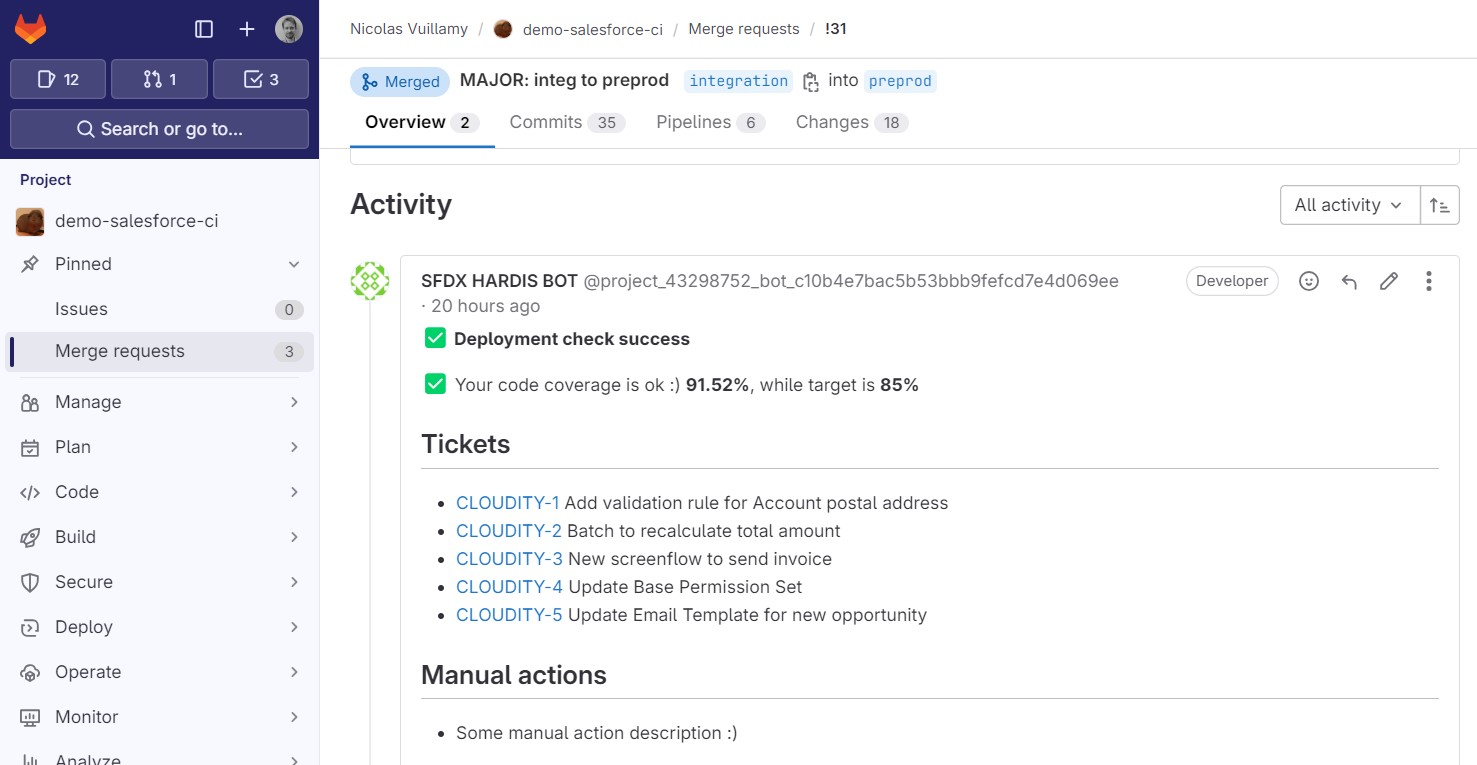\n\n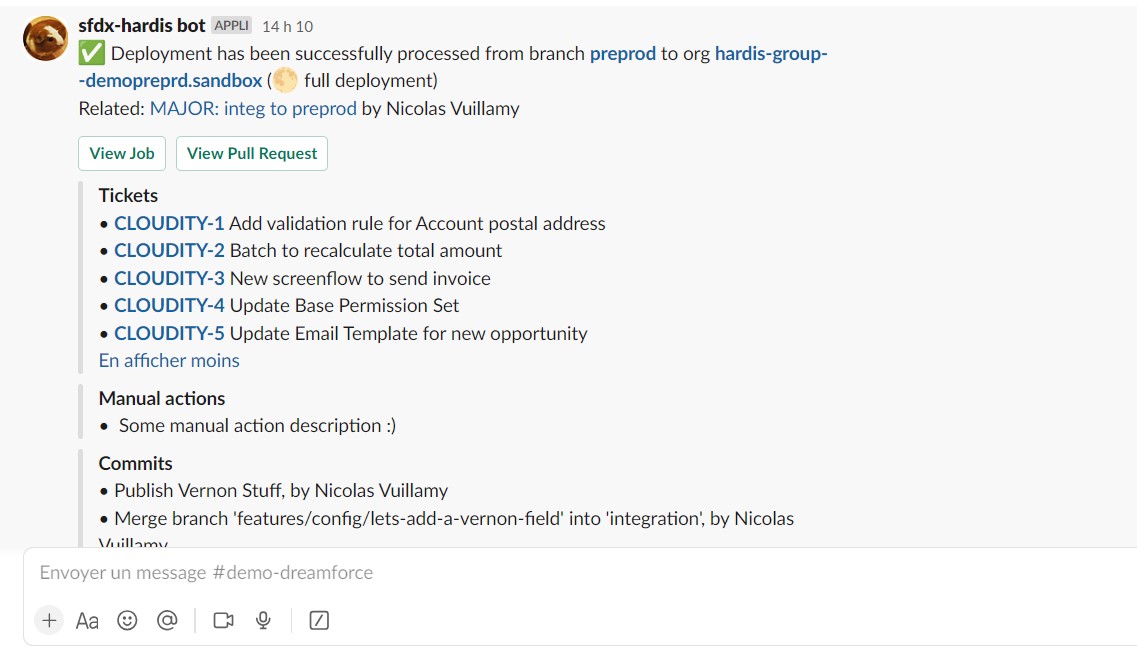\n\n### Flows Visual Git Diff\n\n- Visually show you the differences on a diagram\n\n- Display the update details without having to open any XML !\n\n🟩 = added\n\n🟥 = removed\n\n🟧 = updated\n\n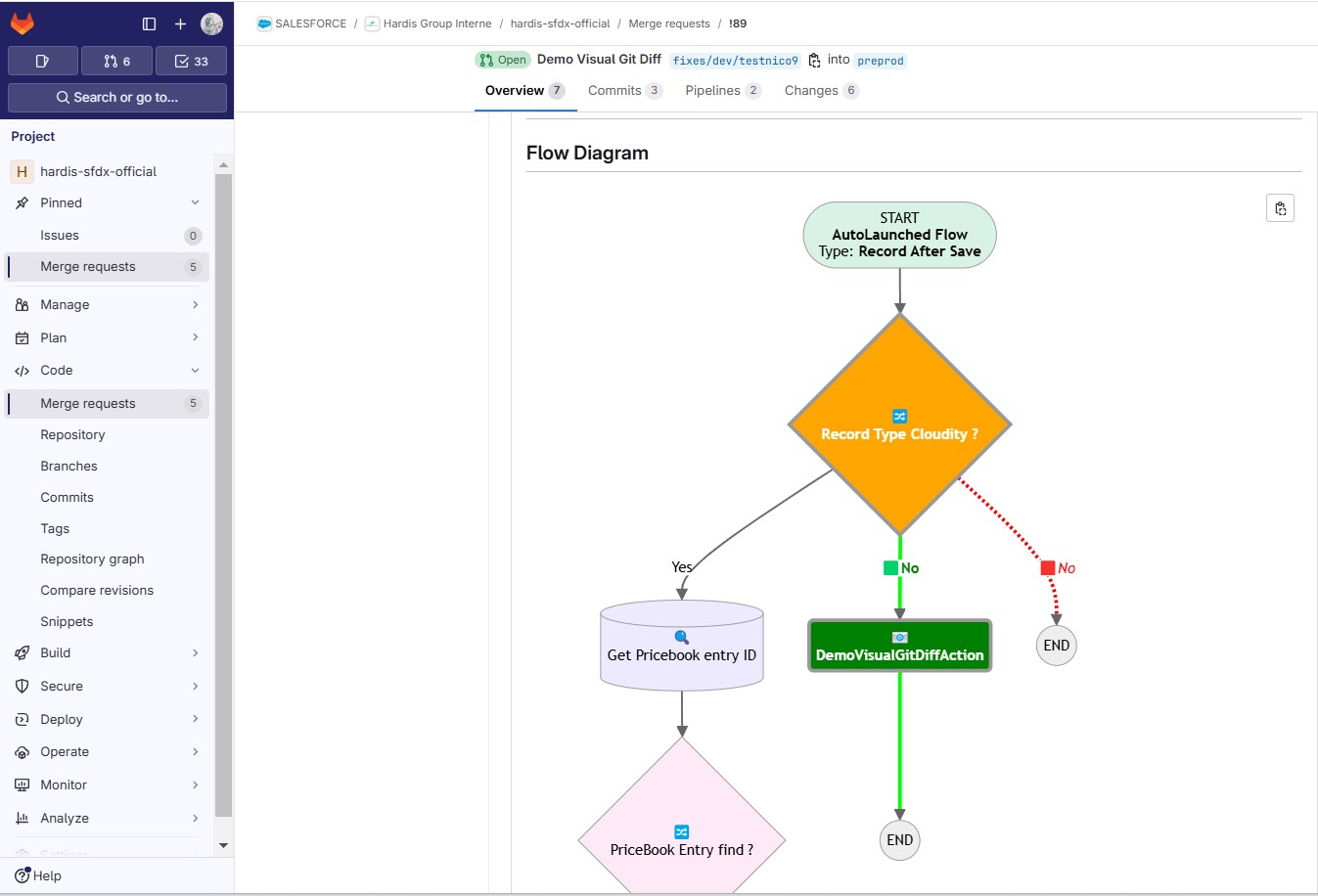\n\n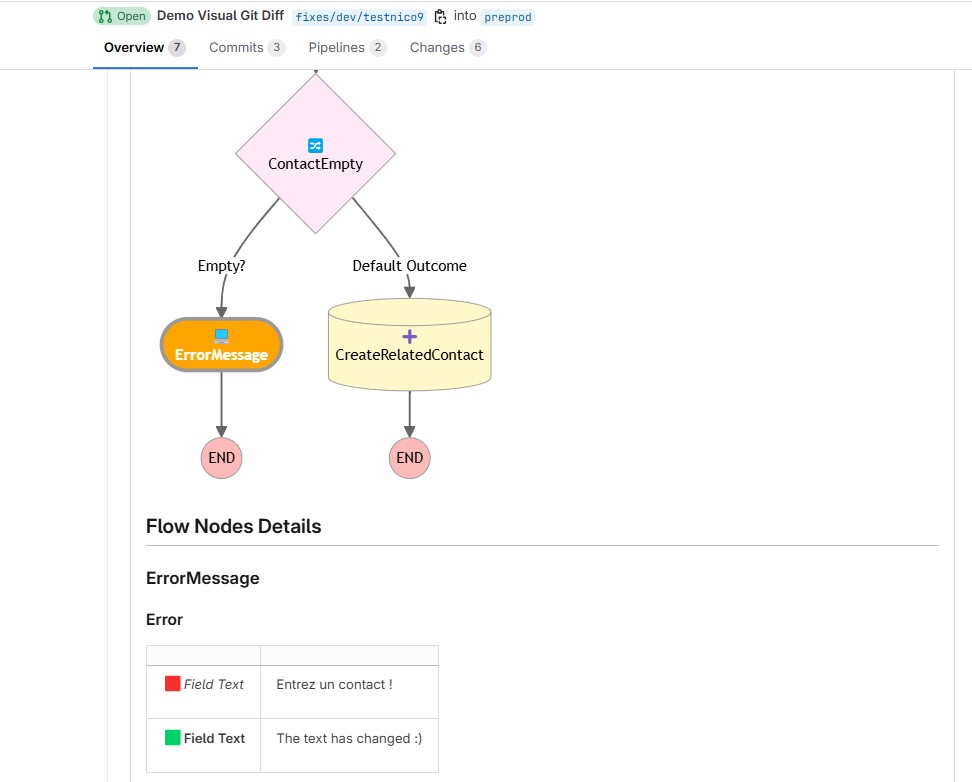\n\n### In custom CI/CD workflow\n\nExample of usage in a custom CI/CD pipeline:\n\n```bash\n# Disable exit-on-error temporarily\nset +e\n\n# Run the deploy command\nsf project deploy start [....]\nRET_CODE=$?\n\n# Re-enable exit-on-error\nset -e\n\n# Determine MYSTATUS based on return code\nif [ $RET_CODE -eq 0 ]; then\n MYSTATUS=\"valid\"\nelse\n MYSTATUS=\"invalid\"\nfi\n\n# Run the notify command with MYSTATUS\nsf hardis:project:deploy:notify --check-only --deploy-status \"$MYSTATUS\"\n```\n\n### Other usages\n\nThis command is for custom SF Cli pipelines, if you are a sfdx-hardis user, it is already embedded in sf hardis:deploy:smart.\n\nYou can also use [sfdx-hardis wrapper commands of SF deployment commands](https://sfdx-hardis.cloudity.com/salesforce-deployment-assistant-setup/#using-custom-cicd-pipeline)\n",
"examples": [
"$ sf hardis:project:deploy:notify --check-only --deploy-status valid --message \"This deployment check is valid\\n\\nYahooo !!\"",
"$ sf hardis:project:deploy:notify --check-only --deploy-status invalid --message \"This deployment check has failed !\\n\\Oh no !!\"",
"$ sf hardis:project:deploy:notify --deploy-status valid --message \"This deployment has been processed !\\n\\nYahooo !!\""
],
"flags": {
"json": {
"description": "Format output as json.",
"helpGroup": "GLOBAL",
"name": "json",
"allowNo": false,
"type": "boolean"
},
"flags-dir": {
"helpGroup": "GLOBAL",
"name": "flags-dir",
"summary": "Import flag values from a directory.",
"hasDynamicHelp": false,
"multiple": false,
"type": "option"
},
"check-only": {
"char": "c",
"description": "Use this option to send notifications from a Deployment simulation job",
"name": "check-only",
"allowNo": false,
"type": "boolean"
},
"deploy-status": {
"char": "s",
"description": "Send success, failure or unknown (default) to indicate if the deployment or deployment simulation is in success or not",
"name": "deploy-status",
"default": "unknown",
"hasDynamicHelp": false,
"multiple": false,
"options": [
"valid",
"invalid",
"unknown"
],
"type": "option"
},
"message": {
"char": "m",
"description": "Custom message that you want to be added in notifications (string or markdown format)",
"name": "message",
"default": "",
"hasDynamicHelp": false,
"multiple": false,
"type": "option"
},
"debug": {
"char": "d",
"description": "Activate debug mode (more logs)",
"name": "debug",
"allowNo": false,
"type": "boolean"
},
"websocket": {
"description": "Websocket host:port for VsCode SFDX Hardis UI integration",
"name": "websocket",
"hasDynamicHelp": false,
"multiple": false,
"type": "option"
},
"skipauth": {
"description": "Skip authentication check when a default username is required",
"name": "skipauth",
"allowNo": false,
"type": "boolean"
},
"target-org": {
"aliases": [
"targetusername",
"u"
],
"char": "o",
"deprecateAliases": true,
"name": "target-org",
"noCacheDefault": true,
"summary": "Username or alias of the target org.",
"hasDynamicHelp": true,
"multiple": false,
"type": "option"
}
},
"hasDynamicHelp": true,
"hiddenAliases": [],
"id": "hardis:project:deploy:notify",
"pluginAlias": "sfdx-hardis",
"pluginName": "sfdx-hardis",
"pluginType": "core",
"strict": true,
"enableJsonFlag": true,
"title": "Deployment Notifications",
"requiresProject": true,
"isESM": true,
"relativePath": [
"lib",
"commands",
"hardis",
"project",
"deploy",
"notify.js"
],
"aliasPermutations": [],
"permutations": [
"hardis:project:deploy:notify",
"project:hardis:deploy:notify",
"project:deploy:hardis:notify",
"project:deploy:notify:hardis",
"hardis:deploy:project:notify",
"deploy:hardis:project:notify",
"deploy:project:hardis:notify",
"deploy:project:notify:hardis",
"hardis:deploy:notify:project",
"deploy:hardis:notify:project",
"deploy:notify:hardis:project",
"deploy:notify:project:hardis",
"hardis:project:notify:deploy",
"project:hardis:notify:deploy",
"project:notify:hardis:deploy",
"project:notify:deploy:hardis",
"hardis:notify:project:deploy",
"notify:hardis:project:deploy",
"notify:project:hardis:deploy",
"notify:project:deploy:hardis",
"hardis:notify:deploy:project",
"notify:hardis:deploy:project",
"notify:deploy:hardis:project",
"notify:deploy:project:hardis"
]
},
"hardis:project:deploy:quick": {
"aliases": [
"hardis:deploy:quick"
],
"args": {},
"description": "sfdx-hardis wrapper for **sf project deploy quick** that displays tips to solve deployment errors.\n\nNote: Use **--json** argument to have better results\n\n[](https://nicolas.vuillamy.fr/assisted-solving-of-salesforce-deployments-errors-47f3666a9ed0)\n\n[See documentation of Salesforce command](https://developer.salesforce.com/docs/atlas.en-us.sfdx_cli_reference.meta/sfdx_cli_reference/cli_reference_project_commands_unified.htm#cli_reference_project_deploy_quick_unified)\n\n### Deployment pre or post commands\n\nYou can define command lines to run before or after a deployment, with parameters:\n\n- **id**: Unique Id for the command\n- **label**: Human readable label for the command\n- **skipIfError**: If defined to \"true\", the post-command won't be run if there is a deployment failure\n- **context**: Defines the context where the command will be run. Can be **all** (default), **check-deployment-only** or **process-deployment-only**\n- **runOnlyOnceByOrg**: If set to true, the command will be run only one time per org. A record of SfdxHardisTrace__c is stored to make that possible (it needs to be existing in target org)\n\nIf the commands are not the same depending on the target org, you can define them into **config/branches/.sfdx-hardis-BRANCHNAME.yml** instead of root **config/.sfdx-hardis.yml**\n\nExample:\n\n```yaml\ncommandsPreDeploy:\n - id: knowledgeUnassign\n label: Remove KnowledgeUser right to the user who has it\n command: sf data update record --sobject User --where \"UserPermissionsKnowledgeUser='true'\" --values \"UserPermissionsKnowledgeUser='false'\" --json\n - id: knowledgeAssign\n label: Assign Knowledge user to the deployment user\n command: sf data update record --sobject User --where \"Username='deploy.github@myclient.com'\" --values \"UserPermissionsKnowledgeUser='true'\" --json\n\ncommandsPostDeploy:\n - id: knowledgeUnassign\n label: Remove KnowledgeUser right to the user who has it\n command: sf data update record --sobject User --where \"UserPermissionsKnowledgeUser='true'\" --values \"UserPermissionsKnowledgeUser='false'\" --json\n - id: knowledgeAssign\n label: Assign Knowledge user to desired username\n command: sf data update record --sobject User --where \"Username='admin-yser@myclient.com'\" --values \"UserPermissionsKnowledgeUser='true'\" --json\n - id: someActionToRunJustOneTime\n label: And to run only if deployment is success\n command: sf sfdmu:run ...\n skipIfError: true\n context: process-deployment-only\n runOnlyOnceByOrg: true\n```\n",
"flags": {
"json": {
"description": "Format output as json.",
"helpGroup": "GLOBAL",
"name": "json",
"allowNo": false,
"type": "boolean"
},
"flags-dir": {
"helpGroup": "GLOBAL",
"name": "flags-dir",
"summary": "Import flag values from a directory.",
"hasDynamicHelp": false,
"multiple": false,
"type": "option"
},
"api-version": {
"char": "a",
"description": "api-version",
"name": "api-version",
"hasDynamicHelp": false,
"multiple": false,
"type": "option"
},
"async": {
"description": "async",
"exclusive": [
"wait"
],
"name": "async",
"allowNo": false,
"type": "boolean"
},
"target-org": {
"char": "o",
"name": "target-org",
"noCacheDefault": true,
"required": true,
"summary": "Username or alias of the target org. Not required if the `target-org` configuration variable is already set.",
"hasDynamicHelp": true,
"multiple": false,
"type": "option"
},
"tests": {
"description": "tests",
"name": "tests",
"hasDynamicHelp": false,
"multiple": false,
"type": "option"
},
"--job-id": {
"char": "i",
"description": "job-id",
"name": "--job-id",
"hasDynamicHelp": false,
"multiple": false,
"type": "option"
},
"--use-most-recent": {
"char": "r",
"description": "use-most-recent",
"name": "--use-most-recent",
"allowNo": false,
"type": "boolean"
},
"wait": {
"char": "w",
"description": "wait",
"exclusive": [
"async"
],
"name": "wait",
"default": 33,
"hasDynamicHelp": false,
"multiple": false,
"type": "option"
},
"debug": {
"description": "debug",
"name": "debug",
"allowNo": false,
"type": "boolean"
}
},
"hasDynamicHelp": true,
"hiddenAliases": [],
"id": "hardis:project:deploy:quick",
"pluginAlias": "sfdx-hardis",
"pluginName": "sfdx-hardis",
"pluginType": "core",
"strict": true,
"enableJsonFlag": true,
"requiresProject": true,
"isESM": true,
"relativePath": [
"lib",
"commands",
"hardis",
"project",
"deploy",
"quick.js"
],
"aliasPermutations": [
"hardis:deploy:quick",
"deploy:hardis:quick",
"deploy:quick:hardis",
"hardis:quick:deploy",
"quick:hardis:deploy",
"quick:deploy:hardis"
],
"permutations": [
"hardis:project:deploy:quick",
"project:hardis:deploy:quick",
"project:deploy:hardis:quick",
"project:deploy:quick:hardis",
"hardis:deploy:project:quick",
"deploy:hardis:project:quick",
"deploy:project:hardis:quick",
"deploy:project:quick:hardis",
"hardis:deploy:quick:project",
"deploy:hardis:quick:project",
"deploy:quick:hardis:project",
"deploy:quick:project:hardis",
"hardis:project:quick:deploy",
"project:hardis:quick:deploy",
"project:quick:hardis:deploy",
"project:quick:deploy:hardis",
"hardis:quick:project:deploy",
"quick:hardis:project:deploy",
"quick:project:hardis:deploy",
"quick:project:deploy:hardis",
"hardis:quick:deploy:project",
"quick:hardis:deploy:project",
"quick:deploy:hardis:project",
"quick:deploy:project:hardis"
]
},
"hardis:project:deploy:simulate": {
"aliases": [],
"args": {},
"description": "\n## Command Behavior\n\n**Simulates the deployment of Salesforce metadata to a target org, primarily used by the VS Code Extension for quick validation.**\n\nThis command allows developers to perform a dry run of a metadata deployment without actually committing changes to the Salesforce org. This is incredibly useful for:\n\n- **Pre-Deployment Validation:** Identifying potential errors, warnings, or conflicts before a full deployment.\n- **Troubleshooting:** Quickly testing metadata changes and debugging issues in a safe environment.\n- **Local Development:** Validating changes to individual metadata components (e.g., a Permission Set) without needing to run a full CI/CD pipeline.\n\nKey functionalities:\n\n- **Source Specification:** Takes a source file or directory (`--source-dir`) containing the metadata to be simulated.\n- **Target Org Selection:** Prompts the user to select a Salesforce org for the simulation. This allows for flexible testing across different environments.\n- **Dry Run Execution:** Executes the Salesforce CLI's `sf project deploy start --dry-run` command, which performs all validation steps but does not save any changes to the org.\n\nThis command is primarily used by the VS Code Extension to provide immediate feedback to developers.\n\n<details markdown=\"1\">\n<summary>Technical explanations</summary>\n\nThe command's technical implementation involves:\n\n- **Interactive Org Prompt:** Uses `promptOrgUsernameDefault` to allow the user to select the target Salesforce org for the deployment simulation.\n- **Salesforce CLI Integration:** It constructs and executes the `sf project deploy start` command with the `--dry-run` and `--ignore-conflicts` flags. The `--source-dir` and `--target-org` flags are dynamically populated based on user input.\n- **`wrapSfdxCoreCommand`:** This utility is used to execute the Salesforce CLI command and capture its output.\n- **Connection Variables:** Ensures Salesforce connection variables are set using `setConnectionVariables`.\n</details>\n",
"examples": [
"$ sf hardis:project:deploy:simulate --source-dir force-app/defaut/main/permissionset/PS_Admin.permissionset-meta.xml"
],
"flags": {
"json": {
"description": "Format output as json.",
"helpGroup": "GLOBAL",
"name": "json",
"allowNo": false,
"type": "boolean"
},
"flags-dir": {
"helpGroup": "GLOBAL",
"name": "flags-dir",
"summary": "Import flag values from a directory.",
"hasDynamicHelp": false,
"multiple": false,
"type": "option"
},
"source-dir": {
"char": "f",
"description": "Source file or directory to simulate the deployment",
"name": "source-dir",
"required": true,
"hasDynamicHelp": false,
"multiple": true,
"type": "option"
},
"debug": {
"char": "d",
"description": "Activate debug mode (more logs)",
"name": "debug",
"allowNo": false,
"type": "boolean"
},
"websocket": {
"description": "Websocket host:port for VsCode SFDX Hardis UI integration",
"name": "websocket",
"hasDynamicHelp": false,
"multiple": false,
"type": "option"
},
"skipauth": {
"description": "Skip authentication check when a default username is required",
"name": "skipauth",
"allowNo": false,
"type": "boolean"
},
"target-org": {
"aliases": [
"targetusername",
"u"
],
"char": "o",
"deprecateAliases": true,
"name": "target-org",
"noCacheDefault": true,
"required": true,
"summary": "Username or alias of the target org. Not required if the `target-org` configuration variable is already set.",
"hasDynamicHelp": true,
"multiple": false,
"type": "option"
}
},
"hasDynamicHelp": true,
"hiddenAliases": [],
"id": "hardis:project:deploy:simulate",
"pluginAlias": "sfdx-hardis",
"pluginName": "sfdx-hardis",
"pluginType": "core",
"strict": true,
"enableJsonFlag": true,
"title": "Simulate the deployment of metadata in an org prompted to the user.\nUsed by VS Code extension.",
"requiresProject": true,
"isESM": true,
"relativePath": [
"lib",
"commands",
"hardis",
"project",
"deploy",
"simulate.js"
],
"aliasPermutations": [],
"permutations": [
"hardis:project:deploy:simulate",
"project:hardis:deploy:simulate",
"project:deploy:hardis:simulate",
"project:deploy:simulate:hardis",
"hardis:deploy:project:simulate",
"deploy:hardis:project:simulate",
"deploy:project:hardis:simulate",
"deploy:project:simulate:hardis",
"hardis:deploy:simulate:project",
"deploy:hardis:simulate:project",
"deploy:simulate:hardis:project",
"deploy:simulate:project:hardis",
"hardis:project:simulate:deploy",
"project:hardis:simulate:deploy",
"project:simulate:hardis:deploy",
"project:simulate:deploy:hardis",
"hardis:simulate:project:deploy",
"simulate:hardis:project:deploy",
"simulate:project:hardis:deploy",
"simulate:project:deploy:hardis",
"hardis:simulate:deploy:project",
"simulate:hardis:deploy:project",
"simulate:deploy:hardis:project",
"simulate:deploy:project:hardis"
]
},
"hardis:project:deploy:smart": {
"aliases": [
"hardis:project:deploy:sources:dx"
],
"args": {},
"description": "Smart deploy of SFDX sources to target org, with many useful options.\n\nIn case of errors, [tips to fix them](https://sfdx-hardis.cloudity.com/deployTips/) will be included within the error messages.\n\n### Quick Deploy\n\nIn case Pull Request comments are configured on the project, Quick Deploy will try to be used (equivalent to button Quick Deploy)\n\nIf you do not want to use QuickDeploy, define variable `SFDX_HARDIS_QUICK_DEPLOY=false`\n\n- [GitHub Pull Requests comments config](https://sfdx-hardis.cloudity.com/salesforce-ci-cd-setup-integration-github/)\n- [Gitlab Merge requests notes config](https://sfdx-hardis.cloudity.com/salesforce-ci-cd-setup-integration-gitlab/)\n- [Azure Pull Requests comments config](https://sfdx-hardis.cloudity.com/salesforce-ci-cd-setup-integration-azure/)\n\n### Delta deployments\n\nTo activate delta deployments, define property `useDeltaDeployment: true` in `config/.sfdx-hardis.yml`.\n\nThis will activate delta deployments only between minor and major branches (major to major remains full deployment mode)\n\nIf you want to force the delta deployment into major orgs (ex: preprod to prod), this is not recommended but you can use env variable ALWAYS_ENABLE_DELTA_DEPLOYMENT=true\n\n### Smart Deployments Tests\n\nNot all metadata updates can break test classes, use Smart Deployment Tests to skip running test classes if ALL the following conditions are met:\n\n- Delta deployment is activated and applicable to the source and target branches\n- Delta deployed metadatas are all matching the list of **NOT_IMPACTING_METADATA_TYPES** (see below)\n- Target org is not a production org\n\nActivate Smart Deployment tests with:\n\n- env variable `USE_SMART_DEPLOYMENT_TESTS=true`\n- .sfdx-hardis.yml config property `useSmartDeploymentTests: true`\n\nDefaut list for **NOT_IMPACTING_METADATA_TYPES** (can be overridden with comma-separated list on env var NOT_IMPACTING_METADATA_TYPES)\n\n- ActionLinkGroupTemplate\n- AnalyticSnapshot\n- AppMenu\n- Audience\n- AuraDefinitionBundle\n- Bot\n- BotVersion\n- BrandingSet\n- ContentAsset\n- CustomApplication\n- CustomApplicationComponent\n- CustomLabel\n- CustomFeedFilter\n- CustomHelpMenuSection\n- CustomObjectTranslation\n- CustomPageWebLink\n- CustomSite\n- CustomTab\n- CustomValueSetTranslation\n- Dashboard\n- DashboardFolder\n- Document\n- EmailTemplate\n- ExperienceBundle\n- FlexiPage\n- GlobalValueSetTranslation\n- HomePageComponent\n- HomePageLayout\n- Layout\n- Letterhead\n- LightningExperienceTheme\n- LightningComponentBundle\n- LightningMessageChannel\n- ListView\n- NavigationMenu\n- PathAssistant\n- QuickAction\n- ReportType\n- Report\n- ReportFolder\n- SiteDotCom\n- StandardValueSetTranslation\n- StaticResource\n- Translations\n- WebLink\n\nNote: if you want to disable Smart test classes for a PR, add **nosmart** in the text of the latest commit.\n\n### Custom Apex Test Classes (optional)\n\nYou can force Smart Deploy to run a specific list of Apex Test Classes. This is **not recommended** because best practice is to run all local tests. Enable it only if you have a specific need.\n\n- `enableDeploymentApexTestClasses` (boolean, default: false): Activate the custom list.\n- `deploymentApexTestClasses` (array of strings): The Apex Test Classes to run. Used only when the flag above is true.\n\nExample configuration in `config/.sfdx-hardis.yml` (can also be scoped to branches in `config/branches/.sfdx-hardis-BRANCHNAME.yml` or in Pull Request description):\n\n```yaml\nenableDeploymentApexTestClasses: true\ndeploymentApexTestClasses:\n - MyTestClass1\n - MyTestClass2\n```\n\n### Dynamic deployment items / Overwrite management\n\nIf necessary,you can define the following files (that supports wildcards <members>*</members>):\n\n- `manifest/package-no-overwrite.xml`: Every element defined in this file will be deployed only if it is not existing yet in the target org (can be useful with ListView for example, if the client wants to update them directly in production org).\n - Can be overridden for a branch using .sfdx-hardis.yml property **packageNoOverwritePath** or environment variable PACKAGE_NO_OVERWRITE_PATH (for example, define: `packageNoOverwritePath: manifest/package-no-overwrite-main.xml` in config file `config/.sfdx-hardis.main.yml`)\n- `manifest/packageXmlOnChange.xml`: Every element defined in this file will not be deployed if it already has a similar definition in target org (can be useful for SharingRules for example)\n\nSee [Overwrite management documentation](https://sfdx-hardis.cloudity.com/salesforce-ci-cd-config-overwrite/)\n\n### Packages installation\n\nYou can define a list of package to install during deployments using property `installedPackages`\n\n- If `INSTALL_PACKAGES_DURING_CHECK_DEPLOY` is defined as `true` (or `installPackagesDuringCheckDeploy: true` in `.sfdx-hardis.yml`), packages will be installed even if the command is called with `--check` mode\n- You can automatically update this property by listing all packages installed on an org using command `sf hardis:org:retrieve:packageconfig`\n\nExample:\n\n```yaml\ninstalledPackages:\n - Id: 0A35r0000009EtECAU\n SubscriberPackageId: 033i0000000LVMYAA4\n SubscriberPackageName: Marketing Cloud\n SubscriberPackageNamespace: et4ae5\n SubscriberPackageVersionId: 04t6S000000l11iQAA\n SubscriberPackageVersionName: Marketing Cloud\n SubscriberPackageVersionNumber: 236.0.0.2\n installOnScratchOrgs: true // true or false depending you want to install this package when creating a new scratch org\n installDuringDeployments: true // set as true to install package during a deployment using sf hardis:project:deploy:smart\n installationkey: xxxxxxxxxxxxxxxxxxxx // if the package has a password, write it in this property\n - Id: 0A35r0000009F9CCAU\n SubscriberPackageId: 033b0000000Pf2AAAS\n SubscriberPackageName: Declarative Lookup Rollup Summaries Tool\n SubscriberPackageNamespace: dlrs\n SubscriberPackageVersionId: 04t5p000001BmLvAAK\n SubscriberPackageVersionName: Release\n SubscriberPackageVersionNumber: 2.15.0.9\n installOnScratchOrgs: true\n installDuringDeployments: true\n```\n\n### Deployment pre or post commands\n\nYou can define command lines to run before or after a deployment, with parameters:\n\n- **id**: Unique Id for the command\n- **label**: Human readable label for the command\n- **skipIfError**: If defined to \"true\", the post-command won't be run if there is a deployment failure\n- **context**: Defines the context where the command will be run. Can be **all** (default), **check-deployment-only** or **process-deployment-only**\n- **runOnlyOnceByOrg**: If set to true, the command will be run only one time per org. A record of SfdxHardisTrace__c is stored to make that possible (it needs to be existing in target org)\n\nIf the commands are not the same depending on the target org, you can define them into **config/branches/.sfdx-hardis-BRANCHNAME.yml** instead of root **config/.sfdx-hardis.yml**\n\nExample:\n\n```yaml\ncommandsPreDeploy:\n - id: knowledgeUnassign\n label: Remove KnowledgeUser right to the user who has it\n command: sf data update record --sobject User --where \"UserPermissionsKnowledgeUser='true'\" --values \"UserPermissionsKnowledgeUser='false'\" --json\n - id: knowledgeAssign\n label: Assign Knowledge user to the deployment user\n command: sf data update record --sobject User --where \"Username='deploy.github@myclient.com'\" --values \"UserPermissionsKnowledgeUser='true'\" --json\n\ncommandsPostDeploy:\n - id: knowledgeUnassign\n label: Remove KnowledgeUser right to the user who has it\n command: sf data update record --sobject User --where \"UserPermissionsKnowledgeUser='true'\" --values \"UserPermissionsKnowledgeUser='false'\" --json\n - id: knowledgeAssign\n label: Assign Knowledge user to desired username\n command: sf data update record --sobject User --where \"Username='admin-yser@myclient.com'\" --values \"UserPermissionsKnowledgeUser='true'\" --json\n - id: someActionToRunJustOneTime\n label: And to run only if deployment is success\n command: sf sfdmu:run ...\n skipIfError: true\n context: process-deployment-only\n runOnlyOnceByOrg: true\n```\n\n### Pull Requests Custom Behaviors\n\nIf some words are found **in the Pull Request description**, special behaviors will be applied\n\n| Word | Behavior |\n| :--- | :--- |\n| NO_DELTA | Even if delta deployments are activated, a deployment in mode **full** will be performed for this Pull Request |\n| PURGE_FLOW_VERSIONS | After deployment, inactive and obsolete Flow Versions will be deleted (equivalent to command sf hardis:org:purge:flow)<br/>**Caution: This will also purge active Flow Interviews !** |\n| DESTRUCTIVE_CHANGES_AFTER_DEPLOYMENT | If a file manifest/destructiveChanges.xml is found, it will be executed in a separate step, after the deployment of the main package |\n\nYou can also override some `.sfdx-hardis.yml` properties directly in the Pull Request description using YAML blocks. Supported keys: `deploymentApexTestClasses`, `commandsPreDeploy`, `commandsPostDeploy`.\n\nExample (in PR description):\n\n```yaml\ndeploymentApexTestClasses:\n - MyTestClass1\n - MyTestClass2\n```\n\n> For example, define `PURGE_FLOW_VERSIONS` and `DESTRUCTIVE_CHANGES_AFTER_DEPLOYMENT` in your Pull Request comments if you want to delete fields that are used in an active flow.\n\nNote: it is also possible to define these behaviors as ENV variables:\n\n- For all deployments (example: `PURGE_FLOW_VERSIONS=true`)\n- For a specific branch, by appending the target branch name (example: `PURGE_FLOW_VERSIONS_UAT=true`)\n\n### Deployment plan (deprecated)\n\n> **This feature is deactivated by default (enable with `enableDeprecatedDeploymentPlan` in project configuration). Use preCommands and postCommands instead.** \n\nIf you need to deploy in multiple steps, you can define a property `deploymentPlan` in `.sfdx-hardis.yml`.\n\n- If a file `manifest/package.xml` is found, it will be placed with order 0 in the deployment plan\n\n- If a file `manifest/destructiveChanges.xml` is found, it will be executed as --postdestructivechanges\n\n- If env var `SFDX_HARDIS_DEPLOY_IGNORE_SPLIT_PACKAGES` is defined as `false` , split of package.xml will be applied\n\nExample:\n\n```yaml\ndeploymentPlan:\n packages:\n - label: Deploy Flow-Workflow\n packageXmlFile: manifest/splits/packageXmlFlowWorkflow.xml\n order: 6\n - label: Deploy SharingRules - Case\n packageXmlFile: manifest/splits/packageXmlSharingRulesCase.xml\n order: 30\n waitAfter: 30\n```\n\n### Automated fixes post deployments\n\n#### List view with scope Mine\n\nIf you defined a property **listViewsToSetToMine** in your .sfdx-hardis.yml, related ListViews will be set to Mine ( see command <https://sfdx-hardis.cloudity.com/hardis/org/fix/listviewmine/> )\n\nExample:\n\n```yaml\nlistViewsToSetToMine:\n - \"Operation__c:MyCurrentOperations\"\n - \"Operation__c:MyFinalizedOperations\"\n - \"Opportunity:Default_Opportunity_Pipeline\"\n - \"Opportunity:MyCurrentSubscriptions\"\n - \"Opportunity:MySubscriptions\"\n - \"Account:MyActivePartners\"\n```\n\nTroubleshooting: if you need to fix ListViews with mine from an alpine-linux based docker image, use this workaround in your dockerfile:\n\n```dockerfile\n# Do not use puppeteer embedded chromium\nRUN apk add --update --no-cache chromium\nENV PUPPETEER_SKIP_CHROMIUM_DOWNLOAD=\"true\"\nENV CHROMIUM_PATH=\"/usr/bin/chromium-browser\"\nENV PUPPETEER_EXECUTABLE_PATH=\"$\\{CHROMIUM_PATH}\" // remove \\ before {\n```\n\nIf you need to increase the deployment waiting time (sf project deploy start --wait arg), you can define env variable SFDX_DEPLOY_WAIT_MINUTES (default: 120)\n\nIf you need notifications to be sent using the current Pull Request and not the one just merged ([see use case](https://github.com/hardisgroupcom/sfdx-hardis/issues/637#issuecomment-2230798904)), define env variable SFDX_HARDIS_DEPLOY_BEFORE_MERGE=true\n\nIf you want to disable the calculation and display of Flow Visual Git Diff in Pull Request comments, define variable **SFDX_DISABLE_FLOW_DIFF=true**\n",
"examples": [
"$ sf hardis:project:deploy:smart",
"$ sf hardis:project:deploy:smart --check",
"$ sf hardis:project:deploy:smart --check --testlevel RunRepositoryTests",
"$ sf hardis:project:deploy:smart --check --testlevel RunRepositoryTests --runtests '^(?!FLI|MyPrefix).*'",
"$ sf hardis:project:deploy:smart --check --testlevel RunRepositoryTestsExceptSeeAllData",
"$ sf hardis:project:deploy:smart",
"$ FORCE_TARGET_BRANCH=preprod NODE_OPTIONS=--inspect-brk sf hardis:project:deploy:smart --check --websocket localhost:2702 --skipauth --target-org nicolas.vuillamy@myclient.com.preprod",
"$ SYSTEM_ACCESSTOKEN=xxxxxx SYSTEM_COLLECTIONURI=https://dev.azure.com/xxxxxxx/ SYSTEM_TEAMPROJECT=\"xxxxxxx\" BUILD_REPOSITORY_ID=xxxxx SYSTEM_PULLREQUEST_PULLREQUESTID=1418 FORCE_TARGET_BRANCH=uat NODE_OPTIONS=--inspect-brk sf hardis:project:deploy:smart --check --websocket localhost:2702 --skipauth --target-org my.salesforce@org.com",
"$ CI_SFDX_HARDIS_BITBUCKET_TOKEN=xxxxxx BITBUCKET_WORKSPACE=sfdxhardis-demo BITBUCKET_REPO_SLUG=test BITBUCKET_BUILD_NUMBER=1 BITBUCKET_BRANCH=uat BITBUCKET_PR_ID=2 FORCE_TARGET_BRANCH=uat NODE_OPTIONS=--inspect-brk sf hardis:project:deploy:smart --check --websocket localhost:2702 --skipauth --target-org my-salesforce-org@client.com",
"$ GITHUB_TOKEN=xxxx GITHUB_REPOSITORY=my-user/my-repo FORCE_TARGET_BRANCH=uat NODE_OPTIONS=--inspect-brk sf hardis:project:deploy:smart --check --websocket localhost:2702 --skipauth --target-org my-salesforce-org@client.com"
],
"flags": {
"json": {
"description": "Format output as json.",
"helpGroup": "GLOBAL",
"name": "json",
"allowNo": false,
"type": "boolean"
},
"flags-dir": {
"helpGroup": "GLOBAL",
"name": "flags-dir",
"summary": "Import flag values from a directory.",
"hasDynamicHelp": false,
"multiple": false,
"type": "option"
},
"check": {
"char": "c",
"description": "Only checks the deployment, there is no impact on target org",
"name": "check",
"allowNo": false,
"type": "boolean"
},
"testlevel": {
"char": "l",
"description": "Level of tests to validate deployment. RunRepositoryTests auto-detect and run all repository test classes",
"name": "testlevel",
"hasDynamicHelp": false,
"multiple": false,
"options": [
"NoTestRun",
"RunSpecifiedTests",
"RunRepositoryTests",
"RunRepositoryTestsExceptSeeAllData",
"RunLocalTests",
"RunRelevantTests",
"RunAllTestsInOrg"
],
"type": "option"
},
"runtests": {
"char": "r",
"description": "If testlevel=RunSpecifiedTests, please provide a list of classes.\nIf testlevel=RunRepositoryTests, can contain a regular expression to keep only class names matching it. If not set, will run all test classes found in the repo.",
"name": "runtests",
"hasDynamicHelp": false,
"multiple": false,
"type": "option"
},
"packagexml": {
"char": "p",
"description": "Path to package.xml containing what you want to deploy in target org",
"name": "packagexml",
"hasDynamicHelp": false,
"multiple": false,
"type": "option"
},
"delta": {
"description": "Applies sfdx-git-delta to package.xml before other deployment processes",
"name": "delta",
"allowNo": false,
"type": "boolean"
},
"debug": {
"char": "d",
"description": "Activate debug mode (more logs)",
"name": "debug",
"allowNo": false,
"type": "boolean"
},
"websocket": {
"description": "Websocket host:port for VsCode SFDX Hardis UI integration",
"name": "websocket",
"hasDynamicHelp": false,
"multiple": false,
"type": "option"
},
"skipauth": {
"description": "Skip authentication check when a default username is required",
"name": "skipauth",
"allowNo": false,
"type": "boolean"
},
"target-org": {
"aliases": [
"targetusername",
"u"
],
"char": "o",
"deprecateAliases": true,
"name": "target-org",
"noCacheDefault": true,
"required": true,
"summary": "Username or alias of the target org. Not required if the `target-org` configuration variable is already set.",
"hasDynamicHelp": true,
"multiple": false,
"type": "option"
}
},
"hasDynamicHelp": true,
"hiddenAliases": [],
"id": "hardis:project:deploy:smart",
"pluginAlias": "sfdx-hardis",
"pluginName": "sfdx-hardis",
"pluginType": "core",
"strict": true,
"enableJsonFlag": true,
"title": "Smart Deploy sfdx sources to org",
"requiresProject": true,
"isESM": true,
"relativePath": [
"lib",
"commands",
"hardis",
"project",
"deploy",
"smart.js"
],
"aliasPermutations": [
"hardis:project:deploy:sources:dx",
"project:hardis:deploy:sources:dx",
"project:deploy:hardis:sources:dx",
"project:deploy:sources:hardis:dx",
"project:deploy:sources:dx:hardis",
"hardis:deploy:project:sources:dx",
"deploy:hardis:project:sources:dx",
"deploy:project:hardis:sources:dx",
"deploy:project:sources:hardis:dx",
"deploy:project:sources:dx:hardis",
"hardis:deploy:sources:project:dx",
"deploy:hardis:sources:project:dx",
"deploy:sources:hardis:project:dx",
"deploy:sources:project:hardis:dx",
"deploy:sources:project:dx:hardis",
"hardis:deploy:sources:dx:project",
"deploy:hardis:sources:dx:project",
"deploy:sources:hardis:dx:project",
"deploy:sources:dx:hardis:project",
"deploy:sources:dx:project:hardis",
"hardis:project:sources:deploy:dx",
"project:hardis:sources:deploy:dx",
"project:sources:hardis:deploy:dx",
"project:sources:deploy:hardis:dx",
"project:sources:deploy:dx:hardis",
"hardis:sources:project:deploy:dx",
"sources:hardis:project:deploy:dx",
"sources:project:hardis:deploy:dx",
"sources:project:deploy:hardis:dx",
"sources:project:deploy:dx:hardis",
"hardis:sources:deploy:project:dx",
"sources:hardis:deploy:project:dx",
"sources:deploy:hardis:project:dx",
"sources:deploy:project:hardis:dx",
"sources:deploy:project:dx:hardis",
"hardis:sources:deploy:dx:project",
"sources:hardis:deploy:dx:project",
"sources:deploy:hardis:dx:project",
"sources:deploy:dx:hardis:project",
"sources:deploy:dx:project:hardis",
"hardis:project:sources:dx:deploy",
"project:hardis:sources:dx:deploy",
"project:sources:hardis:dx:deploy",
"project:sources:dx:hardis:deploy",
"project:sources:dx:deploy:hardis",
"hardis:sources:project:dx:deploy",
"sources:hardis:project:dx:deploy",
"sources:project:hardis:dx:deploy",
"sources:project:dx:hardis:deploy",
"sources:project:dx:deploy:hardis",
"hardis:sources:dx:project:deploy",
"sources:hardis:dx:project:deploy",
"sources:dx:hardis:project:deploy",
"sources:dx:project:hardis:deploy",
"sources:dx:project:deploy:hardis",
"hardis:sources:dx:deploy:project",
"sources:hardis:dx:deploy:project",
"sources:dx:hardis:deploy:project",
"sources:dx:deploy:hardis:project",
"sources:dx:deploy:project:hardis",
"hardis:project:deploy:dx:sources",
"project:hardis:deploy:dx:sources",
"project:deploy:hardis:dx:sources",
"project:deploy:dx:hardis:sources",
"project:deploy:dx:sources:hardis",
"hardis:deploy:project:dx:sources",
"deploy:hardis:project:dx:sources",
"deploy:project:hardis:dx:sources",
"deploy:project:dx:hardis:sources",
"deploy:project:dx:sources:hardis",
"hardis:deploy:dx:project:sources",
"deploy:hardis:dx:project:sources",
"deploy:dx:hardis:project:sources",
"deploy:dx:project:hardis:sources",
"deploy:dx:project:sources:hardis",
"hardis:deploy:dx:sources:project",
"deploy:hardis:dx:sources:project",
"deploy:dx:hardis:sources:project",
"deploy:dx:sources:hardis:project",
"deploy:dx:sources:project:hardis",
"hardis:project:dx:deploy:sources",
"project:hardis:dx:deploy:sources",
"project:dx:hardis:deploy:sources",
"project:dx:deploy:hardis:sources",
"project:dx:deploy:sources:hardis",
"hardis:dx:project:deploy:sources",
"dx:hardis:project:deploy:sources",
"dx:project:hardis:deploy:sources",
"dx:project:deploy:hardis:sources",
"dx:project:deploy:sources:hardis",
"hardis:dx:deploy:project:sources",
"dx:hardis:deploy:project:sources",
"dx:deploy:hardis:project:sources",
"dx:deploy:project:hardis:sources",
"dx:deploy:project:sources:hardis",
"hardis:dx:deploy:sources:project",
"dx:hardis:deploy:sources:project",
"dx:deploy:hardis:sources:project",
"dx:deploy:sources:hardis:project",
"dx:deploy:sources:project:hardis",
"hardis:project:dx:sources:deploy",
"project:hardis:dx:sources:deploy",
"project:dx:hardis:sources:deploy",
"project:dx:sources:hardis:deploy",
"project:dx:sources:deploy:hardis",
"hardis:dx:project:sources:deploy",
"dx:hardis:project:sources:deploy",
"dx:project:hardis:sources:deploy",
"dx:project:sources:hardis:deploy",
"dx:project:sources:deploy:hardis",
"hardis:dx:sources:project:deploy",
"dx:hardis:sources:project:deploy",
"dx:sources:hardis:project:deploy",
"dx:sources:project:hardis:deploy",
"dx:sources:project:deploy:hardis",
"hardis:dx:sources:deploy:project",
"dx:hardis:sources:deploy:project",
"dx:sources:hardis:deploy:project",
"dx:sources:deploy:hardis:project",
"dx:sources:deploy:project:hardis"
],
"permutations": [
"hardis:project:deploy:smart",
"project:hardis:deploy:smart",
"project:deploy:hardis:smart",
"project:deploy:smart:hardis",
"hardis:deploy:project:smart",
"deploy:hardis:project:smart",
"deploy:project:hardis:smart",
"deploy:project:smart:hardis",
"hardis:deploy:smart:project",
"deploy:hardis:smart:project",
"deploy:smart:hardis:project",
"deploy:smart:project:hardis",
"hardis:project:smart:deploy",
"project:hardis:smart:deploy",
"project:smart:hardis:deploy",
"project:smart:deploy:hardis",
"hardis:smart:project:deploy",
"smart:hardis:project:deploy",
"smart:project:hardis:deploy",
"smart:project:deploy:hardis",
"hardis:smart:deploy:project",
"smart:hardis:deploy:project",
"smart:deploy:hardis:project",
"smart:deploy:project:hardis"
]
},
"hardis:project:deploy:start": {
"aliases": [
"hardis:deploy:start"
],
"args": {},
"description": "sfdx-hardis wrapper for **sf project deploy start** that displays tips to solve deployment errors.\n\nNote: Use **--json** argument to have better results\n\n[](https://nicolas.vuillamy.fr/assisted-solving-of-salesforce-deployments-errors-47f3666a9ed0)\n\n[See documentation of Salesforce command](https://developer.salesforce.com/docs/atlas.en-us.sfdx_cli_reference.meta/sfdx_cli_reference/cli_reference_project_commands_unified.htm#cli_reference_project_deploy_start_unified)\n\n### Deployment pre or post commands\n\nYou can define command lines to run before or after a deployment, with parameters:\n\n- **id**: Unique Id for the command\n- **label**: Human readable label for the command\n- **skipIfError**: If defined to \"true\", the post-command won't be run if there is a deployment failure\n- **context**: Defines the context where the command will be run. Can be **all** (default), **check-deployment-only** or **process-deployment-only**\n- **runOnlyOnceByOrg**: If set to true, the command will be run only one time per org. A record of SfdxHardisTrace__c is stored to make that possible (it needs to be existing in target org)\n\nIf the commands are not the same depending on the target org, you can define them into **config/branches/.sfdx-hardis-BRANCHNAME.yml** instead of root **config/.sfdx-hardis.yml**\n\nExample:\n\n```yaml\ncommandsPreDeploy:\n - id: knowledgeUnassign\n label: Remove KnowledgeUser right to the user who has it\n command: sf data update record --sobject User --where \"UserPermissionsKnowledgeUser='true'\" --values \"UserPermissionsKnowledgeUser='false'\" --json\n - id: knowledgeAssign\n label: Assign Knowledge user to the deployment user\n command: sf data update record --sobject User --where \"Username='deploy.github@myclient.com'\" --values \"UserPermissionsKnowledgeUser='true'\" --json\n\ncommandsPostDeploy:\n - id: knowledgeUnassign\n label: Remove KnowledgeUser right to the user who has it\n command: sf data update record --sobject User --where \"UserPermissionsKnowledgeUser='true'\" --values \"UserPermissionsKnowledgeUser='false'\" --json\n - id: knowledgeAssign\n label: Assign Knowledge user to desired username\n command: sf data update record --sobject User --where \"Username='admin-yser@myclient.com'\" --values \"UserPermissionsKnowledgeUser='true'\" --json\n - id: someActionToRunJustOneTime\n label: And to run only if deployment is success\n command: sf sfdmu:run ...\n skipIfError: true\n context: process-deployment-only\n runOnlyOnceByOrg: true\n```\n",
"flags": {
"json": {
"description": "Format output as json.",
"helpGroup": "GLOBAL",
"name": "json",
"allowNo": false,
"type": "boolean"
},
"flags-dir": {
"helpGroup": "GLOBAL",
"name": "flags-dir",
"summary": "Import flag values from a directory.",
"hasDynamicHelp": false,
"multiple": false,
"type": "option"
},
"api-version": {
"char": "a",
"description": "api-version",
"name": "api-version",
"hasDynamicHelp": false,
"multiple": false,
"type": "option"
},
"async": {
"description": "async",
"exclusive": [
"wait"
],
"name": "async",
"allowNo": false,
"type": "boolean"
},
"dry-run": {
"description": "dry-run",
"name": "dry-run",
"allowNo": false,
"type": "boolean"
},
"ignore-conflicts": {
"char": "c",
"description": "ignore-conflicts",
"name": "ignore-conflicts",
"allowNo": false,
"type": "boolean"
},
"ignore-errors": {
"char": "r",
"description": "ignore-errors",
"name": "ignore-errors",
"allowNo": false,
"type": "boolean"
},
"ignore-warnings": {
"char": "g",
"description": "ignore-warnings",
"name": "ignore-warnings",
"allowNo": false,
"type": "boolean"
},
"manifest": {
"char": "x",
"description": "manifest",
"name": "manifest",
"hasDynamicHelp": false,
"multiple": false,
"type": "option"
},
"metadata": {
"char": "m",
"description": "metadata",
"name": "metadata",
"hasDynamicHelp": false,
"multiple": true,
"type": "option"
},
"metadata-dir": {
"description": "metadata-dir",
"name": "metadata-dir",
"hasDynamicHelp": false,
"multiple": false,
"type": "option"
},
"single-package": {
"dependsOn": [
"metadata-dir"
],
"description": "single-package",
"name": "single-package",
"allowNo": false,
"type": "boolean"
},
"source-dir": {
"char": "d",
"description": "source-dir",
"name": "source-dir",
"hasDynamicHelp": false,
"multiple": true,
"type": "option"
},
"target-org": {
"char": "o",
"name": "target-org",
"noCacheDefault": true,
"required": true,
"summary": "Username or alias of the target org. Not required if the `target-org` configuration variable is already set.",
"hasDynamicHelp": true,
"multiple": false,
"type": "option"
},
"tests": {
"description": "tests",
"name": "tests",
"hasDynamicHelp": false,
"multiple": false,
"type": "option"
},
"test-level": {
"description": "test-level",
"name": "test-level",
"hasDynamicHelp": false,
"multiple": false,
"type": "option"
},
"wait": {
"char": "w",
"description": "wait",
"exclusive": [
"async"
],
"name": "wait",
"default": 33,
"hasDynamicHelp": false,
"multiple": false,
"type": "option"
},
"purge-on-delete": {
"description": "purge-on-delete",
"name": "purge-on-delete",
"allowNo": false,
"type": "boolean"
},
"pre-destructive-changes": {
"dependsOn": [
"manifest"
],
"description": "pre-destructive-changes",
"name": "pre-destructive-changes",
"hasDynamicHelp": false,
"multiple": false,
"type": "option"
},
"post-destructive-changes": {
"dependsOn": [
"manifest"
],
"description": "post-destructive-changes",
"name": "post-destructive-changes",
"hasDynamicHelp": false,
"multiple": false,
"type": "option"
},
"coverage-formatters": {
"description": "coverage-formatters",
"name": "coverage-formatters",
"hasDynamicHelp": false,
"multiple": false,
"type": "option"
},
"junit": {
"description": "junit",
"name": "junit",
"allowNo": false,
"type": "boolean"
},
"results-dir": {
"description": "results-dir",
"name": "results-dir",
"hasDynamicHelp": false,
"multiple": false,
"type": "option"
},
"debug": {
"description": "debug",
"name": "debug",
"allowNo": false,
"type": "boolean"
}
},
"hasDynamicHelp": true,
"hiddenAliases": [],
"id": "hardis:project:deploy:start",
"pluginAlias": "sfdx-hardis",
"pluginName": "sfdx-hardis",
"pluginType": "core",
"strict": true,
"enableJsonFlag": true,
"requiresProject": true,
"isESM": true,
"relativePath": [
"lib",
"commands",
"hardis",
"project",
"deploy",
"start.js"
],
"aliasPermutations": [
"hardis:deploy:start",
"deploy:hardis:start",
"deploy:start:hardis",
"hardis:start:deploy",
"start:hardis:deploy",
"start:deploy:hardis"
],
"permutations": [
"hardis:project:deploy:start",
"project:hardis:deploy:start",
"project:deploy:hardis:start",
"project:deploy:start:hardis",
"hardis:deploy:project:start",
"deploy:hardis:project:start",
"deploy:project:hardis:start",
"deploy:project:start:hardis",
"hardis:deploy:start:project",
"deploy:hardis:start:project",
"deploy:start:hardis:project",
"deploy:start:project:hardis",
"hardis:project:start:deploy",
"project:hardis:start:deploy",
"project:start:hardis:deploy",
"project:start:deploy:hardis",
"hardis:start:project:deploy",
"start:hardis:project:deploy",
"start:project:hardis:deploy",
"start:project:deploy:hardis",
"hardis:start:deploy:project",
"start:hardis:deploy:project",
"start:deploy:hardis:project",
"start:deploy:project:hardis"
]
},
"hardis:project:deploy:validate": {
"aliases": [
"hardis:deploy:validate"
],
"args": {},
"description": "sfdx-hardis wrapper for **sf project deploy validate** that displays tips to solve deployment errors.\n\nNote: Use **--json** argument to have better results\n\n[](https://nicolas.vuillamy.fr/assisted-solving-of-salesforce-deployments-errors-47f3666a9ed0)\n\n[See documentation of Salesforce command](https://developer.salesforce.com/docs/atlas.en-us.sfdx_cli_reference.meta/sfdx_cli_reference/cli_reference_project_commands_unified.htm#cli_reference_project_deploy_validate_unified)\n\n### Deployment pre or post commands\n\nYou can define command lines to run before or after a deployment, with parameters:\n\n- **id**: Unique Id for the command\n- **label**: Human readable label for the command\n- **skipIfError**: If defined to \"true\", the post-command won't be run if there is a deployment failure\n- **context**: Defines the context where the command will be run. Can be **all** (default), **check-deployment-only** or **process-deployment-only**\n- **runOnlyOnceByOrg**: If set to true, the command will be run only one time per org. A record of SfdxHardisTrace__c is stored to make that possible (it needs to be existing in target org)\n\nIf the commands are not the same depending on the target org, you can define them into **config/branches/.sfdx-hardis-BRANCHNAME.yml** instead of root **config/.sfdx-hardis.yml**\n\nExample:\n\n```yaml\ncommandsPreDeploy:\n - id: knowledgeUnassign\n label: Remove KnowledgeUser right to the user who has it\n command: sf data update record --sobject User --where \"UserPermissionsKnowledgeUser='true'\" --values \"UserPermissionsKnowledgeUser='false'\" --json\n - id: knowledgeAssign\n label: Assign Knowledge user to the deployment user\n command: sf data update record --sobject User --where \"Username='deploy.github@myclient.com'\" --values \"UserPermissionsKnowledgeUser='true'\" --json\n\ncommandsPostDeploy:\n - id: knowledgeUnassign\n label: Remove KnowledgeUser right to the user who has it\n command: sf data update record --sobject User --where \"UserPermissionsKnowledgeUser='true'\" --values \"UserPermissionsKnowledgeUser='false'\" --json\n - id: knowledgeAssign\n label: Assign Knowledge user to desired username\n command: sf data update record --sobject User --where \"Username='admin-yser@myclient.com'\" --values \"UserPermissionsKnowledgeUser='true'\" --json\n - id: someActionToRunJustOneTime\n label: And to run only if deployment is success\n command: sf sfdmu:run ...\n skipIfError: true\n context: process-deployment-only\n runOnlyOnceByOrg: true\n```\n",
"flags": {
"json": {
"description": "Format output as json.",
"helpGroup": "GLOBAL",
"name": "json",
"allowNo": false,
"type": "boolean"
},
"flags-dir": {
"helpGroup": "GLOBAL",
"name": "flags-dir",
"summary": "Import flag values from a directory.",
"hasDynamicHelp": false,
"multiple": false,
"type": "option"
},
"api-version": {
"char": "a",
"description": "api-version",
"name": "api-version",
"hasDynamicHelp": false,
"multiple": false,
"type": "option"
},
"async": {
"description": "async",
"exclusive": [
"wait"
],
"name": "async",
"allowNo": false,
"type": "boolean"
},
"dry-run": {
"description": "dry-run",
"name": "dry-run",
"allowNo": false,
"type": "boolean"
},
"ignore-conflicts": {
"char": "c",
"description": "ignore-conflicts",
"name": "ignore-conflicts",
"allowNo": false,
"type": "boolean"
},
"ignore-errors": {
"char": "r",
"description": "ignore-errors",
"name": "ignore-errors",
"allowNo": false,
"type": "boolean"
},
"ignore-warnings": {
"char": "g",
"description": "ignore-warnings",
"name": "ignore-warnings",
"allowNo": false,
"type": "boolean"
},
"manifest": {
"char": "x",
"description": "manifest",
"name": "manifest",
"hasDynamicHelp": false,
"multiple": false,
"type": "option"
},
"metadata": {
"char": "m",
"description": "metadata",
"name": "metadata",
"hasDynamicHelp": false,
"multiple": true,
"type": "option"
},
"metadata-dir": {
"description": "metadata-dir",
"name": "metadata-dir",
"hasDynamicHelp": false,
"multiple": false,
"type": "option"
},
"single-package": {
"dependsOn": [
"metadata-dir"
],
"description": "single-package",
"name": "single-package",
"allowNo": false,
"type": "boolean"
},
"source-dir": {
"char": "d",
"description": "source-dir",
"name": "source-dir",
"hasDynamicHelp": false,
"multiple": true,
"type": "option"
},
"target-org": {
"char": "o",
"name": "target-org",
"noCacheDefault": true,
"required": true,
"summary": "Username or alias of the target org. Not required if the `target-org` configuration variable is already set.",
"hasDynamicHelp": true,
"multiple": false,
"type": "option"
},
"tests": {
"description": "tests",
"name": "tests",
"hasDynamicHelp": false,
"multiple": false,
"type": "option"
},
"test-level": {
"description": "test-level",
"name": "test-level",
"hasDynamicHelp": false,
"multiple": false,
"type": "option"
},
"wait": {
"char": "w",
"description": "wait",
"exclusive": [
"async"
],
"name": "wait",
"default": 33,
"hasDynamicHelp": false,
"multiple": false,
"type": "option"
},
"purge-on-delete": {
"description": "purge-on-delete",
"name": "purge-on-delete",
"allowNo": false,
"type": "boolean"
},
"pre-destructive-changes": {
"dependsOn": [
"manifest"
],
"description": "pre-destructive-changes",
"name": "pre-destructive-changes",
"hasDynamicHelp": false,
"multiple": false,
"type": "option"
},
"post-destructive-changes": {
"dependsOn": [
"manifest"
],
"description": "post-destructive-changes",
"name": "post-destructive-changes",
"hasDynamicHelp": false,
"multiple": false,
"type": "option"
},
"coverage-formatters": {
"description": "coverage-formatters",
"name": "coverage-formatters",
"hasDynamicHelp": false,
"multiple": false,
"type": "option"
},
"junit": {
"description": "junit",
"name": "junit",
"allowNo": false,
"type": "boolean"
},
"results-dir": {
"description": "results-dir",
"name": "results-dir",
"hasDynamicHelp": false,
"multiple": false,
"type": "option"
},
"debug": {
"description": "debug",
"name": "debug",
"allowNo": false,
"type": "boolean"
}
},
"hasDynamicHelp": true,
"hiddenAliases": [],
"id": "hardis:project:deploy:validate",
"pluginAlias": "sfdx-hardis",
"pluginName": "sfdx-hardis",
"pluginType": "core",
"strict": true,
"enableJsonFlag": true,
"requiresProject": true,
"isESM": true,
"relativePath": [
"lib",
"commands",
"hardis",
"project",
"deploy",
"validate.js"
],
"aliasPermutations": [
"hardis:deploy:validate",
"deploy:hardis:validate",
"deploy:validate:hardis",
"hardis:validate:deploy",
"validate:hardis:deploy",
"validate:deploy:hardis"
],
"permutations": [
"hardis:project:deploy:validate",
"project:hardis:deploy:validate",
"project:deploy:hardis:validate",
"project:deploy:validate:hardis",
"hardis:deploy:project:validate",
"deploy:hardis:project:validate",
"deploy:project:hardis:validate",
"deploy:project:validate:hardis",
"hardis:deploy:validate:project",
"deploy:hardis:validate:project",
"deploy:validate:hardis:project",
"deploy:validate:project:hardis",
"hardis:project:validate:deploy",
"project:hardis:validate:deploy",
"project:validate:hardis:deploy",
"project:validate:deploy:hardis",
"hardis:validate:project:deploy",
"validate:hardis:project:deploy",
"validate:project:hardis:deploy",
"validate:project:deploy:hardis",
"hardis:validate:deploy:project",
"validate:hardis:deploy:project",
"validate:deploy:hardis:project",
"validate:deploy:project:hardis"
]
},
"hardis:project:fix:profiletabs": {
"aliases": [],
"args": {},
"description": "\n## Command Behavior\n\n**Interactively updates tab visibility settings in Salesforce profiles, addressing a common issue where tab visibilities are not correctly retrieved by `sf project retrieve start`.**\n\nThis command provides a user-friendly interface to manage tab settings within your profile XML files, ensuring that your local project accurately reflects the intended tab configurations in your Salesforce org.\n\nKey functionalities:\n\n- **Interactive Tab Selection:** Displays a multi-select menu of all available tabs in your org, allowing you to choose which tabs to update.\n- **Visibility Control:** Lets you set the visibility for the selected tabs to either `DefaultOn` (Visible) or `Hidden`.\n- **Profile Selection:** Presents a multi-select menu of all .profile-meta.xml files in your project, allowing you to apply the tab visibility changes to specific profiles.\n- **XML Updates:** Modifies the <tabVisibilities> section of the selected profile XML files to reflect the chosen tab settings. If a tab visibility setting already exists for a selected tab, it will be updated; otherwise, a new one will be added.\n- **Sorted Output:** The <tabVisibilities> in the updated profile XML files are sorted alphabetically for consistency and readability.\n\n<details markdown=\"1\">\n<summary>Technical explanations</summary>\n\nThe command's technical implementation involves:\n\n- **SOQL Queries (Tooling API):** It queries the `TabDefinition` object using `soqlQueryTooling` to retrieve a list of all available tabs in the target org.\n- **File Discovery:** Uses `glob` to find all .profile-meta.xml files within the specified project path.\n- **Interactive Prompts:** Leverages the `prompts` library to create interactive menus for selecting tabs, visibility settings, and profiles.\n- **XML Parsing and Manipulation:** Uses `parseXmlFile` to read the content of profile XML files and `writeXmlFile` to write the modified content back. It manipulates the `tabVisibilities` array within the parsed XML to add or update tab settings.\n- **Array Sorting:** Employs the `sort-array` library to sort the `tabVisibilities` alphabetically by tab name.\n- **Logging:** Provides feedback to the user about which profiles have been updated and a summary of the changes.\n</details>\n",
"examples": [
"$ sf hardis:project:fix:profiletabs"
],
"flags": {
"json": {
"description": "Format output as json.",
"helpGroup": "GLOBAL",
"name": "json",
"allowNo": false,
"type": "boolean"
},
"flags-dir": {
"helpGroup": "GLOBAL",
"name": "flags-dir",
"summary": "Import flag values from a directory.",
"hasDynamicHelp": false,
"multiple": false,
"type": "option"
},
"path": {
"char": "p",
"description": "Root folder",
"name": "path",
"default": "/home/runner/work/sfdx-hardis/sfdx-hardis",
"hasDynamicHelp": false,
"multiple": false,
"type": "option"
},
"debug": {
"char": "d",
"description": "Activate debug mode (more logs)",
"name": "debug",
"allowNo": false,
"type": "boolean"
},
"websocket": {
"description": "Websocket host:port for VsCode SFDX Hardis UI integration",
"name": "websocket",
"hasDynamicHelp": false,
"multiple": false,
"type": "option"
},
"skipauth": {
"description": "Skip authentication check when a default username is required",
"name": "skipauth",
"allowNo": false,
"type": "boolean"
},
"target-org": {
"aliases": [
"targetusername",
"u"
],
"char": "o",
"deprecateAliases": true,
"name": "target-org",
"noCacheDefault": true,
"required": true,
"summary": "Username or alias of the target org. Not required if the `target-org` configuration variable is already set.",
"hasDynamicHelp": true,
"multiple": false,
"type": "option"
}
},
"hasDynamicHelp": true,
"hiddenAliases": [],
"id": "hardis:project:fix:profiletabs",
"pluginAlias": "sfdx-hardis",
"pluginName": "sfdx-hardis",
"pluginType": "core",
"strict": true,
"enableJsonFlag": true,
"title": "Fix profiles to add tabs that are not retrieved by SF CLI",
"requiresProject": true,
"isESM": true,
"relativePath": [
"lib",
"commands",
"hardis",
"project",
"fix",
"profiletabs.js"
],
"aliasPermutations": [],
"permutations": [
"hardis:project:fix:profiletabs",
"project:hardis:fix:profiletabs",
"project:fix:hardis:profiletabs",
"project:fix:profiletabs:hardis",
"hardis:fix:project:profiletabs",
"fix:hardis:project:profiletabs",
"fix:project:hardis:profiletabs",
"fix:project:profiletabs:hardis",
"hardis:fix:profiletabs:project",
"fix:hardis:profiletabs:project",
"fix:profiletabs:hardis:project",
"fix:profiletabs:project:hardis",
"hardis:project:profiletabs:fix",
"project:hardis:profiletabs:fix",
"project:profiletabs:hardis:fix",
"project:profiletabs:fix:hardis",
"hardis:profiletabs:project:fix",
"profiletabs:hardis:project:fix",
"profiletabs:project:hardis:fix",
"profiletabs:project:fix:hardis",
"hardis:profiletabs:fix:project",
"profiletabs:hardis:fix:project",
"profiletabs:fix:hardis:project",
"profiletabs:fix:project:hardis"
]
},
"hardis:project:fix:v53flexipages": {
"aliases": [],
"args": {},
"description": "\n## Command Behavior\n\n**Fixes Salesforce FlexiPages for compatibility with API Version 53.0 (Winter '22 release) by adding missing identifiers to component instances.**\n\nSalesforce introduced a change in API Version 53.0 that requires `identifier` tags within `componentInstance` and `fieldInstance` elements in FlexiPage metadata. If these identifiers are missing, deployments to orgs with API version 53.0 or higher will fail. This command automates the process of adding these missing identifiers, ensuring your FlexiPages remain deployable.\n\nKey functionalities:\n\n- **Targeted FlexiPage Processing:** Scans all .flexipage-meta.xml files within the specified root folder (defaults to current working directory).\n- **Identifier Injection:** Inserts a unique `identifier` tag (e.g., `SFDX_HARDIS_REPLACEMENT_ID`) into `componentInstance` and `fieldInstance` elements that lack one.\n\n**Important Note:** After running this command, ensure you update your `apiVersion` to `53.0` (or higher) in your `package.xml` and `sfdx-project.json` files.\n\n<details markdown=\"1\">\n<summary>Technical explanations</summary>\n\nThe command's technical implementation involves:\n\n- **File Discovery:** Uses `glob` to find all .flexipage-meta.xml files.\n- **Content Reading:** Reads the XML content of each FlexiPage file.\n- **Regular Expression Replacement:** Employs a set of regular expressions to identify specific XML patterns (componentName.../componentName.../componentInstance, componentName.../componentName.../visibilityRule, fieldItem.../fieldItem.../fieldInstance) that are missing the `identifier` tag.\n- **Dynamic ID Generation:** For each match, it generates a unique identifier (e.g., `sfdxHardisIdX`) and injects it into the XML structure.\n- **File Writing:** If changes are made, the modified XML content is written back to the FlexiPage file using `fs.writeFile`.\n- **Logging:** Provides messages about which FlexiPages are being processed and a summary of the total number of identifiers added.\n</details>\n",
"examples": [
"$ sf hardis:project:fix:v53flexipages"
],
"flags": {
"json": {
"description": "Format output as json.",
"helpGroup": "GLOBAL",
"name": "json",
"allowNo": false,
"type": "boolean"
},
"flags-dir": {
"helpGroup": "GLOBAL",
"name": "flags-dir",
"summary": "Import flag values from a directory.",
"hasDynamicHelp": false,
"multiple": false,
"type": "option"
},
"path": {
"char": "p",
"description": "Root folder",
"name": "path",
"default": "/home/runner/work/sfdx-hardis/sfdx-hardis",
"hasDynamicHelp": false,
"multiple": false,
"type": "option"
},
"debug": {
"char": "d",
"description": "Activate debug mode (more logs)",
"name": "debug",
"allowNo": false,
"type": "boolean"
},
"websocket": {
"description": "Websocket host:port for VsCode SFDX Hardis UI integration",
"name": "websocket",
"hasDynamicHelp": false,
"multiple": false,
"type": "option"
},
"skipauth": {
"description": "Skip authentication check when a default username is required",
"name": "skipauth",
"allowNo": false,
"type": "boolean"
}
},
"hasDynamicHelp": false,
"hiddenAliases": [],
"id": "hardis:project:fix:v53flexipages",
"pluginAlias": "sfdx-hardis",
"pluginName": "sfdx-hardis",
"pluginType": "core",
"strict": true,
"enableJsonFlag": true,
"title": "Fix flexipages for v53",
"requiresProject": true,
"isESM": true,
"relativePath": [
"lib",
"commands",
"hardis",
"project",
"fix",
"v53flexipages.js"
],
"aliasPermutations": [],
"permutations": [
"hardis:project:fix:v53flexipages",
"project:hardis:fix:v53flexipages",
"project:fix:hardis:v53flexipages",
"project:fix:v53flexipages:hardis",
"hardis:fix:project:v53flexipages",
"fix:hardis:project:v53flexipages",
"fix:project:hardis:v53flexipages",
"fix:project:v53flexipages:hardis",
"hardis:fix:v53flexipages:project",
"fix:hardis:v53flexipages:project",
"fix:v53flexipages:hardis:project",
"fix:v53flexipages:project:hardis",
"hardis:project:v53flexipages:fix",
"project:hardis:v53flexipages:fix",
"project:v53flexipages:hardis:fix",
"project:v53flexipages:fix:hardis",
"hardis:v53flexipages:project:fix",
"v53flexipages:hardis:project:fix",
"v53flexipages:project:hardis:fix",
"v53flexipages:project:fix:hardis",
"hardis:v53flexipages:fix:project",
"v53flexipages:hardis:fix:project",
"v53flexipages:fix:hardis:project",
"v53flexipages:fix:project:hardis"
]
},
"hardis:project:generate:bypass": {
"aliases": [],
"args": {},
"description": "\n## Command Behavior\n\n**Generates custom permissions and permission sets to bypass specified Salesforce automations (Flows, Triggers, and Validation Rules) for specific sObjects, with optional automatic implementation of bypass logic.**\n\nThis command provides a controlled mechanism to temporarily or permanently disable automations for certain sObjects, which is invaluable for:\n\n- **Data Loading:** Bypassing validation rules or triggers during large data imports.\n- **Troubleshooting:** Isolating automation issues by temporarily disabling them.\n- **Development:** Allowing developers to work on specific sObjects without triggering complex automations.\n\nKey functionalities:\n\n- **Global Bypass Generation:** Automatically creates global bypass permissions (`BypassAllFlows`, `BypassAllTriggers`, `BypassAllVRs`) that work across all sObjects.\n- **sObject Selection:** Specify a comma-separated list of sObjects via `--objects` flag (e.g., `Account,Contact`), or use interactive prompts to select from available triggerable and customizable sObjects.\n- **Automation Type Selection:** Choose which automation types to bypass via `--automations` flag: `Flow`, `Trigger`, or `VR` (Validation Rules), or select interactively.\n- **Automatic Bypass Implementation:** Optionally inject bypass logic directly into automation metadata using:\n - `--apply-to-flows`: Adds a decision node at the start of record-triggered flows to check bypass permissions.\n - `--apply-to-triggers`: Inserts a bypass check at the beginning of Apex trigger bodies using `FeatureManagement.checkPermission()`.\n - `--apply-to-vrs`: Wraps validation rule error conditions with bypass permission checks.\n- **Metadata Source Control:** Choose where to retrieve automation metadata from via `--metadata-source`:\n - `org`: Retrieves the latest metadata from the connected org (recommended for accuracy).\n - `local`: Uses local metadata files from the project (faster but may be outdated).\n- **Metadata Generation:** For each selected sObject and automation type, generates:\n - **Custom Permission** (e.g., `BypassAccountFlows`) - The bypass switch that can be assigned via Permission Sets.\n - **Permission Set** (e.g., `BypassAccountFlows`) - Grants the corresponding Custom Permission to users.\n- **Comprehensive Reporting:** Generates two detailed CSV reports:\n - **Metadata Generation Report:** Lists all custom permissions and permission sets created.\n - **Implementation Report:** Shows which automations had bypass logic added, skipped, ignored, or failed.\n- **Credits Control:** Use `--skip-credits` to omit the \"Generated by sfdx-hardis\" attribution in XML files.\n\n<details markdown=\"1\">\n<summary>Technical explanations</summary>\n\nThe command's technical implementation involves:\n\n- **SOQL Queries:** \n - Queries `EntityDefinition` to list all triggerable and customizable sObjects.\n - Queries `ValidationRule` (Tooling API) to find validation rules for selected sObjects.\n - Queries `ApexTrigger` (Tooling API) to find triggers related to selected sObjects.\n - Queries `FlowDefinitionView` to find record-triggered flows for selected sObjects.\n- **Interactive Prompts:** Uses the `prompts` library for user-friendly selection of sObjects, automation types, and implementation options when flags are not provided.\n- **XML Generation:** Dynamically generates Custom Permission and Permission Set XML files with descriptive labels and comments indicating their purpose.\n- **File System Operations:** Uses `fs-extra` to create directory structures and write metadata files to `force-app/main/default/customPermissions/` and `force-app/main/default/permissionsets/`.\n- **Metadata Retrieval:** When `--metadata-source org` is used, executes `sf project retrieve start --metadata` commands in chunks of 25 records to retrieve current automation metadata from the org.\n- **Smart Bypass Implementation:**\n - **Validation Rules:** Modifies `errorConditionFormula` XML nodes to wrap existing formulas with `AND(NOT($Permission.Bypass...), ...)` checks.\n - **Triggers:** Injects `if(FeatureManagement.checkPermission('Bypass...')) { return; }` at the start of trigger bodies.\n - **Flows:** Adds a decision node named `SFDX_HARDIS_FLOW_BYPASS_DO_NOT_RENAME` as the first node, checking both specific and global bypass permissions.\n- **Duplicate Detection:** Skips implementation if bypass logic is already present, preventing duplicate additions.\n- **Error Handling:** \n - Validates sObject and automation selections.\n - Handles missing files gracefully when using local metadata source.\n - Reports errors for each automation that fails processing.\n - Continues processing remaining items even when individual items fail (unless critical errors occur).\n- **Reporting:** Generates timestamped CSV reports showing outcomes for both metadata generation and bypass implementation operations.\n</details>\n",
"examples": [
"$ sf hardis:project:generate:bypass",
"$ sf hardis:project:generate:bypass --sObjects Account,Contact,Opportunity",
"$ sf hardis:project:generate:bypass --automations Flow,Trigger,VR",
"$ sf hardis:project:generate:bypass --sObjects Account,Opportunity --automations Flow,Trigger",
"$ sf hardis:project:generate:bypass --skipCredits",
"$ sf hardis:project:generate:bypass --apply-to-vrs",
"$ sf hardis:project:generate:bypass --apply-to-triggers",
"$ sf hardis:project:generate:bypass --metadata-source org"
],
"flags": {
"json": {
"description": "Format output as json.",
"helpGroup": "GLOBAL",
"name": "json",
"allowNo": false,
"type": "boolean"
},
"flags-dir": {
"helpGroup": "GLOBAL",
"name": "flags-dir",
"summary": "Import flag values from a directory.",
"hasDynamicHelp": false,
"multiple": false,
"type": "option"
},
"target-org": {
"aliases": [
"targetusername",
"u"
],
"char": "o",
"deprecateAliases": true,
"name": "target-org",
"noCacheDefault": true,
"required": true,
"summary": "Username or alias of the target org. Not required if the `target-org` configuration variable is already set.",
"hasDynamicHelp": true,
"multiple": false,
"type": "option"
},
"outputfile": {
"char": "f",
"description": "Force the path and name of output report file. Must end with .csv",
"name": "outputfile",
"hasDynamicHelp": false,
"multiple": false,
"type": "option"
},
"objects": {
"aliases": [
"sObjects"
],
"char": "s",
"description": "Comma-separated list of sObjects to bypass (e.g., Account,Contact,Opportunity). If omitted, you will be prompted to select.",
"name": "objects",
"required": false,
"hasDynamicHelp": false,
"multiple": false,
"type": "option"
},
"automations": {
"char": "a",
"description": "Comma-separated automations to bypass: Flow, Trigger, VR",
"name": "automations",
"required": false,
"hasDynamicHelp": false,
"multiple": false,
"type": "option"
},
"websocket": {
"description": "Websocket host:port for VsCode SFDX Hardis UI integration",
"name": "websocket",
"hasDynamicHelp": false,
"multiple": false,
"type": "option"
},
"skipauth": {
"description": "Skip authentication check when a default username is required",
"name": "skipauth",
"allowNo": false,
"type": "boolean"
},
"skip-credits": {
"aliases": [
"skipCredits"
],
"char": "k",
"description": "Omit the \"Generated by\" line in the XML files",
"name": "skip-credits",
"required": false,
"allowNo": false,
"type": "boolean"
},
"apply-to-vrs": {
"aliases": [
"applyToVrs"
],
"description": "Apply bypass to Validation Rules",
"name": "apply-to-vrs",
"required": false,
"allowNo": false,
"type": "boolean"
},
"apply-to-triggers": {
"aliases": [
"applyToTriggers"
],
"description": "Apply bypass to Triggers",
"name": "apply-to-triggers",
"required": false,
"allowNo": false,
"type": "boolean"
},
"apply-to-flows": {
"aliases": [
"applyToFlows"
],
"description": "Apply bypass to Flows",
"name": "apply-to-flows",
"required": false,
"allowNo": false,
"type": "boolean"
},
"metadata-source": {
"aliases": [
"metadataSource"
],
"char": "r",
"description": "Source of metadata elements to apply bypass to. Options: 'org' or 'local'.",
"name": "metadata-source",
"required": false,
"hasDynamicHelp": false,
"multiple": false,
"type": "option"
}
},
"hasDynamicHelp": true,
"hiddenAliases": [],
"id": "hardis:project:generate:bypass",
"pluginAlias": "sfdx-hardis",
"pluginName": "sfdx-hardis",
"pluginType": "core",
"strict": true,
"enableJsonFlag": true,
"isESM": true,
"relativePath": [
"lib",
"commands",
"hardis",
"project",
"generate",
"bypass.js"
],
"aliasPermutations": [],
"permutations": [
"hardis:project:generate:bypass",
"project:hardis:generate:bypass",
"project:generate:hardis:bypass",
"project:generate:bypass:hardis",
"hardis:generate:project:bypass",
"generate:hardis:project:bypass",
"generate:project:hardis:bypass",
"generate:project:bypass:hardis",
"hardis:generate:bypass:project",
"generate:hardis:bypass:project",
"generate:bypass:hardis:project",
"generate:bypass:project:hardis",
"hardis:project:bypass:generate",
"project:hardis:bypass:generate",
"project:bypass:hardis:generate",
"project:bypass:generate:hardis",
"hardis:bypass:project:generate",
"bypass:hardis:project:generate",
"bypass:project:hardis:generate",
"bypass:project:generate:hardis",
"hardis:bypass:generate:project",
"bypass:hardis:generate:project",
"bypass:generate:hardis:project",
"bypass:generate:project:hardis"
]
},
"hardis:project:generate:flow-git-diff": {
"aliases": [],
"args": {},
"description": "Generate Flow Visual Git Diff markdown between 2 commits\n\nNote: This command might requires @mermaid-js/mermaid-cli to be installed.\n\nRun `npm install @mermaid-js/mermaid-cli --global`\n ",
"examples": [
"$ sf hardis:project:generate:flow-git-diff",
"$ sf hardis:project:generate:flow-git-diff --flow \"force-app/main/default/flows/Opportunity_AfterUpdate_Cloudity.flow-meta.xml\" --commit-before 8bd290e914c9dbdde859dad7e3c399776160d704 --commit-after e0835251bef6e400fb91e42f3a31022f37840f65"
],
"flags": {
"json": {
"description": "Format output as json.",
"helpGroup": "GLOBAL",
"name": "json",
"allowNo": false,
"type": "boolean"
},
"flags-dir": {
"helpGroup": "GLOBAL",
"name": "flags-dir",
"summary": "Import flag values from a directory.",
"hasDynamicHelp": false,
"multiple": false,
"type": "option"
},
"flow": {
"description": "Path to flow file (will be prompted if not set)",
"name": "flow",
"hasDynamicHelp": false,
"multiple": false,
"type": "option"
},
"commit-before": {
"description": "Hash of the commit of the previous flow state, or \"allStates\" (will be prompted if not set)",
"name": "commit-before",
"default": "",
"hasDynamicHelp": false,
"multiple": false,
"type": "option"
},
"commit-after": {
"description": "Hash of the commit of the new flow state (will be prompted if not set)",
"name": "commit-after",
"default": "",
"hasDynamicHelp": false,
"multiple": false,
"type": "option"
},
"debug": {
"char": "d",
"description": "Activate debug mode (more logs)",
"name": "debug",
"allowNo": false,
"type": "boolean"
},
"websocket": {
"description": "Websocket host:port for VsCode SFDX Hardis UI integration",
"name": "websocket",
"hasDynamicHelp": false,
"multiple": false,
"type": "option"
},
"skipauth": {
"description": "Skip authentication check when a default username is required",
"name": "skipauth",
"allowNo": false,
"type": "boolean"
}
},
"hasDynamicHelp": false,
"hiddenAliases": [],
"id": "hardis:project:generate:flow-git-diff",
"pluginAlias": "sfdx-hardis",
"pluginName": "sfdx-hardis",
"pluginType": "core",
"strict": true,
"enableJsonFlag": true,
"title": "Generate Flow Visual Gif Diff",
"requiresProject": true,
"isESM": true,
"relativePath": [
"lib",
"commands",
"hardis",
"project",
"generate",
"flow-git-diff.js"
],
"aliasPermutations": [],
"permutations": [
"hardis:project:generate:flow-git-diff",
"project:hardis:generate:flow-git-diff",
"project:generate:hardis:flow-git-diff",
"project:generate:flow-git-diff:hardis",
"hardis:generate:project:flow-git-diff",
"generate:hardis:project:flow-git-diff",
"generate:project:hardis:flow-git-diff",
"generate:project:flow-git-diff:hardis",
"hardis:generate:flow-git-diff:project",
"generate:hardis:flow-git-diff:project",
"generate:flow-git-diff:hardis:project",
"generate:flow-git-diff:project:hardis",
"hardis:project:flow-git-diff:generate",
"project:hardis:flow-git-diff:generate",
"project:flow-git-diff:hardis:generate",
"project:flow-git-diff:generate:hardis",
"hardis:flow-git-diff:project:generate",
"flow-git-diff:hardis:project:generate",
"flow-git-diff:project:hardis:generate",
"flow-git-diff:project:generate:hardis",
"hardis:flow-git-diff:generate:project",
"flow-git-diff:hardis:generate:project",
"flow-git-diff:generate:hardis:project",
"flow-git-diff:generate:project:hardis"
]
},
"hardis:project:generate:gitdelta": {
"aliases": [],
"args": {},
"description": "\n## Command Behavior\n\n**Generates a `package.xml` and `destructiveChanges.xml` representing the metadata differences between two Git commits.**\n\nThis command is a powerful tool for managing Salesforce metadata deployments by focusing only on the changes between specific points in your version control history. It leverages `sfdx-git-delta` to accurately identify added, modified, and deleted metadata components.\n\nKey functionalities:\n\n- **Commit-Based Comparison:** Allows you to specify a starting commit (`--fromcommit`) and an ending commit (`--tocommit`) to define the scope of the delta. If not provided, interactive prompts will guide you through selecting commits from your Git history.\n- **Branch Selection:** You can specify a Git branch (`--branch`) to work with. If not provided, it will prompt you to select one.\n- **`package.xml` Generation:** Creates a `package.xml` file that lists all metadata components that have been added or modified between the specified commits.\n- **`destructiveChanges.xml` Generation:** Creates a `destructiveChanges.xml` file that lists all metadata components that have been deleted between the specified commits.\n- **Temporary File Output:** The generated `package.xml` and `destructiveChanges.xml` files are placed in a temporary directory.\n\n<details markdown=\"1\">\n<summary>Technical explanations</summary>\n\nThe command's technical implementation involves:\n\n- **Git Integration:** Uses `simple-git` (`git()`) to interact with the Git repository, including fetching branches (`git().fetch()`), checking out branches (`git().checkoutBranch()`), and listing commit history (`git().log()`).\n- **Interactive Prompts:** Leverages the `prompts` library to guide the user through selecting a Git branch and specific commits for delta generation if they are not provided as command-line arguments.\n- **`sfdx-git-delta` Integration:** The core of the delta generation is handled by the `callSfdxGitDelta` utility function, which wraps the `sfdx-git-delta` tool. This tool performs the actual Git comparison and generates the `package.xml` and `destructiveChanges.xml` files.\n- **Temporary Directory Management:** Uses `createTempDir` to create a temporary directory for storing the generated XML files, ensuring a clean working environment.\n- **File System Operations:** Uses `fs-extra` to manage temporary files and directories.\n- **User Feedback:** Provides clear messages to the user about the generated files and their locations.\n</details>\n",
"examples": [
"$ sf hardis:project:generate:gitdelta"
],
"flags": {
"json": {
"description": "Format output as json.",
"helpGroup": "GLOBAL",
"name": "json",
"allowNo": false,
"type": "boolean"
},
"flags-dir": {
"helpGroup": "GLOBAL",
"name": "flags-dir",
"summary": "Import flag values from a directory.",
"hasDynamicHelp": false,
"multiple": false,
"type": "option"
},
"branch": {
"description": "Git branch to use to generate delta",
"name": "branch",
"hasDynamicHelp": false,
"multiple": false,
"type": "option"
},
"fromcommit": {
"description": "Hash of commit to start from",
"name": "fromcommit",
"hasDynamicHelp": false,
"multiple": false,
"type": "option"
},
"tocommit": {
"description": "Hash of commit to stop at",
"name": "tocommit",
"hasDynamicHelp": false,
"multiple": false,
"type": "option"
},
"debug": {
"char": "d",
"description": "Activate debug mode (more logs)",
"name": "debug",
"allowNo": false,
"type": "boolean"
},
"websocket": {
"description": "Websocket host:port for VsCode SFDX Hardis UI integration",
"name": "websocket",
"hasDynamicHelp": false,
"multiple": false,
"type": "option"
},
"skipauth": {
"description": "Skip authentication check when a default username is required",
"name": "skipauth",
"allowNo": false,
"type": "boolean"
}
},
"hasDynamicHelp": false,
"hiddenAliases": [],
"id": "hardis:project:generate:gitdelta",
"pluginAlias": "sfdx-hardis",
"pluginName": "sfdx-hardis",
"pluginType": "core",
"strict": true,
"enableJsonFlag": true,
"title": "Generate Git Delta",
"requiresProject": false,
"isESM": true,
"relativePath": [
"lib",
"commands",
"hardis",
"project",
"generate",
"gitdelta.js"
],
"aliasPermutations": [],
"permutations": [
"hardis:project:generate:gitdelta",
"project:hardis:generate:gitdelta",
"project:generate:hardis:gitdelta",
"project:generate:gitdelta:hardis",
"hardis:generate:project:gitdelta",
"generate:hardis:project:gitdelta",
"generate:project:hardis:gitdelta",
"generate:project:gitdelta:hardis",
"hardis:generate:gitdelta:project",
"generate:hardis:gitdelta:project",
"generate:gitdelta:hardis:project",
"generate:gitdelta:project:hardis",
"hardis:project:gitdelta:generate",
"project:hardis:gitdelta:generate",
"project:gitdelta:hardis:generate",
"project:gitdelta:generate:hardis",
"hardis:gitdelta:project:generate",
"gitdelta:hardis:project:generate",
"gitdelta:project:hardis:generate",
"gitdelta:project:generate:hardis",
"hardis:gitdelta:generate:project",
"gitdelta:hardis:generate:project",
"gitdelta:generate:hardis:project",
"gitdelta:generate:project:hardis"
]
},
"hardis:project:metadata:activate-decomposed": {
"aliases": [],
"args": {},
"description": "\n## Command Behavior\n\n**Activate decomposed metadata types in Salesforce DX projects.**\n\nThis command helps manage decomposed metadata types that can be split into multiple files in source format. It automatically decomposes all supported metadata types that exist in your project.\n\nSupported metadata types (Beta):\n\n- CustomLabels\n- PermissionSet\n- ExternalServiceRegistration\n- SharingRules\n- Workflow\n\nSee [Salesforce documentation on decomposed metadata](https://developer.salesforce.com/docs/atlas.en-us.sfdx_dev.meta/sfdx_dev/sfdx_dev_ws_decomposed_md_types.htm)\n\nKey features:\n\n- Automatically detects and decomposes all applicable metadata types\n- Decomposes only metadata types that exist in your project\n- Interactive confirmation for decomposition operations\n- Handles all confirmation prompts automatically\n\n<details markdown=\"1\">\n<summary>Technical explanations</summary>\n\nThis command utilizes Salesforce CLI's decomposed metadata feature to split complex metadata types into smaller, more manageable components:\n\n- **CustomLabels**: Each custom label becomes a separate file, making it easier to track changes and manage translations.\n- **PermissionSets**: Permission sets are decomposed into multiple files based on the permissions they contain (field permissions, object permissions, etc.).\n- **ExternalServiceRegistration**: Decomposes external service registrations.\n- **SharingRules**: Decomposes sharing rules into individual components.\n- **Workflow**: Decomposes workflow rules into individual components.\n\nThe command wraps the underlying Salesforce CLI functionality and provides a more user-friendly interface with additional validation and error handling.\n\nNote: All decomposed metadata features are currently in Beta in Salesforce CLI.\n</details>\n",
"examples": [
"$ sf hardis:project:metadata:activate-decomposed",
"$ sf hardis:project:metadata:activate-decomposed --debug"
],
"flags": {
"json": {
"description": "Format output as json.",
"helpGroup": "GLOBAL",
"name": "json",
"allowNo": false,
"type": "boolean"
},
"flags-dir": {
"helpGroup": "GLOBAL",
"name": "flags-dir",
"summary": "Import flag values from a directory.",
"hasDynamicHelp": false,
"multiple": false,
"type": "option"
},
"debug": {
"char": "d",
"description": "Run command in debug mode",
"name": "debug",
"allowNo": false,
"type": "boolean"
},
"websocket": {
"description": "Websocket host:port for VsCode SFDX Hardis UI integration",
"name": "websocket",
"hasDynamicHelp": false,
"multiple": false,
"type": "option"
},
"skipauth": {
"description": "Skip authentication check when a default username is required",
"name": "skipauth",
"allowNo": false,
"type": "boolean"
}
},
"hasDynamicHelp": false,
"hiddenAliases": [],
"id": "hardis:project:metadata:activate-decomposed",
"pluginAlias": "sfdx-hardis",
"pluginName": "sfdx-hardis",
"pluginType": "core",
"strict": true,
"enableJsonFlag": true,
"title": "Activate Decomposed Metadata (Beta)",
"isESM": true,
"relativePath": [
"lib",
"commands",
"hardis",
"project",
"metadata",
"activate-decomposed.js"
],
"aliasPermutations": [],
"permutations": [
"hardis:project:metadata:activate-decomposed",
"project:hardis:metadata:activate-decomposed",
"project:metadata:hardis:activate-decomposed",
"project:metadata:activate-decomposed:hardis",
"hardis:metadata:project:activate-decomposed",
"metadata:hardis:project:activate-decomposed",
"metadata:project:hardis:activate-decomposed",
"metadata:project:activate-decomposed:hardis",
"hardis:metadata:activate-decomposed:project",
"metadata:hardis:activate-decomposed:project",
"metadata:activate-decomposed:hardis:project",
"metadata:activate-decomposed:project:hardis",
"hardis:project:activate-decomposed:metadata",
"project:hardis:activate-decomposed:metadata",
"project:activate-decomposed:hardis:metadata",
"project:activate-decomposed:metadata:hardis",
"hardis:activate-decomposed:project:metadata",
"activate-decomposed:hardis:project:metadata",
"activate-decomposed:project:hardis:metadata",
"activate-decomposed:project:metadata:hardis",
"hardis:activate-decomposed:metadata:project",
"activate-decomposed:hardis:metadata:project",
"activate-decomposed:metadata:hardis:project",
"activate-decomposed:metadata:project:hardis"
]
},
"hardis:project:metadata:findduplicates": {
"aliases": [],
"args": {},
"description": "find duplicate values in XML file(s).\n Find duplicate values in XML file(s). Keys to be checked can be configured in `config/sfdx-hardis.yml` using property metadataDuplicateFindKeys.\n\nDefault config :\nmetadataDuplicateFindKeys :\n[object Object]\n",
"examples": [
"\n<?xml version=\"1.0\" encoding=\"UTF-8\"?>\n<Layout xmlns=\"http://soap.sforce.com/2006/04/metadata\">\n <layoutSections>\n ...\n <layoutColumns>\n <layoutItems>\n <behavior>Required</behavior>\n <field>Name</field>\n </layoutItems>\n <layoutItems>\n <behavior>Required</behavior>\n <field>Name</field>\n </layoutItems>\n </layoutColumns>\n </layoutSections>\n</Layout>\n",
"\n$ sf hardis:project:metadata:findduplicates --file layout.layout-meta.xml\n[sfdx-hardis] Duplicate values in layout.layout-meta.xml\n - Key : Layout.layoutSections.layoutColumns.layoutItems.field\n - Values : Name\n",
"\n$ sf hardis:project.metadata:findduplicates -f \"force-app/main/default/**/*.xml\"\n[sfdx-hardis] hardis:project:metadata:findduplicates execution time 0:00:00.397\n[sfdx-hardis] Duplicate values in layout1.layout-meta.xml\n - Key : Layout.layoutSections.layoutColumns.layoutItems.field\n - Values : CreatedById\n\n[sfdx-hardis] Duplicate values in layout2.layout-meta.xml\n - Key : Layout.layoutSections.layoutColumns.layoutItems.field\n - Values : LastModifiedById, Name\n"
],
"flags": {
"json": {
"description": "Format output as json.",
"helpGroup": "GLOBAL",
"name": "json",
"allowNo": false,
"type": "boolean"
},
"flags-dir": {
"helpGroup": "GLOBAL",
"name": "flags-dir",
"summary": "Import flag values from a directory.",
"hasDynamicHelp": false,
"multiple": false,
"type": "option"
},
"files": {
"char": "f",
"description": "XML metadata files path",
"name": "files",
"hasDynamicHelp": false,
"multiple": true,
"type": "option"
},
"websocket": {
"description": "Websocket host:port for VsCode SFDX Hardis UI integration",
"name": "websocket",
"hasDynamicHelp": false,
"multiple": false,
"type": "option"
},
"skipauth": {
"description": "Skip authentication check when a default username is required",
"name": "skipauth",
"allowNo": false,
"type": "boolean"
}
},
"hasDynamicHelp": false,
"hiddenAliases": [],
"id": "hardis:project:metadata:findduplicates",
"pluginAlias": "sfdx-hardis",
"pluginName": "sfdx-hardis",
"pluginType": "core",
"strict": true,
"enableJsonFlag": true,
"metadataDuplicateFindKeys": {
"layout": [
"Layout.layoutSections.layoutColumns.layoutItems.field",
"Layout.quickActionListItems.quickActionName"
],
"profile": [
"Profile.fieldPermissions.field",
"Profile.objectPermissions.object",
"Profile.classAccesses.apexClass"
],
"labels": [
"CustomLabels.labels.fullName"
],
"permissionset": [
"PermissionSet.fieldPermissions.field",
"PermissionSet.objectPermissions.object",
"PermissionSet.classAccesses.apexClass"
]
},
"title": "XML duplicate values finder",
"requiresProject": true,
"isESM": true,
"relativePath": [
"lib",
"commands",
"hardis",
"project",
"metadata",
"findduplicates.js"
],
"aliasPermutations": [],
"permutations": [
"hardis:project:metadata:findduplicates",
"project:hardis:metadata:findduplicates",
"project:metadata:hardis:findduplicates",
"project:metadata:findduplicates:hardis",
"hardis:metadata:project:findduplicates",
"metadata:hardis:project:findduplicates",
"metadata:project:hardis:findduplicates",
"metadata:project:findduplicates:hardis",
"hardis:metadata:findduplicates:project",
"metadata:hardis:findduplicates:project",
"metadata:findduplicates:hardis:project",
"metadata:findduplicates:project:hardis",
"hardis:project:findduplicates:metadata",
"project:hardis:findduplicates:metadata",
"project:findduplicates:hardis:metadata",
"project:findduplicates:metadata:hardis",
"hardis:findduplicates:project:metadata",
"findduplicates:hardis:project:metadata",
"findduplicates:project:hardis:metadata",
"findduplicates:project:metadata:hardis",
"hardis:findduplicates:metadata:project",
"findduplicates:hardis:metadata:project",
"findduplicates:metadata:hardis:project",
"findduplicates:metadata:project:hardis"
]
},
"hardis:scratch:pool:create": {
"aliases": [],
"args": {},
"description": "Select a data storage service and configure information to build a scratch org pool\n\n Run the command, follow instruction, then you need to schedule a daily CI job for the pool maintenance:\n\n - Define CI ENV variable SCRATCH_ORG_POOL with value \"true\"\n\n - Call the following lines in the CI job:\n\n```shell\n sf hardis:auth:login --devhub\n sf hardis:scratch:pool:refresh\n```\n ",
"examples": [
"$ sf hardis:scratch:pool:configure"
],
"flags": {
"json": {
"description": "Format output as json.",
"helpGroup": "GLOBAL",
"name": "json",
"allowNo": false,
"type": "boolean"
},
"flags-dir": {
"helpGroup": "GLOBAL",
"name": "flags-dir",
"summary": "Import flag values from a directory.",
"hasDynamicHelp": false,
"multiple": false,
"type": "option"
},
"debug": {
"char": "d",
"description": "Activate debug mode (more logs)",
"name": "debug",
"allowNo": false,
"type": "boolean"
},
"websocket": {
"description": "Websocket host:port for VsCode SFDX Hardis UI integration",
"name": "websocket",
"hasDynamicHelp": false,
"multiple": false,
"type": "option"
},
"skipauth": {
"description": "Skip authentication check when a default username is required",
"name": "skipauth",
"allowNo": false,
"type": "boolean"
},
"target-dev-hub": {
"aliases": [
"targetdevhubusername"
],
"char": "v",
"deprecateAliases": true,
"name": "target-dev-hub",
"noCacheDefault": true,
"required": true,
"summary": "Username or alias of the Dev Hub org. Not required if the `target-dev-hub` configuration variable is already set.",
"hasDynamicHelp": true,
"multiple": false,
"type": "option"
}
},
"hasDynamicHelp": true,
"hiddenAliases": [],
"id": "hardis:scratch:pool:create",
"pluginAlias": "sfdx-hardis",
"pluginName": "sfdx-hardis",
"pluginType": "core",
"strict": true,
"enableJsonFlag": true,
"title": "Create and configure scratch org pool",
"requiresProject": true,
"isESM": true,
"relativePath": [
"lib",
"commands",
"hardis",
"scratch",
"pool",
"create.js"
],
"aliasPermutations": [],
"permutations": [
"hardis:scratch:pool:create",
"scratch:hardis:pool:create",
"scratch:pool:hardis:create",
"scratch:pool:create:hardis",
"hardis:pool:scratch:create",
"pool:hardis:scratch:create",
"pool:scratch:hardis:create",
"pool:scratch:create:hardis",
"hardis:pool:create:scratch",
"pool:hardis:create:scratch",
"pool:create:hardis:scratch",
"pool:create:scratch:hardis",
"hardis:scratch:create:pool",
"scratch:hardis:create:pool",
"scratch:create:hardis:pool",
"scratch:create:pool:hardis",
"hardis:create:scratch:pool",
"create:hardis:scratch:pool",
"create:scratch:hardis:pool",
"create:scratch:pool:hardis",
"hardis:create:pool:scratch",
"create:hardis:pool:scratch",
"create:pool:hardis:scratch",
"create:pool:scratch:hardis"
]
},
"hardis:scratch:pool:localauth": {
"aliases": [],
"args": {},
"description": "\n## Command Behavior\n\n**Authenticates a local user to the configured scratch org pool storage service, enabling them to fetch and manage scratch orgs from the pool.**\n\nThis command is essential for developers who want to utilize a shared scratch org pool for their local development. It establishes the necessary authentication with the backend storage service (e.g., Salesforce Custom Object, Redis) that manages the pool's state, allowing the user to retrieve available scratch orgs for their work.\n\nKey functionalities:\n\n- **Storage Service Authentication:** Initiates the authentication process with the chosen storage service to obtain the required API keys or secrets.\n- **Enables Pool Access:** Once authenticated, the local user can then use other sfdx-hardis commands to fetch, use, and return scratch orgs from the pool.\n- **Configuration Check:** Verifies if a scratch org pool is already configured for the current project and provides guidance if it's not.\n\n<details markdown=\"1\">\n<summary>Technical explanations</summary>\n\nThe command's technical implementation involves:\n\n- **Configuration Loading:** It retrieves the `poolConfig` from the project's .sfdx-hardis.yml file to identify the configured storage service.\n- **Provider Instantiation:** It uses the `instantiateProvider` utility function to create an instance of the `KeyValueProviderInterface` corresponding to the configured storage service.\n- **User Authentication:** It then calls the `userAuthenticate()` method on the instantiated provider. This method encapsulates the specific logic for authenticating with the chosen storage service (e.g., prompting for API keys, performing OAuth flows).\n- **Error Handling:** It checks for the absence of a configured scratch org pool and provides a user-friendly message.\n</details>\n",
"examples": [
"$ sf hardis:scratch:pool:localauth"
],
"flags": {
"json": {
"description": "Format output as json.",
"helpGroup": "GLOBAL",
"name": "json",
"allowNo": false,
"type": "boolean"
},
"flags-dir": {
"helpGroup": "GLOBAL",
"name": "flags-dir",
"summary": "Import flag values from a directory.",
"hasDynamicHelp": false,
"multiple": false,
"type": "option"
},
"debug": {
"char": "d",
"description": "Activate debug mode (more logs)",
"name": "debug",
"allowNo": false,
"type": "boolean"
},
"websocket": {
"description": "Websocket host:port for VsCode SFDX Hardis UI integration",
"name": "websocket",
"hasDynamicHelp": false,
"multiple": false,
"type": "option"
},
"skipauth": {
"description": "Skip authentication check when a default username is required",
"name": "skipauth",
"allowNo": false,
"type": "boolean"
},
"target-dev-hub": {
"aliases": [
"targetdevhubusername"
],
"char": "v",
"deprecateAliases": true,
"name": "target-dev-hub",
"noCacheDefault": true,
"required": true,
"summary": "Username or alias of the Dev Hub org. Not required if the `target-dev-hub` configuration variable is already set.",
"hasDynamicHelp": true,
"multiple": false,
"type": "option"
}
},
"hasDynamicHelp": true,
"hiddenAliases": [],
"id": "hardis:scratch:pool:localauth",
"pluginAlias": "sfdx-hardis",
"pluginName": "sfdx-hardis",
"pluginType": "core",
"strict": true,
"enableJsonFlag": true,
"title": "Authenticate locally to scratch org pool",
"requiresProject": true,
"isESM": true,
"relativePath": [
"lib",
"commands",
"hardis",
"scratch",
"pool",
"localauth.js"
],
"aliasPermutations": [],
"permutations": [
"hardis:scratch:pool:localauth",
"scratch:hardis:pool:localauth",
"scratch:pool:hardis:localauth",
"scratch:pool:localauth:hardis",
"hardis:pool:scratch:localauth",
"pool:hardis:scratch:localauth",
"pool:scratch:hardis:localauth",
"pool:scratch:localauth:hardis",
"hardis:pool:localauth:scratch",
"pool:hardis:localauth:scratch",
"pool:localauth:hardis:scratch",
"pool:localauth:scratch:hardis",
"hardis:scratch:localauth:pool",
"scratch:hardis:localauth:pool",
"scratch:localauth:hardis:pool",
"scratch:localauth:pool:hardis",
"hardis:localauth:scratch:pool",
"localauth:hardis:scratch:pool",
"localauth:scratch:hardis:pool",
"localauth:scratch:pool:hardis",
"hardis:localauth:pool:scratch",
"localauth:hardis:pool:scratch",
"localauth:pool:hardis:scratch",
"localauth:pool:scratch:hardis"
]
},
"hardis:scratch:pool:refresh": {
"aliases": [],
"args": {},
"description": "## Command Behavior\n\n**Refreshes a scratch org pool by creating new scratch orgs to fill the pool and deleting expired ones.**\n\nThis command is designed to maintain a healthy and adequately sized scratch org pool, ensuring that developers and CI/CD pipelines always have access to ready-to-use scratch orgs. It automates the lifecycle management of scratch orgs within the pool.\n\nKey functionalities:\n\n- **Expired Org Cleanup:** Identifies and deletes scratch orgs from the pool that are nearing their expiration date (configurable via `minScratchOrgRemainingDays` in `.sfdx-hardis.yml`).\n- **Pool Replenishment:** Creates new scratch orgs to replace expired ones and to reach the `maxScratchOrgsNumber` defined in the pool configuration.\n- **Parallel Creation:** New scratch orgs are created in parallel using child processes, optimizing the replenishment process.\n- **Authentication Handling:** Authenticates to scratch orgs before deletion or creation, ensuring proper access.\n\n<details markdown=\"1\">\n<summary>Technical explanations</summary>\n\nThe command's technical implementation involves:\n\n- **Configuration Loading:** It retrieves the `poolConfig` from the project's `.sfdx-hardis.yml` file to get parameters like `maxScratchOrgsNumber`, `maxScratchOrgsNumberToCreateOnce`, and `minScratchOrgRemainingDays`.\n- **Pool Storage Interaction:** It uses `getPoolStorage` and `setPoolStorage` to interact with the configured storage service (e.g., Salesforce Custom Object, Redis) to retrieve and update the list of scratch orgs in the pool.\n- **Expiration Check:** It calculates the remaining days for each scratch org in the pool using moment and flags those below the `minScratchOrgRemainingDays` threshold for deletion.\n- **Scratch Org Deletion:** For expired orgs, it authenticates to them using `authenticateWithSfdxUrlStore` and then executes `sf org delete scratch` via `execCommand`.\n- **Scratch Org Creation:** To replenish the pool, it spawns new child processes that run the `sf hardis:scratch:create --pool` command. This allows for parallel creation of multiple scratch orgs.\n- **Error Handling:** It includes error handling for scratch org creation failures, logging them and updating the pool storage accordingly.\n- **Logging:** Provides detailed logs about the status of scratch orgs (kept, deleted, created, failed creations) and a summary of the refresh operation.\n</details>\n",
"examples": [
"$ sf hardis:scratch:pool:refresh"
],
"flags": {
"json": {
"description": "Format output as json.",
"helpGroup": "GLOBAL",
"name": "json",
"allowNo": false,
"type": "boolean"
},
"flags-dir": {
"helpGroup": "GLOBAL",
"name": "flags-dir",
"summary": "Import flag values from a directory.",
"hasDynamicHelp": false,
"multiple": false,
"type": "option"
},
"debug": {
"char": "d",
"description": "Activate debug mode (more logs)",
"name": "debug",
"allowNo": false,
"type": "boolean"
},
"websocket": {
"description": "Websocket host:port for VsCode SFDX Hardis UI integration",
"name": "websocket",
"hasDynamicHelp": false,
"multiple": false,
"type": "option"
},
"skipauth": {
"description": "Skip authentication check when a default username is required",
"name": "skipauth",
"allowNo": false,
"type": "boolean"
},
"target-dev-hub": {
"aliases": [
"targetdevhubusername"
],
"char": "v",
"deprecateAliases": true,
"name": "target-dev-hub",
"noCacheDefault": true,
"required": true,
"summary": "Username or alias of the Dev Hub org. Not required if the `target-dev-hub` configuration variable is already set.",
"hasDynamicHelp": true,
"multiple": false,
"type": "option"
}
},
"hasDynamicHelp": true,
"hiddenAliases": [],
"id": "hardis:scratch:pool:refresh",
"pluginAlias": "sfdx-hardis",
"pluginName": "sfdx-hardis",
"pluginType": "core",
"strict": true,
"enableJsonFlag": true,
"title": "Refresh scratch org pool",
"requiresProject": true,
"isESM": true,
"relativePath": [
"lib",
"commands",
"hardis",
"scratch",
"pool",
"refresh.js"
],
"aliasPermutations": [],
"permutations": [
"hardis:scratch:pool:refresh",
"scratch:hardis:pool:refresh",
"scratch:pool:hardis:refresh",
"scratch:pool:refresh:hardis",
"hardis:pool:scratch:refresh",
"pool:hardis:scratch:refresh",
"pool:scratch:hardis:refresh",
"pool:scratch:refresh:hardis",
"hardis:pool:refresh:scratch",
"pool:hardis:refresh:scratch",
"pool:refresh:hardis:scratch",
"pool:refresh:scratch:hardis",
"hardis:scratch:refresh:pool",
"scratch:hardis:refresh:pool",
"scratch:refresh:hardis:pool",
"scratch:refresh:pool:hardis",
"hardis:refresh:scratch:pool",
"refresh:hardis:scratch:pool",
"refresh:scratch:hardis:pool",
"refresh:scratch:pool:hardis",
"hardis:refresh:pool:scratch",
"refresh:hardis:pool:scratch",
"refresh:pool:hardis:scratch",
"refresh:pool:scratch:hardis"
]
},
"hardis:scratch:pool:reset": {
"aliases": [],
"args": {},
"description": "\n## Command Behavior\n\n**Resets the scratch org pool by deleting all existing scratch orgs within it.**\n\nThis command provides a way to clear out the entire scratch org pool, effectively starting fresh. This can be useful for:\n\n- **Troubleshooting:** If the pool becomes corrupted or contains problematic scratch orgs.\n- **Major Changes:** When there are significant changes to the scratch org definition or initialization process that require all existing orgs to be recreated.\n- **Cleanup:** Periodically cleaning up the pool to ensure only the latest and most relevant scratch orgs are available.\n\nKey functionalities:\n\n- **Full Pool Deletion:** Identifies all scratch orgs currently in the pool and initiates their deletion.\n- **Dev Hub Integration:** Works with your configured Dev Hub to manage the scratch orgs within the pool.\n\n<details markdown=\"1\">\n<summary>Technical explanations</summary>\n\nThe command's technical implementation involves:\n\n- **Configuration Loading:** It retrieves the `poolConfig` from the project's .sfdx-hardis.yml file to ensure a pool is configured.\n- **Pool Storage Interaction:** It uses `getPoolStorage` to retrieve the current list of scratch orgs in the pool and `setPoolStorage` to clear the pool's record.\n- **Scratch Org Deletion:** It iterates through each scratch org in the retrieved list. For each org, it authenticates to it using `authenticateWithSfdxUrlStore` and then executes `sf org delete scratch` via `execCommand`.\n- **Logging:** Provides clear messages about the deletion process and the status of each scratch org.\n</details>\n",
"examples": [
"$ sf hardis:scratch:pool:refresh"
],
"flags": {
"json": {
"description": "Format output as json.",
"helpGroup": "GLOBAL",
"name": "json",
"allowNo": false,
"type": "boolean"
},
"flags-dir": {
"helpGroup": "GLOBAL",
"name": "flags-dir",
"summary": "Import flag values from a directory.",
"hasDynamicHelp": false,
"multiple": false,
"type": "option"
},
"debug": {
"char": "d",
"description": "Activate debug mode (more logs)",
"name": "debug",
"allowNo": false,
"type": "boolean"
},
"websocket": {
"description": "Websocket host:port for VsCode SFDX Hardis UI integration",
"name": "websocket",
"hasDynamicHelp": false,
"multiple": false,
"type": "option"
},
"skipauth": {
"description": "Skip authentication check when a default username is required",
"name": "skipauth",
"allowNo": false,
"type": "boolean"
},
"target-dev-hub": {
"aliases": [
"targetdevhubusername"
],
"char": "v",
"deprecateAliases": true,
"name": "target-dev-hub",
"noCacheDefault": true,
"required": true,
"summary": "Username or alias of the Dev Hub org. Not required if the `target-dev-hub` configuration variable is already set.",
"hasDynamicHelp": true,
"multiple": false,
"type": "option"
}
},
"hasDynamicHelp": true,
"hiddenAliases": [],
"id": "hardis:scratch:pool:reset",
"pluginAlias": "sfdx-hardis",
"pluginName": "sfdx-hardis",
"pluginType": "core",
"strict": true,
"enableJsonFlag": true,
"title": "Reset scratch org pool",
"requiresProject": true,
"isESM": true,
"relativePath": [
"lib",
"commands",
"hardis",
"scratch",
"pool",
"reset.js"
],
"aliasPermutations": [],
"permutations": [
"hardis:scratch:pool:reset",
"scratch:hardis:pool:reset",
"scratch:pool:hardis:reset",
"scratch:pool:reset:hardis",
"hardis:pool:scratch:reset",
"pool:hardis:scratch:reset",
"pool:scratch:hardis:reset",
"pool:scratch:reset:hardis",
"hardis:pool:reset:scratch",
"pool:hardis:reset:scratch",
"pool:reset:hardis:scratch",
"pool:reset:scratch:hardis",
"hardis:scratch:reset:pool",
"scratch:hardis:reset:pool",
"scratch:reset:hardis:pool",
"scratch:reset:pool:hardis",
"hardis:reset:scratch:pool",
"reset:hardis:scratch:pool",
"reset:scratch:hardis:pool",
"reset:scratch:pool:hardis",
"hardis:reset:pool:scratch",
"reset:hardis:pool:scratch",
"reset:pool:hardis:scratch",
"reset:pool:scratch:hardis"
]
},
"hardis:scratch:pool:view": {
"aliases": [],
"args": {},
"description": "\n## Command Behavior\n\n**Displays information about the configured scratch org pool, including its current state and available scratch orgs.**\n\nThis command provides visibility into your scratch org pool, allowing you to monitor its health, check the number of available orgs, and verify its configuration. It's a useful tool for administrators and developers managing shared scratch org environments.\n\nKey functionalities:\n\n- **Pool Configuration Display:** Shows the `poolConfig` defined in your \".sfdx-hardis.yml\" file, including the chosen storage service and the maximum number of scratch orgs.\n- **Pool Storage Content:** Displays the raw content of the pool storage, which includes details about each scratch org in the pool (e.g., alias, username, expiration date).\n- **Available Scratch Org Count:** Provides a summary of how many scratch orgs are currently available in the pool.\n\n<details markdown=\"1\">\n<summary>Technical explanations</summary>\n\nThe command's technical implementation involves:\n\n- **Configuration Loading:** It retrieves the `poolConfig` from the project's \".sfdx-hardis.yml\" file using `getConfig`.\n- **Pool Storage Retrieval:** It uses `getPoolStorage` to connect to the configured storage service (e.g., Salesforce Custom Object, Redis) and retrieve the current state of the scratch org pool.\n- **Data Display:** It logs the retrieved pool configuration and pool storage content to the console in a human-readable format.\n- **Error Handling:** It checks if a scratch org pool is configured for the project and provides a warning message if it's not.\n</details>\n",
"examples": [
"$ sf hardis:scratch:pool:view"
],
"flags": {
"json": {
"description": "Format output as json.",
"helpGroup": "GLOBAL",
"name": "json",
"allowNo": false,
"type": "boolean"
},
"flags-dir": {
"helpGroup": "GLOBAL",
"name": "flags-dir",
"summary": "Import flag values from a directory.",
"hasDynamicHelp": false,
"multiple": false,
"type": "option"
},
"debug": {
"char": "d",
"description": "Activate debug mode (more logs)",
"name": "debug",
"allowNo": false,
"type": "boolean"
},
"websocket": {
"description": "Websocket host:port for VsCode SFDX Hardis UI integration",
"name": "websocket",
"hasDynamicHelp": false,
"multiple": false,
"type": "option"
},
"skipauth": {
"description": "Skip authentication check when a default username is required",
"name": "skipauth",
"allowNo": false,
"type": "boolean"
},
"target-dev-hub": {
"aliases": [
"targetdevhubusername"
],
"char": "v",
"deprecateAliases": true,
"name": "target-dev-hub",
"noCacheDefault": true,
"required": true,
"summary": "Username or alias of the Dev Hub org. Not required if the `target-dev-hub` configuration variable is already set.",
"hasDynamicHelp": true,
"multiple": false,
"type": "option"
}
},
"hasDynamicHelp": true,
"hiddenAliases": [],
"id": "hardis:scratch:pool:view",
"pluginAlias": "sfdx-hardis",
"pluginName": "sfdx-hardis",
"pluginType": "core",
"strict": true,
"enableJsonFlag": true,
"title": "View scratch org pool info",
"requiresProject": true,
"isESM": true,
"relativePath": [
"lib",
"commands",
"hardis",
"scratch",
"pool",
"view.js"
],
"aliasPermutations": [],
"permutations": [
"hardis:scratch:pool:view",
"scratch:hardis:pool:view",
"scratch:pool:hardis:view",
"scratch:pool:view:hardis",
"hardis:pool:scratch:view",
"pool:hardis:scratch:view",
"pool:scratch:hardis:view",
"pool:scratch:view:hardis",
"hardis:pool:view:scratch",
"pool:hardis:view:scratch",
"pool:view:hardis:scratch",
"pool:view:scratch:hardis",
"hardis:scratch:view:pool",
"scratch:hardis:view:pool",
"scratch:view:hardis:pool",
"scratch:view:pool:hardis",
"hardis:view:scratch:pool",
"view:hardis:scratch:pool",
"view:scratch:hardis:pool",
"view:scratch:pool:hardis",
"hardis:view:pool:scratch",
"view:hardis:pool:scratch",
"view:pool:hardis:scratch",
"view:pool:scratch:hardis"
]
},
"hardis:project:audit:apiversion": {
"aliases": [],
"args": {},
"description": "This command identifies metadata with an apiVersion lower than the value specified in the --minimumapiversion parameter.\n\n It can also update the apiVersion to a specific value:\n - When --fix parameter is provided (updates to minimumapiversion)\n - When --newapiversion is specified (updates to that version)\n\n Example to handle [ApexClass / Trigger & ApexPage mandatory version upgrade](https://help.salesforce.com/s/articleView?id=sf.admin_locales_update_api.htm&type=5) :\n \n `sf hardis:project:audit:apiversion --metadatatype ApexClass,ApexTrigger,ApexPage --minimumapiversion 45 --newapiversion 50`\n ",
"examples": [
"$ sf hardis:project:audit:apiversion",
"$ sf hardis:project:audit:apiversion --metadatatype ApexClass,ApexTrigger,ApexPage --minimumapiversion 45",
"$ sf hardis:project:audit:apiversion --metadatatype ApexClass,ApexTrigger,ApexPage --minimumapiversion 45 --fix",
"$ sf hardis:project:audit:apiversion --metadatatype ApexClass,ApexTrigger,ApexPage --minimumapiversion 45 --newapiversion 50"
],
"flags": {
"json": {
"description": "Format output as json.",
"helpGroup": "GLOBAL",
"name": "json",
"allowNo": false,
"type": "boolean"
},
"flags-dir": {
"helpGroup": "GLOBAL",
"name": "flags-dir",
"summary": "Import flag values from a directory.",
"hasDynamicHelp": false,
"multiple": false,
"type": "option"
},
"minimumapiversion": {
"char": "m",
"description": "Minimum allowed API version",
"name": "minimumapiversion",
"default": 20,
"hasDynamicHelp": false,
"multiple": false,
"type": "option"
},
"failiferror": {
"char": "f",
"description": "Fails (exit code 1) if an error is found",
"name": "failiferror",
"allowNo": false,
"type": "boolean"
},
"debug": {
"char": "d",
"description": "Activate debug mode (more logs)",
"name": "debug",
"allowNo": false,
"type": "boolean"
},
"websocket": {
"description": "Websocket host:port for VsCode SFDX Hardis UI integration",
"name": "websocket",
"hasDynamicHelp": false,
"multiple": false,
"type": "option"
},
"skipauth": {
"description": "Skip authentication check when a default username is required",
"name": "skipauth",
"allowNo": false,
"type": "boolean"
},
"metadatatype": {
"description": "Metadata Types to fix. Comma separated. Supported Metadata types: ApexClass, ApexTrigger, ApexPage",
"name": "metadatatype",
"hasDynamicHelp": false,
"multiple": false,
"type": "option"
},
"fix": {
"description": "Automatically update API versions in files that are below the minimum version threshold to match the minimum version",
"name": "fix",
"allowNo": false,
"type": "boolean"
},
"newapiversion": {
"char": "n",
"description": "Define an API version value to apply when updating files",
"name": "newapiversion",
"hasDynamicHelp": false,
"multiple": false,
"type": "option"
}
},
"hasDynamicHelp": false,
"hiddenAliases": [],
"id": "hardis:project:audit:apiversion",
"pluginAlias": "sfdx-hardis",
"pluginName": "sfdx-hardis",
"pluginType": "core",
"strict": true,
"enableJsonFlag": true,
"title": "Audit Metadatas API Version",
"requiresProject": true,
"isESM": true,
"relativePath": [
"lib",
"commands",
"hardis",
"project",
"audit",
"apiversion.js"
],
"aliasPermutations": [],
"permutations": [
"hardis:project:audit:apiversion",
"project:hardis:audit:apiversion",
"project:audit:hardis:apiversion",
"project:audit:apiversion:hardis",
"hardis:audit:project:apiversion",
"audit:hardis:project:apiversion",
"audit:project:hardis:apiversion",
"audit:project:apiversion:hardis",
"hardis:audit:apiversion:project",
"audit:hardis:apiversion:project",
"audit:apiversion:hardis:project",
"audit:apiversion:project:hardis",
"hardis:project:apiversion:audit",
"project:hardis:apiversion:audit",
"project:apiversion:hardis:audit",
"project:apiversion:audit:hardis",
"hardis:apiversion:project:audit",
"apiversion:hardis:project:audit",
"apiversion:project:hardis:audit",
"apiversion:project:audit:hardis",
"hardis:apiversion:audit:project",
"apiversion:hardis:audit:project",
"apiversion:audit:hardis:project",
"apiversion:audit:project:hardis"
]
},
"hardis:project:audit:callincallout": {
"aliases": [],
"args": {},
"description": "\n## Command Behavior\n\n**Audits Apex classes for inbound (Call-In) and outbound (Call-Out) API calls, providing insights into integration points.**\n\nThis command helps developers and architects understand the integration landscape of their Salesforce project by identifying where Apex code interacts with external systems or exposes functionality for external consumption. It's useful for security reviews, refactoring efforts, and documenting system integrations.\n\nKey functionalities:\n\n- **Inbound Call Detection:** Identifies Apex methods exposed as web services (`webservice static`) or REST resources (`@RestResource`).\n- **Outbound Call Detection:** Detects HTTP callouts (`new HttpRequest`).\n- **Detailed Information:** Extracts relevant details for each detected call, such as endpoint URLs for outbound calls or resource names for inbound calls.\n- **Test Class Exclusion:** Automatically skips test classes (`@isTest`) to focus on production code.\n- **CSV Report Generation:** Generates a CSV report summarizing all detected call-ins and call-outs, including their type, subtype (protocol), file name, namespace, and extracted details.\n\n<details markdown=\"1\">\n<summary>Technical explanations</summary>\n\nThe command's technical implementation involves:\n\n- **File Discovery:** Uses `glob` to find all Apex class (`.cls`) and trigger (`.trigger`) files within the project.\n- **Content Analysis:** Reads the content of each Apex file and uses regular expressions to identify patterns indicative of inbound or outbound calls.\n- **Pattern Matching:** Defines a set of `catchers`, each with a `type` (INBOUND/OUTBOUND), `subType` (SOAP/REST/HTTP), and `regex` to match specific API call patterns. It also includes `detail` regexes to extract additional information.\n- **`catchMatches` Utility:** This utility function is used to apply the defined `catchers` to each Apex file and extract all matching occurrences.\n- **Data Structuring:** Organizes the extracted information into a structured format, including the file name, namespace, and detailed matches.\n- **Reporting:** Uses `generateReports` to create a CSV report and display a table in the console, summarizing the audit findings.\n- **Filtering:** Filters out files that start with 'hidden' or contain `@isTest` to focus on relevant code.\n</details>\n",
"examples": [
"$ sf hardis:project:audit:callouts"
],
"flags": {
"json": {
"description": "Format output as json.",
"helpGroup": "GLOBAL",
"name": "json",
"allowNo": false,
"type": "boolean"
},
"flags-dir": {
"helpGroup": "GLOBAL",
"name": "flags-dir",
"summary": "Import flag values from a directory.",
"hasDynamicHelp": false,
"multiple": false,
"type": "option"
},
"debug": {
"char": "d",
"description": "Activate debug mode (more logs)",
"name": "debug",
"allowNo": false,
"type": "boolean"
},
"websocket": {
"description": "Websocket host:port for VsCode SFDX Hardis UI integration",
"name": "websocket",
"hasDynamicHelp": false,
"multiple": false,
"type": "option"
},
"skipauth": {
"description": "Skip authentication check when a default username is required",
"name": "skipauth",
"allowNo": false,
"type": "boolean"
}
},
"hasDynamicHelp": false,
"hiddenAliases": [],
"id": "hardis:project:audit:callincallout",
"pluginAlias": "sfdx-hardis",
"pluginName": "sfdx-hardis",
"pluginType": "core",
"strict": true,
"enableJsonFlag": true,
"title": "Audit CallIns and CallOuts",
"requiresProject": true,
"isESM": true,
"relativePath": [
"lib",
"commands",
"hardis",
"project",
"audit",
"callincallout.js"
],
"aliasPermutations": [],
"permutations": [
"hardis:project:audit:callincallout",
"project:hardis:audit:callincallout",
"project:audit:hardis:callincallout",
"project:audit:callincallout:hardis",
"hardis:audit:project:callincallout",
"audit:hardis:project:callincallout",
"audit:project:hardis:callincallout",
"audit:project:callincallout:hardis",
"hardis:audit:callincallout:project",
"audit:hardis:callincallout:project",
"audit:callincallout:hardis:project",
"audit:callincallout:project:hardis",
"hardis:project:callincallout:audit",
"project:hardis:callincallout:audit",
"project:callincallout:hardis:audit",
"project:callincallout:audit:hardis",
"hardis:callincallout:project:audit",
"callincallout:hardis:project:audit",
"callincallout:project:hardis:audit",
"callincallout:project:audit:hardis",
"hardis:callincallout:audit:project",
"callincallout:hardis:audit:project",
"callincallout:audit:hardis:project",
"callincallout:audit:project:hardis"
]
},
"hardis:project:audit:duplicatefiles": {
"aliases": [],
"args": {},
"description": "\n## Command Behavior\n\n**Identifies and reports on duplicate file names within your Salesforce DX project folder.**\n\nThis command helps detect instances where files with the same name exist in different directories within your SFDX project. While some duplicates are expected (e.g., metadata files for different components of the same object), others can be a result of past Salesforce CLI bugs or improper source control practices, leading to confusion and potential deployment issues.\n\nKey functionalities:\n\n- **File Scan:** Recursively scans a specified root path (defaults to the current working directory) for all files.\n- **Duplicate Detection:** Identifies files that share the same name but reside in different locations.\n- **Intelligent Filtering:** Accounts for known patterns where duplicate file names are legitimate (e.g., `field-meta.xml`, `listView-meta.xml`, `recordType-meta.xml`, `webLink-meta.xml` files within object subdirectories).\n- **Reporting:** Outputs a JSON object detailing the detected duplicates, including the file name and the full paths of its occurrences.\n\n<details markdown=\"1\">\n<summary>Technical explanations</summary>\n\nThe command's technical implementation involves:\n\n- **File System Traversal:** Uses `fs-readdir-recursive` to list all files within the specified directory, excluding `node_modules`.\n- **Duplicate Logic:** Iterates through the list of all files and compares their base names. If two files have the same base name but different full paths, they are considered potential duplicates.\n- **Exclusion Logic:** The `checkDoublingAllowed` function contains regular expressions to identify specific file path patterns where duplicate names are acceptable (e.g., `objects/Account/fields/MyField__c.field-meta.xml` and `objects/Contact/fields/MyField__c.field-meta.xml`). This prevents false positives.\n- **Data Structuring:** Organizes the results into a JavaScript object where keys are duplicate file names and values are arrays of their full paths.\n</details>\n",
"examples": [
"$ sf hardis:project:audit:duplicatefiles"
],
"flags": {
"json": {
"description": "Format output as json.",
"helpGroup": "GLOBAL",
"name": "json",
"allowNo": false,
"type": "boolean"
},
"flags-dir": {
"helpGroup": "GLOBAL",
"name": "flags-dir",
"summary": "Import flag values from a directory.",
"hasDynamicHelp": false,
"multiple": false,
"type": "option"
},
"path": {
"char": "p",
"description": "Root path to check",
"name": "path",
"default": "/home/runner/work/sfdx-hardis/sfdx-hardis",
"hasDynamicHelp": false,
"multiple": false,
"type": "option"
},
"debug": {
"char": "d",
"description": "Activate debug mode (more logs)",
"name": "debug",
"allowNo": false,
"type": "boolean"
},
"websocket": {
"description": "Websocket host:port for VsCode SFDX Hardis UI integration",
"name": "websocket",
"hasDynamicHelp": false,
"multiple": false,
"type": "option"
},
"skipauth": {
"description": "Skip authentication check when a default username is required",
"name": "skipauth",
"allowNo": false,
"type": "boolean"
}
},
"hasDynamicHelp": false,
"hiddenAliases": [],
"id": "hardis:project:audit:duplicatefiles",
"pluginAlias": "sfdx-hardis",
"pluginName": "sfdx-hardis",
"pluginType": "core",
"strict": true,
"enableJsonFlag": true,
"title": "Find duplicate sfdx files",
"requiresProject": false,
"isESM": true,
"relativePath": [
"lib",
"commands",
"hardis",
"project",
"audit",
"duplicatefiles.js"
],
"aliasPermutations": [],
"permutations": [
"hardis:project:audit:duplicatefiles",
"project:hardis:audit:duplicatefiles",
"project:audit:hardis:duplicatefiles",
"project:audit:duplicatefiles:hardis",
"hardis:audit:project:duplicatefiles",
"audit:hardis:project:duplicatefiles",
"audit:project:hardis:duplicatefiles",
"audit:project:duplicatefiles:hardis",
"hardis:audit:duplicatefiles:project",
"audit:hardis:duplicatefiles:project",
"audit:duplicatefiles:hardis:project",
"audit:duplicatefiles:project:hardis",
"hardis:project:duplicatefiles:audit",
"project:hardis:duplicatefiles:audit",
"project:duplicatefiles:hardis:audit",
"project:duplicatefiles:audit:hardis",
"hardis:duplicatefiles:project:audit",
"duplicatefiles:hardis:project:audit",
"duplicatefiles:project:hardis:audit",
"duplicatefiles:project:audit:hardis",
"hardis:duplicatefiles:audit:project",
"duplicatefiles:hardis:audit:project",
"duplicatefiles:audit:hardis:project",
"duplicatefiles:audit:project:hardis"
]
},
"hardis:project:audit:remotesites": {
"aliases": [],
"args": {},
"description": "\n## Command Behavior\n\n**Audits Salesforce Remote Site Settings in your project, providing a comprehensive overview of external endpoints accessed by your Salesforce org.**\n\nThis command is crucial for security reviews, compliance checks, and understanding the external integrations of your Salesforce environment. It helps identify all configured remote sites, their URLs, activity status, and associated protocols.\n\nKey functionalities:\n\n- **Remote Site Discovery:** Scans your project for RemoteSiteSetting metadata files (.remoteSite-meta.xml or .remoteSite).\n- **URL Extraction:** Extracts the URL, active status, and description for each remote site.\n- **Protocol and Domain Identification:** Determines the protocol (HTTP/HTTPS) and extracts the domain from each URL, providing a clearer picture of the external systems being accessed.\n- **Reporting:** Generates a CSV report summarizing all detected remote sites, including their protocol, domain, name, URL, active status, and description.\n\n<details markdown=\"1\">\n<summary>Technical explanations</summary>\n\nThe command's technical implementation involves:\n\n- **File Discovery:** Uses `glob` to find all RemoteSiteSetting metadata files within the project.\n- **Content Analysis:** Reads the content of each XML file and uses regular expressions (/<url>(.*?)<\\/url>/gim, /<isActive>(.*?)<\\/isActive>/gim, /<description>(.*?)<\\/description>/gim) to extract relevant details.\n- **`catchMatches` Utility:** This utility function is used to apply the defined regular expressions to each file and extract all matching occurrences.\n- **URL Parsing:** Uses Node.js's `url` module to parse the extracted URLs and `psl` (Public Suffix List) to extract the domain name from the hostname.\n- **Data Structuring:** Organizes the extracted information into a structured format, including the remote site's name, file name, namespace, URL, active status, description, protocol, and domain.\n- **Reporting:** Uses `generateReports` to create a CSV report and display a table in the console, summarizing the audit findings.\n</details>\n",
"examples": [
"$ sf hardis:project:audit:remotesites"
],
"flags": {
"json": {
"description": "Format output as json.",
"helpGroup": "GLOBAL",
"name": "json",
"allowNo": false,
"type": "boolean"
},
"flags-dir": {
"helpGroup": "GLOBAL",
"name": "flags-dir",
"summary": "Import flag values from a directory.",
"hasDynamicHelp": false,
"multiple": false,
"type": "option"
},
"debug": {
"char": "d",
"description": "Activate debug mode (more logs)",
"name": "debug",
"allowNo": false,
"type": "boolean"
},
"websocket": {
"description": "Websocket host:port for VsCode SFDX Hardis UI integration",
"name": "websocket",
"hasDynamicHelp": false,
"multiple": false,
"type": "option"
},
"skipauth": {
"description": "Skip authentication check when a default username is required",
"name": "skipauth",
"allowNo": false,
"type": "boolean"
}
},
"hasDynamicHelp": false,
"hiddenAliases": [],
"id": "hardis:project:audit:remotesites",
"pluginAlias": "sfdx-hardis",
"pluginName": "sfdx-hardis",
"pluginType": "core",
"strict": true,
"enableJsonFlag": true,
"title": "Audit Remote Sites",
"requiresProject": true,
"isESM": true,
"relativePath": [
"lib",
"commands",
"hardis",
"project",
"audit",
"remotesites.js"
],
"aliasPermutations": [],
"permutations": [
"hardis:project:audit:remotesites",
"project:hardis:audit:remotesites",
"project:audit:hardis:remotesites",
"project:audit:remotesites:hardis",
"hardis:audit:project:remotesites",
"audit:hardis:project:remotesites",
"audit:project:hardis:remotesites",
"audit:project:remotesites:hardis",
"hardis:audit:remotesites:project",
"audit:hardis:remotesites:project",
"audit:remotesites:hardis:project",
"audit:remotesites:project:hardis",
"hardis:project:remotesites:audit",
"project:hardis:remotesites:audit",
"project:remotesites:hardis:audit",
"project:remotesites:audit:hardis",
"hardis:remotesites:project:audit",
"remotesites:hardis:project:audit",
"remotesites:project:hardis:audit",
"remotesites:project:audit:hardis",
"hardis:remotesites:audit:project",
"remotesites:hardis:audit:project",
"remotesites:audit:hardis:project",
"remotesites:audit:project:hardis"
]
},
"hardis:org:retrieve:sources:analytics": {
"aliases": [],
"args": {},
"description": "\n## Command Behavior\n\n**Retrieves all CRM Analytics (formerly Tableau CRM or Einstein Analytics) sources from a Salesforce org, including workarounds for known SFDX bugs.**\n\nThis command is designed to extract the complete configuration of your CRM Analytics assets, such as dashboards, dataflows, lenses, and recipes. It's essential for version controlling your Analytics development, migrating assets between environments, or backing up your Analytics configurations.\n\nKey functionalities:\n\n- **Comprehensive Retrieval:** Fetches all supported CRM Analytics metadata types.\n- **SFDX Bug Workarounds:** Incorporates internal logic to handle common issues or limitations encountered when retrieving CRM Analytics metadata using standard Salesforce CLI commands.\n- **Target Org Selection:** Allows you to specify the Salesforce org from which to retrieve the Analytics sources. If not provided, it will prompt for selection.\n\n<details markdown=\"1\">\n<summary>Technical explanations</summary>\n\nThe command's technical implementation involves:\n\n- **Full Org Manifest Generation:** It first generates a complete `package.xml` for the target org using `buildOrgManifest`. This ensures that all available metadata, including CRM Analytics components, are identified.\n- **Analytics Metadata Filtering:** It then filters this comprehensive `package.xml` to include only the CRM Analytics-related metadata types (e.g., `WaveApplication`, `WaveDashboard`, `WaveDataflow`, `WaveLens`, `WaveRecipe`, `WaveXmd`).\n- **Filtered `package.xml` Creation:** A new `package.xml` file containing only the filtered CRM Analytics metadata is created temporarily.\n- **Salesforce CLI Retrieval:** It executes the `sf project retrieve start` command, using the newly created Analytics-specific `package.xml` to retrieve the sources to your local project.\n- **Temporary File Management:** It uses `createTempDir` to manage temporary files and directories created during the process.\n- **Interactive Org Selection:** Uses `promptOrgUsernameDefault` to guide the user in selecting the target Salesforce org if not provided via flags.\n</details>\n",
"examples": [
"$ sf hardis:org:retrieve:sources:analytics"
],
"flags": {
"json": {
"description": "Format output as json.",
"helpGroup": "GLOBAL",
"name": "json",
"allowNo": false,
"type": "boolean"
},
"flags-dir": {
"helpGroup": "GLOBAL",
"name": "flags-dir",
"summary": "Import flag values from a directory.",
"hasDynamicHelp": false,
"multiple": false,
"type": "option"
},
"debug": {
"char": "d",
"description": "Activate debug mode (more logs)",
"name": "debug",
"allowNo": false,
"type": "boolean"
},
"websocket": {
"description": "Websocket host:port for VsCode SFDX Hardis UI integration",
"name": "websocket",
"hasDynamicHelp": false,
"multiple": false,
"type": "option"
},
"skipauth": {
"description": "Skip authentication check when a default username is required",
"name": "skipauth",
"allowNo": false,
"type": "boolean"
},
"target-org": {
"aliases": [
"targetusername",
"u"
],
"char": "o",
"deprecateAliases": true,
"name": "target-org",
"noCacheDefault": true,
"required": true,
"summary": "Username or alias of the target org. Not required if the `target-org` configuration variable is already set.",
"hasDynamicHelp": true,
"multiple": false,
"type": "option"
}
},
"hasDynamicHelp": true,
"hiddenAliases": [],
"id": "hardis:org:retrieve:sources:analytics",
"pluginAlias": "sfdx-hardis",
"pluginName": "sfdx-hardis",
"pluginType": "core",
"strict": true,
"enableJsonFlag": true,
"title": "Retrieve CRM Analytics configuration from an org",
"requiresProject": true,
"isESM": true,
"relativePath": [
"lib",
"commands",
"hardis",
"org",
"retrieve",
"sources",
"analytics.js"
],
"aliasPermutations": [],
"permutations": [
"hardis:org:retrieve:sources:analytics",
"org:hardis:retrieve:sources:analytics",
"org:retrieve:hardis:sources:analytics",
"org:retrieve:sources:hardis:analytics",
"org:retrieve:sources:analytics:hardis",
"hardis:retrieve:org:sources:analytics",
"retrieve:hardis:org:sources:analytics",
"retrieve:org:hardis:sources:analytics",
"retrieve:org:sources:hardis:analytics",
"retrieve:org:sources:analytics:hardis",
"hardis:retrieve:sources:org:analytics",
"retrieve:hardis:sources:org:analytics",
"retrieve:sources:hardis:org:analytics",
"retrieve:sources:org:hardis:analytics",
"retrieve:sources:org:analytics:hardis",
"hardis:retrieve:sources:analytics:org",
"retrieve:hardis:sources:analytics:org",
"retrieve:sources:hardis:analytics:org",
"retrieve:sources:analytics:hardis:org",
"retrieve:sources:analytics:org:hardis",
"hardis:org:sources:retrieve:analytics",
"org:hardis:sources:retrieve:analytics",
"org:sources:hardis:retrieve:analytics",
"org:sources:retrieve:hardis:analytics",
"org:sources:retrieve:analytics:hardis",
"hardis:sources:org:retrieve:analytics",
"sources:hardis:org:retrieve:analytics",
"sources:org:hardis:retrieve:analytics",
"sources:org:retrieve:hardis:analytics",
"sources:org:retrieve:analytics:hardis",
"hardis:sources:retrieve:org:analytics",
"sources:hardis:retrieve:org:analytics",
"sources:retrieve:hardis:org:analytics",
"sources:retrieve:org:hardis:analytics",
"sources:retrieve:org:analytics:hardis",
"hardis:sources:retrieve:analytics:org",
"sources:hardis:retrieve:analytics:org",
"sources:retrieve:hardis:analytics:org",
"sources:retrieve:analytics:hardis:org",
"sources:retrieve:analytics:org:hardis",
"hardis:org:sources:analytics:retrieve",
"org:hardis:sources:analytics:retrieve",
"org:sources:hardis:analytics:retrieve",
"org:sources:analytics:hardis:retrieve",
"org:sources:analytics:retrieve:hardis",
"hardis:sources:org:analytics:retrieve",
"sources:hardis:org:analytics:retrieve",
"sources:org:hardis:analytics:retrieve",
"sources:org:analytics:hardis:retrieve",
"sources:org:analytics:retrieve:hardis",
"hardis:sources:analytics:org:retrieve",
"sources:hardis:analytics:org:retrieve",
"sources:analytics:hardis:org:retrieve",
"sources:analytics:org:hardis:retrieve",
"sources:analytics:org:retrieve:hardis",
"hardis:sources:analytics:retrieve:org",
"sources:hardis:analytics:retrieve:org",
"sources:analytics:hardis:retrieve:org",
"sources:analytics:retrieve:hardis:org",
"sources:analytics:retrieve:org:hardis",
"hardis:org:retrieve:analytics:sources",
"org:hardis:retrieve:analytics:sources",
"org:retrieve:hardis:analytics:sources",
"org:retrieve:analytics:hardis:sources",
"org:retrieve:analytics:sources:hardis",
"hardis:retrieve:org:analytics:sources",
"retrieve:hardis:org:analytics:sources",
"retrieve:org:hardis:analytics:sources",
"retrieve:org:analytics:hardis:sources",
"retrieve:org:analytics:sources:hardis",
"hardis:retrieve:analytics:org:sources",
"retrieve:hardis:analytics:org:sources",
"retrieve:analytics:hardis:org:sources",
"retrieve:analytics:org:hardis:sources",
"retrieve:analytics:org:sources:hardis",
"hardis:retrieve:analytics:sources:org",
"retrieve:hardis:analytics:sources:org",
"retrieve:analytics:hardis:sources:org",
"retrieve:analytics:sources:hardis:org",
"retrieve:analytics:sources:org:hardis",
"hardis:org:analytics:retrieve:sources",
"org:hardis:analytics:retrieve:sources",
"org:analytics:hardis:retrieve:sources",
"org:analytics:retrieve:hardis:sources",
"org:analytics:retrieve:sources:hardis",
"hardis:analytics:org:retrieve:sources",
"analytics:hardis:org:retrieve:sources",
"analytics:org:hardis:retrieve:sources",
"analytics:org:retrieve:hardis:sources",
"analytics:org:retrieve:sources:hardis",
"hardis:analytics:retrieve:org:sources",
"analytics:hardis:retrieve:org:sources",
"analytics:retrieve:hardis:org:sources",
"analytics:retrieve:org:hardis:sources",
"analytics:retrieve:org:sources:hardis",
"hardis:analytics:retrieve:sources:org",
"analytics:hardis:retrieve:sources:org",
"analytics:retrieve:hardis:sources:org",
"analytics:retrieve:sources:hardis:org",
"analytics:retrieve:sources:org:hardis",
"hardis:org:analytics:sources:retrieve",
"org:hardis:analytics:sources:retrieve",
"org:analytics:hardis:sources:retrieve",
"org:analytics:sources:hardis:retrieve",
"org:analytics:sources:retrieve:hardis",
"hardis:analytics:org:sources:retrieve",
"analytics:hardis:org:sources:retrieve",
"analytics:org:hardis:sources:retrieve",
"analytics:org:sources:hardis:retrieve",
"analytics:org:sources:retrieve:hardis",
"hardis:analytics:sources:org:retrieve",
"analytics:hardis:sources:org:retrieve",
"analytics:sources:hardis:org:retrieve",
"analytics:sources:org:hardis:retrieve",
"analytics:sources:org:retrieve:hardis",
"hardis:analytics:sources:retrieve:org",
"analytics:hardis:sources:retrieve:org",
"analytics:sources:hardis:retrieve:org",
"analytics:sources:retrieve:hardis:org",
"analytics:sources:retrieve:org:hardis"
]
},
"hardis:org:retrieve:sources:dx": {
"aliases": [],
"args": {},
"description": "\n## Command Behavior\n\n**Retrieves Salesforce metadata from an org and converts it into Salesforce DX (SFDX) source format.**\n\nThis command provides a flexible way to pull metadata from any Salesforce org into your local SFDX project. It's particularly useful for:\n\n- **Initial Project Setup:** Populating a new SFDX project with existing org metadata.\n- **Environment Synchronization:** Bringing changes from a Salesforce org (e.g., a sandbox) into your local development environment.\n- **Selective Retrieval:** Allows you to specify which metadata types to retrieve, or to filter out certain types.\n- **Org Shape Creation:** Can optionally create an org shape, which is useful for defining the characteristics of scratch orgs.\n\nKey functionalities:\n\n- **Metadata Retrieval:** Connects to a target Salesforce org and retrieves metadata based on specified filters.\n- **MDAPI to SFDX Conversion:** Converts the retrieved metadata from Metadata API format to SFDX source format.\n- **Org Shape Generation (Optional):** If the `--shape` flag is used, it also captures the org's shape and stores installed package information.\n- **Temporary File Management:** Uses temporary folders for intermediate steps, ensuring a clean working directory.\n\n<details markdown=\"1\">\n<summary>Technical explanations</summary>\n\nThe command's technical implementation involves:\n\n- **Temporary Directory Management:** It creates and manages temporary directories (`./tmp`, `mdapipkg`, `sfdx-project`) to stage the retrieved metadata and the converted SFDX sources.\n- **`MetadataUtils.retrieveMetadatas`:** This utility is used to connect to the Salesforce org and retrieve metadata in Metadata API format. It supports filtering by metadata types and excluding certain items.\n- **SFDX Project Creation:** It executes `sf project generate` to create a new SFDX project structure within a temporary directory.\n- **MDAPI to SFDX Conversion:** It then uses `sf project convert mdapi` to convert the retrieved metadata from the MDAPI format to the SFDX source format.\n- **File System Operations:** It uses `fs-extra` to copy the converted SFDX sources to the main project folder, while preserving important project files like `.gitignore` and `sfdx-project.json`.\n- **Org Shape Handling:** If `--shape` is enabled, it copies the generated `package.xml` and stores information about installed packages using `setConfig`.\n- **Error Handling:** Includes robust error handling for Salesforce CLI commands and file system operations.\n- **WebSocket Communication:** Uses `WebSocketClient.sendRefreshCommandsMessage` to notify connected VS Code clients about changes to the project.\n</details>\n",
"examples": [
"$ sf hardis:org:retrieve:sources:dx"
],
"flags": {
"json": {
"description": "Format output as json.",
"helpGroup": "GLOBAL",
"name": "json",
"allowNo": false,
"type": "boolean"
},
"flags-dir": {
"helpGroup": "GLOBAL",
"name": "flags-dir",
"summary": "Import flag values from a directory.",
"hasDynamicHelp": false,
"multiple": false,
"type": "option"
},
"folder": {
"char": "f",
"description": "Folder",
"name": "folder",
"default": ".",
"hasDynamicHelp": false,
"multiple": false,
"type": "option"
},
"tempfolder": {
"char": "t",
"description": "Temporary folder",
"name": "tempfolder",
"default": "./tmp",
"hasDynamicHelp": false,
"multiple": false,
"type": "option"
},
"keepmetadatatypes": {
"char": "k",
"description": "Comma separated list of metadatas types that will be the only ones to be retrieved",
"name": "keepmetadatatypes",
"hasDynamicHelp": false,
"multiple": false,
"type": "option"
},
"filteredmetadatas": {
"char": "m",
"description": "Comma separated list of Metadatas keys to remove from PackageXml file",
"name": "filteredmetadatas",
"hasDynamicHelp": false,
"multiple": false,
"type": "option"
},
"shape": {
"char": "s",
"description": "Updates project-scratch-def.json from org shape",
"name": "shape",
"allowNo": false,
"type": "boolean"
},
"instanceurl": {
"char": "r",
"description": "URL of org instance",
"name": "instanceurl",
"hasDynamicHelp": false,
"multiple": false,
"type": "option"
},
"debug": {
"char": "d",
"description": "Activate debug mode (more logs)",
"name": "debug",
"allowNo": false,
"type": "boolean"
},
"websocket": {
"description": "Websocket host:port for VsCode SFDX Hardis UI integration",
"name": "websocket",
"hasDynamicHelp": false,
"multiple": false,
"type": "option"
},
"skipauth": {
"description": "Skip authentication check when a default username is required",
"name": "skipauth",
"allowNo": false,
"type": "boolean"
},
"target-org": {
"aliases": [
"targetusername",
"u"
],
"char": "o",
"deprecateAliases": true,
"name": "target-org",
"noCacheDefault": true,
"required": true,
"summary": "Username or alias of the target org. Not required if the `target-org` configuration variable is already set.",
"hasDynamicHelp": true,
"multiple": false,
"type": "option"
}
},
"hasDynamicHelp": true,
"hiddenAliases": [],
"id": "hardis:org:retrieve:sources:dx",
"pluginAlias": "sfdx-hardis",
"pluginName": "sfdx-hardis",
"pluginType": "core",
"strict": true,
"enableJsonFlag": true,
"title": "Retrieve sfdx sources from org",
"requiresProject": false,
"isESM": true,
"relativePath": [
"lib",
"commands",
"hardis",
"org",
"retrieve",
"sources",
"dx.js"
],
"aliasPermutations": [],
"permutations": [
"hardis:org:retrieve:sources:dx",
"org:hardis:retrieve:sources:dx",
"org:retrieve:hardis:sources:dx",
"org:retrieve:sources:hardis:dx",
"org:retrieve:sources:dx:hardis",
"hardis:retrieve:org:sources:dx",
"retrieve:hardis:org:sources:dx",
"retrieve:org:hardis:sources:dx",
"retrieve:org:sources:hardis:dx",
"retrieve:org:sources:dx:hardis",
"hardis:retrieve:sources:org:dx",
"retrieve:hardis:sources:org:dx",
"retrieve:sources:hardis:org:dx",
"retrieve:sources:org:hardis:dx",
"retrieve:sources:org:dx:hardis",
"hardis:retrieve:sources:dx:org",
"retrieve:hardis:sources:dx:org",
"retrieve:sources:hardis:dx:org",
"retrieve:sources:dx:hardis:org",
"retrieve:sources:dx:org:hardis",
"hardis:org:sources:retrieve:dx",
"org:hardis:sources:retrieve:dx",
"org:sources:hardis:retrieve:dx",
"org:sources:retrieve:hardis:dx",
"org:sources:retrieve:dx:hardis",
"hardis:sources:org:retrieve:dx",
"sources:hardis:org:retrieve:dx",
"sources:org:hardis:retrieve:dx",
"sources:org:retrieve:hardis:dx",
"sources:org:retrieve:dx:hardis",
"hardis:sources:retrieve:org:dx",
"sources:hardis:retrieve:org:dx",
"sources:retrieve:hardis:org:dx",
"sources:retrieve:org:hardis:dx",
"sources:retrieve:org:dx:hardis",
"hardis:sources:retrieve:dx:org",
"sources:hardis:retrieve:dx:org",
"sources:retrieve:hardis:dx:org",
"sources:retrieve:dx:hardis:org",
"sources:retrieve:dx:org:hardis",
"hardis:org:sources:dx:retrieve",
"org:hardis:sources:dx:retrieve",
"org:sources:hardis:dx:retrieve",
"org:sources:dx:hardis:retrieve",
"org:sources:dx:retrieve:hardis",
"hardis:sources:org:dx:retrieve",
"sources:hardis:org:dx:retrieve",
"sources:org:hardis:dx:retrieve",
"sources:org:dx:hardis:retrieve",
"sources:org:dx:retrieve:hardis",
"hardis:sources:dx:org:retrieve",
"sources:hardis:dx:org:retrieve",
"sources:dx:hardis:org:retrieve",
"sources:dx:org:hardis:retrieve",
"sources:dx:org:retrieve:hardis",
"hardis:sources:dx:retrieve:org",
"sources:hardis:dx:retrieve:org",
"sources:dx:hardis:retrieve:org",
"sources:dx:retrieve:hardis:org",
"sources:dx:retrieve:org:hardis",
"hardis:org:retrieve:dx:sources",
"org:hardis:retrieve:dx:sources",
"org:retrieve:hardis:dx:sources",
"org:retrieve:dx:hardis:sources",
"org:retrieve:dx:sources:hardis",
"hardis:retrieve:org:dx:sources",
"retrieve:hardis:org:dx:sources",
"retrieve:org:hardis:dx:sources",
"retrieve:org:dx:hardis:sources",
"retrieve:org:dx:sources:hardis",
"hardis:retrieve:dx:org:sources",
"retrieve:hardis:dx:org:sources",
"retrieve:dx:hardis:org:sources",
"retrieve:dx:org:hardis:sources",
"retrieve:dx:org:sources:hardis",
"hardis:retrieve:dx:sources:org",
"retrieve:hardis:dx:sources:org",
"retrieve:dx:hardis:sources:org",
"retrieve:dx:sources:hardis:org",
"retrieve:dx:sources:org:hardis",
"hardis:org:dx:retrieve:sources",
"org:hardis:dx:retrieve:sources",
"org:dx:hardis:retrieve:sources",
"org:dx:retrieve:hardis:sources",
"org:dx:retrieve:sources:hardis",
"hardis:dx:org:retrieve:sources",
"dx:hardis:org:retrieve:sources",
"dx:org:hardis:retrieve:sources",
"dx:org:retrieve:hardis:sources",
"dx:org:retrieve:sources:hardis",
"hardis:dx:retrieve:org:sources",
"dx:hardis:retrieve:org:sources",
"dx:retrieve:hardis:org:sources",
"dx:retrieve:org:hardis:sources",
"dx:retrieve:org:sources:hardis",
"hardis:dx:retrieve:sources:org",
"dx:hardis:retrieve:sources:org",
"dx:retrieve:hardis:sources:org",
"dx:retrieve:sources:hardis:org",
"dx:retrieve:sources:org:hardis",
"hardis:org:dx:sources:retrieve",
"org:hardis:dx:sources:retrieve",
"org:dx:hardis:sources:retrieve",
"org:dx:sources:hardis:retrieve",
"org:dx:sources:retrieve:hardis",
"hardis:dx:org:sources:retrieve",
"dx:hardis:org:sources:retrieve",
"dx:org:hardis:sources:retrieve",
"dx:org:sources:hardis:retrieve",
"dx:org:sources:retrieve:hardis",
"hardis:dx:sources:org:retrieve",
"dx:hardis:sources:org:retrieve",
"dx:sources:hardis:org:retrieve",
"dx:sources:org:hardis:retrieve",
"dx:sources:org:retrieve:hardis",
"hardis:dx:sources:retrieve:org",
"dx:hardis:sources:retrieve:org",
"dx:sources:hardis:retrieve:org",
"dx:sources:retrieve:hardis:org",
"dx:sources:retrieve:org:hardis"
]
},
"hardis:org:retrieve:sources:dx2": {
"aliases": [],
"args": {},
"description": "\n## Command Behavior\n\n**Retrieves Salesforce metadata from an org into SFDX source format, offering flexible input options for specifying metadata to retrieve.**\n\nThis command provides an alternative and enhanced way to pull metadata from any Salesforce org into your local SFDX project. It's particularly useful when you need fine-grained control over which metadata components are retrieved, either by providing a custom `package.xml` or by using predefined templates.\n\nKey functionalities:\n\n- **`package.xml` Input:** You can specify the path to a `package.xml` file using the `--packagexml` flag, which defines the exact metadata components to retrieve.\n- **Template-Based Retrieval:** Use the `--template` flag to leverage predefined `package.xml` templates provided by sfdx-hardis (e.g., `wave` for CRM Analytics metadata), simplifying common retrieval scenarios.\n- **Interactive Input:** If neither `--packagexml` nor `--template` is provided, the command will interactively prompt you to select a `package.xml` file or a template.\n- **Target Org Selection:** Allows you to specify the Salesforce org from which to retrieve the sources. If not provided, it will prompt for selection.\n\n<details markdown=\"1\">\n<summary>Technical explanations</summary>\n\nThe command's technical implementation involves:\n\n- **Org Selection:** It uses `promptOrg` to guide the user in selecting the target Salesforce org if not provided via flags.\n- **`package.xml` Resolution:** It determines the `package.xml` to use based on the provided flags (`--packagexml` or `--template`). If a template is used, it resolves the path to the corresponding template file within the sfdx-hardis installation.\n- **File System Operations:** It checks if the specified `package.xml` file exists. If the file is outside the current project directory, it copies it to a temporary location within the project to ensure proper handling by the Salesforce CLI.\n- **Salesforce CLI Retrieval:** It executes the `sf project retrieve start` command, passing the resolved `package.xml` path and the target username to retrieve the sources.\n- **User Feedback:** Provides clear messages to the user about the retrieval process and its success.\n</details>\n",
"examples": [
"$ sf hardis:org:retrieve:sources:dx2"
],
"flags": {
"json": {
"description": "Format output as json.",
"helpGroup": "GLOBAL",
"name": "json",
"allowNo": false,
"type": "boolean"
},
"flags-dir": {
"helpGroup": "GLOBAL",
"name": "flags-dir",
"summary": "Import flag values from a directory.",
"hasDynamicHelp": false,
"multiple": false,
"type": "option"
},
"packagexml": {
"char": "x",
"description": "Path to package.xml file",
"name": "packagexml",
"hasDynamicHelp": false,
"multiple": false,
"type": "option"
},
"template": {
"char": "t",
"description": "sfdx-hardis package.xml Template name. ex: wave",
"name": "template",
"hasDynamicHelp": false,
"multiple": false,
"type": "option"
},
"debug": {
"char": "d",
"description": "Activate debug mode (more logs)",
"name": "debug",
"allowNo": false,
"type": "boolean"
},
"websocket": {
"description": "Websocket host:port for VsCode SFDX Hardis UI integration",
"name": "websocket",
"hasDynamicHelp": false,
"multiple": false,
"type": "option"
},
"skipauth": {
"description": "Skip authentication check when a default username is required",
"name": "skipauth",
"allowNo": false,
"type": "boolean"
},
"target-org": {
"aliases": [
"targetusername",
"u"
],
"char": "o",
"deprecateAliases": true,
"name": "target-org",
"noCacheDefault": true,
"required": true,
"summary": "Username or alias of the target org. Not required if the `target-org` configuration variable is already set.",
"hasDynamicHelp": true,
"multiple": false,
"type": "option"
}
},
"hasDynamicHelp": true,
"hiddenAliases": [],
"id": "hardis:org:retrieve:sources:dx2",
"pluginAlias": "sfdx-hardis",
"pluginName": "sfdx-hardis",
"pluginType": "core",
"strict": true,
"enableJsonFlag": true,
"title": "Retrieve sfdx sources from org (2)",
"requiresProject": true,
"isESM": true,
"relativePath": [
"lib",
"commands",
"hardis",
"org",
"retrieve",
"sources",
"dx2.js"
],
"aliasPermutations": [],
"permutations": [
"hardis:org:retrieve:sources:dx2",
"org:hardis:retrieve:sources:dx2",
"org:retrieve:hardis:sources:dx2",
"org:retrieve:sources:hardis:dx2",
"org:retrieve:sources:dx2:hardis",
"hardis:retrieve:org:sources:dx2",
"retrieve:hardis:org:sources:dx2",
"retrieve:org:hardis:sources:dx2",
"retrieve:org:sources:hardis:dx2",
"retrieve:org:sources:dx2:hardis",
"hardis:retrieve:sources:org:dx2",
"retrieve:hardis:sources:org:dx2",
"retrieve:sources:hardis:org:dx2",
"retrieve:sources:org:hardis:dx2",
"retrieve:sources:org:dx2:hardis",
"hardis:retrieve:sources:dx2:org",
"retrieve:hardis:sources:dx2:org",
"retrieve:sources:hardis:dx2:org",
"retrieve:sources:dx2:hardis:org",
"retrieve:sources:dx2:org:hardis",
"hardis:org:sources:retrieve:dx2",
"org:hardis:sources:retrieve:dx2",
"org:sources:hardis:retrieve:dx2",
"org:sources:retrieve:hardis:dx2",
"org:sources:retrieve:dx2:hardis",
"hardis:sources:org:retrieve:dx2",
"sources:hardis:org:retrieve:dx2",
"sources:org:hardis:retrieve:dx2",
"sources:org:retrieve:hardis:dx2",
"sources:org:retrieve:dx2:hardis",
"hardis:sources:retrieve:org:dx2",
"sources:hardis:retrieve:org:dx2",
"sources:retrieve:hardis:org:dx2",
"sources:retrieve:org:hardis:dx2",
"sources:retrieve:org:dx2:hardis",
"hardis:sources:retrieve:dx2:org",
"sources:hardis:retrieve:dx2:org",
"sources:retrieve:hardis:dx2:org",
"sources:retrieve:dx2:hardis:org",
"sources:retrieve:dx2:org:hardis",
"hardis:org:sources:dx2:retrieve",
"org:hardis:sources:dx2:retrieve",
"org:sources:hardis:dx2:retrieve",
"org:sources:dx2:hardis:retrieve",
"org:sources:dx2:retrieve:hardis",
"hardis:sources:org:dx2:retrieve",
"sources:hardis:org:dx2:retrieve",
"sources:org:hardis:dx2:retrieve",
"sources:org:dx2:hardis:retrieve",
"sources:org:dx2:retrieve:hardis",
"hardis:sources:dx2:org:retrieve",
"sources:hardis:dx2:org:retrieve",
"sources:dx2:hardis:org:retrieve",
"sources:dx2:org:hardis:retrieve",
"sources:dx2:org:retrieve:hardis",
"hardis:sources:dx2:retrieve:org",
"sources:hardis:dx2:retrieve:org",
"sources:dx2:hardis:retrieve:org",
"sources:dx2:retrieve:hardis:org",
"sources:dx2:retrieve:org:hardis",
"hardis:org:retrieve:dx2:sources",
"org:hardis:retrieve:dx2:sources",
"org:retrieve:hardis:dx2:sources",
"org:retrieve:dx2:hardis:sources",
"org:retrieve:dx2:sources:hardis",
"hardis:retrieve:org:dx2:sources",
"retrieve:hardis:org:dx2:sources",
"retrieve:org:hardis:dx2:sources",
"retrieve:org:dx2:hardis:sources",
"retrieve:org:dx2:sources:hardis",
"hardis:retrieve:dx2:org:sources",
"retrieve:hardis:dx2:org:sources",
"retrieve:dx2:hardis:org:sources",
"retrieve:dx2:org:hardis:sources",
"retrieve:dx2:org:sources:hardis",
"hardis:retrieve:dx2:sources:org",
"retrieve:hardis:dx2:sources:org",
"retrieve:dx2:hardis:sources:org",
"retrieve:dx2:sources:hardis:org",
"retrieve:dx2:sources:org:hardis",
"hardis:org:dx2:retrieve:sources",
"org:hardis:dx2:retrieve:sources",
"org:dx2:hardis:retrieve:sources",
"org:dx2:retrieve:hardis:sources",
"org:dx2:retrieve:sources:hardis",
"hardis:dx2:org:retrieve:sources",
"dx2:hardis:org:retrieve:sources",
"dx2:org:hardis:retrieve:sources",
"dx2:org:retrieve:hardis:sources",
"dx2:org:retrieve:sources:hardis",
"hardis:dx2:retrieve:org:sources",
"dx2:hardis:retrieve:org:sources",
"dx2:retrieve:hardis:org:sources",
"dx2:retrieve:org:hardis:sources",
"dx2:retrieve:org:sources:hardis",
"hardis:dx2:retrieve:sources:org",
"dx2:hardis:retrieve:sources:org",
"dx2:retrieve:hardis:sources:org",
"dx2:retrieve:sources:hardis:org",
"dx2:retrieve:sources:org:hardis",
"hardis:org:dx2:sources:retrieve",
"org:hardis:dx2:sources:retrieve",
"org:dx2:hardis:sources:retrieve",
"org:dx2:sources:hardis:retrieve",
"org:dx2:sources:retrieve:hardis",
"hardis:dx2:org:sources:retrieve",
"dx2:hardis:org:sources:retrieve",
"dx2:org:hardis:sources:retrieve",
"dx2:org:sources:hardis:retrieve",
"dx2:org:sources:retrieve:hardis",
"hardis:dx2:sources:org:retrieve",
"dx2:hardis:sources:org:retrieve",
"dx2:sources:hardis:org:retrieve",
"dx2:sources:org:hardis:retrieve",
"dx2:sources:org:retrieve:hardis",
"hardis:dx2:sources:retrieve:org",
"dx2:hardis:sources:retrieve:org",
"dx2:sources:hardis:retrieve:org",
"dx2:sources:retrieve:hardis:org",
"dx2:sources:retrieve:org:hardis"
]
},
"hardis:org:retrieve:sources:metadata": {
"aliases": [],
"args": {},
"description": "\n## Command Behavior\n\n**Retrieves Salesforce metadata from an org into a local directory, primarily for backup and monitoring purposes.**\n\nThis command is designed to pull metadata from any Salesforce org, providing a snapshot of its configuration. It's particularly useful in monitoring contexts where you need to track changes in an org's metadata over time.\n\nKey functionalities:\n\n- **Metadata Retrieval:** Connects to a target Salesforce org and retrieves metadata based on a specified `package.xml`.\n- **Managed Package Filtering:** By default, it filters out metadata from managed packages to reduce the volume of retrieved data. This can be overridden with the `--includemanaged` flag.\n- **Monitoring Integration:** Designed to be used within a monitoring CI/CD job, it performs additional post-retrieval actions like running Apex tests and checking for legacy API usage.\n\n<details markdown=\"1\">\n<summary>Technical explanations</summary>\n\nThe command's technical implementation involves:\n\n- **Git Repository Check:** Ensures the current directory is a Git repository and initializes it if necessary.\n- **`MetadataUtils.retrieveMetadatas`:** This utility is the core of the retrieval process. It connects to the Salesforce org, retrieves metadata based on the provided `package.xml` and filtering options (e.g., `filterManagedItems`), and places the retrieved files in a specified folder.\n- **File System Operations:** Uses `fs-extra` to manage directories and copy retrieved files to the target folder.\n- **Post-Retrieval Actions (for Monitoring Jobs):** If the command detects it's running within a monitoring CI/CD job (`isMonitoringJob()`):\n - It updates the `.gitlab-ci.yml` file if `AUTO_UPDATE_GITLAB_CI_YML` is set.\n - It converts the retrieved metadata into SFDX format using `sf project convert mdapi`.\n - It executes `sf hardis:org:test:apex` to run Apex tests.\n - It executes `sf hardis:org:diagnose:legacyapi` to check for legacy API usage.\n - It logs warnings if post-actions fail or if the monitoring version is deprecated.\n- **Error Handling:** Includes robust error handling for retrieval failures and post-action execution.\n</details>\n",
"examples": [
"$ sf hardis:org:retrieve:sources:metadata",
"$ SFDX_RETRIEVE_WAIT_MINUTES=200 sf hardis:org:retrieve:sources:metadata"
],
"flags": {
"json": {
"description": "Format output as json.",
"helpGroup": "GLOBAL",
"name": "json",
"allowNo": false,
"type": "boolean"
},
"flags-dir": {
"helpGroup": "GLOBAL",
"name": "flags-dir",
"summary": "Import flag values from a directory.",
"hasDynamicHelp": false,
"multiple": false,
"type": "option"
},
"folder": {
"char": "f",
"description": "Folder",
"name": "folder",
"default": ".",
"hasDynamicHelp": false,
"multiple": false,
"type": "option"
},
"packagexml": {
"char": "p",
"description": "Path to package.xml manifest file",
"name": "packagexml",
"hasDynamicHelp": false,
"multiple": false,
"type": "option"
},
"includemanaged": {
"description": "Include items from managed packages",
"name": "includemanaged",
"allowNo": false,
"type": "boolean"
},
"instanceurl": {
"char": "r",
"description": "URL of org instance",
"name": "instanceurl",
"hasDynamicHelp": false,
"multiple": false,
"type": "option"
},
"debug": {
"char": "d",
"description": "Activate debug mode (more logs)",
"name": "debug",
"allowNo": false,
"type": "boolean"
},
"websocket": {
"description": "Websocket host:port for VsCode SFDX Hardis UI integration",
"name": "websocket",
"hasDynamicHelp": false,
"multiple": false,
"type": "option"
},
"skipauth": {
"description": "Skip authentication check when a default username is required",
"name": "skipauth",
"allowNo": false,
"type": "boolean"
},
"target-org": {
"aliases": [
"targetusername",
"u"
],
"char": "o",
"deprecateAliases": true,
"name": "target-org",
"noCacheDefault": true,
"required": true,
"summary": "Username or alias of the target org. Not required if the `target-org` configuration variable is already set.",
"hasDynamicHelp": true,
"multiple": false,
"type": "option"
}
},
"hasDynamicHelp": true,
"hiddenAliases": [],
"id": "hardis:org:retrieve:sources:metadata",
"pluginAlias": "sfdx-hardis",
"pluginName": "sfdx-hardis",
"pluginType": "core",
"strict": true,
"enableJsonFlag": true,
"title": "Retrieve sfdx sources from org",
"requiresProject": false,
"triggerNotification": true,
"isESM": true,
"relativePath": [
"lib",
"commands",
"hardis",
"org",
"retrieve",
"sources",
"metadata.js"
],
"aliasPermutations": [],
"permutations": [
"hardis:org:retrieve:sources:metadata",
"org:hardis:retrieve:sources:metadata",
"org:retrieve:hardis:sources:metadata",
"org:retrieve:sources:hardis:metadata",
"org:retrieve:sources:metadata:hardis",
"hardis:retrieve:org:sources:metadata",
"retrieve:hardis:org:sources:metadata",
"retrieve:org:hardis:sources:metadata",
"retrieve:org:sources:hardis:metadata",
"retrieve:org:sources:metadata:hardis",
"hardis:retrieve:sources:org:metadata",
"retrieve:hardis:sources:org:metadata",
"retrieve:sources:hardis:org:metadata",
"retrieve:sources:org:hardis:metadata",
"retrieve:sources:org:metadata:hardis",
"hardis:retrieve:sources:metadata:org",
"retrieve:hardis:sources:metadata:org",
"retrieve:sources:hardis:metadata:org",
"retrieve:sources:metadata:hardis:org",
"retrieve:sources:metadata:org:hardis",
"hardis:org:sources:retrieve:metadata",
"org:hardis:sources:retrieve:metadata",
"org:sources:hardis:retrieve:metadata",
"org:sources:retrieve:hardis:metadata",
"org:sources:retrieve:metadata:hardis",
"hardis:sources:org:retrieve:metadata",
"sources:hardis:org:retrieve:metadata",
"sources:org:hardis:retrieve:metadata",
"sources:org:retrieve:hardis:metadata",
"sources:org:retrieve:metadata:hardis",
"hardis:sources:retrieve:org:metadata",
"sources:hardis:retrieve:org:metadata",
"sources:retrieve:hardis:org:metadata",
"sources:retrieve:org:hardis:metadata",
"sources:retrieve:org:metadata:hardis",
"hardis:sources:retrieve:metadata:org",
"sources:hardis:retrieve:metadata:org",
"sources:retrieve:hardis:metadata:org",
"sources:retrieve:metadata:hardis:org",
"sources:retrieve:metadata:org:hardis",
"hardis:org:sources:metadata:retrieve",
"org:hardis:sources:metadata:retrieve",
"org:sources:hardis:metadata:retrieve",
"org:sources:metadata:hardis:retrieve",
"org:sources:metadata:retrieve:hardis",
"hardis:sources:org:metadata:retrieve",
"sources:hardis:org:metadata:retrieve",
"sources:org:hardis:metadata:retrieve",
"sources:org:metadata:hardis:retrieve",
"sources:org:metadata:retrieve:hardis",
"hardis:sources:metadata:org:retrieve",
"sources:hardis:metadata:org:retrieve",
"sources:metadata:hardis:org:retrieve",
"sources:metadata:org:hardis:retrieve",
"sources:metadata:org:retrieve:hardis",
"hardis:sources:metadata:retrieve:org",
"sources:hardis:metadata:retrieve:org",
"sources:metadata:hardis:retrieve:org",
"sources:metadata:retrieve:hardis:org",
"sources:metadata:retrieve:org:hardis",
"hardis:org:retrieve:metadata:sources",
"org:hardis:retrieve:metadata:sources",
"org:retrieve:hardis:metadata:sources",
"org:retrieve:metadata:hardis:sources",
"org:retrieve:metadata:sources:hardis",
"hardis:retrieve:org:metadata:sources",
"retrieve:hardis:org:metadata:sources",
"retrieve:org:hardis:metadata:sources",
"retrieve:org:metadata:hardis:sources",
"retrieve:org:metadata:sources:hardis",
"hardis:retrieve:metadata:org:sources",
"retrieve:hardis:metadata:org:sources",
"retrieve:metadata:hardis:org:sources",
"retrieve:metadata:org:hardis:sources",
"retrieve:metadata:org:sources:hardis",
"hardis:retrieve:metadata:sources:org",
"retrieve:hardis:metadata:sources:org",
"retrieve:metadata:hardis:sources:org",
"retrieve:metadata:sources:hardis:org",
"retrieve:metadata:sources:org:hardis",
"hardis:org:metadata:retrieve:sources",
"org:hardis:metadata:retrieve:sources",
"org:metadata:hardis:retrieve:sources",
"org:metadata:retrieve:hardis:sources",
"org:metadata:retrieve:sources:hardis",
"hardis:metadata:org:retrieve:sources",
"metadata:hardis:org:retrieve:sources",
"metadata:org:hardis:retrieve:sources",
"metadata:org:retrieve:hardis:sources",
"metadata:org:retrieve:sources:hardis",
"hardis:metadata:retrieve:org:sources",
"metadata:hardis:retrieve:org:sources",
"metadata:retrieve:hardis:org:sources",
"metadata:retrieve:org:hardis:sources",
"metadata:retrieve:org:sources:hardis",
"hardis:metadata:retrieve:sources:org",
"metadata:hardis:retrieve:sources:org",
"metadata:retrieve:hardis:sources:org",
"metadata:retrieve:sources:hardis:org",
"metadata:retrieve:sources:org:hardis",
"hardis:org:metadata:sources:retrieve",
"org:hardis:metadata:sources:retrieve",
"org:metadata:hardis:sources:retrieve",
"org:metadata:sources:hardis:retrieve",
"org:metadata:sources:retrieve:hardis",
"hardis:metadata:org:sources:retrieve",
"metadata:hardis:org:sources:retrieve",
"metadata:org:hardis:sources:retrieve",
"metadata:org:sources:hardis:retrieve",
"metadata:org:sources:retrieve:hardis",
"hardis:metadata:sources:org:retrieve",
"metadata:hardis:sources:org:retrieve",
"metadata:sources:hardis:org:retrieve",
"metadata:sources:org:hardis:retrieve",
"metadata:sources:org:retrieve:hardis",
"hardis:metadata:sources:retrieve:org",
"metadata:hardis:sources:retrieve:org",
"metadata:sources:hardis:retrieve:org",
"metadata:sources:retrieve:hardis:org",
"metadata:sources:retrieve:org:hardis"
]
},
"hardis:org:retrieve:sources:retrofit": {
"aliases": [],
"args": {},
"description": "Retrieve changes from org link to a ref branch not present in sources\n\n This command need to be triggered from a branch that is connected to a SF org. It will then retrieve all changes not present in that branch sources, commit them and create a merge request against the default branch. If a merge request already exists, it will simply add a new commit.\n\n Define the following properties in **.sfdx-hardis.yml**\n\n - **productionBranch** : Name of the git branch that is corresponding to production org\n - **retrofitBranch** : Name of the git branch that will be used as merge request target\n\n List of metadata to retrieve can be set in three way, in order of priority :\n\n - `CI_SOURCES_TO_RETROFIT`: env variable (can be defined in CI context)\n - `sourcesToRetrofit` property in `.sfdx-hardis.yml`\n - Default list:\n\n - CompactLayout\n - CustomApplication\n - CustomField\n - CustomLabel\n - CustomLabels\n - CustomMetadata\n - CustomObject\n - CustomObjectTranslation\n - CustomTab\n - DuplicateRule\n - EmailTemplate\n - FlexiPage\n - GlobalValueSet\n - Layout\n - ListView\n - MatchingRules\n - PermissionSet\n - RecordType\n - StandardValueSet\n - Translations\n - ValidationRule\n\n You can also ignore some files even if they have been updated in production. To do that, define property **retrofitIgnoredFiles** in .sfdx-hardis.yml\n\n Example of full retrofit configuration:\n\n ```yaml\n productionBranch: master\n retrofitBranch: preprod\n retrofitIgnoredFiles:\n - force-app/main/default/applications/MyApp.app-meta.xml\n - force-app/main/default/applications/MyOtherApp.app-meta.xml\n - force-app/main/default/flexipages/MyFlexipageContainingDashboards.flexipage-meta.xml\n ```\n ",
"examples": [
"$ sf hardis:org:retrieve:sources:retrofit",
"sf hardis:org:retrieve:sources:retrofit --productionbranch master --commit --commitmode updated",
"sf hardis:org:retrieve:sources:retrofit --productionbranch master --retrofitbranch preprod --commit --commitmode updated --push --pushmode mergerequest"
],
"flags": {
"json": {
"description": "Format output as json.",
"helpGroup": "GLOBAL",
"name": "json",
"allowNo": false,
"type": "boolean"
},
"flags-dir": {
"helpGroup": "GLOBAL",
"name": "flags-dir",
"summary": "Import flag values from a directory.",
"hasDynamicHelp": false,
"multiple": false,
"type": "option"
},
"commit": {
"description": "If true, a commit will be performed after the retrofit",
"name": "commit",
"allowNo": false,
"type": "boolean"
},
"commitmode": {
"description": "Defines if we commit all retrieved updates, or all updates including creations",
"name": "commitmode",
"default": "updated",
"hasDynamicHelp": false,
"multiple": false,
"options": [
"updated",
"all"
],
"type": "option"
},
"push": {
"description": "If true, a push will be performed after the retrofit",
"name": "push",
"allowNo": false,
"type": "boolean"
},
"pushmode": {
"description": "Defines if we send merge request options to git push arguments",
"name": "pushmode",
"default": "default",
"hasDynamicHelp": false,
"multiple": false,
"options": [
"default",
"mergerequest"
],
"type": "option"
},
"productionbranch": {
"description": "Name of the git branch corresponding to the org we want to perform the retrofit on.\nCan be defined in productionBranch property in .sfdx-hardis.yml",
"name": "productionbranch",
"hasDynamicHelp": false,
"multiple": false,
"type": "option"
},
"retrofittargetbranch": {
"description": "Name of branch the merge request will have as target\nCan be defined in retrofitBranch property in .sfdx-hardis.yml",
"name": "retrofittargetbranch",
"hasDynamicHelp": false,
"multiple": false,
"type": "option"
},
"debug": {
"char": "d",
"description": "Activate debug mode (more logs)",
"name": "debug",
"allowNo": false,
"type": "boolean"
},
"websocket": {
"description": "Websocket host:port for VsCode SFDX Hardis UI integration",
"name": "websocket",
"hasDynamicHelp": false,
"multiple": false,
"type": "option"
},
"skipauth": {
"description": "Skip authentication check when a default username is required",
"name": "skipauth",
"allowNo": false,
"type": "boolean"
},
"target-org": {
"aliases": [
"targetusername",
"u"
],
"char": "o",
"deprecateAliases": true,
"name": "target-org",
"noCacheDefault": true,
"required": true,
"summary": "Username or alias of the target org. Not required if the `target-org` configuration variable is already set.",
"hasDynamicHelp": true,
"multiple": false,
"type": "option"
}
},
"hasDynamicHelp": true,
"hiddenAliases": [],
"id": "hardis:org:retrieve:sources:retrofit",
"pluginAlias": "sfdx-hardis",
"pluginName": "sfdx-hardis",
"pluginType": "core",
"strict": true,
"enableJsonFlag": true,
"DEFAULT_SOURCES_TO_RETROFIT": [
"CompactLayout",
"CustomApplication",
"CustomField",
"CustomLabel",
"CustomLabels",
"CustomMetadata",
"CustomObject",
"CustomObjectTranslation",
"CustomTab",
"DuplicateRule",
"EmailTemplate",
"FlexiPage",
"GlobalValueSet",
"Layout",
"ListView",
"MatchingRules",
"PermissionSet",
"RecordType",
"StandardValueSet",
"Translations",
"ValidationRule"
],
"title": "Retrofit changes from an org",
"requiresProject": true,
"isESM": true,
"relativePath": [
"lib",
"commands",
"hardis",
"org",
"retrieve",
"sources",
"retrofit.js"
],
"aliasPermutations": [],
"permutations": [
"hardis:org:retrieve:sources:retrofit",
"org:hardis:retrieve:sources:retrofit",
"org:retrieve:hardis:sources:retrofit",
"org:retrieve:sources:hardis:retrofit",
"org:retrieve:sources:retrofit:hardis",
"hardis:retrieve:org:sources:retrofit",
"retrieve:hardis:org:sources:retrofit",
"retrieve:org:hardis:sources:retrofit",
"retrieve:org:sources:hardis:retrofit",
"retrieve:org:sources:retrofit:hardis",
"hardis:retrieve:sources:org:retrofit",
"retrieve:hardis:sources:org:retrofit",
"retrieve:sources:hardis:org:retrofit",
"retrieve:sources:org:hardis:retrofit",
"retrieve:sources:org:retrofit:hardis",
"hardis:retrieve:sources:retrofit:org",
"retrieve:hardis:sources:retrofit:org",
"retrieve:sources:hardis:retrofit:org",
"retrieve:sources:retrofit:hardis:org",
"retrieve:sources:retrofit:org:hardis",
"hardis:org:sources:retrieve:retrofit",
"org:hardis:sources:retrieve:retrofit",
"org:sources:hardis:retrieve:retrofit",
"org:sources:retrieve:hardis:retrofit",
"org:sources:retrieve:retrofit:hardis",
"hardis:sources:org:retrieve:retrofit",
"sources:hardis:org:retrieve:retrofit",
"sources:org:hardis:retrieve:retrofit",
"sources:org:retrieve:hardis:retrofit",
"sources:org:retrieve:retrofit:hardis",
"hardis:sources:retrieve:org:retrofit",
"sources:hardis:retrieve:org:retrofit",
"sources:retrieve:hardis:org:retrofit",
"sources:retrieve:org:hardis:retrofit",
"sources:retrieve:org:retrofit:hardis",
"hardis:sources:retrieve:retrofit:org",
"sources:hardis:retrieve:retrofit:org",
"sources:retrieve:hardis:retrofit:org",
"sources:retrieve:retrofit:hardis:org",
"sources:retrieve:retrofit:org:hardis",
"hardis:org:sources:retrofit:retrieve",
"org:hardis:sources:retrofit:retrieve",
"org:sources:hardis:retrofit:retrieve",
"org:sources:retrofit:hardis:retrieve",
"org:sources:retrofit:retrieve:hardis",
"hardis:sources:org:retrofit:retrieve",
"sources:hardis:org:retrofit:retrieve",
"sources:org:hardis:retrofit:retrieve",
"sources:org:retrofit:hardis:retrieve",
"sources:org:retrofit:retrieve:hardis",
"hardis:sources:retrofit:org:retrieve",
"sources:hardis:retrofit:org:retrieve",
"sources:retrofit:hardis:org:retrieve",
"sources:retrofit:org:hardis:retrieve",
"sources:retrofit:org:retrieve:hardis",
"hardis:sources:retrofit:retrieve:org",
"sources:hardis:retrofit:retrieve:org",
"sources:retrofit:hardis:retrieve:org",
"sources:retrofit:retrieve:hardis:org",
"sources:retrofit:retrieve:org:hardis",
"hardis:org:retrieve:retrofit:sources",
"org:hardis:retrieve:retrofit:sources",
"org:retrieve:hardis:retrofit:sources",
"org:retrieve:retrofit:hardis:sources",
"org:retrieve:retrofit:sources:hardis",
"hardis:retrieve:org:retrofit:sources",
"retrieve:hardis:org:retrofit:sources",
"retrieve:org:hardis:retrofit:sources",
"retrieve:org:retrofit:hardis:sources",
"retrieve:org:retrofit:sources:hardis",
"hardis:retrieve:retrofit:org:sources",
"retrieve:hardis:retrofit:org:sources",
"retrieve:retrofit:hardis:org:sources",
"retrieve:retrofit:org:hardis:sources",
"retrieve:retrofit:org:sources:hardis",
"hardis:retrieve:retrofit:sources:org",
"retrieve:hardis:retrofit:sources:org",
"retrieve:retrofit:hardis:sources:org",
"retrieve:retrofit:sources:hardis:org",
"retrieve:retrofit:sources:org:hardis",
"hardis:org:retrofit:retrieve:sources",
"org:hardis:retrofit:retrieve:sources",
"org:retrofit:hardis:retrieve:sources",
"org:retrofit:retrieve:hardis:sources",
"org:retrofit:retrieve:sources:hardis",
"hardis:retrofit:org:retrieve:sources",
"retrofit:hardis:org:retrieve:sources",
"retrofit:org:hardis:retrieve:sources",
"retrofit:org:retrieve:hardis:sources",
"retrofit:org:retrieve:sources:hardis",
"hardis:retrofit:retrieve:org:sources",
"retrofit:hardis:retrieve:org:sources",
"retrofit:retrieve:hardis:org:sources",
"retrofit:retrieve:org:hardis:sources",
"retrofit:retrieve:org:sources:hardis",
"hardis:retrofit:retrieve:sources:org",
"retrofit:hardis:retrieve:sources:org",
"retrofit:retrieve:hardis:sources:org",
"retrofit:retrieve:sources:hardis:org",
"retrofit:retrieve:sources:org:hardis",
"hardis:org:retrofit:sources:retrieve",
"org:hardis:retrofit:sources:retrieve",
"org:retrofit:hardis:sources:retrieve",
"org:retrofit:sources:hardis:retrieve",
"org:retrofit:sources:retrieve:hardis",
"hardis:retrofit:org:sources:retrieve",
"retrofit:hardis:org:sources:retrieve",
"retrofit:org:hardis:sources:retrieve",
"retrofit:org:sources:hardis:retrieve",
"retrofit:org:sources:retrieve:hardis",
"hardis:retrofit:sources:org:retrieve",
"retrofit:hardis:sources:org:retrieve",
"retrofit:sources:hardis:org:retrieve",
"retrofit:sources:org:hardis:retrieve",
"retrofit:sources:org:retrieve:hardis",
"hardis:retrofit:sources:retrieve:org",
"retrofit:hardis:sources:retrieve:org",
"retrofit:sources:hardis:retrieve:org",
"retrofit:sources:retrieve:hardis:org",
"retrofit:sources:retrieve:org:hardis"
]
},
"hardis:project:deploy:sources:metadata": {
"aliases": [],
"args": {},
"description": "Deploy metadatas to source org",
"examples": [
"$ sf hardis:project:deploy:sources:metadata"
],
"flags": {
"json": {
"description": "Format output as json.",
"helpGroup": "GLOBAL",
"name": "json",
"allowNo": false,
"type": "boolean"
},
"flags-dir": {
"helpGroup": "GLOBAL",
"name": "flags-dir",
"summary": "Import flag values from a directory.",
"hasDynamicHelp": false,
"multiple": false,
"type": "option"
},
"check": {
"char": "c",
"description": "Only checks the deployment, there is no impact on target org",
"name": "check",
"allowNo": false,
"type": "boolean"
},
"deploydir": {
"char": "x",
"description": "Deploy directory",
"name": "deploydir",
"default": ".",
"hasDynamicHelp": false,
"multiple": false,
"type": "option"
},
"packagexml": {
"char": "p",
"description": "Path to package.xml file to deploy",
"name": "packagexml",
"hasDynamicHelp": false,
"multiple": false,
"type": "option"
},
"filter": {
"char": "f",
"description": "Filter metadatas before deploying",
"name": "filter",
"allowNo": false,
"type": "boolean"
},
"destructivepackagexml": {
"char": "k",
"description": "Path to destructiveChanges.xml file to deploy",
"name": "destructivepackagexml",
"hasDynamicHelp": false,
"multiple": false,
"type": "option"
},
"testlevel": {
"char": "l",
"description": "Level of tests to apply to validate deployment",
"name": "testlevel",
"default": "RunLocalTests",
"hasDynamicHelp": false,
"multiple": false,
"options": [
"NoTestRun",
"RunSpecifiedTests",
"RunLocalTests",
"RunRelevantTests",
"RunAllTestsInOrg"
],
"type": "option"
},
"debug": {
"char": "d",
"description": "Activate debug mode (more logs)",
"name": "debug",
"allowNo": false,
"type": "boolean"
},
"websocket": {
"description": "Websocket host:port for VsCode SFDX Hardis UI integration",
"name": "websocket",
"hasDynamicHelp": false,
"multiple": false,
"type": "option"
},
"skipauth": {
"description": "Skip authentication check when a default username is required",
"name": "skipauth",
"allowNo": false,
"type": "boolean"
},
"target-org": {
"aliases": [
"targetusername",
"u"
],
"char": "o",
"deprecateAliases": true,
"name": "target-org",
"noCacheDefault": true,
"required": true,
"summary": "Username or alias of the target org. Not required if the `target-org` configuration variable is already set.",
"hasDynamicHelp": true,
"multiple": false,
"type": "option"
}
},
"hasDynamicHelp": true,
"hiddenAliases": [],
"id": "hardis:project:deploy:sources:metadata",
"pluginAlias": "sfdx-hardis",
"pluginName": "sfdx-hardis",
"pluginType": "core",
"strict": true,
"enableJsonFlag": true,
"title": "Deploy metadata sources to org",
"requiresProject": false,
"requiresSfdxPlugins": [
"sfdx-essentials"
],
"isESM": true,
"relativePath": [
"lib",
"commands",
"hardis",
"project",
"deploy",
"sources",
"metadata.js"
],
"aliasPermutations": [],
"permutations": [
"hardis:project:deploy:sources:metadata",
"project:hardis:deploy:sources:metadata",
"project:deploy:hardis:sources:metadata",
"project:deploy:sources:hardis:metadata",
"project:deploy:sources:metadata:hardis",
"hardis:deploy:project:sources:metadata",
"deploy:hardis:project:sources:metadata",
"deploy:project:hardis:sources:metadata",
"deploy:project:sources:hardis:metadata",
"deploy:project:sources:metadata:hardis",
"hardis:deploy:sources:project:metadata",
"deploy:hardis:sources:project:metadata",
"deploy:sources:hardis:project:metadata",
"deploy:sources:project:hardis:metadata",
"deploy:sources:project:metadata:hardis",
"hardis:deploy:sources:metadata:project",
"deploy:hardis:sources:metadata:project",
"deploy:sources:hardis:metadata:project",
"deploy:sources:metadata:hardis:project",
"deploy:sources:metadata:project:hardis",
"hardis:project:sources:deploy:metadata",
"project:hardis:sources:deploy:metadata",
"project:sources:hardis:deploy:metadata",
"project:sources:deploy:hardis:metadata",
"project:sources:deploy:metadata:hardis",
"hardis:sources:project:deploy:metadata",
"sources:hardis:project:deploy:metadata",
"sources:project:hardis:deploy:metadata",
"sources:project:deploy:hardis:metadata",
"sources:project:deploy:metadata:hardis",
"hardis:sources:deploy:project:metadata",
"sources:hardis:deploy:project:metadata",
"sources:deploy:hardis:project:metadata",
"sources:deploy:project:hardis:metadata",
"sources:deploy:project:metadata:hardis",
"hardis:sources:deploy:metadata:project",
"sources:hardis:deploy:metadata:project",
"sources:deploy:hardis:metadata:project",
"sources:deploy:metadata:hardis:project",
"sources:deploy:metadata:project:hardis",
"hardis:project:sources:metadata:deploy",
"project:hardis:sources:metadata:deploy",
"project:sources:hardis:metadata:deploy",
"project:sources:metadata:hardis:deploy",
"project:sources:metadata:deploy:hardis",
"hardis:sources:project:metadata:deploy",
"sources:hardis:project:metadata:deploy",
"sources:project:hardis:metadata:deploy",
"sources:project:metadata:hardis:deploy",
"sources:project:metadata:deploy:hardis",
"hardis:sources:metadata:project:deploy",
"sources:hardis:metadata:project:deploy",
"sources:metadata:hardis:project:deploy",
"sources:metadata:project:hardis:deploy",
"sources:metadata:project:deploy:hardis",
"hardis:sources:metadata:deploy:project",
"sources:hardis:metadata:deploy:project",
"sources:metadata:hardis:deploy:project",
"sources:metadata:deploy:hardis:project",
"sources:metadata:deploy:project:hardis",
"hardis:project:deploy:metadata:sources",
"project:hardis:deploy:metadata:sources",
"project:deploy:hardis:metadata:sources",
"project:deploy:metadata:hardis:sources",
"project:deploy:metadata:sources:hardis",
"hardis:deploy:project:metadata:sources",
"deploy:hardis:project:metadata:sources",
"deploy:project:hardis:metadata:sources",
"deploy:project:metadata:hardis:sources",
"deploy:project:metadata:sources:hardis",
"hardis:deploy:metadata:project:sources",
"deploy:hardis:metadata:project:sources",
"deploy:metadata:hardis:project:sources",
"deploy:metadata:project:hardis:sources",
"deploy:metadata:project:sources:hardis",
"hardis:deploy:metadata:sources:project",
"deploy:hardis:metadata:sources:project",
"deploy:metadata:hardis:sources:project",
"deploy:metadata:sources:hardis:project",
"deploy:metadata:sources:project:hardis",
"hardis:project:metadata:deploy:sources",
"project:hardis:metadata:deploy:sources",
"project:metadata:hardis:deploy:sources",
"project:metadata:deploy:hardis:sources",
"project:metadata:deploy:sources:hardis",
"hardis:metadata:project:deploy:sources",
"metadata:hardis:project:deploy:sources",
"metadata:project:hardis:deploy:sources",
"metadata:project:deploy:hardis:sources",
"metadata:project:deploy:sources:hardis",
"hardis:metadata:deploy:project:sources",
"metadata:hardis:deploy:project:sources",
"metadata:deploy:hardis:project:sources",
"metadata:deploy:project:hardis:sources",
"metadata:deploy:project:sources:hardis",
"hardis:metadata:deploy:sources:project",
"metadata:hardis:deploy:sources:project",
"metadata:deploy:hardis:sources:project",
"metadata:deploy:sources:hardis:project",
"metadata:deploy:sources:project:hardis",
"hardis:project:metadata:sources:deploy",
"project:hardis:metadata:sources:deploy",
"project:metadata:hardis:sources:deploy",
"project:metadata:sources:hardis:deploy",
"project:metadata:sources:deploy:hardis",
"hardis:metadata:project:sources:deploy",
"metadata:hardis:project:sources:deploy",
"metadata:project:hardis:sources:deploy",
"metadata:project:sources:hardis:deploy",
"metadata:project:sources:deploy:hardis",
"hardis:metadata:sources:project:deploy",
"metadata:hardis:sources:project:deploy",
"metadata:sources:hardis:project:deploy",
"metadata:sources:project:hardis:deploy",
"metadata:sources:project:deploy:hardis",
"hardis:metadata:sources:deploy:project",
"metadata:hardis:sources:deploy:project",
"metadata:sources:hardis:deploy:project",
"metadata:sources:deploy:hardis:project",
"metadata:sources:deploy:project:hardis"
]
}
},
"version": "6.23.4"
}