sfcc-cip-analytics-client
Version:
SFCC Commerce Intelligence Platform Analytics Client
336 lines (244 loc) • 10.4 kB
Markdown
# SFCC Commerce Intelligence Platform Analytics Client
A TypeScript/Node.js client library and CLI tool for querying Salesforce Commerce Cloud (SFCC) Commerce Intelligence Platform (CIP) analytics data through the use of the JDBC protocol. This client abstracts the underlying Avatica protobuf protocol and provides both programmatic and command-line interfaces for accessing your commerce analytics data.
See [https://developer.salesforce.com/docs/commerce/b2c-commerce/guide/jdbc_intro.html](https://developer.salesforce.com/docs/commerce/b2c-commerce/guide/jdbc_intro.html) for the details of the JDBC driver used with Java applications as well as the business object and schema reference.
<!--toc:start-->
- [SFCC Commerce Intelligence Platform Analytics Client](#sfcc-commerce-intelligence-platform-analytics-client)
- [Installation](#installation)
- [Global CLI Installation](#global-cli-installation)
- [CLI Usage](#cli-usage)
- [Configuration](#configuration)
- [Environment Variables](#environment-variables)
- [Command-line Options](#command-line-options)
- [Commands](#commands)
- [`sql` - Execute custom SQL queries](#sql-execute-custom-sql-queries)
- [`query` - Execute predefined business object queries](#query-execute-predefined-business-object-queries)
- [Basic Query](#basic-query)
- [With Date Placeholders](#with-date-placeholders)
- [Different Output Formats](#different-output-formats)
- [Using Heredocs (Multi-line SQL)](#using-heredocs-multi-line-sql)
- [From Files](#from-files)
- [API Usage](#api-usage)
- [Low Level Client](#low-level-client)
- [Type-Centric Parameterized Queries](#type-centric-parameterized-queries)
- [High Level Business Use Case Queries](#high-level-business-use-case-queries)
- [Examples](#examples)
- [Development Setup](#development-setup)
- [Prerequisites](#prerequisites)
- [Getting Started](#getting-started)
- [API Documentation](#api-documentation)
- [CIPClient](#cipclient)
- [Constructor](#constructor)
- [Methods](#methods)
- [Todo](#todo)
- [License](#license)
- [Support](#support)
<!--toc:end-->
## Installation
```bash
npm install sfcc-cip-analytics-client
```
### Global CLI Installation
```bash
npm install -g sfcc-cip-analytics-client
# Now you can use: cip-query "SELECT * FROM table"
```
## CLI Usage
### Configuration
The CLI can be configured using environment variables or command-line options. Your Account Manager API client must have the `SALESFORCE_COMMERCE_API:[instance]` role and tenant filter.
#### Environment Variables
```bash
export SFCC_CLIENT_ID="your-client-id"
export SFCC_CLIENT_SECRET="your-client-secret"
export SFCC_CIP_INSTANCE="your-instance-name" # example abcd_prd
# Optional: Enable debug logging
export SFCC_DEBUG=true
```
#### Command-line Options
You can also provide credentials directly via CLI options (these override environment variables):
```bash
cip-query sql --client-id "your-client-id" \
--client-secret "your-client-secret" \
--instance "your-instance-name" \
"SELECT * FROM ccdw_aggr_ocapi_request LIMIT 10"
```
### Commands
The CLI supports two main commands:
#### `sql` - Execute custom SQL queries
```bash
cip-query sql "SELECT * FROM ccdw_aggr_ocapi_request LIMIT 10"
```
#### `query` - Execute predefined business object queries
```bash
cip-query query --list
cip-query query --name ocapi-requests --from "2024-01-01" --to "2024-01-31"
```
### Basic Query
```bash
cip-query sql "SELECT * FROM ccdw_aggr_ocapi_request LIMIT 10"
```
### With Date Placeholders
```bash
cip-query sql --from "2024-07-01" --to "2024-07-31" \
"SELECT * FROM ccdw_aggr_ocapi_request WHERE request_date >= <FROM> AND request_date <= <TO>"
```
### Different Output Formats
```bash
# JSON output
cip-query sql --format json "SELECT api_name, COUNT(*) as count FROM ccdw_aggr_ocapi_request GROUP BY api_name"
# CSV output for spreadsheet analysis
cip-query sql --format csv --from "last week" \
"SELECT * FROM ccdw_aggr_ocapi_request WHERE request_date >= <FROM>"
```
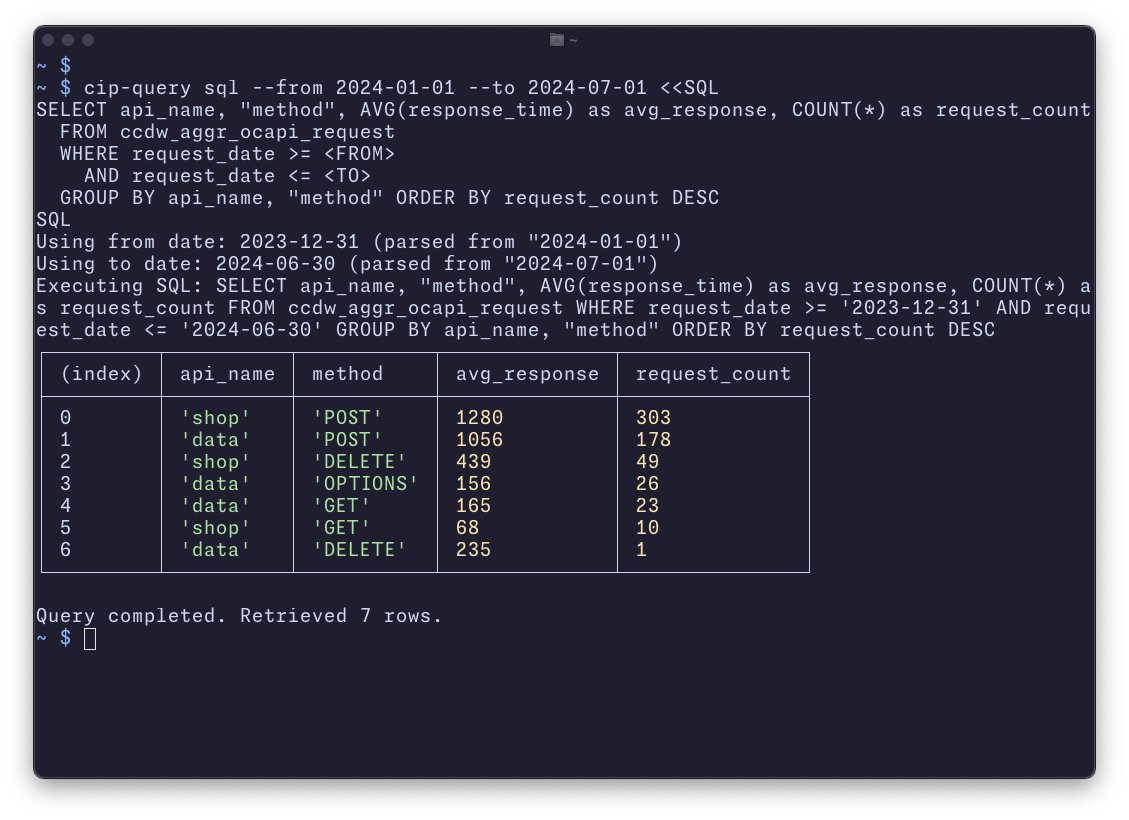
### Using Heredocs (Multi-line SQL)
```bash
cip-query sql --format json --from "2024-01-01" --to "2024-01-31" <<SQL
SELECT
api_name,
"method",
AVG(response_time) as avg_response_time,
COUNT(*) as request_count
FROM ccdw_aggr_ocapi_request
WHERE request_date >= <FROM>
AND request_date <= <TO>
GROUP BY api_name, "method"
ORDER BY request_count DESC
SQL
```
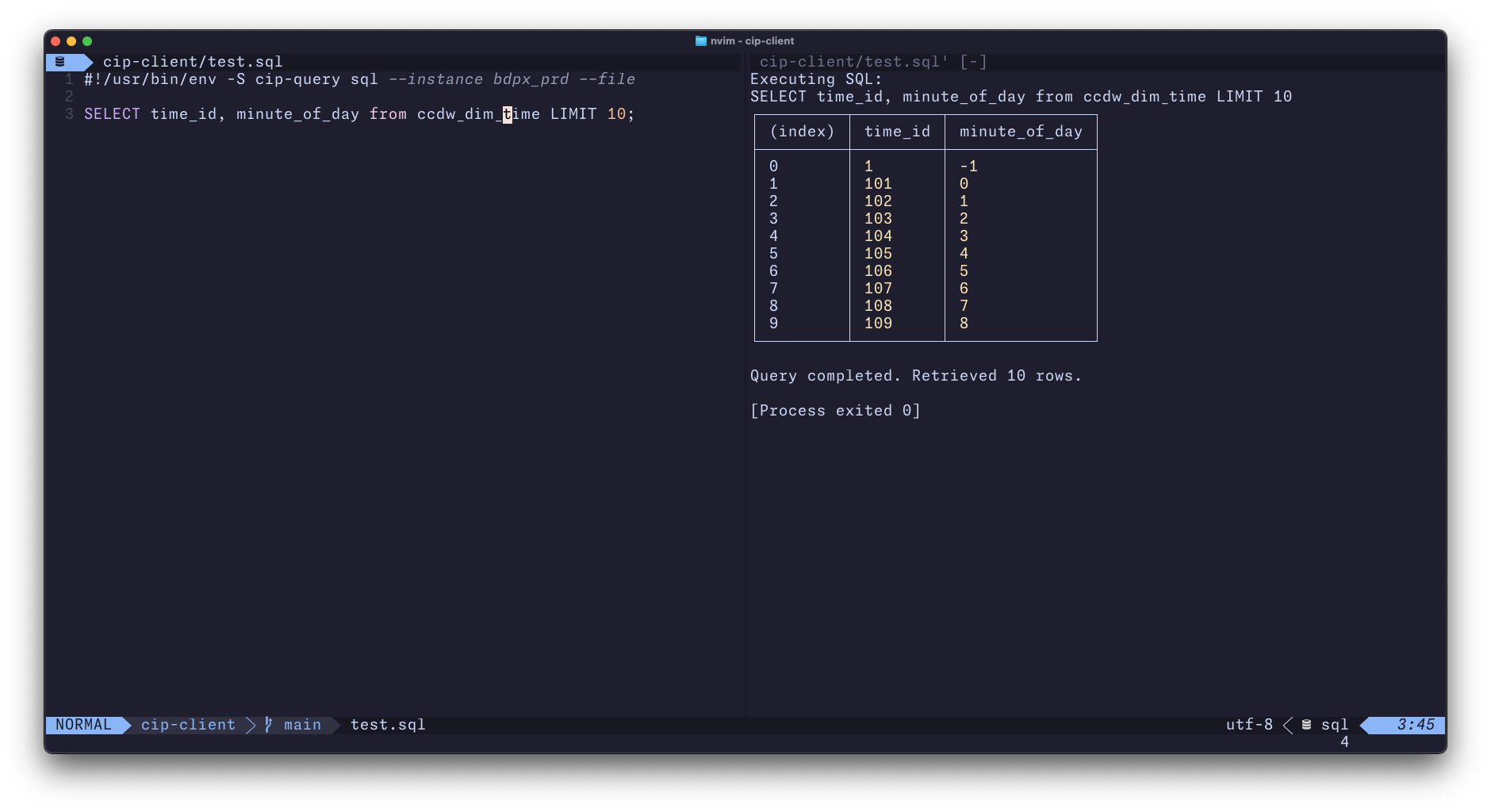
### From Files
```bash
# Save complex queries in .sql files
cip-query sql --format csv < my-analytics-query.sql
```
## API Usage
### Low Level Client
```typescript
import { CIPClient } from 'sfcc-cip-analytics-client';
const client = new CIPClient(
process.env.SFCC_CLIENT_ID!,
process.env.SFCC_CLIENT_SECRET!,
process.env.SFCC_CIP_INSTANCE!
);
async function queryData() {
// direct statement execution
try {
await client.openConnection();
const statementId = await client.createStatement();
const result = await client.execute(
statementId,
"SELECT * FROM ccdw_aggr_ocapi_request LIMIT 10"
);
// see example/basic.ts for more details on result structure
console.table(result);
await client.closeStatement(statementId);
} finally {
await client.closeConnection();
}
}
queryData();
```
### Type-Centric Parameterized Queries
```typescript
import { CIPClient, executeParameterizedQuery } from 'sfcc-cip-analytics-client';
interface OCAPISummary {
request_date: string;
site_id: string;
api_resource: string;
num_requests: number;
}
try {
await client.openConnection();
const query = executeParameterizedQuery<OCAPISummary>(
client,
`SELECT request_date,site_id,api_resource,SUM(num_requests) as requests FROM
ccdw_aggr_ocapi_request
WHERE
request_date >= '2024-01-01'
AND request_date <= '2024-01-31'
GROUP BY request_date,site_id,api_resource`,
[],
100 // batch size
);
for await (const batch of query) {
console.log(`Processed ${batch.length} ocapi requests`);
for (const record of batch) {
// Each record is typed as OCAPISummary
console.log(record.api_resource);
}
}
} finally {
await client.closeConnection();
}
queryData();
```
### High Level Business Use Case Queries
The client provides specialized query functions for common business analytics use cases. These return simple arrays of plain old JavaScript objects, making it easy to work with the data.
For complete documentation of all available business queries, see [Business Queries Reference](./docs/BUSINESS_QUERIES.md).
```typescript
import { CIPClient, querySalesAnalytics } from 'sfcc-cip-analytics-client';
const client = new CIPClient(clientId, clientSecret, instance);
async function analyzeSalesData() {
await client.openConnection();
const query = querySalesAnalytics(
client,
{ siteId: 'Sites-RefArch-Site', startDate: new Date('2024-01-01'), endDate: new Date('2024-01-31') },
100 // batch size
);
for await (const batch of query) {
console.log(`Processed ${batch.length} daily sales metrics`);
// Each record has: date, std_revenue, orders, std_aov, units, aos
}
await client.closeConnection();
}
```
## Examples
See the [`examples/`](./examples/) directory for complete working examples:
- [`examples/basic.ts`](./examples/basic.ts) - Basic usage with result pagination
- [`examples/ocapi.ts`](./examples/ocapi.ts) - Using data helper functions for OCAPI analytics
## Development Setup
### Prerequisites
- Node.js 18+ or Bun
- SFCC Commerce Cloud production access with CIP Analytics enabled
### Getting Started
1. **Clone and install**
```bash
git clone <repository-url>
# ...
npm install
```
3. **Build the project**
```bash
npm run build
```
4. **Run linting**
```bash
npm run lint
```
## API Documentation
### CIPClient
Main client class for interacting with CIP.
#### Constructor
```typescript
new CIPClient(clientId: string, clientSecret: string, instance: string, options?: CIPClientOptions)
```
#### Methods
- `openConnection(info?: IConnectionProperties): Promise<void>` - Open database connection
- `closeConnection(): Promise<void>` - Close database connection
- `createStatement(): Promise<number>` - Create a new SQL statement
- `closeStatement(statementId: number): Promise<void>` - Close a statement
- `execute(statementId: number, sql: string, maxRowCount?: number): Promise<NormalizedExecuteResponse>` - Execute SQL query
- `fetch(statementId: number, offset: number, fetchMaxRowCount: number): Promise<NormalizedFetchResponse>` - Fetch more results
- `prepare(sql: string, maxRowsTotal?: number): Promise<IPrepareResponse>` - Prepare a SQL statement with parameter placeholders
- `executeWithParameters(statementHandle: IStatementHandle, parameters?: any[], firstFrameMaxSize?: number): Promise<IExecuteResponse>` - Execute a prepared statement with parameters
- `prepareAndExecuteWithParameters(sql: string, parameters?: any[], firstFrameMaxSize?: number): Promise<IExecuteResponse>` - Prepare and execute a statement with parameters in one call
## Todo
- [ ] support proxy / fetch replacement (for browser use and advanced proxy scenarios)
- [ ] static build of protobuf for web use
## License
Licensed under the current NDA and licensing agreement in place with your organization. (This is explicitly **not** open source licensing.)
### Support
**This project should not be treated as Salesforce Product.** It is a tool B2C instances. Customers and partners implement this at-will with no expectation of roadmap, technical support, defect resolution, production-style SLAs.
This project is maintained by the **Salesforce Community**. Salesforce Commerce Cloud or Salesforce Platform Technical Support do not support this project or its setup.
THE SOFTWARE IS PROVIDED "AS IS", WITHOUT WARRANTY OF ANY KIND, EXPRESS OR IMPLIED.
For feature requests or bugs, please open a [GitHub issue](https://github.com/clavery/sfcc-cip-analytics-client/issues).