sf-decomposer
Version:
Break down large Salesforce metadata files into smaller, more manageable files for version control and then recreate deployment-compatible files.
336 lines (231 loc) • 20.1 kB
Markdown
# `sf-decomposer`
[](https://www.npmjs.com/package/sf-decomposer) [](https://npmjs.org/package/sf-decomposer) [](https://raw.githubusercontent.com/mcarvin8/sf-decomposer/main/LICENSE.md)
<!-- TABLE OF CONTENTS -->
<details>
<summary>Table of Contents</summary>
- [Quick Start](#quick-start)
- [Why Choose `sf-decomposer`?](#why-choose-sf-decomposer)
- [Commands](#commands)
- [`sf decomposer decompose`](#sf-decomposer-decompose)
- [`sf decomposer recompose`](#sf-decomposer-recompose)
- [Decompose Structure](#decompose-structure)
- [Supported Metadata](#supported-metadata)
- [Exceptions](#exceptions)
- [Troubleshooting](#troubleshooting)
- [Hooks](#hooks)
- [Ignore Files](#ignore-files)
- [`.forceignore`](#.forceignore)
- [`.sfdecomposerignore`](#.sfdecomposerignore)
- [`.gitignore`](#.gitignore)
- [Issues](#issues)
- [Built With](#built-with)
- [Contributing](#contributing)
- [License](#license)
</details>
Break down large Salesforce metadata files (XML) into smaller, more manageable files (XML/JSON/YAML/TOML/JSON5/INI) for version control and then recreate deployment-compatible files.
## Quick Start
1. Install plugin using `sf`
```bash
sf plugins install sf-decomposer@x.y.z
```
2. Retrieve metadata into your Salesforce DX project
3. [Decompose](#sf-decomposer-decompose) the metadata type(s)
```bash
sf decomposer decompose -m "flow" -m "labels" --postpurge
```
4. Add decomposed files to [`.forceignore`](#.forceignore)
> This is **REQUIRED** to avoid errors when running `sf`commands
5. Stage decomposed files in version control
6. [Recompose](#sf-decomposer-recompose) the metadata type(s) before deployment
```bash
sf decomposer recompose -m "flow" -m "labels"
```
7. Deploy recomposed metadata
## Why Choose `sf-decomposer`?
Salesforce's built-in decomposition has limitations. `sf-decomposer` offers more control, flexibility, and versioning benefits for Admins and Developers.
### Key Advantages
- **Supports More Metadata** – Works with most Metadata API types, unlike Salesforce’s limited decomposition.
- **Selective Decomposition** – Decompose only what you need, avoiding Salesforce’s all-or-nothing approach.
- See [.sfdecomposerignore](#.sfdecomposerignore)
- **Multiple Decomposition Strategies** – Choose between:
- `unique-id` (default): disassembles each nested element into its own uniquely named file based on XML content or hash.
- `grouped-by-tag`: groups all nested elements by tag into a single file per tag (e.g., all `<fieldPermissions>` in a permission set into `fieldPermissions.xml`).
- Both strategies decompose leaf elements into the same file named after the original XML.
- **Fully Decomposes Metadata** – Allow complete decomposition for types that Salesforce only partially decomposes (e.g., `decomposePermissionSetBeta2`).
- **Consistent Sorting** – Keeps elements in a predictable order to reduce unnecessary version control noise.
> DISCLAIMER: If you use "toml" or "ini" format for decomposed files, the element sorting will vary compared to the other formats
- **Multiple Output Formats** – Supports XML, JSON, JSON5, TOML, INI, and YAML for greater flexibility.
- **CI/CD Integration** – Hooks enable seamless decomposition and recomposition in automated workflows.
- **Improved Version Control** – Smaller, structured files make pull requests easier to review and reduce merge conflicts.
### How It Helps Salesforce Teams
- **Better Peer Reviews** – More readable diffs for large metadata in GitHub and other CI/CD platforms.
- **Safer Deployments** – Ensures only intended changes are deployed, improving release quality.
## Commands
The `sf-decomposer` supports 2 commands:
- `sf decomposer decompose`
- `sf decomposer recompose`
## `sf decomposer decompose`
Decomposes the original metadata files in all local package directories into smaller files for version control.
```
USAGE
$ sf decomposer decompose -m <value> -f <value> -i <value> -s <value> [--prepurge --postpurge --debug --json]
FLAGS
-m, --metadata-type=<value> The metadata suffix to process, such as 'flow', 'labels', etc.
Can be declared multiple times.
-f, --format=<value> The file type for the decomposed files.
Options: ['xml', 'yaml', 'json', 'toml', 'ini', 'json5']
[default: 'xml']
-i, --ignore-package-directory=<value> Package directory to ignore.
Should be as they appear in the "sfdx-project.json".
Can be declared multiple times.
-s, --strategy=<value> The decompose strategy to use.
Options: ['unique-id', 'grouped-by-tag']
[default: 'unique-id']
--prepurge Purgd directories of pre-existing decomposed files.
[default: false]
--postpurge Purge the original files after decomposing them.
[default: false]
--debug Log debugging results to a text file (disassemble.log).
[default: false]
GLOBAL FLAGS
--json Format output as json.
EXAMPLES
Decompose all flows in XML format:
$ sf decomposer decompose -m "flow" -f "xml" --prepurge --postpurge --debug
Decompose all flows and custom labels in YAML format
$ sf decomposer decompose -m "flow" -m "labels" -f "yaml" --prepurge --postpurge --debug
Decompose flows except for those in the "force-app" package directory.
$ sf decomposer decompose -m "flow" -i "force-app"
```
## `sf decomposer recompose`
Recompose decomposed files into deployment-compatible files.
```
USAGE
$ sf decomposer recompose -m <value> -i <value> [--postpurge --debug --json]
FLAGS
-m, --metadata-type=<value> The metadata suffix to process, such as 'flow', 'labels', etc.
Can be declared multiple times.
-i, --ignore-package-directory=<value> Package directory to ignore.
Should be as they appear in the "sfdx-project.json".
Can be declared multiple times.
--postpurge Purge the decomposed files after recomposing them.
[default: false]
--debug Log debugging results to a text file (disassemble.log).
[default: false]
GLOBAL FLAGS
--json Format output as json.
EXAMPLES
Recompose all flows:
$ sf decomposer recompose -m "flow" --postpurge --debug
Recompose flows except for those in the "force-app" package directory.
$ sf decomposer recompose -m "flow" -i "force-app"
```
## Decompose Structure
> Ensure you do not MIX strategies on the same metadata type. If you have previously decomposed metadata with a past verson of `sf-decomposer`, which uses the unique-id strategy, and would like to switch over to the grouped-by-tag strategy, you will need to supply the decompose command with the `--prepurge` flag and `-s "grouped-by-tag"` flag to re-create decomposed files with the new strategy.
You can decompose all metadata, except for custom labels, via 1 of 2 strategies:
- **unique-id** (default): Each nested element is written to its own file. File names are derived from specified unique ID elements or hashed content.
- **grouped-by-tag**: All nested elements with the same tag are grouped into a single file, named after the tag (e.g., `fieldPermissions.xml`).
- Leaf elements (like `<userLicense>Salesforce</userLicense>`) are always grouped in a file named after the original source XML in both strategies.
**Decomposed Permission Set Example - Unique ID Strategy**
| Format | Example |
| --------- | --------------------------------------------------------------------------------------------------------------- |
| **XML** | 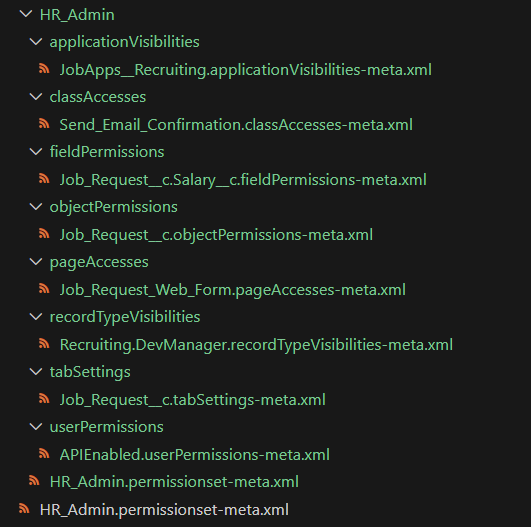<br> |
| **YAML** | 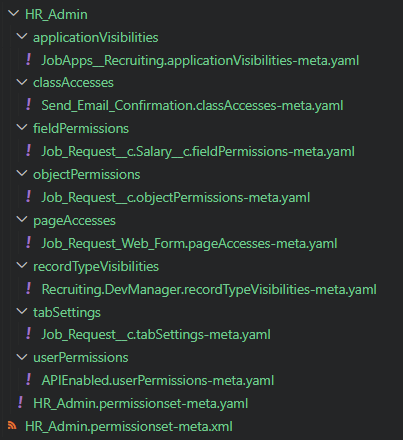<br> |
| **JSON** | 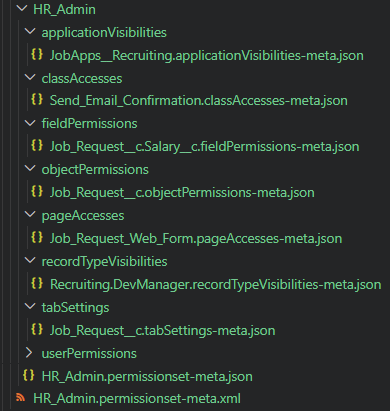<br> |
| **JSON5** | 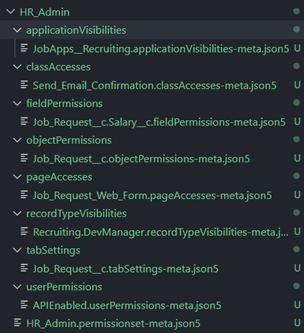<br> |
| **TOML** | <br> |
| **INI** | <br> |
**Decomposed Permission Set Example - Grouped by Tag Strategy**
| Format | Example |
| --------- | -------------------------------------------------------------------------------------------------------------------- |
| **XML** | 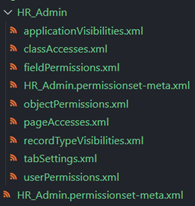<br> |
| **YAML** | 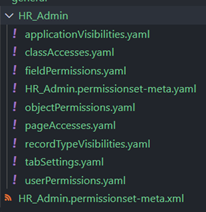<br> |
| **JSON** | 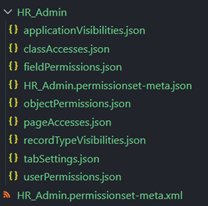<br> |
| **JSON5** | 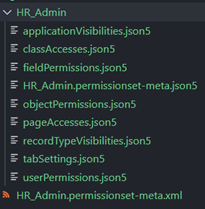<br> |
| **TOML** | <br> |
| **INI** | <br> |
Custom labels can only be decomposed via the `unique-id` strategy. If you attempt to decompose custom labels with the `grouped-by-tag` strategy, it will warn and skip decomposing custom labels.
Custom labels decomposed under the `unique-id` strategy will look like such, each label will have its own file:
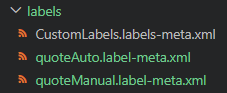<br>
## Supported Metadata
All parent metadata types imported from this plugin's version of `@salesforce/source-deploy-retrieve` (SDR) toolkit are supported except for certain types.
The `--metadata-type`/`-m` flag should be the metadata's `suffix` value as listed in the [metadataRegistry.json](https://github.com/forcedotcom/source-deploy-retrieve/blob/main/src/registry/metadataRegistry.json). You can also infer the suffix by looking at the original XML file-name, i.e. `*.{suffix}-meta.xml`.
Here are some examples:
| Metadata Type | CLI Option |
| --------------------------- | -------------------------------------------- |
| Custom Labels | `--metadata-type "labels"` |
| Workflows | `--metadata-type "workflow"` |
| Profiles | `--metadata-type "profile"` |
| Permission Sets | `--metadata-type "permissionset"` |
| AI Scoring Model Definition | `--metadata-type "aiScoringModelDefinition"` |
| Decision Matrix Definition | `--metadata-type "decisionMatrixDefinition"` |
| Bot | `--metadata-type "bot"` |
| Marketing App Extension | `--metadata-type "marketingappextension"` |
### Exceptions
| Scenario | Message |
| --------------------------------------------------------------------------------------------------------------- | -------------------------------------------------------------------------------------------------------------------------------------------- |
| `botVersion` is blocked from being run directly | `Error (1): botVersion suffix should not be used. Please use bot to decompose/recompose bot and bot version files.` |
| Custom Objects not supported | `Error (1): Custom Objects are not supported by this plugin.` |
| Unsupported SDR adapter strategies (e.g., `matchingContentFile`, `digitalExperience`, `mixedContent`, `bundle`) | `Error (1): Metadata types with [matchingContentFile, digitalExperience, mixedContent, bundle] strategies are not supported by this plugin.` |
| Children metadata types (e.g., custom fields) and invalid suffixes | `Error (1): Metadata type not found for the given suffix: field.` |
## Troubleshooting
`sf-decomposer` searches the current working directory for the `sfdx-project.json`, and if it's not found in the current working directory, it will search upwards for it until it hits your root drive. If the `sfdx-project.json` file isn't found, the plugin will fail with:
```
Error (1): sfdx-project.json not found in any parent directory.
```
The `xml-disassembler` package will create a log file, `disassemble.log`, at all times. By default, the log will only contain XML decomposing/recomposing errors. XML decomposing/recomposing errors do not cause the Salesforce CLI to fail. The CLI will proceed to decompose/recompose all remaining metadata.
The Salesforce CLI will print XML errors as warnings in the terminal:
```
Warning: C:\Users\matth\Documents\sf-decomposer\test\baselines\flows\Get_Info\actionCalls\Get_Info.actionCalls-meta.xml was unabled to be parsed and will not be processed. Confirm formatting and try again.
```
To add debugging to the log, provide the `--debug` flag to the decompose or recompose command.
```
[2024-03-30T14:28:37.959] [DEBUG] default - Created disassembled file: mock\no-nested-elements\HR_Admin\HR_Admin.permissionset-meta.xml
```
If a file only contains leaf elements, the decomposer has nothing to decompose so it will print this warning and skip processing the file:
```
Warning: The XML file force-app\main\default\permissionsets\view_of_projects_tab_on_opportunity.permissionset-meta.xml only has leaf elements. This file will not be disassembled.
```
Custom labels can only be decomposed via the `unique-id` strategy. If the other one is provided, it will print this warning and skip to the next metadata entry.
```
Warning: You cannot decompose custom labels using the grouped-by-tag strategy. Please switch strategies and try again for labels.
```
## Hooks
> **NOTE:** In order to avoid errors when running `sf` commands, you must configure your `.forceignore` file to have the Salesforce CLI ignore the decomposed files. See [Ignore Files](#ignore-files).
`sf-decomposer` supports automatic decomposition and recomposition by defining a `.sfdecomposer.config.json` file in your project root.
You can copy and update the sample [.sfdecomposer.config.json](https://raw.githubusercontent.com/mcarvin8/sf-decomposer/main/samples/.sfdecomposer.config.json).
| Configuration Option | Required | Description |
| -------------------------- | -------- | ---------------------------------------------------------------------------------------------------------------------------------------------- |
| `metadataSuffixes` | Yes | Comma-separated string of metadata suffixes to decompose and recompose based on the CLI command. |
| `ignorePackageDirectories` | No | Comma-separated string of package directories to ignore. |
| `prePurge` | No | `true` or `false`. If `true`, deletes existing decomposed files before decomposing. Defaults to `false`. |
| `postPurge` | No | `true` or `false`. If `true`, deletes the retrieval file after decomposing or deletes decomposed files after recomposing. Defaults to `false`. |
| `decomposedFormat` | No | Format of decomposed files: `xml`, `json`, `json5`, `toml`, `ini`, or `yaml`. Defaults to `xml`. |
| `strategy` | No | Strategy for decomposing the files: `unique-id` or `grouped-by-tag`. Defaults to `unique-id`. |
If `.sfdecomposer.config.json` is found, the hooks will run:
- the decompose command **after** a `sf project retrieve start` command completes successfully
- the recompose command **before** a `sf project deploy [start/validate]` command starts
## Ignore Files
### `.forceignore`
The Salesforce CLI **must** ignore the decomposed files and allow the recomposed files.
You can use the sample [.forceignore](https://raw.githubusercontent.com/mcarvin8/sf-decomposer/main/samples/.forceignore). Update the decomposed file extensions based on what format you're using (`.xml`, `.json`, `.json5`, `.toml`, `.ini`, or `.yaml`).
### `.sfdecomposerignore`
Optionally, you can create a `.sfdecomposerignore` file in the root of your Salesforce DX project to ignore specific XMLs when decomposing. The `.sfdecomposerignore` file should follow [.gitignore spec 2.22.1](https://git-scm.com/docs/gitignore).
When you run `sf decomposer decompose --debug` and it processes a file that matches an entry in `.sfdecomposerignore`, a warning will be printed to the `disassemble.log`:
```
[2024-05-22T09:32:12.078] [WARN] default - File ignored by .sfdecomposerignore: C:\Users\matth\Documents\sf-decomposer\test\baselines\bots\Assessment_Bot\v1.botVersion-meta.xml
```
`.sfdecomposerignore` is not read when recomposing metadata.
### `.gitignore`
Optionally, git can ignore the recomposed files so you don't stage those in your repositories. You can also have git ignore the `disassemble.log` created by the `xml-disassembler` package.
You can use the sample [.gitignore](https://raw.githubusercontent.com/mcarvin8/sf-decomposer/main/samples/.gitignore).
## Issues
If you encounter any bugs or would like to request features, please create an [issue](https://github.com/mcarvin8/sf-decomposer/issues).
## Built With
- [`xml-disassembler`](https://github.com/mcarvin8/xml-disassembler) - Disassembles XML files into smaller files and reassembles the XML
- [`fs-extra`](https://github.com/jprichardson/node-fs-extra) - Node.js: extra methods for the fs object like copy(), remove(), mkdirs()
- [`@salesforce/source-deploy-retrieve`](https://github.com/forcedotcom/source-deploy-retrieve) - JavaScript toolkit for working with Salesforce metadata
## Contributing
Contributions are welcome! See [Contributing](https://github.com/mcarvin8/sf-decomposer/blob/main/CONTRIBUTING.md).
## License
This project is licensed under the MIT license. Please see the [LICENSE](https://raw.githubusercontent.com/mcarvin8/sf-decomposer/main/LICENSE.md) file for details.