sf-decomposer
Version:
Break down large Salesforce metadata files into smaller, more manageable files for version control and then recreate deployment-compatible files.
403 lines (272 loc) • 23.3 kB
Markdown
# `sf-decomposer`
[](https://www.npmjs.com/package/sf-decomposer)
[](https://npmjs.org/package/sf-decomposer)
[](https://raw.githubusercontent.com/mcarvin8/sf-decomposer/main/LICENSE.md)
[](https://qlty.sh/gh/mcarvin8/projects/sf-decomposer)
[](https://qlty.sh/gh/mcarvin8/projects/sf-decomposer)
[](https://snyk.io//test/github/mcarvin8/sf-decomposer?targetFile=package.json)
<!-- TABLE OF CONTENTS -->
<details>
<summary>Table of Contents</summary>
- [Quick Start](#quick-start)
- [Why Choose `sf-decomposer`?](#why-choose-sf-decomposer)
- [Commands](#commands)
- [`sf decomposer decompose`](#sf-decomposer-decompose)
- [`sf decomposer recompose`](#sf-decomposer-recompose)
- [Decompose Strategies](#decompose-strategies)
- [Custom Labels Decomposition](#custom-labels-decomposition)
- [Additional Permission Set Decomposition](#additional-permission-set-decomposition)
- [Loyalty Program Setup Decomposition](#loyalty-program-setup-decomposition)
- [Supported Metadata](#supported-metadata)
- [Exceptions](#exceptions)
- [Troubleshooting](#troubleshooting)
- [Hooks](#hooks)
- [Ignore Files](#ignore-files)
- [`.forceignore`](#.forceignore)
- [`.sfdecomposerignore`](#.sfdecomposerignore)
- [`.gitignore`](#.gitignore)
- [Issues](#issues)
- [Built With](#built-with)
- [Contributing](#contributing)
- [License](#license)
</details>
Break down large Salesforce metadata files (XML) into smaller, more manageable files (XML/JSON/YAML/TOML/JSON5/INI) for version control and then recreate deployment-compatible files.
## Quick Start
1. Install plugin using `sf`
```bash
sf plugins install sf-decomposer@x.y.z
```
2. Retrieve metadata into your Salesforce DX project
3. [Decompose](#sf-decomposer-decompose) the metadata type(s)
```bash
sf decomposer decompose -m "flow" -m "labels" --postpurge
```
4. Add decomposed files to [`.forceignore`](#.forceignore)
> This is **REQUIRED** to avoid errors when running `sf`commands
5. Stage decomposed files in version control
6. [Recompose](#sf-decomposer-recompose) the metadata type(s) before deployment
```bash
sf decomposer recompose -m "flow" -m "labels"
```
7. Deploy recomposed metadata
## Why Choose `sf-decomposer`?
Salesforce's built-in decomposition has limitations. `sf-decomposer` offers more control, flexibility, and versioning benefits for Admins and Developers.
### Key Advantages
- **Supports More Metadata** – Works with most Metadata API types, unlike Salesforce’s limited decomposition.
- **Selective Decomposition** – Decompose only what you need, avoiding Salesforce’s all-or-nothing approach.
- See [.sfdecomposerignore](#.sfdecomposerignore)
- **Multiple [Decompose Strategies](#decompose-strategies)** – Choose between:
- `unique-id` (default): disassembles each nested element into its own uniquely named file based on XML content or hash.
- `grouped-by-tag`: groups all nested elements by tag into a single file per tag (e.g., all `<fieldPermissions>` in a permission set into `fieldPermissions.xml`).
- Additionally opt into further decomposition on permisison sets by using the `grouped-by-tag` strategy with the `--decompose-nested-permissions` flag.
- Both strategies decompose leaf elements into the same file named after the original XML.
- **Fully Decomposes Metadata** – Allow complete decomposition for types that Salesforce only partially decomposes (e.g., `decomposePermissionSetBeta2`).
- **Consistent Sorting** – Keeps elements in a predictable order to reduce unnecessary version control noise.
> DISCLAIMER: If you use "toml" or "ini" format for decomposed files, the element sorting will vary compared to the other formats
- **Multiple Output Formats** – Supports XML, JSON, JSON5, TOML, INI, and YAML for greater flexibility.
- **CI/CD Integration** – Hooks enable seamless decomposition and recomposition in automated workflows.
- **Improved Version Control** – Smaller, structured files make pull requests easier to review and reduce merge conflicts.
### How It Helps Salesforce Teams
- **Better Peer Reviews** – More readable diffs for large metadata in GitHub and other CI/CD platforms.
- **Safer Deployments** – Ensures only intended changes are deployed, improving release quality.
## Commands
The `sf-decomposer` supports 2 commands:
- `sf decomposer decompose`
- `sf decomposer recompose`
## `sf decomposer decompose`
Decomposes the original metadata files in all local package directories into smaller files for version control.
```
USAGE
$ sf decomposer decompose -m <value> -f <value> -i <value> -s <value> [--prepurge --postpurge --debug -p --json]
FLAGS
-m, --metadata-type=<value> The metadata suffix to process, such as 'flow', 'labels', etc.
Can be declared multiple times.
-f, --format=<value> The file type for the decomposed files.
Options: ['xml', 'yaml', 'json', 'toml', 'ini', 'json5']
[default: 'xml']
-i, --ignore-package-directory=<value> Package directory to ignore.
Should be as they appear in the "sfdx-project.json".
Can be declared multiple times.
-s, --strategy=<value> The decompose strategy to use.
Options: ['unique-id', 'grouped-by-tag']
[default: 'unique-id']
--prepurge Purgd directories of pre-existing decomposed files.
[default: false]
--postpurge Purge the original files after decomposing them.
[default: false]
--debug Log debugging results to a text file (disassemble.log).
[default: false]
-p, --decompose-nested-permissions If strategy is "grouped-by-tag", opt into further decomposition
on object and field permissions on permission sets.
GLOBAL FLAGS
--json Format output as json.
EXAMPLES
Decompose all flows in XML format:
$ sf decomposer decompose -m "flow" -f "xml" --prepurge --postpurge --debug
Decompose all flows and custom labels in YAML format
$ sf decomposer decompose -m "flow" -m "labels" -f "yaml" --prepurge --postpurge --debug
Decompose flows except for those in the "force-app" package directory.
$ sf decomposer decompose -m "flow" -i "force-app"
```
## `sf decomposer recompose`
Recompose decomposed files into deployment-compatible files.
```
USAGE
$ sf decomposer recompose -m <value> -i <value> [--postpurge --debug --json]
FLAGS
-m, --metadata-type=<value> The metadata suffix to process, such as 'flow', 'labels', etc.
Can be declared multiple times.
-i, --ignore-package-directory=<value> Package directory to ignore.
Should be as they appear in the "sfdx-project.json".
Can be declared multiple times.
--postpurge Purge the decomposed files after recomposing them.
[default: false]
--debug Log debugging results to a text file (disassemble.log).
[default: false]
GLOBAL FLAGS
--json Format output as json.
EXAMPLES
Recompose all flows:
$ sf decomposer recompose -m "flow" --postpurge --debug
Recompose flows except for those in the "force-app" package directory.
$ sf decomposer recompose -m "flow" -i "force-app"
```
## Decompose Strategies
> Ensure you do not MIX strategies on the same metadata type. If you have previously decomposed metadata with a past verson of `sf-decomposer`, which uses the unique-id strategy, and would like to switch over to the grouped-by-tag strategy, you will need to supply the decompose command with the `--prepurge` flag and `-s "grouped-by-tag"` flag to re-create decomposed files with the new strategy.
You can decompose all metadata, except for custom labels, via 1 of 2 strategies:
- **unique-id** (default): Each nested element is written to its own file. File names are derived from specified unique ID elements or hashed content.
- **grouped-by-tag**: All nested elements with the same tag, e.g. `<fieldPermissions>`, are grouped into a single file, named after the tag (e.g., `fieldPermissions.xml`).
Leaf elements (like `<userLicense>Salesforce</userLicense>`) are always grouped in a file named after the original source XML in both strategies.
**Decomposed Permission Set Example - Unique ID Strategy**
| Format | Example |
| --------- | --------------------------------------------------------------------------------------------------------------- |
| **XML** | 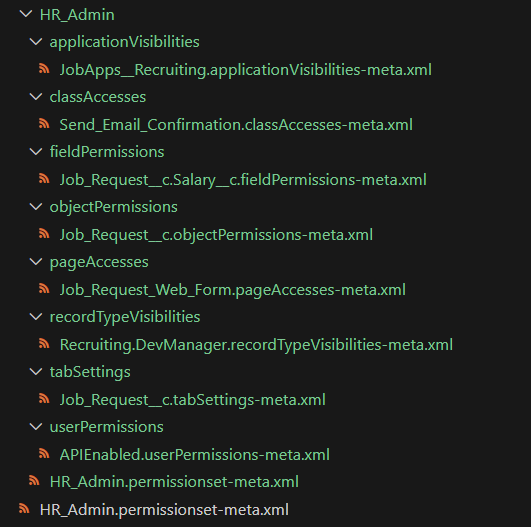<br> |
| **YAML** | 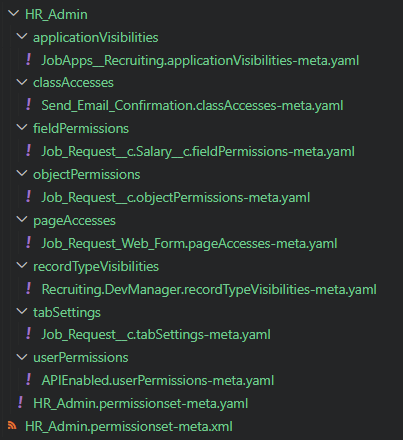<br> |
| **JSON** | 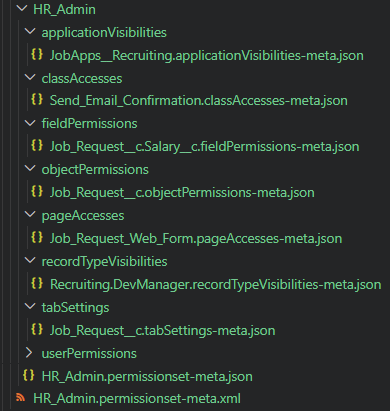<br> |
| **JSON5** | 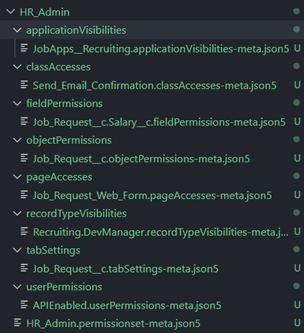<br> |
| **TOML** | <br> |
| **INI** | <br> |
**Decomposed Permission Set Example - Grouped by Tag Strategy**
| Format | Example |
| --------- | -------------------------------------------------------------------------------------------------------------------- |
| **XML** | 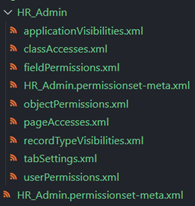<br> |
| **YAML** | 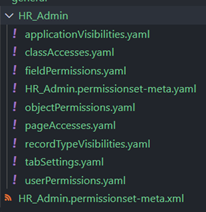<br> |
| **JSON** | 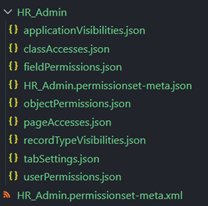<br> |
| **JSON5** | 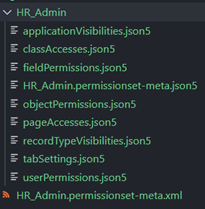<br> |
| **TOML** | <br> |
| **INI** | <br> |
### Custom Labels Decomposition
Custom labels can only be decomposed via the `unique-id`strategy.
If you attempt to decompose custom labels using the `grouped-by-tag` strategy, `sf-decomposer` will automatically override the strategy to `unique-id` and continue. You will see a warning in the terminal, but the operation will not be skipped:
```
Warning: Overriding strategy to "unique-id" for custom labels, as "grouped-by-tag" is not supported.
```
Each label will be decomposed into its own file:
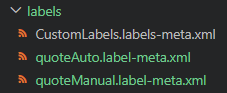<br>
### Additional Permission Set Decomposition
When using the `grouped-by-tag` strategy, you can enable deeper decomposition of permission sets by including the `--decompose-nested-permissions` (`-p`) flag.
This flag decomposes:
- All `<objectPermissions>` into individual files within an `objectPermissions/` subdirectory.
- All `<fieldPermissions>` into grouped files by object name within a `fieldPermissions/` subdirectory.
This mirrors the behavior of Salesforce's `decomposePermissionSetBeta2` feature, but provides better control and formatting options.
```bash
sf decomposer decompose -m "permissionset" -s "grouped-by-tag" -p
```
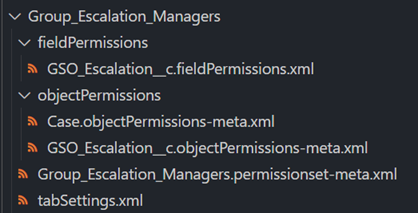<br>
### Loyalty Program Setup Decomposition
Loyalty Program Setup metadata (`-m loyaltyProgramSetup`) is only supported with the `unique-id` strategy.
If the `grouped-by-tag` strategy is provided, `sf-decomposer` will automatically override the strategy to `unique-id` and continue. You will see a warning like this:
`Warning: Overriding strategy to "unique-id" for loyaltyProgramSetup, as "grouped-by-tag" is not supported.`
Under the `unique-id` strategy, the loyalty program setup metadata is further decomposed:
- Each `<programProcesses>` element is written to its own file.
- Each `<parameters>` and `<rules>` child within a process is further broken out into its own file.
> **NOTE**: Recomposition for loyalty program setup deletes the decomposed files regardless of `--postpurge`. To preserve them, use version control or a CI/CD pipeline.
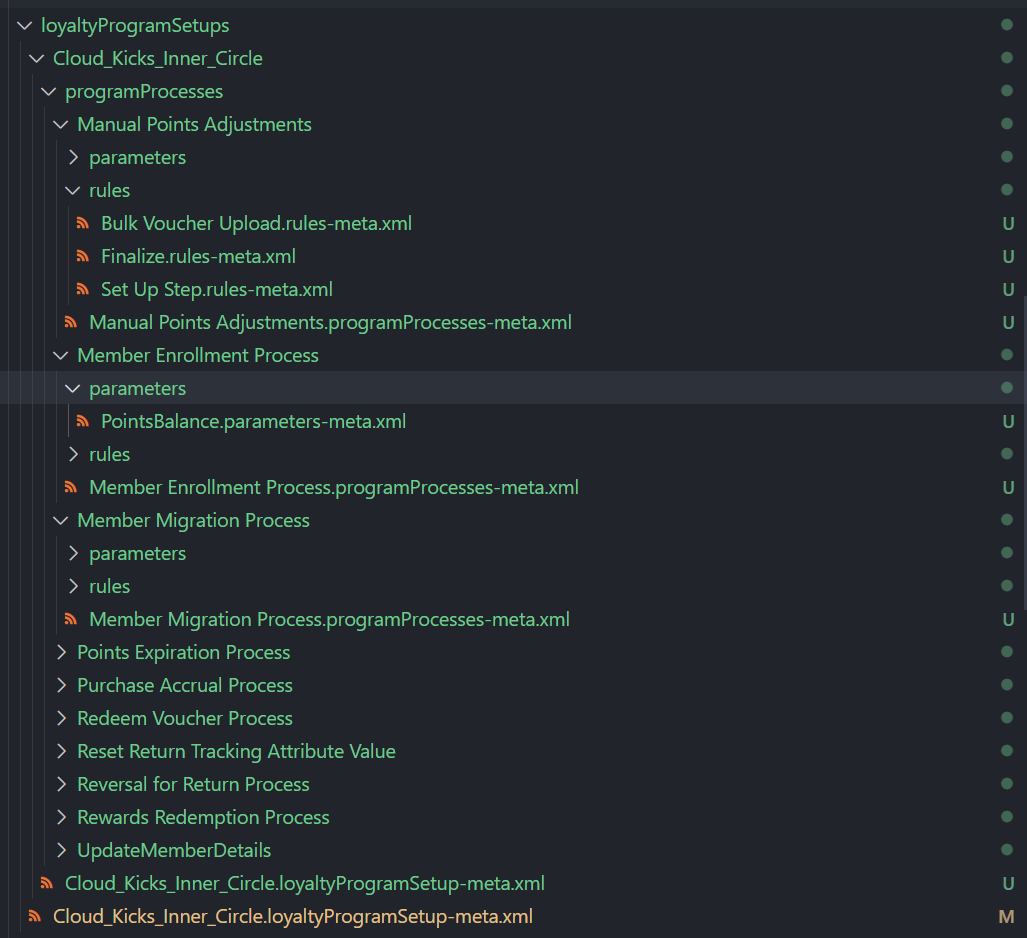<br>
## Supported Metadata
All parent metadata types imported from this plugin's version of `@salesforce/source-deploy-retrieve` (SDR) toolkit are supported except for certain types.
The `--metadata-type`/`-m` flag should be the metadata's `suffix` value as listed in the [metadataRegistry.json](https://github.com/forcedotcom/source-deploy-retrieve/blob/main/src/registry/metadataRegistry.json). You can also infer the suffix by looking at the original XML file-name, i.e. `*.{suffix}-meta.xml`.
Here are some examples:
| Metadata Type | CLI Option |
| --------------------------- | -------------------------------------------- |
| Custom Labels | `--metadata-type "labels"` |
| Workflows | `--metadata-type "workflow"` |
| Profiles | `--metadata-type "profile"` |
| Permission Sets | `--metadata-type "permissionset"` |
| AI Scoring Model Definition | `--metadata-type "aiScoringModelDefinition"` |
| Decision Matrix Definition | `--metadata-type "decisionMatrixDefinition"` |
| Bot | `--metadata-type "bot"` |
| Marketing App Extension | `--metadata-type "marketingappextension"` |
### Exceptions
| Scenario | Message |
| --------------------------------------------------------------------------------------------------------------- | -------------------------------------------------------------------------------------------------------------------------------------------- |
| `botVersion` is blocked from being run directly | `Error (1): botVersion suffix should not be used. Please use bot to decompose/recompose bot and bot version files.` |
| Custom Objects not supported | `Error (1): Custom Objects are not supported by this plugin.` |
| Unsupported SDR adapter strategies (e.g., `matchingContentFile`, `digitalExperience`, `mixedContent`, `bundle`) | `Error (1): Metadata types with [matchingContentFile, digitalExperience, mixedContent, bundle] strategies are not supported by this plugin.` |
| Children metadata types (e.g., custom fields) and invalid suffixes | `Error (1): Metadata type not found for the given suffix: field.` |
## Troubleshooting
### Missing `sfdx-project.json`
`sf-decomposer` requires an `sfdx-project.json` file to function. It starts by checking the current working directory and will search upward through parent directories until it reaches the root of your drive. If the file isn't found, the command will fail with:
```
Error (1): sfdx-project.json not found in any parent directory.
```
---
### Understanding the Log File
The plugin always generates a `disassemble.log` file using the `xml-disassembler` dependency.
By default, this log will contain only errors related to XML decomposition or recomposition. These errors **do not stop** the CLI command — the tool will continue processing all other metadata files.
Example warning printed in the terminal:
```
Warning: C:\Users\matth\Documents\sf-decomposer\test\baselines\flows\Get_Info\actionCalls\Get_Info.actionCalls-meta.xml was unabled to be parsed and will not be processed. Confirm formatting and try again.
```
---
### Enabling Debug Output
To capture more detailed output (including processed files), use the `--debug` flag with either `decompose` or `recompose`.
Example log entry:
```
[2024-03-30T14:28:37.959] [DEBUG] default - Created disassembled file: mock\no-nested-elements\HR_Admin\HR_Admin.permissionset-meta.xml
```
---
### Skipped Files with Only Leaf Elements
If a metadata file contains only leaf elements (e.g. strings, booleans, or primitives), there’s nothing to decompose. The CLI will warn and skip the file:
```
Warning: The XML file force-app\main\default\permissionsets\view_of_projects_tab_on_opportunity.permissionset-meta.xml only has leaf elements. This file will not be disassembled.
```
## Hooks
> **NOTE:** In order to avoid errors when running `sf` commands, you must configure your `.forceignore` file to have the Salesforce CLI ignore the decomposed files. See [Ignore Files](#ignore-files).
`sf-decomposer` supports automatic decomposition and recomposition by defining a `.sfdecomposer.config.json` file in your project root.
You can copy and update the sample [.sfdecomposer.config.json](https://raw.githubusercontent.com/mcarvin8/sf-decomposer/main/samples/.sfdecomposer.config.json).
| Configuration Option | Required | Description |
| ---------------------------- | -------- | ---------------------------------------------------------------------------------------------------------------------------------------------- |
| `metadataSuffixes` | Yes | Comma-separated string of metadata suffixes to decompose and recompose based on the CLI command. |
| `ignorePackageDirectories` | No | Comma-separated string of package directories to ignore. |
| `prePurge` | No | `true` or `false`. If `true`, deletes existing decomposed files before decomposing. Defaults to `false`. |
| `postPurge` | No | `true` or `false`. If `true`, deletes the retrieval file after decomposing or deletes decomposed files after recomposing. Defaults to `false`. |
| `decomposedFormat` | No | Format of decomposed files: `xml`, `json`, `json5`, `toml`, `ini`, or `yaml`. Defaults to `xml`. |
| `strategy` | No | Strategy for decomposing the files: `unique-id` or `grouped-by-tag`. Defaults to `unique-id`. |
| `decomposeNestedPermissions` | No | If strategy is `grouped-by-tag` and this is set to `true`, decompose permission sets further by object and field permissions. |
If `.sfdecomposer.config.json` is found, the hooks will run:
- the decompose command **after** a `sf project retrieve start` command completes successfully
- the recompose command **before** a `sf project deploy [start/validate]` command starts
## Ignore Files
### `.forceignore`
The Salesforce CLI **must** ignore the decomposed files and allow the recomposed files.
You can use the sample [.forceignore](https://raw.githubusercontent.com/mcarvin8/sf-decomposer/main/samples/.forceignore). Update the decomposed file extensions based on what format you're using (`.xml`, `.json`, `.json5`, `.toml`, `.ini`, or `.yaml`).
### `.sfdecomposerignore`
Optionally, you can create a `.sfdecomposerignore` file in the root of your Salesforce DX project to ignore specific XMLs when decomposing. The `.sfdecomposerignore` file should follow [.gitignore spec 2.22.1](https://git-scm.com/docs/gitignore).
When you run `sf decomposer decompose --debug` and it processes a file that matches an entry in `.sfdecomposerignore`, a warning will be printed to the `disassemble.log`:
```
[2024-05-22T09:32:12.078] [WARN] default - File ignored by .sfdecomposerignore: C:\Users\matth\Documents\sf-decomposer\test\baselines\bots\Assessment_Bot\v1.botVersion-meta.xml
```
`.sfdecomposerignore` is not read when recomposing metadata.
### `.gitignore`
Optionally, git can ignore the recomposed files so you don't stage those in your repositories. You can also have git ignore the `disassemble.log` created by the `xml-disassembler` package.
You can use the sample [.gitignore](https://raw.githubusercontent.com/mcarvin8/sf-decomposer/main/samples/.gitignore).
## Issues
If you encounter any bugs or would like to request features, please create an [issue](https://github.com/mcarvin8/sf-decomposer/issues).
## Built With
- [`xml-disassembler`](https://github.com/mcarvin8/xml-disassembler) - Disassembles XML files into smaller files and reassembles the XML
- [`fs-extra`](https://github.com/jprichardson/node-fs-extra) - Node.js: extra methods for the fs object like copy(), remove(), mkdirs()
- [`@salesforce/source-deploy-retrieve`](https://github.com/forcedotcom/source-deploy-retrieve) - JavaScript toolkit for working with Salesforce metadata
## Contributing
Contributions are welcome! See [Contributing](https://github.com/mcarvin8/sf-decomposer/blob/main/CONTRIBUTING.md).
## License
This project is licensed under the MIT license. Please see the [LICENSE](https://raw.githubusercontent.com/mcarvin8/sf-decomposer/main/LICENSE.md) file for details.