seneca-quartz-scheduler
Version:
Seneca quartz-scheduler plugin
128 lines (81 loc) • 3.5 kB
Markdown
# seneca-quartz-scheduler
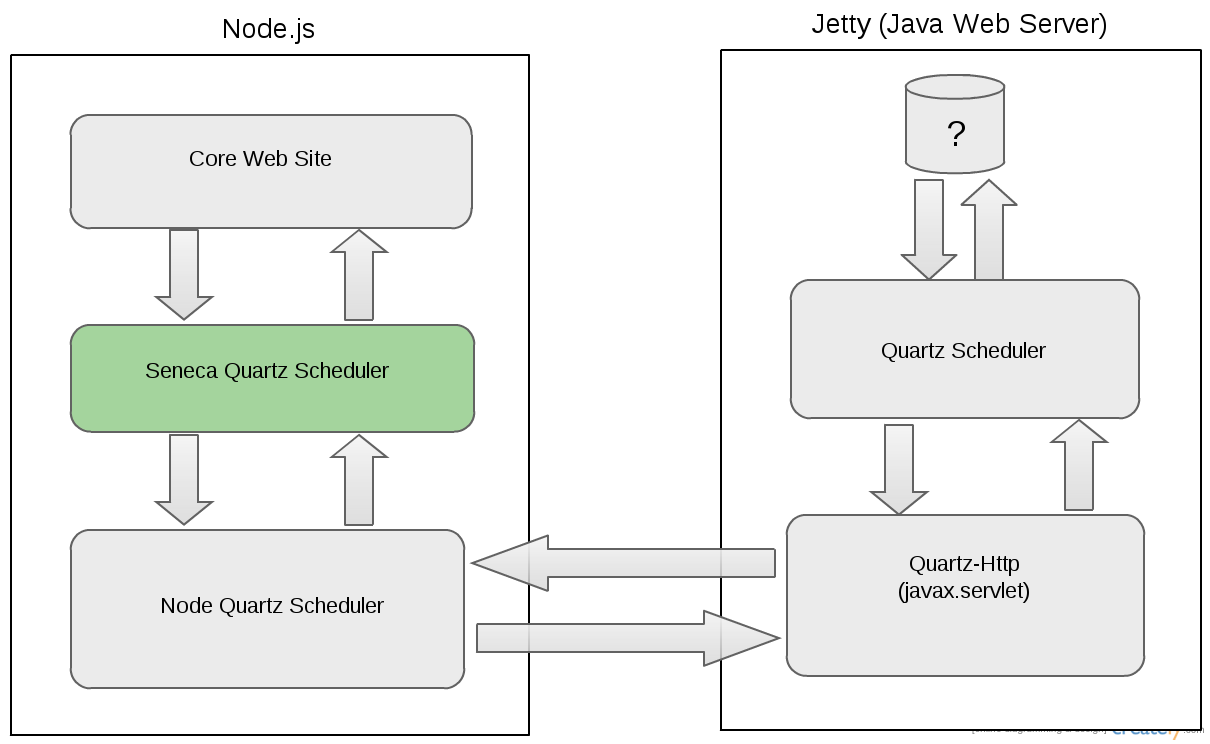
A scheduler plugin for the [Seneca](http://senecajs.org) toolkit that wraps [node-quartz-scheduler](https://github.com/nherment/node-quartz-scheduler).
Quartz does not expose HTTP services by itself - you'll need to build (maven) a war file from [quartz-http](https://github.com/nherment/quartz-http).
## Support
If you're using this module, feel free to contact us on twitter if you
have any questions: [@wildfiction](https://twitter.com/wildfiction) or [@darsee](https://twitter.com/darsee)
Current Version: 0.1.0
Tested on: node 0.10.31, seneca 0.5.21
## Visually
## Quick examples
Schedule a single future event:
```
var seneca = require('seneca')();
seneca.use('quartz-scheduler');
seneca.ready(function(err){
if( err ) return console.log(err);
// Setup the receiver.
// When the scheduler calls back to your web site then the cmd 'event'
// is raised on the 'scheduler' micro-service. By hooking into this
// you can route the executed event to the appropriate place, usually
// another micro-service.
this.add({role:'customRole', cmd:'myCommand'}, function(args, callback){
var seneca = this;
// args contain the payload you sent to the scheduler when you originally
// set-it-up with the 'register' cmd.
var name = args.name; // hello world
// Hence the scheduler can call any microservice that you have in your application.
// The only restriction is that the payload needs to be serializable into JSON
});
// Register an event (job) to fire at some point in the future...
seneca.act({
role:'scheduler',
cmd:'register',
when: new Date(2016, 5, 1),
args: {role: 'customRole', cmd: 'myCommand', name: 'hello world'}
}, function(err, data) {
// If there is no error then data will have a property called jobId.
// This was generated by the quartz-scheduler and you should store this
// if you ever want to cancel or update the job that you just scheduled.
// If you never want to cancel or update the job then you can discard this value.
var jobId = data.jobId;
}
);
})
```
## Install
```
npm install seneca
npm install seneca-quartz-scheduler
```
You'll need the [seneca](http://github.com/rjrodger/seneca) module to use this module - it's just a plugin.
## Usage
To load the plugin:
```
seneca.use('quartz-scheduler', { ... options ... })
```
For available options, see [node-quartz-scheduler](https://github.com/nherment/node-quartz-scheduler).
## Actions
All actions provide results via the standard callback format: <code>function(error,data){ ... }</code>.
### ACTION: role:scheduler, cmd:register
Register a task with the scheduler.
#### Arguments:
* _when_: a Date object
* _args_: A JSON object of the seneca command you want executed to you when the scheduler triggers
## Logging
To see what this plugin is doing, try:
```
node your-app.js --seneca.log=plugin:quartz-scheduler
```
This will print action logs and plugin logs for the user plugin. To skip the action logs, use:
```
node your-app.js --seneca.log=type:plugin,plugin:quartz-scheduler
```
For more logging options, see the [Seneca logging tutorial](http://senecajs.org/logging-example.html).
## Test
Run tests with:
```
npm test
```
You'll need a scheduler running for the tests to communicate with.