senangwebs-buy
Version:
Lightweight JavaScript library that that enables easy implementation of e-commerce functionality through HTML attributes
289 lines (242 loc) • 9.03 kB
Markdown
# SenangWebs Buy (SWB)
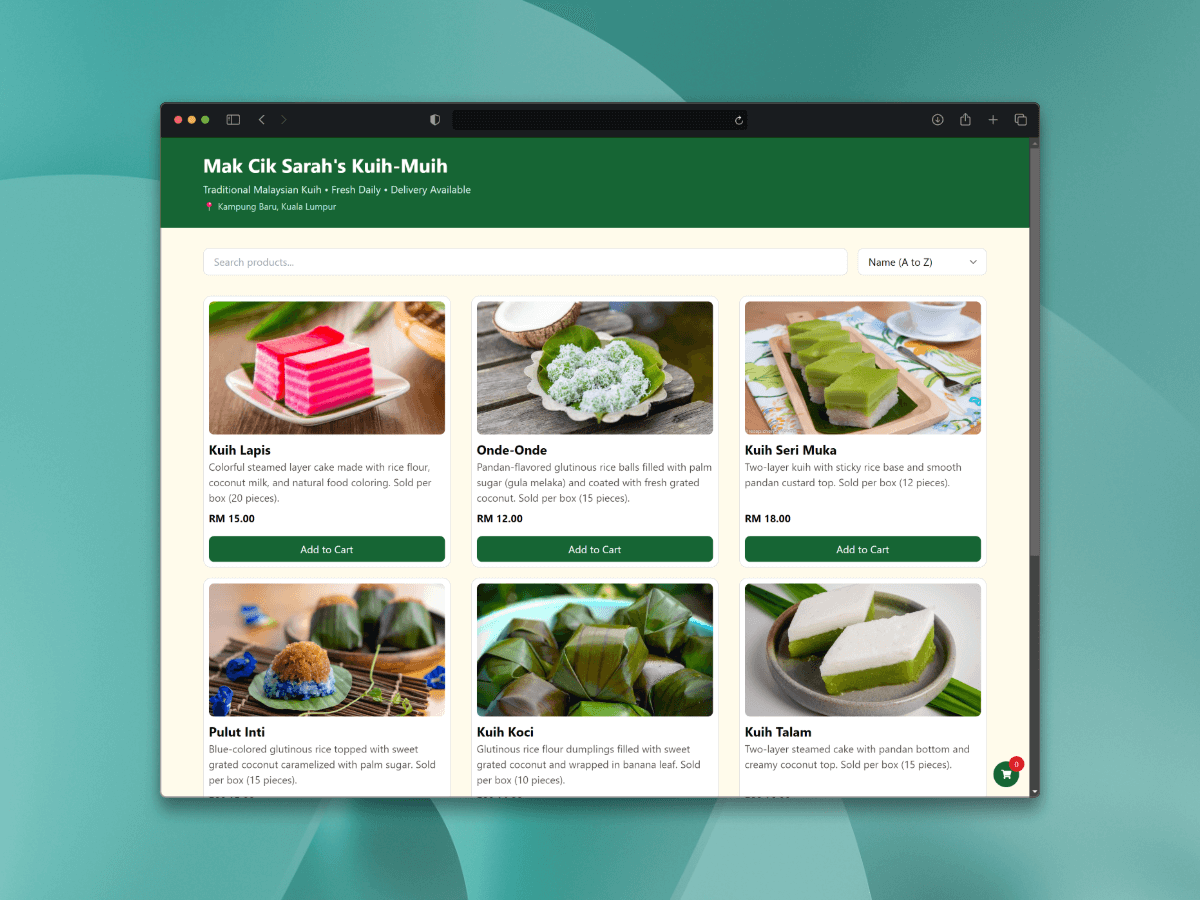
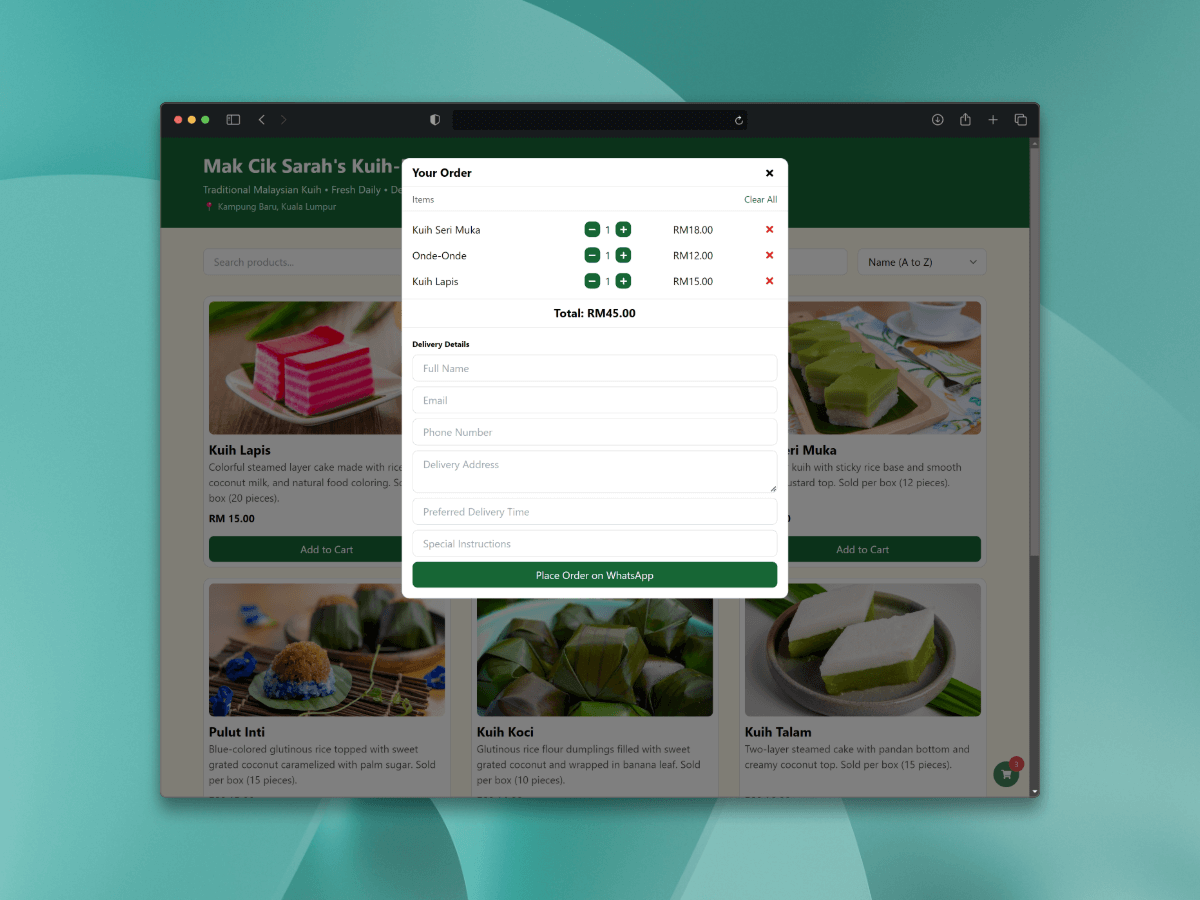
SenangWebs Buy (SWB) is a lightweight JavaScript library that transforms HTML attributes into a basic WhatsApp based e-commerce solution. Create dynamic shopping experiences with WhatsApp checkout integration, advanced product filtering, multi-store support, and more - all with minimal setup and zero dependencies.
## Example
[Mak Cik Sarah's Kuih-Muih](https://unpkg.com/senangwebs-buy@latest/examples/store-d/index.html)
## Preview
## Features
- Declarative HTML attribute-based configuration
- Multi-store support with independent carts and settings
- Persistent shopping cart using localStorage
- WhatsApp-based checkout system with customizable forms
- Advanced product filtering and sorting
- Real-time search functionality
- Multi-currency support with automatic formatting
- Customizable theming system
- Floating cart option
- External product links
- Independent product and cart components
- Responsive design for all devices
- Zero external dependencies
- TypeScript support
- Custom checkout fields support
- Customizable checkout UI text
- Enhanced cart management
- Advanced billing form options
## Installation
### Using npm
```bash
npm install senangweb-buy
```
### Using a CDN
Include SenangWebs Buy directly in your HTML file:
```html
<script src="https://unpkg.com/senangwebs-buy@latest/dist/swb.js"></script>
<link rel="stylesheet" href="https://unpkg.com/senangwebs-buy@latest/dist/swb.css">
```
## Usage
### Basic Catalog Setup
```html
<div data-swb-catalog
data-swb-store-id="store1"
data-swb-store="Your Store Name"
data-swb-whatsapp="+1234567890"
data-swb-currency="USD"
data-swb-color-primary="#4F46E5"
data-swb-color-secondary="#EF4444"
data-swb-cart="true"
data-swb-cart-floating="true"
data-swb-checkout-title="Shopping Cart"
data-swb-enable-billing="true"
data-swb-billing-title="Your Information"
data-swb-submit-text="Place Order"
data-swb-custom-fields='[
{"name": "notes", "type": "textarea", "placeholder": "Order Notes", "required": true},
{"name": "size", "type": "select", "placeholder": "Size", "required": true}
]'>
<div class="swb-grid senangwebs-buy-products">
<!-- Product Item -->
<div data-swb-product
data-swb-product-sku="PROD001"
data-swb-product-name="Product Name"
data-swb-product-price="99.99"
data-swb-product-add-cart-title="Add to Cart"
data-swb-product-link="https://example.com"
data-swb-product-link-title="View Details">
<div data-swb-product-image>
<img src="product-image.jpg" alt="Product">
</div>
<div data-swb-product-name>
<h3>Product Name</h3>
</div>
<div data-swb-product-price>
$99.99
</div>
<div data-swb-product-description>
<p>Product description goes here...</p>
</div>
<div data-swb-product-buttons></div>
</div>
</div>
</div>
```
### Independent Components
```html
<!-- Standalone Add to Cart Button -->
<button data-swb-product-sku="PROD002"
data-swb-product-name="Another Product"
data-swb-product-price="49.99"
data-swb-store-id="store1">
Add to Cart
</button>
<!-- Standalone Cart Button -->
<button data-swb-cart
data-swb-store-id="store1"
data-swb-store="Store Name"
data-swb-whatsapp="+1234567890"
data-swb-currency="USD">
View Cart (<span data-swb-cart-count>0</span>)
</button>
```
## Configuration Options
### Catalog Attributes
| Attribute | Type | Description | Default |
|-----------|------|-------------|---------|
| `data-swb-catalog` | flag | Main catalog container identifier | required |
| `data-swb-store-id` | string | Unique store identifier | required |
| `data-swb-store` | string | Store name for checkout messages | required |
| `data-swb-whatsapp` | string | WhatsApp number for checkout | required |
| `data-swb-currency` | string | Currency code (USD, EUR, MYR, etc.) | USD |
| `data-swb-color-primary` | string | Primary theme color (hex) | #007bff |
| `data-swb-color-secondary` | string | Secondary theme color (hex) | #dc3545 |
| `data-swb-cart` | boolean | Enable/disable cart functionality | true |
| `data-swb-cart-floating` | boolean | Enable floating cart button | false |
| `data-swb-checkout-title` | string | Custom checkout modal title | "Your Cart" |
| `data-swb-enable-billing` | boolean | Enable/disable billing form | true |
| `data-swb-billing-title` | string | Custom billing form title | "Billing Details" |
| `data-swb-submit-text` | string | Custom submit button text | "Proceed to WhatsApp" |
| `data-swb-custom-fields` | JSON | Custom form fields configuration | [] |
### Product Attributes
| Attribute | Type | Description | Default |
|-----------|------|-------------|---------|
| `data-swb-product` | flag | Product container identifier | required |
| `data-swb-product-sku` | string | Product SKU/ID | required |
| `data-swb-product-name` | string | Product name | required |
| `data-swb-product-price` | number | Product price | required |
| `data-swb-product-link` | string | External product link URL | optional |
| `data-swb-product-link-title` | string | External link button text | "View Details" |
| `data-swb-product-add-cart-title` | string | Add to cart button text | "Add to Cart" |
| `data-swb-product-description` | flag | Container for product description | optional |
| `data-swb-product-buttons` | flag | Container for product buttons | required |
## Advanced Features
### Custom Form Fields
- Support for various field types:
- Text inputs
- Textareas
- Select dropdowns
- Custom field types
- Configurable field attributes:
- Required/optional
- Placeholders
- Custom validation patterns
- Min/max values
- Fields appear in checkout form
- Data included in WhatsApp message
### Enhanced Checkout Experience
- Customizable UI text
- Configurable form titles
- Custom submit button text
- Optional billing information
- Flexible form layout
- Real-time validation
- Clear cart functionality
- Quantity management
- Price calculations
### Multi-Store Management
- Support for multiple independent stores on a single page
- Each store maintains its own:
- Shopping cart
- Theme settings
- Currency configuration
- WhatsApp checkout
- Product catalog
- Custom fields
- Checkout configuration
### Enhanced Shopping Cart
- Persistent cart state across page refreshes
- Real-time quantity updates
- Automatic price calculations
- Clear cart functionality
- Cart item count badge
- Optional floating cart button
- Individual item removal
- Bulk clear option
### Product Management
- Real-time search by name or SKU
- Advanced sorting options:
- Alphabetical (A-Z/Z-A)
- Price (Low-High/High-Low)
- Product grid layout with responsive design
- Support for product images and descriptions
- Custom button text and external links
- Sale badges support
### Checkout Process
1. Cart Review
- Item list with quantities
- Price summaries
- Edit quantities
- Remove items
- Clear all option
2. Customer Information Collection
- Full Name
- Email Address
- Phone Number
- Delivery Address
- Custom Fields
3. WhatsApp Integration
- Formatted order details
- Customer information
- Custom field data
- Total calculations
- Store identification
### Theming System
- Custom color schemes
- Consistent styling across components
- Responsive design patterns
- Modern UI elements
- Custom button styling
- Modal interfaces
- Floating cart design
- Sale badge styling
## Supported Currencies
The library includes formatting for multiple currencies:
- USD ($)
- EUR (€)
- GBP (£)
- JPY (¥)
- CNY (¥)
- MYR (RM)
- SGD (S$)
- AUD (A$)
- CAD (C$)
- INR (₹)
- KRW (₩)
- THB (฿)
- PHP (₱)
- IDR (Rp)
- VND (₫)
## Browser Support
Compatible with all modern browsers:
- Chrome
- Firefox
- Safari
- Edge
- Opera
## Contributing
Contributions are welcome! Please feel free to submit a Pull Request.
## License
This project is licensed under the MIT License - see the [LICENSE.md](LICENSE.md) file for details.
## Acknowledgments
- Thanks to all contributors who have helped improve this library
- Inspired by the need for simple, WhatsApp-based e-commerce solutions