sedk-postgres
Version:
Simple SQL builder and validator
499 lines (404 loc) • 16.6 kB
Markdown
# SEDK-postgres
[](https://github.com/amerharb/sedk/tree/version/0.15.1)
[](https://opensource.org/licenses/ISC)


SEDK is a SQL builder library for Postgres dialect, support binding parameters, and use a pre-defined database schema
### Example
```typescript
import * as sedk from 'sedk-postgres'
// Schema definition (practically this should be defined in one separate file for the whole project)
const database = new sedk.Database({
version: 1,
schemas: {
public: new sedk.Schema({
name: 'public',
tables: {
Employee: new sedk.Table({
name: 'Employee',
columns: {
name: new sedk.TextColumn({ name: 'name' }),
salary: new sedk.NumberColumn({ name: 'salary' }),
isManager: new sedk.BooleanColumn({ name: 'isManager' }),
startDate: new sedk.DateColumn({ name: 'startDate' }),
},
}),
},
}),
},
})
// Aliases
const Employee = database.s.public.t.Employee
const name = Employee.c.name
const salary = Employee.c.salary
const AND = sedk.LogicalOperator.AND
// Start to build SQL & Binder
const sql = sedk.builder(database)
const stmt1 = sql.select(name, salary).from(Employee).where(name.eq('John'), AND, salary.gt(1500)).getSQL()
console.log(stmt1)
// SELECT "name", "salary" FROM "Employee" WHERE ( "name" = 'John' AND "salary" > 1500 );
// Also it can be written as
const stmt2 = sql.select(name, salary).from(Employee).where(name.eq('John')).and(salary.gt(1500)).getSQL()
console.log(stmt2)
// SELECT "name", "salary" FROM "Employee" WHERE "name" = 'John' AND "salary" > 1500;
const binderExample = sql.select(name, salary).from(Employee).where(name.eq$('John'), AND, salary.gt$(1500))
console.log(binderExample.getSQL())
// SELECT "name", "salary" FROM "Employee" WHERE ( "name" = $1 AND "salary" > $2 );
console.log(binderExample.getBindValues())
// [ 'John', 1500 ]
```
## SEDK-postgres Principles
1. **What You See Is What You Get:** SEDK build in a way that the sequence of the functions as if you are writing normal SQL query
2. **No Magic String:** Everything is defined as class or object, for example database schema names defined in one place one time,
currently the only place where string is used is when you define an alias for a column or aggregate function that string can be used again in orderBy()
3. **Not ORM:** SEDK is not and will not become an ORM, it is a SQL builder tool, using it is optional, and it won't build a layer between you and the database, so you can use it in some query and ignore it in others
4. **No Runtime Schema Change:** SEDK build in the mind set that you will not change your database schema without updating your code. Of course that is only valid for the part of the database that you actually use
5. **One Library One Dialect:** SEDK-postgres is made for postgres hence the name, in the future there might be SEDK-mysql, SEDK-mssql, SEDK-sqlite, SEDK-sql92...etc. or even SEDK-neo4j for graph
so if you change from Postgres to Mysql then you will need to change the library too
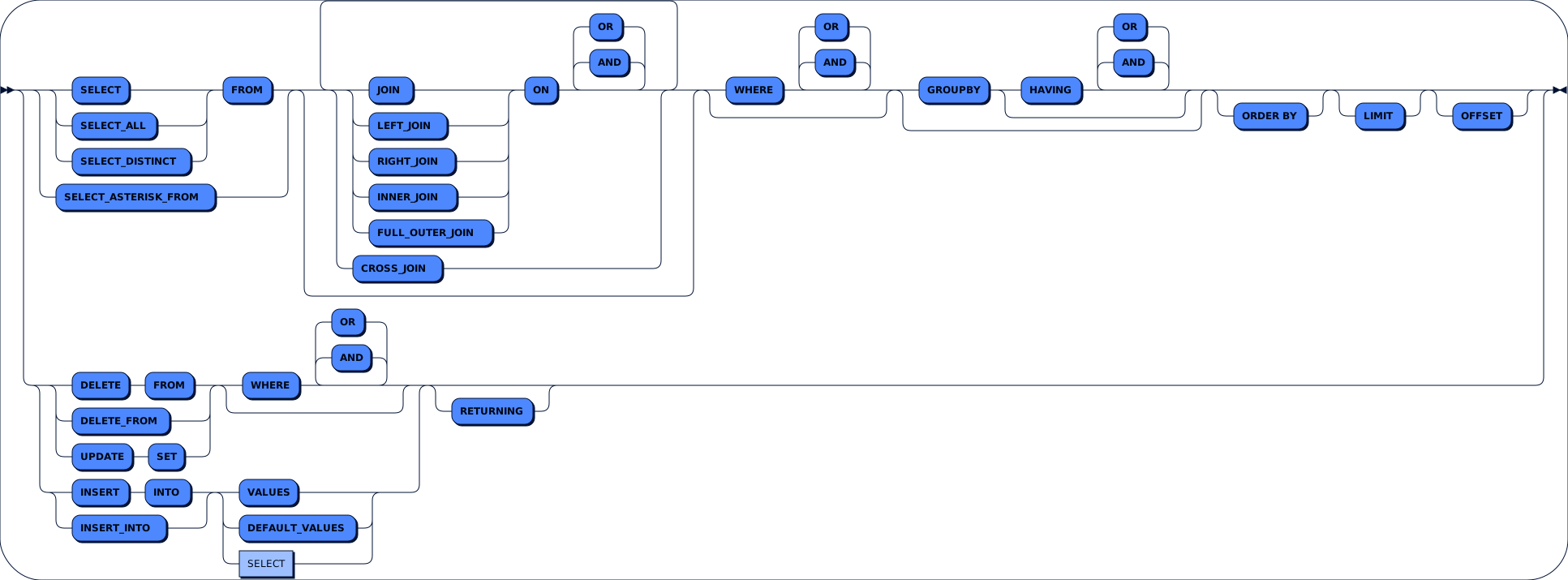
## Steps Rail Road
## What is New
### Version: 0.15.1
- fix type issue can be caused by eq() function, it throws UpdateInfo instead of UpdateCondition when it used from AliasedTable like:
```typescript
const E = Employee.as('E')
sql.selectAsteriskFrom(E).where(E.table.c.name.eq('John')).getSQL()
```
### Version: 0.15.0
- Use eq() in UPDATE instead of let() to be more WYSIWYG
- Add NOT function to Condition also as standalone function
```typescript
sql.selectAsteriskFrom(Employee).where(name.eq('John').NOT).getSQL()
// SELECT * FROM "Employee" WHERE NOT "name" = 'John';
```
or
```typescript
sql.selectAsteriskFrom(Employee).where(NOT(name.eq('John'))).getSQL()
// SELECT * FROM "Employee" WHERE NOT "name" = 'John';
```
- Support insert more than one row
```typescript
sql.insertInto(Employee, name).values('John')('Tahsin')('Khaldon').getSQL()
// INSERT INTO Employee(name) VALUES ('John'),('Tahsin'),('Khaldon');
```
- Support object callable style in insert statement (old style still supported)
```typescript
sql.insertInto(Employee)(name, salary).values('John', 11_000).getSQL()
// INSERT INTO Employee(name, salary) VALUES ('John', 11000);
```
### Version: 0.14.1
- Support IN and NOT IN Operator
```typescript
sql.selectAsteriskFrom(Employee).where(name.in('John', 'Jane')).and(age.notIn(18, 19, 20)).getSQL()
// SELECT * FROM "Employee" WHERE "name" IN ('John', 'Jane') AND "age" NOT IN (18, 19, 20);
```
IN with binder
```typescript
sql.selectAsteriskFrom(Employee).where(name.in$('John', 'Jane')).and(age.notIn$(18, 19, 20))
.getSQL()
// SELECT * FROM "Employee" WHERE "name" IN ($1, $2) AND "age" NOT IN ($3, $4, $5);
.getBindValues()
// ['John', 'Jane', 18, 19, 20]
```
- Support Asterisk after Table
```typescript
sql.select(Employee.ASTERISK).From(Employee).leftJoin(Manager).on(Employee.c.name.eq(Manager.c.name)).getSQL()
// SELECT "Employee".* FROM "Employee" LEFT JOIN "Manager" ON "Employee"."name" = "Manager"."name";
```
### Version: 0.14.0
- Add Insert path
```typescript
sql.insert().into(Employee).values(10, 'John', 11_000, false, new Date(Date.now())).getSQL()
// INSERT INTO Employee VALUES (10, 'John', 11000, false, '2020-01-01T00:00:00.000Z');
```
or use shortcut `insertInto()`
```typescript
sql.insertInto(Employee).values(10, 'John', 11_000, false, new Date(Date.now())).getSQL()
// INSERT INTO Employee VALUES (10, 'John', 11000, false, '2020-01-01T00:00:00.000Z');
```
- Also, with columns after table
```typescript
sql.insertInto(Employee, name, salary).values('John', 11_000).getSQL()
// INSERT INTO Employee(name, salary) VALUES ('John', 11000);
```
- with returning
```typescript
sql.insertInto(Employee, name, salary).values('John', 11_000).returning(id).getSQL()
// INSERT INTO Employee(name, salary) VALUES ('John', 11000) RETURNING id;
```
- Insert with binder
```typescript
sql.insertInto(Employee, name, salary).values($('John'), 11_000)
.getSQL()
// INSERT INTO Employee(name, salary) VALUES ($1, 11000);
.getBindValues()
// ['John']
```
- or by using `values$()` in one step for all
```typescript
sql.insertInto(Employee, name, salary).values$('John', 11_000)
.getSQL()
// INSERT INTO Employee(name, salary) VALUES ($1, $2);
.getBindValues()
// ['John', 11000]
```
- Insert with Select
```typescript
sql.insertInto(Employee, name, salary).select(name, salary).from(OldEmployee).getSQL()
// INSERT INTO Employee(name, salary) SELECT "name", "salary" FROM OldEmployee;
```
- with DEFAULT keyword
```typescript
sql.insertInto(Employee, name, salary).values('John', DEFAULT).getSQL()
// INSERT INTO Employee(name, salary) VALUES ('John', DEFAULT);
```
- or with DEFAULT VALUES step
```typescript
sql.insertInto(Employee, name, salary).defaultValues().getSQL()
// INSERT INTO Employee(name, salary) DEFAULT VALUES;
```
- Add Update path
```typescript
sql.update(Employee).set(salary.let(20_000)).where(name.eq('John')).getSQL()
// UPDATE Employee SET salary = 20000 WHERE name = 'John';
```
- or by using `let$()`
```typescript
sql.update(Employee).set(salary.let$(20_000)).where(name.eq('John'))
.getSQL()
// UPDATE Employee SET salary = $1 WHERE name = 'John';
.getBindValues()
// [20000]
```
### Version: 0.13.1
- Add returning step
```typescript
sql.deleteFrom(Employee).returning(id);
// DELETE FROM "Employee" RETURNING "id";
```
### Version: 0.13.0
- Support Delete Step, either delete().from() or for short deleteFrom()
```typescript
sql.delete().from(Employee);
// or like this
sql.deleteFrom(Employee);
// DELETE FROM "Employee";
```
- New option, default value is `true`
```typescript
{
throwErrorIfDeleteHasNoCondition: boolean
}
```
Note: For safety Delete step without where clause will throw an error that to avoid generate delete all table info by mistake unless you explicitly
set option `throwErrorIfDeleteHasNoCondition` to `false` or by just adding a dummy condition like `.where(e(1).eq(1))`
- Delete step can be followed by where(), or() and and() steps
```typescript
sql.delete().from(Employee).where(name.eq('John')).and(age.gt(40)).getSQL()
// DELETE FROM "Employee" WHERE "name" = 'John' AND "age" > 40;
```
- functions `eq()`, `eq$()`, `ne()` and `ne$()` will not accept null anymore, therefor they will only return equal "=" or not equal "<>" condition.
this is a breaking change in behavior, but for the old behavior function that automatically return Equal "=" or Is "IS" you should use the
new functions `isEq()`, `isEq$()`, `isNe()`, `isNe$()`. This correction needed to follow SEDK principle WYSIWYG, so `eq()` always return "=" but `isEq()` can return either "IS" or "="
### Version: 0.12.1
- Update README.md: fix code and add railroad diagram to it
- Check the validity of Condition, throw error if not valid
- Function `eq()` in Expression accept all Primitive types
- Add function `ne()` to Expression
### Version: 0.12.0
- Support Date Column which include Date and Timestamp with and without timezone
```typescript
const dob = new Date(Date.UTC(1979, 10, 14))
sql.selectAsteriskFrom(Employee).where(Employee.c.birthday.eq(dob)).getSQL();
// SELECT * FROM "Employee" WHERE "birthday" = '1979-11-14T00:00:00.000Z';
```
### Version: 0.11.7
- Bitwise operator accept string that contains number
- upgrade development dependencies
### Version: 0.11.6
- Fix Typescript build error "Operand file not found"
- Add ISC license file
### Version: 0.11.5
- Throw error in case of adding more than one WHERE step
### Version: 0.11.4
- Add bitwise operation support `&`, `|` and `#`
```typescript
sql.selectAsteriskFrom(Employee).where(Employee.c.age.bitwiseAnd(1).eq(0)).getSQL()
// SELECT * FROM "Employee" WHERE "age" & 1 = 0;
```
also can be added with binder values
```typescript
sql.selectAsteriskFrom(Employee).where(Employee.c.age.bitwiseAnd$(1).eq$(0))
.getSQL() // SQL: SELECT * FROM "Employee" WHERE "age" & $1 = $2;
.getBindValues() // VALUES: [1, 0];
```
### Version: 0.11.3
- Fix some bugs
### Version: 0.11.1
- Change package.json files to include sub folders
### Version: 0.11.0
- From Step can have more than one table
```typescript
sql.select(Employee.c.name.as('Employee Name'), Manager.c.name.as('Manager Name')).from(Employee, Manager).getSQL()
// SELECT "Employee"."name" AS "Employee Name", "Manager"."name" AS "Manager Name" FROM "Employee", "Manager";
```
- CrossJoin Step can have more than one table
```typescript
sql.select(Employee.c.name, Manager.c.name).from(Employee).crossJoin(Manager).getSQL()
// SELECT "Employee"."name", "Manager"."name" FROM "Employee" CROSS JOIN "Manager";
```
- Table can be aliased
```typescript
sql.select(name).from(Employee.as('All Employees')).getSQL()
// SELECT "name" FROM "Employee" AS "All Employees";
```
- New option added
```typescript
{
addAsBeforeTableAlias: 'always' | 'never'
}
```
- Join, Left Join, Right Join, Inner Join and Full Outer Join Steps has been added
```typescript
sql.selectAsteriskFrom(Employee).leftJoin(Manager).on(Employee.c.name.eq(Manager.c.name)).getSQL()
// SELECT * FROM "Employee" LEFT JOIN "Manager" ON "Employee"."name" = "Manager"."name";
```
### Version: 0.10.1
- Remove the limitation of version 0.10.0, Having step can contain aggregate function condition like:
```typescript
sql.select(name, f.avg(age).as('Employee Age Avrage')).from(Employee).groupBy(name).having(f.avg(age).gt(40)).getSQL()
// SELECT "name", AVG("age") AS "Employee Age Avrage" FROM "Employee" GROUP BY "name" HAVING AVG("age") > 40;
```
- New option added
```typescript
{
addPublicSchemaName: 'always' | 'never' | 'when other schema mentioned'
addTableName: 'always' | 'when two tables or more'
}
```
### Version: 0.10.0
- Add Having Step
- Add `And` and `Or` Steps for Having Step
#### Limitation
- Currently, Having step can only be used with Where conditions, aggregate function condition to be added later
```typescript
sql.select(name, f.avg(age).as('Employee Age Avrage')).from(Employee).groupBy(name).having(name.eq('John')).getSQL()
// SELECT "name", AVG("age") AS "Employee Age Avrage" FROM "Employee" GROUP BY "name" HAVING "name" = 'John';
```
### Version: 0.9.0
- Add GroupBy Step
- Add aggregated functions: sum(), avg(), count(), max() and min()
```typescript
sql.select(name, f.avg(age).as('Employee Age Avrage')).from(Employee).groupBy(name).getSQL()
// SELECT "name", AVG("age") AS "Employee Age Avrage" FROM "Employee" GROUP BY "name";
```
or you can use
```typescript
sql.select(name, age.avg.as('Employee Age Avrage')).from(Employee).groupBy(name).getSQL()
// SELECT "name", AVG("age") AS "Employee Age Avrage" FROM "Employee" GROUP BY "name";
```
- Add "$()" function that give binder directly from primitive type
```typescript
sql.select($(99)).from(Employee).getBinds()
/*
{
sql: 'SELECT $1 FROM "Employee";',
values: [99],
}
*/
```
### Version: 0.8.2
- Columns defined now as an object in Table class instead of array, so column can be called by its name from property "
columns" (or just "c") for easy access
```typescript
const name = new sedk.TextColumn({ name: 'name' })
const age = new sedk.NumberColumn({ name: 'age' })
const Employee = new sedk.Table({ name: 'Employee', columns: { name, age } })
console.log(Employee.c.name.name) // print: name
console.log(Employee.c.age.name) // print: age
```
- Table defined now as an object in Schema class instead of array
- Schema defined now as an object in Database class instead of array
### Version: 0.8.1
- database schema include definition for schema and database class separately
### Version: 0.8.0
- LIMIT & OFFSET steps
```typescript
sql.selectAsteriskFrom(Employee).limit(50).offset(10).getSQL()
// SELECT * FROM "Employee" LIMIT 50 OFFSET 10;
sql.selectAsteriskFrom(Employee).limit$(50).offset$(10).getBinds()
/*
{
sql: 'SELECT * FROM "Employee" LIMIT $1 OFFSET $2',
values: [50, 10],
}
*/
```
### Version: 0.7.1
- ASC, DESC, NULLS_FIRST and NULLS_LAST can be added in OrderBy step
```typescript
sql.selectAsteriskFrom(Employee).orderBy(column1, ASC, NULLS_FIRST).getSQL()
// SELECT * FROM "Employee" ORDER BY "col1" ASC NULLS FIRST;
```
### Version: 0.7.0
- Table & column name always has double quote around their names
- Column can have an alias
```typescript
sql.select(name, age.as('Employee Age')).from(Employee).getSQL()
// SELECT "name", "age" AS "Employee Age" FROM "Employee";
```
- New Builder Option
```typescript
{
addAsBeforeColumnAlias: 'always' | 'never'
}
```
- OrderBy Expression
```typescript
sql.selectAsteriskFrom(Employee).orderBy(e(age, ADD, salary)).getSQL()
// SELECT * FROM "Employee" ORDER BY ("age" + "salary");
```
- OrderBy using helper function o()
```typescript
sql.selectAsteriskFrom(Employee).orderBy(o(age, DESC, NULLS_FIRST)).getSQL()
// SELECT * FROM "Employee" ORDER BY "age" DESC NULLS_FIRST;
```
### Version: 0.6.0
- OrderBy now support ASC, DESC, NULLS FIRST and NULLS LAST
```typescript
sql.selectAsteriskFrom(Employee).orderBy(name.asc, age.desc).getSQL()
// "SELECT DISTINCT name, age FROM Employee ORDER BY name ASC, age DESC;"
```
- Support DISTINCT and ALL clause after SELECT
```typescript
sql.selectDistinct(name, age).from(Employee).getSQL()
// or like
sql.select(DISTINCT, name, age).from(Employee).getSQL()
// "SELECT DISTINCT name, age FROM Employee;"
```
- New Builder Option
```typescript
{
addAscAfterOrderByItem: 'always' | 'never' | 'when mentioned'
addNullsLastAfterOrderByItem: 'always' | 'never' | 'when mentioned'
}
```
### Version: 0.5.0
- Now you can add asterisk to Select step
```typescript
sql.select(ASTERISK).from(Employee).getSQL()
// "SELECT * FROM Employee"
```
- Also asterisk can be added with from in one function
```typescript
sql.selectAsteriskFrom(Employee).getSQL()
// "SELECT * FROM Employee"
```
- OrderBy step
```typescript
sql.select(ASTERISK).from(Employee).orderBy(age).getSQL()
// "SELECT * FROM Employee ORDER BY age"
```
current **orderBy** limitation
- Only takes the column name without AS
- Doesn't support ASC and DEC