scimgateway
Version:
Using SCIM protocol as a gateway for user provisioning to other endpoints
1,405 lines (1,096 loc) • 45.6 kB
Markdown
# SCIM Gateway
[](https://app.travis-ci.com/github/jelhub/scimgateway)
[](https://www.npmjs.com/package/scimgateway)
[](https://www.npmjs.com/package/scimgateway)
[](https://github.com/jelhub/scimgateway)
**Author:** [Jarle Elshaug](https://www.elshaug.xyz)
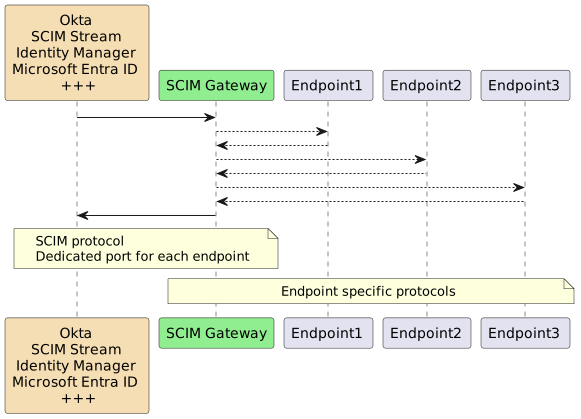
SCIM Gateway is a user provisioning bridge built with [Bun](https://bun.sh/) and [Node.js](https://nodejs.dev/) using TypeScript. It translates incoming SCIM 1.1/2.0 requests into endpoint-specific protocols — turning any destination into a SCIM-compatible interface without vendor lock-in.
---
## Table of Contents
- [SCIM Gateway](#scim-gateway)
- [Table of Contents](#table-of-contents)
- [What's New](#whats-new)
- [Included Plugins](#included-plugins)
- [Installation](#installation)
- [Prerequisites](#prerequisites)
- [Install SCIM Gateway](#install-scim-gateway)
- [Verify the Default Loki Plugin](#verify-the-default-loki-plugin)
- [Upgrading](#upgrading)
- [Configuration](#configuration)
- [Entry Point — `index.ts`](#entry-point--indexts)
- [Plugin File Naming](#plugin-file-naming)
- [Core Options](#core-options)
- [Authentication](#authentication)
- [Basic Authentication](#basic-authentication)
- [Bearer Token (Shared Secret)](#bearer-token-shared-secret)
- [JWT (Standard)](#jwt-standard)
- [OAuth Client Credentials](#oauth-client-credentials)
- [Authentication PassThrough](#authentication-passthrough)
- [IP Allow List](#ip-allow-list)
- [TLS \& Certificates](#tls--certificates)
- [Using PEM files](#using-pem-files)
- [Using PFX / PKCS#12](#using-pfx--pkcs12)
- [No TLS](#no-tls)
- [Email Notifications](#email-notifications)
- [Microsoft Exchange Online (OAuth)](#microsoft-exchange-online-oauth)
- [Google Workspace Gmail (OAuth)](#google-workspace-gmail-oauth)
- [SMTP Auth](#smtp-auth)
- [Azure Relay](#azure-relay)
- [Secrets from External Sources](#secrets-from-external-sources)
- [Remote Log Subscription](#remote-log-subscription)
- [Gateway Chaining](#gateway-chaining)
- [HelperRest](#helperrest)
- [Basic Auth](#basic-auth)
- [Entra ID — Client Secret](#entra-id--client-secret)
- [Entra ID — Certificate Secret](#entra-id--certificate-secret)
- [Entra ID — Federated Credentials (no secrets)](#entra-id--federated-credentials-no-secrets)
- [General OAuth (Client Credentials)](#general-oauth-client-credentials)
- [Single Binary Deployment](#single-binary-deployment)
- [Running the Gateway](#running-the-gateway)
- [Manual Startup](#manual-startup)
- [Windows Task Scheduler](#windows-task-scheduler)
- [Docker](#docker)
- [Single Image](#single-image)
- [Docker Compose](#docker-compose)
- [Identity Provider Integration](#identity-provider-integration)
- [Microsoft Entra ID as IdP](#microsoft-entra-id-as-idp)
- [Symantec/Broadcom Identity Manager as IdP](#symantecbroadcom-identity-manager-as-idp)
- [Entra ID Provisioning Plugin](#entra-id-provisioning-plugin)
- [Entra ID App Registration](#entra-id-app-registration)
- [Plugin Configuration](#plugin-configuration)
- [Using with Symantec/Broadcom (ConnectorXpress)](#using-with-symantecbroadcom-connectorxpress)
- [API Gateway](#api-gateway)
- [Building Custom Plugins](#building-custom-plugins)
- [Setup](#setup)
- [Mandatory Plugin Initialization](#mandatory-plugin-initialization)
- [Implementation Order](#implementation-order)
- [Plugin Methods](#plugin-methods)
- [Custom Schemas](#custom-schemas)
- [License](#license)
- [Change Log](#change-log)
- [v6.2.2](#v622)
- [v6.2.1](#v621)
- [v6.2.0](#v620)
- [v6.1.20](#v6120)
- [v6.1.19](#v6119)
- [v6.1.18](#v6118)
- [v6.1.17](#v6117)
- [v6.1.16](#v6116)
- [v6.1.15](#v6115)
- [v6.1.14](#v6114)
- [v6.1.13](#v6113)
- [v6.1.12](#v6112)
- [v6.1.11](#v6111)
- [v6.1.10](#v6110)
- [v6.1.9](#v619)
- [v6.1.8 / v6.1.7](#v618--v617)
- [v6.1.6](#v616)
- [v6.1.5](#v615)
- [v6.1.4](#v614)
- [v6.1.3](#v613)
- [v6.1.2](#v612)
- [v6.1.1](#v611)
- [v6.1.0](#v610)
- [v6.0.0 — Major](#v600--major)
- [v5.x — Previous Major Series](#v5x--previous-major-series)
---
## What's New
- **`plugin-entra-id`** now supports Entra ID roles and access packages, in addition to reading licenses.
- **`plugin-generic`** replaces `plugin-scim` — a flexible template using `endpointMapper` with the new `valueMap` option for allowlisting and name mapping e.g., groups
- **`GET /Roles` and `GET /Entitlements`** endpoint support, with user management via SCIM `roles` and `entitlements` attributes; `plugin-entra-id` uses `entitlements` for Entra ID licenses (read-only) and `roles` for Permanent and Eligible PIM roles (full management)
- **AI Agent ready** — `x-agent-schema` configuration in `endpointMapper` enables custom schema generation with MCP tool instructions for autonomous provisioning agents
- **Bun binary builds** — compile a plugin into a single executable for simplified deployment
- **ES module / TypeScript support in Node.js** via `tsx`
- **v6.0.0** — API method response bodies returned as-is; new `publicApi()` method for unauthenticated `/pub/api` routes; `bearerJwtAzure.tenantIdGUID` replaced by `bearerJwt.azureTenantId`
- **Federated Identity Credentials** (Entra ID) — access Microsoft-protected resources without managing secrets, via internal JWKS
- **External JWKS** support for JWT authentication
- **Azure Relay** — secure outbound-only tunnel with one minute of setup (~$10/month per listener)
- **ETag** and **Bulk Operations** support (SCIM RFC 7644)
- **Remote real-time log subscription** via browser, curl, or custom client at `https://<host>/logger`
- **Gateway chaining** — chain `gateway1 → gateway2 → gateway3 → endpoint` with reverse-proxy-style auth validation
- **OAuth for email** — Microsoft Exchange Online and Google Workspace Gmail alongside traditional SMTP Auth
- [SCIM Stream](https://elshaug.xyz/docs/scim-stream) — subscribe-based provisioning as an alternative to top-down IGA polling
---
## Included Plugins
| Plugin | Endpoint Type | Description |
|---|---|---|
| **loki** | NoSQL | Standalone SCIM endpoint using [LokiJS](https://github.com/techfort/LokiJS). Includes test users and groups. Ideal for development. |
| **mongodb** | NoSQL | Like Loki but backed by an external MongoDB. Demonstrates multi-tenant via `baseEntity`. |
| **entra-id** | REST | Users/Groups/Roles/AccessPackages/Licenses provisioning to Microsoft Entra ID via Microsoft Graph API. |
| **generic** | REST | Generic template using `endpointMapper` and the `valueMap` option for allowlisting and name mapping e.g., groups. Defaults to plugin-loki as the SCIM target. Can also act as a SCIM version gateway (e.g. 1.1 → 2.0). |
| **api** | REST | Non-SCIM plugin demonstrating API Gateway mode for custom REST specifications. |
| **soap** | SOAP | User provisioning to a SOAP-based endpoint with example WSDLs. |
| **mssql** | SQL | User provisioning to Microsoft SQL Server. |
| **saphana** | SQL | SAP HANA–specific user provisioning. |
| **ldap** | Directory | Full LDAP plugin pre-configured for Microsoft Active Directory. |
---
## Installation
### Prerequisites
Install [Bun](https://bun.sh/) first. By default Bun installs to `HOMEPATH\.bun`. To install elsewhere, set `BUN_INSTALL=<path>` as a system environment variable before running the installer. Consider adding Bun to the system path for all users.
### Install SCIM Gateway
```sh
mkdir c:\my-scimgateway
cd c:\my-scimgateway
bun init -y
bun install scimgateway
bun pm trust scimgateway # required to allow postinstall to copy example files
```
This copies `index.ts`, `lib/`, and `config/` (with example plugins) into your package directory.
### Verify the Default Loki Plugin
```sh
bun c:\my-scimgateway
```
Then open a browser and try:
```
# Health check
GET http://localhost:8880/ping
# List users and groups (basic auth: gwadmin / password)
GET http://localhost:8880/Users
GET http://localhost:8880/Groups
# Real-time remote log monitoring
http://localhost:8880/logger
# Fetch a specific user or group
GET http://localhost:8880/Users/bjensen
GET http://localhost:8880/Groups/Admins
# Filter examples
GET http://localhost:8880/Users?filter=userName eq "bjensen"
GET http://localhost:8880/Users?filter=emails.value co "@example.com"&attributes=userName,name.familyName,emails&sortBy=name.familyName&sortOrder=descending
GET http://localhost:8880/Groups?filter=displayName eq "Admins"&excludedAttributes=members
GET http://localhost:8880/Groups?filter=members.value eq "bjensen"&attributes=id,displayName,members.value
```
Press `Ctrl+C` to stop.
> Using **Node.js**, the startup command is: `node --import=tsx ./index.ts`
### Upgrading
The recommended approach is to rename the old package folder, do a fresh install, then copy your customized `index.ts`, `config/`, and `lib/` from the previous install.
```sh
# Minor upgrade
bun install scimgateway
# Major upgrade (may break existing plugins — review change log first)
bun install scimgateway@latest
```
**Excluding example plugins in production:** Bun skips `postinstall` unless you run `bun pm trust scimgateway`. For npm or Node.js environments, set `scimgateway_postinstall_skip = true` in `.npmrc` or the environment variable `SCIMGATEWAY_POSTINSTALL_SKIP=true`.
---
## Configuration
### Entry Point — `index.ts`
`index.ts` defines which plugins to start:
```ts
// Start one or more plugins:
import './lib/plugin-entra-id.ts'
export {}
```
### Plugin File Naming
Each plugin requires a TypeScript file and a JSON configuration file sharing the same name prefix:
```
lib/plugin-entra-id.ts
config/plugin-entra-id.json
```
The JSON file has two top-level objects:
```json
{
"scimgateway": { ... },
"endpoint": { ... }
}
```
`scimgateway` holds gateway core settings (port, auth, logging, TLS). `endpoint` holds plugin-specific connection details (host, credentials, mappings).
---
### Core Options
| Option | Type | Default | Description |
|---|---|---|---|
| `port` | number | — | Port the gateway listens on |
| `localhostonly` | boolean | false | Accept requests only from `127.0.0.1` |
| `chainingBaseUrl` | string | — | Route requests to another gateway (`http(s)://host:port`) |
| `idleTimeout` | number | 120 | Seconds before an idle connection is dropped |
| `scim.version` | string | `"2.0"` | SCIM protocol version: `"1.1"` or `"2.0"` |
| `scim.skipTypeConvert` | boolean | false | Pass multivalue attributes as-is instead of type-converted objects |
| `scim.skipMetaLocation` | boolean | false | Omit `meta.location` from responses (useful behind a reverse proxy) |
| `scim.groupMemberOfUser` | boolean | false | Keep `groups` on the user object instead of managing group membership via `modifyGroup` |
| `scim.usePutSoftSync` | boolean | false | `PUT` replaces only the attributes in the body; existing attributes are preserved |
**Logging options (`log.*`):**
| Option | Values | Default | Description |
|---|---|---|---|
| `log.loglevel.file` | off, debug, info, warn, error | off | Log level for the plugin log file |
| `log.loglevel.console` | off, debug, info, warn, error | off | Log level for stdout/stderr |
| `log.loglevel.push` | debug, info, warn, error | info | Log level for the remote real-time subscriber |
| `log.logDirectory` | path | `<package>/logs` | Override the default log directory |
| `log.customMasking` | string[] | `[]` | Additional attribute names to mask in logs, e.g. `["SSN", "weight"]` |
| `log.colorize` | boolean | true | Colorized console output; set false for plain JSON |
| `log.maxSize` | number | 20 | Max log file size in MB |
| `log.maxFiles` | number | 5 | Number of rotated log files to keep |
**`scim.skipTypeConvert` example:**
With `skipTypeConvert: false` (default), emails are converted to type-keyed objects:
```json
"emails": {
"work": { "value": "jsmith@example.com", "type": "work" },
"home": { "value": "", "type": "home", "operation": "delete" }
}
```
With `skipTypeConvert: true`, the array is passed as-is:
```json
"emails": [
{ "value": "jsmith@example.com", "type": "work" },
{ "value": "john.smith.org", "type": "home", "operation": "delete" }
]
```
---
### Authentication
The `auth` object supports multiple concurrent methods. Set any admin user to `null` to disable that method. Each entry supports:
- `readOnly` — if `true`, only `GET` requests are allowed
- `baseEntities` — restrict this credential to specific baseEntity values (empty array = all)
#### Basic Authentication
```json
"auth": {
"basic": [
{
"username": "gwadmin",
"password": "password",
"readOnly": false,
"baseEntities": []
}
]
}
```
Cleartext passwords are encrypted on first gateway start.
#### Bearer Token (Shared Secret)
```json
"bearerToken": [
{
"token": "my-shared-secret",
"readOnly": false,
"baseEntities": []
}
]
```
Supported by Entra ID provisioning. The token is encrypted on first start.
#### JWT (Standard)
```json
"bearerJwt": [
{
"secret": null,
"publicKey": "jwt-public-key.pem",
"wellKnownUri": null,
"azureTenantId": null,
"options": {
"issuer": "https://my-idp.example.com"
},
"readOnly": false,
"baseEntities": []
}
]
```
- `secret` — HMAC shared secret (encrypted on start)
- `publicKey` — filename of a PEM file in `config/certs/`
- `wellKnownUri` — JWKS discovery URL, e.g. `https://keycloak.example.com/realms/my-realm/.well-known/openid-configuration`
- `azureTenantId` — Entra ID tenant ID; enables Entra-initiated provisioning using JWT validation
For Entra ID apps accessing the gateway:
```json
"wellKnownUri": "https://login.microsoftonline.com/{tenant-id}/v2.0/.well-known/openid-configuration",
"options": { "audience": "{application-id}" }
```
#### OAuth Client Credentials
```json
"bearerOAuth": [
{
"clientId": "my-client-id",
"clientSecret": "my-client-secret",
"readOnly": false,
"baseEntities": []
}
]
```
Clients request a token from `POST /oauth/token` (e.g. `http://localhost:8880/oauth/token`).
#### Authentication PassThrough
```json
"passThrough": {
"enabled": true,
"readOnly": false,
"baseEntities": []
}
```
The gateway forwards the raw `Authorization` header to the plugin. The plugin must set `scimgateway.authPassThroughAllowed = true` and implement its own auth handling against the endpoint.
---
### IP Allow List
Restrict incoming traffic to specific subnets (CIDR notation). Useful for Entra ID provisioning where you want to accept traffic only from Azure IP ranges:
```json
"ipAllowList": [
"13.64.151.161/32",
"13.66.141.64/27",
"2603:1056:2000::/48"
]
```
> Azure IP ranges can be downloaded from [azureipranges.azurewebsites.net](https://azureipranges.azurewebsites.net) — search for `AzureActiveDirectory` and copy the `addressPrefixes` array.
When running behind a load balancer or reverse proxy, the proxy must include the client IP in the `X-Forwarded-For` header.
---
### TLS & Certificates
#### Using PEM files
```json
"certificate": {
"key": "key.pem",
"cert": "cert.pem",
"ca": "ca.pem"
}
```
Files must be in `config/certs/` or use absolute paths. For multiple CAs: `"ca": ["ca1.pem", "ca2.pem"]`.
**Generate a self-signed certificate:**
```sh
openssl req -nodes -newkey rsa:2048 -x509 -sha256 -days 3650 \
-keyout key.pem -out cert.pem \
-subj "/O=My Company/OU=Application/CN=SCIM Gateway" \
-addext "subjectAltName=DNS:localhost,DNS:127.0.0.1,DNS:*.mycompany.com" \
-addext "extendedKeyUsage=serverAuth" \
-addext "keyUsage=digitalSignature"
```
#### Using PFX / PKCS#12
```json
"pfx": {
"bundle": "certbundle.pfx",
"password": "password"
}
```
> If communicating over localhost only (e.g. gateway installed directly on the provisioning server), you can skip TLS and use `http://localhost:<port>` with `"localhostonly": true`.
#### No TLS
```json
"certificate": {
"key": null,
"cert": null,
"ca": null
}
```
---
### Email Notifications
The `email` section supports alerting on errors and sending mail from plugin code via `scimgateway.sendMail()`.
#### Microsoft Exchange Online (OAuth)
```json
"email": {
"auth": {
"type": "oauth",
"options": {
"azureTenantId": "<tenant-id>",
"clientId": "<client-id>",
"clientSecret": "<client-secret>"
}
},
"emailOnError": {
"enabled": true,
"from": "noreply@example.com",
"to": "ops-team@example.com",
"cc": null,
"subject": "SCIM Gateway error",
"sendInterval": 15
}
}
```
**Entra ID requirements:**
1. Grant the application permission `Mail.Send`
2. Restrict which mailboxes the app can send from via an Exchange `ApplicationAccessPolicy`:
```powershell
Install-Module -Name ExchangeOnlineManagement
Connect-ExchangeOnline
New-ApplicationAccessPolicy `
-AppId <AppClientID> `
-PolicyScopeGroupId <MailEnabledSecurityGroupId> `
-AccessRight RestrictAccess `
-Description "Restrict app to specific mailboxes"
```
#### Google Workspace Gmail (OAuth)
```json
"email": {
"auth": {
"type": "oauth",
"options": {
"serviceAccountKeyFile": "google-service-account.json"
}
},
"emailOnError": {
"enabled": true,
"from": "sender@example.com",
"to": "ops@example.com"
}
}
```
**Google setup:**
1. [Google Cloud Console](https://console.cloud.google.com): create a Service Account → download the JSON key
2. [Google Admin](https://admin.google.com): Security → API controls → Domain Wide Delegation → add Client ID with scope `https://www.googleapis.com/auth/gmail.send`
3. Ensure `from` address has a Google Workspace license
#### SMTP Auth
```json
"email": {
"auth": {
"type": "smtp",
"options": {
"host": "smtp.gmail.com",
"port": 587,
"username": "user@gmail.com",
"password": "app-password"
}
},
"emailOnError": {
"enabled": true,
"to": "ops@example.com"
}
}
```
---
### Azure Relay
Azure Relay lets the gateway listen for inbound SCIM requests over an outbound HTTPS/443 connection — no inbound firewall rules required.
**Cost:** ~$10/month per Hybrid Connection listener.
**Azure setup:**
1. Create a Relay namespace in Azure → create a Hybrid Connection entity (one per plugin)
2. Leave **Requires Client Authorization** unchecked unless your IdP includes a SAS token
3. Copy the primary key from Shared Access Policies → RootManageSharedaccessKey
**Plugin configuration:**
```json
"azureRelay": {
"enabled": true,
"connectionUrl": "https://<namespace>.servicebus.windows.net/<hybrid-connection>",
"apiKey": "<primary-key>",
"keyRule": "RootManageSharedaccessKey"
}
```
The `connectionUrl` becomes the SCIM base URL. Examples:
```
GET https://<namespace>.servicebus.windows.net/<hybrid-connection>/Users
GET https://<namespace>.servicebus.windows.net/<hybrid-connection>/<baseEntity>/Users
```
Multiple gateway instances sharing the same `connectionUrl` will round-robin load-balance.
> Azure Relay does not support remote log subscription.
---
### Secrets from External Sources
All configuration values can be sourced from environment variables, external JSON files, or plain text files. This supports secret managers and Kubernetes secrets.
**From environment variables:**
```json
"port": "process.env.PORT",
"log": { "loglevel": { "file": "process.env.LOG_LEVEL_FILE" } }
```
**From a shared JSON file** (dot-notation keyed by plugin name):
```json
"username": "process.file./var/run/vault/secrets.json"
```
Where `secrets.json` contains:
```json
{
"plugin-soap.scimgateway.auth.basic[0].username": "gwadmin",
"plugin-soap.scimgateway.auth.basic[0].password": "password",
"plugin-soap.endpoint.username": "superuser",
"plugin-soap.endpoint.password": "secret"
}
```
**From a single-value text file:**
```json
"secret": "process.text./var/run/vault/jwt.secret"
```
Where the file contains the raw value: `thisIsSecret`
> Set the environment variable `SEED` to a random string to override default password seeding. This also lets you copy an encrypted configuration file between machines.
---
### Remote Log Subscription
Stream real-time logs from the gateway to a browser, curl, or custom client.
**Browser:** `https://<host>/logger`
**curl:**
```sh
curl -Ns http://localhost:8880/logger -u gwadmin:password | awk '
/^data: / {sub(/^data: /,""); printf "%s", $0; last=1; next}
/^$/ {if (last) print ""; last=0}
'
```
**Custom client (TypeScript/Bun):**
```ts
const username = "gwadmin"
const password = "password"
const url = "http://localhost:8880/logger"
const headers = new Headers({
Authorization: "Basic " + btoa(`${username}:${password}`),
Accept: "text/event-stream"
})
// message handling and custom logic
const messageHandler = async (message: string) => {
console.log(message)
}
async function startup() {
while (true) {
try {
const resp = await fetch(url, { headers })
if (!resp.ok || !resp.body) {
console.error(`❌ Response error: ${resp.status} ${resp.statusText}`)
await Bun.sleep(10_000)
continue
}
console.log('✅ Connected — awaiting log events...\n')
const reader = resp.body.pipeThrough(new TextDecoderStream()).getReader()
while (true) {
const { value, done } = await reader.read()
if (done) break
if (!value.startsWith('data: ')) continue
const i = value.indexOf("\n\n")
if (i < 1) continue
messageHandler(value.slice(6, i))
}
console.error("⚠️ Connection closed")
await Bun.sleep(10_000)
} catch (err: any) {
console.error("❌ Connection error:", err?.message || err)
await Bun.sleep(10_000)
}
}
}
startup()
```
Set a dedicated read-only credential for log collection:
```json
"auth": {
"basic": [
{ "username": "gwadmin", "password": "password", "readOnly": false },
{ "username": "gwread", "password": "password", "readOnly": true }
],
"bearerToken": [
{ "token": "log-secret", "readOnly": true }
]
}
```
Set push log level (default `info`):
```json
"log": { "loglevel": { "push": "debug" } }
```
You can also scope log output to a specific `baseEntity`: `https://<host>/<baseEntity>/logger`
---
### Gateway Chaining
Chain multiple gateways: `gateway1 → gateway2 → gateway3 → endpoint`. Each gateway validates authorization and forwards the request unless PassThrough is enabled.
**gateway1 configuration:**
```json
{
"scimgateway": {
"chainingBaseUrl": "https://gateway2:8880",
"auth": {
"passThrough": {
"enabled": false
}
}
}
}
```
In chaining mode the plugin binary is only used for initialization. You can simplify the plugin to the mandatory section only:
```ts
// start - mandatory plugin initialization
import { ScimGateway } from 'scimgateway'
const scimgateway = new ScimGateway()
const config = scimgateway.getConfig()
scimgateway.authPassThroughAllowed = true // and configuration file having: scimgateway.auth.passThrough=true
scimgateway.pluginAndOrFilterEnabled = false
// end - mandatory plugin initialization
```
---
### HelperRest
`HelperRest` provides a unified REST client for plugins with built-in support for authentication, retries, failover, and proxies.
```ts
helper.doRequest(baseEntity, method, path, body?, ctx?, options?)
```
- `baseEntity` — `'undefined'` if not used; must match a key in `endpoint.entity`
- `method` — `GET`, `POST`, `PATCH`, `PUT`, `DELETE`
- `path` — full URL or path appended to `baseUrl`
- `body` — optional request body
- `ctx` — optional, passes the `Authorization` header for PassThrough auth
- `options` — optional overrides for connection settings
**Endpoint connection structure:**
```json
"endpoint": {
"entity": {
"undefined": {
"connection": {
"baseUrls": ["https://api.example.com"],
"auth": {
"type": "basic|oauth|token|bearer|oauthSamlBearer|oauthJwtBearer",
"options": { ... }
},
"options": {
"headers": {},
"tls": {} // // files located in ./config/certs
},
"proxy": {}
}
}
}
}
```
#### Basic Auth
```json
"connection": {
"baseUrls": ["https://localhost:8880"],
"auth": {
"type": "basic",
"options": {
"username": "gwadmin",
"password": "password"
}
},
"options": {
"tls": { "rejectUnauthorized": false, "ca": "ca.pem" }
}
}
```
#### Entra ID — Client Secret
```json
"connection": {
"baseUrls": [],
"auth": {
"type": "oauth",
"options": {
"azureTenantId": "<tenant-id>",
"clientId": "<client-id>",
"clientSecret": "<client-secret>"
}
}
}
```
#### Entra ID — Certificate Secret
```json
"connection": {
"baseUrls": [],
"auth": {
"type": "oauthJwtBearer",
"options": {
"azureTenantId": "<tenant-id>",
"clientId": "<client-id>",
"tls": {
"key": "key.pem",
"cert": "cert.pem"
}
}
}
}
```
#### Entra ID — Federated Credentials (no secrets)
```json
"connection": {
"baseUrls": [],
"auth": {
"type": "oauthJwtBearer",
"options": {
"azureTenantId": "<tenant-id>",
"fedCred": {
"issuer": "<https://FQDN-scimgateway>", // https://scimgateway.my-company.com
"subject": "<entra-application-object-id>",
"name": "<entra-fed-cred-unique-name>" // plugin-entra-id
}
}
}
}
```
> The `issuer`, `subject`, and `name` must match the Federated Credentials configured in Entra ID (scenario: "Other issuer"). The gateway must be reachable from the internet at the `issuer` URL, or use Azure Relay for outbound-only communication.
#### General OAuth (Client Credentials)
```json
"connection": {
"baseUrls": ["https://api.example.com"],
"auth": {
"type": "oauth",
"options": {
"tokenUrl": "https://idp.example.com/oauth/token",
"clientId": "<client-id>",
"clientSecret": "<client-secret>"
}
}
}
```
Use VS Code IntelliSense on `HelperRest.doRequest()` for full type and option documentation.
---
### Single Binary Deployment
Compile a plugin to a self-contained native binary (no Bun/Node runtime required):
```sh
cd my-scimgateway
bun build --compile ./lib/plugin-loki.ts \
--target=bun-darwin-arm64 \
--outfile ./build/plugin-loki
# See https://bun.sh/docs/bundler/executables#cross-compile-to-other-platforms for all targets
cp -r ./config ./build
cd build
./plugin-loki # binary name must match the config file prefix
```
The `config/` directory must be in the same folder as the binary.
---
## Running the Gateway
### Manual Startup
```sh
# All three are equivalent:
bun c:\my-scimgateway
bun c:\my-scimgateway\index.ts
bun . # from the package root
```
Press `Ctrl+C` to stop.
### Windows Task Scheduler
Open Task Scheduler (`taskschd.msc`), right-click "Task Scheduler Library" → "Create Task":
| Tab | Setting |
|---|---|
| General | Name: `SCIM Gateway`; User: `SYSTEM`; Run with highest privileges |
| Triggers | Begin the task: At startup |
| Actions | Start a program: `<bun-install-path>\bun.exe`; Arguments: `c:\my-scimgateway` |
| Settings | Stop the task if it runs longer than: **Disabled** |
**Verify:**
1. Right-click → Run → confirm process appears in Task Manager
2. Right-click → End → confirm process disappears
3. Reboot → confirm auto-start
---
## Docker
### Single Image
```sh
mkdir /opt/my-scimgateway
cd /opt/my-scimgateway
bun init -y
bun install scimgateway
bun pm trust scimgateway
cp ./config/docker/* .
cp ./config/docker/.dockerignore .
# Build
docker build --platform linux/amd64 --force-rm=true -t my-scimgateway:1.0.0 .
# Create and run
docker create --init --ulimit memlock=-1:-1 --name my-scimgateway -p 8880:8880 my-scimgateway:1.0.0
docker start my-scimgateway
docker stop my-scimgateway
```
Consider passing `-e SEED=<random>` at create time if using encrypted configuration files.
### Docker Compose
Pre-requisites: `docker-compose` and `docker-ce`
```sh
mkdir /opt/my-scimgateway && cd /opt/my-scimgateway
bun init -y && bun install scimgateway && bun pm trust scimgateway
cp ./config/docker/* .
adduser scimgateway
mkdir /home/scimgateway/config
# Copy your plugin config to the persistent volume
scp config/plugin-loki.json scimgateway@host:/home/scimgateway/config/
docker-compose up --build -d
```
Provided compose files:
| File | Purpose |
|---|---|
| `docker-compose.yml` | Main compose file — set exposed ports and environment here |
| `Dockerfile` | Main image definition |
| `DataDockerfile` | Volume mapping |
| `docker-compose-debug.yml` | Attach VS Code debugger |
| `docker-compose-mssql.yml` | Compose example including an MSSQL container |
**Common Docker commands:**
```sh
docker ps # list running containers
docker images # list images
docker logs scimgateway # view logs
docker exec scimgateway <command> # run command in container
docker-compose stop / start # stop / restart
docker-compose -f docker-compose.yml \
-f docker-compose-debug.yml up -d # debug mode (VS Code)
# Upgrade — remove old container and dangling images first
docker rm scimgateway
docker rm $(docker ps -a -q)
docker rmi $(docker images -q -f "dangling=true")
```
---
## Identity Provider Integration
### Microsoft Entra ID as IdP
Entra ID can automatically provision users to SCIM Gateway, which then forwards to your endpoint plugin.
**Plugin configuration requirements:**
```json
"scimgateway": {
"scim": { "version": "2.0" },
"auth": {
"bearerToken": [
{ "token": "shared-secret" }
],
"bearerJwt": [
{ "azureTenantId": "xxxxxxxx-xxxx-xxxx-xxxx-xxxxxxxxxxxx" }
]
}
}
```
- `token` must match the "Secret Token" in the Entra ID provisioning configuration
- `azureTenantId` must match the Entra tenant ID
- If "Secret Token" is left blank in Entra ID, JWT (`azureTenantId`) is used automatically
**Azure Portal paths:**
```
Secret Token: Microsoft Entra ID → Enterprise Apps → <App> → Provisioning → Secret Token
Tenant ID: Microsoft Entra ID → Overview → Tenant ID
Attribute maps: Enterprise Apps → <App> → Provisioning → Edit attribute mappings → Mappings
```
**Required attribute mappings:**
| Object | Source | Target | Matching |
|---|---|---|---|
| User | `userPrincipalName` | `userName` | Precedence #1 |
| Group | `displayName` | `displayName` | Precedence #1 |
| Group | `members` | `members` | — |
**Entra ID behavior notes:**
- Deleting a user sends `PATCH { "active": "False" }` rather than a `DELETE` request
- Entra ID periodically checks for non-existent users/groups as a keep-alive
- Entra ID checks existence before creating (no full user explore like some other IdPs)
---
### Symantec/Broadcom Identity Manager as IdP
Use **SCIM version `"1.1"`** for Symantec/Broadcom Provisioning.
In Provisioning Manager use endpoint type `SCIM (DYN Endpoint)` or create a custom type.
**Example endpoint configuration (plugin-loki):**
```
Endpoint Name: Loki-8880
User Name: gwadmin
Password: password
SCIM Authentication Method: HTTP Basic Authentication
SCIM Based URL: http://localhost:8880
or: http://localhost:8880/<baseEntity>
```
The `baseEntity` parameter enables multi-tenant setups — create multiple endpoints with the same base URL but different `baseEntity` values (e.g. `/client-a`, `/client-b`). Define per-entity connection attributes in the plugin JSON configuration.
---
## Entra ID Provisioning Plugin
`plugin-entra-id` provisions users and groups to Microsoft Entra ID via the Microsoft Graph API.
### Entra ID App Registration
1. **Microsoft Entra ID → App registrations → New registration**
- Name: `SCIM Gateway Inbound`
- Accounts: This organizational directory only
2. **Overview** — copy Application (client) ID and Directory (tenant) ID
3. **Certificates & secrets → New client secret** — copy the value
4. **API permissions → Add → Microsoft Graph → Application permissions:**
- `Directory.ReadWriteAll`
- `Organization.ReadWrite.All`
- Additional for signInActivity, roles, licenses and access packages:
- `AuditLog.Read.All` *(only if using `map.user.signInActivity`; requires Entra ID Premium)*
- `RoleEligibilitySchedule.ReadWrite.Directory` *(PIM Eligible roles; only if using `map.user.roles`)*
- `RoleManagement.ReadWrite.Directory` *(PIM Permanent roles; only if using `map.user.roles`)*
- `EntitlementManagement.ReadWrite.All` *(IGA Access Packages; only if using `map.user.entitlements`)*
- Click **Grant admin consent**
5. **Entra ID → Roles and administrators → User administrator → Add assignments** — add `SCIM Gateway Inbound`
> For full access to admin users, assign the `Global Administrator` role. The `User Administrator` role has limitations on users with admin roles.
> `signInActivity, roles, licenses and access packages` requires permissions above. Note, `ReadWrite` can be replaced with `Read` if management is not required. **Remove any mapping configuration whose conditions are not met** — Minimum read permissions are validated at startup.
### Plugin Configuration
**`index.ts`:**
```ts
import './lib/plugin-entra-id.ts'
export {}
```
**`config/plugin-entra-id.json` (key sections):**
```json
{
"scimgateway": {
"scim": { "version": "2.0", "skipTypeConvert": true}, // skipTypeConvert if Access Package management (entitlements)
"auth": {
"basic": [
{
"username": "gwadmin",
"password": "password",
"readOnly": false
}
]
}
},
"endpoint": {
"entity": {
"undefined": {
"connection": {
"baseUrls": [],
"auth": {
"type": "oauth",
"options": {
"azureTenantId": "<Tenant ID>",
"clientId": "<Application ID>",
"clientSecret": "<Secret value>"
}
},
"proxy": {
"host": null,
"username": null,
"password": null
}
}
}
}
}
}
```
`clientSecret` and any proxy passwords are automatically encrypted on the first connection.
**Multi-tenant setup:**
```json
"endpoint": {
"entity": {
"undefined": { ... },
"client-a": { ... },
"client-b": { ... }
}
}
```
### Using with Symantec/Broadcom (ConnectorXpress)
1. Start SCIM Gateway with `plugin-entra-id`
2. Open ConnectorXpress → Setup Data Sources → Add Layer7 → Base URL: `http://localhost:8881`
3. Import the endpoint type metadata: `node_modules/scimgateway/config/resources/Azure - ScimGateway.xml`
4. Create endpoint type `Azure - ScimGateway`
**Provisioning Manager endpoint example:**
```
Endpoint Name: AzureAD-8881
User Name: gwadmin
Password: password
SCIM Authentication Method: HTTP Basic Authentication
SCIM Based URL: http://localhost:8881
```
---
## API Gateway
SCIM Gateway doubles as a general API gateway via the `/api` path (no SCIM schema required):
```
GET /api
GET /api?<query>
GET /api/{id}
POST /api + body
PUT /api/{id} + body
PATCH /api/{id} + body
DELETE /api/{id}
```
With `baseEntity`: `/<baseEntity>/api`
A public (unauthenticated) API path is also available:
```
GET /pub/api?model=Tesla
```
See `lib/plugin-api.ts` for a complete example.
---
## Building Custom Plugins
**Recommended editor:** [Visual Studio Code](https://code.visualstudio.com/) — provides IntelliSense for all `scimgateway` methods.
### Setup
1. Copy the closest matching example plugin (e.g. `lib/plugin-mssql.ts` + `config/plugin-mssql.json`) and rename both with your prefix (e.g. `plugin-mine`)
2. Set a unique `port` in `config/plugin-mine.json`
3. Add your plugin to `index.ts`: `import './lib/plugin-mine.ts'`
4. Start the gateway and verify
### Mandatory Plugin Initialization
```ts
// start - mandatory plugin initialization
import { ScimGateway, HelperRest } from 'scimgateway'
const scimgateway = new ScimGateway()
const helper = new HelperRest(scimgateway) // include if using REST
const config = scimgateway.getConfig()
scimgateway.authPassThroughAllowed = false
scimgateway.pluginAndOrFilterEnabled = false
// end - mandatory plugin initialization
```
### Implementation Order
Build and test incrementally:
1. **`getGroups`** — return empty response to disable group handling initially (see `plugin-saphana` for a groups-free example)
2. **`getUsers`** — retrieve all accounts and a single account by filter
3. **`createUser`** — create new accounts
4. **`deleteUser`** — delete accounts
5. **`modifyUser`** — update accounts
6. **`getGroups`** — re-enable with real logic if groups are supported
7. **`createGroup`**, **`deleteGroup`**, **`modifyGroup`** — group lifecycle
### Plugin Methods
**SCIM methods (implement in your plugin):**
| Method | Description |
|---|---|
| `scimgateway.getUsers()` | Retrieve users (all or filtered) |
| `scimgateway.createUser()` | Create a new user |
| `scimgateway.deleteUser()` | Delete a user |
| `scimgateway.modifyUser()` | Update user attributes |
| `scimgateway.getGroups()` | Retrieve groups (all or filtered) |
| `scimgateway.createGroup()` | Create a new group |
| `scimgateway.deleteGroup()` | Delete a group |
| `scimgateway.modifyGroup()` | Update group members/attributes |
| `scimgateway.getEntitlements()` | Retrieve entitlements (e.g. Entra ID licenses) |
| `scimgateway.getRoles()` | Retrieve roles (e.g. Entra ID PIM roles) |
**API Gateway methods:**
| Method | Path |
|---|---|
| `scimgateway.getApi()` | `GET /api` |
| `scimgateway.postApi()` | `POST /api` |
| `scimgateway.putApi()` | `PUT /api/{id}` |
| `scimgateway.patchApi()` | `PATCH /api/{id}` |
| `scimgateway.deleteApi()` | `DELETE /api/{id}` |
| `scimgateway.publicApi()` | `GET /pub/api` (no auth) |
Use VS Code IntelliSense on any method for inline documentation and type information.
### Custom Schemas
If plugin use `endpointMapper`, SCIM schemas will be generated based on configured mapping.
To use custom SCIM schemas, copy `node_modules/scimgateway/lib/scimdef-v2.json` (or `scimdef-v1.json`) to `lib/` and edit as needed. The gateway will use your version when it detects the file.
---
## License
MIT © [Jarle Elshaug](https://www.elshaug.xyz)
---
## Change Log
### v6.2.2
- **[Improved]** `plugin-entra-id` now supports Entra ID IGA Access Packages. For required API permissions, see [Entra ID App Registration](#entra-id-app-registration)
### v6.2.1
- `HelperRest`: fixed minor log cosmetics introduced in v6.2.0
### v6.2.0
- **[Fixed]** `HelperRest`: failed on Bun v1.3.14 due to stricter Fetch standards compliance
- **[Improved]** New `plugin-generic` replaces `plugin-scim`. Uses `endpointMapper` with the new `valueMap` option for group allowlisting and name mapping. Default config uses one-to-one SCIM mapping with plugin-loki as the target endpoint.
- **[Improved]** `endpointMapper` now supports `valueMap`:
```json
"map": {
"group": {
"displayName": {
"mapTo": "displayName",
"type": "string",
"valueMap": {
"outboundEndpointGrp1": "inboundScimGrp1",
"Employees": "Admins"
}
}
}
}
```
Clients only see and manage the SCIM-named groups (`inboundScimGrp1`, `Admins`), mapped to their endpoint counterparts (`outboundEndpointGrp1`, `Employees`). Useful for allowlisting specific groups or supporting different inbound/outbound names.
### v6.1.20
- `plugin-entra-id`: roles introduced in v6.1.19 were missing when retrieving a single user
### v6.1.19
- **[Fixed]** SCIM v2.0 ResourceType endpoint schemas using incorrect id
- **[Improved]** `GET /Roles` and `GET /Entitlements` endpoint support, with user management via SCIM `roles` and `entitlements` attributes
- **[Improved]** `plugin-entra-id`: `entitlements` for Entra ID licenses (read-only); `roles` for Permanent and Eligible PIM roles (full management)
- PIM Eligible roles: requires `RoleEligibilitySchedule.ReadWrite.All`
- PIM Permanent roles: requires `RoleManagement.ReadWrite.Directory`
- Remove `map.user.roles` if above conditions are not met
- `skipSignInActivity` option (v6.1.17) no longer used; `signInActivity` and PIM role permissions are validated at startup
### v6.1.18
- `createUser` and `modifyUser` now return the full user object, ensuring returned data reflects what was modified even when the endpoint hasn't internally synced yet
### v6.1.17
- `plugin-entra-id`: fixed broken `filter=userName eq "user_upn"` introduced in v6.1.11 when using updated config with `map.user.signInActivity`
- `plugin-entra-id`: new option `endpoint.entity.[baseEntity].skipSignInActivity = true` to exclude `signInActivity` (requires Entra ID Premium + `AuditLog.Read.All`)
### v6.1.16
- `plugin-entra-id`: `GET /Entitlements` now uses `derivedIncludes` with full recursive expansion
### v6.1.15
- `plugin-entra-id`: fixed `filter=entitlements pr`
### v6.1.14
- Support for filter `attribute not pr`
- Dependencies bump
### v6.1.13
- `plugin-entra-id`: `signInActivity` attributes are now filterable
### v6.1.12
- Filter operator `pr` (presence) now forwarded to plugins (previously rejected)
- `plugin-entra-id`: handles `pr` filter on entitlements
### v6.1.11
- **[Fixed]** Incorrect schema generation when using `endpointMapper` (regression from v6.1.6)
- **[Improved]** New `GET /Entitlements` endpoint and `scimgateway.getEntitlements()` method
- `plugin-entra-id`: user license information via `entitlements`; remove `map.user.signInActivity` if Entra ID Premium is unavailable
### v6.1.10
- `plugin-entra-id`: group membership now includes nested (transitive) groups (`direct` and `indirect`)
- Fixed missing Docker files: `config/docker/.dockerignore` and `docker-compose-mssql.yml`
### v6.1.9
- `createUser`/`createGroup` responses now correctly include the generated ID
### v6.1.8 / v6.1.7
- Fixed incorrect masking of secrets in request info log messages
- `plugin-entra-id`: fixed edge case where `createUser` with a manager could fail
### v6.1.6
- Fixed `plugin-loki` and `plugin-mongodb` returning empty results when using extension schema attributes in search
- Auth failure due to `readOnly` now returns HTTP 405 instead of 401
- `postinstall` ensures `"type": "module"` is set in `package.json`
- `endpointMapper` now generates a custom schema; supports `"x-agent-schema"` for AI MCP tool instructions
### v6.1.5
- Complex filtering (`and`/`or`) handled by the gateway using the plugin's simple filter logic
- `modifyGroup` now returns HTTP 204 instead of 200
- New `/auth` endpoint for validating external authentication
- `plugin-entra-id`: supports `sw` (startsWith) filter
### v6.1.4
- Fixed OData paging in `plugin-entra-id` and `helper-rest` — missing users/groups/members in large directories
- Fixed incomplete group membership when paging not fully iterated
### v6.1.3
- Azure Relay: improved recovery on failure
- `plugin-ldap`: improvements for Active Directory and `objectGUID`/`mS-DS-ConsistencyGuid`
- `modifyGroup`: adding an existing member or removing a non-existent member now returns 200 OK instead of an error
### v6.1.2
- Fixed SMTP mail failure caused by an updated dependency
- Fixed `endpointMapper` when `mapTo` contained multiple comma-separated attributes including a multivalued one
### v6.1.1
- `plugin-ldap`: fixed race condition where `createUser` immediately followed by `readUser` could fail on some systems (e.g. Samba AD)
- Final info log message now includes full JSON serialization (durationMs, status, requestBody, responseBody, …)
### v6.1.0
- `tsx` included — SCIM Gateway now runs as ES module (TypeScript) in Node.js: `node --import=tsx ./index.ts`
- Simplified mandatory plugin initialization using static `import`
- `index.ts` updated to use static imports
- Bun binary builds now supported (see [Single Binary Deployment](#single-binary-deployment))
### v6.0.0 — Major
- API method response bodies returned as-is (previously wrapped in `{ result: <content> }`) — **clients parsing responses must be updated**
- New `scimgateway.publicApi()` for unauthenticated `/pub/api` routes
- `bearerJwtAzure.tenantIdGUID` replaced by `bearerJwt.azureTenantId` — **existing configurations must be updated**
### v5.x — Previous Major Series
For v5.x change history (Bun/TypeScript migration, Azure Relay, Bulk Operations, SCIM Stream, HelperRest, Docker, email OAuth, and more), see the [GitHub commit history](https://github.com/jelhub/scimgateway/commits/master/).