scimgateway
Version:
Using SCIM protocol as a gateway for user provisioning to other endpoints
1,038 lines (778 loc) • 135 kB
Markdown
# SCIM Gateway
[](https://app.travis-ci.com/github/jelhub/scimgateway) [](https://www.npmjs.com/package/scimgateway)[](https://www.npmjs.com/package/scimgateway) [](https://elshaug.xyz/docs/scimgateway#disqus_thread) [](https://github.com/jelhub/scimgateway)
---
**Author:** Jarle Elshaug
**Validated through IdPs:**
* Symantec/Broadcom Identity Manager
* Microsoft Entra ID
* One Identity Manager
* Okta
* Omada
* SailPoint/IdentityNow
---
Latest news:
- Bun binary build is now supported, allowing SCIM Gateway to be compiled into a single executable binary for simplified deployment and execution. SCIM Gateway can now run as an ES module (TypeScript) in Node.js.
- Major release **v6.0.0** introduces changes to API method responses (not SCIM-related) and a new method `publicApi()` for handling public path `/pub/api` requests with no authentication required. In addition, the configuration option `bearerJwtAzure.tenantIdGUID` has been replaced by `bearerJwt.azureTenantId`. See the version history for details.
- Support for Entra ID [Federated Identity Credentials](https://learn.microsoft.com/en-us/graph/api/resources/federatedidentitycredentials-overview?view=graph-rest-1.0) has been added through internal JWKS (JSON Web Key Set), allowing SCIM Gateway to access Microsoft Entra–protected resources without the need to manage secrets
- External JWKS (JSON Web Key Set) is now supported by JWT authentication, allowing external applications to access SCIM Gateway without the need to manage secrets
- [Azure Relay](https://learn.microsoft.com/en-us/azure/azure-relay/relay-what-is-it) is now supported for secure and hassle-free outbound-only communication — with just one minute of configuration
- [ETag](https://datatracker.ietf.org/doc/html/rfc7644#section-3.14) is now supported
- [Bulk Operations](https://datatracker.ietf.org/doc/html/rfc7644#section-3.7) is now supported
- Remote real-time log subscription for centralized logging and monitoring. Using browser `https://<host>/logger`, curl or custom client API - see configuration notes
- By configuring the chainingBaseUrl, it is now possible to chain multiple gateways in sequence, such as `gateway1->gateway2->gateway3->endpoint`. In this setup, gateway behave like a reverse proxy, validating authorization at each step unless PassThrough mode is enabled. Chaining is also supported in stream subscriber mode
- Email, onError and sendMail() supports more secure RESTful OAuth for Microsoft Exchange Online (ExO) and Google Workspace Gmail, alongside traditional SMTP Auth for all mail systems. HelperRest supports a wide range of common authentication methods, including basicAuth, bearerAuth, tokenAuth, oauth, oauthSamlBearer, oauthJwtBearer and Auth PassTrough
- Major release **v5.0.0** marks a shift from JavaScript to native TypeScript and prioritizes [Bun](https://bun.sh/) over Node.js. This upgrade requires some modifications to existing plugins.
- **BREAKING**: [SCIM Stream](https://elshaug.xyz/docs/scim-stream) is the modern way of user provisioning letting clients subscribe to messages instead of traditional IGA top-down provisioning. SCIM Gateway now offers enhanced functionality with support for message subscription and automated provisioning using SCIM Stream
- Authentication PassThrough letting plugin pass authentication directly to endpoint for avoid maintaining secrets at the gateway. E.g., using Entra ID application OAuth
- Supports OAuth Client Credentials authentication
- Major release **v4.0.0** getUsers() and getGroups() replacing some deprecated methods. No limitations on filtering/sorting. Admin user access can be linked to specific baseEntities. New MongoDB plugin
- ipAllowList for restricting access to allowlisted IP addresses or subnets e.g. Azure IP-range
- General LDAP plugin configured for Active Directory
- [PlugSSO](https://elshaug.xyz/docs/plugsso) using SCIM Gateway
- Each authentication configuration allowing more than one admin user including option for readOnly
- Codebase moved from callback of h... to the the promise(d) land of async/await
- Supports configuration by environments and external files
- Health monitoring through "/ping" URL, and option for error notifications by email
- Entra ID user provisioning including license management e.g. Office 365, installed and configured within minutes!
- Includes API Gateway for none SCIM/provisioning - becomes what you want it to become
- Running SCIM Gateway as a Docker container
---
## Overview
SCIM Gateway facilitates user management using the standardized REST-based SCIM 1.1 or 2.0 protocol, offering easier, more powerful, and consistent provisioning while avoiding vendor lock-in. Acting as a translator for incoming SCIM requests, the gateway seamlessly enables CRUD functionality (create, read, update, and delete) for users and groups. By implementing endpoint-specific protocols, it ensures provisioning across diverse destinations. With the gateway, your destinations become SCIM-compatible interfaces, streamlining integration and simplifying user management.
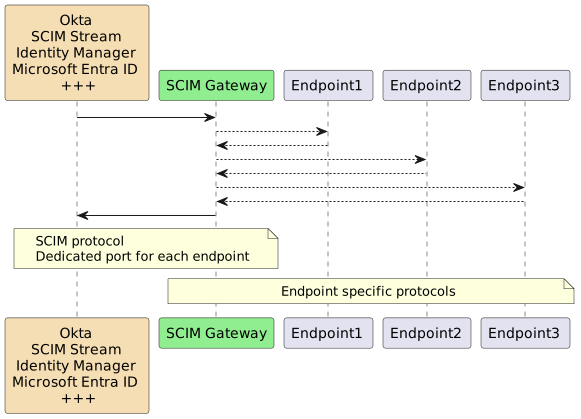
SCIM Gateway is built on the modern, asynchronous, event-driven framework [Bun](https://bun.sh/) or [Node.js](https://nodejs.dev/) using TypeScript/JavaScript. It is designed to be cloud and firewall friendly, runs on nearly all operating systems
The following fully functional plugins are included for demonstration and production use:
| Plugin | Endpoint Type | Description |
| :--- | :--- | :--- |
| **Loki** | NoSQL Database | Transforms the SCIM Gateway into a standalone SCIM endpoint utilizing the internal [LokiJS](https://github.com/techfort/LokiJS) database. Includes two test users and groups |
| **MongoDB** | NoSQL Database | Similar to the Loki plugin, but using an externally managed MongoDB database, showcasing multi-tenant and multi-endpoint capabilities via `baseEntity` |
| **Entra ID** | REST Webservices | Entra ID user provisioning via Microsoft Graph API |
| **SCIM** | REST Webservice | Using plugin Loki as a SCIM provisioning endpoint. May become a SCIM version-gateway (e.g., 1.1 => 2.0) |
| **API** | REST Webservices | A non-SCIM plugin demonstrating API Gateway functionality for custom REST specifications |
| **Soap** | SOAP Webservice | Demonstrates user provisioning to a SOAP-based endpoint with example WSDLs |
| **MSSQL** | Database | Demonstrates user provisioning to an MSSQL database |
| **SAP HANA** | Database | Demonstrates SAP HANA-specific user provisioning |
| **LDAP** | Directory | A fully functional LDAP plugin pre-configured for Microsoft Active Directory |
## Installation
To get started with SCIM Gateway, follow the instructions below.
#### Install Bun
[Bun](https://bun.sh/) is a prerequisite and must be installed
Note, Bun installs by default in the current user’s `HOMEPATH\.bun`. To install it elsewhere, set `BUN_INSTALL=<install-path>` as a global or system environment variable before installing. The installation will add Bun to the current user’s path, but consider adding it to the global or system path for easier access across all users.
#### SCIM Gateway Installation
Create a package directory and install the SCIM Gateway:
mkdir c:\my-scimgateway
cd c:\my-scimgateway
bun init -y
bun install scimgateway
bun pm trust scimgateway
index.ts, lib and config directories containing example plugins are copied to your package. The command `bun pm trust scimgateway` is required to allow the `postinstall` script to copy these files.
#### Startup and verify default Loki plugin
bun c:\my-scimgateway
Start a browser
http://localhost:8880/ping
=> Returns a health check with a "hello" response
http://localhost:8880/Users
http://localhost:8880/Groups
=> Logon using gwadmin/password and two users and groups should be listed
Start a new browser for remote log monitoring
using url: http://localhost:8880/logger
http://localhost:8880/Users/bjensen
http://localhost:8880/Groups/Admins
or
http://localhost:8880/Users?filter=userName eq "bjensen"
http://localhost:8880/Groups?filter=displayName eq "Admins"
=> Lists all attributes for specified user/group
http://localhost:8880/Groups?filter=displayName eq "Admins"&excludedAttributes=members
http://localhost:8880/Groups?filter=members.value eq "bjensen"&attributes=id,displayName,members.value
http://localhost:8880/Users?filter=userName eq "bjensen"&attributes=userName,id,name.givenName
http://localhost:8880/Users?filter=meta.created ge "2010-01-01T00:00:00Z"&attributes=userName,name.familyName,meta.created
http://localhost:8880/Users?filter=emails.value co "@example.com"&attributes=userName,name.familyName,emails&sortBy=name.familyName&sortOrder=descending
=> Filtering and attribute examples
"Ctrl + c" to stop the SCIM Gateway
> For Node.js, the startup command is:
`node --import=tsx ./index.ts`
#### Upgrade Process
The recommended upgrade method is to rename the existing package folder, perform a fresh installation, and then copy your custom `index.ts`, `config`, and `lib` folders from the previous installation.
- Minor Upgrade: `bun install scimgateway`
- Major Upgrade: `bun install scimgateway@latest` (Use with caution, as it may break compatibility with existing custom plugins)
##### Avoid (re-)adding the example plugins created during `postinstall`
For production we do not need example plugins to be incuded by the `postinstall` job
Bun will by default exlude any `postinstall` jobs unless we have trusted the scimgateway package using the `bun pm trust scimgateway` that updates package.json `{ trustedDependencies: ["scimgateway"] }`
For Node.js (and also Bun), we might set the property `scimgateway_postinstall_skip = true` in `.npmrc` or setting environment `SCIMGATEWAY_POSTINSTALL_SKIP = true`
## Configuration
The `index.ts` file defines the plugins to be started.
// start one or more plugins:
import './lib/plugin-entra-id.ts'
export {}
Each endpoint plugin needs a TypeScript file (.ts) and a configuration file (.json).
They both must have the **same naming prefix**. For the Entra ID endpoint, the corresponding files are:
>lib\plugin-entra-id.ts
>config\plugin-entra-id.json
A plugin configuration file has two main JSON objects: `scimgateway` and `endpoint`
{
"scimgateway": {
...
},
"endpoint": {
...
}
}
`scimgateway`: Contains fixed attributes used by the core gateway functionality, such as port, logging, and authentication.
`endpoint`: Contains customized definitions required by the plugin code for communication with the destination system, including host, port, and credentials.
- **port**: The gateway will listen on this port number. Clients, such as a provisioning server, will use this port to communicate with the gateway.
- **localhostonly**: Set to `true` to accept incoming requests only from localhost (127.0.0.1). Set to `false` to accept requests from all clients.
- **chainingBaseUrl**: The base URL for chaining another gateway, with the syntax `http(s)://host:port`. When defined, the gateway behaves like a reverse proxy, validating authorization unless PassThrough mode is enabled. See `Configuration notes` for details.
- **idleTimeout**: The number of seconds to wait before timing out a connection due to inactivity. The default value is 120 seconds.
- **scim.version**: Specifies the SCIM protocol version to use, either "1.1" or "2.0". The default is "2.0".
- **scim.skipTypeConvert**: When set to `true`, multivalue attributes with types (e.g., emails, phoneNumbers, ims, photos, addresses, entitlements, and x509Certificates, but not roles, groups, and members) will not be converted into "type converted objects" when sent to `modifyUser` and `createUser`. This is useful for simplifying attribute checks and for the `endpointMapper` method used by `plugin-ldap` and `plugin-entra-id`. For example:
"emails": {
"work": {"value": "jsmith@example.com", "type": "work"},
"home": {"value": "", "type": "home", "operation": "delete"},
"undefined": {"value": "jsmith@hotmail.com"}
}
When `skipTypeConvert` is set to `true`, the attribute is provided "as-is" as an array, allowing duplicate types including blank types. Values to be deleted are marked with `"operation": "delete"`.
"emails": [
{"value": "jsmith@example.com", "type": "work"},
{"value": "john.smith.org", "type": "home", "operation": "delete"},
{"value": "jsmith@hotmail.com"}
]
- **scim.skipMetaLocation**: When set to `true`, the `meta.location` attribute, which contains the protocol and hostname from the request URL, will be excluded from the response (e.g., `"{...,meta":{"location":"https://my-company.com/<...>"}}`). This is useful when using a reverse proxy and not including the `X-Forwarded-Proto` and `X-Forwarded-Host` headers, as the originator will be the proxy and the internal protocol and hostname should not be exposed.
- **scim.groupMemberOfUser**: When set to `true`, and the request body contains groups, the `groups` attribute will remain on the user object (groups are members of the user). The default behavior is for the user to be a member of the groups, which uses the `modifyGroup` method to maintain group members.
- **scim.usePutSoftSync** - true or false, default false. `PUT /Users/bjensen` will replace the user bjensen with body content. If set to `true`, only PUT body content will be replaced. Any additional existing user attributes and groups supported by plugin will remain as-is.
- **log.loglevel.file** - off, debug, info, warn or error. Default off. Output to plugin-logfile e.g. `logs\plugin-saphana.log`
- **log.loglevel.console** - off, debug, info, warn or error. Default off. Output to stdout and errors to stderr
- **log.loglevel.push** - debug, info, warn or error. Default info. Push to stream used by remote real-time log subscription
- **log.logDirectory** - custom defined log directory e.g. `/var/log/scimgateway` that will override default `<scimgateway path>/logs`. If not exist it will be created.
- **log.customMasking** - array of attributes to be masked e.g. `"customMasking": ["SSN", "weight"]`. By default SCIM Gateway includes masking of some standard attributes like password.
- **log.colorize** - default true, gives colorized and minimized console output, if redirected to stdout/stderr standard JSON formatted output and no colors. Set to false give standard JSON
- **log.maxSize** - default 20 (MB) log file size
- **log.maxFiles** - default 5, keep only the last 5 logs - note, new and rotated file on startup
- **auth** - Contains one or more authentication/authorization methods used by clients for accessing gateway - may also include:
- **auth.xx.readOnly** - true/false, true gives read only access - only allowing `GET` requests for corresponding admin user
- **auth.xx.baseEntities** - array containing one or more `baseEntity` allowed for this user e.g. ["client-a"] - empty array allowing all.
**Methods are disabled by setting corresponding admin user to null or remove methods not used**
- **auth.basic** - Array of one ore more basic authentication objects - Basic Authentication with **username**/**password**. Note, we set a clear text password that will become encrypted when gateway is started.
- **auth.bearerToken** - Array of one or more bearer token objects - Shared token/secret (supported by Entra ID). Clear text value will become encrypted when gateway is started.
- **auth.bearerJwt** - Array of one or more standard JWT objects. Using **secret**, **publicKey**, **wellKnownUri** or **azureTenantId** for signature verification. publicKey should be set to the filename of public key or certificate pem-file located in `<package-root>\config\certs` or absolute path being used. Clear text secret will become encrypted when gateway is started. For JWKS (JSON Web Key Set), the **wellKnownUri** must be set to identity provider well-known URI which will be used for lookup the jwks_uri key. **options.issuer** should normally be set for validation when using secret or publicKey, for JWKS (wellKnownUri), the issuer will be included automatically. Other options may also be included according to the JWT standard. When using Azure Entra ID provisioning through scimgateway, set **azureTenantId** to the Entra tenant id. When using Entra ID application accessing gateway use: `wellKnownUri=https://login.microsoftonline.com/{tenant-id}/v2.0/.well-known/openid-configuration` and `options.audience={application-id}`
- **auth.bearerOAuth** - Array of one or more Client Credentials OAuth configuration objects. **`clientId`** and **`clientSecret`** are mandatory. clientSecret value will become encrypted when gateway is started. OAuth token request url is **/oauth/token** e.g. `http://localhost:8880/oauth/token`
- **auth.passThrough** - Setting **auth.passThrough.enabled=true** will bypass SCIM Gateway authentication. Gateway will instead pass ctx containing authentication header to the plugin. Plugin could then use this information for endpoint authentication and we don't have any password/token stored at the gateway. Note, this also requires plugin binary having `scimgateway.authPassThroughAllowed = true` and endpoint logic for handling/passing ctx.request.header.authorization
- **certificate** - If not using TLS certificate, set "key", "cert" and "ca" to **null**. When using TLS, "key" and "cert" have to be defined with the filename corresponding to the primary-key and public-certificate. Both files must be located in the `<package-root>\config\certs` directory unless absolute path being defined e.g:
"certificate": {
"key": "key.pem",
"cert": "cert.pem",
"ca": "ca.pem" // if several: "ca": ["ca1.pem", "ca2.pem"]
}
Example of how to make a self signed certificate:
openssl req -nodes -newkey rsa:2048 -x509 -sha256 -days 3650 -keyout key.pem -out cert.pem -subj "/O=My Company/OU=Application/CN=SCIM Gateway" -addext "subjectAltName=DNS:localhost,DNS:127.0.0.1,DNS:*.mycompany.com" -addext "extendedKeyUsage=serverAuth" -addext "keyUsage=digitalSignature"
Note, when using Symantec/Broadcom Provisioning, the "certificate authority - CA" also must be imported on the Connector Server. For self-signed certificate, CA and the certificate (public key) is the same.
PFX / PKCS#12 bundle can be used instead of key/cert/ca e.g:
"pfx": {
"bundle": "certbundle.pfx",
"password": "password"
}
Note, we should normally use certificate (https) for communicating with SCIM Gateway unless we install gateway locally on the manager (e.g. on the provisioning Connector Server). When installed on the manager, we could use `http://localhost:port` or `http://127.0.0.1:port` which will not be passed down to the data link layer for transmission. We could then also set {"localhostonly": true}
- **ipAllowList** - Array of one or more IPv4/IPv6 subnets (CIDR) allowed for incoming traffic. E.g. using Entra ID as IdP, we would like to restrict access to IP addresses used by Azure. Azure IP-range can be downloaded from: [https://azureipranges.azurewebsites.net](https://azureipranges.azurewebsites.net), enter **AzureActiveDirectory** in the search list and select JSON download. Copy the "addressPrefixes" array content and paste into ipAllowList array. CIDR single IP-host syntax is a.b.c.d/32. Note, front-end HTTP proxy or a load balancer must include client IP-address in the **X-Forwarded-For** header. Configuration example:
"ipAllowList": [
"13.64.151.161/32",
"13.66.141.64/27",
...
"2603:1056:2000::/48",
"2603:1057:2::/48"
]
- **email** - Sending email from plugin or automated error notifications emailOnError. For emailOnError only the first error will be sent until sendInterval have passed. Supporting both SMTP Auth and modern REST OAuth. For OAuth, currently Microsoft Exchange Online (ExO) and Google Workspace Gmail are supported - see configuration notes
- **email.auth** - Authentication configuration
- **email.auth.type** - `oauth` or `smtp`
- **email.auth.options** - Authentication options - note, different options for type oauth and smtp
- **email.auth.options.azureTenantId (oauth/ExO)** - Entra tenant id or domain name
- **email.auth.options.clientId (oauth/ExO)** - Entra OAuth application Client ID
- **email.auth.options.clientSecret (oauth/ExO)** - Entra OAuth application Client Secret
- **email.auth.options.serviceAccountKeyFile (oauth/Gmail)** - Google Service Account key json-file name located in the `package-root>\config\certs` directory unless absolute path being defined
- **email.auth.options.host (smtp)** - Mailserver e.g. "smtp.gmail.com" - mandatory for smtp
- **email.auth.options.port (smtp)** - Port used by mailserver e.g. 587, 25 or 465 - mandatory for smtp
- **email.auth.options.username (smtp)** - Mail account for authentication normally same as sender of the email, e.g. "user@gmail.com"
- **email.auth.options.password (smtp)** - Mail account password
- **email.proxy** - Proxy configuration if using mailproxy
- **email.proxy.host** - Proxy host e.g. `http://proxy-host:1234`
- **email.proxy.username** - username if authentication is required
- **email.proxy.password** - password if authentication is required
- **email.emailOnError** - Contains configuration for sending error notifications by email. Note, only the first error will be sent until sendInterval have passed
- **email.emailOnError.enabled** - true or false, value set to true will enable email notifications
- **email.emailOnError.sendInterval** - Default 15. Mail notifications on error are deferred until sendInterval **minutes** have passed since the last notification
- **email.emailOnError.from** - Sender email addresses e.g: "noreply@example.com". **Mandatory for oauth**. For smtp email.auth.options.username will be used
- **email.emailOnError.to** - Comma separated list of recipients email addresses e.g: "someone@example.com"
- **email.emailOnError.cc** - Optional comma separated list of cc mail addresses
- **email.emailOnError.subject** - Optional mail subject, default `SCIM Gateway error message`
- **azureRelay** - Azure Relay outbound listener
- **azureRelay.enabled** - true or false, true will enable the Azure Relay listener
- **azureRelay.connectionUrl** - `https://<namespace-name>.servicebus.windows.net/<hybrid-connection-name>` - `<namespace-name>` is the name of the Relay created and `<hybrid-connection-name>` is the name of the Hybrid Connection entity created in the Relay
- **azureRelay.apiKey** - The `Private Key` found in the `Shared access policy` (RootManageSharedaccessKey)
- **azureRelay.keyRule** - Optional, the `Shared access policy` name - default using `RootManageSharedaccessKey`
- **stream** - See [SCIM Stream](https://elshaug.xyz/docs/scim-stream) for configuration details
- **endpoint** - Contains endpoint specific configuration according to customized **plugin code**.
### Configuration notes - general
- Custom Schemas, ServiceProviderConfig and ResourceType can be used if `./lib/scimdef-v2.json or scimdef-v1.json` exists. Original scimdef-v2.json/scimdef-v1.json can be copied from node_modules/scimgateway/lib to your plugin/lib and customized.
- Using reverse proxy and we want ipAllowList and correct meta.location response, following headers must be set by proxy: `X-Forwarded-For`, `X-Forwarded-Proto` and `X-Forwarded-Host`
- Setting environment variable `SEED` with some random characters will override default password seeding logic. This also allow copying configuration file with encrypted secrets from one machine to another.
- All configuration can be set based on environment variables. Syntax will then be `"process.env.<ENVIRONMENT>"` where `<ENVIRONMENT>` is the environment variable used. E.g. scimgateway.port could have value "process.env.PORT", then using environment variable PORT.
- All configuration values can be moved to a single external file having JSON dot notation content with plugin name as parent JSON object. Syntax in original configuration file used by the gateway will then be `"process.file.<path>"` where `<path>` is the file used. E.g. key endpoint.password could have value "process.file./var/run/vault/secrets.json"
- All configuration values can be moved to multiple external files, each file containing one single value. Syntax in original configuration file used by the gateway will then be `"process.text.<path>"` where `<path>` is the file which contains raw (`UTF-8`) character value. E.g. key endpoint.password could have value "process.text./var/run/vault/endpoint.password".
Example:
{
"scimgateway": {
...
"port": "process.env.PORT",
...
"loglevel": {
"file": "process.env.LOG_LEVEL_FILE",
...
"auth": {
"basic": [
{
"username": "process.file./var/run/vault/secrets.json",
"password": "process.file./var/run/vault/secrets.json"
},
...
],
"bearerJwt": [
"secret": "process.text./var/run/vault/jwt.secret",
"publicKey": "process.text./var/run/vault/jwt.pub",
...
],
...
},
"endpoint": {
...
"username": "process.file./var/run/vault/secrets.json",
"password": "process.file./var/run/vault/secrets.json",
...
}
}
jwt.secret file content example:
thisIsSecret
secrets.json file content example for plugin-soap:
{
"plugin-soap.scimgateway.auth.basic[0].username": "gwadmin",
"plugin-soap.scimgateway.auth.basic[0].password": "password",
"plugin-soap.endpoint.username": "superuser",
"plugin-soap.endpoint.password": "secret"
}
### Configuration notes - Email, using Microsoft Exchange Online (ExO)
- Entra ID application must have application permissions `Mail.Send`
- To prevent the sending of emails from any defined mailboxes, an ExO `ApplicationAccessPolicy` must be defined through PowerShell.
First create a mail-enabled security-group that only includes those users (mailboxes) the application is allowed to send from
Note, `mail enabled security group` cannot be created from portal, only from admin or admin.exchange console
##Connect to Exchange
Install-Module -Name ExchangeOnlineManagement
Connect-ExchangeOnline
##Create ApplicationAccessPolicy
New-ApplicationAccessPolicy -AppId <AppClientID> -PolicyScopeGroupId <MailEnabledSecurityGrpId> -AccessRight RestrictAccess -Description "Restrict app to specific mailboxes"
### Configuration notes - Email, using Google Workspace Gmail
- https://console.cloud.google.com
- IAM & Admin > Service Accounts > Create Service Account
- Name=email-sender
- Create and Continue
- Grant this service account access to project - not needed
- Grant users access to this service - not needed
- IAM & Admin > Service Accounts > "email-sender" account > Keys
- Add Key > Create new key > JSON
- download json Service Account Key file, refere to configuration `email.auth.options.serviceAccountKeyFile`
- https://admin.google.com
- Security > Access and data control > API controls
- Manage Domain Wide Delegation > Add new
- Client ID = id of service account created
- OAuth scope = `https://www.googleapis.com/auth/gmail.send`
- https://admin.google.com
- Billing > Subscriptions - verify Google Workspace license
- Directory > Users > "user"
- Licenses > Edit > enable Google Workspace license
`email.emailOnError.from` mail address must have Google Workspace license
### Configuration notes - Gateway chainging and chainingBaseUrl
By configuring the `chainingBaseUrl`, it is possible to chain multiple gateways in sequence, such as `gateway1->gateway2->gateway3->endpoint`. In this setup, gateway behave much like a reverse proxy, validating authorization at each step unless PassThrough mode is enabled. Chaining is also supported in stream subscriber mode
{
"scimgateway": {
...
"chainingBaseUrl": "https:\\gateway2:8880",
...
"auth": {
...
"passThrough": {
"enabled": false,
"readOnly": false,
"baseEntities": []
}
...
}
},
...
}
Using above configuration example on gateway1, incoming requests will be routed to `https:\\gateway2:8880`
The plugin and its associated authentication configuration can mirror the setup running on the final gateway. However, in chaining mode, the plugin binary is used solely for initializing and configuring the gateway. This allows for the use of a simplified `plugin-<name>.ts` binary containing only the essential mandatory components:
// start - mandatory plugin initialization
const ScimGateway: typeof import('scimgateway').ScimGateway = await (async () => {
try {
return (await import('scimgateway')).ScimGateway
} catch (err) {
const source = './scimgateway.ts'
return (await import(source)).ScimGateway
}
})()
const scimgateway = new ScimGateway()
const config = scimgateway.getConfig()
scimgateway.authPassThroughAllowed = false
// end - mandatory plugin initialization
Using `scimgateway.authPassThroughAllowed = true` and `plugin-<name>.json` configuration `scimgateway.auth.passThrough=true` enables Authentication PassTrhough
### Configuration notes - HelperRest used by plugins
For REST endpoints, plugins may use HelperRest to simplify authentication and communication
doRequest() executes REST request and return response
`doRequest(<baseEntity>, <method>, <path>, <body>, <ctx>, <options>)`
* baseEntity - 'undefined' if not used and must correspond with endpoint configuration that defines baseUrls and connection options.
* method - GET, PATCH, PUT, DELETE
* path - either full url or just the path that will be added to baseUrl. Using full url will override baseUrl. Using path is preferred because of auth caching logic and simplicity
* body - optional body to be used
* ctx - optional, passing authorization header if Auth PassThrough is enabled
* opt - optional, connection options that will extend/override any endpoint.entity.undefined.connection definitions
Configuration showing connection settings:
{
"scimgateway": {
...
}
"endpoint": {
"entity": {
"undefined": {
"connection": {
"baseUrls": [],
"auth": {
"type": "xxx",
"options": {
...
"jwtPayload": {},
"samlPayload": {},
"tls": {} // files located in ./config/certs
}
},
"options": {
"headers": {},
"tls": {} // files located in ./config/certs
},
"proxy": {}
}
}
}
}
}
* baseUrls - Endpoint URL. Several may be defined for failower. There are retry logic on connection failures
* auth.type - defines authentication being used: `basic`, `oauth`, `token`, `bearer`, `oauthSamlBearer` or `oauthJwtBearer`
* auth.options - for each valid type there are different options. azureTenantId is special for Entra ID and serviceAccountKeyFile is special for Google. Using these will simplify and reduce options to be included. Also note we do not need to include baseUrls when using azureTenantId/serviceAccountKeyFile as long as endpoint is Entra ID (Microsoft Graph) or Google.
Example using basic auth:
"connection": {
"baseUrls": [
"https://localhost:8880"
],
"auth": {
"type": "basic",
"options": {
"username": "gwadmin",
"password": "password"
}
},
"options": {
"tls": {
"rejectUnauthorized": false,
"ca": "ca.pem"
}
}
}
Example Entra ID (plugin-entra-id) using clientId/clientSecret:
"connection": {
"baseUrls": [],
"auth": {
"type": "oauth",
"options": {
"azureTenantId": "<tenantId>",
"clientId": "<clientId>",
"clientSecret": "<clientSecret>"
}
}
}
Example Entra ID (plugin-entra-id) using certificate secret:
"connection": {
"baseUrls": [],
"auth": {
"type": "oauthJwtBearer",
"options": {
"azureTenantId": "<tenantId>",
"clientId": "<clientId>",
"tls": {
"key": "key.pem",
"cert": "cert.pem"
}
}
}
}
Example Entra ID (plugin-entra-id) using federated credentials:
"connection": {
"baseUrls": [],
"auth": {
"type": "oauthJwtBearer",
"options": {
"azureTenantId": "<tenantId>",
"fedCred": {
"issuer": "<https://FQDN-scimgateway>",
"subject": "<entra id application object id - client id>",
"name": "<entra id federated credentials unique name>"
}
}
}
}
// Note, fedCred configuration must match corresponding configuration in Entra ID Application - Certificates & Secrets - Federated credentials - scenario "Other issuer"
// example issuer: "https://scimgateway.my-company.com" note, this scimgateway base URL must be reachable from the internet
// example name: "plugin-entra-id"
Example using general OAuth:
"connection": {
"baseUrls": [<"endpointUrl">],
"auth": {
"type": "oauth",
"options": {
"tokenUrl": "<tokenUrl>"
"clientId": "<clientId>",
"clientSecret": "<clientSecret>"
}
}
}
Please see code editor method HelperRest doRequest() IntelliSense for type and option details
### Configuration notes - Remote real-time log subscription
Using remote real-time log subscription we may implement custom logic like monitoring and centralized logging
- browser and url: https://host/logger
- curl with -u or -H "Authorization: Bearer secret"
```
curl -Ns http://localhost:8880/logger -u gwadmin:password | awk '
/^data: / {sub(/^data: /,""); printf "%s", $0; last=1; next}
/^$/ {if (last) print ""; last=0}
'
```
- custom client API (see example below)
- not supported by Azure Relay
We may configure read-only user/secret for log collection purpose
"auth": {
"basic": [
{
"username": "gwadmin",
"password": "password",
"readOnly": false,
"baseEntities": []
},
{
"username": "gwread",
"password": "password",
"readOnly": true,
"baseEntities": []
}
],
"bearerToken": [
{
"token": "secret",
"readOnly": true,
"baseEntities": []
}
],
...
}
Remote log subscription is configured by log.loglevel.push and the push logger has default loglevel set to `info`
Example using debug loglevel:
"log": {
"loglevel": {
"push": "debug"
}
}
Example code implementing remote real-time log subscription and custom message handling
```
//
// usage: bun <scriptname.ts>
// update url and the auth according to environment used
//
const username = "gwadmin"
const password = "password"
const url = "http://localhost:8880/logger"
const headers = new Headers({
Authorization: "Basic " + btoa(`${username}:${password}`),
Accept: "text/event-stream"
})
// message handling and custom logic
// we could also do JSON.parse(message) and granular filtering on log "level"
const messageHandler = async (message: string) => {
console.log(message)
}
async function startup() {
while (true) {
try {
const resp = await fetch(url, { headers });
if (!resp.ok || !resp.body) {
console.error(`❌ Response error: ${resp.status} ${resp.statusText}`)
await Bun.sleep(10_000)
continue
}
console.log('✅ Now awaiting log events...\n')
const reader = resp.body.pipeThrough(new TextDecoderStream()).getReader()
while (true) {
const { value, done } = await reader.read()
if (done) break
if (!value.startsWith('data: ')) continue
const i = value.indexOf("\n\n")
if (i < 1) continue
const msg = value.slice(6, i)
messageHandler(msg)
}
console.error("⚠️ Connection closed");
await Bun.sleep(10_000)
} catch (err: any) {
console.error("❌ Connection error:", err?.message || err)
await Bun.sleep(10_000)
}
}
}
startup()
```
### Configuration notes - Azure Relay
Using Azure technology we have different options for setting up a communication tunnel to SCIM Gateway:
- `Microsoft Entra Application Proxy + Microsoft Entra Application Proxy Connector` (SCIM Gateway located on-premises or using Azure private VNet/IP)
- `Azure Application Gateway` - Layer 7 (SCIM Gateway located in Azure)
- `Azure Relay` (SCIM Gateway located on-premises or in Azure)
SCIM Gateway have builtin [Azure Relay](https://learn.microsoft.com/en-us/azure/azure-relay/relay-what-is-it) support which gives secure and hassle-free outbound communication — with just one minute of configuration
Azure pricing for using Azure Relay is approx. 10$ per month for each listener (SCIM Gateway plugin)
**Using out-of-the-box Azure Relay:**
- Prerequisite: SCIM Gateway having outbound internet access (https/443)
- In Azure create a `Relay` - `<namespace-name>`
- In the Relay, create an entity of type `Hybrid Connection` - `<hybrid-connection-name>` **one for each SCIM Gateway plugin**
- The `Requires Client Authorization` option **should be unchecked (not activated)**, unless we are using custom IdP/API having logic for including SAS-token in the communication header
- Shared access policies - RootManageSharedaccessKey - Primary Key (copy this one)
Instead of RootManageSharedaccessKey policy in the `<namespace-name>`, we could create dedicated policy in the sub level `<hybrid-connection-name>` and use this policy name in plugin configuration `scimgateway.azureRelay.keyRule`
SCIM Gateway plugin configuration:
```
{
"scimgateway: {
...
"azureRelay": {
"enabled": true,
"connectionUrl": "https://<namespace-name>.servicebus.windows.net/<hybrid-connection-name>",
"apiKey": "<primary-key>"
},
...
},
...
}
````
`connectionUrl` will be the SCIM base URL used by IdP/API for accessing SCIM Gateway
Example:
GET `https://<namespace-name>.servicebus.windows.net/<hybrid-connection-name>/Users`
GET `https://<namespace-name>.servicebus.windows.net/<hybrid-connection-name>/<baseEntity>/Users`
If several SCIM Gateway´s (same plugin) connect listeners using the same Azure Relay connectionUrl, there will be load-balancing and round-robin distribution
### Configuration notes - running SCIM Gateway as a single binary
Bun binary build allowing SCIM Gateway to be compiled into a single executable binary for simplified deployment and execution. The binary must have the same name (prefix) as the configuration file in the config directory, and this directory must be located in the same folder as the binary.
cd my-scimgateway
bun build --compile ./lib/plugin-loki.ts --target=bun-darwin-arm64 --outfile ./build/plugin-loki
# for target options, see: https://bun.com/docs/bundler/executables#cross-compile-to-other-platforms
cp -r ./config ./build
# build directory now ready for production deployment
cd build
# run the binary - note, binary must have same name (prefix) as the configuration file in the config directory
./plugin-loki
## Manual startup
Gateway can be started from a command window running in administrative mode
3 ways to start:
bun c:\my-scimgateway
bun c:\my-scimgateway\index.ts
<package-root>bun .
<kbd>Ctrl</kbd>+<kbd>c</kbd> to stop
## Automatic startup - Windows Task Scheduler
Start Windows Task Scheduler (taskschd.msc), right click on "Task Scheduler Library" and choose "Create Task"
General tab:
-----------
Name = SCIM Gateway
User account = SYSTEM
Run with highest privileges
Triggers tab:
-------------
Begin the task = At startup
Actions tab:
------------
Action = Start a program
Program/script = <install path>\bun.exe
Arguments = c:\my-scimgateway
Settings - tab:
---------------
Stop the task if runs longer than = Disabled (greyed out)
Verification:
- Right click task - **Run**, verify process node.exe (SCIM Gateway) can be found in the task manager (not the same as task scheduler). Also verify logfiles `<pakage-root>\logs`
- Right click task - **End**, verify process node.exe have been terminated and disappeared from task manager
- **Reboot** server and verify SCIM Gateway have been automatically started
## Running as a isolated virtual Docker container
Installing Docker Desktop may be an alternative for creating and testing docker images and containers
There are two options: run SCIM Gateway in a single image, or use Docker Compose, which allows configuration and data outside the image and including other images as dependencies (e.g., MSSQL)
### Docker single image
- Install SCIM Gateway within your own package and copy provided docker files:
```
mkdir /opt/my-scimgateway
cd /opt/my-scimgateway
bun init -y
bun install scimgateway
bun pm trust scimgateway
cp ./config/docker/* .
```
**Dockerfile** <== Main dockerfile
**.dockerignore** <== Files to exclude from the build context
- Build docker images
`docker build --platform linux/amd64 --force-rm=true -t my-scimgateway:1.0.0 .`
- Create container
`docker create --init --ulimit memlock=-1:-1 --name my-scimgateway -p 8880:8880 my-scimgateway:1.0.0`
Note, consider using `-e SEED=<random-characters>` and plugin configuration file my-scimgateway.json must already be encrypted using same SEED environment
- Start container
`docker start my-scimgateway`
- Stop container
`docker stop my-scimgateway`
### Docker image using docker-compose
* Docker Pre-requisites:
**docker-ce
docker-compose**
- Install SCIM Gateway within your own package and copy provided docker files:
```
mkdir /opt/my-scimgateway
cd /opt/my-scimgateway
bun init -y
bun install scimgateway
bun pm trust scimgateway
cp ./config/docker/* .
```
**docker-compose.yml** <== Here is where you would set the exposed port and environment
**Dockerfile** <== Main dockerfile
**DataDockerfile** <== Handles volume mapping
**docker-compose-debug.yml** <== Debugging
**docker-compose-mssql.yml** <== Example including MSSQL docker image
**.dockerignore** <== Files to exclude from the build context
- Create a scimgateway user on your Linux VM.
`adduser scimgateway`
- Create a directory on your VM host for the scimgateway configs:
`mkdir /home/scimgateway/config`
- Copy your updated configuration file e.g. /opt/my-scimgateway/config/plugin-loki.json to /home/scimgateway/config. Use scp to perform the copy.
NOTE: /home/scimgateway/config is where all important configuration and loki datastore will reside outside of the running docker container. If you upgrade scimgateway you won't lose your configurations and data.
- Build docker images and start it up
`docker-compose up --build -d`
NOTE: Add the -d flag to run the command above detached.
Be sure to confirm that port 8880 is available with a simple http request
If using default plugin-loki and we have configured `{"persistence": true}`, we could confirm scimgateway created loki.db:
```
su scimgateway
cd /home/scimgateway/config
ls loki.db
```
To list running containers information:
`docker ps`
To list available images:
`docker images`
To view the logs:
`docker logs scimgateway`
To execute command within your running container:
`docker exec scimgateway <bash command>`
To stop scimgateway:
`docker-compose stop`
To restart scimgateway:
`docker-compose start`
To debug running container (using Visual Studio Code):
`docker-compose -f docker-compose.yml -f docker-compose-debug.yml up -d`
Start Visual Studio Code and follow [these](https://code.visualstudio.com/docs/nodejs/nodejs-debugging) debugging instructions
To upgrade scimgateway docker image (remove the old stuff before running docker-compose up --build):
docker rm scimgateway
docker rm $(docker ps -a -q); docker rmi $(docker images -q -f "dangling=true")
## Entra ID as IdP using SCIM Gateway
Entra ID could do automatic user provisioning by synchronizing users towards SCIM Gateway, and gateway plugins will update endpoints.
Plugin configuration file must include **SCIM Version "2.0"** (scimgateway.scim.version) and either **Bearer Token** (scimgateway.auth.bearerToken[x].token) or **Entra ID Tenant ID** (scimgateway.auth.bearerJwt[x].azureTenantId) or both:
scimgateway: {
"scim": {
"version": "2.0",
...
},
...
"auth": {
"bearerToken": [
{
"token": "shared-secret"
}
],
"bearerJwt": [
{
"azureTenantId": "xxxxxxxx-xxxx-xxxx-xxxx-xxxxxxxxxxxx"
}
]
}
...
}
`token` configuration must correspond with "Secret Token" defined in Entra ID
`azureTenantId` configuration must correspond with Entra ID Tenant ID
In Azure Portal:
`Azure-Microsoft Entra ID-Enterprise Application-<My Application>-Provisioning-Secret Token`
Note, when "Secret Token" is left blank, Azure will use JWT (azureTenantId)
`Azure-Microsoft Entra ID-Overview-Tenant ID`
User mappings attributes between AD and SCIM also needs to be configured
`Azure-Microsoft Entra ID-Enterprise Application-<My Application>-Provisioning-Edit attribute mappings-Mappings`
Entra ID default SCIM attribute mapping for **USER** must have:
userPrincipalName mapped to userName (matching precedence #1)
Entra ID default SCIM attribute mapping for **GROUP** must have:
displayName mapped to displayName (matching precedence #1)
members mapped to members
Some notes related to Entra ID:
- Entra ID SCIM [documentation](https://learn.microsoft.com/en-us/entra/identity/app-provisioning/use-scim-to-provision-users-and-groups)
- For using OAuth/JWT credentials, Entra ID configuration "Secret Token" (bearer token) should be blank. Plugin configuration must then include bearerJwt.azureTenantId. Click "Test Connection" in Azure to verify
- Entra ID do a regular check for a "non" existing user/group. This check seems to be a "keep alive" to verify connection.
- Entra ID first checks if user/group exists, if not exist they will be created (no explore of all users like CA Identity Manager)
- Deleting a user in Entra ID sends a modify user `{"active":"False"}` which means user should be disabled. This logic is default set in attribute mappings expression rule `Switch([IsSoftDeleted], , "False", "True", "True", "False")`. Standard SCIM "DELETE" method seems not to be used.
## Symantec Identity Manager as IdP using SCIM Gateway
Using Symantec/Broadcom Identity Manger, plugin configuration must use **SCIM Version "1.1"** (scimgateway.scim.version).
In the Provisioning Manager we could use `Endpoint type = SCIM (DYN Endpoint)` or create our own custom endpoint type based on this one
SCIM endpoint configuration example for Loki plugin (plugin-loki)
Endpoint Name = Loki-8880
User Name = gwadmin
Password = password
SCIM Authentication Method = HTTP Basic Authentication
SCIM Based URL = http://localhost:8880
or:
SCIM Based URL = http://localhost:8880/<baseEntity>
Username, password and port must correspond with plugin configuration file. For "Loki" plugin it will be `config\plugin-loki.json`
"SCIM Based URL" refer to the FQDN (or localhost) having SCIM Gateway installed. Portnumber must be included. Use HTTPS instead of HTTP if SCIM Gateway configuration includes certificates.
"baseEntity" is optional. This is a parameter used for multi tenant or multi endpoint solutions. We could create several endpoints having same base url with unique baseEntity. e.g:
http://localhost:8880/client-a
http://localhost:8880/client-b
Each baseEntity should then be defined in the plugin configuration file with custom attributes needed. Please see examples in plugin-soap.json
## Entra ID provisioning
Using plugin-entra-id we could do user provisioning towards Entra ID
For testing purposes we could get an Azure free account
### Entra ID configuration
- Logon to [Azure](https://portal.azure.com) as global administrator
- Microsoft Entra ID - App registrations
- Click "New registration"
- Name = SCIM Gateway Inbound
- Select: Accounts in this organizational directory only
- Click "Register"
- Overview:
- Copy "Application (client) ID"
- Copy "Directory (tentant) ID"
- Certificates & secrets:
- Click "New client secret"
- Description = SCIM Gateway Inbound secret#1
- Select an appropriate "Expires"
- Click "Add"
- Copy "Value" of the new secret that was created
- API permissions: - Add a permission - Microsoft Graph - Application permissions
- Optionally remove any defaults included e.g. User.Read
- Click "Add a permission"
- Microsoft Graph
- Application permissions
- Directory - Directory.ReadWriteAll
- Organization - Organization.ReadWrite.All
- Click "Add permissions"
- API permissions: - Grant Admin consent
Or we could go to Enterprise application to grant these consents:
- Microsoft Entra ID - Enterprise applications - SCIM Gateway Inbound
- Permissions:
- Click "Grant admin consent for [tenant name]"
- In the logon dialog, logon as global administrator
- In permissions request dialog, click "Accept"
- C