saas-subscription-helper
Version:
A helper package for integrating Stripe Payment Links with Supabase in SaaS applications.
797 lines (637 loc) • 26.5 kB
Markdown
# SaaS Subscription Helper 💳
<p align="center">
<img src="https://upload.wikimedia.org/wikipedia/commons/thumb/b/ba/Stripe_Logo%2C_revised_2016.svg/2560px-Stripe_Logo%2C_revised_2016.svg.png" alt="Stripe" height="40" style="display: inline-block; margin-right: 20px"/>
<img src="https://images.seeklogo.com/logo-png/43/1/supabase-logo-png_seeklogo-435677.png?v=1957124687587900112" alt="Supabase" height="40" style="display: inline-block"/>
</p>
<p align="center">
<a href="https://www.npmjs.com/package/saas-subscription-helper">
<img src="https://img.shields.io/npm/v/saas-subscription-helper.svg?style=flat-square" alt="NPM version"/>
</a>
</p>
<p align="center">
<a href="https://github.com/richardsondx/saas-subscription-helper">
<img src="https://img.shields.io/github/stars/richardsondx/saas-subscription-helper?style=social" alt="GitHub stars"/>
</a>
</p>
SaaS Subscription Helper is an open-source Node.js package designed to streamline Stripe and Supabase integration in your SaaS applications. It focuses on handling subscription updates, cancellations, and syncing data with your database.
View this project on GitHub: [https://github.com/richardsondx/saas-subscription-helper](https://github.com/richardsondx/saas-subscription-helper)
## Features
- Webhook handling for subscription events
- Subscription status syncing between Stripe and Supabase
- Plan changes (upgrades/downgrades)
- Subscription cancellation
- Trial period support
- Debug logging
## API Reference
### Subscription Management
#### Change Plan (upgrade or downgrade)
```js
const result = await subscriptionHelper.changeUserPlan('user@example.com', 'price_new');
```
- Changes a user's subscription plan
- Handles both upgrades and downgrades
- Preserves trial periods if configured
- Returns detailed result object
Upgrades a user's subscription to a new plan
#### Cancel Subscription
```js
const result = await subscriptionHelper.cancelUserSubscription('user@example.com');
```
### How It Works ( A 5 minute setup)
1. Install the package 📦
2. Add environment variables for Stripe and Supabase 🔑
3. Set Up Webhook Endpoint 🔄
4. Create Payment Links in Stripe, add the links to your app 💳
5. Test the webhook locally using the Stripe CLI 🔄
DONE ✅ ☕️
The experience is seamless for you and your users:
- User Pays via Payment Link: You can easily create payment links in Stripe, where the user's email is captured.
- Stripe Webhook Triggers: Stripe sends updates (e.g., subscription.updated) to your webhook endpoint which the package handles for you.
- Helper Syncs Supabase: The package updates your Supabase table with the user's subscription details, keeping your app in sync.
- Subscriptions Management: Adding upgrade, dowgrade and cancellation logic is as easy as adding a link to your app.
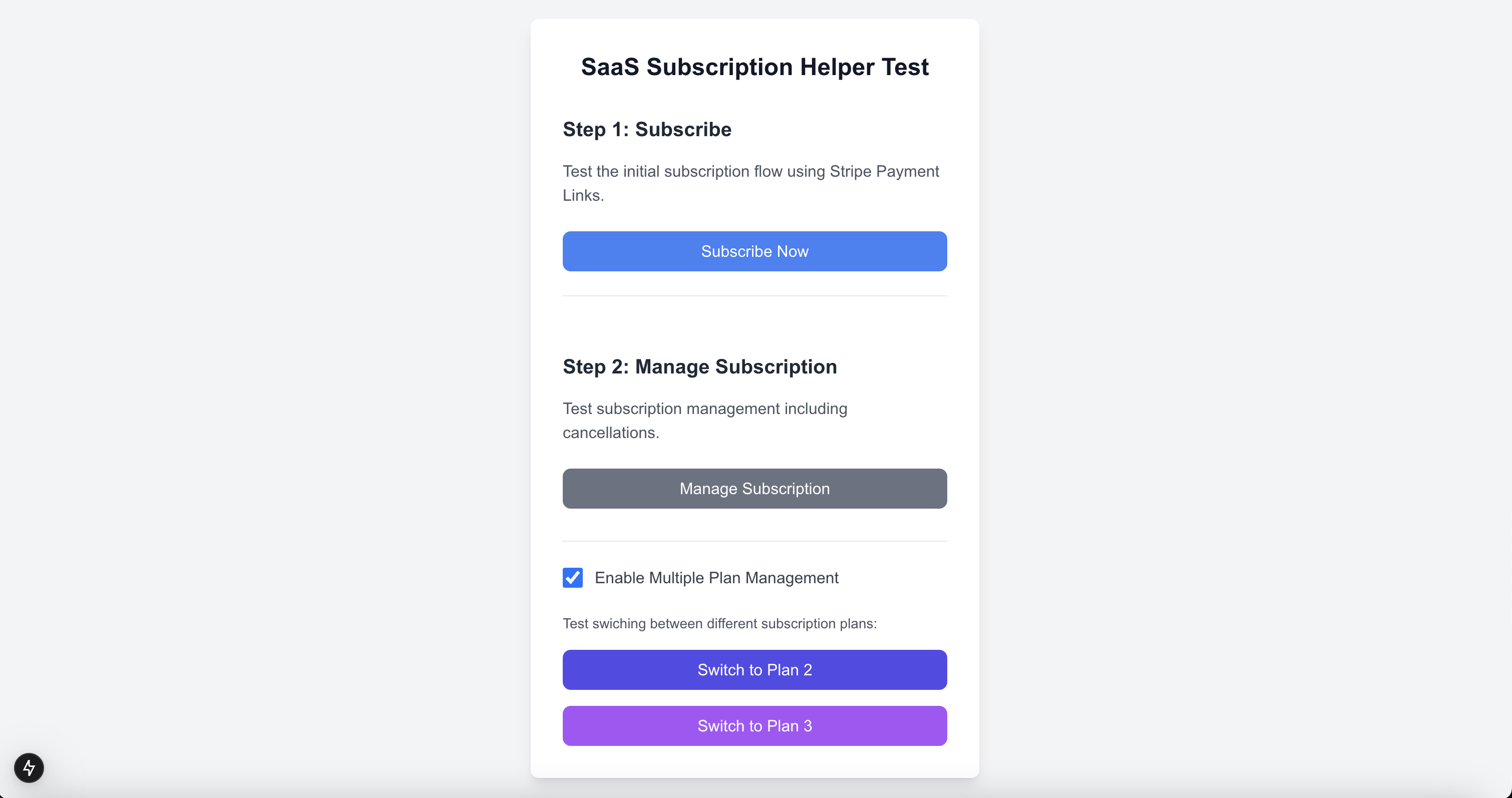
▶️ View test project where we used the package here: https://github.com/richardsondx/subscription-helper-demo
[](https://gyazo.com/2c75e13f6e5dcbb62e076b19ea71b4d6)
## Installation
```bash
npm install saas-subscription-helper
```
Make sure you have the following dependencies installed:
```bash
npm install stripe
npm install @supabase/supabase-js
```
## Quick Setup
### 1. Initialize the Helper
Create a shared configuration file that you'll use throughout your application:
```javascript
// lib/subscription.js
import { SubscriptionHelper } from 'saas-subscription-helper';
export const subscriptionHelper = new SubscriptionHelper({
stripeApiKey: process.env.STRIPE_SECRET_KEY,
supabaseUrl: process.env.SUPABASE_URL,
supabaseKey: process.env.SUPABASE_SERVICE_KEY,
table: 'users',
emailField: 'email',
subscriptionField: 'subscription_status',
});
```
### 2. Set Up Webhooks
Add the webhook endpoint to your app:
```javascript
// app/api/webhooks/route.js
import { subscriptionHelper } from '@/lib/subscription';
export async function POST(req) {
try {
const rawBody = await req.text();
const stripeSignature = req.headers.get('stripe-signature');
const response = await subscriptionHelper.handleWebhooks({
rawBody,
stripeSignature,
headers: Object.fromEntries(req.headers)
});
return new Response(JSON.stringify({ received: true }));
} catch (error) {
console.error('Error processing webhook:', error);
return new Response(
JSON.stringify({ error: error.message }),
{ status: 400 }
);
}
}
```
Test your webhook locally using the Stripe CLI:
```bash
stripe login
```
```bash
stripe listen --forward-to localhost:3000/api/
webhooks
```
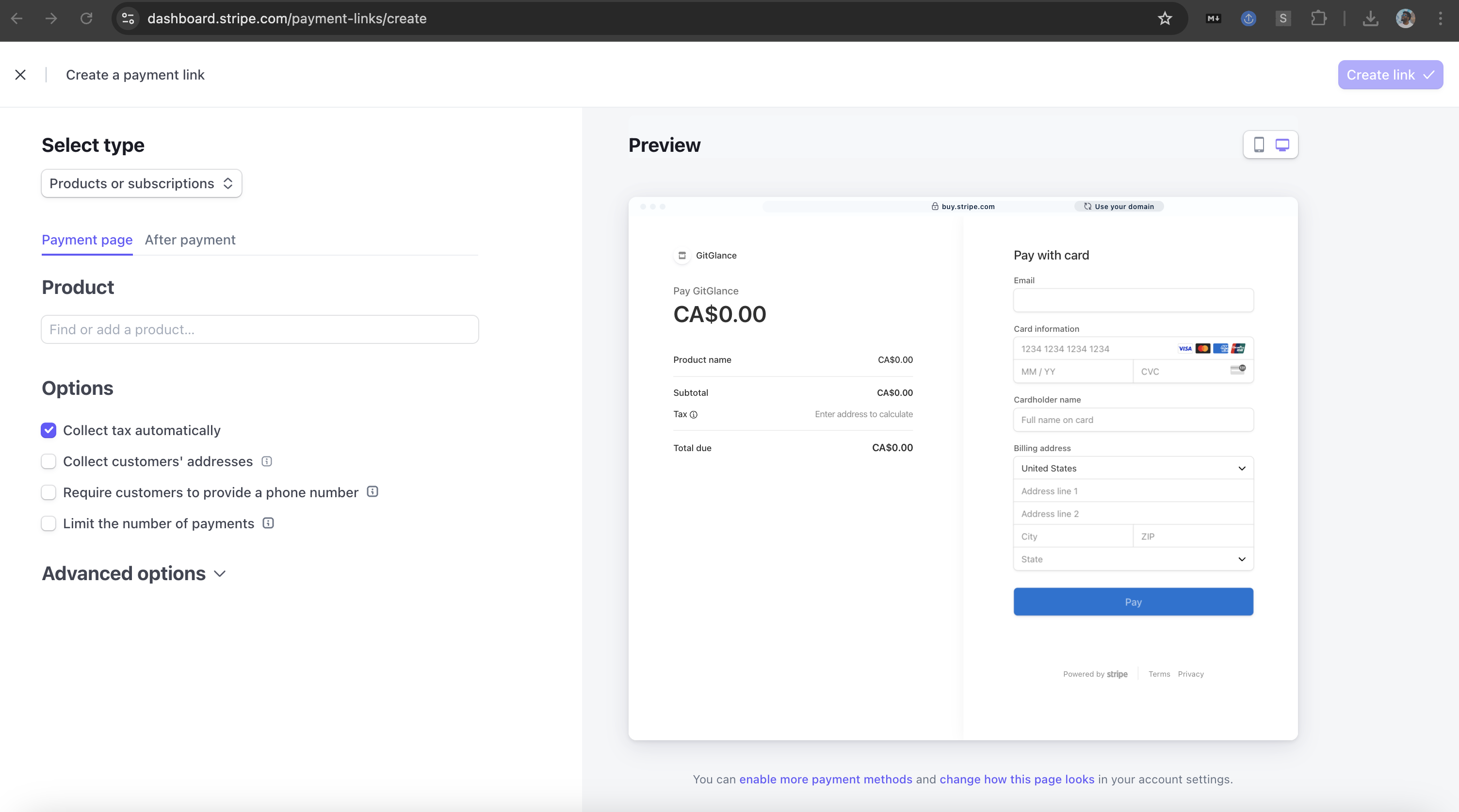
### 3. Create Payment Links
[](https://gyazo.com/d08642d79c353807e8b429a0e1b2ad47)
**Stripe Payment Links** allow you to generate URLs for your
subscription plans.
Here’s how to set them up for development and production
environments.
#### Development:
1. Go to the Stripe Dashboard (Test Mode).
2. Create a Payment Link:
- Set up your products and pricing.
- Generate a Payment Link.
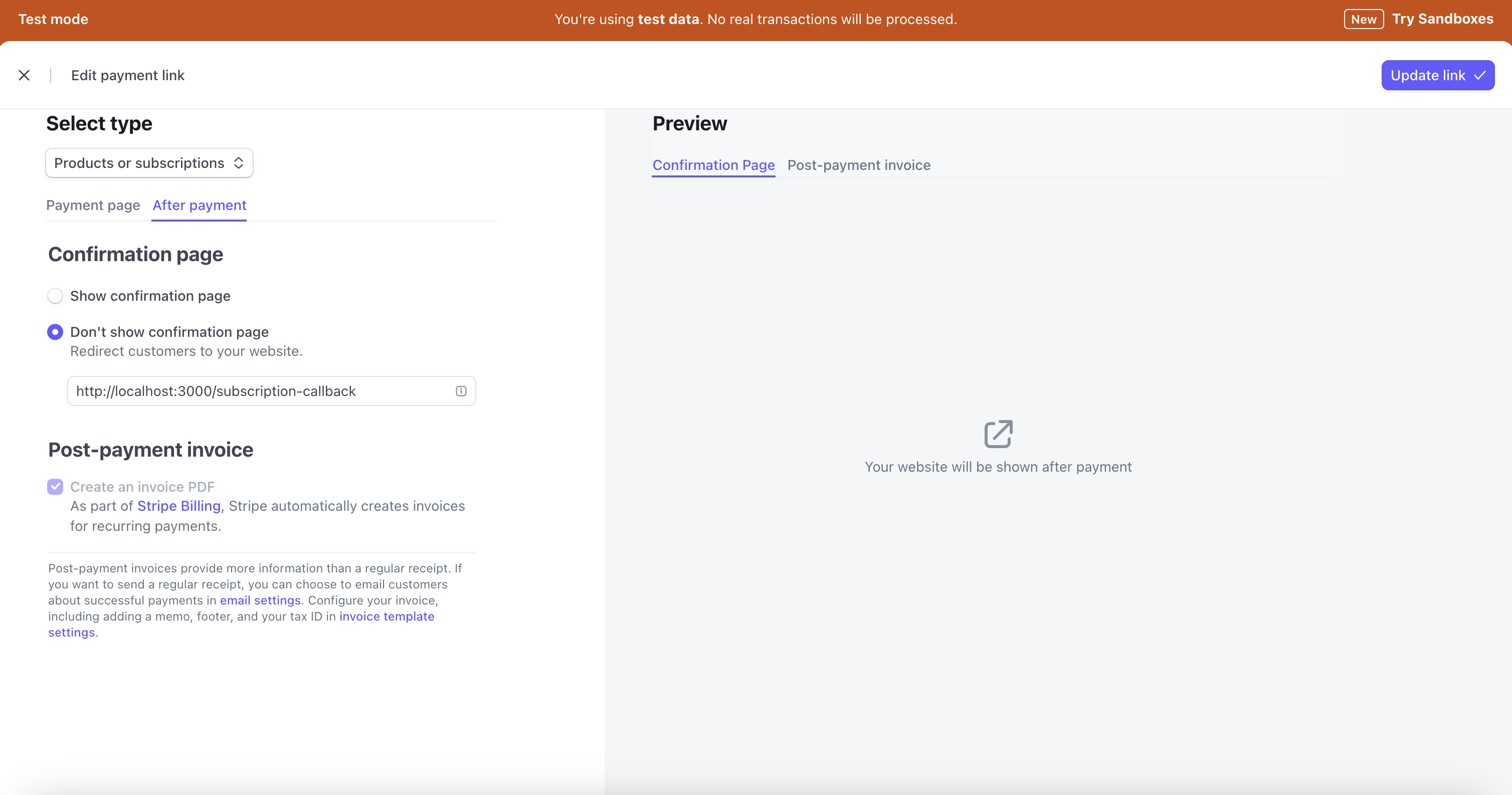
3. Set the Success URL:
- Success URL: http://localhost:3000/subscription-callback
#### Production:
1. Switch to Live Mode in the Stripe Dashboard.
2. Create a Payment Link:
- Use your production products and pricing.
- Generate a Payment Link.
3. Set the Success URLx:
- Success URL: https://yourdomain.com/
subscription-callback
Success URL is the URL that Stripe will redirect to after the user has completed the payment. You can send it wherever you want, but it's best to send it to your app, where users can complete onboarding after payment.
In both environments, the success URL should redirect to
your app, where users can complete onboarding after
payment.
[](https://gyazo.com/f63114a6963fd8cccffb3d06b44a0350)
## Webhook Events
The package automatically handles the following Stripe webhook events:
### Subscription Events
- `subscription.created`: When a new subscription is created
- `subscription.updated`: When a subscription is modified
- `subscription.deleted`: When a subscription is removed
- `customer.subscription.updated`: When customer subscription details change
- `customer.subscription.deleted`: When a customer's subscription is cancelled
### Payment Events
- `payment_intent.succeeded`: When a payment is successful
- `invoice.paid`: When an invoice is paid
- `invoice.payment_failed`: When a payment attempt fails
All these events automatically sync the subscription state with your Supabase database. See **handleWebhooks** for more details.
## Helper Functions
These helper functions make subscription management straightforward. Here's how to use each one:
#### Cancel a Subscription
Perfect for when users want to cancel their subscription:
```javascript
// app/api/subscription/cancel/route.js
export async function POST(req) {
const { email } = await req.json();
await subscriptionHelper.cancelUserSubscription(email);
return NextResponse.json({ message: "Subscription cancelled" });
}
```
#### Change Subscription Plan
Ideal for upgrades or downgrades:
```javascript
// app/api/subscription/change-plan/route.js
export async function POST(req) {
const { email, newPriceId } = await req.json();
await subscriptionHelper.changePlan(email, newPriceId);
return NextResponse.json({ message: "Plan updated" });
}
```
#### Get Subscription Details
Useful for displaying current subscription status:
```javascript
// app/api/subscription/details/route.js
export async function GET(req) {
const email = req.nextUrl.searchParams.get('email');
const subscription = await subscriptionHelper.fetchSubscription(email);
return NextResponse.json(subscription);
}
```
#### Force Sync Subscription
Helpful when you need to manually sync Stripe with Supabase:
```javascript
// app/api/subscription/sync/route.js
export async function POST(req) {
const { email } = await req.json();
await subscriptionHelper.syncSubscription(email);
return NextResponse.json({ message: "Subscription synced" });
}
```
**Note:** Remember to implement proper authentication before exposing these endpoints.
### 5. Manage Upgrades and Cancellations
All subscription management operations must be performed server-side for security. Here's how to implement upgrades and cancellations in different setups:
#### Upgrade Subscription
#### Next.js App Router (13+)
```javascript
// lib/subscription.js
import { SubscriptionHelper } from 'saas-subscription-helper';
export const subscriptionHelper = new SubscriptionHelper({
stripeSecretKey: process.env.STRIPE_SECRET_KEY,
stripeWebhookSecret: process.env.STRIPE_WEBHOOK_SECRET,
supabaseUrl: process.env.SUPABASE_URL,
supabaseKey: process.env.SUPABASE_SERVICE_KEY,
table: 'users',
emailField: 'email',
subscriptionField: 'subscription_status',
});
// app/api/subscription/upgrade/route.js
import { NextResponse } from 'next/server';
import { subscriptionHelper } from '@/lib/subscription';
export async function POST(req) {
try {
const { email, newPriceId } = await req.json();
await subscriptionHelper.changeUserPlan(email, newPriceId);
return NextResponse.json({ success: true });
} catch (error) {
return NextResponse.json({ error: error.message }, { status: 400 });
}
}
```
#### Downgrade Subscription
```javascript
// app/api/subscription/downgrade/route.js
import { NextResponse } from 'next/server';
import { subscriptionHelper } from '@/lib/subscription';
export async function POST(req) {
try {
const { email, newPriceId } = await req.json();
await subscriptionHelper.changeUserPlan(email, newPriceId);
return NextResponse.json({ success: true });
} catch (error) {
return NextResponse.json({ error: error.message }, { status: 400 });
}
}
```
#### Cancel Subscription
```javascript
// app/api/subscription/cancel/route.js
export async function POST(req) {
try {
const { email } = await req.json();
await subscriptionHelper.cancelUserSubscription(email);
return NextResponse.json({ success: true });
} catch (error) {
return NextResponse.json({ error: error.message }, { status: 400 });
}
}
```
#### React with Express Backend
```javascript
// server.js
import { subscriptionHelper } from './lib/subscription.js';
app.post('/api/subscription/upgrade', async (req, res) => {
try {
const { email, newPriceId } = req.body;
await subscriptionHelper.changeUserPlan(email, newPriceId);
res.json({ success: true });
} catch (error) {
res.status(400).json({ error: error.message });
}
});
app.post('/api/subscription/downgrade', async (req, res) => {
try {
const { email, newPriceId } = req.body;
await subscriptionHelper.changeUserPlan(email, newPriceId);
res.json({ success: true });
} catch (error) {
res.status(400).json({ error: error.message });
}
});
app.post('/api/subscription/cancel', async (req, res) => {
try {
const { email } = req.body;
await subscriptionHelper.cancelSubscription(email);
res.json({ success: true });
} catch (error) {
res.status(400).json({ error: error.message });
}
});
```
#### React with Supabase Edge Functions
```typescript
// supabase/functions/lib/subscription.ts
import { SubscriptionHelper } from 'saas-subscription-helper'
export const subscriptionHelper = new SubscriptionHelper({
stripeSecretKey: Deno.env.get('STRIPE_SECRET_KEY'),
supabaseUrl: Deno.env.get('SUPABASE_URL'),
supabaseKey: Deno.env.get('SUPABASE_SERVICE_KEY'),
table: 'users',
emailField: 'email',
subscriptionField: 'subscription_status',
});
// supabase/functions/subscription-manage/index.ts
import { serve } from 'https://deno.land/std@0.168.0/http/server.ts'
import { subscriptionHelper } from '../lib/subscription.ts'
serve(async (req) => {
try {
const { action, email, newPriceId } = await req.json()
if (action === 'upgrade') {
await subscriptionHelper.upgradeUserSubscription(email, newPriceId)
} else if (action === 'cancel') {
await subscriptionHelper.cancelUserSubscription(email)
}
return new Response(JSON.stringify({ success: true }))
} catch (err) {
return new Response(
JSON.stringify({ error: err.message }),
{ status: 400 }
)
}
})
```
#### Client-Side Usage Example
```javascript
// React component example
function SubscriptionManager({ userEmail }) {
const handleUpgrade = async (newPriceId) => {
try {
const res = await fetch('/api/subscription/upgrade', {
method: 'POST',
headers: { 'Content-Type': 'application/json' },
body: JSON.stringify({ email: userEmail, newPriceId })
});
const data = await res.json();
if (!data.success) throw new Error(data.error);
// Handle success (e.g., show toast, redirect)
} catch (error) {
// Handle error
}
};
const handleCancel = async () => {
try {
const res = await fetch('/api/subscription/cancel', {
method: 'POST',
headers: { 'Content-Type': 'application/json' },
body: JSON.stringify({ email: userEmail })
});
const data = await res.json();
if (!data.success) throw new Error(data.error);
// Handle success
} catch (error) {
// Handle error
}
};
const handleDowngrade = async (newPriceId) => {
try {
const res = await fetch('/api/subscription/downgrade', {
method: 'POST',
headers: { 'Content-Type': 'application/json' },
body: JSON.stringify({ email: userEmail, newPriceId })
});
const data = await res.json();
if (!data.success) throw new Error(data.error);
// Handle success
} catch (error) {
// Handle error
}
};
return (
<div>
<button onClick={() => handleUpgrade('price_premium')}>
Upgrade to Premium
</button>
<button onClick={() => handleDowngrade('price_basic')}>
Downgrade to Basic
</button>
<button onClick={handleCancel}>
Cancel Subscription
</button>
</div>
);
}
```
For best practices and advanced configuration tips, see our [Best Practices Guide](./best_practise.md).
**Important Security Notes:**
- Never expose Stripe or Supabase keys on the client side
- Always verify user authentication before processing subscription changes
- Use environment variables for sensitive configuration
- Implement rate limiting on your subscription management endpoints
### Configuration Fields
#### Required Fields
| Field | Description | Example |
|-------|-------------|---------|
| `stripeSecretKey` | Your private Stripe API key used for server-side operations | `sk_test_...` |
| `stripeWebhookSecret` | Secret used to verify Stripe webhook signatures | `whsec_...` |
| `supabaseUrl` | Your Supabase project URL | `https://xxx.supabase.co` |
| `supabaseKey` | Your Supabase service role key for database operations | `eyJhbGci...` |
| `table` | Name of the Supabase table storing user data | `"users"` |
| `emailField` | Column name for user email in your table | `"email"` |
| `subscriptionField` | Column name for subscription status | `"subscription_status"` |
#### Optional Fields
| Field | Description | Default | Options |
|-------|-------------|---------|----------|
| `createUserIfNotExists` | Auto-create user records if not found | `false` | `true`/`false` |
| `debug` | Enable detailed debug logging | `false` | `true`/`false` |
| `debugHeaders` | Log webhook headers (not recommended in production) | `false` | `true`/`false` |
| `prorationBehavior` | How Stripe handles plan change proration | `"always_invoice"` | `"always_invoice"`, `"create_prorations"`, `"none"` |
#### Synced Stripe Fields (Optional)
All fields default to `false` unless explicitly enabled in configuration.
| Field | Description | Data Type |
|-------|-------------|-----------|
| `stripe_customer_id` | Stripe's unique customer identifier | `text` |
| `default_payment_method` | ID of default payment method | `text` |
| `payment_last4` | Last 4 digits of payment card | `text` |
| `payment_brand` | Card brand (visa, mastercard, etc.) | `text` |
| `payment_exp_month` | Card expiration month | `integer` |
| `payment_exp_year` | Card expiration year | `integer` |
| `current_period_start` | Start date of current billing period | `timestamp` |
| `current_period_end` | End date of current billing period | `timestamp` |
| `cancel_at_period_end` | Whether subscription will cancel at period end | `boolean` |
| `canceled_at` | Timestamp of cancellation | `timestamp` |
| `trial` | Whether subscription is in trial period | `boolean` |
| `trial_start` | Trial period start date | `timestamp` |
| `trial_end` | Trial period end date | `timestamp` |
| `subscription_created_at` | When subscription was initially created | `timestamp` |
Example configuration:
```javascript
const subscriptionHelper = new SubscriptionHelper({
// Required fields
stripeSecretKey: process.env.STRIPE_SECRET_KEY,
stripeWebhookSecret: process.env.STRIPE_WEBHOOK_SECRET,
supabaseUrl: process.env.SUPABASE_URL,
supabaseKey: process.env.SUPABASE_KEY,
table: "profiles",
emailField: "email",
subscriptionField: "subscription_status",
// Optional fields
createUserIfNotExists: true, // Will create a new user record if email not found
debug: true,
debugHeaders: false,
prorationBehavior: 'create_prorations',
preserveTrialPeriods: true, // Maintain trial status during plan changes
// OPTIONAL – Sync additional Stripe fields with your database
syncedStripeFields: {
stripe_customer_id: true, // Store Stripe Customer ID
payment_last4: true, // Store last 4 digits of card
payment_brand: true, // Store card brand
trial: true, // Track trial status
current_period_end: true, // Store subscription end date
cancel_at_period_end: true, // Store cancellation status
trial_end: true // Store trial end date
}
});
```
syncedStripeFields are all set to false by default, unless explicitly set to true in the configuration.
**Note:** When using `syncedStripeFields`, make sure your database table has the corresponding columns:
```sql
ALTER TABLE profiles
ADD COLUMN stripe_customer_id text,
ADD COLUMN payment_last4 text,
ADD COLUMN payment_brand text,
ADD COLUMN payment_exp_month integer,
ADD COLUMN payment_exp_year integer,
ADD COLUMN trial boolean,
ADD COLUMN current_period_end timestamp with time zone,
ADD COLUMN cancel_at_period_end boolean,
ADD COLUMN trial_end timestamp with time zone;
```
All `syncedStripeFields` default to `false` unless explicitly set to `true` in the configuration.
### Database Schema
By default, the library expects a table with the following structure (using default names):
```sql
CREATE TABLE profiles (
-- Required columns
email text PRIMARY KEY, -- User's email (emailField)
subscription_status text, -- Subscription status (subscriptionField)
stripe_price_id text, -- Links to Stripe Payment Link's price ID
-- Optional columns for additional features
stripe_customer_id text, -- Stripe Customer ID
trial boolean, -- Trial status
trial_end timestamp with time zone,
current_period_end timestamp with time zone,
cancel_at_period_end boolean,
-- Other columns can be added as needed
created_at timestamp with time zone DEFAULT timezone('utc'::text, now())
);
-- Optional: Link to plan details
CREATE TABLE user_plans (
stripe_price_id text PRIMARY KEY, -- Matches Stripe Price ID
name text, -- Plan name
description text, -- Plan description
features jsonb -- Plan features
);
```
Some fields are required, but you can customize the table and column names in the configuration:
You can customize the table and column names in the configuration:
```javascript
const subscriptionHelper = new SubscriptionHelper({
// ... other config
table: "profiles", // Custom table name (default: 'users')
emailField: "email", // Custom email column (default: 'email')
subscriptionField: "sub_status", // Custom status column (default: 'subscription_status')
});
```
#### Column Descriptions:
- `email`: Stores the user's email address (used as identifier)
- `subscription_status`: Stores the Stripe subscription status (e.g., 'active', 'canceled')
- `stripe_price_id`: Fixed field that stores the Stripe Price ID from payment links (not customizable)
### Manage Billing
There are two ways to let your users manage their subscriptions through Stripe's Customer Portal:
#### 1. Quick Setup: Direct Link (Recommended for MVP)
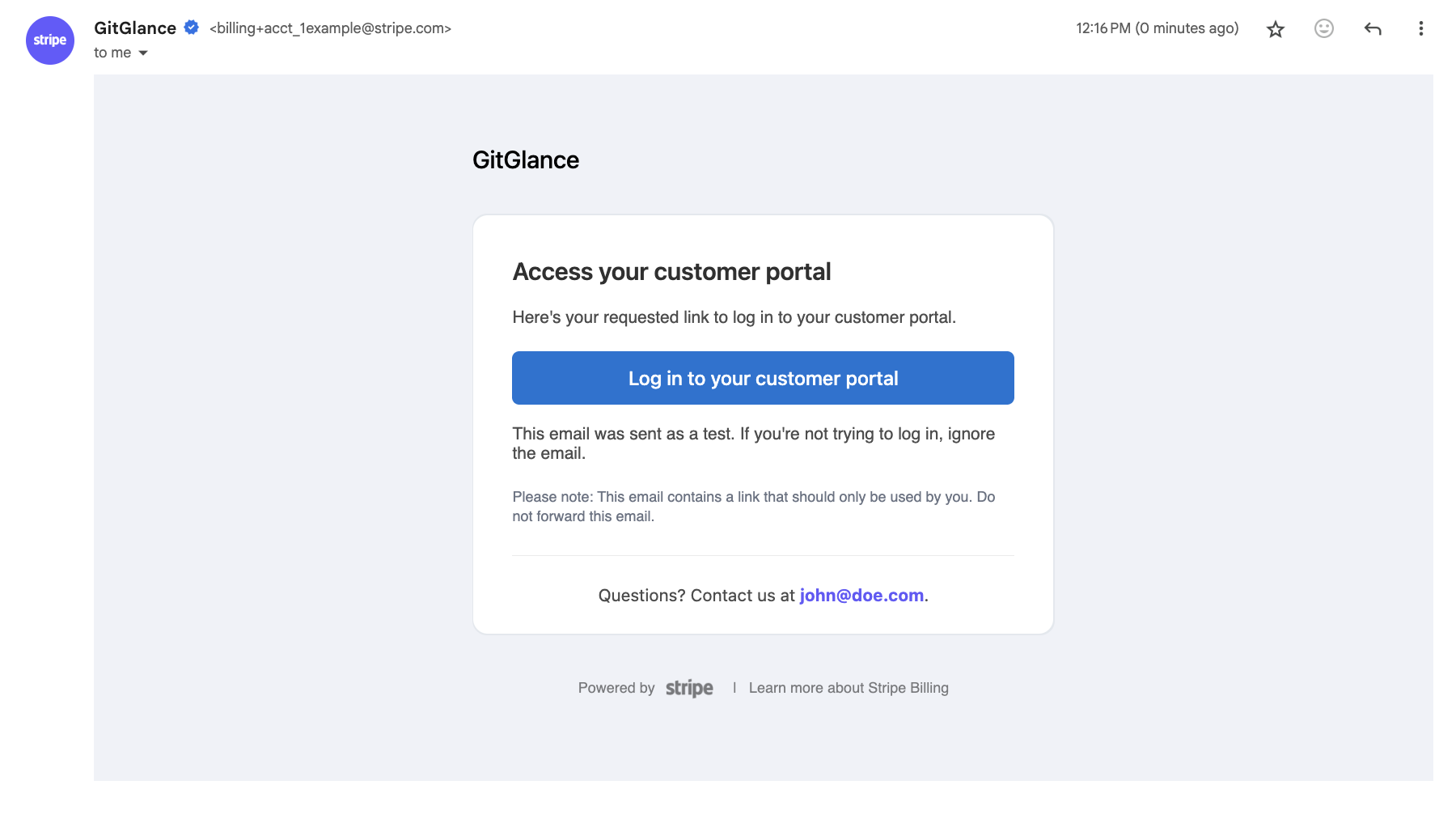
The simplest approach is to use Stripe's hosted billing portal login page. Users will receive a secure link via email to access their billing settings.
```javascript
// Add this link to your app's UI
<a href="https://billing.stripe.com/p/login/YOUR_PORTAL_ID">Manage Billing</a>
```
[](https://gyazo.com/075de020a7993ce0af8c2b250bc8badc)
When users click the link:
1. They enter their email
2. Stripe sends them a secure login link
3. They can manage their subscription, update payment methods, and view invoices
The subscription helper automatically handles any changes made through the portal via webhooks.
#### 2. Direct Portal Access (Advanced)
For a more seamless experience, you can create a portal session for logged-in users:
```javascript
// app/api/create-portal-session/route.js
import Stripe from 'stripe';
const stripe = new Stripe(process.env.STRIPE_SECRET_KEY);
export async function POST(req) {
const { email } = await req.json();
// Get Stripe customer ID for the user
const customer = await stripe.customers.list({
email: email,
limit: 1
});
// Create portal session
const session = await stripe.billingPortal.sessions.create({
customer: customer.data[0].id,
return_url: 'https://your-site.com/account'
});
return new Response(JSON.stringify({ url: session.url }));
}
```
```javascript
// Client component
function BillingPortalButton({ userEmail }) {
const openPortal = async () => {
const res = await fetch('/api/create-portal-session', {
method: 'POST',
headers: { 'Content-Type': 'application/json' },
body: JSON.stringify({ email: userEmail })
});
const { url } = await res.json();
window.location.href = url;
};
return (
<button onClick={openPortal}>
Manage Billing
</button>
);
}
```
Both approaches are fully supported by the subscription helper - any changes made in the portal will trigger webhooks that automatically update your Supabase database.
### Plan Changes and Cancellations
```javascript
// Upgrade or downgrade subscription
await subscriptionHelper.changePlan(email, newPriceId, {
prorationBehavior: 'always_invoice', // Optional override
preserveTrialPeriods: true // Optional: keep trial status
});
// Cancel subscription
await subscriptionHelper.cancelSubscription(email);
```
### Debug Mode
Enable detailed logging by setting `debug: true` in your configuration:
```javascript
const subscriptionHelper = new SubscriptionHelper({
// ... other config
debug: true,
debugHeaders: true // Include header info in logs
});
```
Debug mode will log:
- Webhook processing details
- Database operations
- Stripe API calls
- Error details
- User creation/updates
- Subscription changes
### Environment Variables
Required environment variables:
```plaintext
STRIPE_SECRET_KEY=sk_test_...
STRIPE_WEBHOOK_SECRET=whsec_...
SUPABASE_URL=https://your-project.supabase.co
SUPABASE_SERVICE_KEY=eyJ...
```
### Error Handling
The helper provides detailed error messages and types:
```javascript
try {
await subscriptionHelper.changePlan(email, newPriceId);
} catch (error) {
switch(error.code) {
case 'USER_NOT_FOUND':
// Handle missing user
break;
case 'STRIPE_CUSTOMER_NOT_FOUND':
// Handle missing Stripe customer
break;
default:
// Handle other errors
}
}
```
### Subscription Syncing
Manually sync Stripe and Supabase subscription states:
```javascript
const result = await subscriptionHelper.syncSubscription(email);
// Returns current subscription state and whether sync was needed
```
### Example with Debug Mode
```javascript
const subscriptionHelper = new SubscriptionHelper({
stripeSecretKey: process.env.STRIPE_SECRET_KEY,
stripeWebhookSecret: process.env.STRIPE_WEBHOOK_SECRET,
supabaseUrl: process.env.SUPABASE_URL,
supabaseKey: process.env.SUPABASE_KEY,
table: "profiles",
emailField: "email",
subscriptionField: "subscription_status",
debug: true // Enable debug logging
});
```
When debug mode is enabled, you'll see detailed logs about:
- Stripe API calls and responses
- Supabase operations
- Webhook processing
- Subscription updates and cancellations
- Error details
### License
This project is licensed under the MIT License. See the [LICENSE.md](./LICENSE.md) file for details.
### Contributing
Contributions are welcome! Feel free to fork the repository and submit pull requests.
Author
Created by Richardson Dackam.
Follow me on GitHub.