rtk
Version:
Agnostic software release tool for managing versions on changelog (keep-a-changelog), multi-format files (JSON, Makefile, text, TOML, YAML), and also for tagging source code of a Git repo
269 lines (198 loc) • 7.62 kB
Markdown
<img align="right" src="https://raw.github.com/cliffano/rtk/master/avatar.jpg" alt="Avatar"/>
[](https://github.com/cliffano/rtk/actions?query=workflow%3ACI)
[](https://snyk.io/test/github/cliffano/rtk)
[](https://libraries.io/npm/rtk)
[](https://coveralls.io/r/cliffano/rtk?branch=master)
[](http://www.npmjs.com/package/rtk)
<br/>
RTK
---
RTK is a code release tool for managing version number on a variety of file types such as keep-a-changelog, JSON, Makefile, text, TOML, YAML files, and also for tagging Git repo.
By using RTK, it automates the following steps:
* Replace pre-release version on resource paths with its release version
* Commit the release version changes to SCM
* Add release tag using its version value
* Replace release version on resource paths with the next pre-release version
* Commit the next pre-release version changes to SCM
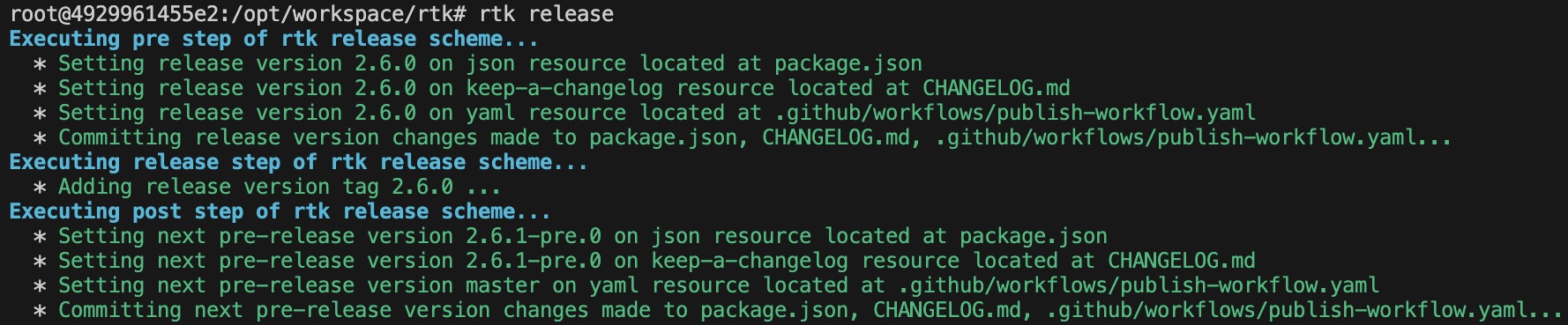
RTK comes with a default set of steps, but it's also open for extension by implementing custom release scheme.
Other than that, RTK also helps with managing version number (by default, using [semantic versioning](https://semver.org) scheme) across multiple files in a single repo.
Installation
------------
npm install -g rtk
Usage
-----
Cut off a release using default RTK release scheme:
rtk release
By default, the release version will increment minor value, and the next pre-release version will increment patch value.
This default is based on the idea that most release involves additions and changes (which often mean minor value increment), more than removals (which could mean backward incompatible major value increment) and fixes (which often mean patch value increment).
However, in order to honour the possibility of fixes, the next pre-release version will increment patch value.
The increment types can be customised, e.g. to cut off a release with major release and minor post-release increment types:
rtk release --release-increment-type major --post-release-increment-type minor
Do a release dry run without modifying resource files and making any SCM changes:
rtk release --dry-run
Cut off a release with major release and minor post-release increment types:
rtk release --release-increment-type major --post-release-increment-type minor
Configuration
-------------
Resources can be configured in a `.rtk.json` file. This configuration file defines which other files to manage when cutting off a release.
### Managing version on JSON file
Example `json` resource configuration:
{
"resources": [
{
"path": "package.json",
"type": "json",
"params": {
"property": "version"
}
}
]
}
Example `json` resource configuration with an array sub-property:
{
"resources": [
{
"path": "package.json",
"type": "json",
"params": {
"property": "versions[1].minor"
}
}
]
}
### Managing version on YAML file
Example `yaml` resource configuration:
{
"resources": [
{
"path": "playbook.yaml",
"type": "yaml",
"params": {
"property": "version"
}
}
]
}
Example `yaml` resource configuration with an array sub-property:
{
"resources": [
{
"path": "playbook.yaml",
"type": "yaml",
"params": {
"property": "versions[1].minor"
}
}
]
}
### Managing version on Keep a Changelog file
Example `keep-a-changelog` resource configuration:
{
"resources": [
{
"path": "CHANGELOG.md",
"type": "keep-a-changelog"
}
]
}
### Managing version on TOML file
Example `toml` resource configuration:
{
"resources": [
{
"path": "pyproject.toml",
"type": "toml",
"params": {
"property": "version"
}
}
]
}
### Managing version on Makefile file
Example `makefile` resource configuration:
{
"resources": [
{
"path": "Makefile",
"type": "makefile",
"params": {
"variable": "version"
}
}
]
}
### Managing version on Text file
Example `text` resource configuration:
{
"resources": [
{
"path": "somefile.txt",
"type": "text",
"params": {
"regex": "(\\d+)\\.(\\d+)\\.(\\d+)(?:-([0-9A-Za-z-]+(?:\\.[0-9A-Za-z-]+)*))?"
}
}
]
}
### Overriding version value
It is also possible to force the release and post-release values instead of using the version scheme generated value:
Note: because release and post-release values are specified at resource level, the SCM tag will still use the version scheme generated value
{
"resources": [
{
"path": "package.json",
"type": "json",
"params": {
"property": "version",
"release_value": "1.2.3",
"post_release_value": "master"
}
}
]
}
### Custom version format
If you want to format the tag instead of using the version number as the tag, you can configure `tagFormat` property:
{
"tagFormat": "v{version}",
"resources": [...]
}
The above example will set the tag `v1.2.3` for version `1.2.3` .
If you want to format the resource's release value, you can configure `format` property:
{
"resources": [
{
"path": "Makefile",
"type": "makefile",
"params": {
"variable": "version",
"release_format": "v{version}"
}
}
]
}
Upgrade
-------
From 0.x, 1.x, 2.x to 3.x:
Modify configuration which uses array sub-property syntax to use square brackets, e.g.:
* from `versions.1.minor` to `versions[1].minor`
* from `a.b.0.d.e` to `a.b[0].d.e`
* from `jobs.build.steps.0.with.ref` to `jobs.build.steps[0].with.ref`
Failing to update the syntax will result in the following error:
file:///path/to/lib/node_modules/rtk/node_modules/dot-prop/index.js:176
throw new Error('Cannot use string index');
^
Error: Cannot use string index
at assertNotStringIndex (file:///path/to/lib/node_modules/rtk/node_modules/dot-prop/index.js:176:9)
Colophon
--------
[Developer's Guide](https://cliffano.github.io/developers_guide.html#nodejs)
Build reports:
* [Code complexity report](https://cliffano.github.io/rtk/complexity/plato/index.html)
* [Unit tests report](https://cliffano.github.io/rtk/test/mocha.txt)
* [Test coverage report](https://cliffano.github.io/rtk/coverage/c8/index.html)
* [Integration tests report](https://cliffano.github.io/rtk/test-integration/cmdt.txt)
* [API Documentation](https://cliffano.github.io/rtk/doc/jsdoc/index.html)
Related projects:
* [Packer RTK](https://github.com/cliffano/packer-rtk) - Packer builder of machine image for running RTK code release tool