rsi.cli
Version:
The swiss army knife for RSI related tasks.
199 lines (120 loc) • 7.56 kB
Markdown
# RSI (RESTful Service Interface) command line interface
[](https://travis-ci.com/wzr1337/rsi.cli)
[](https://badge.fury.io/js/rsi.cli)
<center>

</center>
The swiss army knife for RSI related tasks.
This project supports the RESTful Service Interface as published under [https://www.w3.org/Submission/2016/01/](https://www.w3.org/Submission/2016/01/).
The framework proposes a slightly out-of-date JSON schema for service definitions, so this module uses the service schema published under [https://github.com/wzr1337/rsi.schema](https://github.com/wzr1337/rsi.schema)
## Installation
To install the cli globally run the following command:
```bash
$ npm i -g rsi.cli
```
## Usage
Usage: `rsi <commands...> [options...]`
**options**
| option | alias | meaning |
| --------------- | ----- |-------------------------------------------------------- |
| --version | -v | Print the version |
| --help | -h | Print this usage guide |
**commands**
| command | what it does |
| ----------------------------- | --------------------------------------------------------------- |
| [service](#service) | operate on service level |
| [bundle](#bundle) | operate on service bundle level |
### <a name="service"></a>service
Usage:
`$ rsi service`
prints you a list of available commands on service level.
**commands**
| command | what it does |
| ----------------------------- | --------------------------------------------------------------- |
| [document](#service.document) | render HTML documentation based on the schema |
| [init](#service.init) | initialize a new repository |
| [release](#service.release) | prepare service for release |
| [render](#service.render) | render UML from schema |
| [markdown](#service.markdown) | render markdown documentation based on the schema |
| [validate](#service.validate) | validate a schema |
### <a name="bundle"></a>bundle
Usage:
`$ rsi bundle`
prints you a list of available commands on service level.
**commands**
| command | what it does |
| ----------------------------- | --------------------------------------------------------------- |
| [document](#service.document) | render HTML documentation based on the schemas in the bundle |
| [render](#service.render) | render bundle UML |
| [markdown](#service.markdown) | render markdown documentation based for bundle |
| [validate](#service.validate) | validate a schemas in bundle |
#### <a name="service.document"></a>document
Usage:
`$ rsi <service||bundle> document --sourceFolder <pathToServiceFolder> --output <pathToOutputFolder>`
or
`$ rsi <service||bundle> document -s <pathToServiceFolder> -o <pathToOutputFolder>`
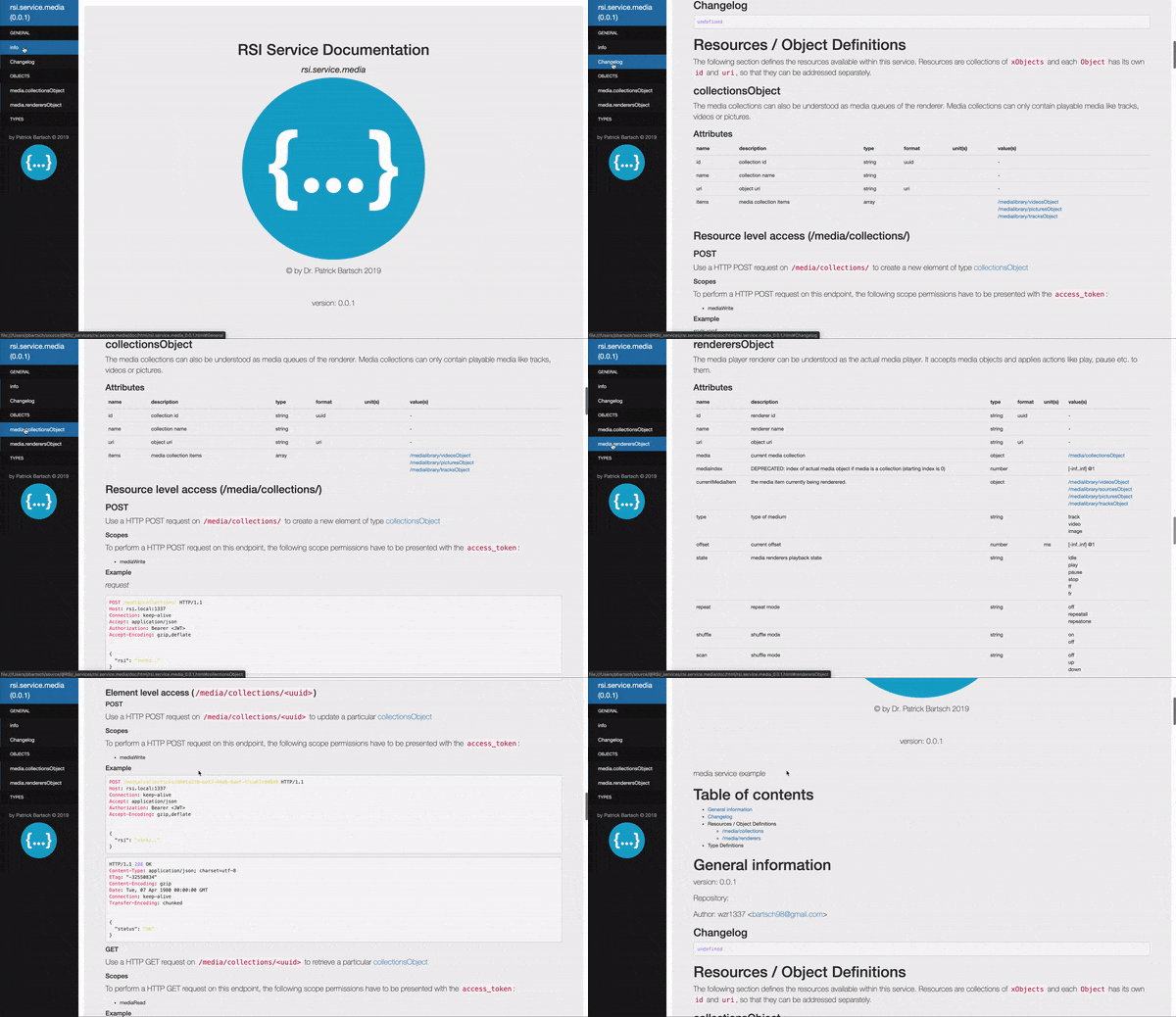
Renders a set of HTML documents out of the schema.json file contained in `<pathToServiceFolder>` into `<pathToOutputFolder>`.
**options**
| option | alias | meaning |
| --------------- | ----- | ------------------------------------------------------- |
| --sourceFolder | -s | the root folder of the project definition repository |
| --outputFolder | -o | the output folder for the generated documentation |
| --watch | -w | watch the source folder for changes |
#### <a name="service.init"></a>init
Usage:
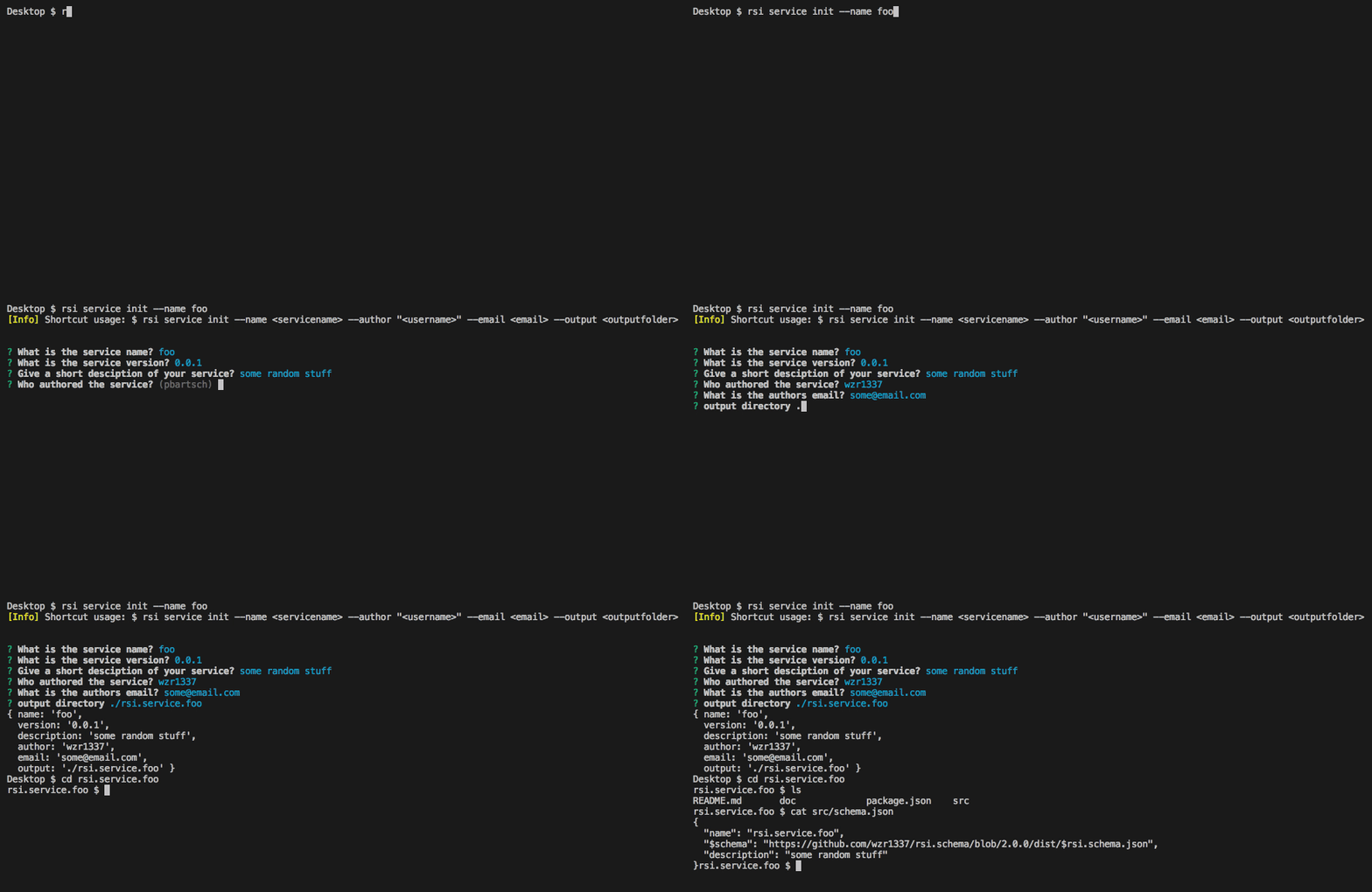
`$ rsi service init`
initializes an empty service definition repository with the following sturcture:
```bash
├── CHANGELOG.md
├── README.md
├── package.json
└── src
└── schema.json
```
After you initialized the repository, you can start editing the `src/schema.json` file. Please be aware that it must comply with the
schema definition found under <https://github.com/wzr1337/rsi.schema/blob/master/doc/schema.spec.md>
**options**
init does not support any options
#### <a name="service.release"></a>release
Usage:
`$ rsi service release`
releases a service definition in the desired way:
**options**
init does not support any options
#### <a name="service.render"></a>render
Usage:
`$ rsi <service||bundle> render --sourceFolder <pathToServiceFolder> --output <pathToOutputFolder>`
or
`$ rsi <service||bundle> render -s <pathToServiceFolder> -o <pathToOutputFolder>`
Renders a class diagram (plantuml) out of the schema.json file contained in `<pathToServiceFolder>` into `<pathToOutputFolder>`.
**options**
| option | alias | meaning |
| --------------- | ----- | ------------------------------------------------------- |
| --sourceFolder | -s | the root folder of the project definition repository |
| --outputFolder | -o | the output folder for the generated diagram |
| --watch | -w | watch the source folder for changes |
#### <a name="service.markdown"></a>markdown
Usage:
`$ rsi <service||bundle> markdown --sourceFolder <pathToServiceFolder> --output <pathToOutputFolder>`
or
`$ rsi <service||bundle> markdown -s <pathToServiceFolder> -o <pathToOutputFolder>`
Renders a markdown document out of the schema.json file contained in `<pathToServiceFolder>` into `<pathToOutputFolder>`.
**options**
| option | alias | meaning |
| --------------- | ----- | ------------------------------------------------------- |
| --sourceFolder | -s | the root folder of the project definition repository |
| --outputFolder | -o | the output folder for the generated documentation |
| --watch | -w | watch the source folder for changes |
#### <a name="service.validate"></a>validate
Usage:
`$ rsi <service||bundle> validate --sourceFolder <pathToServiceFolder>`
or
`$ rsi <service||bundle> validate -s <pathToServiceFolder>`
Validates schema.json file contained in `<pathToServiceFolder>`.
**options**
| option | alias | meaning |
| --------------- | ----- | ------------------------------------------------------- |
| --sourceFolder | -s | the root folder of the project definition repository |
| --watch | -w | watch the source folder for changes |