rkeys
Version:
A platform for creating tablet/HTML5 virtual-keyboard apps to send keystrokes to remote X11
357 lines (300 loc) • 15.8 kB
Markdown
# rkeys
[![Build Status][badge-travis-svg]][badge-travis-url]
A platform for creating tablet/HTML5 virtual-keyboard apps to send keystrokes to remote [X11]:
* [define virtual keyboards or keypads][teslapad] with a bit of [jade] and [stylus]
* define [chords](#chords) and [sequences](#sequences) with delays and auto-repeat
* use the built-in [mixins] and [templates] to minimise your code
* enhance with [LiveScript] and [Font Awesome] icons
* assign keys to dynamically switch layouts
* context sensitivity - show/hide regions matching the active window title
* simulate mouse buttons and run shell commands
* add [sound effects](#sfx): server-side or (experimental) client-side
* emit special characters using [compose-key sequences][ComposeKey]
## install globally
With [node.js] installed on the target [X11] box:
$ npm install -g rkeys # might need to prefix with sudo
## run examples
$ rkeys
then navigate your remote tablet to `http://your-rkeys-server:7000/example`:
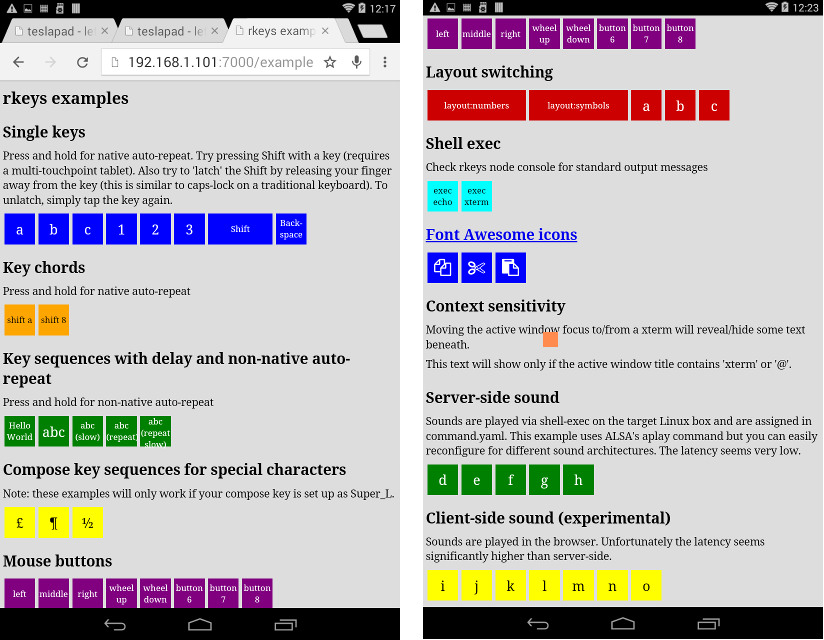
See this example's [jade](./site/example-app/example.jade), [stylus](./site/example-app/example.styl)
and [yaml](./site/example-app/command.yaml).
Also see [some real-world examples](https://github.com/dizzib/rkeys-apps).
## create your first keypad
An rkeys app is a directory containing at least one jade file.
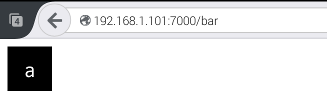
Create file `bar.jade` in directory `foo` and add the following lines:
extend /template/keys
block layout
+key('a')
Host the app by passing its directory on the rkeys command line `$ rkeys foo`
then navigate your tablet to `http://your-rkeys-server:7000/bar`:
## <a name="keys-template"></a>keys template
Most of the time you'll be laying out sets of keys and this is where the
[keys template] comes in handy. It extends the [base template] with the
[Font Awesome] icons along with the following:
### +key mixin
Generate a single key comprised of an action and some label text.
The action is a [keysym] with or without the `XK_` prefix,
a [chord] denoted by infix `+` symbols,
a comma-delimited sequence of keysyms and/or chords,
or a [command id](#command.yaml) with optional parameters.
The label text is displayed inside the key unless it contains [font awesome]
class names in which case an icon is displayed.
Some examples:
* `+key('a')`:
emit a KeyPress `a` on touchstart (**down**) and KeyRelease `a` on touchend
(**up**). Press and hold the key for native auto-repeat.
* `+key('%')`:
emit a percent symbol. Symbols are mapped to [keysyms] in the [core command.yaml].
* `+key('XK_Shift_L')`:
simulate the left shift key by specifying an explicit [keysym].
* `+key('Shift_L')`:
as above but with the optional `XK_` prefix dropped.
* `+key('Shift_L', 'shift')`:
show a user-friendly label.
* `+key('Shift_L shift')`:
as above using a shorter syntax.
* `+key('Shift_L fa-chevron-up')`:
replace label with a nice
[font awesome icon](http://fortawesome.github.io/Font-Awesome/icon/chevron-up).
A word starting with `fa-` is treated as a font awesome class.
Multiple font awesome classes can be specified.
* <a name="chords"></a>`+key('C+S+A+F12')`:
a [chord] emitting the KeyPress sequence `Ctrl` `Shift` `Alt` and `F12`
on touchstart, followed by KeyRelease sequence in the same order on touchend.
Specify `S+` for **Shift_L**+, `C+` for **Control_L**+ and `A+` for **Alt_L**+.
Press and hold for native auto-repeat.
* `+key('C+S+A+F12 fold all')`:
as above but with a nice label.
* `+key('VBOX-HOST+m show virtualbox menu fa-navicon')`:
a chord using a [custom alias](#VBOX-HOST), some descriptive text (not displayed)
and an icon.
* <a name="sequences"></a>`+key('a,b,3')`:
emit the keystroke sequence `a` `b` `3` on touchstart with no auto-repeat.
A keystroke is a KeyPress immediately followed by a KeyRelease.
* `+key('a,b,3,1000')`:
as above but auto-repeating every second until touchend.
Integers `0` to `9` denote digits whereas longer integers denote time
delay in milliseconds. Here the trailing delay indicates time to auto-repeat.
* `+key('a,500,b,500,3,1000')`:
as above but with interim pauses of 0.5 seconds.
This might be necessary if a sequence is firing too quickly for all keystrokes
to take effect, for example if a slow application needs more time to react.
* `+key('C+A+F3,05,Super_L+a fa-gear')`:
emit two chords separated by a 5 millisecond delay.
* `+key('button:3')`:
invoke the [button](#button) command with parameter `3`
to simulate the right mouse button.
* `+key('button:3 fa-hand-o-down fa-flip-horizontal')`:
as above but with a flipped
[font awesome icon](http://fortawesome.github.io/Font-Awesome/icon/hand-o-down).
* `+key('button:3 right mouse button fa-hand-o-down fa-flip-horizontal')`:
as above but with some descriptive text (not displayed).
* `+key('layout:fn-keys')`:
switch the [layout](#layout) to `fn-keys` across all connected clients on
touchstart, reverting back to the default layout on touchend.
### +keys mixin
Generate a set of keys by invoking `+key` multiple times.
Accepts either a single space-delimited string of actions or a list of strings
to apply to `+key` in order. Any classes or attributes are applied to each `+key`.
Some examples:
* `+keys('a b').z`:
expands to `+key('a').z` `+key('b').z`
* `+keys('a b c').z`:
expands to `+key('a').z` `+key('b').z` `+key('c').z`
* `+keys('a', 'b').z`:
expands to `+key('a').z` `+key('b').z`
* `+keys('a b', 'c d').z`:
expands to `+key('a b').z` `+key('c d').z`
* `+keys('q w e r t y')`:
expands to `+key('q')` `+key('w')` `+key('e')` `+key('r')` `+key('t')` `+key('y')`
* `+keys('layout:fn fn', 'Shift_R shift').w-3.latchable`:
expands to `+key('layout:fn fn').w-3.latchable`
`+key('Shift_R shift').w-3.latchable`
### stylus mixins and stylesheet classes
The [default minimal styling](./site/ui/template/keys.styl) is easily overridden
with the following mixins and classes:
* key-color(*up*, *label-up*, *down*, *label-down*) :
set the label-foreground and/or key-background colours when in the
**up** or **down** states. If you only specify *up* and *label-up*
then these colours are swapped on **down**.
Call this mixin at the root level to apply to all keys or from
within a selector to apply to a subset of keys.
* key-size(*k*, *gap-percent*) :
a mixin to override the default key size and/or gap between keys.
* .key-cols-*n* :
a set of adjacent keys will normally [float left] but you can
apply this class to their parent to arrange them into *n* columns.
*n* can be from 1 to 9, so `.key-cols-1` will produce a single
vertical column of keys.
* .h-*n* :
apply this class to a key to multiply its height by *n* where n is from 2 to 9.
For example `+key('a').h-2` will double the key's height.
* .w-*n* :
apply this class to a key to multiply its width by *n* where n is from 2 to 9.
For example `+key('a').w-3` will triple the key's width.
* .latchable :
normally a key is **down** only when you're touching it, reverting back to **up**
otherwise. Applying this class to a key allows it to remain **down**
even when you're not touching it, by dragging your finger sideways away from
the key before releasing it. Then simply tap the key to unlatch it.
A latchable `shift` key behaves rather like CapsLock on a traditional keyboard.
## base template
The [base template] is the foundation of rkeys apps and includes the JavaScript
libraries [faye-websocket] to communicate the user's keystrokes to the server,
[jquery] to dynamically manipulate the user interface and
[lodash] for general purpose functions.
It includes the following [jade mixins](./site/ui/mixin/base.jade):
* +prevent-zoom :
lock the zoom-level to prevent accidental pinch-zoom.
Should be placed in the head section.
* <a name="show-if"></a>+show-if(activeWindowTitle='*regexp*') :
only show child content if the active window title matches the
[regular expression] *regexp*.
In addition the following [stylesheet classes](./site/ui/template/base.styl)
are available for manipulating layouts:
* .layout.*id* :
only show child content when the current layout's id is *id*.
The default layout's id is **default**.
* .horizontal :
arrange immediate children horizontally
* .vertical :
arrange immediate children vertically
## <a name="command.yaml"></a>command configuration yaml
You can get more fancy by defining commands
in a [yaml] file (typically `command.yaml`) placed in the app's directory.
Each definition has format `id: command` where `id` is a unique identifier
and `command` is a string specifying what to do.
The first word of a command can specify a **directive** to alter the functionality:
* *id*: **alias** *str* :
replace occurrences of *id* with *str* in all actions and commands.
The standard naming convention for an alias *id* is all capitals.
* *id*: **broadcast** *msg* :
send *msg* to all connected clients on rkeydown.
Useful for keeping things synchronised in multi-tablet setups.
* *id*: [**broadcast** *msg1*, **broadcast** *msg2*] :
broadcast *msg1* on rkeydown and *msg2* on rkeyup.
* *id*: **button** *n* :
simulate mouse button *n* by emitting a ButtonPress on rkeydown
and ButtonRelease on rkeyup.
* *id*: **exec** *cmd* :
execute shell command *cmd* on rkeydown.
* *id*: **javascript** *script* :
dynamically generate a command at runtime using [JavaScript].
The *script* must evaluate to an action or command string.
* *id*: **livescript** *script* :
As above but using [LiveScript].
* *id*: **nop** :
no-operation. Useful as a placeholder to be redefined at runtime.
Examples:
* `abc: a b c`:
A sequence can be delimited by spaces or commas.
* `on: +c -d`:
emit KeyPress `c` and KeyRelease `d` on rkeydown.
Explicit KeyPress/KeyRelease events are denoted by prefixes `+` and `-` respectively.
* `HelloWorld: [H e l l o, +Shift_L w -Shift_L o r l d]`:
emit the keystroke sequence `H` `e` `l` `l` `o` on rkeydown and
`W` `o` `r` `l` `d` on rkeyup.
The square-bracket array has format
**[** *rkeydown-sequence*, *rkeyup-sequence* **]**,
where each sequence is delimited by spaces.
* <a name="VBOX-HOST"></a>`VBOX-HOST: alias Super_R`:
define an alias for the [VirtualBox] host key.
* <a name="button"></a>`button: button $0`:
simulate mouse button $0, where 1=left, 2=middle, 3=right, etc.
This is defined in the [core command.yaml].
* <a name="layout"></a>`layout: [broadcast layout $0, broadcast layout default]`:
instruct connected clients to switch to layout $0 on rkeydown,
switching back to the default on rkeyup.
This is defined in the [core command.yaml].
* `speakeys-onstart: exec qdbus-qt4 org.kde.simon /ActionManager
triggerCommand 'Filter' 'pause' > /dev/null`:
pause the [Simon] speech recognition engine.
* `type: javascript '$0'.split('').join(',')`:
Convert a string into a sequence of keystrokes and emit them.
A more robust version is in the [core command.yaml]
and is ideal for emitting short phrases and sentences.
* `now: livescript (require \moment)!format 'DD/MM/YYYY_HH:mm:ss' .split '' .join ','`:
Type the current date and time.
### overriding default configuration at runtime
When rkeys starts, the [core command.yaml] is loaded first followed by any yaml
files discovered in directories supplied on the command line in the given order.
If a command-id appears multiple times then the last one takes precedence
thus allowing default configuration to be overridden at runtime.
For example if we launch rkeys via `$ rkeys ./app-1 ./app-2 ~/.config`
then if ./app-1/cmd.yaml contains `foo: bar` and ~/.config/rkeys.yaml
contains `foo: my-custom-command` then the latter definition 'wins'.
## <a name="sfx"></a>sidechaining server-side sound effects
The sidechain allows secondary commands to run alongside the primary
and is the best way to add low-latency server-side sound effects.
Whenever a rkeydown or rkeyup occurs the command-id is checked against
a sequence of `/regular-expression/: command` rules and only
the first matching rule will run. Here's an example:
# sidechain in command.yaml
/^kde/: nop # make kde commands silent
/^(button|ffx)/: PLAY-SOUND SFX-BLIP
/^layout/: [ PLAY-SOUND SFX-TICK, PLAY-SOUND SFX-TOCK ]
/.*/: PLAY-SOUND SFX-NOISE # everything else
The built-in `SFX-` aliases are defined in the [core command.yaml] but you can always
supply your own soundfiles (note that relative paths are relative to the source file).
You should redefine the `PLAY-SOUND` alias to match your own system. So with [SoX]
installed you could include the following to play sounds at quarter volume:
PLAY-SOUND: alias exec play -V1 -q --volume 0.25
## options
$ rkeys --help
Usage: rkeys [Options] [directory ...]
Options:
-h, --help output usage information
-V, --version output the version number
-g, --gen-ssl-cert generate a self-signed ssl certificate
-p, --port <port> listening port (default:7000)
-s, --servant-to <host[:port]> run as a servant in a guest virtual machine, forwarding active-window-changed events to the specified rkeys master host
-v, --verbosity <level> verbosity 0=min 2=max (default:1)
## host over https
In a new empty directory either [create a key.pem and cert.pem manually](http://stackoverflow.com/questions/10175812/how-to-create-a-self-signed-certificate-with-openssl?rq=1)
or do the following:
$ rkeys -g # generate using openssl. Follow the prompts.
Include this directory on the `rkeys` command line to host over
https on port + 1 (default 7001) at `https://your-rkeys-server:7001`.
## developer build and run
$ git clone --branch=dev https://github.com/dizzib/rkeys.git
$ cd rkeys
$ npm install # install dependencies
$ npm test # build all and run tests
$ npm start # start the task runner and rkeys
## license
[MIT](./LICENSE)
[badge-travis-svg]: https://travis-ci.org/dizzib/rkeys.svg?branch=master
[badge-travis-url]: https://travis-ci.org/dizzib/rkeys
[base template]: ./site/ui/template/base.jade
[ComposeKey]: https://help.ubuntu.com/community/ComposeKey#Compose%20key%20sequences
[core command.yaml]: ./site/io/command.yaml
[dependencies]: ./package.json.ls
[Express]: http://expressjs.com
[chord]: https://en.wikipedia.org/wiki/Chorded_keyboard
[faye-websocket]: https://github.com/faye/faye-websocket-node
[float left]: https://developer.mozilla.org/en-US/docs/Web/CSS/float
[Font Awesome]: http://fortawesome.github.io/Font-Awesome/
[GCC]: https://gcc.gnu.org
[jade]: http://jade-lang.com
[JavaScript]: https://en.wikipedia.org/wiki/JavaScript
[jquery]: http://jquery.com
[keysym]: https://github.com/sidorares/node-x11/blob/master/lib/keysyms.js
[keysyms]: https://github.com/sidorares/node-x11/blob/master/lib/keysyms.js
[keys template]: ./site/ui/template
[LiveScript]: http://livescript.net
[lodash]: https://lodash.com
[mixins]: ./site/ui/mixin
[node.js]: http://nodejs.org
[node-gyp]: https://github.com/TooTallNate/node-gyp
[python]: https://www.python.org
[regular expression]: https://developer.mozilla.org/en-US/docs/Web/JavaScript/Guide/Regular_Expressions
[Simon]: https://userbase.kde.org/Simon
[SoX]: http://sox.sourceforge.net/Main/HomePage
[stylus]: https://learnboost.github.io/stylus
[templates]: ./site/ui/template
[teslapad]: https://github.com/dizzib/rkeys-apps/tree/master/teslapad
[VirtualBox]: https://www.virtualbox.org
[X11]: https://en.wikipedia.org/wiki/X_Window_System
[yaml]: https://en.wikipedia.org/wiki/YAML