rhombic
Version:
SQL parsing, lineage extraction and manipulation
86 lines (58 loc) • 2.72 kB
Markdown
<img src="https://unpkg.com/rhombic@0.0.1/docs/rhombic-logo.svg" alt="Rhombic-logo" width="400px" />
Utilities for parsing, analysing and manipulating SQL.
```bash
npm install rhombic
```
Rhombic can parse SQL with 2 different parsers with different sets of operations applicable in each case:
- [Chevrotain](https://sap.github.io/chevrotain) based parser built from ground up to support simple statements
for ANSI SQL dialect. Parsed SQL tree can then be manipulated (adding projection items, ordering, filters) and
serialized back to SQL text. For details and available operations see [src/index.ts](src/index.ts)
- [Antlr](https://www.antlr.org) based parser (generated with [antlr4ts](https://github.com/tunnelvisionlabs/antlr4ts)) from SQL grammar derived from Apache Spark SQL grammar with the goal to support most SQL dialects with broad functionality. Currenly this mode can be used to extract SQL column level lineage. For details and available operations see [src/antlr/index.ts](src/antlr/index.ts)
## Antlr parser - lineage
To build SQL column level lineage for an SQL query using Antlr-based parser:
```ts
import { antlr, TablePrimary } from "rhombic";
try {
const parsingOptions = {
// if double quotes should quote identifiers:
doubleQuotedIdentifier: true
};
const q = antlr.parse("SELECT * FROM abc;", parsingOptions);
console.log(q.getUsedTables()); // [{ tableName: "abc" }];
const getTable = (table: TablePrimary) => {
/* Logic to retrieve table & columns metadata */
};
// Whether to use "mergedLeaves" or "tree" lineage type
const mergedLeaves = true;
const lineageOptions = {
positionalRefsEnabled: false
};
const lineage = q.getLineage(getTable, mergedLeaves, lineageOptions);
} catch (e) {
// Parsing errors
}
```
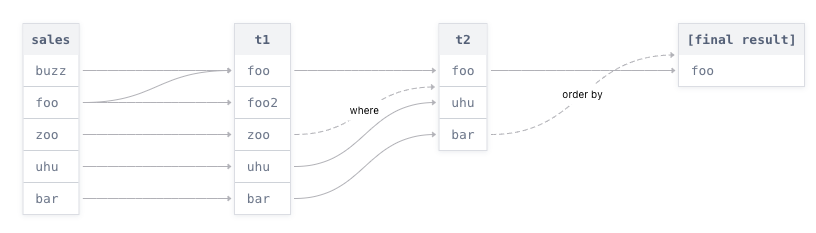
You can then use something like [react-flow](https://github.com/wbkd/react-flow) to draw a nice visualization of your lineage -
```ts
import rhombic from "rhombic";
try {
const query = rhombic
.parse("SELECT * FROM abc;")
.addProjectionItem("city")
.toString();
console.log(query); // SELECT city FROM abc;
} catch (e) {
// Parsing errors
}
```
Just update the `version` in `package.json`!
As soon as your branch will be merged to master, a new npm version will be automatically published for you.
This project was built to support Contiamo® workbench editor (a fancy SQL editor).
## Resources
[SQL 2003-2 BNF](https://github.com/ronsavage/SQL/blob/master/sql-2003-2.bnf)