rerumaccusamus
Version:
The meta-framework suite designed from scratch for frontend-focused modern web development.
109 lines (79 loc) • 4.17 kB
Markdown
---
sidebar_position: 2
---
# 介绍
由于 Electron 是多进程,在不同进程之间需要做通信。通常,我们经常会在如下几个进程间做通信:
- 主进程
- 渲染进程
- 渲染进程(webview)
在不同进程间存在两种通信方式:**单向通信**、**双向通信**。
- 单向通信:仅发送消息出去。比如:`winService.sendTo` 等。
- 双向通信:发送消息出去,并获得返回结果。比如:`callMain` 等。
我们基于 `ipcMain`、`ipcRenderer` 原生通信,做了上层通信设计,帮助我们解决:
- 多进程之间的通信管理问题。
- 封装双向通信,降低通信使用复杂度。比如:窗口 A 通知窗口 B 执行任务并返回结果。
## 通信详解
关于单向通信,如下图:
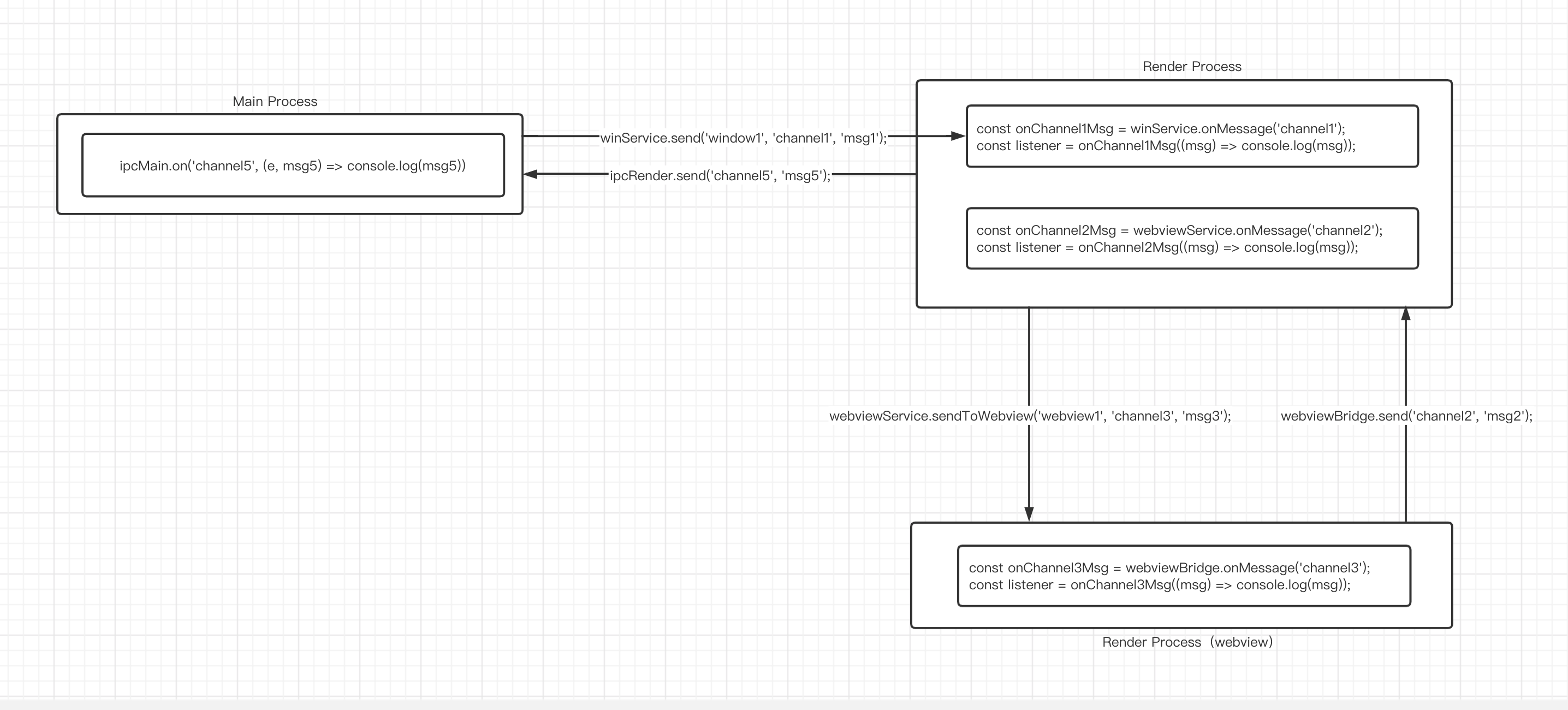
可参考相关 API 即可:
- [`winService.sendTo`](/docs/apis/runtime/electron/main-process/win-service#sendto)(主进程)
- [`winService.sendTo`](/docs/apis/runtime/electron/render-process/win-service#sendto)(渲染进程)
- [`webviewService.sendToWebview`](/docs/apis/runtime/electron/render-process/webview-service#sendtowebview)
- [`webviewBridge.send`](/docs/apis/runtime/electron/webview-process/index_#send)
关于双向通信,如下图所示,展示了彼此之间的通信关系:
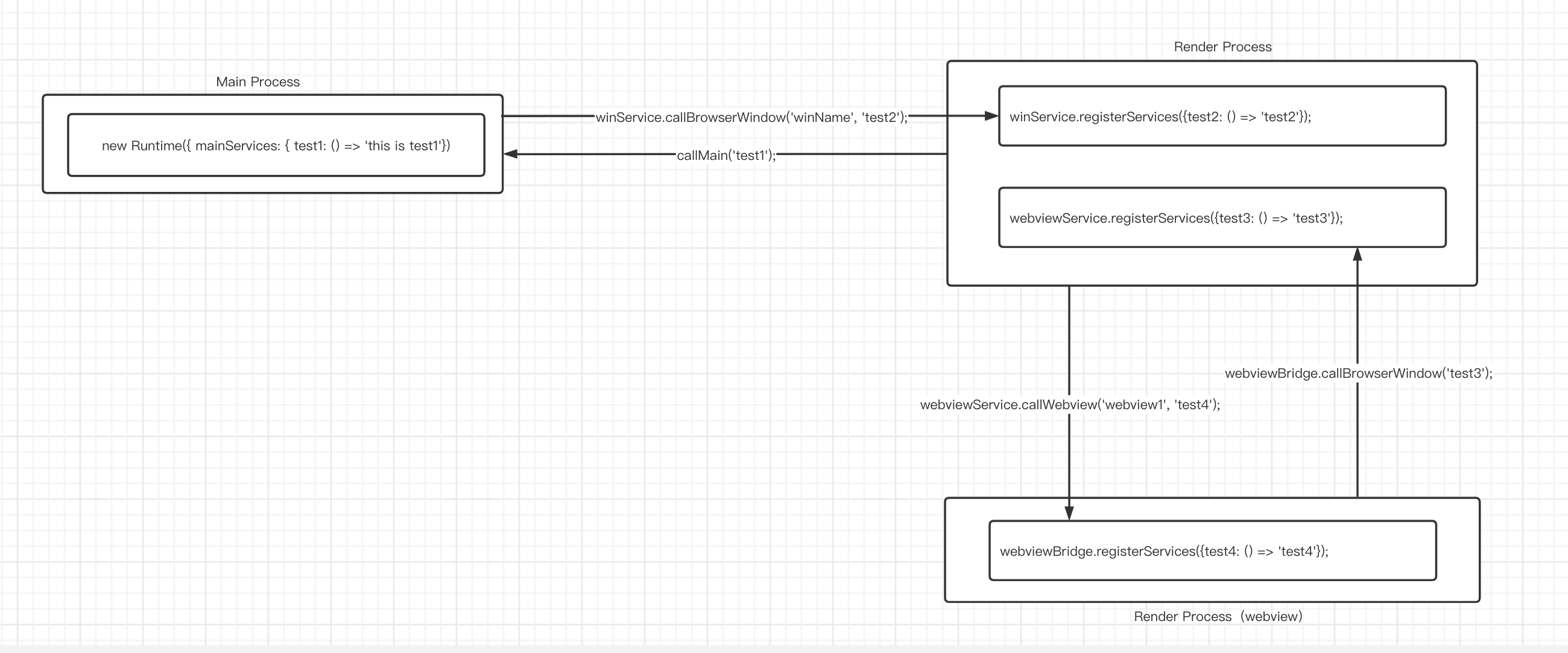
- **主进程**通过 `Runtime` 实例化时在 `mainServices` 中注册了 `test1` 服务函数,**渲染进程**通过 `callMain` 的通信方式让主进程执行 `test1` 并获得结果。
- **渲染进程**通过 `winService.registerServices` 注册了 `test2` 服务函数,**主进程**通过 `winService.callBrowserWindow` 的通信方式让主进程执行 `test2` 并获得结果。
- **渲染进程**通过 `webviewService.registerServices` 注册了 `test3` 服务函数,**渲染进程(webview1 进程)**通过 `webviewBridge.callBrowserWindow` 的通信方式让主进程执行 `test3` 并获得结果。
- **渲染进程(webview1 进程)**通过 `webviewBridge.registerServices` 注册了 `test4` 服务函数,**渲染进程**通过 `webviewService.callWebview` 的通信方式让主进程执行 `test4` 并获得结果。
## 相关示例
### 单向通信
- 原生 Electron 的实现
在 Electron 原生 API 中,我们可以这样实现通信:
- 主进程给某个渲染进程(即窗口)发送消息。
```ts title="主进程"
// 主进程发送消息
const win = new BrowserWindow();
win.webContents.send('xxChannel', {msg: 'this is msg'});
```
```ts title="渲染进程"
// 渲染进程接收消息
import { ipcRenderer } from 'electron';
ipcRenderer.on('xxChannel', (e, msg) => {
console.log('msg:', msg);
})
```
- Modern Js Electron 实现
在原生的写法中,我们有这些问题:
- 主进程给渲染进程发消息依赖 `BrowserWindow` 实例,因此需要设计**窗口管理**。
- 监听了消息,解除监听依赖 `handler` ,有点不便捷。
```ts title="渲染进程"
const handler = (e, msg) => {
console.log('msg:', msg);
};
ipcRenderer.on('xxChannel', handler)
// 解除监听
ipcRenderer.removeListener('xxChannel', handler);
```
在 ModernJs Electron 中:
```ts title="主进程"
// 主进程发送消息给渲染进程
import { winService } from '@modern-js/runtime/electron-main';
...
// 给 demo 窗口发送消息
winService.sendTo('demo', 'xxChannel', {data: 'this is msg from main'});
```
```ts title="渲染进程"
// 渲染进程监听消息
import { winService } from '@modern-js/runtime/electron-render';
const onxxChannelMsg = winService.onMessage<{data: string}>('xxChannel');
...
// 监听
const listener = onxxChannelMsg(({ data }) => {
console.log('msg:', data);
});
// 解除监听
listener.dispose();
```
### 双向通信
双向通信的场景,在我们的框架中被抽象为:[服务的注册与访问](/docs/guides/features/electron/ipc/regist-services/index)。