relative-import-fixer
Version:
CLI tool for TypeScript projects that removes unnecessary relative imports and replaces them with absolute imports based on the paths configured
124 lines (77 loc) • 4.22 kB
Markdown
# relative-import-fixer
[]()
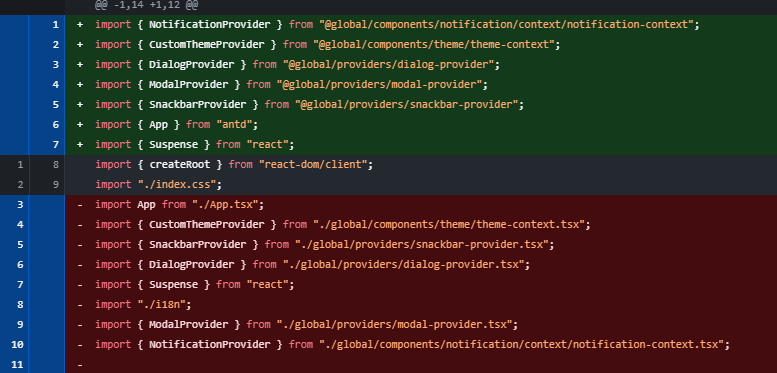
## Demo
## Description
`relative-import-fixer` is a CLI tool for TypeScript projects that removes unnecessary relative imports and replaces them with absolute imports based on the paths configured in `tsconfig.json`.
It also checks for uncommitted git changes before running to ensure your working directory is clean and to prevent accidental loss of work.
This tool uses `ts-morph` to manipulate source code and automatically fix imports, keeping your code organized and easy to maintain.
## Installation
```bash
npm install -g relative-import-fixer
# or install locally in your project
npm install relative-import-fixer
```
## Usage
Run the command in your project root:
```bash
npx run-relative-import-fixer
```
```bash
npm run-relative-import-fixer
```
```bash
pnpm run-relative-import-fixer
```
The script will prompt you for:
- The path to your `tsconfig.json` file (default: `./tsconfig.json`)
- The glob pattern for the TS/TSX files to process (default: `src/**/*.{ts,tsx}`)
Before execution, the script verifies that you have no uncommitted changes and that `tsconfig.json` has absolute paths configured.
## 🧰 CLI Usage
```bash
npx relative-import-fixer [options]
```
### 📌 Options
| Flag | Alias | Description | Default |
| ------------ | ----- | ------------------------------------------ | ------------------- |
| `--tsconfig` | `-t` | Path to your `tsconfig.json` file | `tsconfig.json` |
| `--glob` | `-g` | Glob pattern for files to process | `src/**/*.{ts,tsx}` |
| `--force` | `-f` | Skips Git dirty check and forces execution | `false` |
| `--help` | `-h` | Displays help information | |
### 📈 Example
```bash
npx run-relative-import-fixer -t ./tsconfig.base.json -g apps/student/**/*.{ts,tsx} --force
```
This will:
- Skip Git check
- Use a custom tsconfig path
- Fix imports in the specified files
## How it works
1. **Git status check:** ensures no uncommitted changes exist to prevent accidental work loss.
2. **`tsconfig.json` validation:** verifies that `compilerOptions.paths` contains absolute path mappings.
3. **File processing:** loads the specified TS/TSX files using `ts-morph` and finds relative imports.
4. **Imports removal and fixing:** removes relative imports that aren't Node.js built-ins or dependencies and repairs missing imports with absolute paths.
5. **Imports organization:** organizes imports in each file for clean and maintainable code.
## Main API / Functions
- `checkGitStatusAndExitIfDirty()`: checks git status.
- `hasAbsoluteTsconfigPaths(tsconfigPath: string)`: validates absolute paths in tsconfig.
- `verifyTsConfigFile(tsConfigPath: string)`: verifies tsconfig file existence.
- `isSideEffectImport(importDecl: ImportDeclaration)`: verifies if the import is Side Effect Type ex:(import './index.css').
- `isPackageJsonDependency(importName: string)`: verifies if the import is from the packageJSON libraries.
- `isNodeBuiltin(path: string) `: verifies if the import is from the core of Typescript.
- `fixRelativeImports({ globPattern, tsConfigPath })`: performs the import transformation from relative to absolute.
## Keywords
typescript, imports, import-fixer, relative-imports, ts-morph, code-transformation, cli-tool, nodejs, typescript-transformer, absolute-imports
## Used Dependencies
Thanks to the authors and maintainers of the great open source projects that make this tool possible, especially:
This project relies on the following main libraries:
- [ts-morph](https://github.com/dsherret/ts-morph) — TypeScript compiler API wrapper for source code manipulation.
- [simple-git](https://github.com/steveukx/git-js) — Simple interface for running Git commands in Node.js.
## License
MIT License © 2025 Jhoan Hernández