rehype-callouts
Version:
Rehype plugin for processing and rendering blockquote-based callouts (admonitions/alerts).
440 lines (343 loc) • 14.4 kB
Markdown
# rehype-callouts
[![version][version-badge]][version-link]
[![codecov][coverage-badge]][coverage]
[![npm downloads][npm-downloads-src]][npm-downloads-href]
[![jsDocs.io][jsdocs-src]][jsdocs-href]
A [rehype](https://github.com/rehypejs/rehype) plugin for processing and rendering blockquote-based callouts.
## What is this?
This plugin adds support for callouts (admonitions/alerts), allowing you to use [Obsidian's callout syntax](https://help.obsidian.md/Editing+and+formatting/Callouts) to achieve the following features:
- Includes default callout types for various themes.
- Supports collapsible callouts with `-/+` and nestable callouts.
- Optionally import stylesheets for corresponding themes.
- Allows custom titles with markdown syntax.
- Customizable default callout types.
- Configurable new callout types.
- Configurable aliases for callout types.
- Configurable icon display.
- Configurable element attributes.
## When should I use this?
This plugin helps render markdown callouts, ideal for blogs built with frameworks like Astro or Next.js. It processes HTML directly without needing `allowDangerousHtml` in [remark-rehype](https://github.com/remarkjs/remark-rehype) and supports collapsible callouts with the `details` tag, all without JavaScript.
## Installation
This package is [ESM only](https://gist.github.com/sindresorhus/a39789f98801d908bbc7ff3ecc99d99c). In Node.js (version 18+), install with your package manager:
```sh
npm install rehype-callouts
yarn add rehype-callouts
pnpm add rehype-callouts
```
In Deno with [`esm.sh`](https://esm.sh/):
```js
import rehypeCallouts from 'https://esm.sh/rehype-callouts'
```
In browsers with [`esm.sh`](https://esm.sh/):
```html
<script type="module">
import rehypeCallouts from 'https://esm.sh/rehype-callouts?bundle'
</script>
```
## Usage
Say `example.md` contains:
```md
<!-- Callout type names are case-insensitive: 'Note', 'NOTE', and 'note' are equivalent. -->
> [!note] This is a _non-collapsible_ callout
> Some content is displayed directly!
> [!WARNING]- This is a **collapsible** callout
> Some content shown after opening!
```
For vanilla JS:
```js
// example.js
import { unified } from 'unified'
import remarkParse from 'remark-parse'
import remarkRehype from 'remark-rehype'
import rehypeCallouts from 'rehype-callouts'
import rehypeStringify from 'rehype-stringify'
import { readSync } from 'to-vfile'
const file = unified()
.use(remarkParse)
.use(remarkRehype)
.use(rehypeCallouts)
.use(rehypeStringify)
.processSync(readSync('example.md'))
console.log(String(file))
```
For Astro projects:
```ts
// astro.config.ts
import { defineConfig } from 'astro/config'
import rehypeCallouts from 'rehype-callouts'
// https://docs.astro.build/en/reference/configuration-reference/
export default defineConfig({
markdown: {
rehypePlugins: [rehypeCallouts],
},
})
```
For Next.js projects:
```ts
// next.config.ts
import createMDX from '@next/mdx'
import rehypeCallouts from 'rehype-callouts'
import type { NextConfig } from 'next'
// https://nextjs.org/docs/app/api-reference/config/next-config-js
const nextConfig: NextConfig = {
pageExtensions: ['js', 'jsx', 'md', 'mdx', 'ts', 'tsx'],
}
const withMDX = createMDX({
options: {
remarkPlugins: [],
rehypePlugins: [rehypeCallouts],
// With Turbopack, specify plugin names as strings
// rehypePlugins: [['rehype-callouts']],
},
})
export default withMDX(nextConfig)
```
Run `node example.js` (`pnpm dev`) to get:
```html
<div class="callout" data-callout="note" data-collapsible="false">
<div class="callout-title">
<div class="callout-title-icon" aria-hidden="true">
<!-- svg icon-->
</div>
<div class="callout-title-text">
This is a <em>non-collapsible</em> callout
</div>
</div>
<div class="callout-content">
<p>Some content is displayed directly!</p>
</div>
</div>
<details class="callout" data-callout="warning" data-collapsible="true">
<summary class="callout-title">
<div class="callout-title-icon" aria-hidden="true">
<!-- svg icon-->
</div>
<div class="callout-title-text">
This is a <strong>collapsible</strong> callout
</div>
<div class="callout-fold-icon" aria-hidden="true">
<!-- svg icon-->
</div>
</summary>
<div class="callout-content">
<p>Some content shown after opening!</p>
</div>
</details>
```
## API
This package exports no identifiers. The default export is [`rehypeCallouts`](#unifieduserehypecallouts-options).
### `unified().use(rehypeCallouts[, options])`
Used to render callouts.
###### Parameters
- `options` ([`UserOptions`](#useroptions), optional) — configuration
###### Returns
Transform ([`Transformer`](https://github.com/unifiedjs/unified#transformer)).
### `UserOptions`
Configuration (TypeScript type). All options are optional.
###### Fields
- `theme` (`'github'|'obsidian'|'vitepress'`, default: `'obsidian'`) — your desired callout theme to automatically apply its default callout types.
- `callouts` ([`Record<string, CalloutConfig>`](https://github.com/lin-stephanie/rehype-callouts/blob/main/src/types.ts#L16), default: see [source code](https://github.com/lin-stephanie/rehype-callouts/tree/main/src/themes)) — define default or custom callouts as key-value pairs, where each key is a callout type and the value specifies its default text and icon, e.g., `{'note': {title: 'custom title'}, 'custom': {title: 'new callout', indicator: '<svg ...">...</svg>'}}`.
- `aliases` (`Record<string, string[]>`, default: `{}`) — aliases for callout types, e.g., `{'note': ['n'], 'tip': ['t']}`.
- `showIndicator` (`boolean`, default: `true`) — whether to display an type-specific icons before callout title.
- `tags` ([`TagsConfig`](https://github.com/lin-stephanie/rehype-callouts/blob/main/src/types.ts#L42), default: all `div`) — HTML tag names for callout structure elements.
- `props` ([`PropsConfig`](https://github.com/lin-stephanie/rehype-callouts/blob/main/src/types.ts#L103), default: all `null`) — properties for callout structure elements, where `class` or `className` overrides default class names; see [examples](#examples) below.
## Styling
You can customize callout styles with the class names or by importing the provided [theme-specific](#themes) stylesheets using one of the following methods.
Import in JavaScript/TypeScript:
```ts
import 'rehype-callouts/theme/github'
// import 'rehype-callouts/theme/obsidian'
// import 'rehype-callouts/theme/vitepress'
```
Import in a CSS file:
```css
@import 'rehype-callouts/theme/github';
```
Import in a Sass file:
```scss
@use 'rehype-callouts/theme/github';
```
Directly include in HTML via CDN ([unpkg.com](https://unpkg.com) or [jsdelivr.net](https://www.jsdelivr.com/)):
```html
<link
rel="stylesheet"
href="https://unpkg.com/rehype-callouts/dist/themes/github/index.css"
/>
<link
rel="stylesheet"
href="https://cdn.jsdelivr.net/npm/rehype-callouts/dist/themes/github/index.css"
/>
```
Once imported, you can set colors for default or custom callouts as follows:
```css
/* Using CSS custom properties (for default callouts only) */
:root {
--callout-note-color-light: pink;
--callout-note-color-dark: #ffc0cb;
--callout-tip-color-light: rgb(255, 192, 203);
--callout-tip-color-dark: hsl(350, 100%, 88%);
/* Customize colors for default callout types included in the theme
using `--callout-{type}-color-{light|dark}: <color>` */
}
/* Using attribute selectors (for both default and custom callouts) */
/* Custom callouts default to `#888` if no color is set */
[data-callout='warning'],
[data-callout='custom'] {
--rc-color-light: pink;
--rc-color-dark: #ffc0cb;
}
```
### Themes
This package provides callout styles compatible with [GitHub](https://github.com/orgs/community/discussions/16925), [Obsidian](https://help.obsidian.md/Editing+and+formatting/Callouts), and [VitePress](https://vitepress.dev/guide/markdown#github-flavored-alerts), with dark mode support via the `.dark` class. See the [source code](https://github.com/lin-stephanie/rehype-callouts/tree/main/src/themes) for details.
If your site uses media-query-based dark mode, you can use [v2.1.0](https://github.com/lin-stephanie/rehype-callouts/releases/tag/2.1.0) or copy the styles manually. Suggestions for supporting both modes are welcome.
#### GitHub
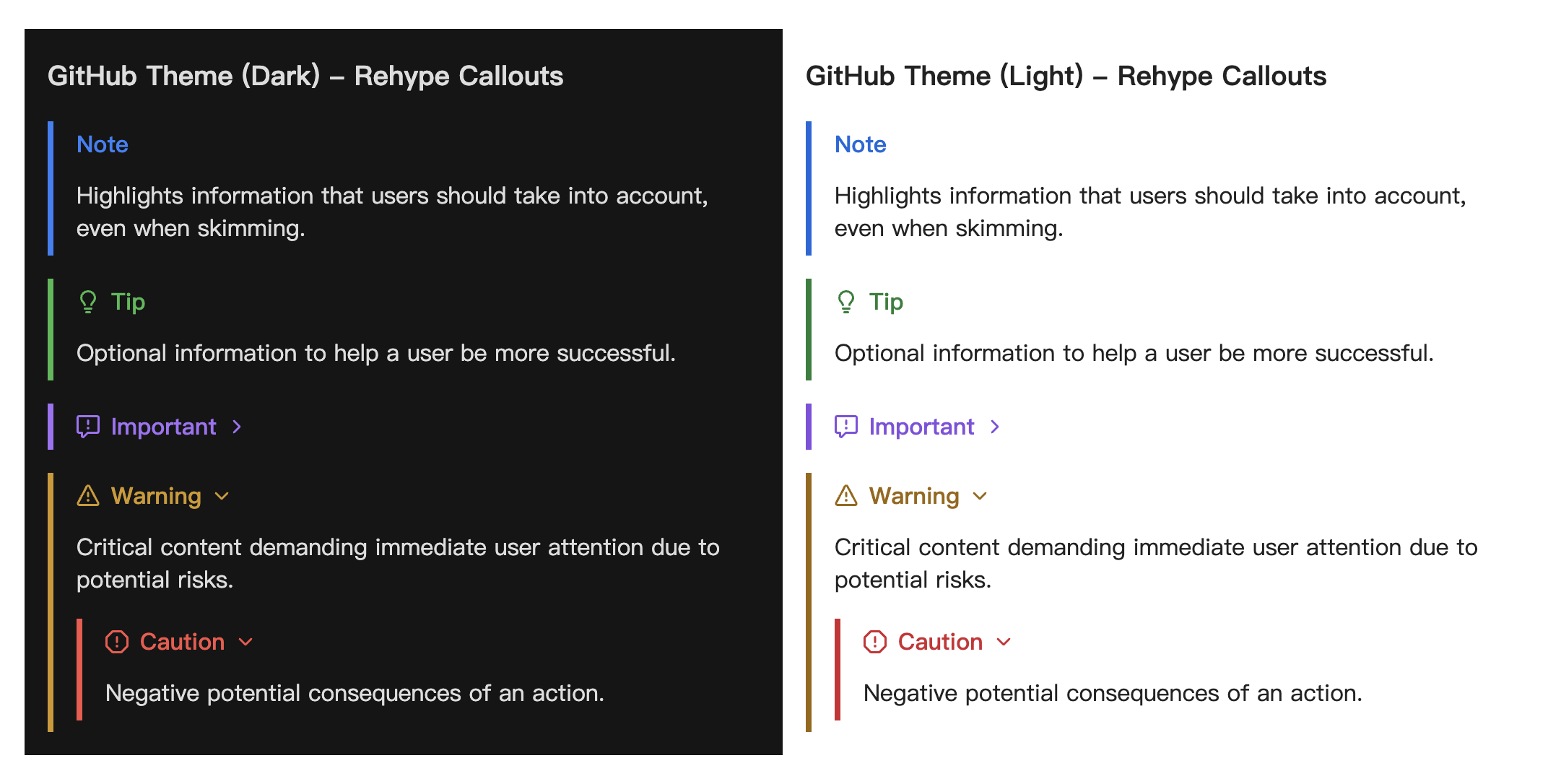
#### Obsidian
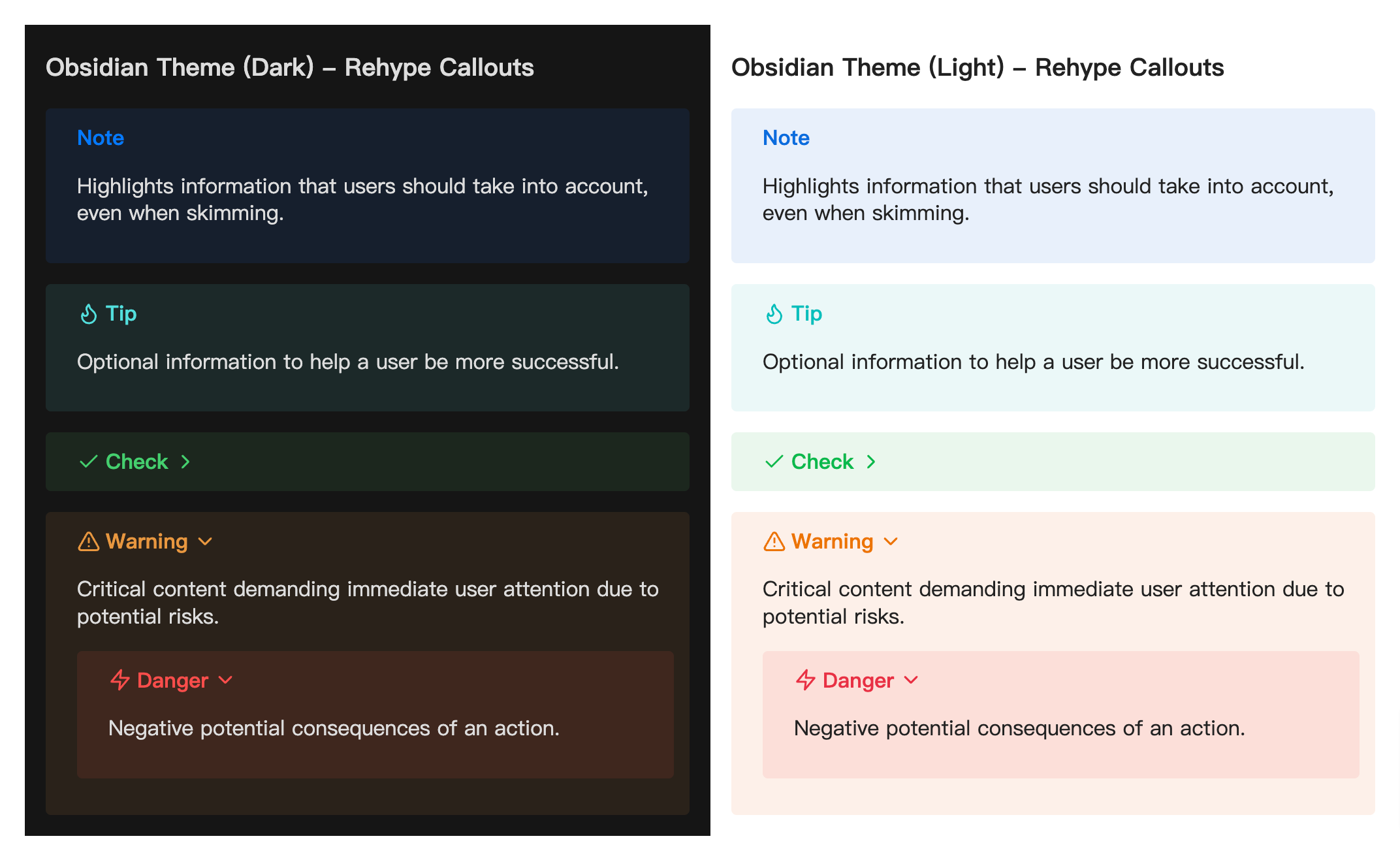
#### VitePress
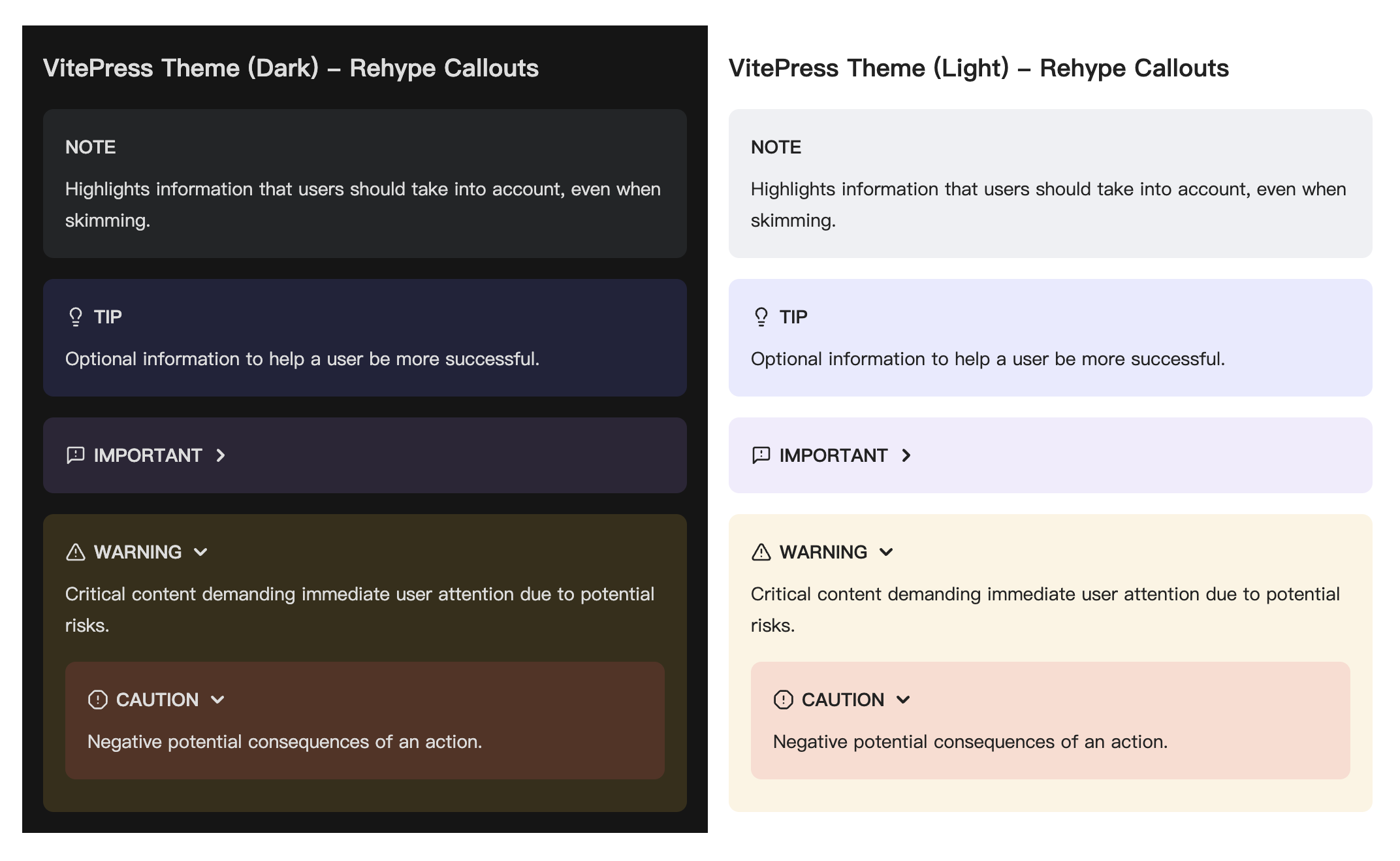
## Examples
### Example: override default class names
The `props` option allows overriding the default class names generated by the plugin. The example from before can be changed like so:
```diff
import rehypeCallouts from 'rehype-callouts'
...
const file = unified()
.use(remarkParse)
.use(remarkRehype)
- .use(rehypeCallouts)
+ .use(rehypeCallouts, {
+ props: {
+ titleProps: { class: 'custom-class1' },
+ contentProps: { className: ['custom-class2', 'custom-class3'] },
+ },
+ })
.use(rehypeStringify)
.processSync(readSync('example.md'))
console.log(String(file))
```
…that would output:
```diff
<div class="callout" data-callout="note" data-collapsible="false">
- <div class="callout-title">
+ <div class="custom-class1">
<div class="callout-title-icon" aria-hidden="true">
<!-- svg icon-->
</div>
<div class="callout-title-text">
This is a <em>non-collapsible</em> callout
</div>
</div>
- <div class="callout-content">
+ <div class="custom-class2 custom-class3">
<p>Some content is displayed directly!</p>
</div>
</div>
<details class="callout" data-callout="warning" data-collapsible="true">
- <summary class="callout-title">
+ <summary class="custom-class1">
<div class="callout-title-icon" aria-hidden="true">
<!-- svg icon-->
</div>
<div class="callout-title-text">
This is a <strong>collapsible</strong> callout
</div>
<div class="callout-fold-icon" aria-hidden="true">
<!-- svg icon-->
</div>
</summary>
- <div class="callout-content">
+ <div class="custom-class2 custom-class3">
<p>Some content shown after opening!</p>
</div>
</details>
```
### Example: custom attributes for callout elements
The `props` option allows adding custom attributes to elements in generated callouts. The example from before can be changed to add the [`dir: auto`](https://developer.mozilla.org/en-US/docs/Web/HTML/Global_attributes/dir) attribute to the outer container of both collapsible and non-collapsible callouts, and to set a custom color for `'note'` callouts, like so:
```diff
import rehypeCallouts from 'rehype-callouts'
...
const file = unified()
.use(remarkParse)
.use(remarkRehype)
- .use(rehypeCallouts)
+ .use(rehypeCallouts, {
+ props: {
+ containerProps(_, type) {
+ const newProps: Record<string, string> = {
+ dir: 'auto',
+ }
+ if (type === 'note') {
+ newProps.style = '--rc-color-light:#fc7777; --rc-color-dark:#fa9292;'
+ }
+ return newProps
+ },
+ },
+ })
.use(rehypeStringify)
.processSync(readSync('example.md'))
console.log(String(file))
```
…that would output:
```diff
<div
+ dir="auto"
+ style="--rc-color-light:#fc7777; --rc-color-dark:#fa9292;"
class="callout"
data-callout="note"
data-collapsible="false"
>
<div class="callout-title">
<div class="callout-title-icon" aria-hidden="true">
<!-- svg icon-->
</div>
<div class="callout-title-text">
This is a <em>non-collapsible</em> callout
</div>
</div>
<div class="callout-content">
<p>Some content is displayed directly!</p>
</div>
</div>
<details
+ dir="auto"
class="callout"
data-callout="warning"
data-collapsible="true"
>
<summary class="callout-title">
<div class="callout-title-icon" aria-hidden="true">
<!-- svg icon-->
</div>
<div class="callout-title-text">
This is a <strong>collapsible</strong> callout
</div>
<div class="callout-fold-icon" aria-hidden="true">
<!-- svg icon-->
</div>
</summary>
<div class="callout-content">
<p>Some content shown after opening!</p>
</div>
</details>
```
**Note:** In Svelte, using `dir="auto"` may trigger a compiler error. See [#15126](https://github.com/sveltejs/svelte/issues/15126) for details.
## Types
This package is fully typed with [TypeScript](https://www.typescriptlang.org/). It exports the additional types `UserOptions`, `CalloutConfig`, `TagsConfig`, `PropsConfig` and `CreateProperties`. See [jsDocs.io](https://www.jsdocs.io/package/rehype-callouts) for type details.
## Credits
- [staticnoise/rehype-obsidian-callout](https://gitlab.com/staticnoise/rehype-obsidian-callout) - basic functionality.
- [Octions](https://primer.style/foundations/icons/) - default icons for GitHub callouts.
- [Lucide](https://lucide.dev/) - default icons for Obsidian, VitePress callouts.
## Contribution
If you see any errors or room for improvement on this plugin, feel free to open an [issues](https://github.com/lin-stephanie/rehype-callouts/issues) or [pull request](https://github.com/lin-stephanie/rehype-callouts/pulls) . Thank you in advance for contributing!
## License
[MIT](https://github.com/lin-stephanie/rehype-callouts/blob/main/LICENSE) © 2024-PRESENT [Stephanie Lin](https://github.com/lin-stephanie)
<!-- Badges -->
[version-badge]: https://img.shields.io/github/v/release/lin-stephanie/rehype-callouts?label=release&style=flat&colorA=080f12&colorB=f87171
[version-link]: https://github.com/lin-stephanie/rehype-callouts/releases
[coverage-badge]: https://img.shields.io/codecov/c/github/lin-stephanie/rehype-callouts?style=flat&colorA=080f12&colorB=f87171
[coverage]: https://codecov.io/github/lin-stephanie/rehype-callouts
[npm-downloads-src]: https://img.shields.io/npm/dm/rehype-callouts?style=flat&colorA=080f12&colorB=f87171
[npm-downloads-href]: https://npmjs.com/package/rehype-callouts
[jsdocs-src]: https://img.shields.io/badge/jsdocs-reference-080f12?style=flat&colorA=080f12&colorB=f87171
[jsdocs-href]: https://www.jsdocs.io/package/rehype-callouts