reactjs-crontab
Version:
React component that allow you to schedule task in reactjs
269 lines (213 loc) • 6.93 kB
Markdown
# reactjs-crontab
The reactjs-crontab module is very light-weight task scheduler in reactjs based on [linux crontab](https://www.geeksforgeeks.org/crontab-in-linux-with-examples). This module allows you to schedule task in reactjs.
[](https://www.npmjs.com/package/reactjs-crontab) [](https://standardjs.com)
**Cron Syntax Guide** at [link](https://d180vcwahe2y6s.cloudfront.net/index.html)
[](https://d180vcwahe2y6s.cloudfront.net/index.html)
## Getting Started
```bash
npm install --save reactjs-crontab
```
## Usage 1
To schedule component,
```jsx
import React from 'react'
import Crontab from 'reactjs-crontab'
import 'reactjs-crontab/dist/index.css'
const styles = {
text: {
margin: '70px',
color: 'skyblue'
}
}
const HelloMsg = () => {
return <h1 style={styles.text}>Hello!</h1>
}
const App = () => {
const [open, setOpen] = React.useState(null)
const sayHello = () => {
setOpen(true)
}
// this is the function which will run according to your settings
const tasks = React.useMemo(
() => [
{
fn: sayHello,
config: '* * * * *'
// this runs every minutes
},
{
fn: sayHello,
config: '* 13,14 10 4 *'
// In April At 9AM and At 35 minute(s), 36 minute(s)
}
],
[]
)
// tasks should be memoized
return (
<div>
<Crontab
tasks={tasks}
timeZone='UTC' // UTC timezone.
dashboard={{
hidden: false, // if true, dashboard is hidden
route: '/' // dashboard will only appear in '/' route
}}
/>
{open && <HelloMsg />}
</div>
)
}
export default App
```
Copying and pasting code above will render `<HelloMsg />`

## Usage 2
To schedule function,
```jsx
import React from 'react'
import Crontab from 'reactjs-crontab'
import 'reactjs-crontab/dist/index.css'
const sayHello = () => {
console.log('Hello')
}
const RequestSomething = () => {
console.log('Api request has been sent')
}
// these are the functions which will run according to the config
const App = () => {
const tasks = React.useMemo(
() => [
{
fn: sayHello,
config: '* * * * *',
// Execute every minutes
id: '1', // optional
name: 'Say Hello' // optional
},
{
fn: RequestSomething,
config: '* 15,19 * 11,12 *',
// Execute In November, December At 3PM and 7PM every minute
id: '2', // optional
name: 'Request Something' // optional
}
],
[]
)
// tasks should be memoized
return (
<Crontab
tasks={tasks}
timeZone='UTC'
// timezone is UTC timezone.
dashboard={{
hidden: false
// if true, dashboard is hidden
}}
/>
)
}
export default App
```
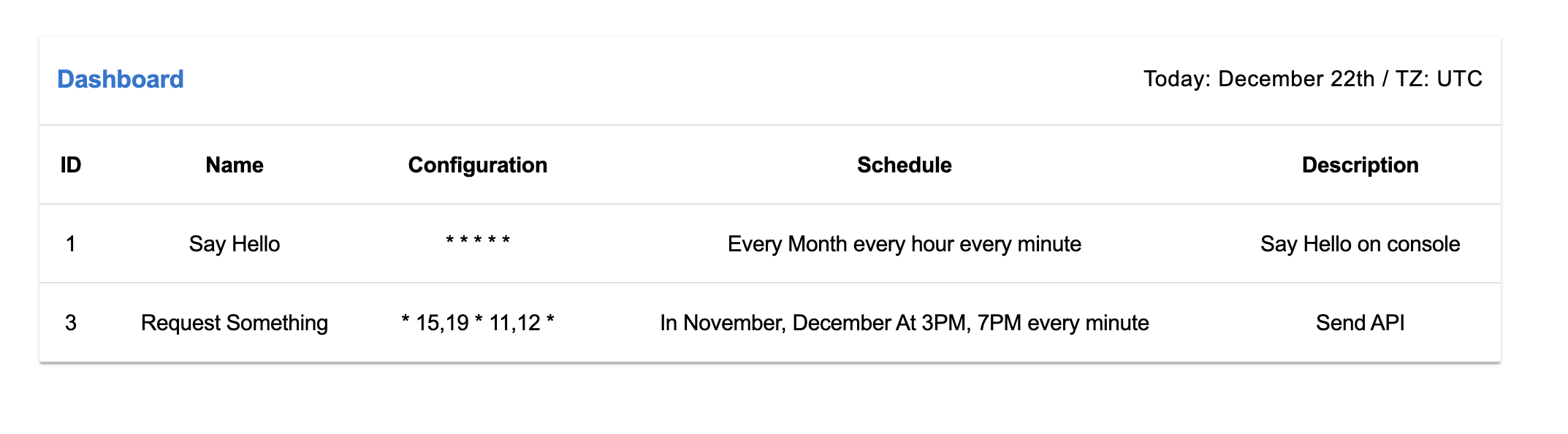
Copying and pasting code above will result something like this below
This will do what it says at the scheduled time.
## Features
- **Supports All Timezones**
- **Supports All modern browsers**
- **No extra dependencies** except React
- **No style library** is used to style the components. **vanilla css** is used.
- Provide **specific error message**, you will find it so easy to debug.
- Provide **Dashboard** which enables easy monitoring of your crontab
- Provide Demo website which helps you to easily set up your crontab
## Cron Syntax
```
# ┌──────────── minute
# │ ┌────────── hour
# │ │ ┌──────── day of month
# │ │ │ ┌────── month
# │ │ │ │ ┌──── day of week
# │ │ │ │ │
# * * * * *
```
```
MIN HOUR DOM MON DOW
```
OR
Can be multiple values like this
```
# ┌──────────── minute
# │ ┌────────── hour
# │ │ ┌──────── day of month
# │ │ │ ┌────── month
# │ │ │ │ ┌──── day of week
# │ │ │ │ │
# 1,2 6,7 * * *
```
```
MIN,MIN HOUR,HOUR DOM,DOM MON,MON DOW,DOW
```
### Allowed values
| field | value |
| ------------ | ----------------- |
| minute | 0-59 |
| hour | 0-23 |
| day of month | 1-31 |
| month | 1-12 |
| day of week | 1-7 (7 is Sunday) |
## API
```
Crontab Props {
tasks: [
{
fn: yourFn,
id: '1',
config: '* 11 18 10,13 *',
name: 'logUserOut'
}
],
timeZone: "UTC", "local" or "YOUR PREFERRED TIMEZONE",
// supported timezone list here
// https://github.com/shawnscoding/reactjs-crontab/blob/master/TIMEZONES.md
dashboard: {
hidden: false
// if true, dashboard is hidden
}
}
Crontab.propTypes = {
tasks: PropTypes.arrayOf(
PropTypes.shape({
fn: PropTypes.func.isRequired,
config: PropTypes.string.isRequired,
id: PropTypes.string,
name: PropTypes.string
})
),
dashboard: PropTypes.shape({
hidden: PropTypes.bool.isRequired,
route: PropTypes.string
}),
timeZone: PropTypes.string.isRequired
}
Crontab.defaultProps = {
tasks: [],
dashboard: {
hidden: false,
route: undefined
},
timeZone: 'UTC'
}
```
## tutorial
- [Brief project based tutorial](https://shawnscoding.medium.com/the-easiest-way-to-automate-or-schedule-component-rendering-in-react-app-f4df7784e1ea)
<!-- - [간단한 프로젝트 베이스 튜토리얼](https://shawnscoding.medium.com/%EB%A6%AC%EC%95%A1%ED%8A%B8-%EC%BB%B4%ED%8F%AC%EB%84%8C%ED%8A%B8-%EB%A0%8C%EB%8D%94%EB%A7%81-%EC%9E%90%EB%8F%99%ED%99%94-%EC%8A%A4%EC%BC%80%EC%A4%84%EB%A7%81-e8c7c9198132) -->
## Supported browsers
We use [browserslist](https://github.com/browserslist/browserslist) config to state the browser support for this lib, so check it out on [browserslist.dev](https://browserslist.dev/?q=ZGVmYXVsdHM%3D).
## Supported Timezones
supported timezone list [here](https://github.com/shawnscoding/reactjs-crontab/blob/master/TIMEZONES.md)
## Note
- feel free to open issue. [Reactjs-crontab Github repo](https://github.com/shawnscoding/reactjs-crontab). Any idea that could improve this package or bug report will be highly appreciated.
- We'll highly appreciate it if you promote this package to other devs in any way. We believe the appropriate usage of this package will save loads of thier time.
## License
MIT © [shawnscoding](https://github.com/shawnscoding/reactjs-crontab/blob/master/LICENSE)