react-use-kana
Version:
A tiny React hook to create better Japanese form
82 lines (57 loc) • 2.48 kB
Markdown
# React Use Kana [](https://badge.fury.io/js/react-use-kana) [](https://circleci.com/gh/ohbarye/react-use-kana/tree/main)
A tiny React hook to build a better Japanese form. With this library, you can implement a feature to automatically fill in kana in your form.
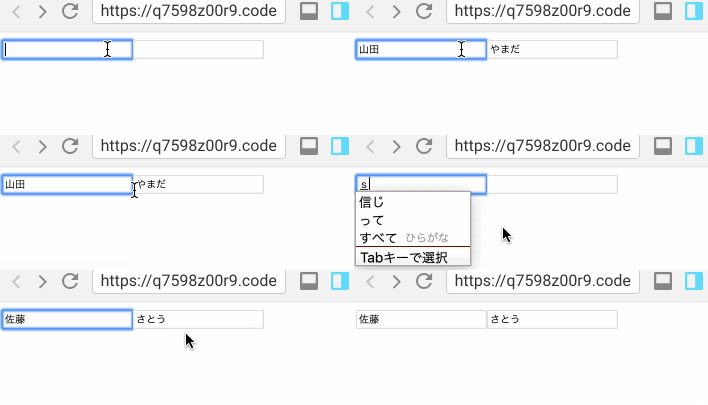
## Usage
### Installation
```shell
npm install react-use-kana
# or
yarn add react-use-kana
```
### API
#### `useKana`
This is the only one hook that `react-use-kana` provides.
- `kana: string`
- A hiragana string that derived from inputs. You set this value to a text input for a kana field.
- `setKanaSource: (value: string) => void`
- A function to let `useKana` hook know a new input value so that it can derive `kana`. In general, you call this function as `onClick` callback of a text input for a name field which probably has kanjis or non-hiragana characters.
This hook accepts an option to define its conversion rule.
- `kataType: 'hiragana' | 'katakana'` (Optional)
- `'hiragana'` is default. If you'd like to convert to katakana, declare like `useKana({ kanaType: 'katakana' })`.
### Example
Let's see the following simple example.
```javascript
import React from 'react';
import ReactDOM from 'react-dom';
import { useKana } from 'react-use-kana';
const App = () => {
const { kana, setKanaSource } = useKana();
return (
<form>
<div>
<span>Japanese Traditional Form</span>
</div>
<div>
<div>
<span>Name</span>
</div>
<input type="text" onChange={(e) => setKanaSource(e.target.value)} />
</div>
<div>
<div>
<span>Name Kana</span>
</div>
<input type="text" value={kana} />
</div>
</form>
);
};
ReactDOM.render(<App />, document.getElementById('root'));
```
`react-use-kana` doesn't provide features to handle your form's behavior (e.g. to set value to a component's state, to check if a field has been touched or not) because it's supposed to be agnostic about form library.
📝 You can check more authentic example code on https://codesandbox.io/s/react-use-kana-example-1kxuh.
## Feature
This library uses:
- [React Hooks](https://reactjs.org/docs/hooks-intro.html)
## Requirement
- `react >= 16.8`