react-table-filter
Version:
> Module creates Excel like Column Filters for Table. The filter list contains all the unique items present in every column. See image below for example.
135 lines (98 loc) • 4.7 kB
Markdown
# react-table-filter
> Module creates Excel like Column Filters for Table. The filter list contains all the unique items present in every column. See image below for example.
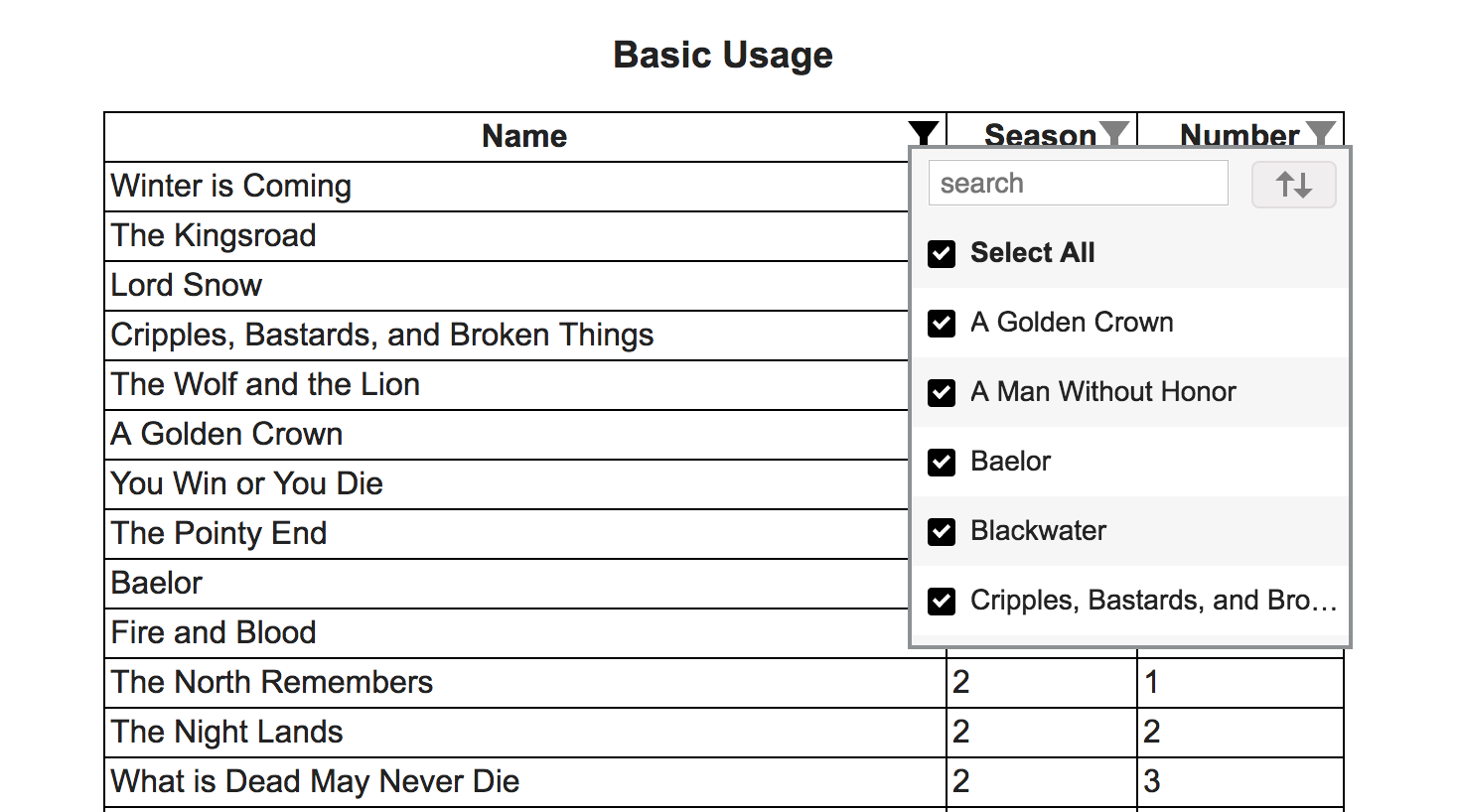
## Demo
[https://cheekujha.github.io/react-table-filter/](https://cheekujha.github.io/react-table-filter/)
## Install
You need to have react and react-dom as dependencies in your project.
1. With [npm](https://npmjs.org/) installed, run
```
$ npm install react-table-filter --save
```
2. At this point you can import react-table-filter and its styles in your application as follows:
```js
import TableFilter from 'react-table-filter';
// Be sure to include styles at some point, probably during your bootstraping
// In JS
import react-table-filter/lib/styles.css;
// In SCSS
@import "path-to-node_modules/react-table-filter/lib/styles.css";
// Or directly import css
<link href="path-to-react-table-filter/lib/styles.css" rel="stylesheet" />
```
## Usage
1. Wrap header columns (th / td) with TableFilter as shown below.
```
<TableFilter
rows={data}
onFilterUpdate={this._filterUpdated}>
<th filterkey="name">
Name
</th>
<th filterkey="season">
Season
</th>
<th filterkey="number">
Number
</th>
</TableFilter>
```
Required Props on TableFilter
rows - Initial Array of Items
onFilterUpdate - Function called with updated filtered data when filters are added/removed. This function is used to show updated data by your application. Ex:
```
filterUpdated = (newData, filterConfiguration) => {
this.setState({
"upddatedData": newData
});
}
```
```
Arguments Detail:
newData - Filtered Data to be used to show on UI
filterConfiguration - Current filters configuration.
```
**filterConfiguration** can be saved and be passed as prop(initialFilters) to **TableFilter** to maintain filter state while initializing the component.(In case user navigates away and comes back etc.)
Required Props on th/td (Header columns)
filterkey - The key by which that column is to be filtered(key as present in rows data)
Only the Columns with "filterkey" prop present will be considered for filtering.
## Reset Items after Initialization
If you want to reset Items after component mount. Make a reference to **TableFilter** node and call **reset** method as shown below.
```
<TableFilter
rows={data}
onFilterUpdate={this._filterUpdated}
initialFilters={this.state.filterConfiguration}
ref={ (node) => {this.tableFilterNode = node;}>
this.tableFilterNode.reset(newData, resetFilters);
```
```
Arguments Detail:
newData - Data to reset
resetFilters(Default: true) - Boolean tells component to maintain/reset existing filters
```
## API
### Properties
#### TableFilter
Name | Type | Default | Required | Description
:--- | :--- | :------ | :------- | :----------
rows | array | | true | Items for the Filter
onFilterUpdate | function(updatedData, filterConfiguration) | | true | Function called with filtered data and updated filter configuration
rowClass | string | | false | Any additional class to be added to table row contaning header columns
initialFilters | Array | | false | Initial Filter configuration to be applied. Configuration is received as second argument for **onFilterUpdate** function
rowComponent | Component | Table Row Element | false | The columns headers will by default be placed inside Table Row Element. If **rowComponent** is passed it will be used. Any react component can be used.
#### TableFilter Ref Methods
Name | Type | Description
:--- | :--- | :----------
reset | function(items, resetFilters=true) | Function called to reset items after component has been mounted. You can choose to either reset current filters or not.
#### Cloumn Headers(td/th)
Name | Type | Default | Required | Description
:--- | :--- | :------ | :------- | :----------
filterkey | string | | false | Key by which the Column should be filtered(Key as present in single Item)
itemDisplayValueFunc | function(itemValue) | | false | Optional Function that returns the Value that is displayed in the filter list for each item(Default is the item value - Item[key])
itemSortValueFunc | function(itemValue) | | false | Optional Function that returns the Value that is used while sorting (Default is the item value - Item[key])
alignleft | string | "false" | false | Decides while side filter list should be aligned w.r.t Column. Allowed "true"/"false"
casesensitive | string | "false" | false | Case Sensitivity during sort. Allowed "true"/"false"
showsearch | string | "true" | false | Display/Hide the search input. Allowed "true"/"false"
## License
MIT