react-stepper-component-simple
Version:
React stepper component with mobile and desktop config.
91 lines (69 loc) • 3.68 kB
Markdown
# React Stepper Component Simple
React stepper component with mobile and desktop config.
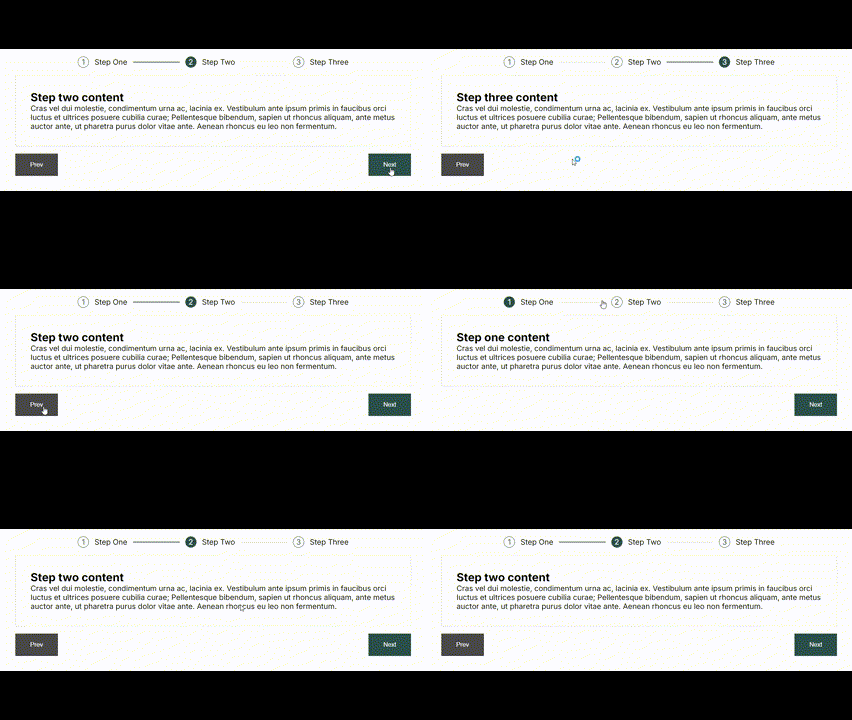
## How it works
- The `<StepperComponent>` acts as a wrapper and the `<StepperItemComponent>` is a wrapper for each step.
## How to use
### Install
Installation: `npm install react-stepper-component-simple`
### Usage
Import the package into your app:
`import { StepperComponent, StepperItemComponent } from "react-stepper-component-simple";`
#### Component Example:
```
<StepperComponent
stepNumberBackgroundColour="#2C514C"
stepNumberTextColour="white"
stepNumberWidth="24px"
stepNumberHeigth="24px"
buttonStyles={{padding: "1rem 2rem", border: 0, backgroundColor: "#2C514C", color: "white"}}
contentWrapperStyles={{padding: "1rem"}}
stepTitleDirectionMobile="column"
stepTitleDirectionDesktop="row"
mobileBreakpoint={768}
>
<StepperItemComponent header="Step One">
<div className="step-content">
<h2>Step one content</h2>
<p>
Cras vel dui molestie, condimentum urna ac, lacinia ex. Vestibulum ante ipsum primis in faucibus orci luctus et ultrices posuere cubilia curae; Pellentesque bibendum, sapien ut rhoncus aliquam, ante metus auctor ante, ut pharetra purus dolor vitae ante. Aenean rhoncus eu leo non fermentum.
</p>
</div>
</StepperItemComponent>
<StepperItemComponent header="Step Two">
<div className="step-content">
<h2>Step Two content</h2>
<p>
Cras vel dui molestie, condimentum urna ac, lacinia ex. Vestibulum ante ipsum primis in faucibus orci luctus et ultrices posuere cubilia curae; Pellentesque bibendum, sapien ut rhoncus aliquam, ante metus auctor ante, ut pharetra purus dolor vitae ante. Aenean rhoncus eu leo non fermentum.
</p>
</div>
</StepperItemComponent>
<StepperItemComponent header="Step Three">
<div className="step-content">
<h2>Step three content</h2>
<p>
Cras vel dui molestie, condimentum urna ac, lacinia ex. Vestibulum ante ipsum primis in faucibus orci luctus et ultrices posuere cubilia curae; Pellentesque bibendum, sapien ut rhoncus aliquam, ante metus auctor ante, ut pharetra purus dolor vitae ante. Aenean rhoncus eu leo non fermentum.
</p>
</div>
</StepperItemComponent>
</StepperComponent>
```
### Component Options:
- `stepNumberBackgroundColour="#2C514C"`
Step number background colour.
- `stepNumberTextColour="white"`
Step number text colour.
- `stepNumberWidth="24px"`
Step number width.
- `stepNumberHeigth="24px"`
Step number height.
- `buttonStyles={{padding: "1rem 2rem", border: 0, backgroundColor: "#2C514C", color: "white"}}`
Prev and next button styles.
- `contentWrapperStyles={{padding: "1rem"}}`
Content wrapper styles.
- `stepTitleDirectionMobile="column"`
Step title flex direction mobile.
- `stepTitleDirectionDesktop="row"`
Step title flex direction desktop.
- `mobileBreakpoint={768}`
Mobile breakpoint.