react-phone-input-textfield-filled
Version:
A react component with a material-UI feel to format phone numbers
448 lines (385 loc) • 8.38 kB
Markdown
# React-Phone-Input-TextField-filled
[react-phone-input-2](https://github.com/bl00mber/react-phone-input-2) with Material-UI's "filled" variant.
Highly customizable phone input component with auto formatting.
### Original look
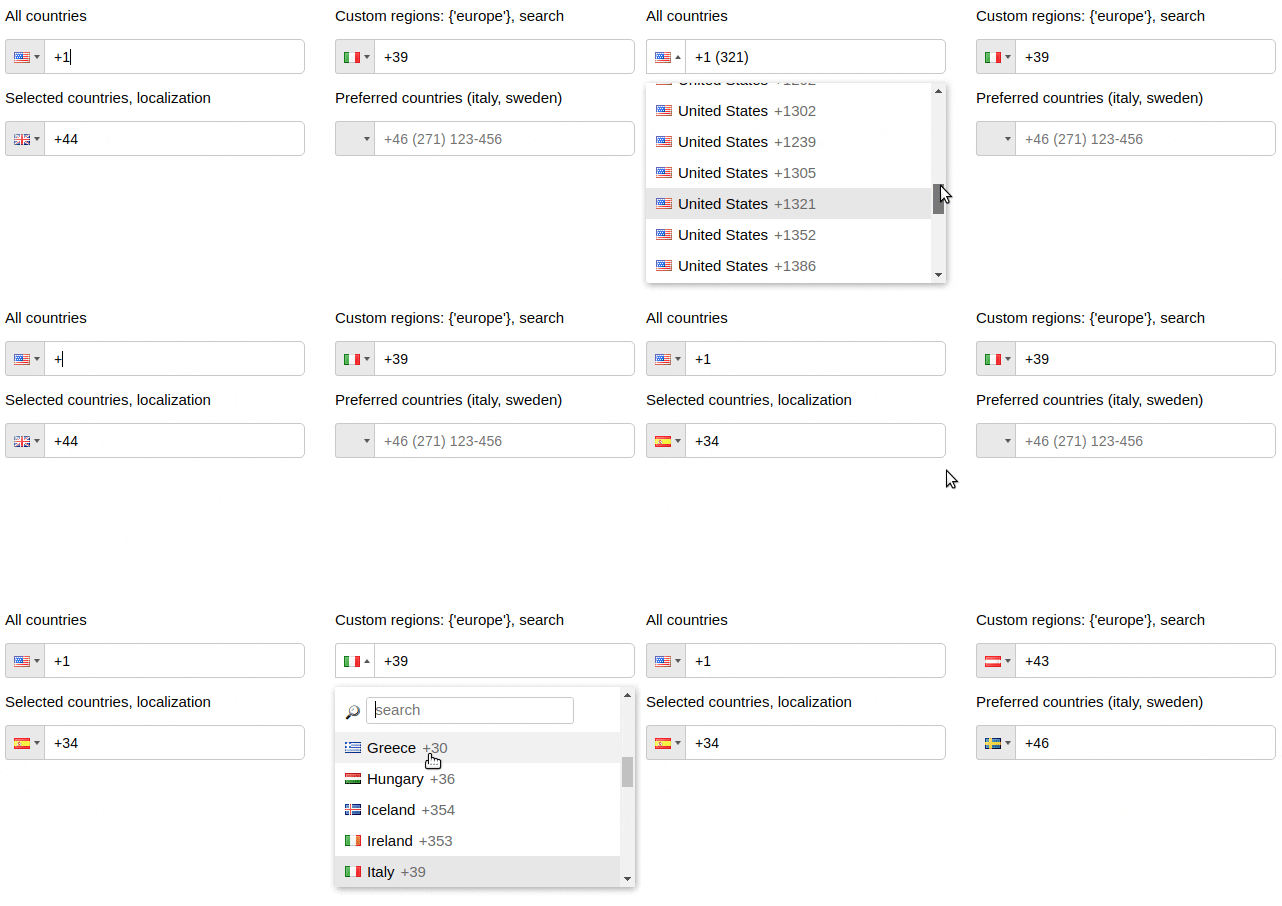
### With a Material-UI TextField look:

## Installation
```shell-script
npm install react-phone-input-textfield-filled --save
```
## Usage
```jsx
import PhoneInput from "react-phone-input-textfield-filled";
import "react-phone-input-textfield-filled/dist/style.css";
<PhoneInput
defaultCountry={"us"}
value={this.state.phone}
onChange={handleOnChange}
/>;
```
```jsx
handleOnChange(value) {
this.setState({ phone: value })
}
```
## Options
<table>
<tr>
<th> Name </th>
<th> Type </th>
<th> Description </th>
<th> Example </th>
</tr>
<tr>
<td> excludeCountries </td>
<td> array </td>
<td> array of country codes to be excluded </td>
<td> ['cu','cw','kz'] </td>
</tr>
<tr>
<td> onlyCountries </td>
<td> array </td>
<td> country codes to be included </td>
<td> ['cu','cw','kz'] </td>
</tr>
<tr>
<td> preferredCountries </td>
<td> array </td>
<td> country codes to be at the top </td>
<td> ['cu','cw','kz'] </td>
</tr>
<tr>
<td> defaultCountry </td>
<td> string </td>
<td> initial country </td>
<td> 'us' </td>
</tr>
<tr>
<td> value </td>
<td> string </td>
<td colspan="2"> input state value </td>
</tr>
<tr>
<td> label </td>
<td> string </td>
<td colspan="2"> input label name </td>
</tr>
<tr>
<td> placeholder </td>
<td> string </td>
<td colspan="2"> custom placeholder </td>
</tr>
<tr>
<td> searchPlaceholder </td>
<td> string </td>
<td colspan="2"> custom search placeholder </td>
</tr>
<tr>
<td> inputExtraProps </td>
<td> object </td>
<td colspan="2"> props to pass into the input </td>
</tr>
</table>
<table>
<tr>
<th> Booleans </th>
<th> Default </th>
<th> Description </th>
</tr>
<tr>
<td> disableAreaCodes </td>
<td> false </td>
<td> disable local codes for all countries </td>
</tr>
<tr>
<td> autoFormat </td>
<td> true </td>
<td> on/off phone formatting </td>
</tr>
<tr>
<td> disabled </td>
<td> false </td>
<td> disable input and dropdown </td>
</tr>
<tr>
<td> disableDropdown </td>
<td> false </td>
<td> disable dropdown only </td>
</tr>
<tr>
<td> disableCountryCode </td>
<td> false </td>
<td> </td>
</tr>
<tr>
<td> enableLongNumbers </td>
<td> false </td>
<td> </td>
</tr>
<tr>
<td> countryCodeEditable </td>
<td> true </td>
<td> </td>
</tr>
<tr>
<td> enableSearchField </td>
<td> false </td>
<td> enable search in the dropdown </td>
</tr>
<tr>
<td> disableSearchIcon </td>
<td> false </td>
<td> hide icon for the search field </td>
</tr>
</table>
```jsx
<PhoneInput
inputExtraProps={{
name: "phone",
required: true,
autoFocus: true
}}
/>
```
### Contents
- [Style](#style)
- [Events](#events)
- [Regions](#regions)
- [Custom area codes](#custom-area-codes)
- [Custom masks](#ocustom-masks)
- [Localization](#localization)
- [Guides](#guides)
- [Phone without dialCode](#phone-without-dialcode)
- [Check validity of the phone number](#check-validity-of-the-phone-number)
- [CDN](#cdn)
- [Contributing](#contributing)
- [Support](https://www.paypal.me/bloomber/20)
### Style
<table>
<tr>
<td> containerClass </td>
<td> string </td>
<td colspan="2"> class for container </td>
</tr>
<tr>
<td> inputClass </td>
<td> string </td>
<td colspan="2"> class for input </td>
</tr>
<tr>
<td> labelClass </td>
<td> string </td>
<td colspan="2"> class for label </td>
</tr>
<tr>
<td> buttonClass </td>
<td> string </td>
<td colspan="2"> class for dropdown button </td>
</tr>
<tr>
<td> dropdownClass </td>
<td> string </td>
<td colspan="2"> class for dropdown container </td>
</tr>
<tr>
<td> searchClass </td>
<td> string </td>
<td colspan="2"> class for search field </td>
</tr>
<tr>
<td> containerStyle </td>
<td> object </td>
<td colspan="2"> styles for container </td>
</tr>
<tr>
<td> inputStyle </td>
<td> object </td>
<td colspan="2"> styles for input </td>
</tr>
<tr>
<td> labelStyle </td>
<td> object </td>
<td colspan="2"> styles for label </td>
</tr>
<tr>
<td> buttonStyle </td>
<td> object </td>
<td colspan="2"> styles for dropdown button </td>
</tr>
<tr>
<td> dropdownStyle </td>
<td> object </td>
<td colspan="2"> styles for dropdown container </td>
</tr>
<tr>
<td> searchStyle </td>
<td> object </td>
<td colspan="2"> styles for search field </td>
</tr>
</table>
### Events
<table>
<tr>
<td> onChange </td>
<td> onFocus </td>
<td> onBlur </td>
<td> onClick </td>
<td> onKeyDown </td>
</tr>
</table>
Country data object does not return from onKeyDown event
<table>
<tr>
<th> Data </th>
<th> Type </th>
<th> Description </th>
</tr>
<tr>
<td> value/event </td>
<td> string/object </td>
<td> event or the phone number </td>
</tr>
<tr>
<td> country data </td>
<td> object </td>
<td> country object { name, dialCode, countryCode (iso2) } </td>
</tr>
</table>
### Regions
<table>
<tr>
<th> Name </th>
<th> Type </th>
<th> Description </th>
</tr>
<tr>
<td> regions </td>
<td> array/string </td>
<td> to only show codes from selected regions </td>
</tr>
</table>
<table>
<tr>
<th> Regions </th>
</tr>
<tr>
<td> ['america', 'europe', 'asia', 'oceania', 'africa'] </td>
</tr>
<tr>
<th> Subregions </th>
</tr>
<tr>
<td> ['north-america', 'south-america', 'central-america', 'carribean', 'european-union', 'ex-ussr', 'middle-east', 'north-africa'] </td>
</tr>
</table>
Regions selected: {'europe'}
```jsx
<PhoneInput defaultCountry="it" regions={"europe"} />
```
Regions selected: {['north-america', 'carribean']}
```jsx
<PhoneInput defaultCountry="ca" regions={["north-america", "carribean"]} />
```
### Custom area codes
<table>
<tr>
<th> Name </th>
<th> Type </th>
</tr>
<tr>
<td> areaCodes </td>
<td> object </td>
</tr>
</table>
```jsx
<PhoneInput
onlyCountries={["gr", "fr", "us"]}
areaCodes={{ gr: ["2694", "2647"], fr: ["369", "463"], us: ["300"] }}
/>
```
### Custom masks
<table>
<tr>
<th> Name </th>
<th> Type </th>
</tr>
<tr>
<td> masks </td>
<td> object </td>
</tr>
</table>
```jsx
<PhoneInput
onlyCountries={["fr", "at"]}
masks={{ fr: "+.. (...) ..-..-..", at: "+.. (....) ...-...." }}
/>
```
### Localization
<table>
<tr>
<th> Name </th>
<th> Type </th>
</tr>
<tr>
<td> localization </td>
<td> object </td>
</tr>
</table>
```jsx
<PhoneInput
onlyCountries={['de', 'es']}
localization={{de: 'Deutschland', es: 'España'}}
/>
<PhoneInput
onlyCountries={['de', 'es']}
localization={{'Germany': 'Deutschland', 'Spain': 'España'}}
/>
```
Predefined translations
`es`, `de`, `ru`, `fr`
```jsx
import es from "lang/es.json";
<PhoneInput localization={es} />;
```
### Preserve countries order
<table>
<tr>
<th> Name </th>
<th> Type </th>
</tr>
<tr>
<td> preserveOrder </td>
<td> array </td>
</tr>
</table>
```jsx
<PhoneInput
onlyCountries={["fr", "at"]}
preserveOrder={["onlyCountries", "preferredCountries"]}
/>
```
### Other props
<table>
<tr>
<td> renderStringAsFlag </td>
<td> string </td>
</tr>
</table>
## Guides
### Phone without dialCode
```jsx
handleOnChange(value, data) {
this.setState({ rawPhone: value.replace(/[^0-9]+/g,'').slice(data.dialCode.length) })
}
```
### Check validity of the phone number
```jsx
<PhoneInput isValid={v => v === "1"} />
```
## Contributing
Code style changes not allowed
## License
[](https://github.com/bl00mber/react-phone-input-2/blob/master/LICENSE)
Based on [react-phone-input-2](https://github.com/bl00mber/react-phone-input-2)