react-phone-input-pro
Version:
Phone number input component for react to format phone numbers according to selected countries in real time.
133 lines (107 loc) • 3.64 kB
Markdown
# react-phone-input-pro
Phone number input component for react to format phone numbers according to selected country in real time.
## Features
* Easy to use - just import and use.
* Lightweight - No third-party dependencies.
* Search bar - You can anable or disable search bar from countries options list.
* You have option to include or exclude dial code from number.
* You can create your own formats
## Installation
Run this command in your terminal
```bash
npm install react-phone-input-pro
```
| Props | Description |
| --- | --- |
| initialFormat: Boolean | When using this component in editable forms. this function automatically guess the the dial code and formats the number|
| prefix: Boolean| user will get dial code pre defined When this is true or undefined |
| className: String | To add a css class in this component |
| includeDialingCode: Boolean | If you don't want to include dial code in number then make this false |
| placeholder: String | To change placeholder |
| onchange: Function() | This function returns current unformatted value. Which you can use to setState of value. |
| onlyCountries: Array | To filter country options. e.g.: ["USA", "IND"] |
| fixLength: Boolean | To limit input length |
| disabled: Boolean | To make input and selector disable|
| fullIsoCode: Boolean | Sets 3 letter ISO Code e.g. "IND", "USA"|
| searchOption: Boolean | To add or remove search bar|
| getCountryCode: Function() | To get selected country code |
| flags: Boolean | To get country code instead of flag |
| error: [errorStatus:boolean, errorMessage:string] | To show error message |
<img width="785" alt="Screenshot 2023-05-14 at 1 37 55 PM" src="https://github.com/faraazHasan/react-phone-input-pro/assets/83122437/c86841f1-4fcf-49a4-bf90-a91d09a93cea">
## Usage
```typescript
import PhoneInput from 'react-phone-input-pro';
```
```javascript
const [number, setNumber] = useState();
const [err, setErr] = useState(false);
```
```typescript
//for typescript
const [number, setNumber] = useState<string | number>();
const [err, setErr] = useState(false);
```
## Example: Inside React-hook-form
#
```typescript
<Controller
control={control}
name={"phone"}
render={({ field: { onChange, value } }) => (
<PhoneInput
value={value}
prefix
onchange={(n: string) => {
onChange(n);
}}
/>
)}
/>
```
## Normal use
#
```typescript
<PhoneInput
initialFormat={true}
value={number}
prefix={true}
onchange={(n) => setNumber(n)}
fullIsoCode={true}
/>
```

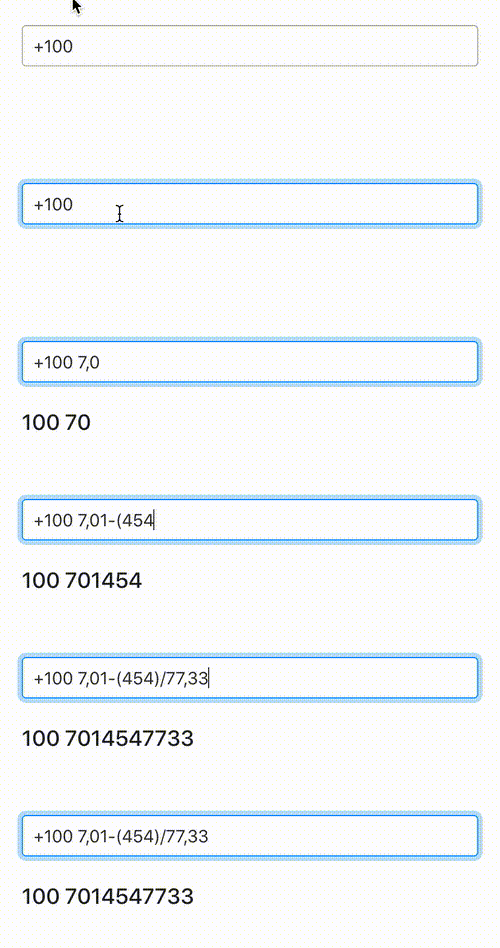
## Create your own format
#
```typescript
<PhoneInput
value={number}
initialFormat={true}
prefix={true}
placeholder={"Phone number..."}
fixLength={true}
format={"+100 #,##-(###)/##,##"}
fullIsoCode={true}
searchOption={true}
onchange={(n)=> setPhone(n)}
/>
```
## Error handling
```typescript
<PhoneInput
value={number}
initialFormat={true}
prefix={false}
placeholder={"Phone number..."}
error={[err, "Invalid Number"]}
fullIsoCode={true}
searchOption={true}
onchange={(value: string)=> {
setNumber(value)
setErr(false);
}}
/>
```

####
Based on [react-number-formatter](https://www.npmjs.com/package/react-number-formatter)