react-online-hook
Version:
React hook to monitor network status.
142 lines (99 loc) • 5.34 kB
Markdown
[](https://www.npmjs.com/package/react-online-hook)
[](https://www.npmjs.com/package/react-online-hook)
[](https://www.npmjs.com/package/react-online-hook)
[](https://www.npmjs.com/package/react-online-hook)
[](https://github.com/facebook/jest)
[](https://www.cypress.io/)
[](https://github.com/Uzwername/react-online-hook/blob/master/LICENSE)
Lightweight, easy to use [React](https://reactjs.org/) hook to detect if user is online or offline with [TypeScript](https://www.typescriptlang.org/) / [Flow](https://flow.org/) support & progressive enhancement capabilities.
+ Offline banners/warnings
+ Online status indicators
+ Offline-aware form submissions
+ Offline-aware network actions
+ Component-level offline handling
Using npm:
```bash
npm install react-online-hook
```
Using yarn:
```bash
yarn add react-online-hook
```
`useOnlineStatus` monitors whether the user is online or offline & returns an up to date status.
Here is an example of how it could be used:
```JSX
import React from 'react';
import useOnlineStatus from 'react-online-hook';
// or
const useOnlineStatus = require('react-online-hook');
const OnlineIndicator = () => {
const { isOnline } = useOnlineStatus();
return (
<span>
{ isOnline ? 'Online' : 'Offline' }
</span>
);
};
export default OnlineIndicator;
```
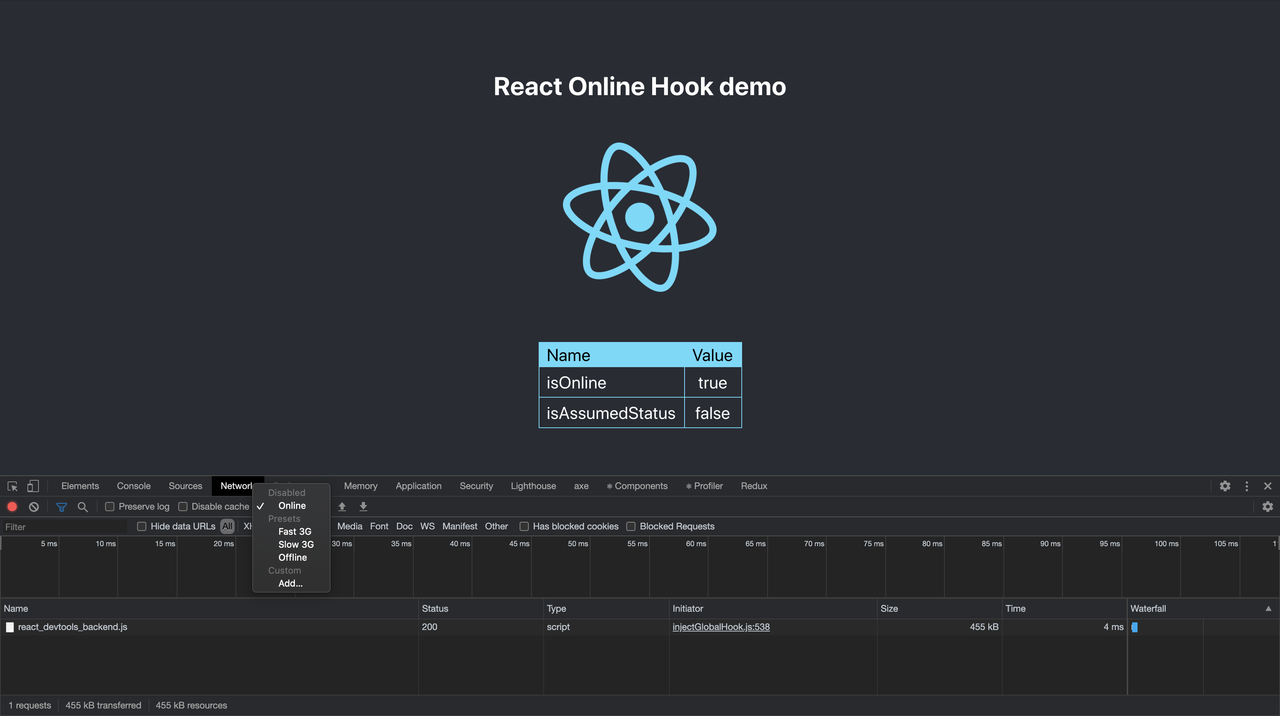
You can play with [demo application](https://uzwername.github.io/react-online-hook/) built to show how `useOnlineStatus` works [using network tab in developer tools](https://developers.google.com/web/ilt/pwa/tools-for-pwa-developers#simulate_offline_behavior).
[](https://postimg.cc/PNSYYqjn)
Please note that if you use any modern browser, `isAssumedStatus` will alway be `false`.
If you want to perform an action when online status changes, you can use [`useEffect`](https://reactjs.org/docs/hooks-reference.html#useeffect) specifying `isOnline` in the dependency array like this:
```JSX
import React, {useEffect} from 'react';
import useOnlineStatus from 'react-online-hook';
const OnlineIndicator = () => {
const { isOnline } = useOnlineStatus();
useEffect(() => {
if (isOnline) {
alert('You are online! 🚀');
} else {
alert('You are offline 😿');
}
}, [isOnline]);
return (
<span>
{ isOnline ? 'Online' : 'Offline' }
</span>
);
};
export default OnlineIndicator;
```
Internally `useOnlineStatus` uses [`window.navigator.onLine`](https://developer.mozilla.org/en-US/docs/Web/API/NavigatorOnLine/onLine) to get initial status when you first call it.
<br>
According to [Can I use](https://caniuse.com/#search=navigator.onLine), this property is supported by around 98% of the browsers.
If your project supports legacy browsers, you could use a utility provided by `useOnlineStatus` to easily implement [progressive enhancement](https://developer.mozilla.org/en-US/docs/Glossary/Progressive_Enhancement).
`useOnlineStatus` is aware that `window.navigator.onLine` might not be present.
<br>
In that case, it _assumes_ that when it first called (which happens on initial mount of your component), the browser is online.
`useOnlineStatus` indicates when the status is assumed & you could use this information like this to implement progressive enhancement:
```JSX
import React from 'react';
import useOnlineStatus from 'react-online-hook';
const LegacyBrowserOnlineIndicator = () => {
const { isOnline, isAssumedStatus } = useOnlineStatus();
if (isAssumedStatus) {
return null;
}
return (
<span>
{ isOnline ? 'Online' : 'Offline' }
</span>
);
};
export default LegacyBrowserOnlineIndicator;
```
Additional things to consider:
+ When status is assumed, `isOnline` is true. You could just use this assumption if it is reasonable in your case.
+ `isAssumedStatus` might change to `false` if browser does not have `window.navigator.onLine` but correctly dispatches [online](https://developer.mozilla.org/en-US/docs/Web/API/Window/online_event) or [offline](https://developer.mozilla.org/en-US/docs/Web/API/Window/offline_event) events.
+ `useOnlineStatus` internally uses [`addEventListener`](https://developer.mozilla.org/es/docs/Web/API/EventTarget/addEventListener) & [`removeEventListener`](https://developer.mozilla.org/es/docs/Web/API/EventTarget/removeEventListener).
This project is licensed under the terms of the [MIT license](https://github.com/Uzwername/react-online-hook/blob/master/LICENSE).