react-native-zendesk-chat
Version:
React Native Wrapper around Zopim Zendesk Chat
197 lines (128 loc) • 6.47 kB
Markdown
# react-native-zendesk-chat
Simple module that supports displaying Zendesk Chat within a React Native Application.
This library assumes you're familiar with Zendesk's Official Documentation: [iOS](https://developer.zendesk.com/embeddables/docs/chat-sdk-v-2-for-ios/introduction) and [Android](https://developer.zendesk.com/embeddables/docs/chat-sdk-v-2-for-android/introduction).
## VERSIONS
- For **Zendesk Chat v2** use version >= 0.4.0 (this requires RN 0.59 or later!)
- For RN version >= 0.59 use version >= 0.3.0 (Zendesk Chat v1)
- For RN version < 0.59 use version <= 0.2.2 (Zendesk Chat v1)
## Known Issues
## Getting Started
With npm:
`npm install react-native-zendesk-chat --save`
or with yarn:
`yarn add react-native-zendesk-chat`
### QuickStart & Usage
1. Setup Native Dependencies<br/> **iOS** If you're on react-native >= 0.60 and you have Cocoapods setup, then you just need to:
```bash
$ yarn install # and see if there are any errors
$ (cd ios; pod install) # and see if there are any errors
# -- you may need to do `pod install --repo-update`
```
If you're on older react-native versions, please see the [Advanced Setup](#advanced-setup) section below
**Android** If you're on react-native >= 0.60, Android should autodetect this dependency. If you're on 0.59, you may need to call `react-native link`
2. Call the JS Initializer:
```javascript
import ZendeskChat from "react-native-zendesk-chat";
// Once in your application:
ZendeskChat.init("YOUR_ZENDESK_ACCOUNT_KEY");
// Optionally specify the appId provided by Zendesk
ZendeskChat.init("YOUR_ZENDESK_ACCOUNT_KEY", "APP_ID_PROVIDED_BY_ZENDESK");
```
3. Show the Chat UI
```javascript
// On button press, when you want to show chat:
ZendeskChat.startChat({
name: user.full_name,
email: user.email,
phone: user.mobile_phone,
tags: ["tag1", "tag2"],
department: "Your department",
// The behaviorFlags are optional, and each default to 'true' if omitted
behaviorFlags: {
showAgentAvailability: true,
showChatTranscriptPrompt: true,
showPreChatForm: true,
showOfflineForm: true,
},
// The preChatFormOptions are optional & each defaults to "optional" if omitted
preChatFormOptions: {
name: !user.full_name ? "required" : "optional",
email: "optional",
phone: "optional",
department: "required",
},
localizedDismissButtonTitle: "Dismiss",
});
```
### Obtaining the `YOUR_ZENDESK_ACCOUNT_KEY`
To optain your zendesk account key see the instructions in [Initializing the SDK](https://api.zopim.com/web-sdk/#initializing-the-sdk) in the Zendesk SDK.
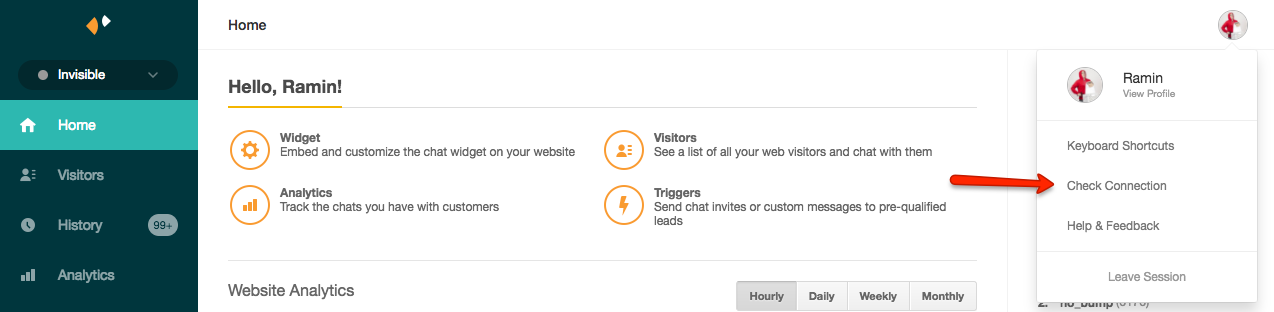
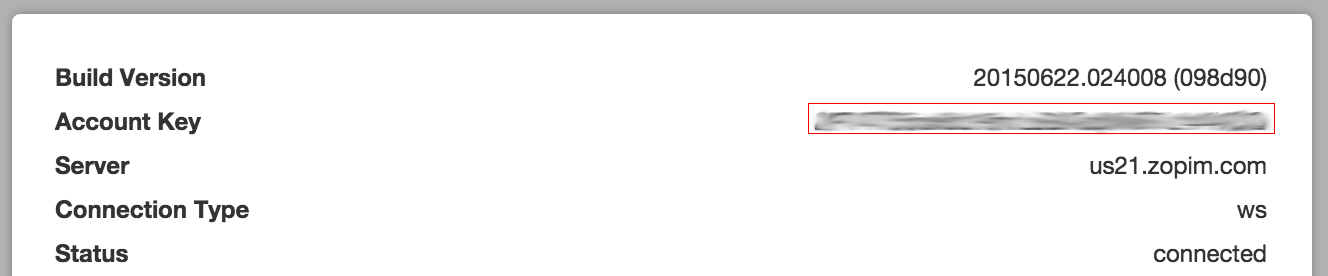
To get your account key, follow these steps:
1. In the Zendesk Chat Dashboard, click on your profile in the upper right corner and click on the 'Check Connection' option:
1. In the dialog, copy the account key value
### Styling
Changing the UI Styling is mostly achieved through native techniques.
On Android, this is the [official documentation](https://developer.zendesk.com/embeddables/docs/android-unified-sdk/customize_the_look#how-theming-works) -- and an example might be adding these [3 lines to your app theme](https://github.com/zendesk/sdk_demo_app_android/blob/ae4c551f78911e983b0aac06967628f46be15e54/app/src/main/res/values/styles.xml#L5-L7)
While on iOS, the options are more minimal -- check the [official doc page](https://developer.zendesk.com/embeddables/docs/chat-sdk-v-2-for-ios/customize_the_look#styling-the-chat-screen)
### Migrating
_From react-native-zendesk-chat <= 0.3.0_
To migrate from previous versions of the library, you should probably remove all integration steps you applied, and start over from the [Quick Start](#quickstart--usage).
The JS API calls are very similar, with mostly additive changes.
### Advanced Setup
Advanced users, or users running on older versions of react-native may want to initialize things in native.
#### iOS: Manually Setting up with Cocoapods
If you're on iOS < 0.60, you may need to manually install the cocoapod:
Add a reference to your Podfile:
```Podfile
pod 'RNZendeskChat', :git => 'https://github.com/taskrabbit/react-native-zendesk-chat.git'
```
then run pod install: `(cd ios; pod install)`
or manually:
In Xcode, drag and drop `node_modules/react-native-zendesk-chat/RNZendeskChat.m` and `node_modules/react-native-zendesk-chat/RNZendeskChat.h` into your project.
#### iOS: Configure `ZDCChat` in `AppDelegate.m`:
```objective-c
#import <ZDCChat/ZDCChat.h>
// ...
// Inside the appropriate appDidFinishLaunching method
[ZDCChat initializeWithAccountKey:@"YOUR_ZENDESK_ACCOUNT_KEY" appId:"YOUR_ZENDESK_APP_ID"];
// And access other interesting APIs
```
#### Android: Manual Setup & Configuration
If you're on react-native < 0.60, you should be able to call `react-native link`.
If this doesn't work, then you may need to do a complete manual install as follows:
1. Open up `android/app/main/java/[...]/MainApplication.java`
- Add `import com.taskrabbit.zendesk.*;` to the imports at the top of the file
- Add `new RNZendeskChatPackage(this)` to the list returned by the `getPackages()` method
2. Append the following lines to `android/settings.gradle`:
```gradle
include ':react-native-zendesk-chat'
project(':react-native-zendesk-chat').projectDir = new File(rootProject.projectDir, '../node_modules/react-native-zendesk-chat/android')
```
3. Insert the following lines inside the dependencies block in `android/app/build.gradle`:
For RN >= 0.60:
```gradle
dependencies {
//
api group: 'com.zendesk', name: 'chat', version: '2.2.0'
api group: 'com.zendesk', name: 'messaging', version: '4.3.1'
```
also in project build.gradle
Add ```gradle
maven { url 'https://zendesk.jfrog.io/zendesk/repo' }```
For RN < 0.60:
```gradle
compile project(':react-native-zendesk-chat')
```
4. Configure `Chat` in `android/app/main/java/[...]/MainActivity.java`
```java
// Note: there is a JS method to do this -- prefer doing that! -- This is for advanced users only.
// Call this once in your Activity's bootup lifecycle
Chat.INSTANCE.init(mReactContext, key, appId);
```
## Contributing
- Pull Requests are encouraged!
- Be respectful!
- The trunk branch of this repo is called `main`
## License
React Native Zendesk Chat is MIT licensed, as found in the [LICENSE](https://github.com/taskrabbit/react-native-zendesk-chat/LICENSE) file.