react-native-wechat-ck
Version:
微信新SDK,除去UIWebview(自用)
48 lines (37 loc) • 1.36 kB
Markdown
# Build Setup for iOS
Add the following libraries to your "Link Binary with Libraries" in Targets > Build Phases :
- [x] `SystemConfiguration.framework`
- [x] `CoreTelephony.framework`
- [x] `libsqlite3.0`
- [x] `libc++`
- [x] `libz`
Add "URL Schema" as your app id for "URL type" in Targets > info, See
the following screenshot for the view on your XCode:
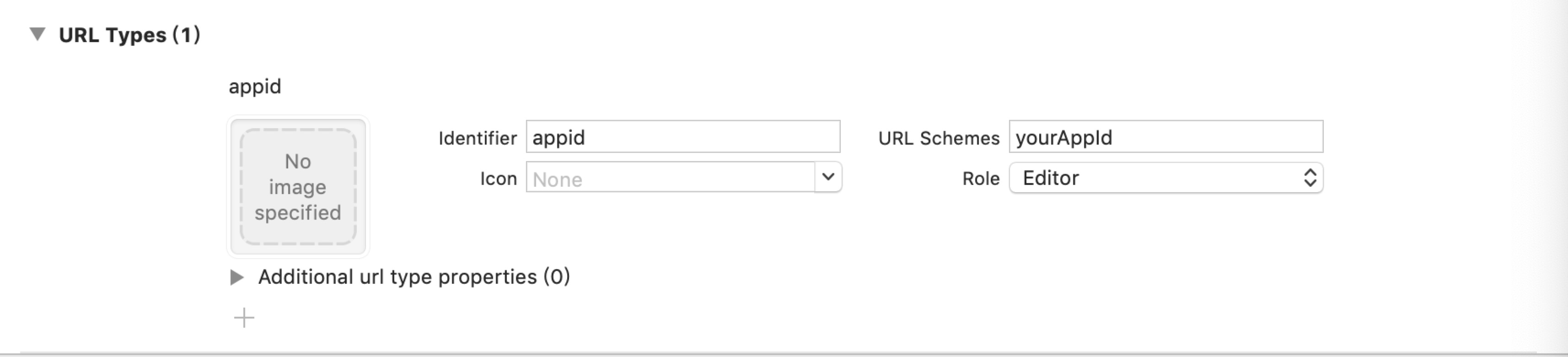
On iOS 9+, add `wechat` and `weixin` into `LSApplicationQueriesSchemes` in
`Targets` > `info` > `Custom iOS Target Properties`. Or edit `Info.plist`
then add:
```xml
<key>LSApplicationQueriesSchemes</key>
<array>
<string>weixin</string>
<string>wechat</string>
</array>
```
Then copy the following in `AppDelegate.m`:
```objc
#import <React/RCTLinkingManager.h>
// ios 8.x or older
- (BOOL)application:(UIApplication *)application openURL:(NSURL *)url
sourceApplication:(NSString *)sourceApplication annotation:(id)annotation
{
return [RCTLinkingManager application:application openURL:url
sourceApplication:sourceApplication annotation:annotation];
}
// ios 9.0+
- (BOOL)application:(UIApplication *)application openURL:(NSURL *)url
options:(NSDictionary<NSString*, id> *)options
{
return [RCTLinkingManager application:application openURL:url options:options];
}
```