react-native-webrtc2
Version:
WebRTC for React Native
127 lines (83 loc) • 4.67 kB
Markdown
## iOS Installation
**If you used this module before, please remove `RCTWebRTC.xcodeproject`/`libjingle_peerconnection` and follow instructions below.**
`npm install react-native-webrtc2 --save`
## Step 1. Add Files Into Project
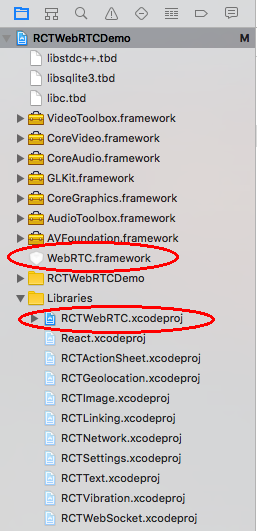
1-1.) in Xcode: Right click `Libraries` ➜ `Add Files to [project]`
1-2.) choose `node_modules/react-native-webrtc2/ios/RCTWebRTC.xcodeproj` then `Add`
1-3.) also add `node_modules/react-native-webrtc2/ios/WebRTC.framework` to project root or anywhere you want:
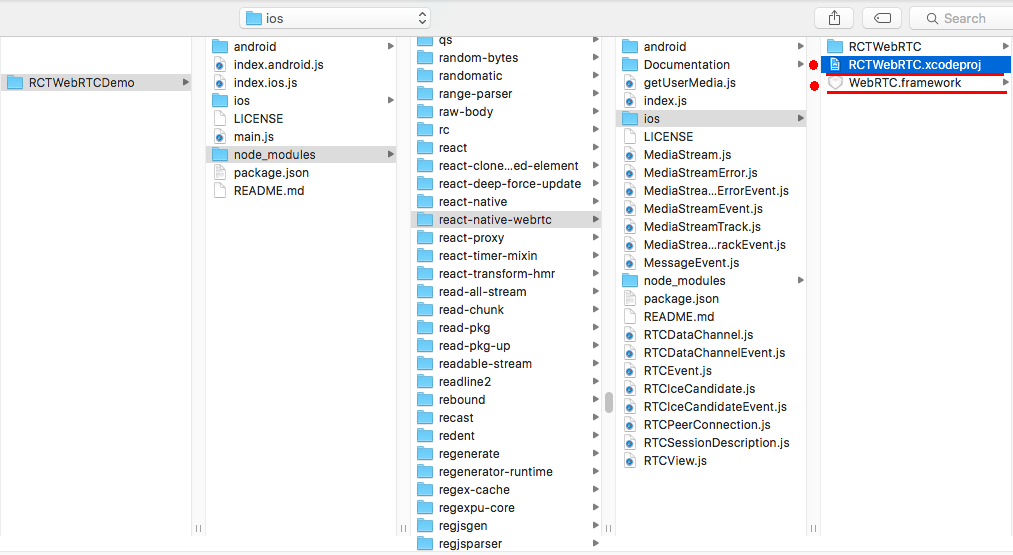
1-4.) you will ended up with structure like:
## iOS Podfile
You can use the included podspec in your podfile to take care of all dependencies instead of manually adding files to the project (instead of steps 2 through 4, but you might still have to do Appendix A/B ).
Include in a Podfile in your react-native ios directory:
```
pod 'react-native-webrtc2', :path => '../node_modules/react-native-webrtc2'
```
You may have to change the `platform` field in your Podfile, as `react-native-webrtc2` doesn't support iOS 9 - set it to '10.0' or above (otherwise you get an error when doing `pod install`):
```
platform :ios, '10.0'
```
## Step 2. Add Library Search Path
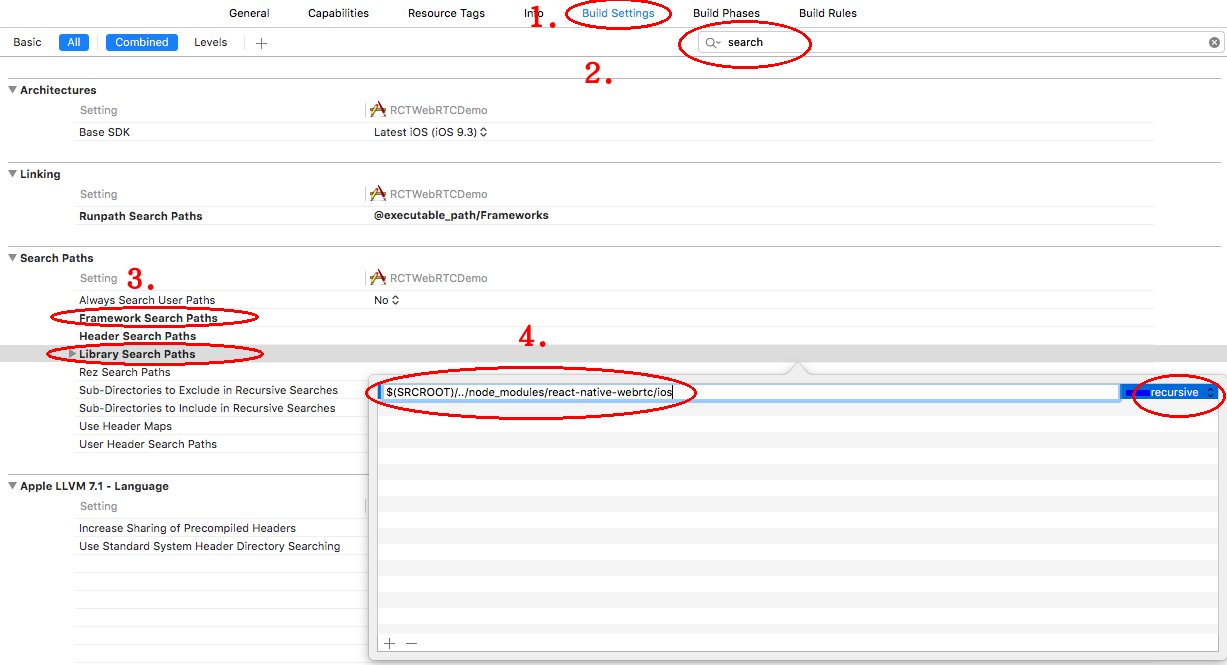
2-1.) select `Build Settings`, find `Search Paths`
2-2.) edit BOTH `Framework Search Paths` and `Library Search Paths`
2-3.) add path on BOTH sections with: `$(SRCROOT)/../node_modules/react-native-webrtc2/ios` with `recursive`
## Step 3. Change General Setting and Embed Framework
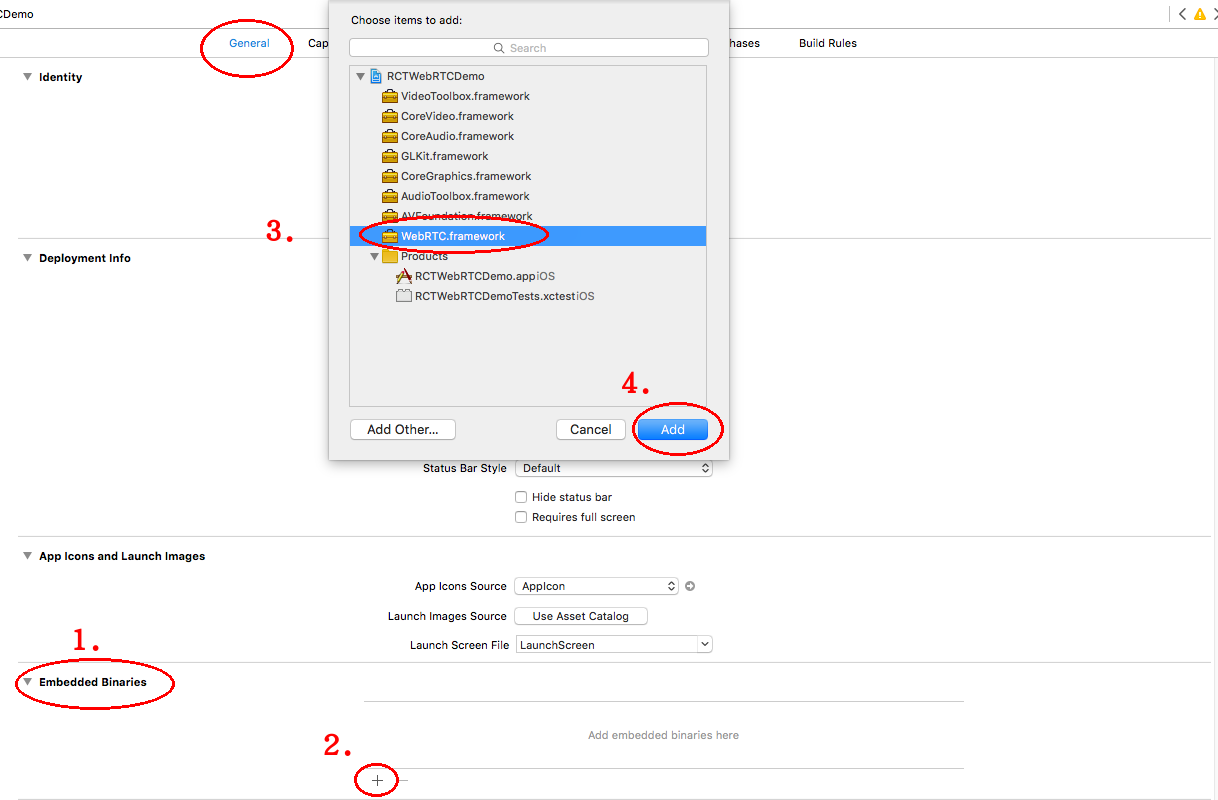
3-1.) go to `General` tab
3-2.) change `Deployment Target` to `8.0`
3-3.) add `Embedded Binaries` like below:
## Step 4. Link/Include Necessary Libraries
4-1.) click `Build Phases` tab, open `Link Binary With Libraries`
4-2.) add `libRCTWebRTC.a`
4-3.) make sure WebRTC.framework linked
4-4.) add the following libraries:
```
AVFoundation.framework
AudioToolbox.framework
CoreGraphics.framework
GLKit.framework
CoreAudio.framework
CoreVideo.framework
VideoToolbox.framework
libc.tbd
libc++.tbd
libsqlite3.tbd
```
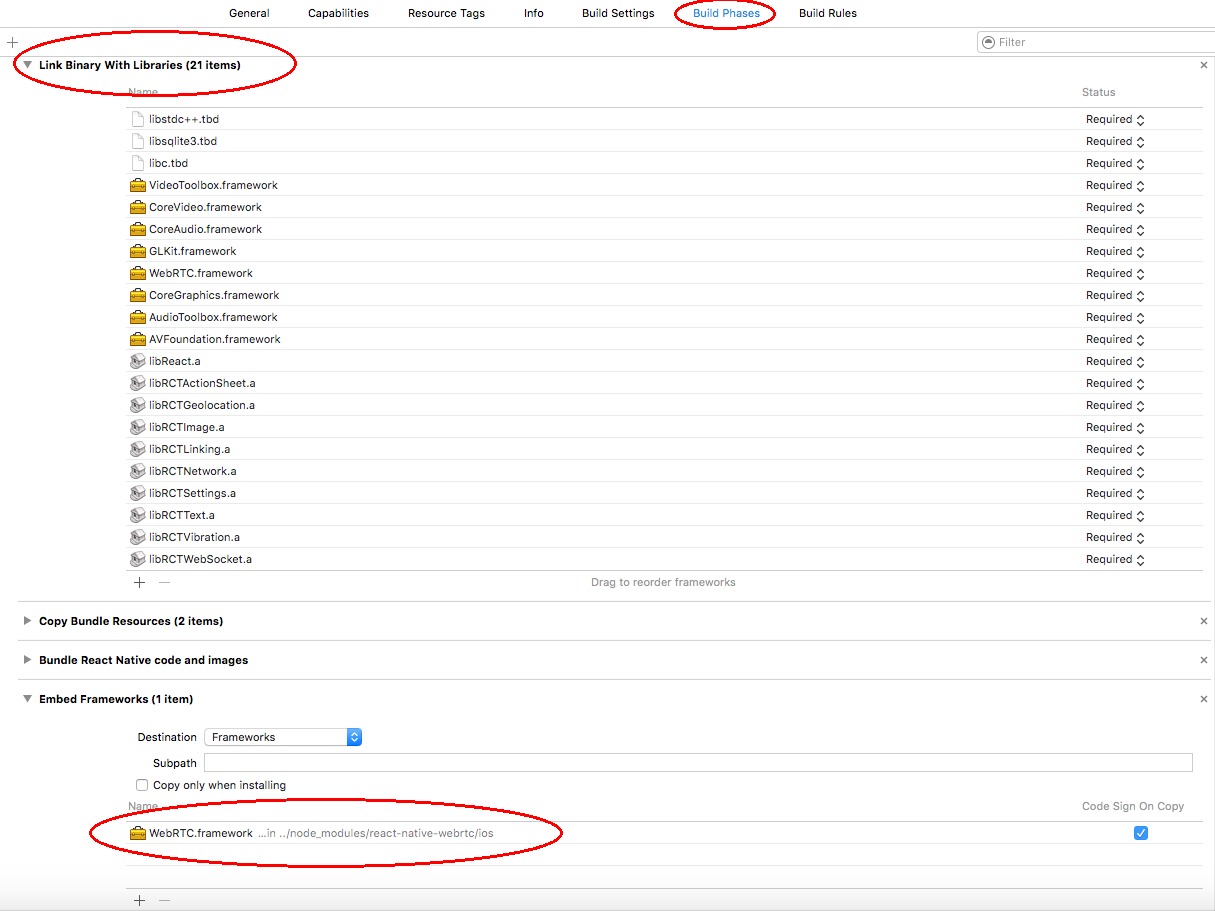
4-5.) Under `Build setting` set `Dead Code Stripping` to `No` also under `Build Options` set `Enable Bitcode` to `No` as well
## Step 5. Add Permissions
5-1.) navigate to `<ProjectFolder>/ios/<ProjectName>/`
5-2.) edit `Info.plist` and add the following lines
```
<key>NSCameraUsageDescription</key>
<string>Camera Permission</string>
<key>NSMicrophoneUsageDescription</key>
<string>Microphone Permission</string>
```
## Appendix A - CLEAN PROCESS
if you encounter any build time errors, like "linking library not found",
try the cleaning steps below, and do it again carefully with every steps.
1. remove npm module: `rm -rf $YourProject/node_modules/react-native-webrtc2`
2. clean npm cache: `npm cache clean`
3. clear temporary build files ( depends on your env )
* ANDROID: clear intermediate files in `gradle buildDir`
* iOS: in xocde project, click `Product` -> `clean`
4. `npm install react-native-webrtc2`
## Appendix B - Apple Store Submission
(ios only)
You should strip simulator (i386/x86_64) archs from WebRTC binary before submit to Apple Store.
We provide a handy script to do it easily. see below sections.
credit: The script is originally provided by [](https://github.com/besarthoxhaj) in [#141](https://github.com/juncocoa/react-native-webrtc2/issues/141), thanks!
## Appendix C - Library not loaded/Code signature invalid
(ios only)
This is an issue with iOS 13.3.1. All dynamic frameworks being compiled to the newest release of iOS 13.3.1 are experiencing this issue when run on a personal provisioning profile/developer account. Use a non-Personal Team provisioning profile (paid developer account).
Source (https://stackoverflow.com/a/60090629/8691951)
#### Strip Simulator Archs Usage
The script and example are here: https://github.com/juncocoa/react-native-webrtc2/blob/master/tools/ios_arch.js
1. go to `react-native-webrtc2/tools` folder
2. extract all archs first: `node ios_arch.js --extract`
3. re-package device related archs only: `node ios_arch.js --device`
4. delete files generated from `step 2` under `node_modules/react-native-webrtc2/ios WebRTC.framework/` (e.g. with a command `rm node_modules/react-native-webrtc2/ios/WebRTC.framework/WebRTC-*` from application root)
5. you can check current arch use this command: `file node_modules/react-native-webrtc2/ios/WebRTC.framework/WebRTC`