react-native-walkthrough-swiper
Version:
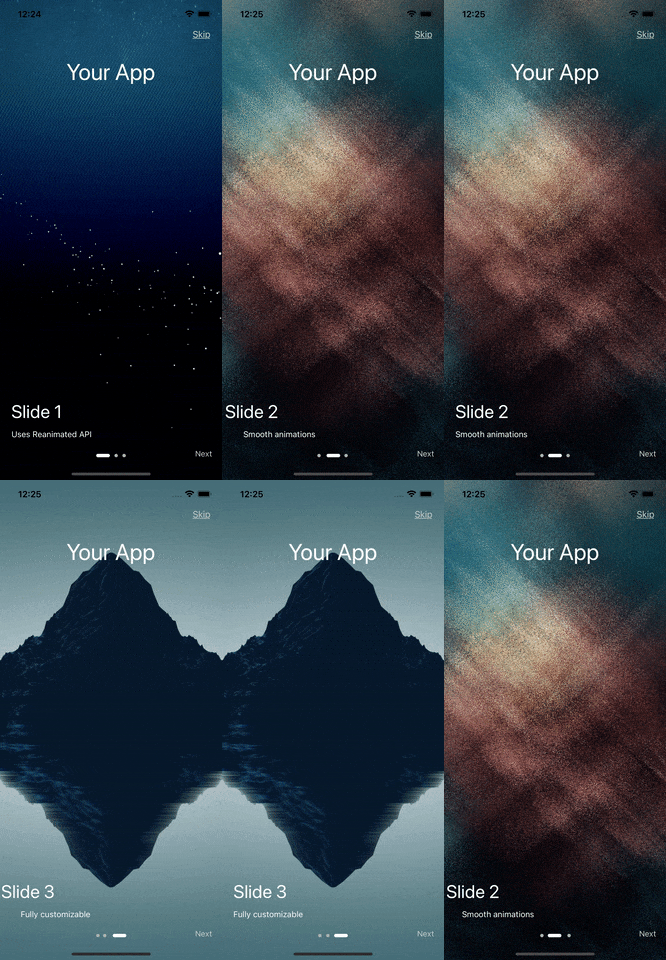
A walkthrough swiper component for React-Native. Can be used in onboarding/walkthrough screens. Uses Reanimated API to create smooth animations.
88 lines (60 loc) • 2.95 kB
Markdown
[](http://badge.fury.io/js/react-native-walkthrough-swiper)
# react-native-walkthrough-swiper
A Intro Swiper component for React-Native. Uses Reanimated API to create smooth animations.
## Demo
## Installation
```sh
npm install react-native-walkthrough-swiper
or
yarn add react-native-walkthrough-swiper
```
> **React Native Reanimated** is essential for this and must be installed. Follow the installation steps here: [react-native-reanimated](https://www.npmjs.com/package/react-native-reanimated)
## Usage
```js
import { WalkthroughSwiper } from 'react-native-walkthrough-swiper';
// ...
<View style={{flex:1}}>
<WalkthroughSwiper
data={sliderData}
skipText={'Skip'}
skipTextStyle={{ color: '#ccc' }}
nextButton={<Text style={{ color: '#ccc' }}>{'Next'}</Text>}
centerComponent={
<Text style={{ fontSize: 40, color: 'white' }}>{'Your App'}</Text>
}
titleStyle={{ color: 'white' }}
subTitleStyle={{ color: 'white' }}
activeSlideColor={'#fff'}
inActiveSlideColor={'#b2b2b2'}
onSkipBtnPress={() => {
// Navigate to the next screen
}}
/>
</View>
const data = [
{
title: 'Slide 1',
subTitle: 'Uses Reanimated API',
age: 29,
bgImage: 'some image URI',
},
...
]
```
### Properties
| Prop | Description | Types |
| ------------------------ | --------------------------------------------------------------- | ----------------- |
| **`data`** | Slide actual data, Should be in format. Check the format above. | `Array` |
| **`skipText`** | String value of the `skipText`. | `string` |
| **`skipTextStyle`** | Style for `skipText`. | `TextStyle` |
| **`nextButton`** | Next Button. Can be text/image or any component. | `React.Component` |
| **`centerComponent`** | The center component, can be any React component | `React.Component` |
| **`titleStyle`** | Styles for the title. | `TextStyle` |
| **`subTitleStyle`** | Styles for the sub-title. | `TextStyle` |
| **`activeSlideColor`** | Active Slide color (circle dot at bottom). | `string` |
| **`inActiveSlideColor`** | Inactive slide color. | `string` |
| **`onSkipBtnPress`** | Event to trigger on press of Skip Button. | `GestureResponderEvent` |
### License
MIT
---