react-native-telebirr-payment
Version:
telebirr inAppSDK payment module
113 lines (87 loc) • 4.78 kB
Markdown
# React Native Telebirr Payment
A react native telebirr inAppSDK payment module which is mainly intended for applications which require telebirr inapp payment.
## Installation
```sh
npm install react-native-telebirr-payment
```
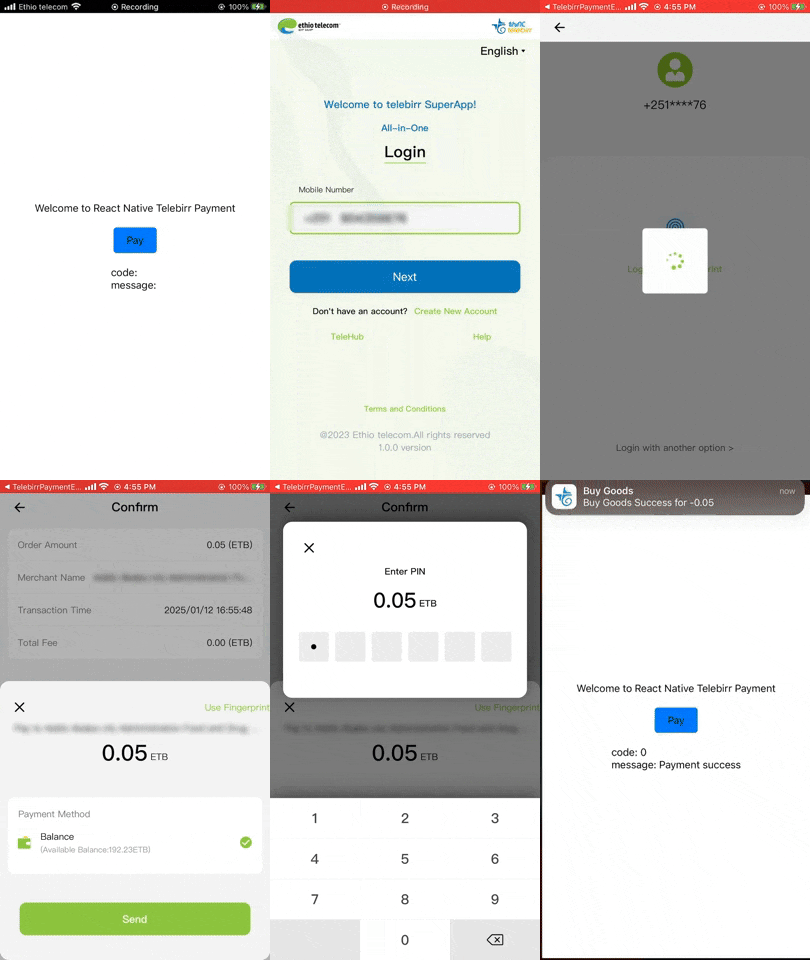
## Demo
## Usage/Examples
```javascript
import TelebirrPayment from 'react-native-telebirr-payment';
// ...
export default function App() {
const [resultCode, setResultCode] = useState(null);
const [resultMessage, setresultMessage] = useState(null);
const handlePayment = async () => {
try {
const appId = '**************';// your own telebirr provided appId
const shortCode = '****'; // your own telebirr provided shortcode
const receiveCode = 'TELEBIRR$BUYGOODS$5510$0.05$10527506c5822051eae86ffbeba60036387009$120m'; // the receiveCode is the response you get from /payment/v1/merchant/inapp/createOrder
const result = await TelebirrPayment.startPay(
appId,
shortCode,
receiveCode
);
const { code, message } = result;
setResultCode(code);
setresultMessage(message);
if (result) {
if (code === -3) {
console.log('User canceled the payment.', message);
} else if (code === 0) {
console.log('Successful Payment.');
} else if (code === -10) {
console.log('Telebirr Payment is not installed.', message);
} else {
console.log(`Error Code: ${code}, Message: ${message}`);
}
} else {
console.log('Unexpected log format:', result);
}
} catch (error) {
console.error('Payment initiation failed:', error);
}
};
return (
<SafeAreaView style={styles.container}>
<View style={styles.subcontainer}>
<Text style={styles.textStyle}>
Welcome to React Native Telebirr Payment
</Text>
<View style={styles.payment}>
<TouchableOpacity style={styles.buttonStyle} onPress={handlePayment}>
<Text style={styles.textStyle}>Pay</Text>
</TouchableOpacity>
</View>
<View style={styles.payment}>
<Text style={styles.textStyle}>code: {resultCode}</Text>
<Text style={styles.textStyle}>message: {resultMessage}</Text>
</View>
</View>
</SafeAreaView>
);
}
```
## API Reference
| Parameter | Type | Required | Description | Default |
| :------------------ | :-------------- | :------- | :------------------------------------------------------------------------------- | :-------------------------- |
| `appId` | `string` | `true` | a telebirr provided appId for the merchant | |
| `shortCode` | `string` | `true` | a telebirr provided shortCode for the merchant | |
| `receiveCode` | `string` | `true` | a concatenated response data from /payment/v1/merchant/inapp/createOrder, "TELEBIRR$BUYGOODS$merch_code$total_amount $prepay_id$timeout_express" | |
## Result Return Codes
| Code | Description |
| :------------------ | :------------------------------------------------------------------------------- |
| `-2` | Parameter error. (all the three parameters should be passed other wise will give this error) |
| `-3` | Cancellation of payment ( when the user is taken to the telebirr superapp and the user cancels the payment |
| `-10` | The Payment is not installed. (if the telebirr superapp apk is not installed (testbed or production apk) |
## UAT Usage
for android UAT(test) you have to change the android archive (aar) inside node_modules\react-native-telebirr-payment\android\build.gradle from
'libs/EthiopiaPaySdkModule-prod-release.aar' to 'libs/EthiopiaPaySdkModule-uat-release.aar'
this will launch the telebirr testbed app and make the transction
## Contributing
See the [contributing guide](CONTRIBUTING.md) to learn how to contribute to the repository and the development workflow.
## License
MIT
---
Made with [create-react-native-library](https://github.com/callstack/react-native-builder-bob)