react-native-search-filter
Version:
React Native search component with filter function.
132 lines (106 loc) • 4.86 kB
Markdown
# React Native Search Filter
React Native search component with filter function.
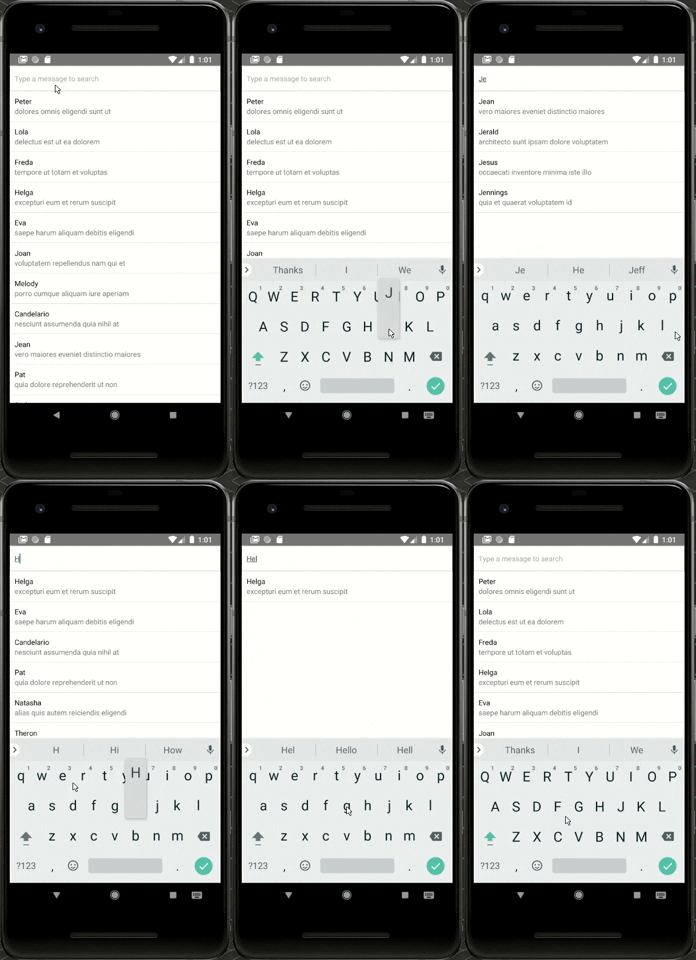
## Getting Started
### Installation
Using `npm`:
`$ npm install react-native-search-filter --save`
Using `yarn`:
`$ yarn add react-native-search-filter`
### Example Usage
Complete example available [here](/example).
```js
import React, { Component } from 'react';
import { StyleSheet, Text, View, ScrollView, TouchableOpacity } from 'react-native';
import SearchInput, { createFilter } from 'react-native-search-filter';
import emails from './emails';
const KEYS_TO_FILTERS = ['user.name', 'subject'];
export default class App extends Component<{}> {
constructor(props) {
super(props);
this.state = {
searchTerm: ''
}
}
searchUpdated(term) {
this.setState({ searchTerm: term })
}
render() {
const filteredEmails = emails.filter(createFilter(this.state.searchTerm, KEYS_TO_FILTERS))
return (
<View style={styles.container}>
<SearchInput
onChangeText={(term) => { this.searchUpdated(term) }}
style={styles.searchInput}
placeholder="Type a message to search"
/>
<ScrollView>
{filteredEmails.map(email => {
return (
<TouchableOpacity onPress={()=>alert(email.user.name)} key={email.id} style={styles.emailItem}>
<View>
<Text>{email.user.name}</Text>
<Text style={styles.emailSubject}>{email.subject}</Text>
</View>
</TouchableOpacity>
)
})}
</ScrollView>
</View>
);
}
}
const styles = StyleSheet.create({
container: {
flex: 1,
backgroundColor: '#fff',
justifyContent: 'flex-start'
},
emailItem:{
borderBottomWidth: 0.5,
borderColor: 'rgba(0,0,0,0.3)',
padding: 10
},
emailSubject: {
color: 'rgba(0,0,0,0.5)'
},
searchInput:{
padding: 10,
borderColor: '#CCC',
borderWidth: 1
}
});
```
## API and Configuration
| Property | Type | Default | Description |
|-------------|----------|--------------|----------------------------------------------------------------|
|```caseSensitive```|```boolean```|```false```|Define if the search should be case sensitive.|
|```clearIcon```|```Node```|```null```|Optional clear icon. |
|```clearIconViewStyles```|```Style```|```{position:absolute',top: 18,right: 22}```|Optional styles for the clear icon view.|
|```filterKeys```|```string``` or ```[string]```||Will be use by the filter method if no argument is passed there.|
|```fuzzy```|```boolean```|```false```|Define if the search should be fuzzy.|
|```inputViewStyles```| ```Style``` | |Optional styles for the input container. |
| ```onChangeText``` | ```Function``` | Required| Function called when the search term is changed (will be passed as an argument).
|```sortResults```|```boolean```|```false```|Define if search results should be sorted by relevance (only works with fuzzy search).|
|```throttle```|```number```|```200```|Reduce call frequency to the onChange function (in ms).|
|```onSubmitEditing```|```function```|```() => {}```|Defines a function for the keyboard search button onPress.|
|```inputFocus```|```boolean```|```false```|Defines whether the field receives focus.|
|```returnKeyType```|```string```|```done```|Determines how the return key should look. The following values work across platforms: ```done```, ```go```, ```next```, ```search```, ```send```|
### Methods
#### ```filter([keys])```
Return a function which can be used to filter an array. keys can be ```string```, ```[string]``` or ```null```.
If an array keys is an array, the function will return true if at least one of the keys of the item matches the search term.
## Static Methods
```js
filter(searchTerm, [keys], [{caseSensitive, fuzzy, sortResults}])
```
Return a function which can be used to filter an array. searchTerm can be a regex or a String. keys can be ```string```, ```[string]``` or ```null```.
If an array keys is an array, the function will return true if at least one of the keys of the item matches the search term.
## Known Issues
### Hide ```clearIcon``` if search input is empty.
Provided you have a custom icon package, a short toggle method for the property will do: ```clearIcon={this.state.searchTerm!==''&&<Icon name="x"/>}```.
### Fuse.js: Unknown plugin "babel-plugin-add-module-exports"
Add ```babel-plugin-add-module-exports``` as a dev dependency. Fuse.js [#154](https://github.com/krisk/Fuse/issues/154).
```npm i babel-plugin-add-module-exports babel-preset-es2015 babel-preset-stage-2 --save-dev```
## Acknowledgement
enkidevs - [Simple react.js component for a search input, providing a filter function ](https://github.com/enkidevs/react-search-input).