react-native-qrcode-styled
Version:
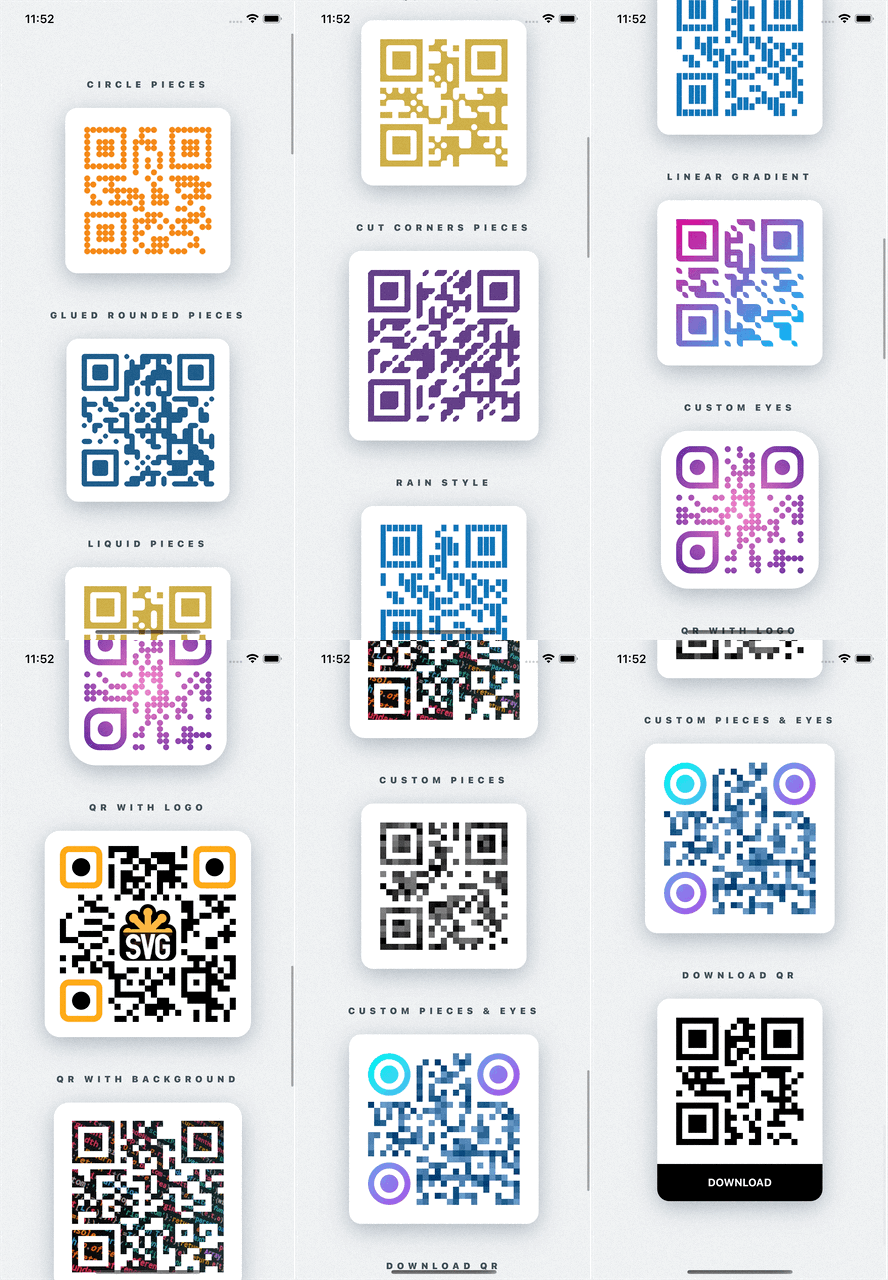
A fully customizable QR Code generator for React Native based on react-native-svg and javascript-qrcode.
175 lines (140 loc) • 7.5 kB
Markdown
<img src="https://raw.githubusercontent.com/tokkozhin/react-native-qrcode-styled/main/assets/library_logo.png" alt="React Native QR Code Styled" >





# react-native-qrcode-styled
Fully customizable QR Codes generator for React Native using react-native-svg
## Installation
```sh
npm i react-native-svg react-native-qrcode-styled
```
or with yarn
```sh
yarn add react-native-svg react-native-qrcode-styled
```
If you use typescript, run:
```sh
yarn add -D @types/qrcode
```
## Usage
Simple usage is:
```jsx
import QRCodeStyled from 'react-native-qrcode-styled';
<QRCodeStyled
data={'Simple QR Code'}
style={{backgroundColor: 'white'}}
padding={20}
pieceSize={8}
/>
```
For more examples [check out the Example app](https://github.com/tokkozhin/react-native-qrcode-styled/tree/main/example)
## Props
Name | Default | Type | Description
---------------------------|----------------|------------------------|-----
data | "I'm QR Code!" | string | Message for encoding. Can also be an array. More info [HERE](https://github.com/soldair/node-qrcode#manual-mode).
pieceSize | 5 | number | Size of each piece of the QR code
pieceScale | undefined | SvgProps['scale'] | Scale of each piece of the QR code
pieceRotation | undefined | SvgProps['rotation'] | Angle of rotation of each piece of the QR code (in degrees)
pieceCornerType | 'rounded' | 'rounded' \| 'cut' | Type of piece corner
pieceBorderRadius | 0 | number \| number[] | Border radius of all corners of each piece. Can also be an array to define different border radius for each corner (start from top-left corner)
pieceStroke | undefined | [ColorValue](https://reactnative.dev/docs/colors) | Border color of each piece
pieceStrokeWidth | undefined | number | Border with of each piece
pieceLiquidRadius | undefined | number | Level of liquid effect between pieces. If you have `pieceBorderRadius` set `isPiecesGlued` to *true*
isPiecesGlued | false | boolean | If *true* between pieces will be glue effect. You will see this if you have `pieceBorderRadius` > 0
outerEyesOptions | undefined | [EyeOptions](#EyeOptions) \| [AllEyesOptions](#AllEyesOptions) | Configurations for outer eyes of QR code. If they defined, previous piece configurations won't be work
innerEyesOptions | undefined | [EyeOptions](#EyeOptions) \| [AllEyesOptions](#AllEyesOptions) | The same as `outerEyesOptions` prop but for inner eyes
color | 'black' | [ColorValue](https://reactnative.dev/docs/colors) | Color of QR code
gradient | undefined | [GradientProps](#GradientProps) | Gradient of QR code. Can be two types: 'linear' \| 'radial'. By default 'linear'
padding | undefined | number | Padding inside `<Svg/>` component from QR code
logo | undefined | [LogoOptions](#LogoOptions) | Configurations for logo. Support svg's `<Image/>` props
backgroundImage | undefined | svg's `<Image/>` props type | Background image for QR code
version | undefined | number |[Description](https://github.com/soldair/node-qrcode#version)
maskPattern | undefined | number |[Description](https://github.com/soldair/node-qrcode#maskpattern)
toSJISFunc | undefined | function |[Description](https://github.com/soldair/node-qrcode#tosjisfunc)
errorCorrectionLevel | 'M' | 'L' \| 'M' \| 'Q' \| 'H' |[Description](https://github.com/soldair/node-qrcode#errorCorrectionLevel)
renderCustomPieceItem | undefined | [RenderCustomPieceItem](#RenderCustomPieceItem) | Render custom piece of QR code. It must return svg component. If it defined, previous piece and eyes configurations won't be work
renderBackground | undefined | (pieceSize: number, bitMatrix: number[][]) => SvgProps['children'] | Ability to add any additional svg components behind qr code
children | undefined | (pieceSize: number, bitMatrix: number[][]) => SvgProps['children'] | Ability to add any additional svg components as children
...rest `<Svg/>` props |
## Types
### GradientProps
```typescript
type GradientType = 'linear' | 'radial';
type LinearGradientProps = {
colors?: ColorValue[];
start?: [number, number]; // start point [x, y] (0 -> 0%, 1 -> 100%)
end?: [number, number]; // end point [x, y] (0 -> 0%, 1 -> 100%)
locations?: number[]; // list of colors positions (0 -> 0%, 1 -> 100%)
};
type RadialGradientProps = {
colors?: ColorValue[];
center?: [number, number]; // center point [x, y] (0 -> 0%, 1 -> 100%)
radius?: [number, number]; // radiusXY [x, y] (0 -> 0%, 1 -> 100%)
locations?: number[]; // list of colors positions (0 -> 0%, 1 -> 100%)
};
type GradientProps = {
type?: GradientType;
options?: LinearGradientProps | RadialGradientProps;
};
```
### EyeOptions
```typescript
type EyeOptions = {
scale?: PathProps['scale']; // scaleXY | [scaleX, scaleY]
rotation?: string | number;
borderRadius?: number | number[];
color?: ColorValue;
gradient?: GradientProps;
stroke?: ColorValue;
strokeWidth?: number;
}
```
### AllEyesOptions
```typescript
type EyePosition = 'topLeft' | 'topRight' | 'bottomLeft';
type AllEyesOptions = { [K in EyePosition]?: EyeOptions }
```
### RenderCustomPieceItem
```typescript
type RenderCustomPieceItem = ({x, y, pieceSize, qrSize, bitMatrix}: {
x: number;
y: number;
pieceSize: number;
qrSize: number;
bitMatrix: number[][];
}) => React.ReactElement | null;
```
### LogoOptions
```typescript
export type LogoArea = {
x: number;
y: number;
width: number;
height: number;
};
export type LogoOptions = {
hidePieces?: boolean;
padding?: number;
scale?: number;
onChange?: (logoArea?: LogoArea) => void;
} & SVGImageProps;
```
## Troubleshooting
### Gaps between pieces (only on Android)
<img src="https://raw.githubusercontent.com/tokkozhin/react-native-qrcode-styled/main/assets/troubleshooying_gaps.png" alt="Gaps between pieces (only on Android)" width="236">
If you'll see that gaps between pieces on Android, just scale pieces up a little bit:
```jsx
<QRCodeStyled
...
pieceScale={1.02} // or any between of 1.01 - 1.04
/>
```
## Contributing
See the [contributing guide](CONTRIBUTING.md) to learn how to contribute to the repository and the development workflow.
## License
MIT
---
Made with [create-react-native-library](https://github.com/callstack/react-native-builder-bob)