react-native-ossd-radio-button
Version:
Customizable React Native Radio Button
115 lines (89 loc) • 3.57 kB
Markdown
Customizable React Native Radio Button
Here you can implement radio button without radio. This library give you customizable radio button. We hope the library can improve user experience and developer experience in developing application with React Native.
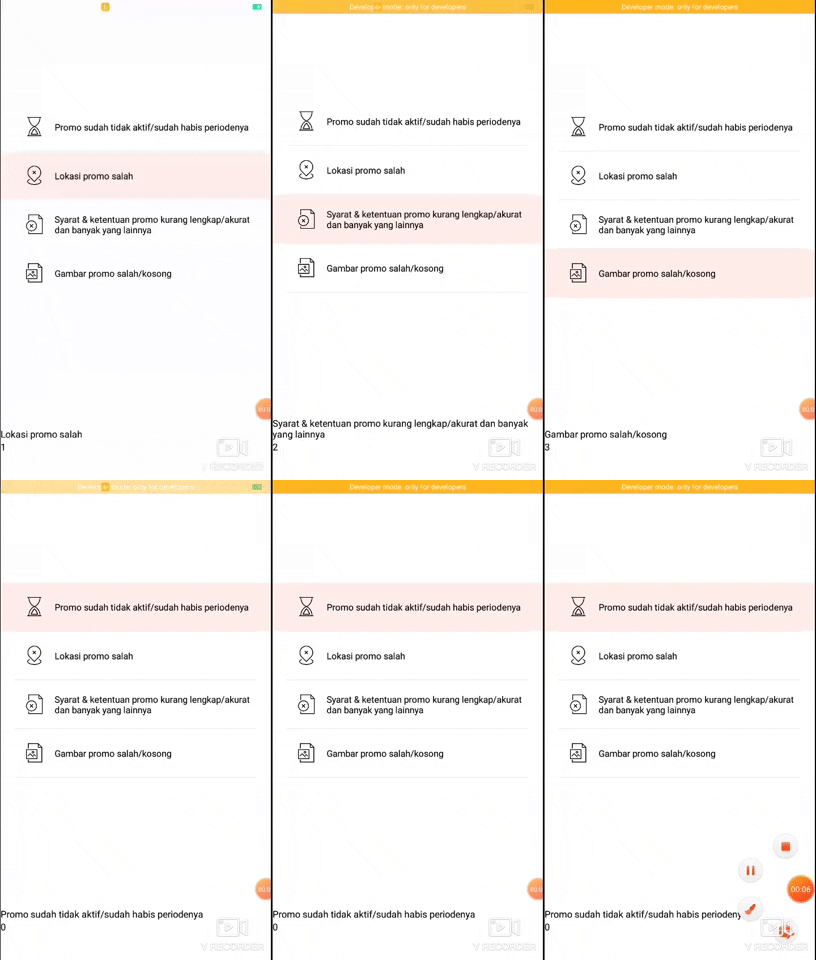
Use the package manager npm to install react-native-ossd-radio-button.
```bash
npm i react-native-ossd-radio-button
```
Import RadioList from 'react-native-ossd-radio-button'
```javascript
import { RadioList } from 'react-native-ossd-radio-button'
```
create the data for the application to render in a list with this kind of format, the icon format is optional.
```javascript
const radioDatas = [
{
text: "Liverpool",
iconUrl: require("./assets/icons/unactive_promo.png")
},
{
text: "Manchester United",
iconUrl: require("./assets/icons/wrong_location.png")
}
]
```
Define the state that will save the choosen radio and add this callback function to the radio button
```javascript
onChangeState(text, radioState) {
this.setState({ text: text, radioState: radioState })
}
```
[] If the option of other is true
```javascript
changeRadioState(item) {
this.setState({ item: item })
}
```
```javascript
<RadioList
onChangeState={this.onChangeState.bind(this)}
radioState={this.state.radioState}
changeRadioState={this.changeRadioState.bind(this)}
/>
```
| Props | Type | Function |
| ------ | ------ | ------ |
| radioState | string | state that can be retrieved outside the component |
| radioDatas | List | List of text data and image (optional) to be shown when component rendered |
| imageShow | boolean | show/hide the image |
| width | number |width of radio button item |
| height | number | height of radio button item |
| activeColor | string | Color of the radio button when clicked |
| defaultColor | string | Default color when radio button not clicked |
| textColor | string | Color of the text of radio button |
| borderColor | string | Radio button border color |
| borderWidth | number | border width |
| justifyContent | string | Radio button alignment |
| imageColor | string | Tint color of image |
| other | boolean | show text option |
| otherText | string | text that show in other option |
| iconUrlText | number | require() image for other option |
## Callback for Radio List
| Callback | Function |
| ------ | ------ |
| onChangeState | callback for change the state of choosen value |
| changeRadioState | callback for change the state on other value |
## React Native OSSD Radio Button TODO List
- [x] Create new repository and first commit
- [x] Learn about npm and how to publish to it
- [x] Create npm account
- [x] Create src and RadioButton Component
- [x] Create first simple radio button without custom settings
- [x] Radio Button can show/hide image
- [x] Publish to npm
- [x] Radio Button can customize button color
- [x] Radio Button can customize text color
- [x] Radio Button can customize line color
- [x] Radio Button can customize line size
- [x] Radio Button can resize
- [x] Radio Button can recenter
- [x] Radio Button image can tint color
- [x] Add image to read me
- [x] Object choosen
- [x] create new type of radio button with textInput
- [x] customizable textInput
- [x] Create documentation