react-native-localize
Version:
A toolbox for your React Native app localization.
431 lines (286 loc) • 10 kB
Markdown
# 🌍 react-native-localize
A toolbox for your React Native app localization.
[](https://www.npmjs.org/package/react-native-localize)
[](https://www.npmjs.org/package/react-native-localize)
[](https://opensource.org/licenses/MIT)
<br>
[](https://www.android.com)
[](https://developer.apple.com/ios)
[](https://developer.apple.com/macos)
[](https://www.microsoft.com/windows)
[](https://developer.mozilla.org)
<img width="400" height="auto" center src="https://github.com/zoontek/react-native-localize/blob/master/docs/screenshot.png?raw=true" />
## Funding
<a href="https://github.com/sponsors/zoontek">
<img align="right" width="150" alt="This library helped you? Consider sponsoring!" src=".github/funding-octocat.svg">
</a>
This module is provided **as is**, I work on it in my free time.
If your company uses it in a production app, consider sponsoring this project 💰. You also can contact me for **premium** enterprise support, help with issues, prioritize bugfixes, feature requests, etc.
## Support
| package name | version | react-native version |
| --------------------- | ------- | -------------------- |
| react-native-localize | 2.0.0+ | 0.60.0+ |
| react-native-localize | 1.0.0+ | 0.56.0+ |
## Setup
```bash
$ npm install --save react-native-localize
# --- or ---
$ yarn add react-native-localize
```
_Don't forget to run `pod install` after that !_
## 🆘 Manual linking
Because this package targets React Native 0.60.0+, you will probably don't need to link it manually. Otherwise if it's not the case, follow this additional instructions:
<details>
<summary><b>👀 See manual linking instructions</b></summary>
### iOS
Add this line to your `ios/Podfile` file, then run `pod install`.
```bash
target 'YourAwesomeProject' do
# …
pod 'RNLocalize', :path => '../node_modules/react-native-localize'
end
```
### Android
1. Add the following lines to `android/settings.gradle`:
```gradle
include ':react-native-localize'
project(':react-native-localize').projectDir = new File(rootProject.projectDir, '../node_modules/react-native-localize/android')
```
2. Add the implementation line to the dependencies in `android/app/build.gradle`:
```gradle
dependencies {
// ...
implementation project(':react-native-localize')
}
```
3. Add the import and link the package in `MainApplication.java`:
```java
import com.zoontek.rnlocalize.RNLocalizePackage; // <- add the RNLocalizePackage import
public class MainApplication extends Application implements ReactApplication {
// …
@Override
protected List<ReactPackage> getPackages() {
@SuppressWarnings("UnnecessaryLocalVariable")
List<ReactPackage> packages = new PackageList(this).getPackages();
// …
packages.add(new RNLocalizePackage());
return packages;
}
// …
}
```
### macOS
Add this line to your `macos/Podfile` file, then run `pod install`.
```bash
target 'YourAwesomeProject' do
# …
pod 'RNLocalize', :path => '../node_modules/react-native-localize'
end
```
### Windows Support
Because this RNW package targets React Native 0.63.0+, you probably won't need to link it manually. Otherwise if it's not the case, follow these additional instructions. You also need to manually link the module on Windows when using React Native Windows prior to 0.63:
For more information about autolinking and manual linking. Follow the [official guide](https://microsoft.github.io/react-native-windows/docs/native-modules-autolinking)
</details>
## Web support
This package supports `react-native-web`. Follow their [official guide](http://necolas.github.io/react-native-web/docs/?path=/docs/guides-multi-platform--page) to configure `webpack`.
## Basic usage example
```js
import * as RNLocalize from "react-native-localize";
console.log(RNLocalize.getLocales());
console.log(RNLocalize.getCurrencies());
RNLocalize.addEventListener("change", () => {
// do localization related stuff…
});
```
## API
### getLocales()
Returns the user preferred locales, in order.
#### Method type
```ts
type getLocales = () => Array<{
languageCode: string;
scriptCode?: string;
countryCode: string;
languageTag: string;
isRTL: boolean;
}>;
```
#### Usage example
```js
console.log(RNLocalize.getLocales());
/* -> [
{ countryCode: "GB", languageTag: "en-GB", languageCode: "en", isRTL: false },
{ countryCode: "US", languageTag: "en-US", languageCode: "en", isRTL: false },
{ countryCode: "FR", languageTag: "fr-FR", languageCode: "fr", isRTL: false },
] */
```
### getNumberFormatSettings()
Returns number formatting settings.
#### Method type
```ts
type getNumberFormatSettings = () => {
decimalSeparator: string;
groupingSeparator: string;
};
```
#### Usage example
```js
console.log(RNLocalize.getNumberFormatSettings());
/* -> {
decimalSeparator: ".",
groupingSeparator: ",",
} */
```
### getCurrencies()
Returns the user preferred currency codes, in order.
#### Method type
```ts
type getCurrencies = () => Array<string>;
```
#### Usage example
```js
console.log(RNLocalize.getCurrencies());
// -> ["EUR", "GBP", "USD"]
```
### getCountry()
Returns the user current country code (based on its device locale, **not** on its position).
#### Method type
```ts
type getCountry = () => string;
```
#### Usage example
```js
console.log(RNLocalize.getCountry());
// -> "FR"
```
#### Note
Devices using Latin American regional settings will return "UN" instead of "419", as the latter is not a standard country code.
### getCalendar()
Returns the user preferred calendar format.
#### Method type
```ts
type getCalendar = () => "gregorian" | "japanese" | "buddhist";
```
#### Usage example
```js
console.log(RNLocalize.getCalendar());
// -> "gregorian"
```
### getTemperatureUnit()
Returns the user preferred temperature unit.
#### Method type
```ts
type getTemperatureUnit = () => "celsius" | "fahrenheit";
```
#### Usage example
```js
console.log(RNLocalize.getTemperatureUnit());
// -> "celsius"
```
### getTimeZone()
Returns the user preferred timezone (based on its device settings, **not** on its position).
#### Method type
```ts
type getTimeZone = () => string;
```
#### Usage example
```js
console.log(RNLocalize.getTimeZone());
// -> "Europe/Paris"
```
### uses24HourClock()
Returns `true` if the user prefers 24h clock format, `false` if he prefers 12h clock format.
#### Method type
```ts
type uses24HourClock = () => boolean;
```
#### Usage example
```js
console.log(RNLocalize.uses24HourClock());
// -> true
```
### usesMetricSystem()
Returns `true` if the user prefers metric measure system, `false` if he prefers imperial.
#### Method type
```ts
type usesMetricSystem = () => boolean;
```
#### Usage example
```js
console.log(RNLocalize.usesMetricSystem());
// -> true
```
### usesAutoDateAndTime()
Tells if the automatic date & time setting is enabled on the phone. **Android only**
#### Method type
```ts
type Option<T> = T | undefined;
type usesAutoDateAndTime = () => Option<boolean>;
```
#### Usage example
```js
console.log(RNLocalize.usesAutoDateAndTime()); // true or false
```
### usesAutoTimeZone()
Tells if the automatic time zone setting is enabled on the phone. **Android only**
#### Method type
```ts
type Option<T> = T | undefined;
type usesAutoTimeZone = () => Option<boolean>;
```
#### Usage example
```js
console.log(RNLocalize.usesAutoTimeZone());
```
### addEventListener() / removeEventListener()
Allows you to listen for any localization change.
#### Methods type
```ts
type addEventListener = (type: "change", handler: Function) => void;
type removeEventListener = (type: "change", handler: Function) => void;
```
#### Usage example
```js
function handleLocalizationChange() {
console.log(RNLocalize.getLocales());
}
RNLocalize.addEventListener("change", handleLocalizationChange);
// …later (ex: component unmount)
RNLocalize.removeEventListener("change", handleLocalizationChange);
```
### findBestAvailableLanguage()
Returns the best language tag possible and its reading direction (⚠️ **it respects the user preferred languages list order, see [explanations](https://github.com/zoontek/react-native-localize/issues/57#issuecomment-508456427)**). Useful to pick the best translation available.
#### Method type
```ts
type findBestAvailableLanguage = (
languageTags: Array<string>,
) => { languageTag: string; isRTL: boolean } | void;
```
#### Usage example
```js
console.log(RNLocalize.findBestAvailableLanguage(["en-US", "en", "fr"]));
// -> { languageTag: "en-US", isRTL: false }
```
## Examples with [i18n-js](https://github.com/fnando/i18n-js)
Browse the files in the [/example](https://github.com/zoontek/react-native-localize/tree/master/example) directory.
## How to test your code
Because it's a native module, you need to mock this package.<br />
The package provides a default mock you may use in your \_\_mocks\_\_/react-native-localize.js or jest.setup.js.
```js
import RNLocalize from "react-native-localize/mock";
jest.mock("react-native-localize", () => RNLocalize);
```
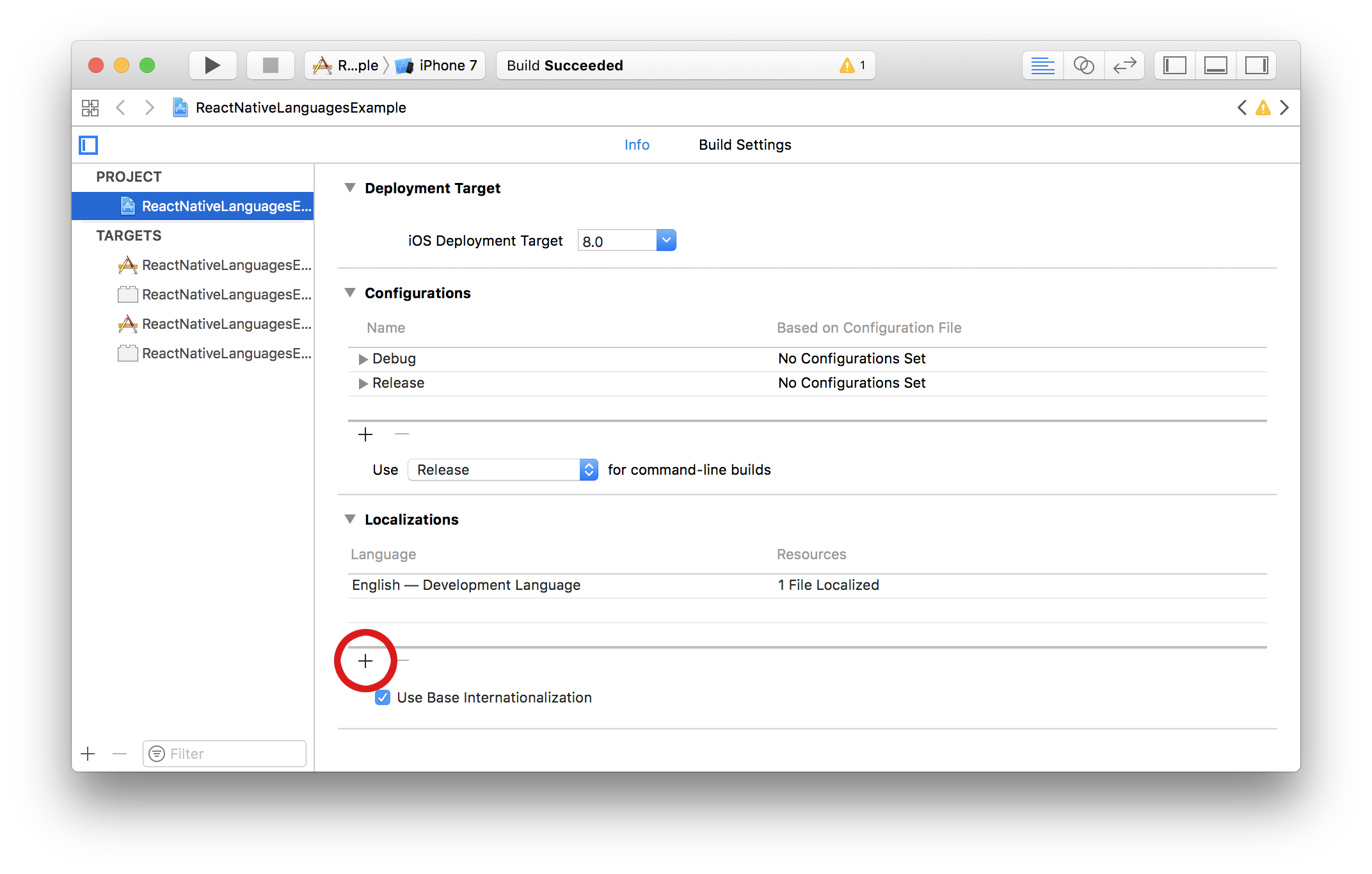
## Add project's supported localizations (iOS)