react-native-hxenavigationbar
Version:
Sohu ERP Mobile HuXiaoE special react-native component.
99 lines (79 loc) • 3.43 kB
Markdown
# react-native-hxenavigationbar
[](https://www.npmjs.com/package/react-native-hxenavigationbar)
[](https://www.npmjs.com/package/react-native-hxenavigationbar)

搜狐《狐小e》轻应用React Native默认导航栏组件。
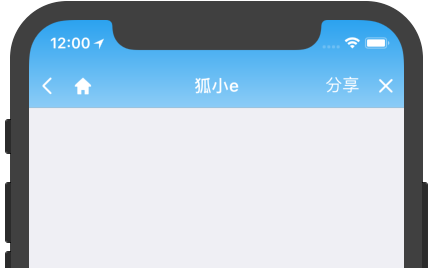
安装方法:
```bash
$ npm i react-native-hxenavigationbar --save
```
OBJECT参数说明:
参数 | 类型 | 必填 | 说明
:---: | :---: | :---: | :---:
navigation | Object | 是 | 屏幕导航属性
title | String | 是 | 标题
backgroundColor | String | 否 | 导航栏背景色的RGBA色彩空间
whiteTint | Boolean | 否 | 导航栏文字和图标的色调,true为白色调,false为黑色调
backButtonHandler | Function | 是 | 点击返回按钮的回调
leftButton | Object | 否 | 左按钮对象(BUTTON OBJECT)
rightButton | Object | 否 | 右按钮对象(BUTTON OBJECT)
customButton | Object | 否 | 自定义按钮对象(BUTTON OBJECT)
> 如果backgroundColor值无效,将采用默认导航栏样式。whiteTint仅在backgroundColor有值时有效,且如果whiteTint值无效,将会根据backgroundColor值自动设置
BUTTON OBJECT参数说明:
参数 | 类型 | 必填 | 说明
:---: | :---: | :---: | :---:
item | String, Number, Object | 是 | 按钮内容,具体分为“文本标题”(String,如:`'按钮标题'`)、“本地图片”(Number,如:`require('./image.png')`)、“图片资源”(Object,如:`{uri: 'http://www.image.com/image.png'}`)
handler | Function | 是 | 点击按钮的回调
> 导航栏按钮从左至右依次为“返回按钮”、“左按钮”、“右按钮”、“自定义按钮”
示例代码:
```js
import hxeNavigationBar from 'react-native-hxenavigationbar'
```
```js
static navigationOptions = ({navigation}) => {
return new hxeNavigationBar({
navigation: navigation,
title: '页面标题',
backgroundColor: 'D65946CC',
whiteTint: true,
backButtonHandler: () => {
console.log('点击了返回按钮');
},
leftButton: {
item: '按钮标题',
handler: () => {
console.log('点击了左按钮');
}
},
rightButton: {
item: require('./image.png'),
handler: () => {
console.log('点击了右按钮');
}
},
customButton: {
item: {uri: 'http://www.image.com/image.png'},
handler: () => {
console.log('点击了自定义按钮');
}
}
});
};
```
> 通过`Navigation`的`setParams`方法,修改`hxeNavigationBarConfig`可以动态改变导航栏
```js
this.props.navigation.setParams({
'hxeNavigationBarConfig': {
navigation: this.props.navigation,
title: '新页面标题',
backButtonHandler: () => {
console.log('又点击了返回按钮');
}
}
});
```
<br />
## License
[Apache-2.0]: https://opensource.org/licenses/Apache-2.0
[Apache-2.0 license][Apache-2.0].