react-native-doc-viewer
Version:
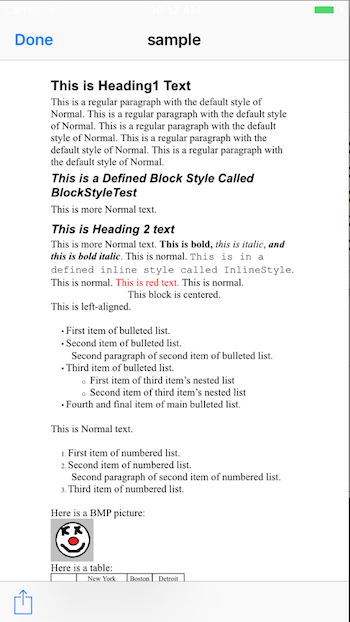
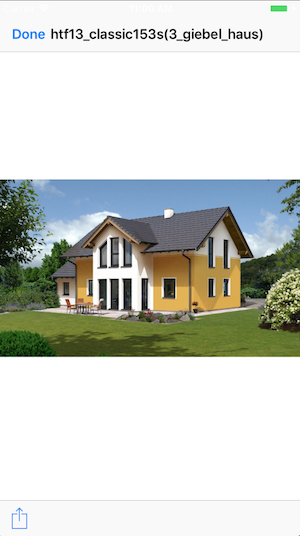
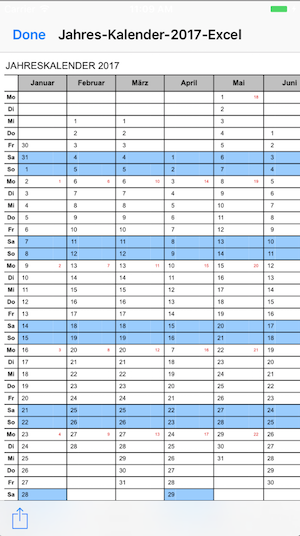
React Native Native Module Bridge Quicklock Document Viewer for IOS + Android supports pdf, png, jpg, xls, ppt, doc, docx, pptx, xlx + Video Player mp4 supported
375 lines (304 loc) • 12.4 kB
Markdown

A React Native bridge module: Document Viewer for files (pdf, png, jpg, xls, doc, ppt, xlsx, docx, pptx etc.)
#### 2017 Roadmap
- Download Progess Event Listener for big Files Android
#### 2018 Roadmap
- Android file without external Application
- Windows Phone Support
#### IMPORTANT INFORMATION: THIS IS A OPEN SOURCE PROJECT, SOMETIMES I HAVE NO TIME TO DEVELOP THIS PROJECT. THANK YOU FOR YOUR PULL REQUEST AND YOUR SUPPORT. I will continue to develop it as it is possible in time.
Changelog:
```
2.7.8 - XLS Exmaple Local File IOS 97-2003
2.7.7 - "react": "^16.3.0-alpha.1","react-native": "0.54.3"
2.7.5 - Pull Request local file from LeMinh1995 + Pull Request podspec Form Linh1987
2.7.3 - Example Local File
2.7.2 - Progress Download Feedback in example and Done Button Callback IOS
2.7.1 - Fix Progress IOS Download
2.6.9 - Progress IOS DOWNLOAD Document Callback in Native Code
2.6.0 - Android Openbase64
2.5.2 - OpenDocAndroid
2.5.1 - Cleanings
2.5.0 - Update Project for React Native 0.50.3
```
## Getting started
`$ npm install react-native-doc-viewer --save`
### Automatic installation
`$ react-native link react-native-doc-viewer`
### CocoaPods installation
If your project uses CocoaPods to manage React installation (especially with Expo-detached project), most likely you will run into issue with header files not found as described here (https://docs.expo.io/versions/latest/guides/expokit.html#changing-native-dependencies "Changing Native Dependencies"). It will be helpful to follow these steps to have it compiled successfully:
1. `npm install react-native-doc-viewer --save`
2. Add the plugin dependency to your Podfile, pointing at the path where NPM installed it:
`pod 'RNReactNativeDocViewer', path: '../node_modules/react-native-doc-viewer'`
3. Run `pod install`
### Manual installation
#### iOS
1. In XCode, in the project navigator, right click `Libraries` ➜ `Add Files to [your project's name]`
2. Go to `node_modules` ➜ `react-native-doc-viewer` and add `RNReactNativeDocViewer.xcodeproj`
3. In XCode, in the project navigator, select your project. Add `libRNReactNativeDocViewer.a` to your project's `Build Phases` ➜ `Link Binary With Libraries`
4. Linked Frameworks and Libraries must have this 2 Libraries (AssetsLibrary.framework & QuickLock.framework). When not you have to add them.
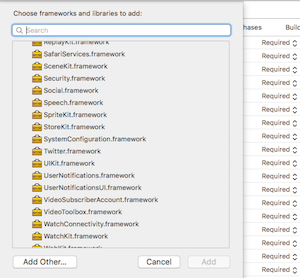

5. When you Show http Links don't forget to set APP Transport Security Settings ->
Allow Arbitrary Loads to YES

6. Run your project (`Cmd+R`)<
#### Android
1. Open up `android/app/src/main/java/[...]/MainApplication.java`
- Add `import com.reactlibrary.RNReactNativeDocViewerPackage;` to the imports at the top of the file
- Add `new RNReactNativeDocViewerPackage()` to the list returned by the `getPackages()` method
2. Append the following lines to `android/settings.gradle`:
```
include ':react-native-doc-viewer'
project(':react-native-doc-viewer').projectDir = new File(rootProject.projectDir, '../node_modules/react-native-doc-viewer/android')
```
3. Insert the following lines inside the dependencies block in `android/app/build.gradle`:
```
compile project(':react-native-doc-viewer')
```
#### Windows on the Roadmap
[Read it! :D](https://github.com/ReactWindows/react-native)
1. In Visual Studio add the `RNReactNativeDocViewer.sln` in `node_modules/react-native-react-native-doc-viewer/windows/RNReactNativeDocViewer.sln` folder to their solution, reference from their app.
2. Open up your `MainPage.cs` app
- Add `using Com.Reactlibrary.RNReactNativeDocViewer;` to the usings at the top of the file
- Add `new RNReactNativeDocViewerPackage()` to the `List<IReactPackage>` returned by the `Packages` method
| resource | description |
|:----------------------------|:----------------------------------|
| `DoneButtonEvent` | return true |
| `RNDownloaderProgress`| return Progress Float|
| resource | description |
|:----------------------------|:----------------------------------|
| `openDoc` | {url:String,fileNameOptional:String (optional)} |
| `openDocb64`| {url:String,fileName:String,fileType:String }|
| `openDocBinaryinUrl` | {url:String,fileName:String,fileType:String } |
| resource | description |
|:----------------------------|:----------------------------------|
| `openDoc` | {url:String,fileName:String, cache:boolean} |
| `openDocb64`| {url:String,fileName:String,fileType:String, cache:boolean }|
| `openDocBinaryinUrl` | not implemented yet |
```javascript
import React, { Component } from 'react';
import {
AppRegistry,
StyleSheet,
Text,
View,
Platform,
Button,
Alert,
ActivityIndicator,
NativeAppEventEmitter,
DeviceEventEmitter,
NativeModules,
NativeEventEmitter,
TouchableHighlight
} from 'react-native';
import OpenFile from 'react-native-doc-viewer';
var RNFS = require('react-native-fs');
var SavePath = Platform.OS === 'ios' ? RNFS.MainBundlePath : RNFS.DocumentDirectoryPath;
export default class DocumentViewerExample extends Component {
constructor(props) {
super(props);
this.state = {
animating: false,
progress: "",
donebuttonclicked: false,
}
this.eventEmitter = new NativeEventEmitter(NativeModules.RNReactNativeDocViewer);
this.eventEmitter.addListener('DoneButtonEvent', (data) => {
/*
*Done Button Clicked
* return true
*/
console.log(data.close);
this.setState({donebuttonclicked: data.close});
})
this.didPressToObjcButton = this.didPressToObjcButton.bind(this);
}
componentDidMount(){
// download progress
this.eventEmitter.addListener(
'RNDownloaderProgress',
(Event) => {
console.log("Progress - Download "+Event.progress + " %")
this.setState({progress: Event.progress + " %"});
}
);
}
componentWillUnmount (){
this.eventEmitter.removeListener();
}
/*
* Handle WWW File Method
* fileType Default == "" you can use it, to set the File Extension (pdf,doc,xls,ppt etc) when in the Url the File Extension is missing.
*/
handlePress = () => {
if(Platform.OS === 'ios'){
//IOS
OpenFile.openDoc([{
url:"https://www.cmu.edu/blackboard/files/evaluate/tests-example.xls",
fileNameOptional:"sample-test"
}], (error, url) => {
if (error) {
console.error(error);
} else {
console.log(url)
}
})
}else{
//Android
OpenFile.openDoc([{
url:"http://mail.hartl-haus.at/uploads/tx_hhhouses/htf13_classic153s(3_giebel_haus).jpg", // Local "file://" + filepath
fileName:"sample",
cache:false,
fileType:"jpg"
}], (error, url) => {
if (error) {
console.error(error);
} else {
console.log(url)
}
})
}
}
/*
* Binary in URL
* Binary String in Url
* fileType Default == "" you can use it, to set the File Extension (pdf,doc,xls,ppt etc) when in the Url you dont have an File Extensions
*/
handlePressBinaryinUrl = () => {
if(Platform.OS === 'ios'){
//IOS
OpenFile.openDocBinaryinUrl([{
url:"https://storage.googleapis.com/need-sure/example",
fileName:"sample",
fileType:"xml"
}], (error, url) => {
if (error) {
console.error(error);
} else {
console.log(url)
}
})
}else{
//Android
Alert.alert("Coming soon for Android")
}
}
/*
* Handle local File Method
* fileType Default == "" you can use it, to set the File Extension (pdf,doc,xls,ppt etc) when in the Url you dont have an File Extensions
*/
handlePressLocalFile = () => {
if(Platform.OS === 'ios'){
OpenFile.openDoc([{
url:SavePath+"filename.pdf",
fileNameOptional:"sample"
}], (error, url) => {
if (error) {
console.error(error);
} else {
console.log(url)
}
})
}else{
//Android
OpenFile.openDoc([{
url:SavePath+"filename.pdf",
fileName:"sample",
cache:true /*Use Cache Folder Android*/
}], (error, url) => {
if (error) {
console.error(error);
} else {
console.log(url)
}
})
}
}
/*
* Base64String
* put only the base64 String without data:application/octet-stream;base64
* fileType Default == "" you can use it, to set the File Extension (pdf,doc,xls,ppt etc) when in the Url you dont have an File Extensions
*/
handlePressb64 = () => {
if(Platform.OS === 'ios'){
OpenFile.openDocb64([{
base64:"{BASE64String}"
fileName:"sample",
fileType:"png"
}], (error, url) => {
if (error) {
console.error(error);
} else {
console.log(url)
}
})
}else{
//Android
OpenFile.openDocb64([{
base64:"{BASE64String}"
fileName:"sample",
fileType:"png",
cache:true /*Use Cache Folder Android*/
}], (error, url) => {
if (error) {
console.error(error);
} else {
console.log(url)
}
})
}
/*
* Video File
*/
handlePressVideo = () => {
if(Platform.OS === 'ios'){
OpenFile.playMovie(video, (error, url) => {
if (error) {
console.error(error);
} else {
console.log(url)
}
})
}else{
Alert.alert("Android coming soon");
}
}
<Button
onPress={this.handlePress.bind(this)}
title="Press Me Open Doc Url"
accessibilityLabel="See a Document"
/>
<Button
onPress={this.handlePressBinaryinUrl.bind(this)}
title="Press Me Open BinaryinUrl"
accessibilityLabel="See a Document"
/>
<Button
onPress={this.handlePressb64.bind(this)}
title="Press Me Open Base64 String"
accessibilityLabel="See a Document"
/>
<Button
onPress={()=>this.handlePressVideo("http://www.sample-videos.com/video/mp4/720/big_buck_bunny_720p_1mb.mp4")}
title="Press Me Open Video"
accessibilityLabel="See a Document"
/>
}
```
Copyright (c) 2017-present, Philipp Hecht
philipp.hecht@icloud.com
If this project help you reduce time to develop, you can give me a cup of coffee :)
[](https://www.paypal.com/cgi-bin/webscr?cmd=_s-xclick&hosted_button_id=A8YE92K9QM7NA)
Bitcoin wallet: 122dhCT98R6jrP5ahCKMRA1UupawtU9cVP
Etherum wallet: 0x68b93b03eb61a27b125416a5963f1e17c3ebad21