react-native-dialog-input-custom
Version:
React native dialog input customizable
144 lines (117 loc) • 4.99 kB
Markdown
# react-native-dialog-input-custom
This is a dialog input for react native, it's really customizable.
It works fine in Android and iOS.
## Setup
```bash
npm install --save react-native-dialog-input
```
## Basic Usage
```javascript
import React, {Component} from 'react';
import {Platform, StyleSheet, Text, View} from 'react-native';
import DialogInput from 'react-native-dialog-input-custom';
export default class App extends Component<> {
constructor(props){
super(props);
this.state = {
dialogIsVisible: true
}
}
render() {
return (
<View style={styles.container}>
<DialogInput
dialogIsVisible={this.state.dialogIsVisible}
closeDialogInput={() => this.setState({dialogIsVisible: false})}
submitInput={(textValue) => console.warn(textValue)}
/>
</View>
);
}
}
const styles = StyleSheet.create({
container: {
flex: 1,
justifyContent: 'center',
alignItems: 'center',
backgroundColor: '#F5FCFF',
},
});
```
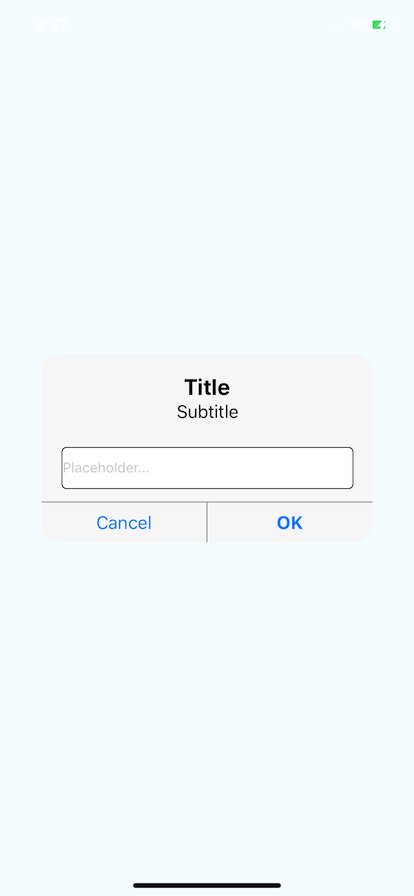
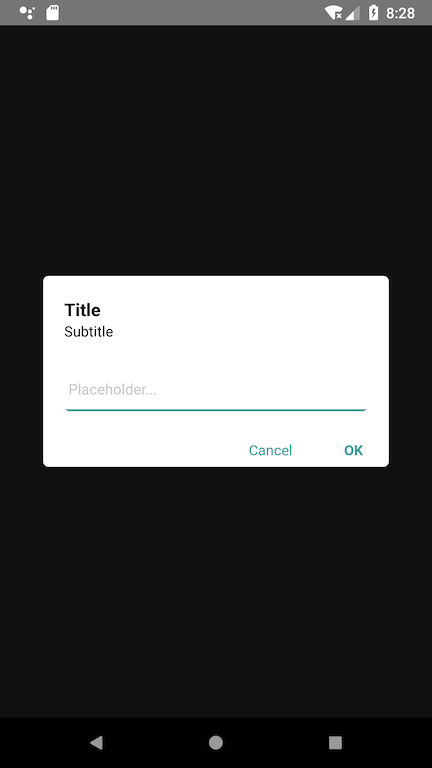
## Example (Basic)
## Custom Usage
```javascript
import React, { Component } from 'react';
import { Platform, StyleSheet, Text, View } from 'react-native';
import DialogInput from 'react-native-dialog-input-custom';
export default class App extends Component<> {
constructor(props) {
super(props);
this.state = {
dialogIsVisible: true
}
}
render() {
return (
<View style={styles.container}>
<DialogInput
dialogIsVisible={this.state.dialogIsVisible}
closeDialogInput={() => this.setState({ dialogIsVisible: false })}
submitInput={(textValue) => console.warn(textValue)}
outerContainerStyle={{ backgroundColor: 'rgba(0,0,0, 0.75)' }}
containerStyle={{ backgroundColor: 'rgba(255,0,0, 0.2)', borderColor: 'red', borderWidth: 5 }}
titleStyle={{ color: 'white' }}
title="This is the title"
subTitleStyle={{ color: 'white' }}
subtitle="This is the subtitle"
placeholderInput="This is the text inside placeholder..."
placeholderTextColor="black"
textInputStyle={{ borderColor: 'black', borderWidth: 2 }}
secureTextEntry={false}
buttonsStyle={{ borderColor: 'white' }}
textCancelStyle={{ color: 'white' }}
submitTextStyle={{ color: 'white', fontStyle: 'italic' }}
cancelButtonText="CANCEL"
submitButtonText="CONFIRM"
/>
</View>
);
}
}
const styles = StyleSheet.create({
container: {
flex: 1,
justifyContent: 'center',
alignItems: 'center',
backgroundColor: '#F5FCFF',
},
});
```
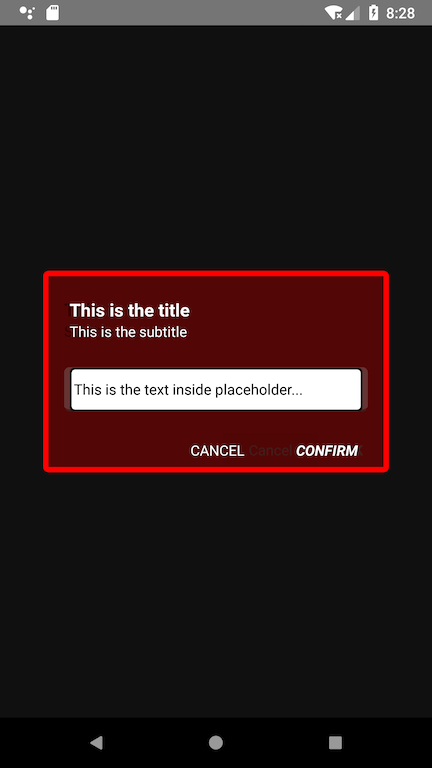
## Example (Custom)

## Properties
name | description | type
:--------------------- |:------------------------------------------- | --------
dialogIsVisible | Value to show the dialog | Boolean
outerContainerStyle | Style for the background of the component | Object (OPTIONAL)
containerStyle | Style for the container of the component | Object (OPTIONAL)
titleStyle | Style for the title | Object (OPTIONAL)
title | Value of the title | String (OPTIONAL)
subTitleStyle | Value of the subtitle | String (OPTIONAL)
placeholderInput | Value of the placeholder | String (OPTIONAL)
placeholderTextColor | Color of the placeholder | String (OPTIONAL)
textInputStyle | Style for the TextInput component | Object (OPTIONAL)
secureTextEntry | Value for the secure text property | Boolean (OPTIONAL), default FALSE
buttonsStyle | Style for the two buttons | Object (OPTIONAL)
textCancelStyle | Style for the "Cancel" Button | Object (OPTIONAL)
submitTextStyle | Style for the "Submit" Button | Object (OPTIONAL)
cancelButtonText | Value of the "Cancel" Button | String (OPTIONAL)
submitButtonText | Value of the "Submit" Button | String (OPTIONAL)
## Methods
name | description | returns
:-------------- |:-------------------------------------------------- | -------:
closeDialogInput() | Event fired when the user press the Cancel Button and Submit Button, used to close the dialog | -
submitInput() | Event fired when the user press the Submit button, it will also invoke closeDialogInput(), and returns the value of the text input | String