react-native-calendar-picker
Version:
Calendar Picker Component for React Native
451 lines (380 loc) • 39.1 kB
Markdown
# react-native-calendar-picker
[](https://badge.fury.io/js/react-native-calendar-picker) [](https://www.npmjs.com/package/react-native-calendar-picker) [](https://travis-ci.org/stephy/CalendarPicker)
This is a Calendar Picker Component for React Native
### Breaking changes in 8.x - replaced moment with date-fns
We've migrated away from [moment.js](https://github.com/moment/moment), in favor of [date-fns](https://date-fns.org/), a modular and lightweight alternative. Users wanting to continue to use Moment should stick with 7.x
# Prerequisites
CalendarPicker requires date-fns >=3.0. Date props may be anything parseable by the [Javascript Date object](https://developer.mozilla.org/en-US/docs/Web/JavaScript/Reference/Global_Objects/Date), such as a Javascript Date, or ISO8601 datetime string.
```
npm install --save date-fns
```
### Scrollable CalendarPicker — New in 7.x
The `scrollable` prop was introduced in 7.0.0 and features a bi-directional infinite scroller. It recycles months using RecyclerListView, shifting them as the ends are reached. If the Chrome debugger is used during development, month shifting may be erratic due to a [RN setTimeout bug](https://github.com/facebook/react-native/issues/4470). To prevent month shifts at the ends of the scroller, set `restrictMonthNavigation`, `minDate`, and `maxDate` range to 5 years or less.
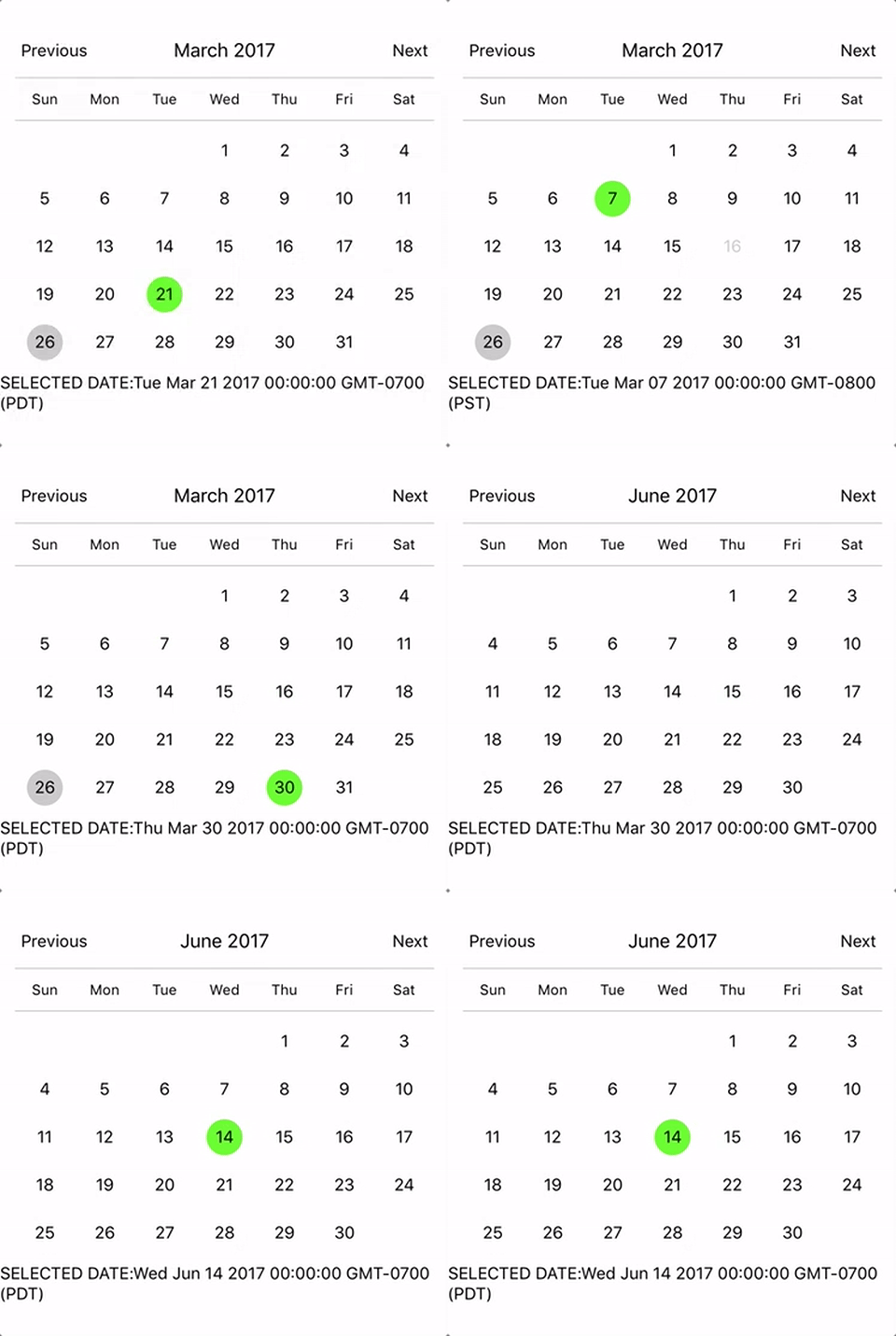
To use the calendar you just need to:
```sh
npm install --save react-native-calendar-picker
```
# Example
```js
import React, { Component } from "react";
import { StyleSheet, Text, View } from "react-native";
import CalendarPicker from "react-native-calendar-picker";
export default class App extends Component {
constructor(props) {
super(props);
this.state = {
selectedStartDate: null,
};
this.onDateChange = this.onDateChange.bind(this);
}
onDateChange(date) {
this.setState({
selectedStartDate: date,
});
}
render() {
const { selectedStartDate } = this.state;
const startDate = selectedStartDate ? selectedStartDate.toString() : "";
return (
<View style={styles.container}>
<CalendarPicker onDateChange={this.onDateChange} />
<View>
<Text>SELECTED DATE:{startDate}</Text>
</View>
</View>
);
}
}
const styles = StyleSheet.create({
container: {
flex: 1,
backgroundColor: "#FFFFFF",
marginTop: 100,
},
});
```
## CalendarPicker Props
| Prop | Type | Description |
| :----------------------------------- | :--------------------------- | :------------------------------------------------------------------------------------------------------------------------------------------------------------------------------------------------------------------------------------------------------------------------------------------------------------------------------------------------------- |
| **`weekdays`** | `Array` | Optional. List of week days. Eg. `['Mon', 'Tue', ...]` Must be 7 days |
| **`months`** | `Array` | Optional. List of months names. Eg. `['Jan', 'Feb', ...]` Must be 12 months |
| **`firstDay`** | `Number` | Optional. Default first day of week will be Sunday. You can set start of week with number from `0` to `6`. Default is `0` or Sunday |
| **`startFromMonday`** | `Boolean` | Optional. Default first day of week will be Sunday. You can set start of week from Monday by setting this to true. Default is `false` |
| **`showDayStragglers`** | `Boolean` | Optional. Populate previous & next month days in empty slots. Default is `false` |
| **`allowRangeSelection`** | `Boolean` | Optional. Allow to select date ranges. Default is `false` |
| **`allowBackwardRangeSelect`** | `Boolean` | Optional. Allow selecting range in reverse. Default is `false` |
| **`previousTitle`** | `String` | Optional. Title of button for previous month. Default is `Previous` |
| **`nextTitle`** | `String` | Optional. Title of button for next month. Default is `Next` |
| **`previousTitleStyle`** | `TextStyle` | Optional. Text styling for Previous text. |
| **`nextTitleStyle`** | `TextStyle` | Optional. Text styling for Next text. |
| **`previousComponent`** | `Object` | Optional. Component to use in `Previous` button. Overrides `previousTitle` & `previousTitleStyle`. |
| **`nextComponent`** | `Object` | Optional. Component to use in `Next` button. Overrides `nextTitle` & `nextTitleStyle`. |
| **`selectedDayColor`** | `String` | Optional. Color for selected day |
| **`selectedDayStyle`** | `ViewStyle` | Optional. Style for selected day. May override selectedDayColor. |
| **`selectedDayTextColor`** | `String` | Optional. Text color for selected day |
| **`selectedDayTextStyle`** | `Object` | Optional. Text style for selected day (including all days in range) |
| **`selectedRangeStartTextStyle`** | `Object` | Optional. Text style for start day of range |
| **`selectedRangeEndTextStyle`** | `Object` | Optional. Text style for end day of range |
| **`selectedRangeStartStyle`** | `ViewStyle` | Optional. Container style for start day of range. |
| **`selectedRangeEndStyle`** | `ViewStyle` | Optional. Container style for end day of range. |
| **`selectedRangeStyle`** | `ViewStyle` | Optional. Container style for all days in range selection. |
| **`selectedDisabledDatesTextStyle`** | `Object` | Optional. Text style for ineligible dates during range selection. |
| **`disabledDates`** | `Array` or `Function` | Optional. Specifies dates that cannot be selected. Array of Dates, or a function that returns true for a given date (apologies for the inverted logic). |
| **`disabledDatesTextStyle`** | `TextStyle` | Optional. Text styling for disabled dates. |
| **`selectedStartDate`** | `Date` | Optional. Specifies a selected Start Date. |
| **`selectedEndDate`** | `Date` | Optional. Specifies a selected End Date. |
| **`minRangeDuration`** | `Number or Array` | Optional. Specifies a minimum range duration when using allowRangeSelection. Can either pass a number to be used for all dates or an Array of objects if the minimum range duration depends on the date `{date: parsable date, minDuration: Number}` |
| **`maxRangeDuration`** | `Number or Array` | Optional. Specifies a maximum range duration when using allowRangeSelection. Can either pass a number to be used for all dates or an Array of objects if the maximum range duration depends on the date `{date: parsable date, maxDuration: Number}` |
| **`todayBackgroundColor`** | `String` | Optional. Background color for today. Default is `#cccccc` |
| **`todayTextStyle`** | `TextStyle` | Optional. Text styling for today. |
| **`textStyle`** | `TextStyle` | Optional. Style overall text. Change fontFamily, color, etc. |
| **`customDatesStyles`** | `Array` or `Func` | Optional. Style individual date(s). Supports an array of objects `{date: parseable date, containerStyle: ViewStyle, style: ViewStyle, textStyle: TextStyle, allowDisabled: Boolean}`, or a callback which receives a date param and returns `{containerStyle: ViewStyle, style: ViewStyle, textStyle: TextStyle, allowDisabled: Boolean}` for that date. |
| **`customDayHeaderStyles`** | `Func` | Optional. Style day of week header (Monday - Sunday). Callback that receives ISO `{dayOfWeek, month, year}` and should return `{style: ViewStyle, textStyle: TextStyle}` |
| **`scaleFactor`** | `Number` | Optional. Default (375) scales to window width |
| **`minDate`** | `Date` | Optional. Specifies minimum date to be selected |
| **`maxDate`** | `Date` | Optional. Specifies maximum date to be selected |
| **`initialDate`** | `Date` | Optional. Date that calendar opens to. Defaults to today. |
| **`width`** | `Number` | Optional. Width of CalendarPicker's container. Defaults to Dimensions width. |
| **`height`** | `Number` | Optional. Height of CalendarPicker's container. Defaults to Dimensions height. |
| **`scrollable`** | `Boolean` | Optional. Months are scrollable if true. Default is `false` |
| **`horizontal`** | `Boolean` | Optional. Scroll axis when `scrollable` set. Default is `true` |
| **`scrollDecelarationRate`** | `Number / "normal" / "fast"` | Optional. Determines how quickly the scroll view decelerates after the user lifts their finger. Default is `normal` |
| **`enableDateChange`** | `Boolean` | Optional. Whether to enable pressing on day. Default is `true` |
| **`restrictMonthNavigation`** | `Boolean` | Optional. Whether to disable Previous month button if it is before minDate or Next month button if it is after MaxDate. Default is `false` |
| **`onDateChange`** | `Function` | Optional. Callback when a date is selected. Returns `date` as first param; `START_DATE` or `END_DATE` as second param. |
| **`onMonthChange`** | `Function` | Optional. Callback when Previous / Next month is pressed. Returns `date` as first parameter. |
| **`dayShape`** | `String` | Optional. Shape of the Day component. Default is `circle`. Available options are `circle` and `square`. |
| **`headingLevel`** | `Number` | Optional. Sets the aria-level for the calendar title heading when on Web. Default is `1`. |
| **`selectMonthTitle`** | `String` | Optional. Title of month selector view. Default is "Select Month in " + {year}. |
| **`selectYearTitle`** | `String` | Optional. Title of year selector view. Default is "Select Year". |
| **`dayLabelsWrapper`** | `ViewStyle` | Optional. Style for weekdays wrapper. E.g If you want to remove top and bottom divider line. |
| **`enableSwipe`** | `Deprecated` | Use `scrollable`. |
| **`swipeConfig`** | `Deprecated` | Use `scrollable`. |
| **`onSwipe`** | `Deprecated` | Use `onMonthChange`. |
| **`dayOfWeekStyles`** | `Deprecated` | Use `customDatesStyles` & `customDayHeaderStyles` callbacks to style individual dates, days of week, and/or header. |
| **`customDatesStylesPriority`** | `Deprecated` | Use `customDatesStyles` & `customDayHeaderStyles` callbacks to style individual dates, days of week, and/or header. |
| **`monthYearHeaderWrapperStyle`** | `ViewStyle` | Optional. Style for header MonthYear title wrapper. E.g If you want to change the order of year and month. |
| **`headerWrapperStyle`** | `ViewStyle` | Optional. Style for entire header controls wrapper. This contains the previous / next controls plus month & year. |
| **`monthTitleStyle`** | `TextStyle` | Optional. Text styling for header's month text. |
| **`yearTitleStyle`** | `TextStyle` | Optional. Text styling for header's year text. |
| **`initialView`** | `String` | Optional. The view that the calendar opens to. Default is `days`. Available options are `years`, `months`, and `days`. |
| **`fontScaling`** | `Boolean` | Optional. To enable fontScaling. Default is `true` |
# Styles
Some styles will overwrite some won't. For instance:
- If you provide textStyle with fontFamily and color, out of ranges dates will not apply your color, just fontFamily.
Order of precedence:
- defaultColor => textStyle => selectedDayColor
- defaultTodayBackgroundColor => todayBackgroundColor
- defaultBackgroundColor => selectedDayColor
- defaultTextStyles => textStyle => selectedDayTextColor
# More Examples
### Start from Monday, allowRangeSelection, Min and Max Dates and Styles Changes Example
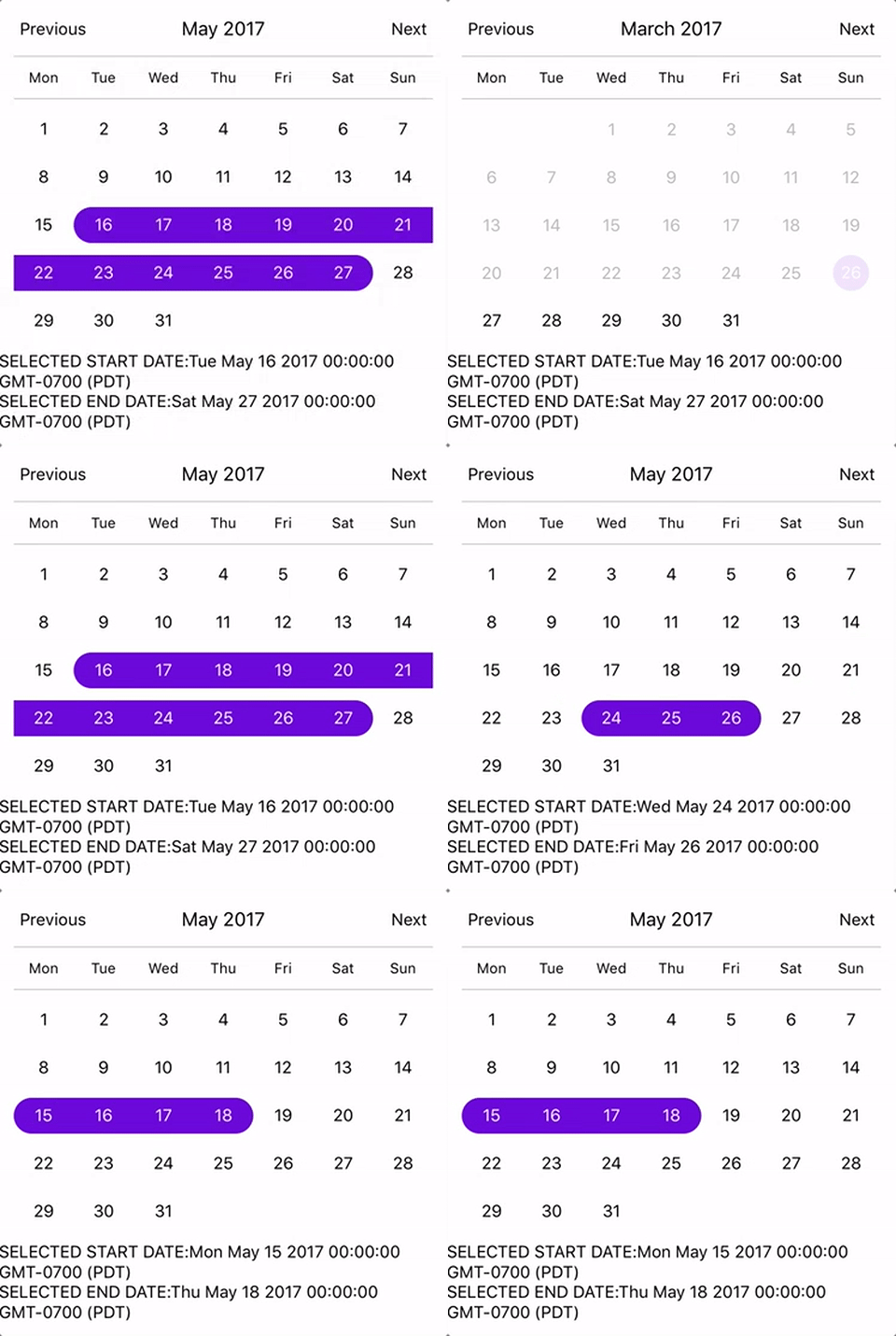
```js
import React, { Component } from "react";
import { StyleSheet, Text, View } from "react-native";
import CalendarPicker from "react-native-calendar-picker";
export default class App extends Component {
constructor(props) {
super(props);
this.state = {
selectedStartDate: null,
selectedEndDate: null,
};
this.onDateChange = this.onDateChange.bind(this);
}
onDateChange(date, type) {
if (type === "END_DATE") {
this.setState({
selectedEndDate: date,
});
} else {
this.setState({
selectedStartDate: date,
selectedEndDate: null,
});
}
}
render() {
const { selectedStartDate, selectedEndDate } = this.state;
const minDate = new Date(); // Today
const maxDate = new Date(2017, 6, 3);
const startDate = selectedStartDate ? selectedStartDate.toString() : "";
const endDate = selectedEndDate ? selectedEndDate.toString() : "";
return (
<View style={styles.container}>
<CalendarPicker
startFromMonday={true}
allowRangeSelection={true}
minDate={minDate}
maxDate={maxDate}
todayBackgroundColor="#f2e6ff"
selectedDayColor="#7300e6"
selectedDayTextColor="#FFFFFF"
onDateChange={this.onDateChange}
/>
<View>
<Text>SELECTED START DATE:{startDate}</Text>
<Text>SELECTED END DATE:{endDate}</Text>
</View>
</View>
);
}
}
const styles = StyleSheet.create({
container: {
flex: 1,
backgroundColor: "#FFFFFF",
marginTop: 100,
},
});
```
### Complex Example, Changing Fonts and Colors, Language and etc...
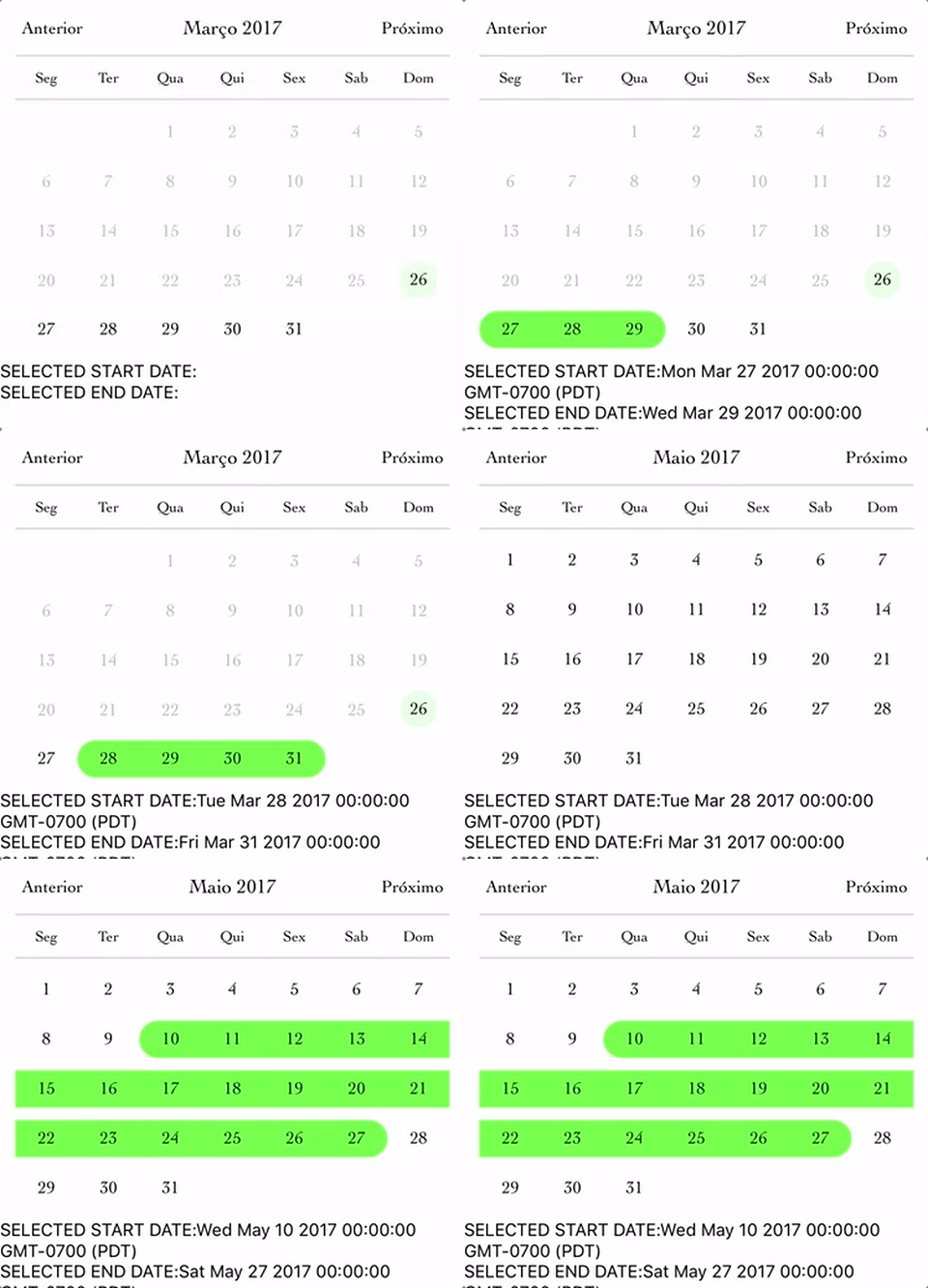
```js
import React, { Component } from "react";
import { StyleSheet, Text, View } from "react-native";
import CalendarPicker from "react-native-calendar-picker";
export default class App extends Component {
constructor(props) {
super(props);
this.state = {
selectedStartDate: null,
selectedEndDate: null,
};
this.onDateChange = this.onDateChange.bind(this);
}
onDateChange(date, type) {
if (type === "END_DATE") {
this.setState({
selectedEndDate: date,
});
} else {
this.setState({
selectedStartDate: date,
selectedEndDate: null,
});
}
}
render() {
const { selectedStartDate, selectedEndDate } = this.state;
const minDate = new Date(); // Today
const maxDate = new Date(2017, 6, 3);
const startDate = selectedStartDate ? selectedStartDate.toString() : "";
const endDate = selectedEndDate ? selectedEndDate.toString() : "";
return (
<View style={styles.container}>
<CalendarPicker
startFromMonday={true}
allowRangeSelection={true}
minDate={minDate}
maxDate={maxDate}
weekdays={["Seg", "Ter", "Qua", "Qui", "Sex", "Sab", "Dom"]}
months={[
"Janeiro",
"Fevereiro",
"Março",
"Abril",
"Maio",
"Junho",
"Julho",
"Agosto",
"Setembro",
"Outubro",
"Novembro",
"Dezembro",
]}
previousTitle="Anterior"
nextTitle="Próximo"
todayBackgroundColor="#e6ffe6"
selectedDayColor="#66ff33"
selectedDayTextColor="#000000"
scaleFactor={375}
textStyle={{
fontFamily: "Cochin",
color: "#000000",
}}
onDateChange={this.onDateChange}
/>
<View>
<Text>SELECTED START DATE:{startDate}</Text>
<Text>SELECTED END DATE:{endDate}</Text>
</View>
</View>
);
}
}
const styles = StyleSheet.create({
container: {
flex: 1,
backgroundColor: "#FFFFFF",
marginTop: 100,
},
});
```
### Custom styling individual dates
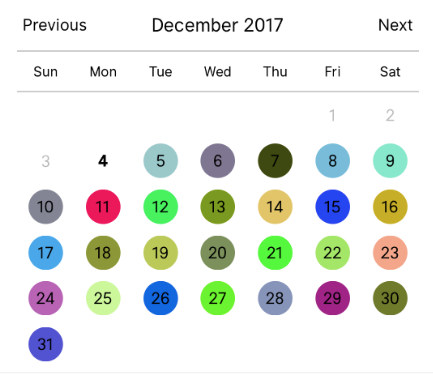
```js
let today = new Date();
let day = today.clone().startOf('month');
let customDatesStyles = [];
while(day.add(1, 'day').isSame(today, 'month')) {
customDatesStyles.push({
date: day.clone(),
// Random colors
style: {backgroundColor: '#'+('#00000'+(Math.random()*(1<<24)|0).toString(16)).slice(-6)},
textStyle: {color: 'black'}, // sets the font color
containerStyle: [], // extra styling for day container
allowDisabled: true, // allow custom style to apply to disabled dates
});
}
render() {
return (
<CalendarPicker
todayTextStyle={{fontWeight: 'bold'}}
todayBackgroundColor={'transparent'}
customDatesStyles={customDatesStyles}
minDate={today}
/>
);
}
```
### Styling each day of the week and the day name header.
```js
const customDayHeaderStylesCallback = {dayOfWeek, month, year} => {
switch(dayOfWeek) { // can also evaluate month, year
case 4: // Thursday
return {
style: {
borderRadius: 12,
backgroundColor: 'cyan',
},
textStyle: {
color: 'blue',
fontSize: 22,
fontWeight: 'bold',
}
};
}
}
const customDatesStylesCallback = date => {
switch(date.isoWeekday()) {
case 1: // Monday
return {
style:{
backgroundColor: '#909',
},
textStyle: {
color: '#0f0',
fontWeight: 'bold',
}
};
case 7: // Sunday
return {
textStyle: {
color: 'red',
}
};
}
}
<CalendarPicker
customDayHeaderStyles={customDayHeaderStylesCallback}
customDatesStyles={customDatesStylesCallback}
/>
```
## Methods
These internal methods may be accessed through a ref to the CalendarPicker.
| Name | Params | Description |
| :-------------------------- | :------------------------------ | :--------------------------------------------------------------------------------------------------------------------------------------------------------------------------- |
| **`handleOnPressDay`** | `{year, month, day} (Integers)` | Programmatically select date. `year`, `month` and `day` are numbers. `day` is the day of the current month. date-fns example for today's day of month: `getDate(new Date())` |
| **`handleOnPressNext`** | | Programmatically advance to next month. |
| **`handleOnPressPrevious`** | | Programmatically advance to previous month. |
| **`resetSelections`** | | Clear date selections. Useful for resetting date range selection when user has picked a start date but not an end date. |
## TypeScript
Definitions are available at https://www.npmjs.com/package/@types/react-native-calendar-picker courtesy of [automatensalat](https://github.com/automatensalat).
```
npm install --save /react-native-calendar-picker
```
# Suggestions?
Open Issues. Submit PRs.
# Special Thanks
I would like to call out some contributors who have been helping with this project
- [peacechen](https://github.com/peacechen)
- [edvinerikson](https://github.com/edvinerikson)
- [thomaswright](https://github.com/thomaswright)
- [brentvatne](https://github.com/brentvatne)
- [kesha-antonov](https://github.com/kesha-antonov)
- [jthestupidkid](https://github.com/jthestupidkid)
- [adamkrell](https://github.com/adamkrell)
- [joshuapinter](https://github.com/joshuapinter)
# Sample Application
The sample app is an Expo project created with `create-react-native-app`.
```sh
cd example
npm run cp
npm install
npm start
```
## Development
The source files are copied from the project root directory into `example` using `npm run cp`. If a source file is modified, it must be copied over again with `npm run cp`.