react-native-branch
Version:
Branch Metrics React Native SDK
42 lines (27 loc) • 1.85 kB
Markdown
# Updating to 1.0.0
## Branch API changes
The method `createBranchUniversalObject` no longer returns an object as in react-native-branch version 0.9.x, instead it returns a **promise**.
Change your code to handle the promise returned.
```Javascript
// Version 0.9.x
let branchUniversalObject = branch.createBranchUniversalObject('canonicalIdentifier', {metadata: {prop1: 'test', prop2: 'abc'}, title: 'Cool Content!', contentDescription: 'Cool Content Description'}
// Version 1.1.0
let branchUniversalObject = await branch.createBranchUniversalObject('canonicalIdentifier', {metadata: {prop1: 'test', prop2: 'abc'}, title: 'Cool Content!', contentDescription: 'Cool Content Description'}
```
## React changes
Version 1.0.0 of react-native-branch requires version 0.40.0 or later
of react-native. You will need to make some changes to the native iOS
project in order to build:
### Imports
Change `#import "RNBranch.h"` to `#import <react-native-branch/RNBranch.h>`
in AppDelegate.m. The native React library also requires similar changes for
headers, for example:
```Objective-C
#import <React/RCTRootView.h>
#import <react-native-branch/RNBranch.h>
```
### Library name
Change the name of the library in Linked Frameworks and Libraries to
`libreact-native-branch.a` instead of `libRNBranch.a`:
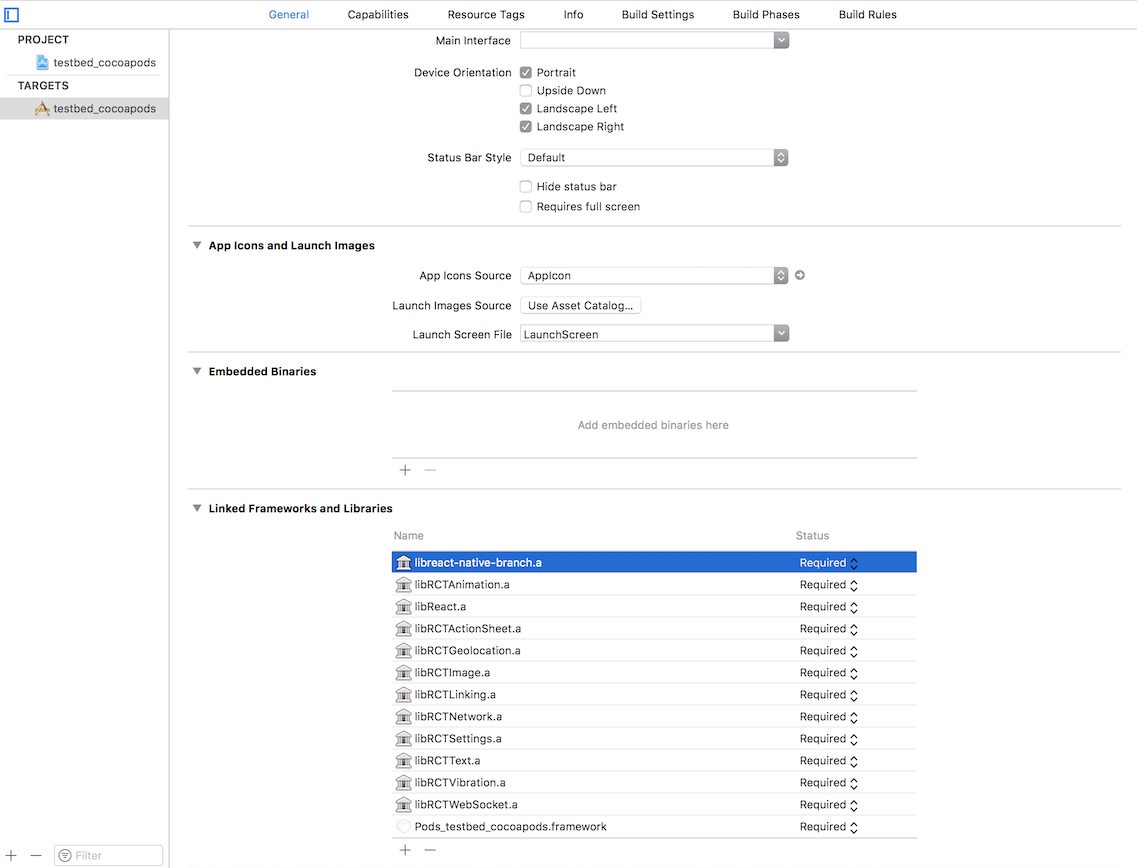
Alternately, you can remove the `RNBranch` project reference from the Libraries group in Xcode (be sure to select Remove Reference or you'll have to reinstall the react-native-branch NPM module) and the dependency on `libRNBranch.a` in Linked Frameworks and Libraries. Then close the project or workspace and run `react-native link` to add `RNBranch` back with the correct library name.