react-native-background-geolocation
Version:
The most sophisticated cross-platform background location-tracking & geofencing module with battery-conscious motion-detection intelligence
320 lines (318 loc) • 14.3 kB
TypeScript
declare module "react-native-background-geolocation" {
type Vertices = number[][];
/**
* The Background Geolocation SDK implements the native iOS and Android Geofencing APIs.
*
* __ℹ️ Note:__
* - Native iOS & Android API support only *circular* geofences, however the plugin does implement a custom mechanism for handling *Polygon Geofences*; see [[vertices]].
* - The minimum reliable [[radius]] is `200` meters.
* - The native geofencing API for both iOS and Android *require* the user authorize [[locationAuthorizationRequest]] **`Always`** — **`When in Use`** will **not** work.
*
* ## Adding Geofences
*
* Adding a single geofence with [[addGeofence]].
* @example
* ```typescript
* BackgroundGeolocation.addGeofence({
* identifier: "Home",
* radius: 200,
* latitude: 45.51921926,
* longitude: -73.61678581,
* notifyOnEntry: true,
* notifyOnExit: true,
* extras: {
* route_id: 1234
* }
* }).then((success) => {
* console.log("[addGeofence] success");
* }).catch((error) => {
* console.log("[addGeofence] FAILURE: ", error);
* });
* ```
*
* Adding multiple geofences with [[addGeofences]].
* @example
* ```typescript
* await BackgroundGeolocation.addGeofences([{
* identifier: "Home",
* radius: 200,
* latitude: 45.51921926,
* longitude: -73.61678581,
* notifyOnEntry: true,
* }, {
* identifier: "Work",
* radius: 200,
* latitude: 45.61921927,
* longitude: -73.71678582,
* notifyOnEntry: true
* }]);
* console.log("[addGeofences] success");
*
* ```
*
* __ℹ️ Note:__ Adding a geofence having an [[identifier]] which already exists within the SDK geofence database will cause the previous record to be destroyed and the new one inserted.
*
* ---------------------------------------------------------------------------------------------------
*
* ## Listening for Geofence Events
*
* Listen to geofence events with [[BackgroundGeolocation.onGeofence]].
*
* @example
* ```typescript
* // Listen for geofence events.
* BackgroundGeolocation.onGeofence(geofence => {
* console.log("[geofence] ", geofence.identifier, geofence.action);
* });
* ```
*
* ---------------------------------------------------------------------------------------------------
*
* ## Polygon Geofencing
*
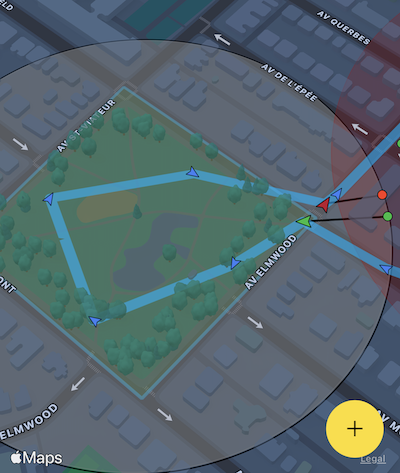
* The Background Geolocation SDK supports *Polygon Geofences* (Geofences of any shape). See API docs [[vertices]].
* * ℹ️ __*Polygon Geofencing*__ is [sold as a separate add-on](https://shop.transistorsoft.com/products/polygon-geofencing) (fully functional in *DEBUG* builds).
*
*
* 
* 
*
*
* ---------------------------------------------------------------------------------------------------
*
* ## Infinite Geofencing
*
* The Background Geolocation SDK contains unique and powerful Geofencing features that allow you to monitor any number of circular geofences you wish (thousands even), in spite of limits imposed by the native platform APIs (**20 for iOS; 100 for Android**).
*
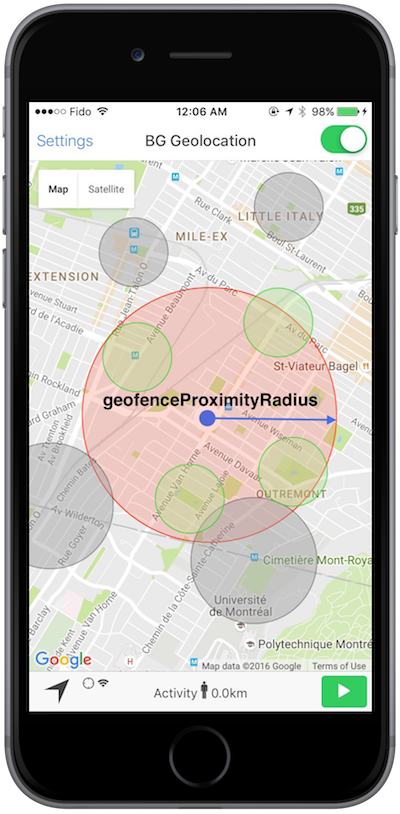
* The SDK achieves this by storing your geofences in its database, using a [geospatial query](https://en.wikipedia.org/wiki/Spatial_query) to determine those geofences in proximity ([[geofenceProximityRadius]]), activating only those geofences closest to the device's current location (according the limit imposed by the corresponding platform).
*
* - When the device is determined to be moving, the plugin periodically queries for geofences within the [[geofenceProximityRadius]] (eg. every minute) using the latest recorded location. This geospatial query is **very fast**, even with tens-of-thousands geofences in the database.
* - The SDK **enforces** a *minimum* [[geofenceProximityRadius]] of `1000` meters.
* - In the following image, the *green* geofences within [[geofenceProximityRadius]] are *actively* monitored. The *grey* geofences outside [[geofenceProximityRadius]] still exist within the SDK's database but are *not* actively being monitored.
*
* 
*
* ---------------------------------------------------------------------------------------------------
*
* ## Listening for changes in the actively-monitored set-of-geofences.
*
* As the SDK periodically queries for geofences within the [[geofenceProximityRadius]], you can listen for changes in the actively-monitored geofences using the event [[onGeofencesChange]]. This event will let you know those geofences which have *begun* to be *actively monitored* ([[GeofencesChangeEvent.on]]) in addition to those which just *ceased* to be actively monitored ([[GeofencesChangeEvent.off]]).
*
* @example
* ```typescript
* BackgroundGeolocation.onGeofencesChange((event) => {
* let on = event.on; //<-- new geofences activated.
* let off = event.off; //<-- geofences that were just de-activated.
*
* // Create map circles
* on.forEach((geofence) => {
* createGeofenceMarker(geofence)
* });
*
* // Remove map circles
* off.forEach((identifier) => {
* removeGeofenceMarker(identifier);
* });
* });
* ```
* ### ⚠️ Note:
* - When **all** geofences have been removed, the [[GeofencesChangeEvent]] will provide empty lists for both [[GeofencesChangeEvent.on]] & [[GeofencesChangeEvent.off]].
*
* ---------------------------------------------------------------------------------------------------
*
* ## Removing Geofences
*
* Once a geofence has been inserted into the SDK's database using [[addGeofence]] or [[addGeofences]], they will be monitored *forever* (as long as the plugin remains `State.enabled == true`). If you've configured [[stopOnTerminate]] __`false`__ and [[startOnBoot]] __`true`__, geofences will continue to be monitored even if the application is terminated or device rebooted.
* To cease monitoring a geofence or *geofences*, you must *remove* them from the SDK's database (or call [[BackgroundGeolocation.stop]]).
*
* - Removing a single geofence by [[identifier]] with [[removeGeofence]]:
* @example
* ```typescript
* BackgroundGeolocation.removeGeofence("HOME").then(success => {
* console.log("[removeGeofence] success");
* })
* ```
*
* - Removing *all* geofences with [[removeGeofences]]:
* @example
* ```typescript
* BackgroundGeolocation.removeGeofences().then(success => {
* console.log("[removeGeofences] all geofences have been destroyed");
* })
* ```
* ---------------------------------------------------------------------------------------------------
*
* ## Querying Geofences
*
* Use the method [[getGeofences]] to retrieve the entire Array of [[Geofence]] stored in the SDK's database.
*
* @example
* ```typescript
* BackgroundGeolocation.getGeofences().then(geofences => {
* console.log("[getGeofences] ", geofences);
* })
* ```
*
* ---------------------------------------------------------------------------------------------------
*
* ## Monitoring *only* geofences
*
* The BackgroundGeolocation SDK allows you to optionally monitor *only* geofences without constant location-tracking. To engage *geofences-only* mode, use the method [[startGeofences]] instead of [[start]].
*
* Use option [[Config.geofenceModeHighAccuracy]]:true to improve the responsiveness of geofence events.
*
* @example
* ```typescript
* BackgroundGeolocation.onGeofence(geofence => {
* console.log("[geofence] ", geofence);
* })
*
* BackgroundGeolocation.ready({
* url: "http://your.server.com/geofences",
* autoSync: true,
* geofenceModeHighAccuracy: true // <-- consumes more power; default is false.
* }, state => {
* // engage geofences-only mode:
* BackgroundGeolocation.startGeofences();
* })
* ```
*
* ## Toggling between tracking-modes [[start]] and [[startGeofences]]
*
* The SDK can easily be toggled between [[State.trackingMode]] simply by executing the corresponding [[start]] or [[startGeofences]] methods.
*
* @example
* ```typescript
* // Listen to geofence events
* BackgroundGeolocation.onGeofence(geofence => {
* console.log("[geofence] ", geofence);
* if (geofence.identifier == "DANGER_ZONE") {
* if (geofence.action == "ENTER") {
* // Entering the danger-zone, we want to aggressively track location.
* BackgroundGeolocation.start();
* } else if (geofence.action == "EXIT") {
* // Exiting the danger-zone, we resume geofences-only tracking.
* BackgroundGeolocation.startGeofences();
* }
* }
* })
*
* // Add a geofence.
* BackgroundGeolocation.addGeofence({
* identifier: "DANGER_ZONE",
* radius: 1000,
* latitude: 45.51921926,
* longitude: -73.61678581,
* notifyOnEntry: true,
* notifyOnExit: true,
* })
*
* // Ready the plugin.
* BackgroundGeolocation.ready({
* desiredAccuracy: BackgroundGeolocation.DESIRED_ACCURACY_HIGH,
* distanceFilter: 10,
* url: "http://your.server.com/locations",
* autoSync: true
* }, state => {
* BackgroundGeolocation.startGeofences();
* })
* ```
*
*/
interface Geofence {
/**
* Unique geofence identifier.
*/
identifier: string;
/**
* Radius of the circular geofence.
*
* ⚠️ The minimum reliable `radius` is __`200`__ meters. Anything less will likely not cause a geofence to trigger. This is documented by Apple [here](https://developer.apple.com/library/archive/documentation/UserExperience/Conceptual/LocationAwarenessPG/RegionMonitoring/RegionMonitoring.html):
* > *"The specific threshold distances are determined by the hardware and the location technologies that are currently available. For example, if WiFi is disabled, region monitoring is significantly less accurate. However, for testing purposes, __you can assume that the minimum distance is approximately 200 meters__*".
*/
radius?: number;
/**
* Latitude of geofence center
*/
latitude?: number;
/**
* Longitude of geofence center.
*/
longitude?: number;
/**
* Set `true` to fire event when device *enters* this geofence.
*
* __ℹ️ See also:__
* - [[Config.geofenceInitialTriggerEntry]]
*/
notifyOnEntry?: boolean;
/**
* Set `true` to fire event when device *exits* this geofence.
*/
notifyOnExit?: boolean;
/**
* Set `true` to fire event when device "loiters" within this geofence for [[loiteringDelay]] milliseconds.
*/
notifyOnDwell?: boolean;
/**
* Minimum time in *milliseconds* the device must "loiter" within this geofence before [[notifyOnDwell]] event fires.
*/
loiteringDelay?: number;
/**
* Arbitrary key-values appended to the geofence event and posted to your configured [[Config.url]].
*/
extras?: Extras;
/**
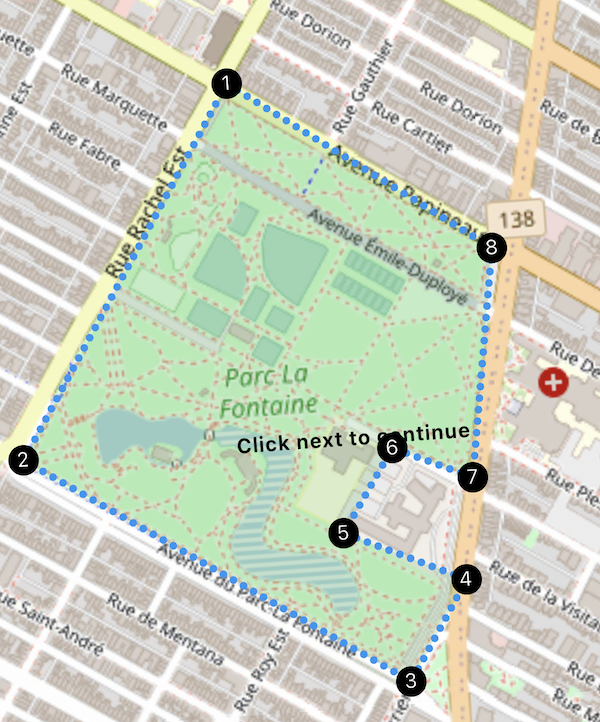
* Optional: a list of vertices (`[ [lat, lng],...]`) defining a Polygon geofence. By default, geofences are circular.
*
* ℹ️ __*Polygon Geofencing*__ is [sold as a separate add-on](https://shop.transistorsoft.com/products/polygon-geofencing) (fully functional in *DEBUG* builds).
*
*
* When defining a polygon geofence, you do **not** provide [[latitude]], [[longitude]] or [[radius]] — those will be automatically calculated based upon the geometry of the polygon.
*
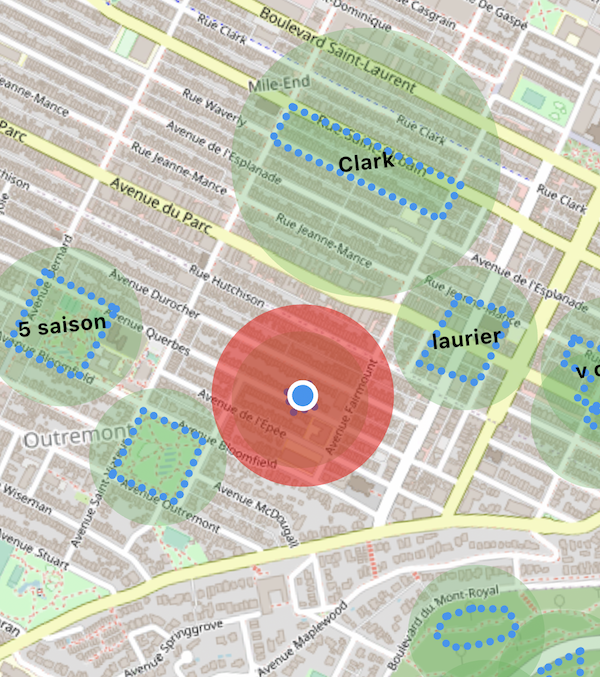
* The following image shows polygon geofences on a map:
*
* 
*
* The *blue polygons* represent the *actual* polygon geofences and the containing *green circles* are traditional circular geofences provided by the native *iOS/Android* Geofencing APIs. The background-geolocation SDK automatically calculates the containing, native cirular geofence by solving the [*minimum enclosing circle*](https://en.wikipedia.org/wiki/Smallest-circle_problem) for the given [[vertices]].
* This is why you do not provide [[latitude]], [[longitude]] and [[radius]].
*
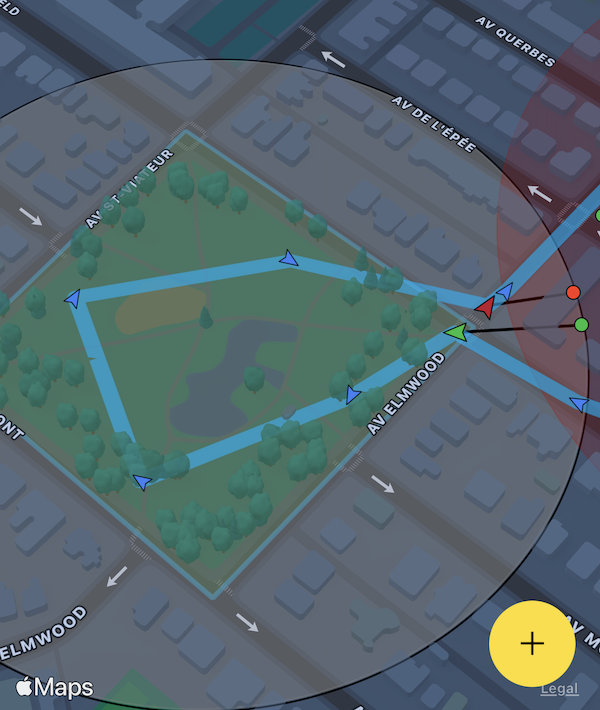
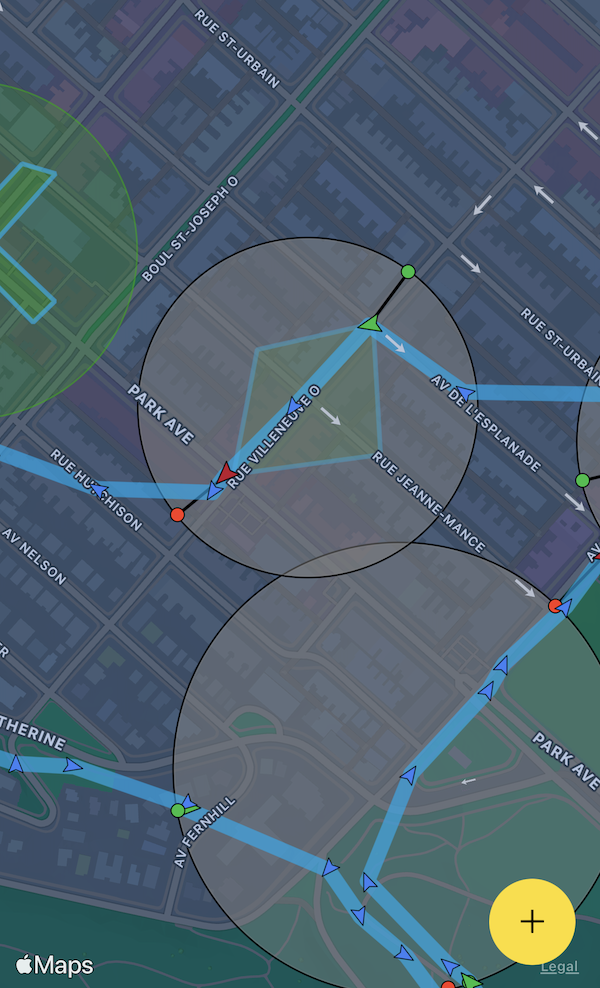
* - When the device *enters* the containing circular geofence, the SDK uses that as a signal that the device is approaching a polygon. At this moment, the SDK begins aggressively monitoring the location to perform "hit-testing" upon the polygon using a fast algorithm implemented with C++ code.
* - When the device *exits* the containing circular geofence, that's the SDK's signal for it to *cease* monitoring that polygon.
*
* @example
* ```javascript
* BackgroundGeolocation.addGeofence({
* identifier: 'Home',
* notifyOnEntry: true,
* notifyOnExit: true,
* vertices: [
* [45.518947279987714, -73.6049889209514], // <-- [lat, lng]
* [45.5182711292279, -73.60338649600598],
* [45.517082240237634, -73.60432670908212],
* [45.51774871402813, -73.60604928622278]
* ]
* });
* ```
*
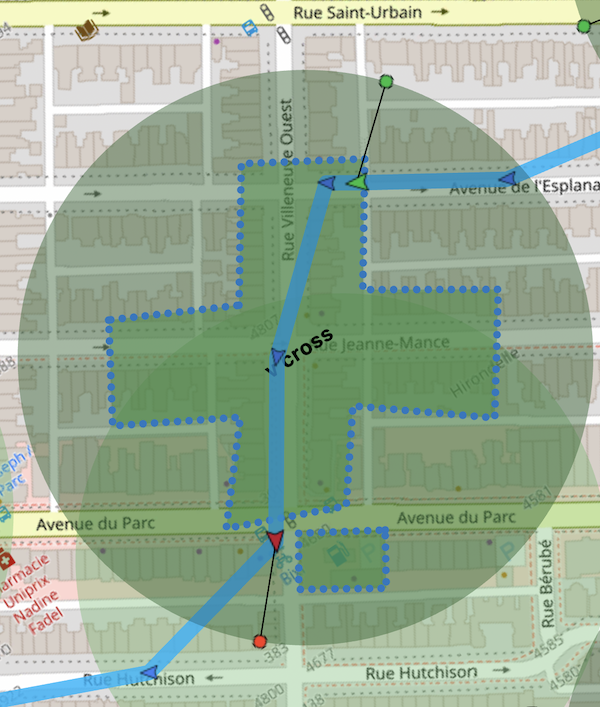
* - #### Entering / exiting a *cross-shaped* polygon geofence:
*
* 
*
* - #### Entering / exiting a park:
*
* 
*
* - #### Entering / exiting a diamond-shaped polygon:
*
* 
*
* - #### Designing a polygon geofence around a park using the demo app:
*
* 
*
*
*/
vertices?: Vertices
}
}